


Mark New Posts
There’s a setting to determine when a post should be considered read. You can pick one of the following:

Considere uma alternativa
Mark New Posts shows warning signs in 2026 — compare the alternatives below before installing. It runs on 500+ sites, is rated 4.8/5 and was last updated 2 years ago, and scores 41/100 on our health check.
- Base de usuários pequenas (mais de 500 instalações ativas)
- Nenhuma atualização em mais de um ano
- Testado apenas até WordPress 6.7 (mais recente é 7.1)
Como ele se acumula?
Lado a lado em instalações, atualizações, avaliações e suporte


Downloads diários
Os picos de download geralmente seguem uma nova versão — cada site que atualiza automaticamente é um download.
Rankings
Where Mark New Posts stands todayWordPress.org Classificações de pesquisa
Posição ao vivo na pesquisa de plugins, top 100| Palavra chave | Posição |
|---|---|
| Highlight | >100 |
| New posts | >100 |
| unread | #34 |
| unread posts | #4 |
Adoção da versão
Compartilhamento de sites ativos por lançamento.
Divisão de classificação
★★★★★★★★★★ 4.8 from 12 reviews
About Mark New Posts
From the official readme · v7.6Descrição
Highlight unread posts on your blog.
Key features:
- Works right out of the box
- Uses cookies, no authorization required
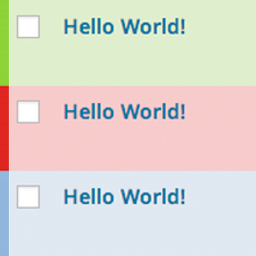
- 4 different types of markers for highlighting posts (a “new” text label,
an orange circle, etc.) - Customizable background color for unread post titles
There’s a setting to determine when a post should be considered read. You can pick one of the following:
- after it was opened
- after it was displayed in the post list
- after opening any page of the blog
Functions available for theme developers:
- mnp_is_new_post($post) – check if a post is unread
- mnp_new_posts_count($query) – get unread posts count
Log de Changes
7.6
- Fixed security issue: possibility for non-admin users to update plugin’s settings. Thanks to Aiden for reporting.
7.5.2
- Fixed possible bug in the “Use JS” mode with posts not getting marked at all
7.5.1
- Fixed: “Allow outside the post list” option makes markup appear in admin post list
7.5.0
- “Allow outside the post list” option
- Cosmetic: fixed some of the texts on the settings page
7.4.0
- Fixed a conflict with Buddypress. I hope now we can be buddies again. Thanks a lot to teeboy4real and r-a-y!
- Improved performance
- If you’ve read this far AND if you like this plugin, why not give it a nice review? It would be lovely!
7.3.2
- Fixed a conflict with WPForms plugin. A message “Notice: is_404 was called incorrectly” appeared when trying to open the Settings page of WPForms.
Capturas de tela


Para desenvolvedores
Este é o seu plugin? Mostre os números.
Adicione um crachá ao vivo ao seu site, Documentos ou Readme do GitHub. Ele é atualizado por conta própria - nenhuma conta necessária.
Best Mark New Posts alternatives
All Highlight plugins →





FAQ
Mark New Posts: quick answers
Respostas diretas, extraídas de dados ao vivo WordPress.org.
Fonte: WordPress.org
Is Mark New Posts free?
Yes. Mark New Posts is free to download and use from the official WordPress.org plugin directory.
Is Mark New Posts safe to use in 2026?
Mark New Posts shows warning signs in 2026 — compare the alternatives below before installing. It runs on 500+ sites, is rated 4.8/5 and was last updated 2 years ago, and scores 41/100 on our health check.
How many websites use Mark New Posts?
Mark New Posts is active on 500+ WordPress websites and has been downloaded 15,136 times since it launched in May 2015. It was downloaded 255 times in the last 30 days.
Does Mark New Posts work with WordPress 7.1?
Mark New Posts is officially tested up to WordPress 6.7.12, while the latest release is 7.1.5. It may still work, but try it on a staging site first.
When was Mark New Posts last updated?
The latest version, 7.6, was released on December 6, 2024 (2 years ago).
Who makes Mark New Posts?
Mark New Posts is developed and maintained by i.lychkov.
What are the best alternatives to Mark New Posts?
The most popular alternatives to Mark New Posts are String locator (100K+ installs), Highlighting Code Block (10K+ installs) and Highlight Search Terms (6K+ installs).
Alimentado por PageForge
Um modelo e uma planilha. Uma página real para cada pesquisa.
PageForge Transforma cada linha de um CSV em uma página WordPress com seu próprio título, URL, SEO campos e esquema, construído no layout que você já desenhou. Gratuito em WordPress.org.
- CSV e XLSX, mais Google Sheets em Profissional e Empresarial
- Seu próprio título, URL, SEO campos e esquema para cada página
- Funciona com o editor de blocos, Elementor, Divi e Avada
- Gratuito em WordPress.org, sem cartão de crédito