

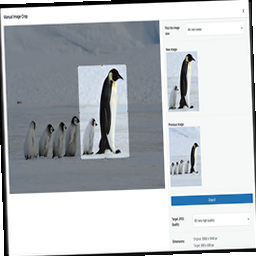
Manual Image Crop
Plugin allows you to manually crop all the image sizes registered in your WordPress theme (in particular featured image).

Escolha sólida
Manual Image Crop is a solid plugin choice in 2026, with a few things worth checking first. It runs on 7K+ sites, is rated 4.1/5 and was last updated 3 months ago, and scores 75/100 on our health check.
- Testado com as últimas WordPress (7.1)
Como ele se acumula?
Lado a lado em instalações, atualizações, avaliações e suporte



Downloads diários
Os picos de download geralmente seguem uma nova versão — cada site que atualiza automaticamente é um download.
Rankings
Where Manual Image Crop stands todayWordPress.org Classificações de pesquisa
Posição ao vivo na pesquisa de plugins, top 100| Palavra chave | Posição |
|---|---|
| crop | #3 |
| cropping | #7 |
| featured image | #32 |
| galeria | >100 |
| thumbnail | #99 |
Adoção da versão
Compartilhamento de sites ativos por lançamento.
Divisão de classificação
★★★★★★★★★★ 4.1 from 56 reviews
About Manual Image Crop
From the official readme · v1.15Descrição
Plugin allows you to manually crop all the image sizes registered in your WordPress theme (in particular featured image).
Simply click on the “Crop” link next to any image in your media library.
The WordPress Media Modal interface will be brought up and you are ready to go.
Whole cropping process is really intuitive and simple.
Apart from media library list, the plugin adds links in few more places:
* Below featured image box (“Crop featured image”)
* In the media insert modal window (once you select an image)
Definições
The plugin includes a settings page where you can configure:
* Image quality settings
* Visibility of crop options
* Custom labels for image sizes
GitHub Repository
https://github.com/tomaszsita/wp-manual-image-crop
Traduções
- Czech (AI Generated)
- Dutch (Bernardo Hulsman)
- French (Gabriel Féron)
- German (Bertram Greenhough)
- Hungarian (Roland Kal)
- Italian (Alessandro Curci)
- Japanese (AI Generated)
- Korean (AI Generated)
- Polish (myself)
- Portuguese (Brazil) (AI Generated)
- Russian (Andrey Hohlov)
- Spanish (Andrew Kurtis)
- Swedish (Karl Oskar Mattsson)
- Turkish (AI Generated)
Please contact me if you want to add a translation (or submit a pull request on GitHub)
Instalação
Manually:
- Upload
manual-image-cropto the/wp-content/plugins/directory - Ative o plugin através do menu 'Plugins' em WordPress
Automatically:
- Navigate to the ‘Plugins’ menu inside of the wordpress wp-admin dashboard, and select ADD NEW
- Search for ‘Manual Image Crop’, and click install
- When the plugin has been installed, Click ‘Activate’
Log de Changes
1.15
- Security: use one parsed attachment ID for both capability checks and crop/editor logic (fixes absint vs FILTER_SANITIZE_NUMBER_INT mismatch, e.g. attachmentId=4.1).
- Security: editor window reads postId only from POST (same source as the auth check; closes $_REQUEST vs $_GET mismatch).
- Security: enqueue crop assets/nonce only for users with upload_files.
1.14
- Security: fixed missing authorization and CSRF on crop AJAX (Subscriber+ could overwrite arbitrary attachment intermediates / metadata). Discovered by Shivamani Vastrala (reported via WPScan).
- Added nonce verification (check_ajax_referer) and capability checks (edit_post) for mic_crop_image and mic_editor_window.
- Compatibility: smoke-tested on WordPress 7.1 (beta) with PHP 8.2; updated “Tested up to” to 7.1.
1.13
- Migrated from thickbox to WordPress Media Modal for better user experience
- Improved responsive design and mobile compatibility
- Enhanced accessibility and modern UI
- Better integration with WordPress admin interface
- Removed size limitations (no more 940px width constraint)
- Improved modal sizing (95vw/95vh) for better screen utilization
- Enhanced error handling and user feedback
- Updated tested up to WordPress 6.5
1.12
- Fixed ‘streched images’ issue
1.11
- Hungarian translation added
- Swedish translation added
- Security improvements
1.10
- Fixed handling of array $crop param
Capturas de tela


Para desenvolvedores
Este é o seu plugin? Mostre os números.
Adicione um crachá ao vivo ao seu site, Documentos ou Readme do GitHub. Ele é atualizado por conta própria - nenhuma conta necessária.
Best Manual Image Crop alternatives
All crop plugins →





FAQ
Manual Image Crop: quick answers
Respostas diretas, extraídas de dados ao vivo WordPress.org.
Fonte: WordPress.org
Is Manual Image Crop free?
Yes. Manual Image Crop is free to download and use from the official WordPress.org plugin directory.
Is Manual Image Crop safe to use in 2026?
Manual Image Crop is a solid plugin choice in 2026, with a few things worth checking first. It runs on 7K+ sites, is rated 4.1/5 and was last updated 3 months ago, and scores 75/100 on our health check.
How many websites use Manual Image Crop?
Manual Image Crop is active on 7K+ WordPress websites and has been downloaded 217,803 times since it launched in October 2013. It was downloaded 2,094 times in the last 30 days.
Does Manual Image Crop work with WordPress 7.1?
Yes. The developer has tested Manual Image Crop up to WordPress 7.1.5, the latest release. It requires WordPress 3.5 or newer.
What PHP version does Manual Image Crop need?
Manual Image Crop requires PHP 7.4 or higher. Most hosts run PHP 8.x today, so it works on any modern WordPress hosting.
When was Manual Image Crop last updated?
The latest version, 1.15, was released on August 13, 2026 (3 months ago).
Who makes Manual Image Crop?
Manual Image Crop is developed and maintained by Tomasz Sita.
What are the best alternatives to Manual Image Crop?
The most popular alternatives to Manual Image Crop are Image Aspect Ratio Crop Fie… (20K+ installs), Image Regenerate & Select C… (7K+ installs) and WP SmartCrop (4K+ installs).
Alimentado por PageForge
Um modelo e uma planilha. Uma página real para cada pesquisa.
PageForge Transforma cada linha de um CSV em uma página WordPress com seu próprio título, URL, SEO campos e esquema, construído no layout que você já desenhou. Gratuito em WordPress.org.
- CSV e XLSX, mais Google Sheets em Profissional e Empresarial
- Seu próprio título, URL, SEO campos e esquema para cada página
- Funciona com o editor de blocos, Elementor, Divi e Avada
- Gratuito em WordPress.org, sem cartão de crédito