


WP SmartCrop
WP SmartCrop will crop your images on-the-fly to match your CSS, keeping the main focal point in view.

Considere uma alternativa
WP SmartCrop shows warning signs in 2026 — compare the alternatives below before installing. It runs on 4K+ sites, is rated 3.7/5 and was last updated 2 years ago, and scores 25/100 on our health check.
- Momentum — downloads up 31.2% vs the previous 30 days
- Nenhuma atualização em 2 anos
- Testado apenas até WordPress 6.4 (mais recente é 7.1)
Como ele se acumula?
Lado a lado em instalações, atualizações, avaliações e suporte


Downloads diários
Os picos de download geralmente seguem uma nova versão — cada site que atualiza automaticamente é um download.
Rankings
Where WP SmartCrop stands todayWordPress.org Classificações de pesquisa
Posição ao vivo na pesquisa de plugins, top 100| Palavra chave | Posição |
|---|---|
| aspect ratio | >100 |
| crop | >100 |
| cropping | #59 |
| image | >100 |
| resize | >100 |
Adoção da versão
Compartilhamento de sites ativos por lançamento.
Divisão de classificação
★★★★★★★★★★ 3.7 from 9 reviews
About WP SmartCrop
From the official readme · v2.0.10Descrição
WP SmartCrop allows you to set the ‘focal point’ of any image, right from the media library, then crops your images to match your css rules (no more squished aspect ratios), keeping that focal point, not only in view, but as near as possible to a ‘rule of thirds’ position in the image. The results are powerful, composed photos at any screen size, with any constraints.
- Visually select your images’ focal points with an intuitive click-based interface
- Quickly enable or disable smart-cropping on a per-image basis.
- Easily target only the images you want to style, with the img.wpsmartcrop-image selector
- Automatic image preloader, so your users never see partially loaded images again
- Semantic HTML5/CSS3 for modern browsers, with automatic fallback to non-semantic HTML4/CSS2 for older browsers.
- Lightweight and fast processing of images, even inside post content
- Fully compatible with common caching and optimization plugins and solutions, such as W3 Total Cache, Wordfence, WPEngine’s EverCache, Better WordPress Minify, and Google’s PageSpeed Module.
- Lets you take full advantage of the new responsive srcset features added in WordPress 4.4, to make the most of your images.
- NEW! Legacy support for existing cropped thumb sizes allows you to see improvements, right out of the box, without changing your CSS!
Compatibilidade
WP SmartCrop has been fully tested in the following browsers:
- Safari
- Chrome
- Firefox
- Microsoft Edge
This is by no means an exhaustive list of supported devices; it just represents our primary target platforms.
Please Rate/Review and Enjoy
Your Ratings and Reviews help us to direct our development, and help other users know what to expect.
Instalação
You can use the built in installer and upgrader, or you can install the plugin
manually.
From your WordPress dashboard
- Visite 'Plugins> Adicionar novo'
- Search for ‘WP SmartCrop’
- Activate WP SmartCrop from your Plugins page.
From WordPress.org
- Download WP SmartCrop.
- Upload the ‘wp-smartcrop’ directory to your ‘/wp-content/plugins/’ directory, using your favorite method (ftp, sftp, scp, etc…)
- Activate WP SmartCrop from your Plugins page.
Once Activated
- Upload images to your Media Library
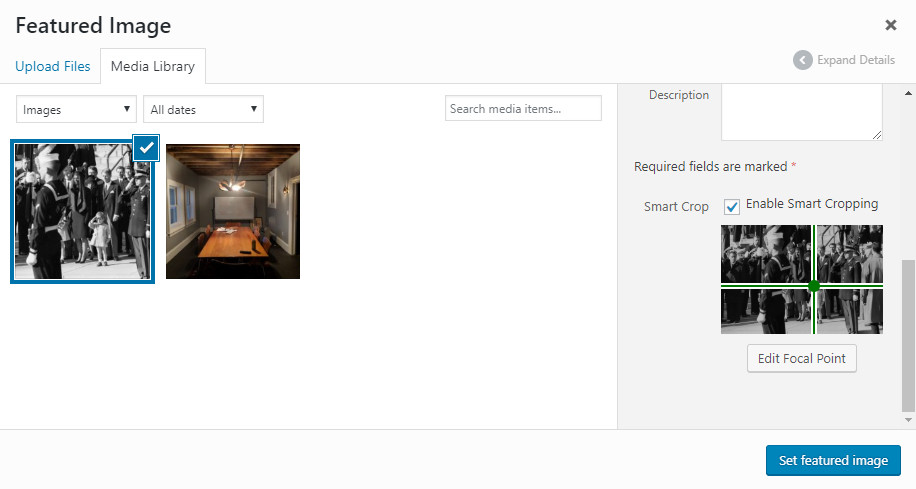
- Select an image in the library, so that image details appear on the right
- Check the Enable Smart Cropping checkbox.
- click edit focal point to choose the location of your images focal point
- Click the focal point of the image in the modal that appears. This should be the central subject, and the area of the image that we want in view at all times. For a portrait, I recommend clicking an eye, or other powerful feature. You can change the focus at any time, simply by clicking on a new part of the image.
- Click apply so save your changes
- Insert the image into a page or post
- Style your images with CSS, using the img.wpsmartcrop-image selector
Log de Changes
2.0.10
- Remove references to plugin website
2.0.9
- Fix attribute parsing issue
2.0.8
- Add support for generic img tags with the default url format
2.0.7
- Add support for figure markup
2.0.6
- Test against WordPress 5.6.0
- Fix a PHP Notice generated by admin settings UI (PR #12, props to @basvandenwijngaard)
2.0.5
- Fix potential security concern
Capturas de tela

Para desenvolvedores
Este é o seu plugin? Mostre os números.
Adicione um crachá ao vivo ao seu site, Documentos ou Readme do GitHub. Ele é atualizado por conta própria - nenhuma conta necessária.
Best WP SmartCrop alternatives
All aspect ratio plugins →FAQ
WP SmartCrop: quick answers
Respostas diretas, extraídas de dados ao vivo WordPress.org.
Fonte: WordPress.org
Is WP SmartCrop free?
Yes. WP SmartCrop is free to download and use from the official WordPress.org plugin directory.
Is WP SmartCrop safe to use in 2026?
WP SmartCrop shows warning signs in 2026 — compare the alternatives below before installing. It runs on 4K+ sites, is rated 3.7/5 and was last updated 2 years ago, and scores 25/100 on our health check.
How many websites use WP SmartCrop?
WP SmartCrop is active on 4K+ WordPress websites and has been downloaded 140,890 times since it launched in March 2016. It was downloaded 3,624 times in the last 30 days.
Does WP SmartCrop work with WordPress 7.1?
WP SmartCrop is officially tested up to WordPress 6.4.15, while the latest release is 7.1.5. It may still work, but try it on a staging site first.
When was WP SmartCrop last updated?
The latest version, 2.0.10, was released on September 13, 2024 (2 years ago).
Who makes WP SmartCrop?
WP SmartCrop is developed and maintained by Bytes.co.
What are the best alternatives to WP SmartCrop?
The most popular alternatives to WP SmartCrop are Code and core (50+ installs), Image Dimensions Display (30+ installs) and Parisia Media (<10 installs).
Alimentado por PageForge
Um modelo e uma planilha. Uma página real para cada pesquisa.
PageForge Transforma cada linha de um CSV em uma página WordPress com seu próprio título, URL, SEO campos e esquema, construído no layout que você já desenhou. Gratuito em WordPress.org.
- CSV e XLSX, mais Google Sheets em Profissional e Empresarial
- Seu próprio título, URL, SEO campos e esquema para cada página
- Funciona com o editor de blocos, Elementor, Divi e Avada
- Gratuito em WordPress.org, sem cartão de crédito