


Generate Images (AI) – Magic Post Thumbnail
Generate featured images from Bing, GPT Image, Unsplash and more. Automatic, bulk or Gutenberg — based on your post title.

Escolha sólida
Generate Images (AI) is a solid plugin choice in 2026, with a few things worth checking first. It runs on 5K+ sites, is rated 4.3/5 and was last updated 2 weeks ago, and scores 75/100 on our health check.
- Desenvolvido ativamente — última atualização 2 semanas atrás
- Testado com as últimas WordPress (7.1)
- Momentum — downloads up 232.8% vs the previous 30 days
Como ele se acumula?
Lado a lado em instalações, atualizações, avaliações e suporte



Downloads diários
Os picos de download geralmente seguem uma nova versão — cada site que atualiza automaticamente é um download.
Rankings
Where Generate Images (AI) stands todayWordPress.org Classificações de pesquisa
Posição ao vivo na pesquisa de plugins, top 100| Palavra chave | Posição |
|---|---|
| ai image | #35 |
| bulk | >100 |
| featured image | #64 |
| image generator | #22 |
| thumbnail | #11 |
Adoção da versão
Compartilhamento de sites ativos por lançamento.
Divisão de classificação
★★★★★★★★★★ 4.3 from 25 reviews
About Generate Images (AI)
From the official readme · v7.0.3Descrição
Black Friday: 30% off the Pro version until November 30, 2026. Use the code MPTBLACKFRIDAY26 on the pricing page.
Magic Post Thumbnail generates images for your posts — as featured images or inside the content — from image sources and AI models.
Free searches can use the post title or text analysis. Pro adds tags, categories, custom fields, custom requests and the OpenAI keyword extractor.
You pick a fallback chain of image sources: if the first source fails, the next one is tried.
Photo sources: Bing Images, Pixabay, Openverse, Flickr, Unsplash, Pexels, YouTube.
AI sources: GPT Image, Stable Diffusion, Replicate, Ideogram, Flux 2, Gemini (Nano Banana), Grok. Optional style presets (photorealistic, cinematic, “no text”…) apply to AI sources only.
You can also use the first image already in the post, or a default fallback image, and optionally draw a title / logo bar on the generated file (off by default).
Generate from the post editor, the posts list column, bulk actions, Gutenberg, or (Pro) cron and imports.
Official Website
Documentation
What is included ?
Magic Post Thumbnail for FREE
- Featured images for posts, pages and custom post types
- Insert an image anywhere in the post content (position up to the 10th occurrence)
- Search based on the title or text analysis
- Gutenberg block to search and insert images
- Image sources: Bing Images, GPT Image, Google Image API, Pixabay, Openverse, Flickr
- Local sources: first image in the post, default fallback image
- AI style presets and “no text” (when generating with an AI source)
- Optional title / logo overlay on generated images
- Generate or regenerate from the posts list
- Bulk generation for posts or taxonomies
- Dashboard health check and one-click test generation
Magic Post Thumbnail PRO
Upgrade to Pro for more image sources, automation and integrations.
- Customisable crons
- Several image locations per generation
- Image sources: Unsplash, Pexels, Stable Diffusion, Replicate, Ideogram, Flux 2, Gemini (Nano Banana), Grok
- More results in the Gutenberg block
- Search based on tags, categories, paragraph analyser, custom fields, custom request and OpenAI keyword extractor
- Image modifications: flip horizontally and/or crop by 10%
- Compatibility with REST, WPeMatico, FeedWordPress, WP All Import, Featured Image from URL, CMB2, ACF and Meta Box
- Restricted domains and proxy
- Priority support with replies within 24 hours
Traduções
- Inglês
- Francês
- Espanhol
- Russo
- Português (Brasil)
- Portuguese (Portugal)
- Italiano
- Japonês
- Alemão
- Holandês
- Polonês
- Turkish
- Vietnamese
- Chinese (Simplified)
- Chinese (Traditional)
- Korean
- Arabic
- Indonesian
- Ukrainian
Support the plugin
If you’ve found the plugin useful, please consider making a donation. Thank you for your support !
Instalação
- Ative o plugin.
- Open Magic Post Thumbnail. The dashboard shows whether your chain and API keys are ready; you can generate a test draft there.
- Under Source, build the fallback chain (drag to set priority) and enter API keys. Under Automatic, choose post types and image placement.
- In a post, use Click to generate (Gutenberg or Classic), or generate from the posts list column.
- For many posts at once: select them in the list and choose Generate featured images under Bulk Actions.
API setup guides: image databases.
Log de Changes
Black Friday: 30% off Pro until November 30, 2026 with the code MPTBLACKFRIDAY26. Upgrade to Pro for advanced AI models, scheduled generation, additional image sources and integrations.
7.0.3 – November 6, 2026
- Black Friday: 30% off Pro until November 30, 2026 with the code MPTBLACKFRIDAY26
7.0.2 – October 22, 2026
- Update Freemius SDK to 2.13.5
7.0.1 – August 24, 2026
- Fix generation aborting when Google Translate is rate-limited
- Switch to the current Google Translate API, with MyMemory as fallback
7.0.0 – August 15, 2026
- Bing Images replaces Google scraping (settings migrated automatically)
- Fix Bing Images returning unrelated results
- GPT Image replaces DALL·E 3 (API keys migrated automatically)
- PRO: Add Ideogram, Flux 2, Gemini (Nano Banana) and Grok; update Stability AI
- Redesign Source: chain on the left, bank settings and preview on the right
- Gutenberg search banks are now chosen on the Gutenberg Block page
- Regenerating an image now picks a different result
- AI style presets and “no text” option (AI banks only)
- New chain banks: first image in the post, and a default fallback image
- Generate or regenerate from the posts list column
- Optional title/logo overlay on generated images (off by default)
- Dashboard: configuration health check and a one-click test generation
- Warn before leaving unsaved settings; prevent duplicate generations
- Security hardening for AJAX, logs and image downloads
- REST auto-generation runs in the background
- Text domain aligned with the plugin slug (
magic-post-thumbnail) - Add translations (RU, PT, IT, JA, DE, NL, PL, TR, VI, ZH, KO, AR, ID, UK, ES)
6.2.2 – August 1, 2026
- PRO: Add support for OpenAI GPT Image 2 model (Replicate)
- PRO: Add Quality (auto/high/medium/low) and Moderation (auto/low) options for GPT Image 2
- PRO: Aspect ratio and output format now applied correctly for GPT Image 2
6.2.1 – April 2, 2026
- Bing Images is the default source for the Google Image (scraping) bank. The old Google HTML pipeline is off.
- Same search options map to Bing (
qftfilters). Filter:mpt_google_scraping_bing_qft_tokens.
Capturas de tela

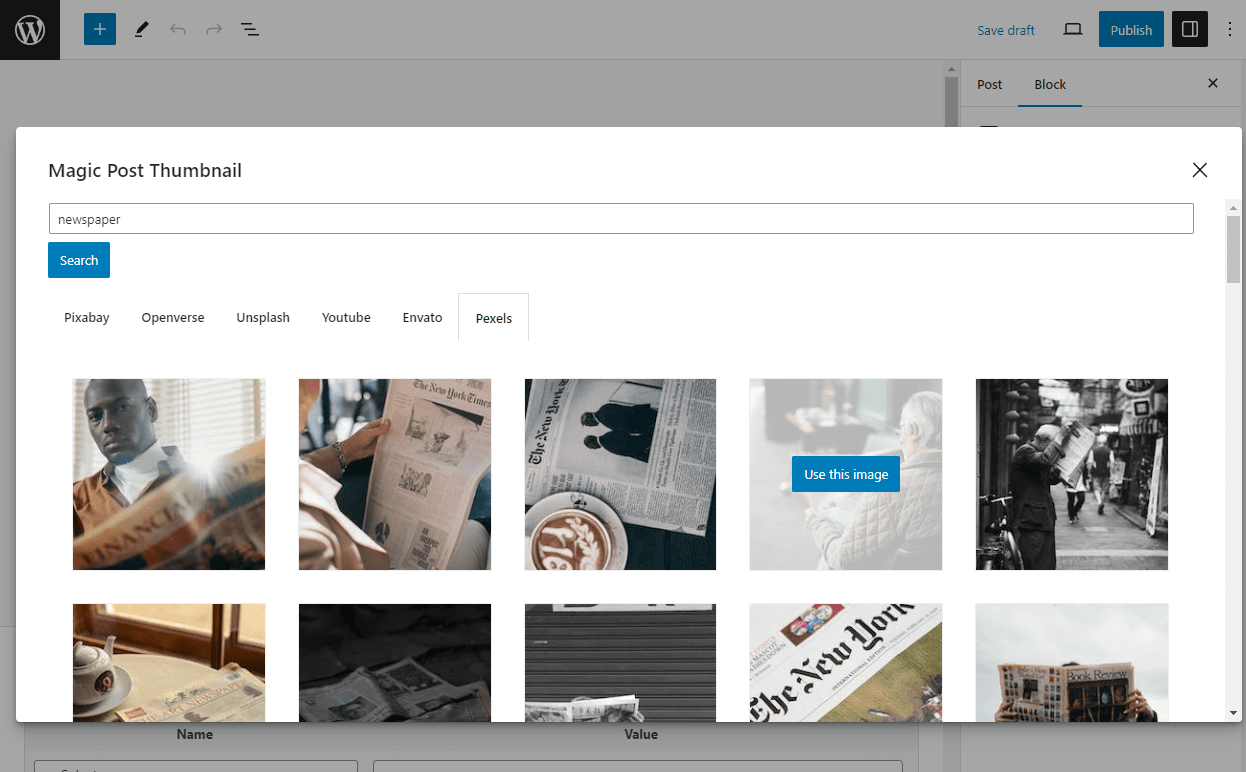


Para desenvolvedores
Este é o seu plugin? Mostre os números.
Adicione um crachá ao vivo ao seu site, Documentos ou Readme do GitHub. Ele é atualizado por conta própria - nenhuma conta necessária.
Best Generate Images (AI) alternatives
All ai image plugins →





FAQ
Generate Images (AI): quick answers
Respostas diretas, extraídas de dados ao vivo WordPress.org.
Fonte: WordPress.org
Is Generate Images (AI) free?
Yes. Generate Images (AI) is free to download and use from the official WordPress.org plugin directory.
Is Generate Images (AI) safe to use in 2026?
Generate Images (AI) is a solid plugin choice in 2026, with a few things worth checking first. It runs on 5K+ sites, is rated 4.3/5 and was last updated 2 weeks ago, and scores 75/100 on our health check.
How many websites use Generate Images (AI)?
Generate Images (AI) is active on 5K+ WordPress websites and has been downloaded 495,783 times since it launched in May 2012. It was downloaded 6,197 times in the last 30 days.
Does Generate Images (AI) work with WordPress 7.1?
Yes. The developer has tested Generate Images (AI) up to WordPress 7.1.5, the latest release. It requires WordPress 6.0 or newer.
What PHP version does Generate Images (AI) need?
Generate Images (AI) requires PHP 7.3 or higher. Most hosts run PHP 8.x today, so it works on any modern WordPress hosting.
When was Generate Images (AI) last updated?
The latest version, 7.0.3, was released on November 6, 2026 (2 weeks ago).
Who makes Generate Images (AI)?
Generate Images (AI) is developed and maintained by Alexandre Gaboriau.
What are the best alternatives to Generate Images (AI)?
The most popular alternatives to Generate Images (AI) are Logo or Image Replace by my… (300+ installs), AI Image Generator (100+ installs) and Genolve (100+ installs).
Alimentado por PageForge
Um modelo e uma planilha. Uma página real para cada pesquisa.
PageForge Transforma cada linha de um CSV em uma página WordPress com seu próprio título, URL, SEO campos e esquema, construído no layout que você já desenhou. Gratuito em WordPress.org.
- CSV e XLSX, mais Google Sheets em Profissional e Empresarial
- Seu próprio título, URL, SEO campos e esquema para cada página
- Funciona com o editor de blocos, Elementor, Divi e Avada
- Gratuito em WordPress.org, sem cartão de crédito