


Image Generator – AI Auto Featured Images, Thumbnails & Post Images
AI image generator for WordPress. Auto-create featured images, post thumbnails & post images with templates or custom AI prompts.

Escolha sólida
Image Generator is a solid plugin choice in 2026, with a few things worth checking first. It runs on 30+ sites and was last updated 6 days ago, and scores 67/100 on our health check.
- Desenvolvido ativamente — última atualização 6 dias atrás
- Testado com as últimas WordPress (7.1)
- Base de usuários pequenas (mais de 30 instalações ativas)
- Muito poucos comentários até agora
Como ele se acumula?
Lado a lado em instalações, atualizações, avaliações e suporte


Downloads diários
Os picos de download geralmente seguem uma nova versão — cada site que atualiza automaticamente é um download.
Rankings
Where Image Generator stands todayWordPress.org Classificações de pesquisa
Posição ao vivo na pesquisa de plugins, top 100| Palavra chave | Posição |
|---|---|
| Ai | >100 |
| ai image | >100 |
| Bloco-editor | >100 |
| featured image | >100 |
| image generator | >100 |
Adoção da versão
Compartilhamento de sites ativos por lançamento.
About Image Generator
From the official readme · v1.8.5Descrição
Image Generator is the all-in-one AI image generator and automatic featured image plugin for WordPress. Create eye-catching featured images, post thumbnails, hero banners, and social media images in two clicks — directly inside the Gutenberg block editor, or automatically every time you publish a post or page.
🚀 Upgrade to Pro | 💻 Live Demo Site | 📄 Plugin Documentation | 🎧 Support
Stop switching between design tools, AI apps and stock photo sites. Stop publishing posts with broken thumbnail spots. With Image Generator you can:
- Design your own image templates in a visual Template Studio and turn every post title into an on-brand image — free, rendered on your own server.
- Generate AI images from a custom prompt using OpenAI GPT Image (your own API key) — right inside the block editor.
- Search free stock photos from Unsplash, Pexels and Pixabay without leaving WordPress, imported with the photographer’s credit.
- Combine them: put a stock photo or an AI image under your own template design, so each post gets a different picture with your logo, colors and title.
- Auto-generate featured images whenever a post or page is saved without one — from a template, AI or a stock photo.
- Insert images straight into Image and Media & Text blocks while you write, or set the featured image with one click from the AI Featured Image sidebar panel.
Where Your Images Come From
- Your own image templates — designs you build in the Template Studio (or start from 10 ready-made ones). The post title and other details are filled in and the image is drawn on your server with PHP’s GD library. No API key, no cost, nothing leaves your site (unless a layer uses a stock photo or AI image).
- AI images — unique images from OpenAI GPT Image, written from your prompt or from the post’s title and excerpt. Needs your own OpenAI API key.
- Free stock photos — Unsplash, Pexels and Pixabay. Needs a free API key from the library you use.
- Templates over photos — any template’s background or image layer can show a stock photo or an AI image picked for each post.
Images inside your templates can come from your Media Library, the post’s featured image, the first image in the post, your site logo or site icon, the author’s avatar (uploaded to the Media Library), a stock photo for the post or an AI image for the post.
Whether you run a blog, news site, magazine, portfolio, affiliate site, online store, or membership platform, this plugin gives every post a polished, SEO-friendly featured image — without the manual work.
🚀 Upgrade to Pro | 💻 Live Demo Site | 📄 Plugin Documentation | 🎧 Support
Watch video tutorial on how to use the Image Generator plugin
Perfect For
- Bloggers who publish daily and never want to think about featured images again.
- News sites and magazines that need every article to have a thumbnail.
- WooCommerce stores that need product placeholder images.
- Affiliate marketers who want unique hero images for every roundup post.
- Agencies and freelancers managing multiple client sites.
- Membership and learning platforms that publish lots of lessons.
- Anyone who has ever shipped a post with a missing or generic thumbnail.
Key Features
✅ AI Image Generation with OpenAI
Plug in your OpenAI API key (or define the AIMG_API_KEY constant in wp-config.php) and generate unique images from natural-language prompts “a sunlit forest path in autumn, photorealistic, soft lighting”, without leaving WordPress.
✅ Block Editor (Gutenberg) Integration
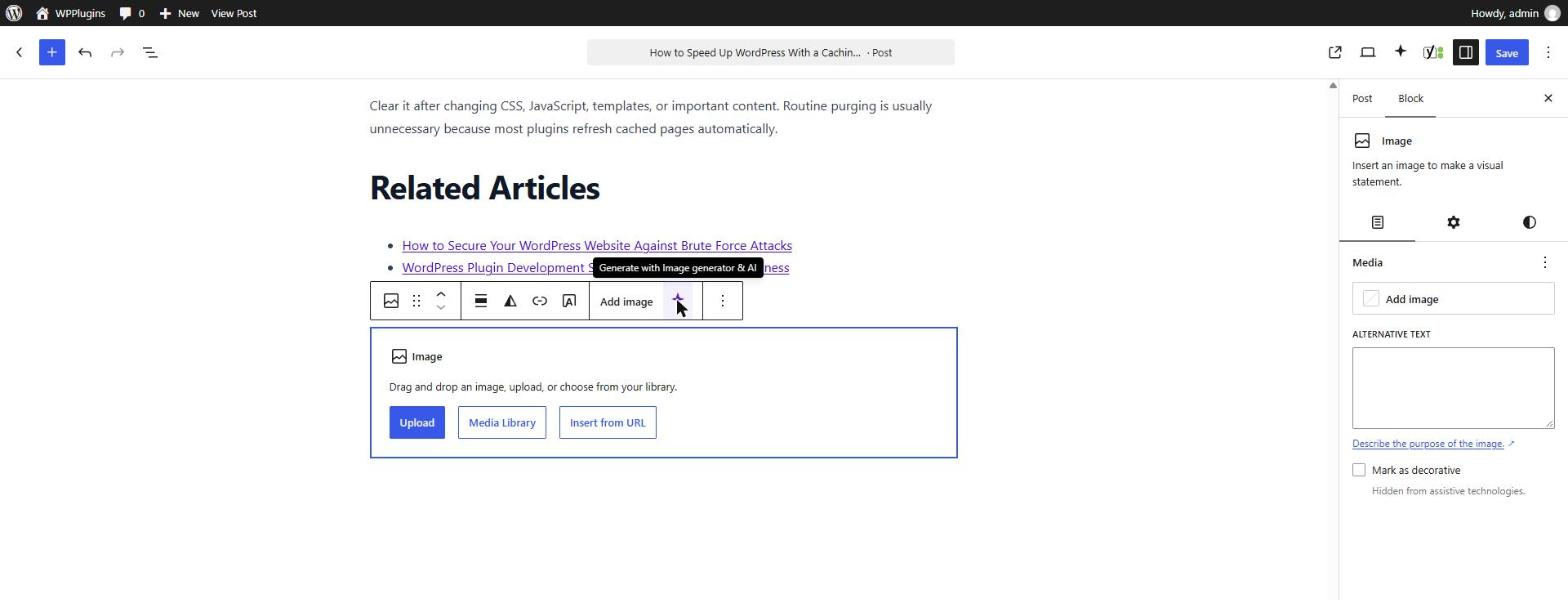
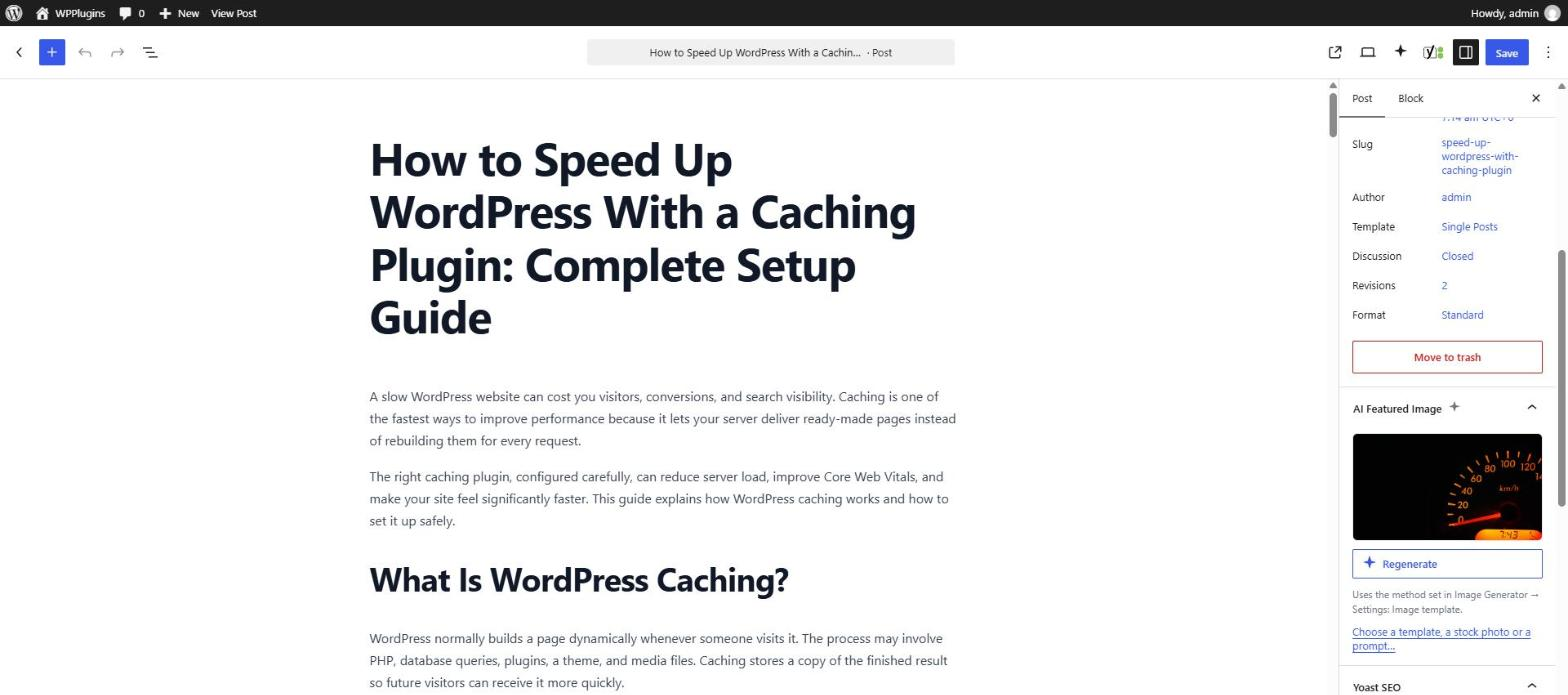
Adds an “AI Generate” sparkle button to the toolbar of core Image and Media & Text blocks, plus a dedicated AI Featured Image panel in the document sidebar. No setup, no shortcodes, it just shows up.
✅ Templates, AI and Stock Photos in One Modal
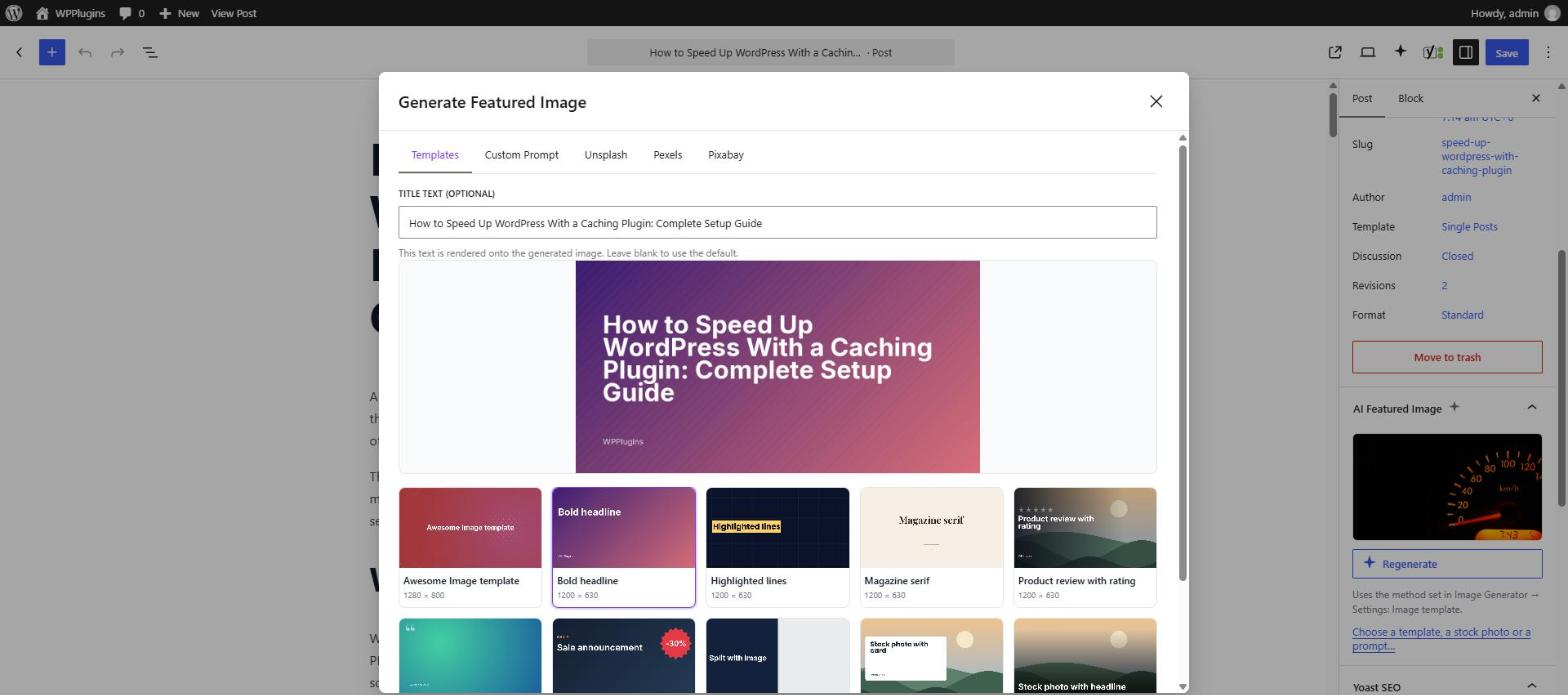
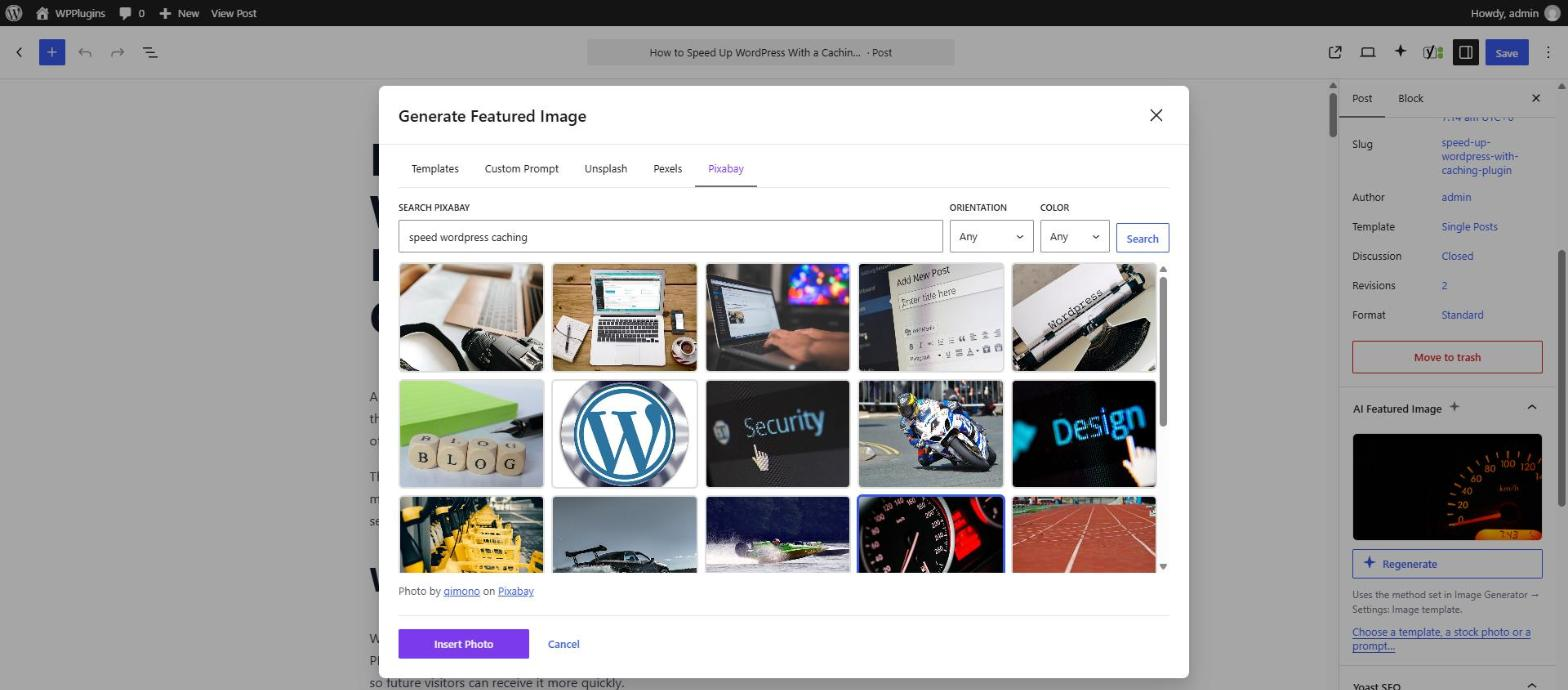
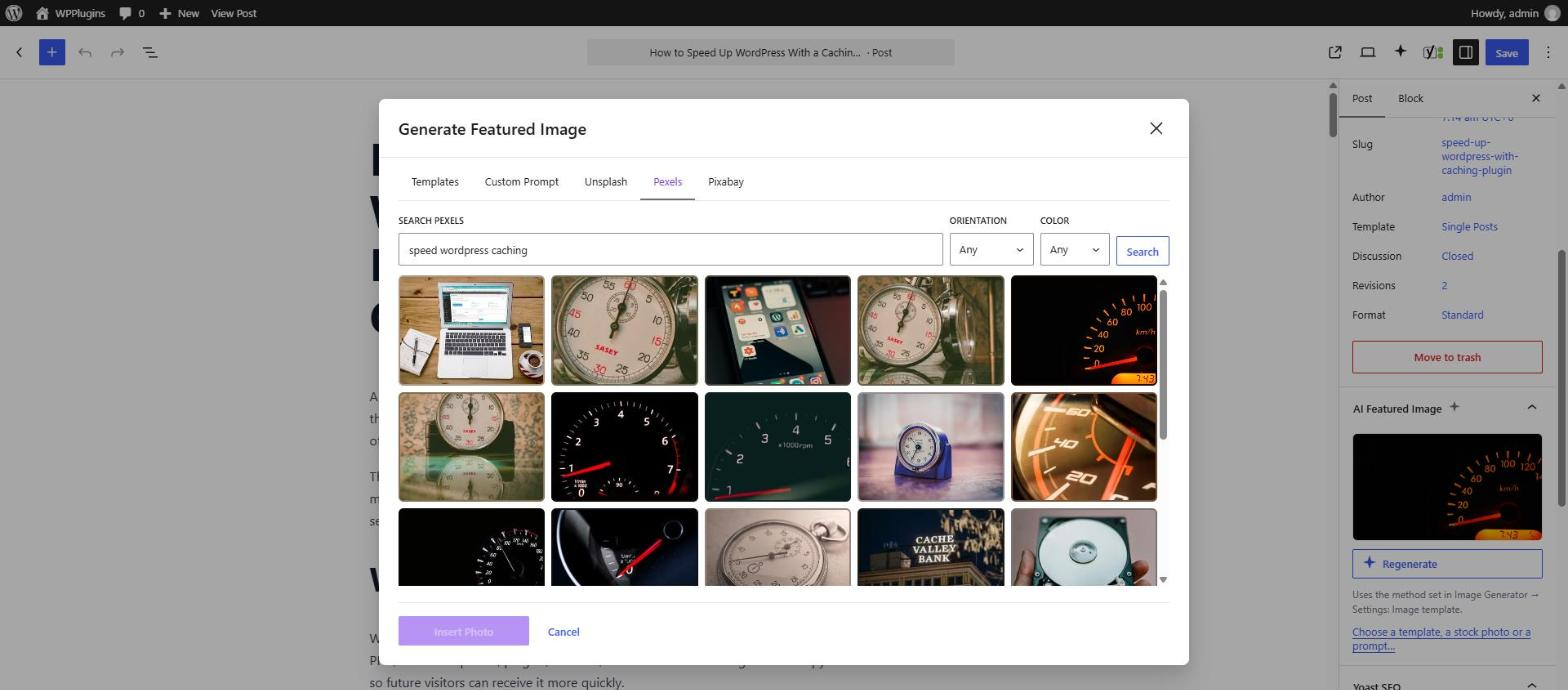
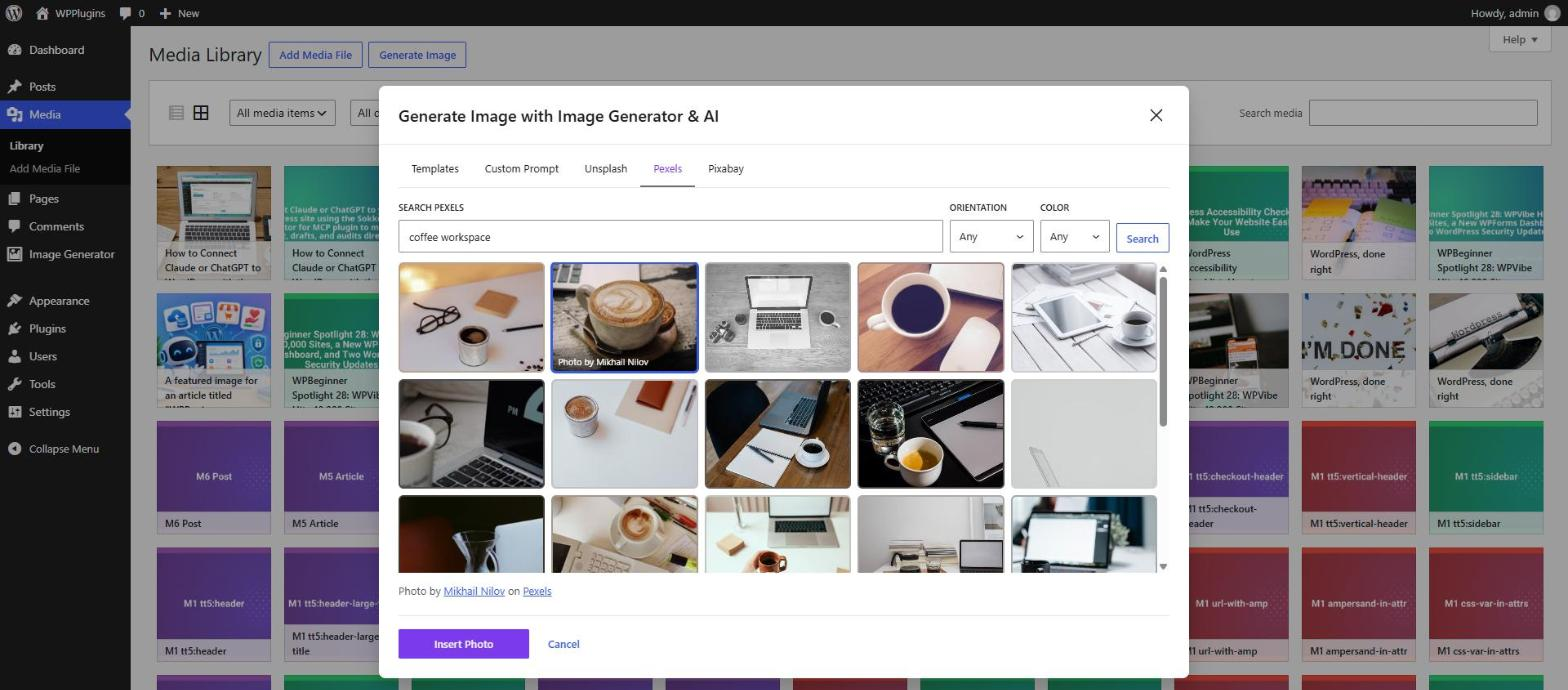
A single modal lets editors switch between Templates (fast, on-brand, free), Custom Prompt (AI-generated, unique) and one tab each for Unsplash, Pexels and Pixabay. It opens from the block editor and from the Media Library, and remembers the tab you used last.
✅ Free Stock Photos from Unsplash, Pexels & Pixabay
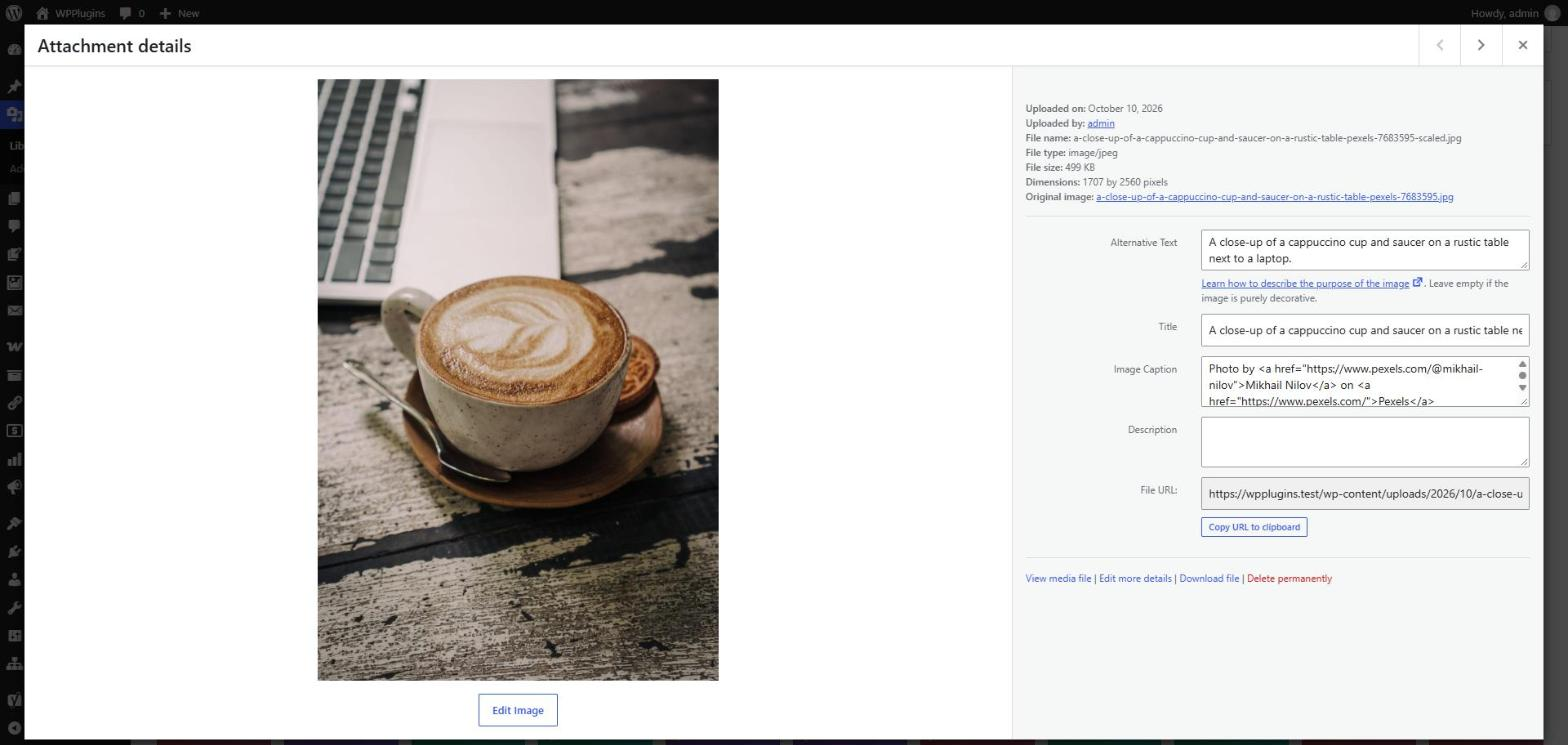
Search millions of free photos in the editor and the Media Library, filter by orientation and color, and insert one with a click. Each photo is downloaded into your Media Library with alt text and the photographer’s credit in the caption. Stock photos can also be the automatic featured image, picked with keywords from the post title. Each library needs its own free API key.
✅ On-Brand Photos: Templates over Stock or AI Images
Use a stock photo or an AI image as a template’s background or image layer, and every post gets a different picture with your logo, colors and title on top. The picture is fetched once per post in the background and reused when you regenerate.
✅ Visual Template Studio
Design image templates on a canvas: drag, resize and rotate layers, with snapping guides, undo/redo and keyboard shortcuts. Combine backgrounds (colors, random palettes, gradients or an image), images with rounded or circle masks, brightness, contrast, blur, black and white and duotone, see-through overlays and fades, shapes, patterns, frames and text. Background and image layers can use a Media Library image, the post’s featured image, the first image in the post, the site logo or icon, the author’s avatar, or a stock photo or AI image picked for each post. Text fits itself to its box, with 11 bundled fonts (or upload your own .ttf/.otf), outlines, shadows, highlight boxes and tags like {title}, {category}, {author}, {date} and {custom_field:key}. Preview with long titles or a real post, check the exact image your server will make, start from 10 ready-made designs, and import or export designs as JSON.
✅ Unlimited Reusable Image Templates
Build as many image templates as you want. Each template is rendered server-side using PHP’s GD library, no external dependency — the canvas you design on draws the same way, so what you see is what your posts get.
✅ Automatic Featured Image on Save — Template, AI or Stock Photo
When a post or page is saved without a featured image, the plugin creates one. Choose from: Image template (a random one, or the one you pick), AI image, Stock photo (Unsplash, Pexels or Pixabay, found with keywords from the post title), or a combination — template with AI as a fallback, AI with a template as a fallback, or a stock photo with a template as a fallback. AI images, stock photos and templates with a stock or AI layer are made in the background, so saving never waits on an outside service, and the editor shows the progress.
✅ Smart AI Prompts
Write your prompt template once with tags like {title}, {excerpt}, {category}, {tags} and {custom_field:key}, choose a style (Photorealistic, Flat illustration, 3D render, Watercolor, Cinematic and more), and every post gets a fitting prompt. A built-in instruction keeps garbled text and watermarks out of the image.
✅ Image Shape, Quality and Variations
Choose square, landscape or portrait images and the quality level (and so the cost). In the editor, generate up to 4 variations and keep the one you like — the others are removed from the Media Library.
✅ Cost Control
Decide which roles can use AI and set an hourly limit per user. Automatic AI images wait until a post is published, so drafts don’t spend credit.
✅ Works Anywhere You Edit
Automatic generation currently covers posts and pages. On-demand generation is not limited that way: the block editor panel and the Media Library modal let you generate an image and set it as the featured image on any post type that supports featured images, including WooCommerce products and custom post types.
✅ Native WordPress Media Library
Every image — template, AI or stock photo — is saved into the Media Library with alt text. So image optimization plugins (Smush, ShortPixel, Imagify, EWWW), CDNs (Cloudflare, BunnyCDN, KeyCDN), and SEO plugins (Yoast, Rank Math, AIOSEO) all see it as a regular attachment.
✅ REST API for Headless & Custom Workflows
Endpoints (/wp-json/aimg/v1/generate, /templates, /featured/{post}, /status/{post}, /prompt, /stock/{library}/search, /stock/{library}/import) with capability checks and nonce protection, perfect for headless WordPress, decoupled frontends, and automation scripts.
✅ Developer-Friendly Filters
Add your own AI provider (aimg_providers), stock photo library (aimg_stock_providers), template layer type (aimg_template_layers), merge tag (aimg_merge_tags), modal tab (aimgModal.tabs), generation method (aimg_generation_methods, aimg_pre_generate_for_post) or style preset (aimg_style_presets), adjust prompts (aimg_post_prompt), and keep using aimg_generate_endpoint and aimg_generate_request_body to customize the OpenAI request.
✅ Translation Ready (i18n)
Fully translatable via the bundled .pot file, both PHP and editor JavaScript strings are registered with wp_set_script_translations. Compatible with WPML, Polylang, Loco Translate, and TranslatePress.
✅ Lightweight, Fast, and Secure
No bloated dependencies. Uses native WordPress components, the GD library (already part of PHP), and the REST API. API keys can be stored outside the database with the AIMG_API_KEY, AIMG_UNSPLASH_KEY, AIMG_PEXELS_KEY and AIMG_PIXABAY_KEY constants, and stock photos are only downloaded from each library’s own image servers.
✅ No Coding Required
Simple admin UI under Image Generator in the WordPress dashboard. Build a template, save your settings, you’re done.
How It Works
Generate from the Block Editor (On Demand)
- Open any post or page in the Gutenberg editor.
- Click the ✨ sparkle icon in the toolbar of an Image or Media & Text block or open the AI Featured Image panel in the document sidebar.
- Choose a tab in the modal:
- Templates: pick a saved image template and see a preview with your post title. The title text defaults to the current post title.
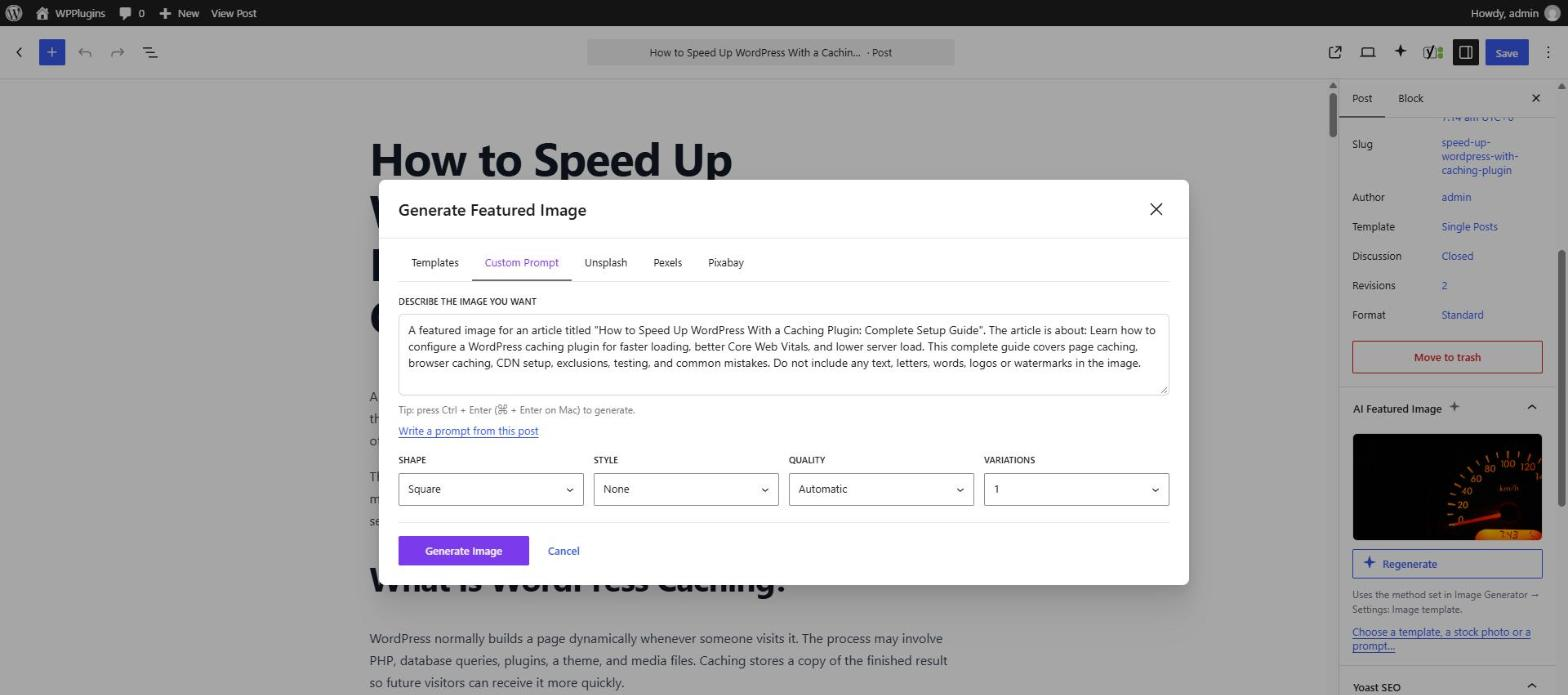
- Custom Prompt: describe the image you want — or click Write a prompt from this post — pick the shape, style, quality and number of variations, and press Generate (or Ctrl + Enter / ⌘ + Enter).
- Unsplash, Pexels or Pixabay: search is filled in with keywords from the post title; filter by orientation and color, scroll for more, pick a photo and press Insert Photo.
- The image is added to the Media Library and inserted into the block or assigned as the featured image automatically. With several AI variations, you pick one first.
The AI Featured Image panel can also (re)generate the featured image in one click using your automatic method. The same modal is available from Media → Library → Generate Image, so you can create images with any editor.
Auto-Generate Featured Images on Publish
- Under Image Generator → Settings → Automatic Featured Images, choose Image template, AI image or Stock photo (or one with a fallback).
- Write your post or page as normal and hit Publish or Update.
- If you already set a featured image, nothing happens.
- If you didn’t, a template image is rendered right away from the post title — or an AI image or stock photo is fetched in the background — saved to the Media Library and attached as the post thumbnail.
Third-Party Assets and Licenses
Roboto Font
Author: Christian Robertson
License: Apache License 2.0
License URI: https://www.apache.org/licenses/LICENSE-2.0
Source: https://fonts.google.com/specimen/Roboto
The Roboto font is bundled under the Apache License 2.0. Full license text available at the URI above.
Template Studio Fonts
Roboto (Regular), Inter, Montserrat, Poppins, Playfair Display and Noto Sans are bundled for the Template Studio.
License: SIL Open Font License 1.1
License URI: https://openfontlicense.org
Source: https://fonts.google.com
Each font’s license, with its copyright notice, ships in assets/fonts/licenses/.
AI Image Generation
AI image generation calls a third-party API (OpenAI by default, https://api.openai.com/v1/images/generations). You are responsible for the API key, usage costs, and compliance with the provider’s terms of use and privacy policy. Nothing is sent to an external service unless you add an API key and either generate from a prompt, click Write a prompt from this post, choose an AI method for automatic featured images, or use a template with an AI image layer. Other template-based generation never leaves your server.
Stock Photos
Searching or importing stock photos calls the library you choose: Unsplash (api.unsplash.com, images from images.unsplash.com), Pexels (api.pexels.com, images from images.pexels.com) or Pixabay (pixabay.com/api, images from pixabay.com). The plugin sends your API key and the search terms — what you type, or keywords from the post title (or the template’s search text) for automatic images. Nothing is sent unless you add a key and search, test the key, choose a stock method for automatic featured images, or use a template with a stock photo layer. Thumbnails in search results are loaded from the library in the editor, as the libraries require; the photo you pick is downloaded to your Media Library. Unsplash: terms, API guidelines, privacy. Pexels: terms, license, privacy. Pixabay: terms, license, privacy.
Privacidade
- Template-based generation runs entirely on your server. No data is sent to third parties, unless a template has a stock photo or AI image layer (then the same rules as below apply).
- AI generation sends a prompt to OpenAI (or your configured endpoint): the prompt you type, or — for automatic AI images — one built from your prompt template, which by default includes the post’s title and excerpt. No user or visitor data is transmitted.
- Stock photo searches send search terms to the library you use (Unsplash, Pexels or Pixabay). No user or visitor data is transmitted.
- The plugin does not set cookies, track users, or load any external scripts on the frontend.
Instalação
Instalação automática
- Go to Plugins → Add New in your WordPress admin.
- Search for “Image Generator” by BeautifulPlugins.
- Click Install Now, then Activate.
Manual Installation
- Download the plugin ZIP file.
- Upload the
artificial-image-generatorfolder to/wp-content/plugins/. - Activate Image Generator through the Plugins menu in WordPress.
Instalação
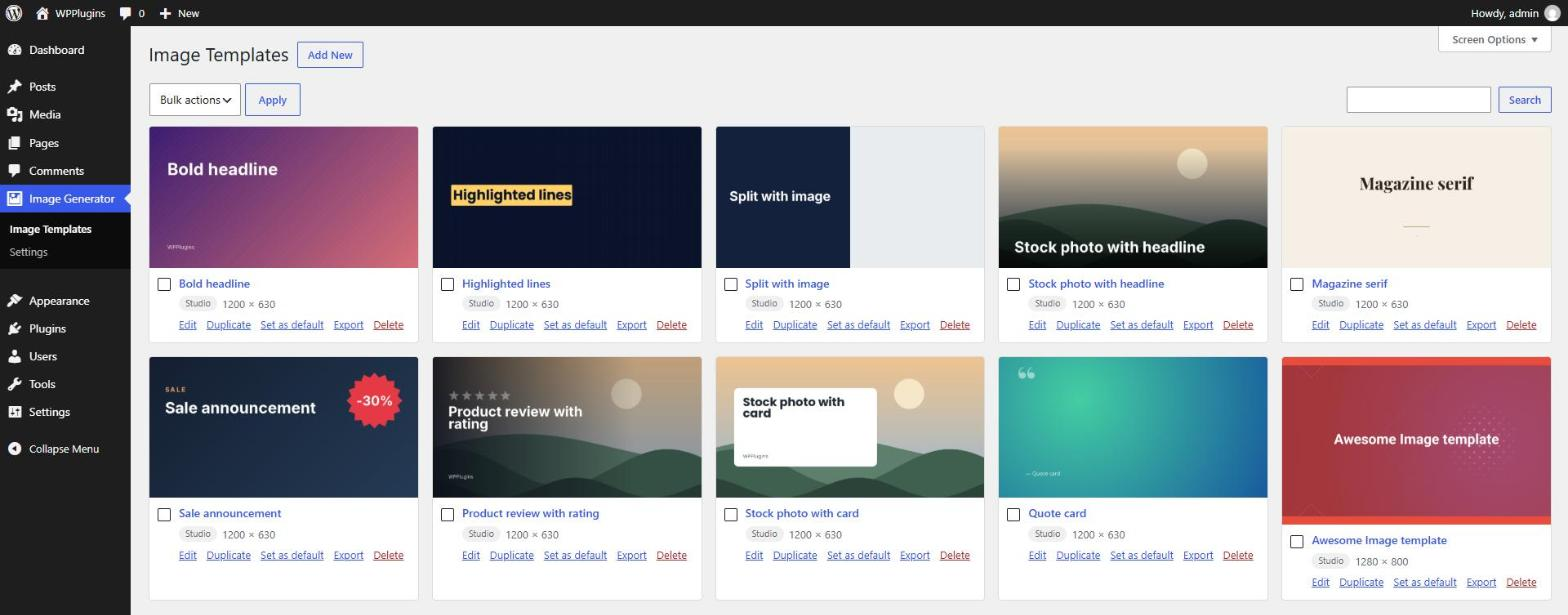
- Go to Image Generator → Image Templates → Add New, pick one of the ready-made designs (or start blank) and adjust it in the Template Studio.
- (Optional) Open Image Generator → Settings and add your OpenAI API key to enable AI images.
- (Optional) Under Settings → Stock Photos, add a free key from Unsplash, Pexels or Pixabay and click Test Connection.
- (Optional, more secure) Define the keys in
wp-config.phpinstead:
define( ‘AIMG_API_KEY’, ‘sk-your-key-here’ ); (andAIMG_UNSPLASH_KEY,AIMG_PEXELS_KEYorAIMG_PIXABAY_KEY) - Done. Generate from the block editor or the Media Library, or just publish a post and let the plugin handle it.
Log de Changes
Adds free stock photos from Unsplash, Pexels and Pixabay and photo templates. Older templates are converted to the Template Studio format in the background only when they look exactly the same. Removes aimg_generate_preview().
1.8.5
- New: Support Sokket MCP Connector for generating images directly from ChatGPT, Claude, Gemini, and other providers.
1.8.2
- New: Admin notices for announcements and offers, with “Remind Me Later” and “Dismiss” options. Offers are not shown while Image Generator Pro is active.
1.8.0
- New: Free stock photos from Unsplash, Pexels and Pixabay. Search them in the editor and the Media Library with orientation and color filters, and insert one with a click. Photos are imported with alt text and the photographer’s credit, and importing the same photo again reuses it.
- New: Stock photos as an automatic featured image method (“Stock photo” or “Stock photo, template if none is found”), picked with keywords from the post title in the background.
- New: Hybrid templates. A background or image layer can show a stock photo or an AI image made for each post, with your design on top. Two new starters use it.
- New: Stock Photos settings with a Test Connection button; keys can also be set with
AIMG_UNSPLASH_KEY,AIMG_PEXELS_KEYandAIMG_PIXABAY_KEY. - Enhance: Templates made before 1.7.0 are converted to the Template Studio format in the background, only when they look exactly the same; any that would change keep working as before and are listed in Site Health. Their old settings are kept.
- Enhance: The default background and text colors in Settings now apply to new templates; existing templates keep the colors they were saved with.
- Dev: Modal tabs can be added with the JS filter
aimgModal.tabs(actionaimg_enqueue_modal); new filtersaimg_stock_providers,aimg_stock_keywords,aimg_stock_stop_words,aimg_stock_max_bytes,aimg_unsplash_app_name,aimg_sanitize_settings,aimg_merge_tag_namesandaimg_studio_sample_tags; REST endpoints under/aimg/v1/stock. - Removed:
aimg_generate_preview(), deprecated in 1.7.1.
1.7.1
- Enhance: The Template Studio is now the only template editor. Templates made before 1.7.0 open in the Studio and look exactly the same; saving them there keeps their old settings too, so downgrading still works.
- Enhance: Duplicating an older template now creates a Studio copy.
- Removed: The classic template form and its save handler.
- Dev: Add-ons can add Template Studio layer types with the JS filter
aimg.studio.layerTypes(scripts enqueued on the newaimg_enqueue_template_studioaction) together withaimg_template_layers. - Enhance: Layers of a type whose plugin is not active are kept in the template instead of being removed, and are shown as unavailable.
- New: “Extra high” and “Maximum” AI image quality for GPT Image 2.5 Flare and Sunburst (GPT Image 2 uses High).
- Enhance: AI requests now wait up to 3 minutes instead of 2, so slow or high-quality images are not cut off. The
aimg_generate_timeoutfilter also receives the model and quality. - Deprecated:
aimg_generate_preview(); useArtificialImageGenerator\Templates\Repository::update_preview(). It will be removed in 1.8.0.
1.7.0
- New: Visual Template Studio. Design templates on a canvas with layers you can drag, resize and rotate, with snapping guides, undo/redo and keyboard shortcuts.
- New: Layer types for backgrounds (color, random palette, gradients, images, the post’s featured or first image), images (rounded or circle masks, brightness, contrast, blur, black and white, duotone), overlays and gradient fades, shapes, patterns, frames and text.
- New: Text fits its box, with max lines, letter case, letter spacing, outline, shadow and highlight boxes, plus tags
{title},{excerpt},{category},{tags},{author},{date},{site_name},{reading_time}and{custom_field:key}, and layers that show only when a tag has a value. - New: 10 more bundled fonts (Roboto, Inter, Montserrat, Poppins, Playfair Display, Noto Sans), font uploads (.ttf/.otf), and the theme’s color palette as swatches.
- New: Preview with short, long or very long titles or a real post, and an exact preview rendered by your server.
- New: Start from 8 ready-made designs, import and export designs as JSON, and duplicate templates.
- New: The templates list shows large previews with Edit, Duplicate, Set as default, Export and Delete.
- New: REST endpoints for managing templates (
/templates,/templates/{id},/templates/preview,/fonts,/capabilities) and developer filtersaimg_template_layers,aimg_fonts,aimg_merge_tags,aimg_template_document,aimg_template_startersandaimg_manage_templates_capability. - Enhance: Template images made from the editor are now attached to their post in the Media Library.
- Compatibility: Existing templates look exactly as before and keep their settings; they switch to the Studio only when you save them there. The classic form stays available for templates you haven’t changed.
1.6.0
- New: Template or AI for automatic featured images. Choose under Settings → Automatic Featured Images: an image template (default, as before), an AI image, or either one with the other as a fallback.
- New: Pick which template automatic images use, instead of a random one.
- New: AI prompt template with tags (
{title},{excerpt},{category},{tags},{site_name},{custom_field:key}), style presets, and instructions that keep text and watermarks out of AI images. - New: Automatic AI images are created in the background (Action Scheduler or WP-Cron), only once a post is published or scheduled, and count against the post author’s hourly limit.
- New: The AI Featured Image panel shows background progress and can generate or regenerate the featured image in one click.
- New: In the Custom Prompt tab, choose the image shape (square, landscape, portrait), quality, style and up to 4 variations, or write the prompt from the post.
- New: The Templates tab previews the selected template with your title.
- New: Default AI image shape and quality settings.
- New: Developer hooks
aimg_providers,aimg_generation_methods,aimg_pre_generate_for_post,aimg_template_for_post,aimg_style_presets,aimg_post_prompt,aimg_auto_generate_statuses,aimg_use_action_scheduler,aimg_kick_queue, and REST endpoints/featured,/status,/promptand/templates/{id}/preview. - Enhance: The template list is loaded once per modal instead of on every tab switch, and the prompt box is disabled until an API key is set.
- Fix: Titles containing
&or quotes are no longer shown as HTML codes in the Title text field, or drawn that way on images generated from the modal. - Fix: The Settings page now confirms when your settings are saved.
- Update: Current OpenAI models. The Image Model setting now offers GPT Image 2.5 Flare (new default), GPT Image 2.5 Sunburst and GPT Image 2. OpenAI retired DALL·E 2 and DALL·E 3 on May 12, 2026 and shuts down GPT Image 1 on October 23, 2026, so those models are removed and sites using them switch to GPT Image 2.5 Flare automatically.
- Fix: Images can only be attached to posts you can edit, and automatic AI images are no longer queued when no API key is set (“AI image, template if AI fails” then uses the template right away).
- Fix: Publishing many posts at once with an AI method no longer starts a server process per post; the extra images are created in the background one after another.
- Fix: Images created in the background are now uploaded by the post’s author, and an old failure message no longer shows on posts that have a featured image.
- Fix: Saving a post no longer retries a failed AI image on every save (each retry was a paid request); use Try again in the AI Featured Image panel instead.
- Fix: A finished background image now appears in the editor even while the AI Featured Image panel is collapsed.
- Fix: Users who can’t upload files (such as Contributors) no longer see generate buttons that would only show a permission error, and the panel is hidden on post types without featured images.
- Fix: AI request timeouts now show a plain message instead of a technical error.
Capturas de tela
Para desenvolvedores
Este é o seu plugin? Mostre os números.
Adicione um crachá ao vivo ao seu site, Documentos ou Readme do GitHub. Ele é atualizado por conta própria - nenhuma conta necessária.
Best Image Generator alternatives
Todos os plugins de IA →





FAQ
Image Generator: quick answers
Respostas diretas, extraídas de dados ao vivo WordPress.org.
Fonte: WordPress.org
Is Image Generator free?
Yes. Image Generator is free to download and use from the official WordPress.org plugin directory.
Is Image Generator safe to use in 2026?
Image Generator is a solid plugin choice in 2026, with a few things worth checking first. It runs on 30+ sites and was last updated 6 days ago, and scores 67/100 on our health check.
How many websites use Image Generator?
Image Generator is active on 30+ WordPress websites and has been downloaded 4,057 times since it launched in December 2025. It was downloaded 776 times in the last 30 days.
Does Image Generator work with WordPress 7.1?
Yes. The developer has tested Image Generator up to WordPress 7.1.5, the latest release. It requires WordPress 6.0 or newer.
What PHP version does Image Generator need?
Image Generator requires PHP 7.4 or higher. Most hosts run PHP 8.x today, so it works on any modern WordPress hosting.
When was Image Generator last updated?
The latest version, 1.8.5, was released on November 15, 2026 (6 days ago).
Who makes Image Generator?
Image Generator is developed and maintained by BeautifulPlugins.
What are the best alternatives to Image Generator?
The most popular alternatives to Image Generator are Elementor Agent Ready Websi… (10M+ installs), Jetpack (3M+ installs) and All in One SEO (2M+ installs).
Alimentado por PageForge
Um modelo e uma planilha. Uma página real para cada pesquisa.
PageForge Transforma cada linha de um CSV em uma página WordPress com seu próprio título, URL, SEO campos e esquema, construído no layout que você já desenhou. Gratuito em WordPress.org.
- CSV e XLSX, mais Google Sheets em Profissional e Empresarial
- Seu próprio título, URL, SEO campos e esquema para cada página
- Funciona com o editor de blocos, Elementor, Divi e Avada
- Gratuito em WordPress.org, sem cartão de crédito