


Jetpack Search
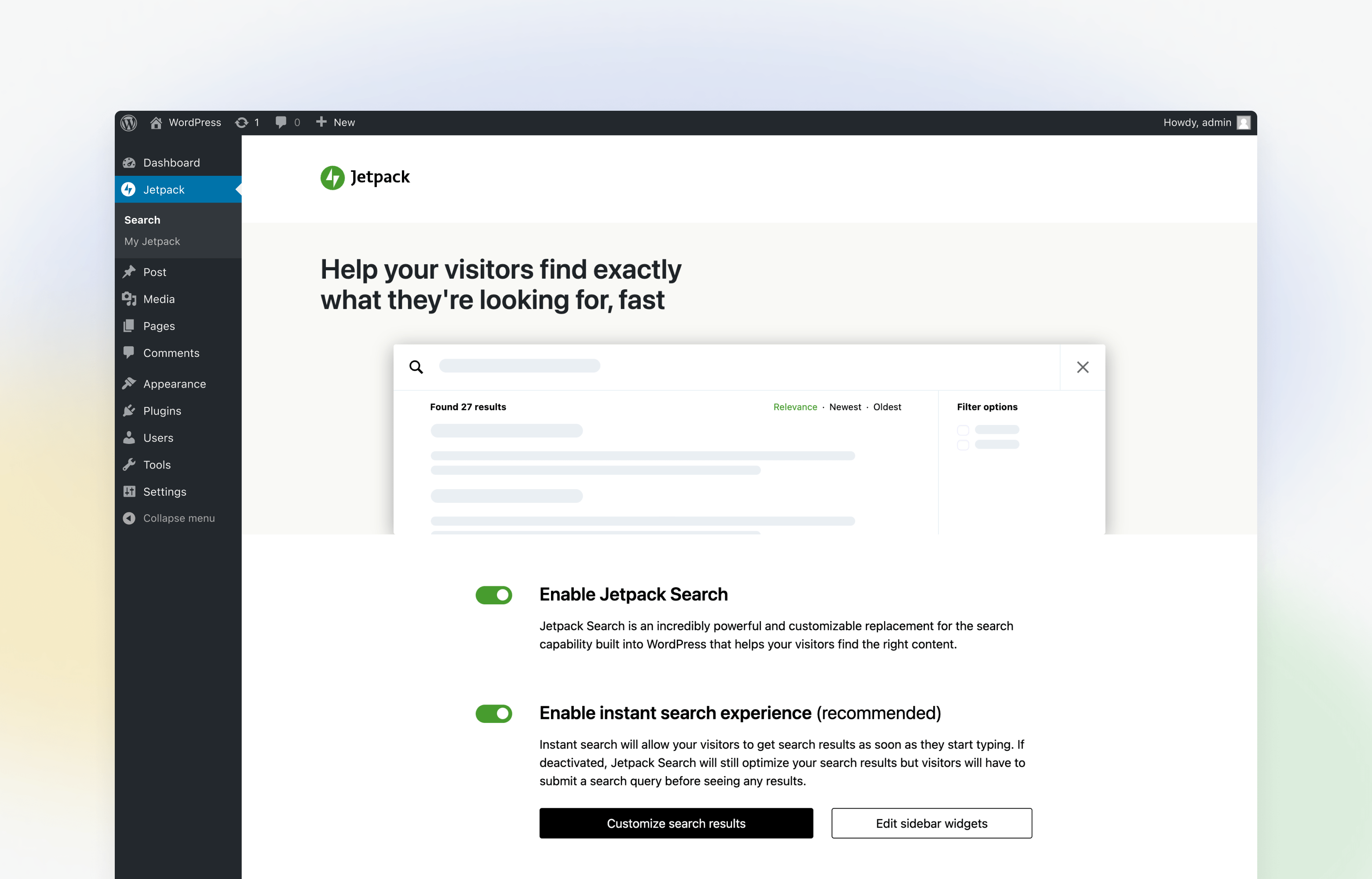
Incredibly powerful and customizable, Jetpack Search helps your visitors instantly find the right content – right when they need it.

Escolha sólida
Jetpack Search is a solid plugin choice in 2026, with a few things worth checking first. It runs on 5K+ sites, is rated 4.5/5 and was last updated 4 weeks ago, and scores 79/100 on our health check.
- Desenvolvido ativamente — última atualização 4 semanas atrás
- Testado com as últimas WordPress (7.1)
- Momentum — downloads up 85.4% vs the previous 30 days
Como ele se acumula?
Lado a lado em instalações, atualizações, avaliações e suporte



Downloads diários
Os picos de download geralmente seguem uma nova versão — cada site que atualiza automaticamente é um download.
Rankings
Where Jetpack Search stands todayWordPress.org Classificações de pesquisa
Posição ao vivo na pesquisa de plugins, top 100| Palavra chave | Posição |
|---|---|
| ajax search | #14 |
| filter | >100 |
| product search | #13 |
| search | #17 |
| woocommerce search | #18 |
Adoção da versão
Compartilhamento de sites ativos por lançamento.
Divisão de classificação
★★★★★★★★★★ 4.5 from 10 reviews
About Jetpack Search
From the official readme · v8.0.0Descrição
Incredibly powerful and customizable, Jetpack Search helps your visitors instantly find the right content – right when they need it.
Jetpack Search is an easy-to-use WordPress search plugin that enhances the default site search functionality provided by the CMS. Thanks to advanced site search tools, your visitors will experience the best search experience you can offer.
From real-time search filtering and faceting, to instant search results, Jetpack Search has all the features and options for best site search usability and results.
Note: Jetpack Search is free to use for sites with up to 5000 documents and 500 search requests per month. Beyond that, a Jetpack Search subscription, or a Jetpack plan subscription that includes Search is required to use this plugin.
LESS DIGGING, MORE FINDING
Do you have a WordPress site with thousands of posts, pages, and products? No problem. Thanks to a powerful search engine, Jetpack Search helps visitors find exactly what they’re looking for — fast.
KEEP PEOPLE READING & BUYING
Give your visitors instant search results and advanced filtering to help them find what they need and stay longer on your site.
People on eCommerce sites are 2x more likely to purchase something when they search.
FINELY-TUNED SEARCH FOR YOUR SITE
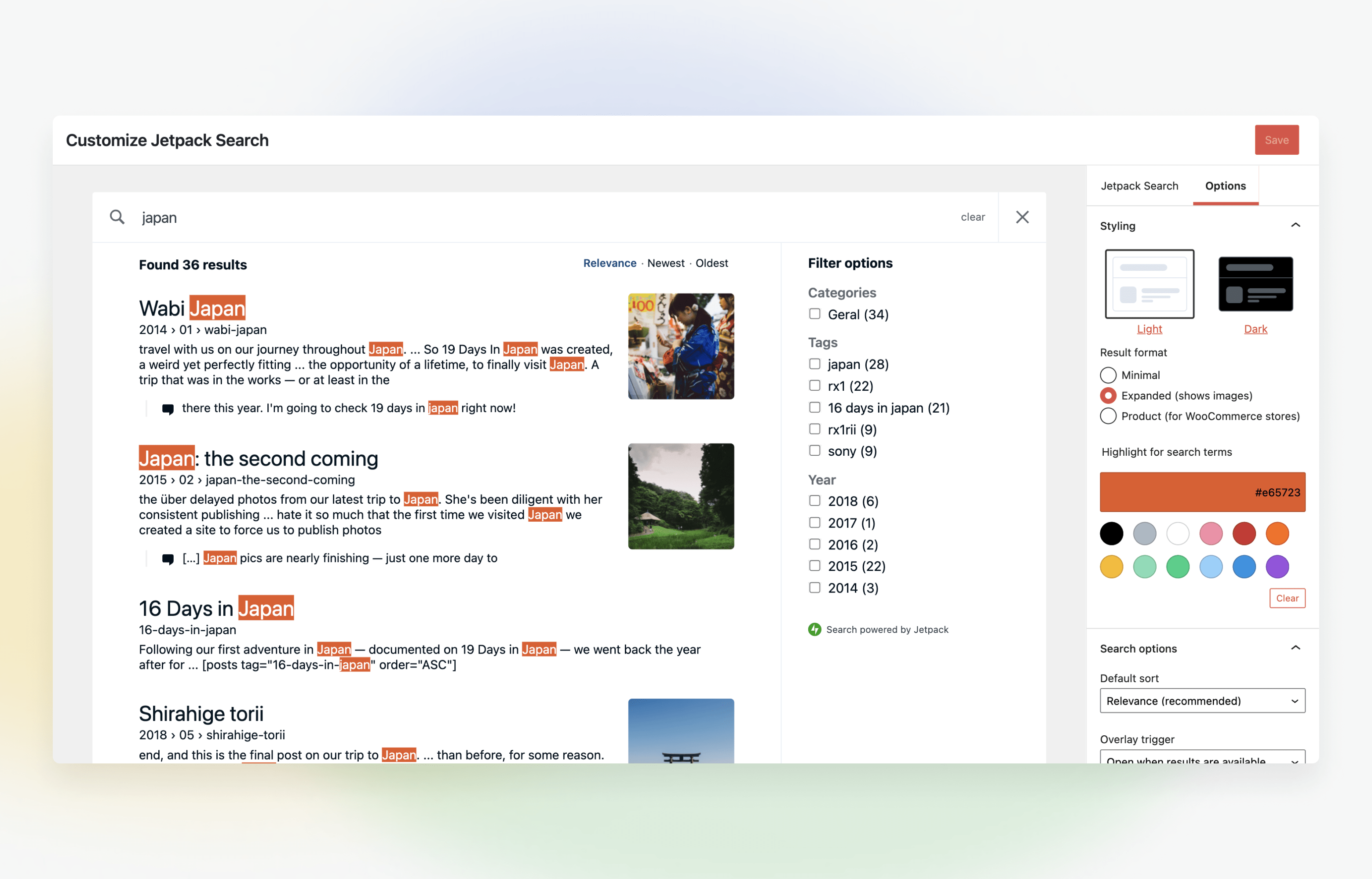
Jetpack Search is a completely customizable WordPress site search plugin, so your visitors get a search experience that blends in seamlessly with your site design.
WHY CHOOSE JETPACK SEARCH?
- Highly relevant search results organized by modern ranking algorithms
- Boosted and prioritized results based on your site’s search stats
- Instant search and filtering without reloading the page
- Site search filters and facets (by categories, tags, dates, custom taxonomies, and post types)
- Improved theme compatibility for both mobile and desktop
- Real-time indexing, so your search index is updated within minutes of changes to your site
- Integrates seamlessly with WooCommerce
- Support for all languages, and advanced language analysis for 38 languages
- Highlighted search terms on comments and post content
- Fast and accurate spelling correction
WITH 💚 BY JETPACK
This is just the start!
We are working hard to bring more features and improvements to Jetpack Search. Let us know your thoughts and ideas!
Testimonials
“I like having a search experience that is sortable, filterable, and feels like it’s integrated natively into the site. Jetpack Search does all of this, but most importantly, it returns great results without heavy configuration.” – Chris Coyier, Web Design Expert (codepen.io / ShopTalk Show)
“If people can get the answers they want quickly without having to email me, it’s pure gold and it makes my job easier. I’m advertising it in my client consultations and telling people to use it because it actually works.” – Kylie Mawdsley, Interior Design Consultant (Kylie M. Interiors)
Instalação
There’s nothing to configure – the setup process is as easy as:
Install the plugin
Activate Jetpack Connection
Note: A Jetpack Search subscription, or a Jetpack plan subscription that includes Search is required to use this plugin. If you want to try it out for free, simply choose the free option during the subscription checkout process.
Log de Changes
8.0.0 – 2026-11-04
Adicionado
- Connection: Add a Connected view to the Users page listing users with a linked WordPress.com account.
- Connection: Show connection errors on the Connectors card, and keep showing the connection owner when their account connection breaks.
- Connection: Surface SSL certificate verification failures reported by WordPress.com as a connection error notice.
- Connection: Transfer connection ownership to another administrator without leaving your site.
- Connection: Transfer connection ownership to another connected administrator from the Connectors page.
- My Jetpack: Add an Available filter to the Features list.
- My Jetpack: Add catalog-controlled Pro offers and preserve existing plan management.
- My Jetpack: Allow the Automattic for Agencies banner to be dismissed.
- My Jetpack: Recognize Jetpack Pro subscriptions and licenses.
Changed
- Activate the free Search plan without being sent through a $0 checkout.
- Activity Log: Show the connection error notice only when a connection error has been recorded.
- Boost: Wait up to four minutes for slow speed tests in My Jetpack instead of timing out after two.
- Charts: follow the WordPress admin color scheme for chart series colors.
- Charts: update chart grid, axis and label colors immediately when the theme changes.
- Connection: Ask for confirmation before disconnecting your user account, and offer to transfer ownership first when you own the connection.
- Connection: Link the connection owner’s name on the Connectors card to their profile, and update the card without reloading the page when a non-owner disconnects their account.
- Connection: Show a clear message when connecting the site to WordPress.com from the Connectors card fails, instead of WordPress.com’s raw error text.
- Connection: Show every connection error in one notice, each with the account it affects, and link to Site Health when a firewall is blocking WordPress.com.
- Connection: Use one wording across My Jetpack and the Connectors screen for the consent notice shown before connecting, for Offline Mode, and for the ownership lock.
- Connection: When disconnecting the site from the Connectors card, list the plugins that will stop working and link to help.
- Dashboard: Keep focus on information icons when their tooltips open, announce the content to screen readers, and show a focus ring after clicking them.
- Drop the Preview label from AI Answers.
- General: Update minimum WordPress version to 7.0.
- My Jetpack: answer module switch clicks immediately, and explain what happened when a change fails.
- My Jetpack: Connect a WordPress.com account from feature cards that need one. Show feature states through switches or buttons instead of redundant Active or Inactive badges, and show host restrictions below descriptions. Leave features out of Available when their only action is an install you cannot make.
- My Jetpack: Leave the recommendation to install or activate plugins included in a bundle plan out of the Jetpack menu notification badge.
- My Jetpack: Line up notices with the cards below them, and drop the grey background behind the Features grid and list buttons.
- My Jetpack: On the Features tab, keep a plugin’s switch busy until its card is up to date after a failed change, or after any change on sites that also run Jetpack.
- My Jetpack: Open supported Modules links in Features when Jetpack is active.
- My Jetpack: Open the Jetpack Connection details on the Connectors screen from the header’s Manage connection link.
- My Jetpack: Refresh Pro availability while preserving existing offers.
- My Jetpack: Restyle dashboard notices to match the WordPress design system.
- My Jetpack: Show a connection error on the Overview connection card while your account is still to be connected, instead of only asking you to connect it.
- My Jetpack: Show a Features tab in place of the Products tab.
- My Jetpack: Show product cards flat, without a drop shadow.
- My Jetpack: Show the avatar and connection status control in the header by default, with access to connection and plan details.
- My Jetpack: Show the dashboard in the new rounded admin page frame.
- My Jetpack: Show the Features page on sites in Offline Mode, without connecting to WordPress.com.
- My Jetpack: Show the Jetpack menu notification badge when a connection error is detected.
- My Jetpack: Show what Paid Stats actually adds — UTM tracking, device stats, and region & city locations — instead of commercial use.
- My Jetpack: Turn a module on once Install Jetpack or Activate Jetpack on its card finishes setup.
- No Results block: Show each empty-state message as it will appear to visitors while editing, and tell the messages apart by name when browsing the page structure.
- Search: report the saved AI Answers choice while the site-wide AI switch is off, disable the controls, and honor the host AI opt-out in the AI Answer block. Require Instant Search to enable AI Answers. The master-state reporting follows the rollout: live on WordPress.com Simple, internal testing environments elsewhere.
- Show the dashboard in the new rounded admin page frame.
- Sidebar: sort Jetpack menu items alphabetically, pinning My Jetpack to the top and external links and Settings to the bottom.
- Stats: Stop counting visitors who have not allowed statistics cookies on sites that run the WP Consent API.
- Tested up to WordPress 7.1.
- Update package dependencies.
Removed
- Search Dashboard: Remove the AI Agent Access toggle.
- Updated PHP version requirements to PHP 7.4 or newer.
Fixed
- Activity Log: Continue the wp-admin menu color behind the page frame on WordPress.com and third-party admin color schemes.
- Activity Log: Fix the page overlapping the admin menu in right-to-left languages.
- Activity Log: honor the module setting, so the page can be turned off.
- Activity Log: Show an empty date picker on the free plan, instead of a date range it does not apply.
- Activity Log: Stop the frame from flashing while loading and when switching admin pages.
- Admin dashboards: Keep the page header and content in view when the wp-admin menu is taller than the window.
- AI Answer: Show the disabled notice when the host turns off AI, and hide the block from the inserter whenever Jetpack AI is off.
- AI Answers: Keep the search preview hidden when answers are turned off.
- AI Answers: Respect the site-wide Jetpack AI filter.
- Avoid requesting the Search plan in offline mode.
- Blocks: Stop offering Search blocks in the Overlay search sidebar’s widget inserter, and flag any already there, because they cannot load in that sidebar.
- Charts: draw labels at the design system’s font weight and size.
- Connection: Explain why connecting the site failed instead of showing a raw or generic error.
- Connection: Fix a stale connection error notice that could persist on healthy sites.
- Connection: Fix reconnecting your WordPress.com account so it no longer disconnects other users and clears the broken-connection notice on the first attempt.
- Connection: Hide connection error notices from users who cannot fix the connection.
- Connection: Let users without admin access reconnect their own broken account from the connection error notice.
- Connection: Report a broken connection on My Jetpack’s connection card instead of claiming everything looks good, and show a break only the connection owner can repair as a warning, not an error, to everyone else.
- Connection: Show connection owner names containing characters like & correctly.
- Connection: Stop showing a duplicate account notice when your WordPress.com email differs from your site email only in letter case.
- Connection: Stop Site Health from showing spurious connection failures — remove the redundant outbound HTTP/HTTPS checks, and no longer prompt a reconnect when the WordPress.com connection test is inconclusive.
- Connection: Stop users who cannot set up the site connection from becoming the connection owner when the owner’s connection is missing.
- Connection: Translate the Connectors card’s text on sites that don’t use English.
- Connection: Update wording for some connection error notices.
- Dashboard: Activate free Search in place from “Start for free” instead of falling back to the $0 checkout.
- Dashboard: Open information tooltips with the keyboard and dismiss them with Escape.
- Dashboard: Start the experience switch and Restore default confirmations on Cancel, so pressing Enter no longer switches the search experience or deletes a customized template.
- Fix a crash on mount when the localized widget configuration is missing or incomplete, which could leave the whole page blank.
- Fix the Search dashboard failing to load on WordPress.com-hosted sites.
- Footer: Hide Products and Help links when My Jetpack is unavailable.
- Instant Search: Fix a leaked scroll handler that could trigger stray page loads after several searches.
- Instant Search: Open the filters panel below the results header on small screens, so the Filters toggle stays visible.
- JITM: Fix missing messages and a console error on sites without the Jetpack plugin active.
- Keep admin icons colored after the @wordpress/icons 16 update, which draws them as strokes.
- My Jetpack: always label the license activation link ‘Activate a license’. It previously read ‘Activate a new license’ on sites with a plan, even when no licenses had been activated.
- My Jetpack: Bring the first Features results into view after changing the filter or search while scrolled down.
- My Jetpack: Fix a fatal error when activating Jetpack Search beside an older Jetpack plugin.
- My Jetpack: Fix the layout of the connection screen for right-to-left languages.
- My Jetpack: Hide other plugins’ notices while the setup screen is open, and stop the full-screen layout breaking when another plugin adds an admin body class first.
- My Jetpack: Keep the Automattic for Agencies banner hidden after dismissing it and switching tabs.
- My Jetpack: Keep the Help tab’s cards inside their column on narrow screens.
- My Jetpack: keep the stats chart tooltip under sticky and fixed page elements.
- My Jetpack: Make the connection screen’s Connect button and footer links reachable on shorter screens.
- My Jetpack: Offer to activate Search, rather than to buy a plan, when the site already owns it and the module is switched off.
- My Jetpack: Point users who cannot connect the site at an administrator, instead of an onboarding screen they cannot complete.
- My Jetpack: Return to the tab you came from with the back link on product upgrade screens.
- My Jetpack: Show each notice once instead of twice.
- My Jetpack: Show the correct product status and use the active plugin copy when turning products on or off with both stable and Beta or development copies installed.
- My Jetpack: Show the fallback starting price per month, billed yearly, instead of $100 a month on the upgrade page when prices cannot be loaded.
- My Jetpack: Show the highest-priority notice first when several are set at once.
- My Jetpack: Show the right product status as soon as fresher plan data is available, instead of reusing an earlier lookup.
- My Jetpack: Stop offering retired Security and Growth plans while preserving existing subscriptions.
- My Jetpack: Stop repeating the partner lookup request on every page load.
- My Jetpack: Stop reporting an error when switching VideoPress off while the Jetpack plugin is inactive.
- My Jetpack: Stop showing $0.00 for paid plans on recommendation cards when prices cannot be loaded.
- My Jetpack: Stop showing an empty account avatar on the Overview connection card on sites without a connection owner when nothing in use needs a user connection.
- My Jetpack: Stop the Stats dashboard from asking which plan you want again after Start for Free was already chosen.
- My Jetpack: stretch the tab content background to the full height of the page.
- Require a paid Search plan to enable AI Answers, not just the setting’s raw value.
- Show Jetpack in-dashboard messages on every tab, not just Overview.
- Show the connection error at the top of the dashboard on every tab.
- Site Chat: Require a paid Search plan to enable chat.
- Status: Detect a site served on any 127.0.0.0/8 loopback address, or on 0.0.0.0, as a local site.
Capturas de tela


Para desenvolvedores
Este é o seu plugin? Mostre os números.
Adicione um crachá ao vivo ao seu site, Documentos ou Readme do GitHub. Ele é atualizado por conta própria - nenhuma conta necessária.
Best Jetpack Search alternatives
All ajax search plugins →





FAQ
Jetpack Search: quick answers
Respostas diretas, extraídas de dados ao vivo WordPress.org.
Fonte: WordPress.org
Is Jetpack Search free?
Yes. Jetpack Search is free to download and use from the official WordPress.org plugin directory.
Is Jetpack Search safe to use in 2026?
Jetpack Search is a solid plugin choice in 2026, with a few things worth checking first. It runs on 5K+ sites, is rated 4.5/5 and was last updated 4 weeks ago, and scores 79/100 on our health check.
How many websites use Jetpack Search?
Jetpack Search is active on 5K+ WordPress websites and has been downloaded 193,391 times since it launched in May 2022. It was downloaded 9,377 times in the last 30 days.
Does Jetpack Search work with WordPress 7.1?
Yes. The developer has tested Jetpack Search up to WordPress 7.1.5, the latest release. It requires WordPress 7.0 or newer.
What PHP version does Jetpack Search need?
Jetpack Search requires PHP 7.4 or higher. Most hosts run PHP 8.x today, so it works on any modern WordPress hosting.
When was Jetpack Search last updated?
The latest version, 8.0.0, was released on November 4, 2026 (4 weeks ago).
Who makes Jetpack Search?
Jetpack Search is developed and maintained by Automattic.
What are the best alternatives to Jetpack Search?
The most popular alternatives to Jetpack Search are FiboSearch (100K+ installs), Ivory Search (90K+ installs) and Advance Product Search- Voi… (9K+ installs).
Alimentado por PageForge
Um modelo e uma planilha. Uma página real para cada pesquisa.
PageForge Transforma cada linha de um CSV em uma página WordPress com seu próprio título, URL, SEO campos e esquema, construído no layout que você já desenhou. Gratuito em WordPress.org.
- CSV e XLSX, mais Google Sheets em Profissional e Empresarial
- Seu próprio título, URL, SEO campos e esquema para cada página
- Funciona com o editor de blocos, Elementor, Divi e Avada
- Gratuito em WordPress.org, sem cartão de crédito