


Ivory Search – WordPress Search Plugin
Advanced WordPress custom search plugin. Provides Search Form Customizer, WooCommerce Search, AJAX Search & Live Search support!

Escolha segura
Yes — Ivory Search is a safe, well-maintained plugin to use in 2026. It runs on 90K+ sites, is rated 4.9/5 and was last updated 1 month ago, and scores 85/100 on our health check.
- Comprovado em escala em mais de 90 mil sites ativos
- Loved by users — 4.9/5 from 1,564 reviews
- Testado com as últimas WordPress (7.1)
Como ele se acumula?
Lado a lado em instalações, atualizações, avaliações e suporte



Downloads diários
Os picos de download geralmente seguem uma nova versão — cada site que atualiza automaticamente é um download.
Rankings
Where Ivory Search stands todayWordPress.org Classificações de pesquisa
Posição ao vivo na pesquisa de plugins, top 100| Palavra chave | Posição |
|---|---|
| ajax search | #6 |
| Pesquisa de arquivos | #3 |
| image search | #2 |
| search | #5 |
| woocommerce search | #11 |
Adoção da versão
Compartilhamento de sites ativos por lançamento.
Divisão de classificação
★★★★★★★★★★ 4.9 from 1,564 reviews
About Ivory Search – WordPress Search Plugin
From the official readme · v5.5.20Descrição
Ivory Search is a simple to use advanced WordPress search plugin.
It enhances the default WordPress search and also allows you to create new custom search forms.
With Ivory Search, you can create an unlimited number of search forms and configure each search form individually to customize WordPress search and perform different types of searches on site content.
Display the custom search forms on site header, footer, sidebar or widget area, navigation or menu, on pages, posts, custom post types or anywhere on the site using its shortcodes.
Note: The styling of the search form highly depends on how your theme styles it. If your theme does not style search form correctly then to style it get free support from Ivory Search Support.
Have any doubt or question?
Feel free to ask it using Contact Form.
Links
Key Features
- Perform faster search with inverted index-based search engine.
- Index and search shortcode contents.
- Search WooCommerce products.
- Search images, files and attachments.
- Customize search form using customizer.
- Search using AJAX search.
- Track searches in search analytics.
- Index and search TablePress shortcode contents.
- Create unlimited number of search forms.
- Configure each search forms separately.
- Configure search form to search specific content.
- Exclude specific content from search results.
- Display Search Forms anywhere on your site.
- Supports multilingual search.
- Multilingual Search supported by Weglot
- Integrates with popular plugins such as WooCommerce, Weglot, Polylang, bbPress, WPML etc.
AJAX Search or Live Search
- Convert any search form including default search form to AJAX search form.
- Search posts, pages, WooCommerce products, images, files or any custom post type using AJAX search.
- Exclude any specific content from AJAX search.
Search Form Customizer
- Use customizer to change search form colors and its text.
- Choose any search form style from various search forms.
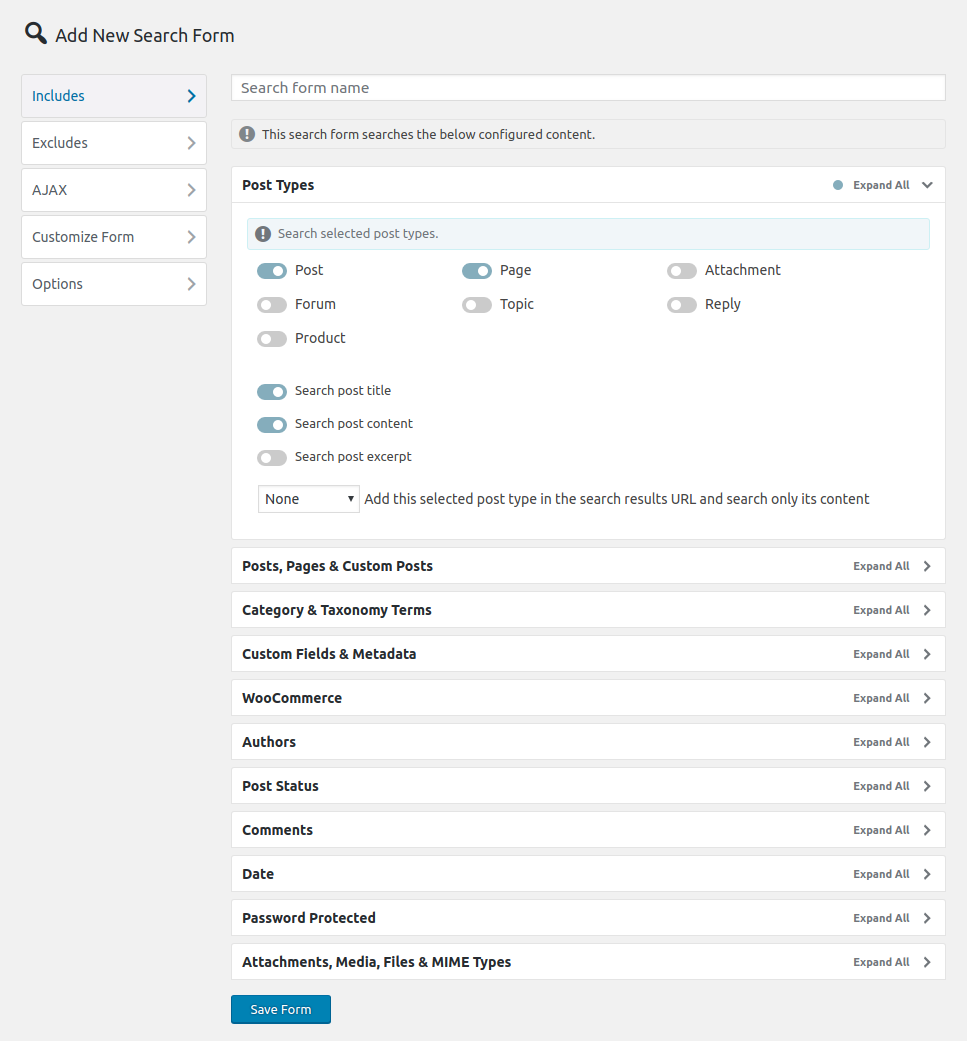
Search Specific Content
- Search specific post types such as post, page, product, attachment, forum etc.
- Search in post title.
- Search in post content.
- Search in post excerpt.
- Search posts having specific category or taxonomy terms.
- Search in category or taxonomy terms title.
- Search in category or taxonomy terms description.
- Search posts having specific custom fields or metadata.
- Search WooCommerce products SKU. [Premium]
- Search WooCommerce products variation. [Premium]
- Search posts created by specific authors. [Premium]
- Search in author Display name and display the posts created by that author.
- Search posts having specific statuses. [Premium]
- Search posts having specific number of comments. [Premium]
- Search in approved comments content.
- Search posts created in specific date.
- Search only password protected posts.
- Search only posts without passwords.
- Search all posts with and without passwords.
- Search specific files, MIME type or media attachments such as images, audio, videos, PDF, documents etc. [Premium]
- Search in the title, caption and description of images, attachments and media.
- Search in multiple languages as the plugin supports multilingual plugins such as Polylang, WPML etc.
Exclude Specific Content From Search
- Exclude specific post types from search.
- Exclude specific posts, pages, WooCommerce Products, Media Attachments, forums or any custom post type from search.
- Do not search in the post title.
- Configure to not search in post content.
- Configure to not search in post excerpt.
- Exclude posts from search having specific category or taxonomy terms.
- Exclude posts from search having specific custom fields or metadata. [Premium]
- Exclude ‘out of stock’ WooCommerce products from search. [Premium]
- Exclude posts from search created by specific authors. [Premium]
- Exclude posts from search having specific statuses. [Premium]
- Exclude sticky posts from search.
- Exclude posts from search having specific number of comments.
- Exclude posts from search created before or after specific dates.
- Exclude password protected posts from search.
- Exclude posts from search without passwords.
- Exclude images, audios, videos, PDF, documents, attachments, files, media, file type or MIME type from search. [Premium]
Control and Extend Search
- Display search form in navigation menu and configure its functionality.
- Configure the number of posts to display in search results.
- Highlight search terms on the search results page.
- Order posts in ascending or descending order of date, relevance, id, author, title, type, name, comment count, menu order or entirely random. [Premium]
- Display or hide sticky posts at the top of the search results page.
- Display an error page or list all posts for empty search queries.
- Display search forms only to site administrators while testing, before going live.
- Disable an individual search form or disable searching site wide.
- Configure stop words which are excluded from search.
- Option to add word synonyms to provide more relevant search results.
- Display post_type argument in the search query URL and restrict search to it.
- Search posts having all or any of the selected category or taxonomy terms.
- Display content having any or all the searched terms.
- Fuzzy Matching – Search posts that include the whole search term or search words in the posts that begins or ends with the search term.
- Keyword Stemming – Also searches base word of searched keyword. [Premium]
Note: some of the features are Premium marked as [Premium]. To have access to those features you will need Ivory Search Premium. You can get Ivory Search Premium here!
We enhanced and re-wrote old Add Search To Menu plugin from the ground up and Add Search To Menu has renamed to Ivory Search.
Ajuda
Need Help? Get Ivory Search support.
Experiência
Any suggestions or comments are welcome. Feel free to contact us using this Contact form.
Instalação
- Install the plugin from the ‘Plugins’ section in your dashboard (Go to
Plugins -> Add New -> Searchand search for Ivory Search). - Alternatively, you can download the plugin from the repository. Unzip it and upload it to the plugins folder of your WordPress installation (
wp-content/plugins/directory of your WordPress installation). - Activate it through the ‘Plugins’ section.
- Use the
Ivory Searchmenu to configure the plugin.
Log de Changes
5.5.20
- Updated – Freemius SDK 2.13.5
5.5.19
- Fixed – Executing scripts via Highlight Search Terms
5.5.18
- Fixed – Incompatibility with WooCommerce features (e.g. High-Performance Order Storage / custom order tables)
5.5.17
- Updated – Freemius SDK 2.13.4
- Fixed – Function _load_textdomain_just_in_time was called incorrectly
5.5.16
- Updated – Freemius SDK 2.13.2
- Fixed – Stored Cross-Site Scripting via Settings
5.5.15
- Updated – Freemius SDK 2.13.1
- Fixed – Class “IS_Admin” is missing error
Capturas de tela



Para desenvolvedores
Este é o seu plugin? Mostre os números.
Adicione um crachá ao vivo ao seu site, Documentos ou Readme do GitHub. Ele é atualizado por conta própria - nenhuma conta necessária.
Best Ivory Search alternatives
All ajax search plugins →





FAQ
Ivory Search: quick answers
Respostas diretas, extraídas de dados ao vivo WordPress.org.
Fonte: WordPress.org
Is Ivory Search free?
Yes. Ivory Search is free to download and use from the official WordPress.org plugin directory.
Is Ivory Search safe to use in 2026?
Yes — Ivory Search is a safe, well-maintained plugin to use in 2026. It runs on 90K+ sites, is rated 4.9/5 and was last updated 1 month ago, and scores 85/100 on our health check.
How many websites use Ivory Search?
Ivory Search is active on 90K+ WordPress websites and has been downloaded 3,254,024 times since it launched in April 2017. It was downloaded 20,112 times in the last 30 days.
Does Ivory Search work with WordPress 7.1?
Yes. The developer has tested Ivory Search up to WordPress 7.1.5, the latest release. It requires WordPress 3.9 or newer.
What PHP version does Ivory Search need?
Ivory Search requires PHP 5.2.4 or higher. Most hosts run PHP 8.x today, so it works on any modern WordPress hosting.
When was Ivory Search last updated?
The latest version, 5.5.20, was released on October 21, 2026 (1 month ago).
Who makes Ivory Search?
Ivory Search is developed and maintained by Vinod Dalvi.
What are the best alternatives to Ivory Search?
The most popular alternatives to Ivory Search are FiboSearch (100K+ installs), Advance Product Search- Voi… (9K+ installs) and Sokol: Smart WooCommerce Se… (5K+ installs).
Alimentado por PageForge
Um modelo e uma planilha. Uma página real para cada pesquisa.
PageForge Transforma cada linha de um CSV em uma página WordPress com seu próprio título, URL, SEO campos e esquema, construído no layout que você já desenhou. Gratuito em WordPress.org.
- CSV e XLSX, mais Google Sheets em Profissional e Empresarial
- Seu próprio título, URL, SEO campos e esquema para cada página
- Funciona com o editor de blocos, Elementor, Divi e Avada
- Gratuito em WordPress.org, sem cartão de crédito