


WPZOOM Social Feed Widget & Block
Instagram feed plugin for WordPress: Display your Instagram photos, videos & reels. Easy setup with Gutenberg block, widget, shortcode & Elementor

Escolha segura
Yes — WPZOOM Social Feed Widget & Blo… is a safe, well-maintained plugin to use in 2026. It runs on 50K+ sites, is rated 4.3/5 and was last updated 9 hours ago, and scores 92/100 on our health check.
- Comprovado em escala em mais de 50 mil sites ativos
- Actively developed — last update 9 hours ago
- Testado com as últimas WordPress (7.1)
- Momentum — downloads up 395.7% vs the previous 30 days
Como ele se acumula?
Lado a lado em instalações, atualizações, avaliações e suporte



Downloads diários
Os picos de download geralmente seguem uma nova versão — cada site que atualiza automaticamente é um download.
Rankings
Where WPZOOM Social Feed Widget &… stands todayWordPress.org Classificações de pesquisa
Posição ao vivo na pesquisa de plugins, top 100| Palavra chave | Posição |
|---|---|
| #3 | |
| instagram feed | #3 |
| instagram gallery | #9 |
| instagram photos | #3 |
| Instagram widget | #3 |
Adoção da versão
Compartilhamento de sites ativos por lançamento.
Divisão de classificação
★★★★★★★★★★ 4.3 from 52 reviews
About WPZOOM Social Feed Widget & Block
From the official readme · v2.5.1Descrição
Instagram Feed Plugin for WordPress – Easy & Powerful
The best Instagram widget plugin for WordPress. Display your Instagram feed, photos, videos, and reels in beautiful galleries. Works with Gutenberg blocks, widgets, shortcodes, and Elementor.
Create stunning Instagram galleries and Instagram sliders anywhere on your WordPress site. Perfect for showcasing your Instagram content, growing followers, and adding social proof to your website.
⭐️ Get Instagram Widget PRO — Unlock Shoppable Feeds, Moderation, Insights, the Stories Row & More! ⭐️
View Live Demo | Documentation
Why Choose WPZOOM Social Feed Widget?
Quick & Easy Setup – Connect your Instagram account and display feeds in just 3 steps
Fully Responsive – Looks perfect on desktop, tablet, and mobile devices
Multiple Embed Options – Gutenberg Block, Shortcode, Widget, and Elementor support
Lightweight & Fast – Optimized for performance with lazy loading
Regular Updates – Fully compatible with the latest Instagram API
“Finally, an Instagram plugin that just works!” – Join thousands of satisfied users
📸 FREE FEATURES
- Create Unlimited Instagram Feeds – Display as many feeds as you need
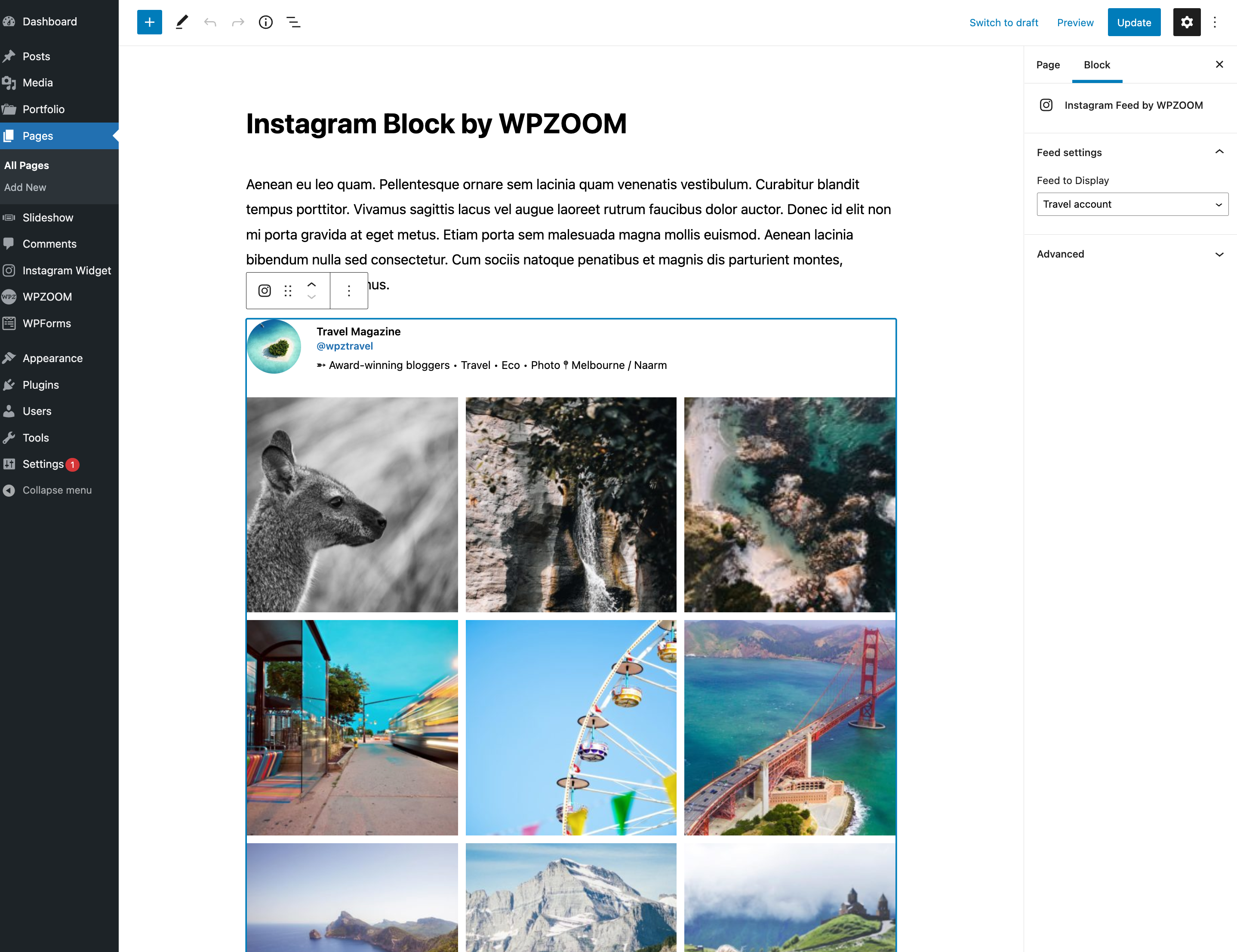
- Gutenberg Block – Native WordPress block editor support
- Shortcode Support – Embed feeds in Elementor, Beaver Builder, Divi, and any page builder
- Multiple Layouts – Grid, full-width, masonry and carousel/slider layouts to match your design
- Highlighted Posts – Make selected posts larger in the grid
- Responsive Column Control – Set different columns for desktop, tablet, and mobile
- Load More Button – Let visitors load additional posts without a page refresh
- Likes & Comments Counts – Show engagement on each post
- Verified Badge & Account Stats – Show the verified badge and your posts, followers and following counts in the feed header
- Connect Multiple Accounts – Connect several Instagram accounts and show each one in its own feed
- Lightbox Gallery – View photos and videos in a beautiful popup
- Custom Header – Add your own avatar and bio text
- Instagram Stories – A stories ring on your profile image that opens your active stories in a viewer
- Lazy Loading – Improves page speed and performance
- AJAX Initial Load – Load feed content asynchronously for faster initial page loads
- Responsive Design – Mobile-friendly out of the box
⭐️ PRO FEATURES
Upgrade to Instagram Widget PRO for powerful features:
- 🛍️ WooCommerce Product Tagging 🆕 – Turn your Instagram feed into a shoppable gallery by linking posts to WooCommerce products
- 🛡️ Feed Moderation 🆕 – Hide or show individual posts from your feed without deleting them from Instagram
- 📊 Instagram Insights & Analytics – Track follower growth, reach, impressions, engagement, and individual post performance with beautiful charts
- Stories Row – A carousel of story thumbnails above the feed, including stories from multiple accounts
- Multi-Account Feed – Combine posts from multiple Instagram accounts into a single unified feed
- Priority Support – Get help when you need it
⭐️ Upgrade to PRO Today! ⭐️
📊 NEW: Instagram Insights & Analytics (PRO)
Track your Instagram performance directly from your WordPress dashboard:
- Follower Growth: Monitor new followers, lost followers, and net growth over time
- Reach & Impressions: See how many accounts your content is reaching
- Engagement Metrics: Track accounts engaged and total interactions
- Post Performance: Analyze likes, comments, saves, and reach for each post
- Interactive Charts: Beautiful visualizations of your Instagram data
- Multiple Date Ranges: View data for 7, 14, 30, or 90 days
🛍️ NEW: Shoppable Instagram Feed with WooCommerce (PRO)
Turn your Instagram feed into a sales channel by tagging posts with WooCommerce products:
- Link Products to Posts: Assign one or more WooCommerce products to any Instagram post directly from the feed editor
- Album Support: Tag different products on each image in carousel/album posts
- Flexible Display: Choose between a subtle shopping icon with product popover or a prominent “Buy Now” button
- Customizable Styling: Control colors, positioning, and appearance of product tags
- Seamless Shopping: Visitors can discover and buy products without leaving your site
🛡️ NEW: Feed Moderation (PRO)
Take full control of which Instagram posts appear in your feed:
- Hide Individual Posts: Remove specific posts from your feed with a single click
- Non-Destructive: Hidden posts stay on Instagram — only removed from your website display
- Easy Toggle: Use the eye icon in the Moderate tab to show or hide any post
- Instant Preview: See your moderated feed in real-time before publishing
Works With Your Favorite Tools
- Gutenberg / Block Editor
- Elementor
- Construtor de castores
- Divi Builder
- WPBakery Page Builder
- Any theme or page builder with shortcode support
Smash Balloon Alternative
Looking for a lightweight Instagram feed plugin? WPZOOM Social Feed is a fast, easy-to-use alternative to heavier Instagram plugins. Get all the essential features without the bloat:
- Smaller file size = faster loading
- Clean, minimal code
- No unnecessary features slowing down your site
- Same Instagram API support
- Regular updates and responsive support
Get Involved
Looking to contribute? Fork the repository on GitHub and help make this plugin even better!
Serviços externos
This plugin displays content from Instagram, so it relies on external services provided by Meta Platforms, Inc. Nothing is sent to these services until a site administrator connects an Instagram account.
Instagram API and Facebook Graph API (Meta)
Used to authorize your Instagram account and to retrieve the content shown in your feeds: profile details (username, name, biography, profile picture, post and follower counts), posts, reels, stories, captions, like and comment counts and, for accounts connected through Facebook, account insights.
- What is sent: the access token of the connected Instagram account and the ID of the account or media item being requested. No data about your site visitors is sent by the plugin.
- When: when an administrator connects or reconnects an account, when a feed is displayed and its cache has expired, when a visitor loads more posts or opens an album in the lightbox, when the access token is refreshed, and when the Insights screen is opened.
- Endpoints:
graph.instagram.com,graph.facebook.com,api.instagram.comandwww.facebook.com(authorization dialogs).
Images and videos that belong to the connected account are downloaded from Instagram’s content servers (CDN) and stored in your Media Library, so feeds can be served from your own site. Videos, and images that have not been cached yet, are loaded by the visitor’s browser directly from Instagram’s servers, which means the visitor’s IP address and browser information are visible to Meta, as with any embedded media.
These services are provided by Meta Platforms, Inc.: Terms of Use, Meta Platform Terms, Privacy Policy.
WPZOOM authorization service
Instagram and Facebook only return an authorization result to a pre-registered address, so the “Connect” buttons use a relay hosted on wpzoom.com (/instagram-auth/, /instagram-business-auth/ and /graph-auth/). After you approve access on Instagram or Facebook, your browser passes through this page, which exchanges the authorization code for an access token and redirects you back to your own WordPress dashboard.
- What is sent: the authorization code issued by Instagram/Facebook and the URL of your WordPress admin page to return to.
- When: only when an administrator clicks one of the “Connect” buttons. It is not used when feeds are displayed.
This service is provided by WPZOOM: Terms of Use, Privacy Policy.
Instalação
Quick Start (3 Easy Steps)
Step 1: Install and activate the plugin via Plugins → Add New and search for “WPZOOM Social Feed Widget & Block”
Step 2: Go to Instagram Widget → Connect and connect your Instagram account
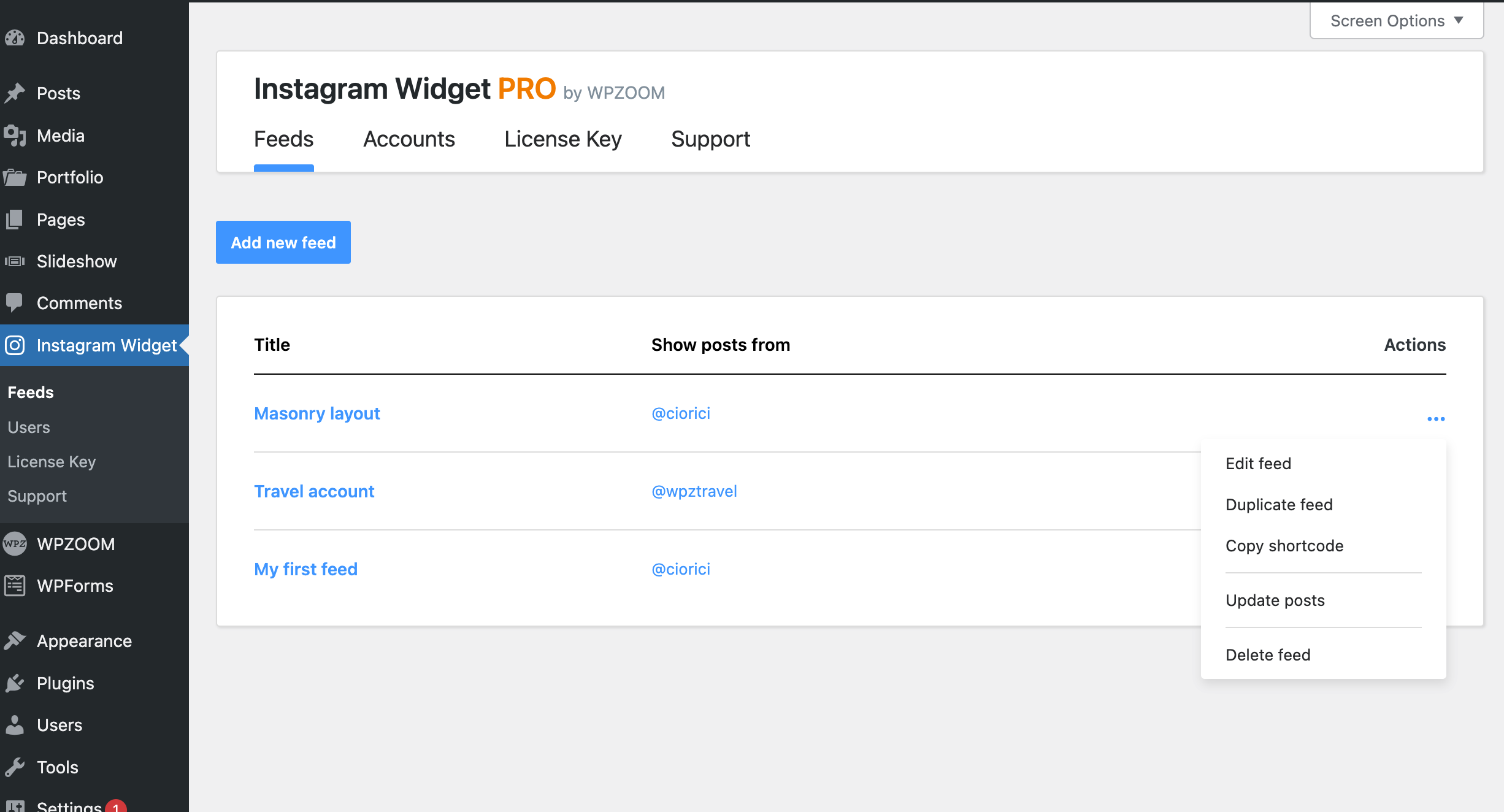
Step 3: Create a new feed in Instagram Widget → Feeds and embed it using the Gutenberg block or shortcode
Detailed Installation
- Upload the plugin folder to
/wp-content/plugins/or install via the WordPress plugin installer - Activate the plugin through the Plugins menu
- Navigate to Instagram Widget in your WordPress dashboard
- Click Connect and follow the prompts to connect your Instagram account
- Create your first feed and customize it to match your website design
- Embed the feed using the Gutenberg block, shortcode, or widget
Log de Changes
More features are now free. If you use Instagram Widget PRO, update it to 1.6.0 or newer first: Insights, the stories row, post moderation and product links are now provided by the PRO plugin itself.
2.5.1
- Changed: The lightbox no longer uses the Magnific Popup library. It now opens in the browser’s native dialog, with the same look, Escape and click-outside to close, and one less script to load
- Note: If your theme relied on the copy of Magnific Popup that this plugin used to load, it now needs to load its own
2.5.0
- New: Masonry and carousel layouts, highlighted posts, the Load More button, likes and comments counts, the verified badge, account stats and responsive columns are now available in the free version
- New: You can now connect more than one Instagram account in the free version and show each one in its own feed
- Changed: Instagram Insights, the stories row, post moderation and WooCommerce product links are now provided entirely by the Instagram Widget PRO plugin. If you use PRO, update it to version 1.6.0 or newer to keep using these features
- Improved: Updated Swiper to version 14 and Magnific Popup to version 1.2.0
- Improved: The readme now documents the external services the plugin connects to
- Improved: Stricter sanitization of plugin settings and escaping of feed output
- Fixed: Cached feed images are now located through the uploads directory, which fixes image sizes on sites with a relocated uploads folder
2.4.3
- New: on the Feeds list, a tip shows how to manage your site by chatting with Claude or ChatGPT through the free WPZOOM AI Connect plugin, for example to add a feed to a page, with one button to install, activate or open it. Hide it once and it stays hidden for you. Shown on WordPress 6.9 and newer
2.4.2
- Security: The Instagram access token is no longer exposed in the page source or in “Load More” responses. If your feed uses the “Load More” button (PRO), we recommend reconnecting your Instagram account after updating and clearing any page cache
2.4.1
- Improved: Faster page loads – Dashicons is no longer loaded on the front-end, and feed icons are now inline SVGs
2.4.0
- New: Instagram Stories are now available in the free version. Turn on “Display Instagram Stories” in the feed’s profile settings to show a stories ring on the profile image (off by default)
- New: “Store cached images as WebP” option (Settings → Global) – feed image sizes downloaded from Instagram are saved as WebP, typically 30-45% smaller. Off by default; only affects images cached by the plugin
- New: “Regenerate Cached Images” button to convert already-cached images after changing the option
- Improved: Feed images start loading as soon as the page is ready instead of waiting for every other asset on the page
- Improved: Link to the Stories row demo in the feed settings
- Fixed: Stories with a song from Instagram’s music library showed as a black screen; they now show as a photo
- Fixed: Block editor error when a new feed takes too long to load the first time
Capturas de tela



Para desenvolvedores
Este é o seu plugin? Mostre os números.
Adicione um crachá ao vivo ao seu site, Documentos ou Readme do GitHub. Ele é atualizado por conta própria - nenhuma conta necessária.


Best WPZOOM Social Feed Widget & B… alternatives
All Instagram plugins →





FAQ
WPZOOM Social Feed Widget & Block: quick answers
Respostas diretas, extraídas de dados ao vivo WordPress.org.
Fonte: WordPress.org
Is WPZOOM Social Feed Widget & Blo… free?
Yes. WPZOOM Social Feed Widget & Blo… is free to download and use from the official WordPress.org plugin directory.
Is WPZOOM Social Feed Widget & Blo… safe to use in 2026?
Yes — WPZOOM Social Feed Widget & Blo… is a safe, well-maintained plugin to use in 2026. It runs on 50K+ sites, is rated 4.3/5 and was last updated 9 hours ago, and scores 92/100 on our health check.
How many websites use WPZOOM Social Feed Widget & Blo…?
WPZOOM Social Feed Widget & Blo… is active on 50K+ WordPress websites and has been downloaded 2,810,685 times since it launched in March 2015. It was downloaded 75,696 times in the last 30 days.
Does WPZOOM Social Feed Widget & Blo… work with WordPress 7.1?
Yes. The developer has tested WPZOOM Social Feed Widget & Blo… up to WordPress 7.2, the latest release. It requires WordPress 6.5 or newer.
What PHP version does WPZOOM Social Feed Widget & Blo… need?
WPZOOM Social Feed Widget & Blo… requires PHP 7.4 or higher. Most hosts run PHP 8.x today, so it works on any modern WordPress hosting.
When was WPZOOM Social Feed Widget & Blo… last updated?
The latest version, 2.5.1, was released on November 26, 2026 (9 hours ago).
Who makes WPZOOM Social Feed Widget & Blo…?
WPZOOM Social Feed Widget & Blo… is developed and maintained by WPZOOM.
What are the best alternatives to WPZOOM Social Feed Widget & Blo…?
The most popular alternatives to WPZOOM Social Feed Widget & Blo… are Smash Balloon Social Photo… (1M+ installs), Metricool (90K+ installs) and Social Feed Gallery (80K+ installs).
Alimentado por PageForge
Um modelo e uma planilha. Uma página real para cada pesquisa.
PageForge Transforma cada linha de um CSV em uma página WordPress com seu próprio título, URL, SEO campos e esquema, construído no layout que você já desenhou. Gratuito em WordPress.org.
- CSV e XLSX, mais Google Sheets em Profissional e Empresarial
- Seu próprio título, URL, SEO campos e esquema para cada página
- Funciona com o editor de blocos, Elementor, Divi e Avada
- Gratuito em WordPress.org, sem cartão de crédito