


Image Map Connect – Display Posts as Image Hotspots
Image Map Connect allows you to add any image to your WordPress website and make it an interactive image map. On the image map you can:

Considere uma alternativa
Image Map Connect shows warning signs in 2026 — compare the alternatives below before installing. It runs on 100+ sites, is rated 5/5 and was last updated 2 years ago, and scores 32/100 on our health check.
- Base de usuários pequenas (mais de 100 instalações ativas)
- Muito poucos comentários até agora
- Nenhuma atualização em 2 anos
- Testado apenas até WordPress 6.7 (mais recente é 7.1)
Como ele se acumula?
Lado a lado em instalações, atualizações, avaliações e suporte



Downloads diários
Os picos de download geralmente seguem uma nova versão — cada site que atualiza automaticamente é um download.
Rankings
Where Image Map Connect stands todayWordPress.org Classificações de pesquisa
Posição ao vivo na pesquisa de plugins, top 100| Palavra chave | Posição |
|---|---|
| floor plan | #58 |
| image hotspot | #65 |
| Image Map | >100 |
| Indoor map | #6 |
| interactive image | >100 |
Adoção da versão
Compartilhamento de sites ativos por lançamento.
Divisão de classificação
★★★★★ ★★★★★ 5 de 1 comentários
About Image Map Connect
Do Readme oficial · v1.0.2Descrição
What is Image Map Connect Plugin?
Image Map Connect allows you to add any image to your WordPress website and make it an interactive image map. On the image map you can:
- Display your existing and/or new posts as markers, including custom post types
- Show post details in a popup
- Filter markers
- Switch between layers
- Zoom in and out
- Use block settings to visually configure the plugin
The plugin uses built-in WordPress features where possible, for example it extends the current posts and makes use of the default blocks like the query block.
What Can You Use the Plugin for?
Among other things, you can use the plugin provide an interactive
- Indoor maps (e.g. for campus facilities, grocery stores, hotels, conferences, museums, and exhibitions)
- Simplified or stylised outdoor maps (e.g. for events, routes, towns and villages)
- Infographics to introduce a complex concept (e.g. technical frameworks)
- Technical drawings to provide context
- Product images with highlighted product features
Key Features
- Create unlimited amount of image maps, layers, and markers
- Embed the image map in block theme templates
- Add the image map to block-based widget area in classic themes
- Embed the image map in any pages or (custom) posts
- Display your existing and new posts as markers, including custom post types
- Show post details in a popup
- Define image map center, height and zoom level
- Modify marker and popup styling
- Filter markers based on query loop or archive
- Add multiple layers
- The image map is responsive
Help and Support
You can contact us in two ways at the moment:
- If you have any questions, you can send an email to info@flarehub.io
- If you find a bug or have a feature request, you can send an email or report an issue in our Github repository. Please just make sure to search the existing issues and only report new ones.
Instalação
Install Image Map Connect within WordPress
- Visit the plugins page within your dashboard and select ‘Add New’
- Search for ‘Image Map Connect’
- Activate the Image Map Connect plugin from your Plugins page
- See the section ‘After activation’ below.
Install Image Map Connect manually
- Upload the ‘image-map-connect’ folder to the /wp-content/plugins/ directory
- Activate the Image Map Connect plugin from your Plugins page
- See the section ‘After activation’ below.
After activation
- Click ‘Image Maps’ in WordPress sidebar menu
- You can find more instructions on the ‘Info’ tab
- Set up the plugin for your site by creating a map and adding layer(s) and markers. Tooltips included in the Maps/Layers/Markers tabs help you when filling in the details.
- Add Image Map Connect block to your page or template.
Log de Changes
1.0.1
- Fixed Fixed: missing sanitization of REST API field updates.
Dependencies
This plugin makes use of multiple independent open source packages, both from NPM and from Packagist. You can find a list of all the projects we have the pleasure of including on this plugin in the composer.json and package.json files. For a more comprehensive list, including all the packages that these packages use, see composer.lock and package-lock.json.
Development Instructions
Código fonte
The code can be found on Github
Development environment setup
This plugin makes use of both Node and Composer as development tools. For this reason, ensure both are installed and execute the following commands after cloning the project:
npm installcomposer install
The javascript for this plugin is built with the wordpress scripts package, which requires the javascript to be built. To build the corresponding assets, run one of the following:
– npm run build to execute wp-scripts build with the correct configuration
– npm run watch to execute wp-scripts start with the correct configuration
There is also a Docker configuration included to aid the development. If you wish to use this, make sure docker in installed and run npm run start to:
- Start the docker containers
- Execute wp-scripts start
- Start browser sync to refresh the browser on code updates
Folder structure
This is a brief description of the folder structure used in this plugin.
.vscode
plugin recommendations, settings and debug configuration for VS Code.
app
The javascript source code.
docker
The docker configuration and setup files.
inc
The php classes and helper files.
releases
The files to send to the wordpress plugin library.
scripts
javascript development scripts
root
The root folder contains all the necessary configuration files for all the development tools used in this plugin:
- Git
- ESLint
- Browsersync
- Composer
- NPM
- Webpack
Capturas de tela


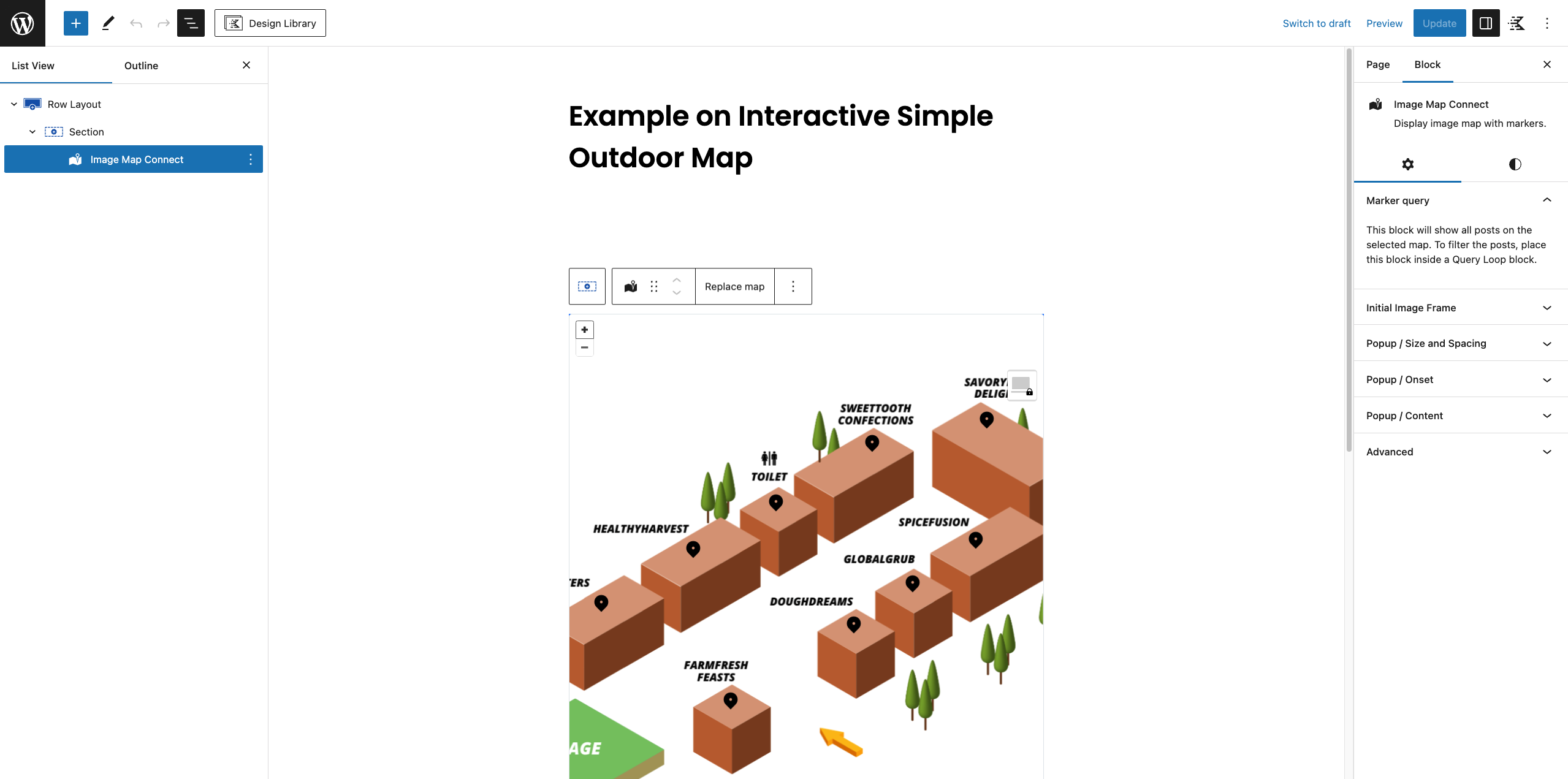
Para desenvolvedores
Este é o seu plugin? Mostre os números.
Adicione um crachá ao vivo ao seu site, Documentos ou Readme do GitHub. Ele é atualizado por conta própria - nenhuma conta necessária.
Best Image Map Connect alternatives
All floor plan plugins →





FAQ
Image Map Connect: quick answers
Respostas diretas, extraídas de dados ao vivo WordPress.org.
Fonte: WordPress.org
Is Image Map Connect free?
Yes. Image Map Connect is free to download and use from the official WordPress.org plugin directory.
Is Image Map Connect safe to use in 2026?
Image Map Connect shows warning signs in 2026 — compare the alternatives below before installing. It runs on 100+ sites, is rated 5/5 and was last updated 2 years ago, and scores 32/100 on our health check.
How many websites use Image Map Connect?
Image Map Connect is active on 100+ WordPress websites and has been downloaded 3,163 times since it launched in January 2024. It was downloaded 150 times in the last 30 days.
Does Image Map Connect work with WordPress 7.1?
Image Map Connect is officially tested up to WordPress 6.7.12, while the latest release is 7.1.5. It may still work, but try it on a staging site first.
What PHP version does Image Map Connect need?
Image Map Connect requires PHP 7.2 or higher. Most hosts run PHP 8.x today, so it works on any modern WordPress hosting.
When was Image Map Connect last updated?
The latest version, 1.0.2, was released on November 10, 2024 (2 years ago).
Who makes Image Map Connect?
Image Map Connect is developed and maintained by Igor.
What are the best alternatives to Image Map Connect?
The most popular alternatives to Image Map Connect are Interactive Image Map Plugin (20K+ installs), Vision (2K+ installs) and HappyVR (80+ installs).
Alimentado por PageForge
Um modelo e uma planilha. Uma página real para cada pesquisa.
PageForge Transforma cada linha de um CSV em uma página WordPress com seu próprio título, URL, SEO campos e esquema, construído no layout que você já desenhou. Gratuito em WordPress.org.
- CSV e XLSX, mais Google Sheets em Profissional e Empresarial
- Seu próprio título, URL, SEO campos e esquema para cada página
- Funciona com o editor de blocos, Elementor, Divi e Avada
- Gratuito em WordPress.org, sem cartão de crédito