


Gravity Forms + Custom Post Types
Map your Gravity-Forms-generated posts to a custom post type and/or custom taxonomies.

Escolha sólida
Gravity Forms + Custom Post Typ… is a solid plugin choice in 2026, with a few things worth checking first. It runs on 10K+ sites, is rated 4.4/5 and was last updated 2 months ago, and scores 72/100 on our health check.
- Comprovado em escala em sites ativos de mais de 10 mil
- Testado com as últimas WordPress (7.1)
Como ele se acumula?
Lado a lado em instalações, atualizações, avaliações e suporte



Downloads diários
Os picos de download geralmente seguem uma nova versão — cada site que atualiza automaticamente é um download.
Rankings
Where Gravity Forms + Custom Post… stands todayWordPress.org Classificações de pesquisa
Posição ao vivo na pesquisa de plugins, top 100| Palavra chave | Posição |
|---|---|
| Tipos de postagem personalizados | #8 |
| custom taxonomy | #26 |
| gravity forms | #3 |
| gravity forms posts | #1 |
| taxonomy | #90 |
Adoção da versão
Compartilhamento de sites ativos por lançamento.
Divisão de classificação
★★★★★★★★★★ 4.4 from 46 reviews
About Gravity Forms + Custom Post Types
From the official readme · v3.1.33Descrição
This plugin is an add-on for Gravity Forms. Make sure you visit GravityWiz.com for more free Gravity Forms resources. And if you’re looking to the largest collection of Gravity Forms plugins, check out Gravity Perks.
Gravity Forms allows you to create posts from a form submission using special Post Fields. By default, the submitted form will be created as a standard WordPress post. This plugin allows you to change the post type of the generated post. No code required! This plugin also provides the ability to assign the generated post to a custom taxonomy.
Need to update posts? Learn how to update posts with Gravity Forms.
Recursos
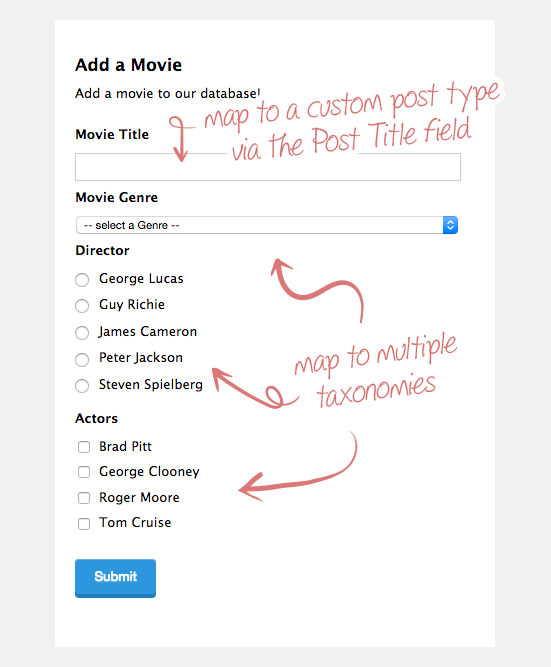
- Map posts to a custom post type
- Map posts to a custom taxonomy (via Drop Down, Multi-select, Radio Button or Checkbox field)
- Map posts to multiple taxonomies
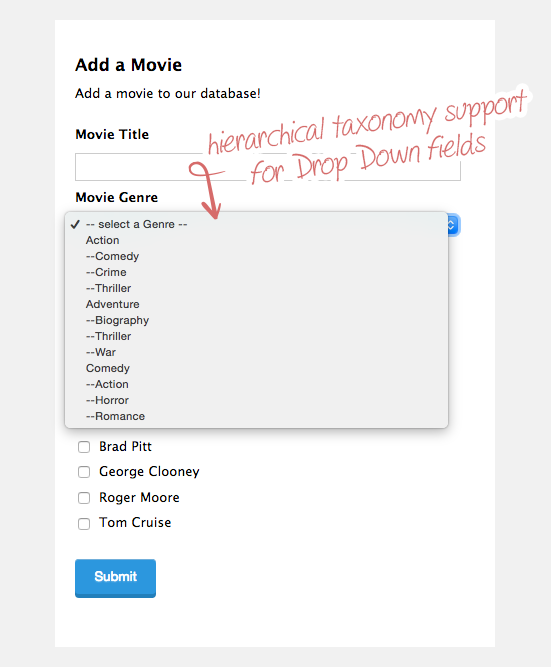
- Visual hierarchy support for hierarchical taxonomies (Drop Down field only)
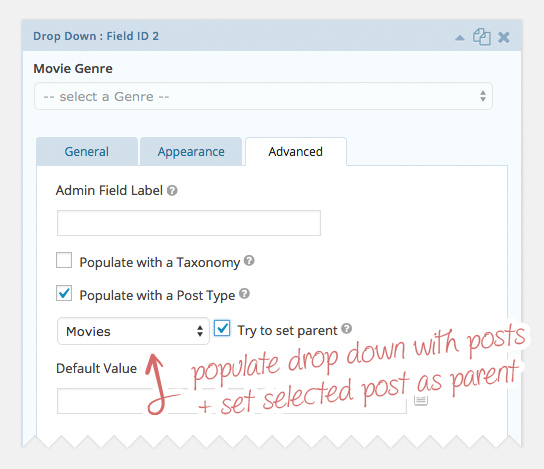
- Populate a Drop Down with posts
- Assign parent post for generated post (Drop Down field only)
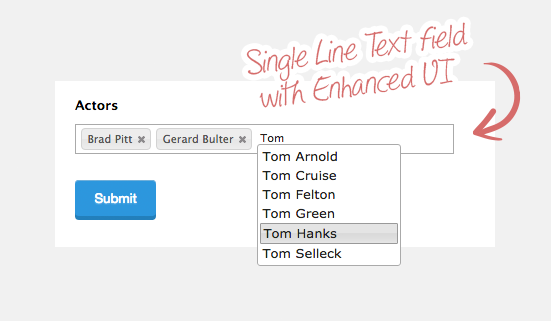
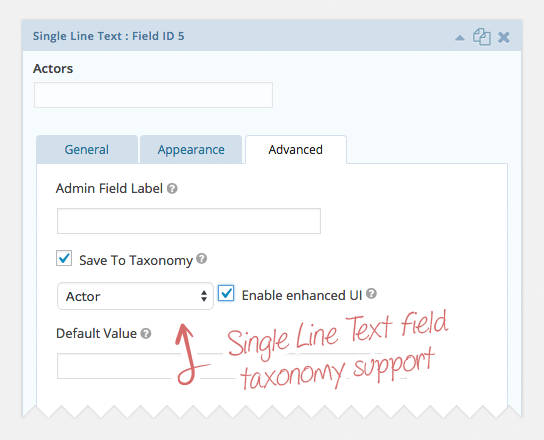
- Single Line Text field support for taxonomies (enter as a comma-delimited list: term a, term b, term c)
- Enhanced UI support for Single Line Text fields (see screenshots)
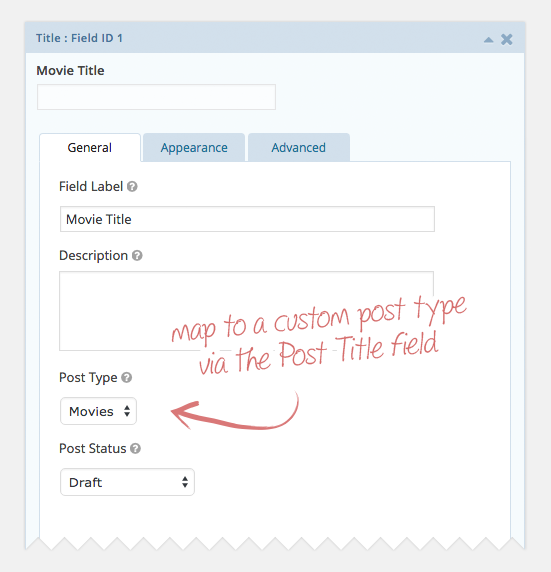
How to map a form to a custom post type
- Add a Post Title field to your form and click on it to open the field settings.
- Below the “Description” field setting, you will find the “Post Type” setting.
- Select the desired post type from the drop down (default is “Posts”).
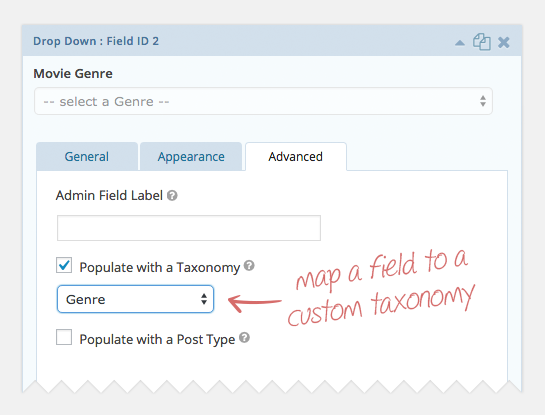
How to link a field to a custom taxonomy
- Add the desired field to which the custom taxonomy should be mapped. Drop Down, Multi Select, Radio Buttons and Checkboxes fields are current supported.
- Open the field settings by clicking on the field and click on the “Advanced” tab.
- Check the “Populate with a Taxonomy” checkbox.
- Select the desired taxonomy from the drop down that appears.
How to link the saved post to taxonomies using a single line text field
Single Line Text fields are a great way to allow users to select existing taxonomy terms and to also add new terms.
- Add a Single Line Text field to your form.
- Open the field settings by clicking on the field and click on the “Advanced” tab.
- Check the “Save to Taxonomy” checkbox.
- Select the desired taxonomy from the drop down that appears.
- (optional) Check the “Enable Enhanced UI” checkbox to enable an awesome tag-input style UI (see screenshots).
Note: If the user inputs exising term names, the generated post will be assigned these terms. If the user inputs term names that do not exist, these terms will be added to the selected taxonomy and the generated post will also be assigned these terms.
How to set a parent post with the drop down field
When populating a Drop Down field with a post type, you may wish to set the selected post as the parent post for the generated post.
- Add A Drop Down field to your form.
- Click on the field to open the field settings. Then click on the “Advanced” tab.
- Check the “Populate with Post Type” checkbox.
- Select the desired post type from the drop down that appears. Be sure to select the same post type for which the post is being generated.
Instalação
- Upload the plugin folder ‘gravity-forms-custom-post-types’ to your
/wp-content/plugins/folder - Ative o plugin através do menu 'Plugins' em WordPress
- Make sure you also have Gravity Forms activated.
Log de Changes
Please note, Gravity Forms 1.9.3 is now required.
3.1.33
- Fixed additional conflict with Gravity Forms 3.0.
3.1.32
- Improved compatibility with Gravity Forms 3.0.
3.1.31
- Fixed readme.txt formatting for WordPress.org plugin directory.
3.1.30
- Fixed a PHP notice that occurred when field had no choices set.
- Updated “Tested up to” tag to 6.9.1.
3.1.29
- Fixed PHP warning.
3.1.28
- Fixed potential PHP warning.
- Updated “Tested up to” to WordPress 6.0.2.
Capturas de tela
Para desenvolvedores
Este é o seu plugin? Mostre os números.
Adicione um crachá ao vivo ao seu site, Documentos ou Readme do GitHub. Ele é atualizado por conta própria - nenhuma conta necessária.
Best Gravity Forms + Custom Post T… alternatives
All custom post types plugins →





FAQ
Gravity Forms + Custom Post Types: quick answers
Respostas diretas, extraídas de dados ao vivo WordPress.org.
Fonte: WordPress.org
Is Gravity Forms + Custom Post Typ… free?
Yes. Gravity Forms + Custom Post Typ… is free to download and use from the official WordPress.org plugin directory.
Is Gravity Forms + Custom Post Typ… safe to use in 2026?
Gravity Forms + Custom Post Typ… is a solid plugin choice in 2026, with a few things worth checking first. It runs on 10K+ sites, is rated 4.4/5 and was last updated 2 months ago, and scores 72/100 on our health check.
How many websites use Gravity Forms + Custom Post Typ…?
Gravity Forms + Custom Post Typ… is active on 10K+ WordPress websites and has been downloaded 565,284 times since it launched in February 2011. It was downloaded 3,437 times in the last 30 days.
Does Gravity Forms + Custom Post Typ… work with WordPress 7.1?
Yes. The developer has tested Gravity Forms + Custom Post Typ… up to WordPress 7.1.5, the latest release. It requires WordPress 3.0.1 or newer.
What PHP version does Gravity Forms + Custom Post Typ… need?
Gravity Forms + Custom Post Typ… requires PHP 5.6 or higher. Most hosts run PHP 8.x today, so it works on any modern WordPress hosting.
When was Gravity Forms + Custom Post Typ… last updated?
The latest version, 3.1.33, was released on September 17, 2026 (2 months ago).
Who makes Gravity Forms + Custom Post Typ…?
Gravity Forms + Custom Post Typ… is developed and maintained by Dave from Gravity Wiz.
What are the best alternatives to Gravity Forms + Custom Post Typ…?
The most popular alternatives to Gravity Forms + Custom Post Typ… are Custom Post Type UI (1M+ installs), Meta Box (500K+ installs) and Pods (100K+ installs).
Alimentado por PageForge
Um modelo e uma planilha. Uma página real para cada pesquisa.
PageForge Transforma cada linha de um CSV em uma página WordPress com seu próprio título, URL, SEO campos e esquema, construído no layout que você já desenhou. Gratuito em WordPress.org.
- CSV e XLSX, mais Google Sheets em Profissional e Empresarial
- Seu próprio título, URL, SEO campos e esquema para cada página
- Funciona com o editor de blocos, Elementor, Divi e Avada
- Gratuito em WordPress.org, sem cartão de crédito