


Co-Authors Plus
Assign multiple bylines to posts, pages, and custom post types with a search-as-you-type input box.

Escolha sólida
Co-Authors Plus is a solid plugin choice in 2026, with a few things worth checking first. It runs on 20K+ sites, is rated 3.5/5 and was last updated 2 weeks ago, and scores 72/100 on our health check.
- Comprovado em escala em mais de 20 mil sites ativos
- Desenvolvido ativamente — última atualização 2 semanas atrás
- Testado com as últimas WordPress (7.1)
- Momentum — downloads up 149.5% vs the previous 30 days
Como ele se acumula?
Lado a lado em instalações, atualizações, avaliações e suporte



Downloads diários
Os picos de download geralmente seguem uma nova versão — cada site que atualiza automaticamente é um download.
Rankings
Where Co-Authors Plus stands todayWordPress.org Classificações de pesquisa
Posição ao vivo na pesquisa de plugins, top 100| Palavra chave | Posição |
|---|---|
| authors | #2 |
| co-authors | #2 |
| multi author | #5 |
| multiple authors | #3 |
| users | >100 |
Adoção da versão
Compartilhamento de sites ativos por lançamento.
Divisão de classificação
★★★★★★★★★★ 3.5 from 77 reviews
About Co-Authors Plus
From the official readme · v4.2.2Descrição
Assign multiple bylines to posts, pages, and custom post types via a search-as-you-type input box. Co-authored posts appear on a co-author’s archive page and in their feed. Co-authors may edit the posts they are associated with, and co-authors who are contributors may only edit posts if they have not been published (as is core behavior).
Add writers as bylines without creating WordPress user accounts. Simply create a guest author profile for the writer and assign the byline as you normally would.
On the frontend, use the Co-Authors Plus template tags or the block editor blocks to list co-authors anywhere you’d normally list the author.
Documentação
Guides for site owners, themers and developers live in the docs/ directory on GitHub (they are not bundled in the distribution ZIP):
- Guest authors and roles and capabilities
- Template tags and blocks
- Querying posts by author or co-author
- Customizing Co-Authors Plus: recipes for the most common filters
- Filters and actions and the REST API
- WP-CLI commands
- Upgrading to 4.0
Co-Authors Plus is an almost complete rewrite of the Co-Authors plugin originally developed by Weston Ruter (2007). The original plugin was inspired by the ‘Multiple Authors‘ plugin by Mark Jaquith (2005).
Instalação
- IMPORTANT: If you are using the original Co-Authors plugin, disable it before installing Co-Authors Plus.
- Extract the co-authors-plus.zip file and upload its contents to the
/wp-content/plugins/directory. Alternately, you can install directly from the Plugin directory within your WordPress Install. - Activate the plugin through the “Plugins” menu in WordPress.
- Place co-authors template tags in your template.
- Add co-authors to your posts and pages.
Log de Changes
Security release that tightens co-author permission checks and comment emails. Unlinked guest authors no longer receive moderation emails. Update soon.
The highlights of recent releases are below. Every change, including older releases, is listed in CHANGELOG.md.
4.2.2
- Changed: Guest authors without a linked user no longer receive comment moderation emails, and Contributors no longer receive them for published posts.
- Security: Co-authors only receive comment emails for posts and comments they can access.
- Security: Tighten how guest author profiles are looked up, who can see co-authors’ email addresses, how private posts are counted, and who can change a post’s author.
4.2.1
- Changed:
wp co-authors-plus export-coauthorsnow requires--file. If you ran it without--fileon 4.2.0, deletewp-content/cap-coauthors-export.json. - Changed: A Query Loop containing Co-Authors Plus blocks no longer forces “Reload full page”.
- Fixed: Author archive URLs for a slug that matches no one return a 404, instead of listing posts.
- Fixed: The Authors panel and blocks load in the block editor on WordPress 6.4 and 6.5.
- Fixed: Post counts and author lists treat a linked user and guest author as one person, so posts aren’t counted twice and guest authors don’t go missing from lists.
- Fixed: Authors whose nicename isn’t a clean slug, as some SSO and sync plugins write them, appear in the author search and in bylines.
- Fixed: Yoast SEO’s structured data stays valid on posts with co-authors.
- Fixed:
wp co-authors-plus create-guest-authorsaccepts--roleand other user query arguments again. - Security: Tighten how co-authors and author queries are matched.
4.2.0
- Changed: RSS feeds credit each item’s co-authors on every site. To keep the old feed bylines, return
falsefrom thecoauthors_filter_feed_authorsfilter. - Changed: Creating, listing and editing guest authors needs the guest author manage capability (Administrators by default) everywhere, including WordPress’s own post screens, so Editors can no longer edit guest authors there. Change this with the
coauthors_guest_author_manage_capfilter. - Changed: Setting co-authors on pages and custom post types checks that post type’s own edit-others capability.
- Changed: Core’s
/wp/v2/coauthorsREST route needs theedit_postscapability, and/wp/v2/guest-authoris gone. Read co-authors through the plugin’scoauthors/v1endpoints, which now return unescaped values. - Changed: The plain byline template tags, such as
coauthors(), escape their output. - New: WP-CLI commands to move guest authors and their bylines between sites (
export-coauthors,import-coauthors) and to list a post’s co-authors (list-authors). - New: Filters to change the author data in the editors’ author search, for example to hide email addresses.
- Fixed: Co-author names with apostrophes display correctly in the block editor, and the Authors panel fills in on sites that override the
coauthorsREST field. - Fixed: Trashing a guest author no longer drops them from bylines.
- Fixed: Many WP-CLI commands now do what they report, including
swap-coauthors --dry-run,reassign-termsand the author term backfills. - Security: Tighter permission checks for managing guest authors, and no more user logins in public REST responses.
Capturas de tela

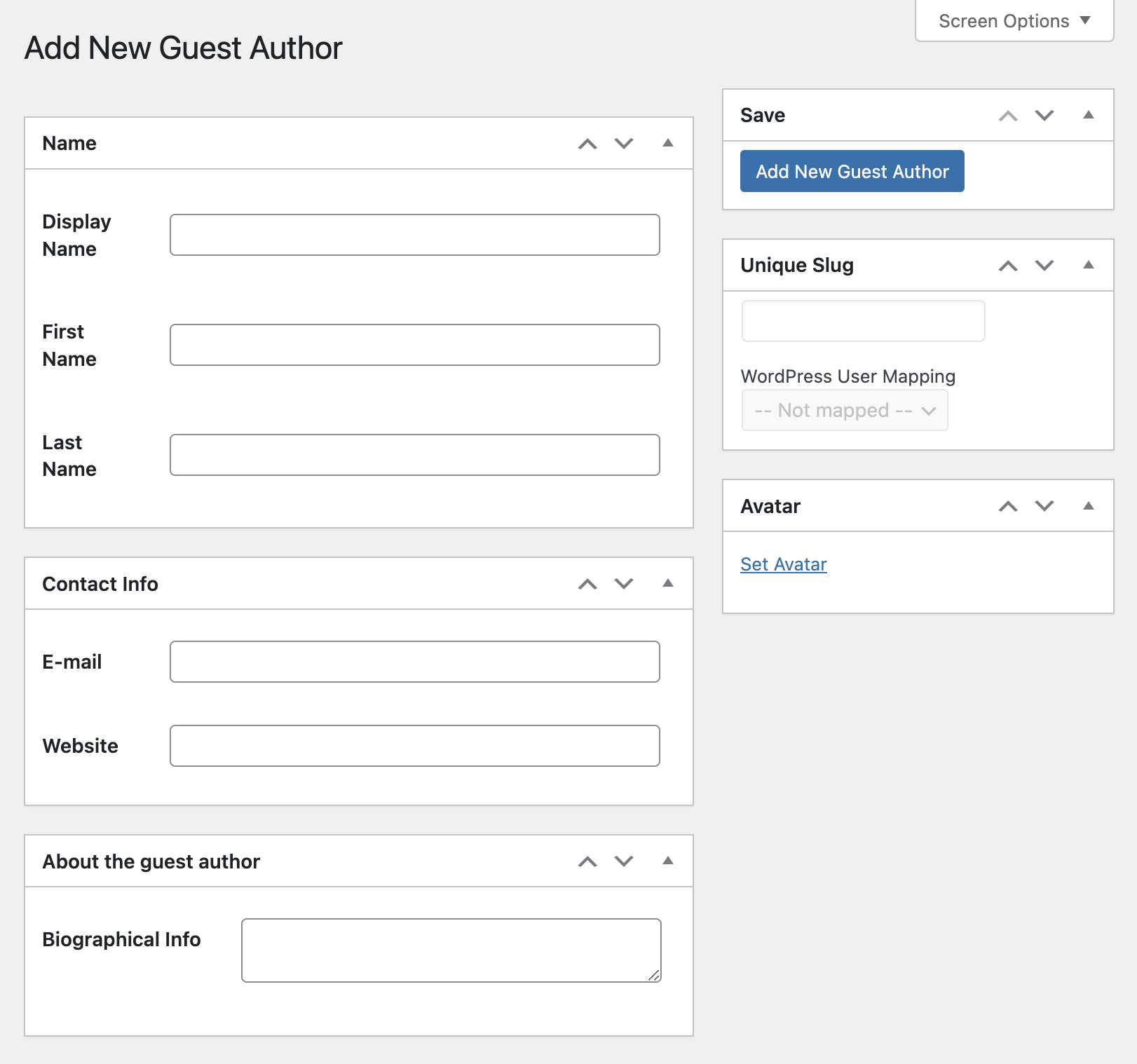
Para desenvolvedores
Este é o seu plugin? Mostre os números.
Adicione um crachá ao vivo ao seu site, Documentos ou Readme do GitHub. Ele é atualizado por conta própria - nenhuma conta necessária.
Best Co-Authors Plus alternatives
All authors plugins →





FAQ
Co-Authors Plus: quick answers
Respostas diretas, extraídas de dados ao vivo WordPress.org.
Fonte: WordPress.org
Is Co-Authors Plus free?
Yes. Co-Authors Plus is free to download and use from the official WordPress.org plugin directory.
Is Co-Authors Plus safe to use in 2026?
Co-Authors Plus is a solid plugin choice in 2026, with a few things worth checking first. It runs on 20K+ sites, is rated 3.5/5 and was last updated 2 weeks ago, and scores 72/100 on our health check.
How many websites use Co-Authors Plus?
Co-Authors Plus is active on 20K+ WordPress websites and has been downloaded 1,684,697 times since it launched in April 2009. It was downloaded 74,117 times in the last 30 days.
Does Co-Authors Plus work with WordPress 7.1?
Yes. The developer has tested Co-Authors Plus up to WordPress 7.1.5, the latest release. It requires WordPress 6.4 or newer.
What PHP version does Co-Authors Plus need?
Co-Authors Plus requires PHP 7.4 or higher. Most hosts run PHP 8.x today, so it works on any modern WordPress hosting.
When was Co-Authors Plus last updated?
The latest version, 4.2.2, was released on November 7, 2026 (2 weeks ago).
Who makes Co-Authors Plus?
Co-Authors Plus is developed and maintained by Automattic.
What are the best alternatives to Co-Authors Plus?
The most popular alternatives to Co-Authors Plus are Co-Authors, Multiple Author… (20K+ installs), Osom Author Pro (1K+ installs) and Just Writing Statistics (1K+ installs).
Alimentado por PageForge
Um modelo e uma planilha. Uma página real para cada pesquisa.
PageForge Transforma cada linha de um CSV em uma página WordPress com seu próprio título, URL, SEO campos e esquema, construído no layout que você já desenhou. Gratuito em WordPress.org.
- CSV e XLSX, mais Google Sheets em Profissional e Empresarial
- Seu próprio título, URL, SEO campos e esquema para cada página
- Funciona com o editor de blocos, Elementor, Divi e Avada
- Gratuito em WordPress.org, sem cartão de crédito