


CartRevival – Abandoned Cart Recovery & Live Cart Monitor
Abandoned cart recovery for WooCommerce: win carts back on WhatsApp via 6rsh (official Meta Tech Provider) and email, with a live cart monitor.

Escolha sólida
CartRevival is a solid plugin choice in 2026, with a few things worth checking first. It runs on 40+ sites, is rated 5/5 and was last updated 2 hours ago, and scores 74/100 on our health check.
- Actively developed — last update 2 hours ago
- Testado com as últimas WordPress (7.1)
- Momentum — downloads up 54.6% vs the previous 30 days
- Base de usuários pequenas (mais de 40 instalações ativas)
- Muito poucos comentários até agora
Como ele se acumula?
Lado a lado em instalações, atualizações, avaliações e suporte



Downloads diários
Os picos de download geralmente seguem uma nova versão — cada site que atualiza automaticamente é um download.
Rankings
Where CartRevival stands todayWordPress.org Classificações de pesquisa
Posição ao vivo na pesquisa de plugins, top 100| Palavra chave | Posição |
|---|---|
| abandoned cart | #31 |
| cart recovery | #22 |
| exit-intent | #83 |
| >100 | |
| WooCommerce | >100 |
Adoção da versão
Compartilhamento de sites ativos por lançamento.
Divisão de classificação
★★★★★ ★★★★★ 5 de 2 comentários
About CartRevival
From the official readme · v2.36.1Descrição
CartRevival is abandoned cart recovery for WooCommerce that also shows you carts as they happen. It shows you the cart filling up right now, and automatically wins it back if the shopper leaves — a genuine cart revival, not just a reminder.
Every shopper who adds a product is captured — registered customers and anonymous guests alike — along with their cart contents, location and device. If they go quiet, CartRevival marks the cart abandoned and sends a cart abandonment email that rebuilds their exact cart in one click.
WhatsApp cart recovery with 6rsh — free, official, built in
Most shoppers open WhatsApp within minutes; email often waits for days. CartRevival’s recommended recovery channel is WhatsApp, delivered through 6rsh — an official Meta Tech Provider on the WhatsApp Business Platform.
- Included in the free plugin — no Pro needed
- Sent from your own WhatsApp Business number over the official Cloud API — no unofficial tools, no phone that has to stay online
- Uses your Meta-approved templates in any language, with a button that opens the shopper’s exact cart
- Shopper replies land in your 6rsh inbox, so you can close the sale in chat
- Respects quiet hours and unsubscribes, and never messages the same cart twice
- Already running the 6rsh WooCommerce plugin? CartRevival reuses that connection automatically — nothing to paste
Set-up takes a few minutes: sign up at 6rsh.com and connect your number through Meta’s official sign-up, paste your 6rsh API key, pick a template. Turn on “ask for phone” in the cart-saving popup and every guest who saves their cart becomes reachable on WhatsApp.
Live cart tracking, free
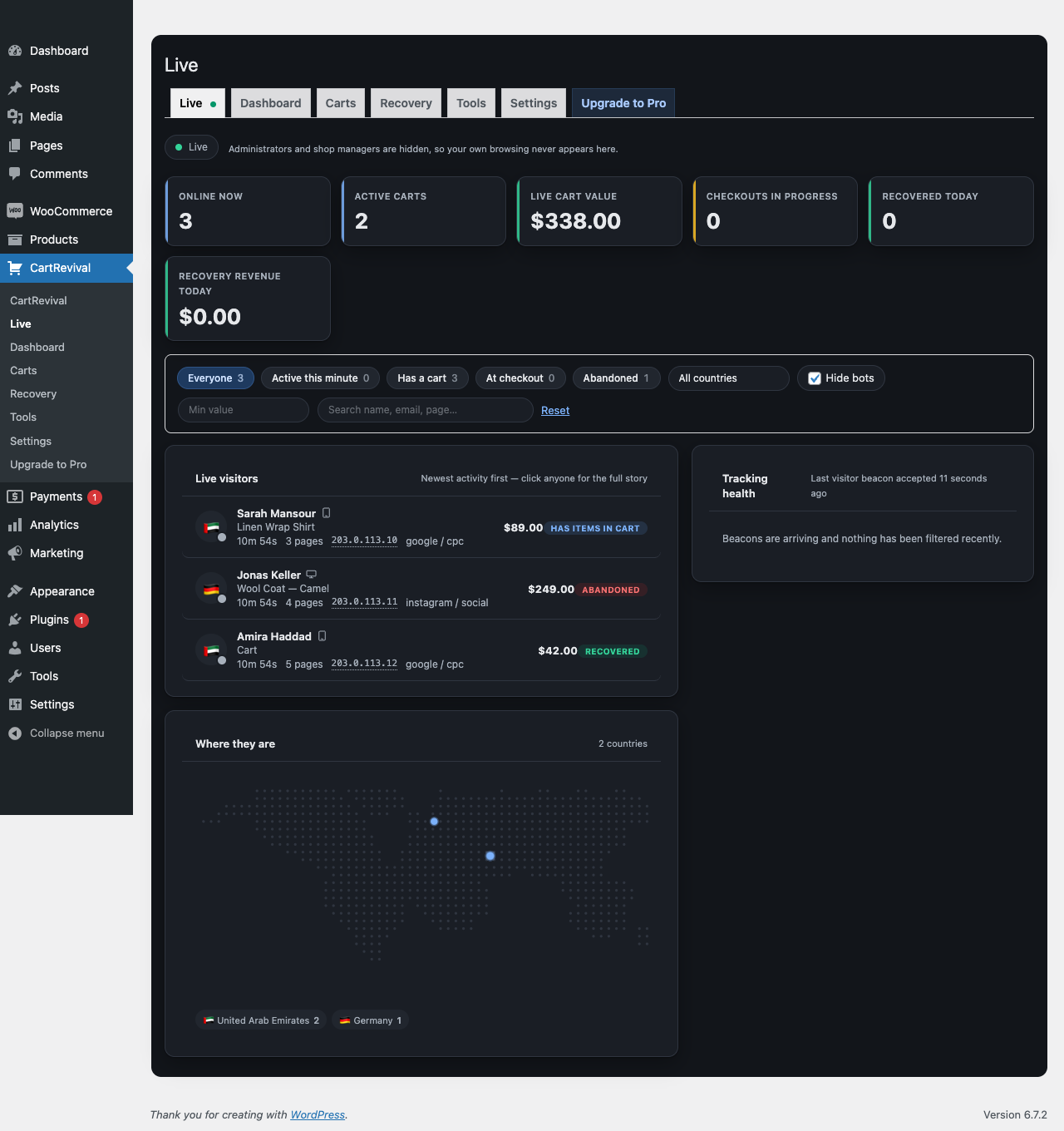
The Live tab is a real-time view of your store. Watch visitors arrive, browse, add products and reach checkout, with cart values updating the instant something changes. See what people added and then removed — the hesitation that never shows up in any other report.
What you get for free
- Abandoned cart recovery for both logged-in customers and guests
- Live cart tracking monitor with real-time visitor and cart status
- Free-shipping goal bar on the cart, mini-cart and checkout — “You are $20 away from free shipping”, read from your own WooCommerce shipping zones and updated live
- Exit intent popup on desktop and mobile, with scroll-up velocity and back-gesture detection on touch devices
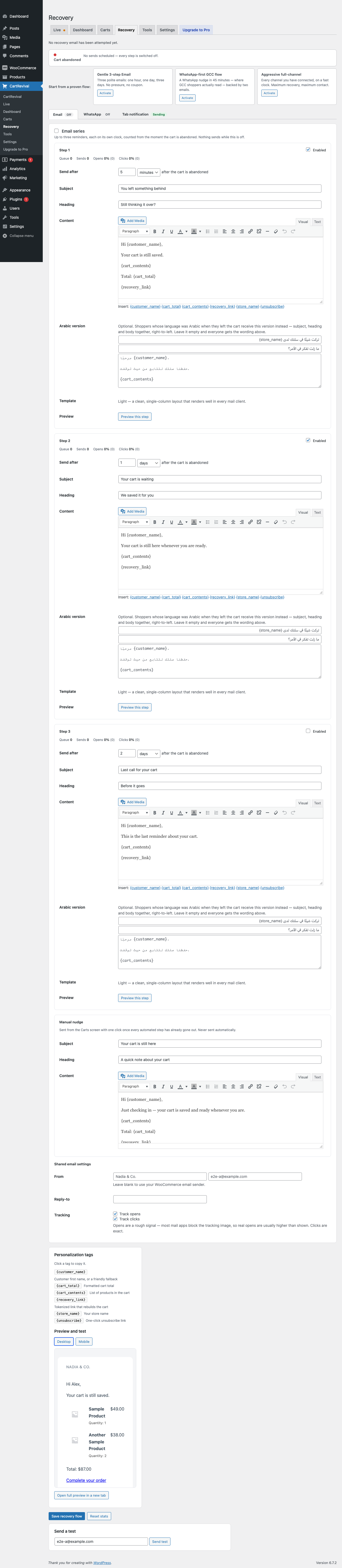
- A three-step recovery email series, each step with its own delay, subject, heading, content, coupon field and open/click stats
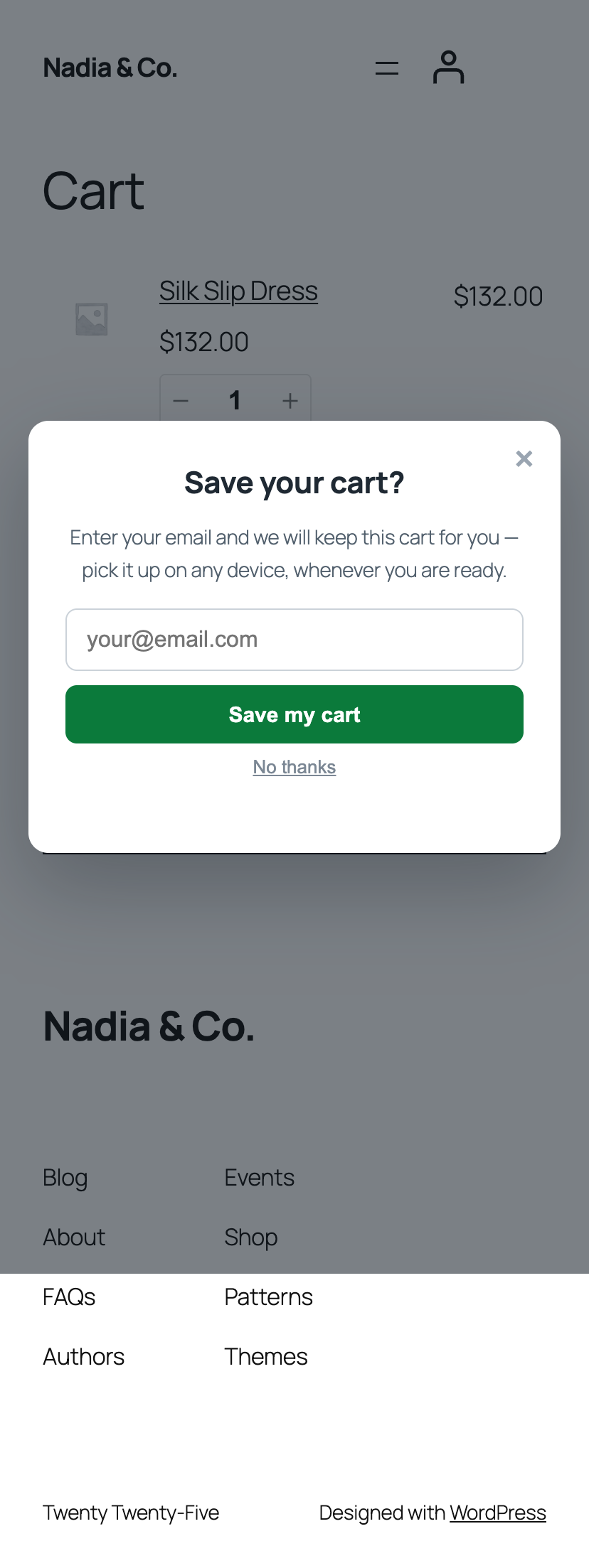
- Early capture popup that asks for an email or phone on add-to-cart, so guest carts become recoverable
- Tab notification that alternates the browser tab title and badges the favicon while the shopper is on another tab
- One-click cart restore link that rebuilds variations, quantities and custom item data
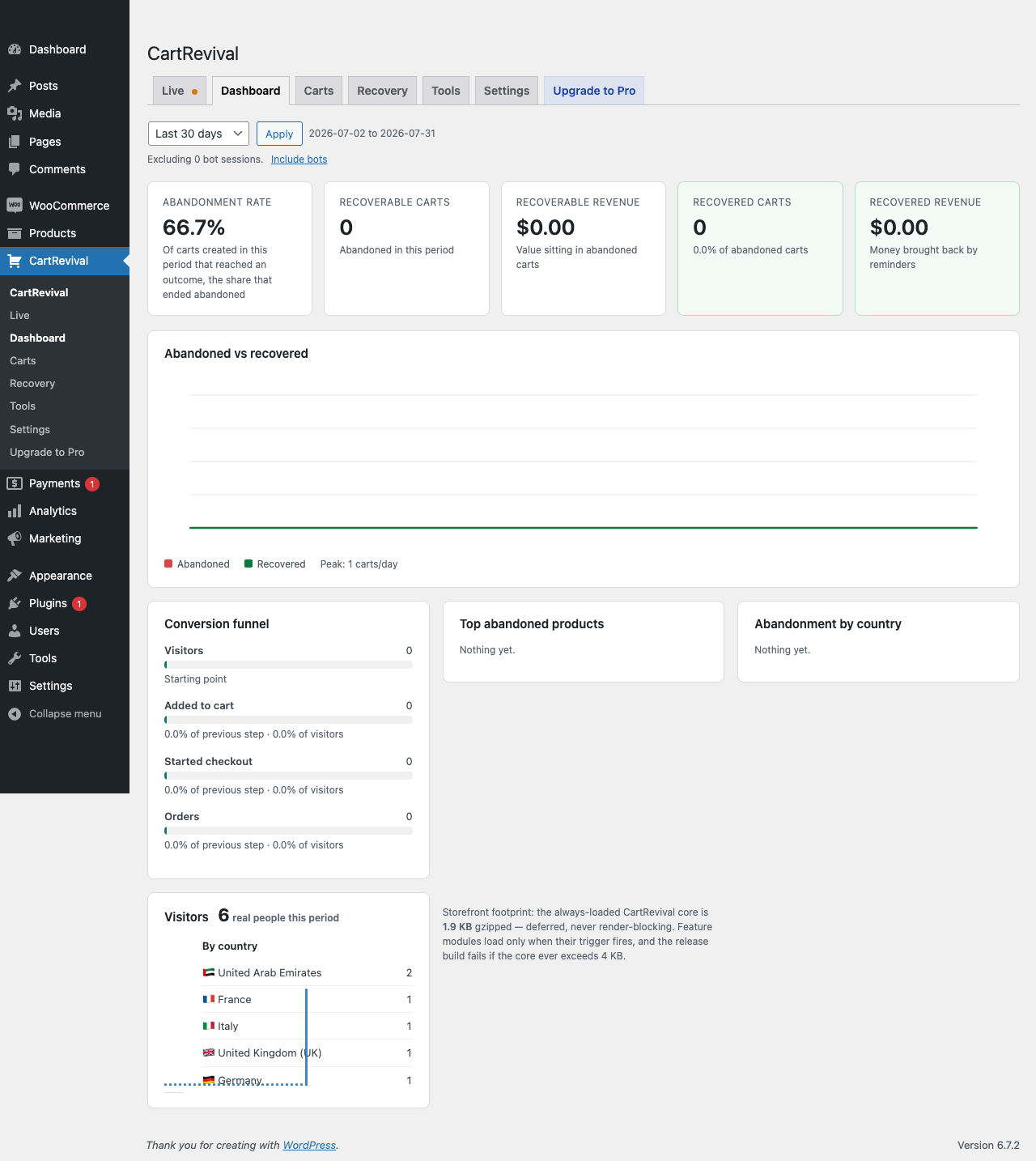
- Conversion funnel: visitors → add to cart → checkout → orders, with drop-off at each step
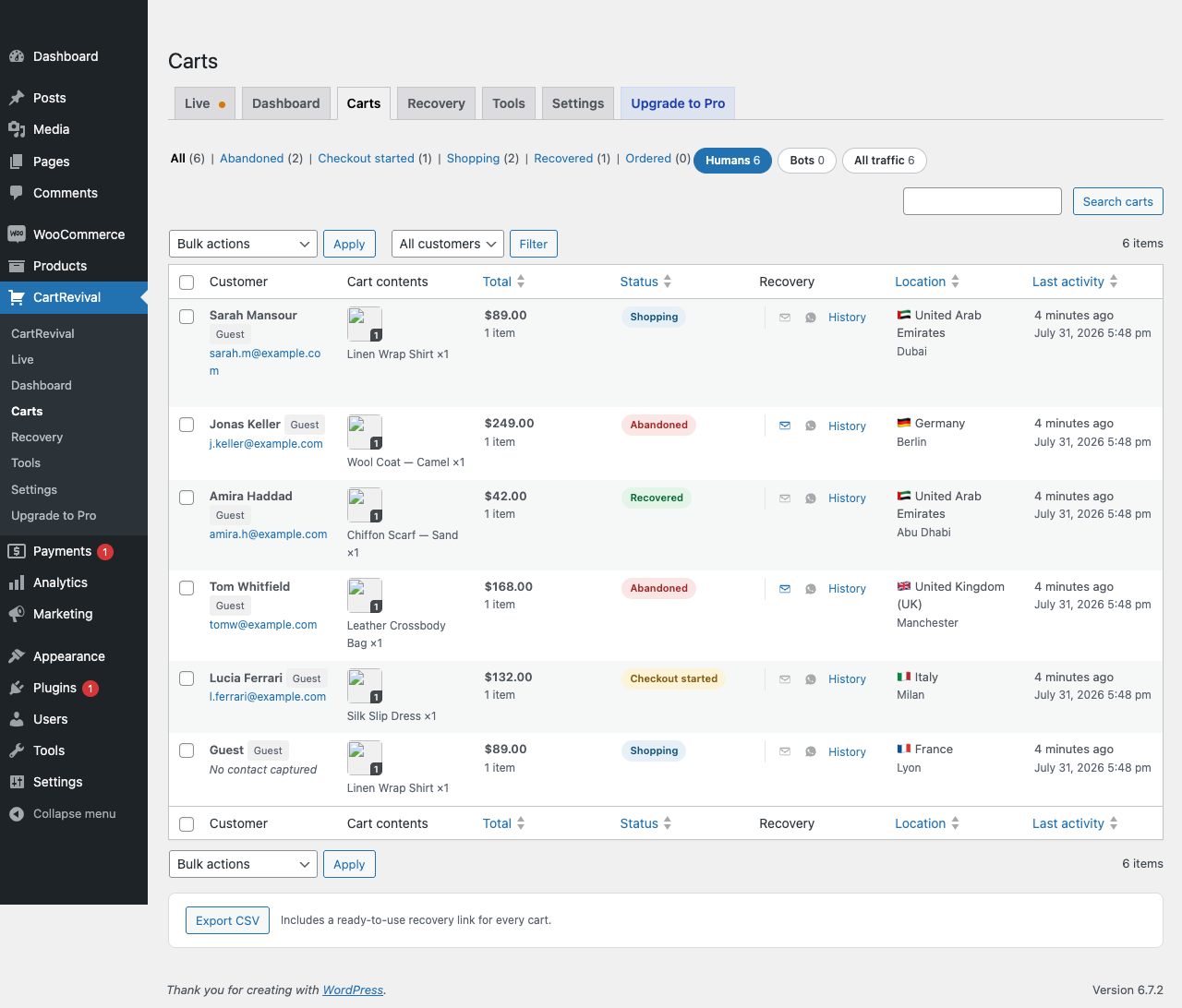
- Reports: abandonment rate, recoverable revenue, recovered revenue, top abandoned products, abandonment by country
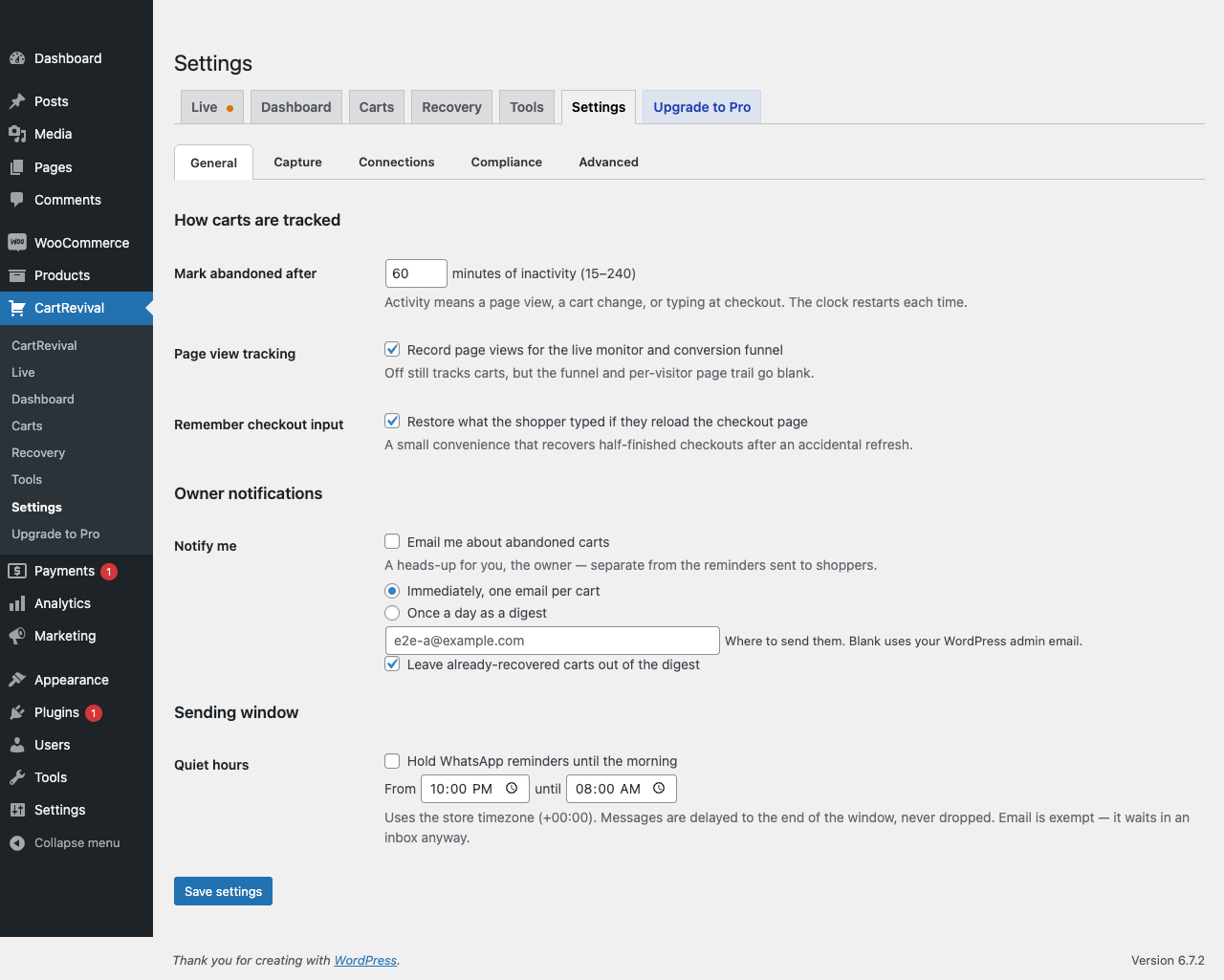
- Remember checkout input across page reloads
- CSV export including a ready-to-use recovery link per cart
- Store owner notifications, instantly or as a daily digest
- Bot defense on every capture: honeypot, user-agent blocklist, minimum time on page, optional reCAPTCHA v3
- Exclusions by email, phone and user role, plus auto-delete for old anonymous carts
- Full GDPR support: data exporter, eraser, one-click unsubscribe, IP and URL collection toggles
Built to be invisible on your storefront
Performance was the first requirement, not an afterthought.
- An always-loaded core of about 2 KB gzipped (2.2 KB measured), loaded deferred — every other feature is a tiny module that downloads only when its trigger fires
- No jQuery, no frontend CSS unless you turn on a popup
- Tracking uses
navigator.sendBeacon(), so nothing ever blocks navigation - Custom database tables with pre-aggregated daily reports — dashboards never scan raw data
- No
admin-ajax.phpanywhere - Zero database writes on a page view when the visitor has an empty cart
No limits on the free plugin
There is no cart quota, no registration and no account. Everything described above works on every store, on every cart, forever, and this plugin never contacts a licensing server to decide what you may do.
A separate paid add-on, CartRevival PRO, adds channels and automation on top: SMS through Twilio or BulkGate, web push, a unified multi-channel sequence builder, automatically generated single-use coupons, subject-line A/B tests that pick the winner for you, thank-you emails with a next-order coupon, review requests, smart message suggestions, email-marketing sync, and the full visitor analytics history. It is an optional extra — nothing here is switched off or held back to make a case for it. Details and pricing.
Execução
CartRevival’s storefront footprint is two-stage, and the always-loaded part is about 2 KB:
- Core (always loads): 2.2 KB gzipped. The tracking beacon and a tiny module loader. Deferred, sendBeacon transport, no CSS, zero render-blocking, zero database writes on an empty-cart page view.
- Feature modules (load only on their trigger): exit intent (~1.1 KB, on a real leave gesture), field capture (~1.4 KB, on first field focus — or on checkout), early-capture popup (~1.0 KB, on add-to-cart), push opt-in + service worker (~0.6 KB, on add-to-cart with push enabled), tab notification (~0.8 KB, first time the tab is hidden). A visitor who never triggers a feature never downloads it.
- Enforced at build time: the release build fails if the core ever exceeds 4 KB gzipped, so the claim cannot silently rot.
Serviços externos
This plugin works entirely on your own server by default. It does not phone home, and it has no licence check, no registration and no usage metering: with a fresh install and default settings, it makes no external requests at all.
Three optional integrations can send data off your site. Each is off until you switch it on, and each is listed here with exactly what leaves your server.
1. 6rsh (WhatsApp reminder delivery) — only if you connect it
To send WhatsApp reminders the plugin needs a WhatsApp Business sender, which it reaches through 6rsh, operated by 6rsh.com. It is used only when you save a 6rsh API key (or already run the 6rsh WooCommerce plugin on the same site) and switch the WhatsApp channel on.
- What is sent: your API key, the shopper’s phone number, the approved template name, and the template variables you mapped (typically the shopper’s first name, your store name, the cart total and the recovery link).
- When: at the moment a WhatsApp reminder is sent for an abandoned cart, and when the plugin fetches your list of approved templates so you can pick one.
- Terms of service: https://6rsh.com/terms
- Privacy policy: https://6rsh.com/privacy
2. ip-api.com (visitor country and city lookup) — off by default
Location for the carts list and live monitor normally comes from WooCommerce’s own MaxMind database, which is a file on your server; nothing is transmitted for that. If that database cannot place an address, and only if you tick “Look up a visitor’s country and city with an external service” under CartRevival → Settings → Compliance, that one IP address is sent to ip-api.com, operated by ip-api.com.
- What is sent: a single visitor IP address. Nothing else — no name, email, phone, cart contents or order data.
- When: at most once per IP address per day, and only when the local database returned no country.
- Note: the free ip-api.com endpoint accepts plain HTTP only, so this request is not encrypted in transit. This is why the setting is off by default. You can point it at a provider of your choice with the
cartrevival_geo_provider_urlfilter, or disable it in code with thecartrevival_geo_remote_enabledfilter. - Terms of service: https://ip-api.com/docs/legal
- Privacy policy: https://ip-api.com/docs/legal
3. Google reCAPTCHA v3 (bot filtering on capture) — only if you configure it
If you enter reCAPTCHA v3 keys under CartRevival → Settings → Capture, captures are verified with Google’s siteverify endpoint.
- What is sent: your reCAPTCHA secret key, the reCAPTCHA token from the visitor’s browser, and the visitor’s IP address, to https://www.google.com/recaptcha/api/siteverify.
- When: on each cart capture, while reCAPTCHA keys are configured.
- In the visitor’s browser: when reCAPTCHA is configured, the browser loads Google’s reCAPTCHA script from https://www.google.com/recaptcha/api.js only when it is about to save a contact (popup, exit-intent or checkout capture). This sends Google the visitor’s IP address and browser data and may set Google cookies. It is never loaded on ordinary page views.
- Terms of service: https://policies.google.com/terms
- Privacy policy: https://policies.google.com/privacy
4. cartrevival.com (opt-in “Stay in the loop” telemetry) — off until you opt in
CartRevival can send a small daily ping to cartrevival.com, operated by us. This is strictly opt-in: nothing is ever sent until you pick one of three equal choices — in the “Stay in the loop” step of the setup guide or on the one-time notice on CartRevival’s own admin screens — and nothing is pre-selected. Choosing “No thanks” is remembered and never re-asked.
- “Yes, send me the weekly report”: your site’s domain, the email address you enter (prefilled with the site admin email, which you can change), the CartRevival, WordPress and PHP versions, a random site code, and four totals for the last 7 days — carts abandoned, carts recovered, value recovered (with your store currency) and reminders sent. We use these to email you a free weekly recovery report and security & update alerts when a new CartRevival release is out. Every email has a one-click unsubscribe.
- Since 2.27.0, for stores that opt in on 2.27.0 or later: which CartRevival features are switched on (for example reminders on, popups on, Pro installed) — on/off switches only — and, with the weekly report, how many of the last 30 days’ carts had an email or only a phone (counts only).
- “Share anonymously”: only the CartRevival, WordPress and PHP versions, the feature switches and a random site code. No domain, no email, no totals.
- “No thanks”: nothing, ever.
- Never sent under any choice: customer names, emails, phone numbers, addresses, IP addresses, cart contents or orders.
- When: once a day by a scheduled background task, only while you are opted in. Change or withdraw the choice at any time under CartRevival → Settings → Compliance → Usage telemetry; withdrawing stops the pings, removes the scheduled task and deletes the site code and report email so past pings cannot be linked to you. Deactivating or uninstalling the plugin also removes the scheduled task.
- Terms of service: https://cartrevival.com/terms
- Privacy policy: https://cartrevival.com/privacy
Instalação
- Install and activate WooCommerce first.
- Upload the
cartrevivalfolder to/wp-content/plugins/, or install through Plugins → Add New. - Activate CartRevival.
- Go to CartRevival → Settings to choose how long a cart sits idle before it counts as abandoned.
- Go to CartRevival → Recovery to write your reminder email and switch it on.
Sending is off by default. Nothing is ever emailed to a shopper until you enable it.
Log de Changes
Fixes found in end-to-end testing: friendlier greetings, cleaner logs on WordPress 6.7+, correct channel credit for recovered sales.
2.36.1
- Fixed: reminder emails to shoppers who only gave an email greeted them oddly (“Hi Layla.test,”). The name now comes from the first word of the address (“Hi Layla,”), and addresses like info@ or sales@ get “Hi there,”.
- Fixed: opening a reminder link logged a burst of WooCommerce “get_cart was called incorrectly” notices. The cart is now rebuilt once WooCommerce has finished loading.
- Fixed: WordPress 6.7+ reported “translation loading was triggered too early” for CartRevival on every page.
- Fixed: a sale recovered through the email’s main button was credited to no channel, so per-channel reports undercounted it. It is now credited to the reminder the shopper clicked.
- Fixed (Pro): the WhatsApp login button and fields looked unstyled on block themes such as Twenty Twenty-Five.
2.36.0
- New: unpaid orders get a “Pay now” link. When a shopper placed an order but never finished paying (left the payment page, card declined), every reminder now opens that order’s own payment page instead of rebuilding the cart, so no duplicate order is created. The email button reads “Pay now”, and two new merge tags are available:
{pay_link}and{order_number}. - New (Pro): log in or sign up with WhatsApp. Shoppers can log in with a 6-digit code sent to their WhatsApp (through your connected 6rsh account) instead of a password, on My Account, at checkout, or anywhere with
[cartrevival_whatsapp_login]. New numbers can create an account by adding an email. Staff and admin accounts always use their password. - Improved (Pro): a cart’s own single-use coupon is now applied from any reminder link, including the WhatsApp button, not only from
{coupon_link}.
2.35.0
- New (Pro): quiet hours now use the shopper’s own timezone, not only the store’s. With Smart send-time switched on, the quiet-hours window (“don’t message at night”) is checked against the shopper’s own local clock, inferred from their country — the same timezone Smart send-time already uses to pick a civil hour. Free keeps the store-timezone check unchanged.
2.34.0
- Fixed: the daily digest email no longer lists bot carts. Carts from crawlers, scrapers and automated browsers were mixed in with real shoppers. The digest now shows only the carts the Carts screen shows under Humans; bot carts stay visible under the Bots filter.
- Fixed: instant “cart abandoned” alerts are no longer sent for carts the bot check held out of recovery.
- Improved: the digest headline counts every human cart, not just the 50 rows listed, and totals each currency separately instead of adding them under one symbol.
- Fixed: stores already connected to 6rsh no longer see the 6rsh sign-up card when WhatsApp reminders are off; they get an “Enable WhatsApp reminders” button instead.
- New: “Fetch templates from 6rsh” button on the WhatsApp tab shows a newly approved template right away.
2.33.0
- New: recovery channel priority — email first, then WhatsApp, then the rest. Each reminder step now reaches the shopper the gentlest way first. WhatsApp follows the email after a wait you choose (30 minutes by default) only if the shopper has not clicked the email; SMS and web push come last. Shoppers with no email go straight to WhatsApp. Switch back to “send every channel at the same time” any time.
- New: a priority ladder card on the Recovery screen shows the order, the timing and each channel’s status at a glance.
- Improved: skipped lower-priority reminders are recorded on the cart’s Recovery History with the reason, so nothing disappears silently.
- Developers:
cartrevival_channel_priority_orderfilter.
2.32.0
- New: recovery emails show your store logo. CartRevival uses the Header image from WooCommerce → Settings → Emails, so reminders match your order emails. With no image set, the store name is shown as before. Developers can change it with the
cartrevival_email_logo_urlfilter.
Capturas de tela
Para desenvolvedores
Este é o seu plugin? Mostre os números.
Adicione um crachá ao vivo ao seu site, Documentos ou Readme do GitHub. Ele é atualizado por conta própria - nenhuma conta necessária.
Best CartRevival alternatives
All abandoned cart plugins →





FAQ
CartRevival: quick answers
Respostas diretas, extraídas de dados ao vivo WordPress.org.
Fonte: WordPress.org
Is CartRevival free?
Yes. CartRevival is free to download and use from the official WordPress.org plugin directory.
Is CartRevival safe to use in 2026?
CartRevival is a solid plugin choice in 2026, with a few things worth checking first. It runs on 40+ sites, is rated 5/5 and was last updated 2 hours ago, and scores 74/100 on our health check.
How many websites use CartRevival?
CartRevival is active on 40+ WordPress websites and has been downloaded 2,832 times since it launched in July 2026. It was downloaded 1,237 times in the last 30 days.
Does CartRevival work with WordPress 7.1?
Yes. The developer has tested CartRevival up to WordPress 7.1.5, the latest release. It requires WordPress 6.2 or newer.
What PHP version does CartRevival need?
CartRevival requires PHP 7.4 or higher. Most hosts run PHP 8.x today, so it works on any modern WordPress hosting.
When was CartRevival last updated?
The latest version, 2.36.1, was released on November 22, 2026 (2 hours ago).
Who makes CartRevival?
CartRevival is developed and maintained by cartrevival.
What are the best alternatives to CartRevival?
The most popular alternatives to CartRevival are Booster for WooCommerce (30K+ installs), MWB HubSpot for WooCommerce (6K+ installs) and ActiveCampaign for WooComme… (5K+ installs).
Alimentado por PageForge
Um modelo e uma planilha. Uma página real para cada pesquisa.
PageForge Transforma cada linha de um CSV em uma página WordPress com seu próprio título, URL, SEO campos e esquema, construído no layout que você já desenhou. Gratuito em WordPress.org.
- CSV e XLSX, mais Google Sheets em Profissional e Empresarial
- Seu próprio título, URL, SEO campos e esquema para cada página
- Funciona com o editor de blocos, Elementor, Divi e Avada
- Gratuito em WordPress.org, sem cartão de crédito