


BrikPanel: WooCommerce Dashboard & Analytics, Abandoned Cart Recovery, Order Export, Inventory Management & Bulk Editor
Free WooCommerce dashboard & sales report: recover abandoned carts, order export, Google Sheets sync, ROAS, bulk edit & inventory management

Escolha segura
Yes — BrikPanel: WooCommerce Dashboar… is a safe, well-maintained plugin to use in 2026. It runs on 1K+ sites, is rated 5/5 and was last updated 24 hours ago, and scores 91/100 on our health check.
- Loved by users — 5/5 from 57 reviews
- Actively developed — last update 24 hours ago
- Testado com as últimas WordPress (7.1)
- Suporte responsivo — 100% dos tópicos recentes resolvidos
- Momentum — downloads up 20.2% vs the previous 30 days
Como ele se acumula?
Lado a lado em instalações, atualizações, avaliações e suporte



Downloads diários
Os picos de download geralmente seguem uma nova versão — cada site que atualiza automaticamente é um download.
Rankings
Where BrikPanel: WooCommerce Dash… stands todayWordPress.org Classificações de pesquisa
Posição ao vivo na pesquisa de plugins, top 100| Palavra chave | Posição |
|---|---|
| abandoned cart | #1 |
| cart abandonment | #3 |
| order export | #2 |
| woocommerce bulk editor | #1 |
| woocommerce dashboard. | #2 |
Adoção da versão
Compartilhamento de sites ativos por lançamento.
Divisão de classificação
★★★★★★★★★★ 5 from 57 reviews
About BrikPanel: WooCommerce Dashboard & Anal…
From the official readme · v3.3.57Descrição
Live demo (no install needed): Explore the full BrikPanel admin on a real WooCommerce store
BrikPanel turns the default WooCommerce admin panel into a clean, fast, all-in-one cockpit: a modern WooCommerce dashboard, a real-time WooCommerce sales report, a powerful WooCommerce bulk editor, an inventory management workspace, an order management center, a coupon manager, a custom WP login page, and a real-time conversion tracking suite. Everything is free. Forever. No premium tier, no feature locks, no monthly subscriptions. A self-hosted Shopify alternative for WooCommerce: own your data, your products, and your customer list, with no monthly platform fee and no transaction fee.
Who is BrikPanel for?
- Store owners who want a modern WooCommerce dashboard with real numbers, not the slow built-in reports, and a self-hosted WooCommerce analytics solution instead of paying monthly fees to external SaaS tools
- Stores that want a lighter woocommerce inventory management workspace built into a complete admin redesign
- Anyone who needs to bulk edit WooCommerce products, including variations, without a premium plugin
- Agencies handing off stores to non-technical clients who need a simplified WooCommerce admin
- Shop owners migrating from Shopify who want a familiar, modern admin for their WooCommerce store, a free, self-hosted Shopify alternative
What you get (all free)
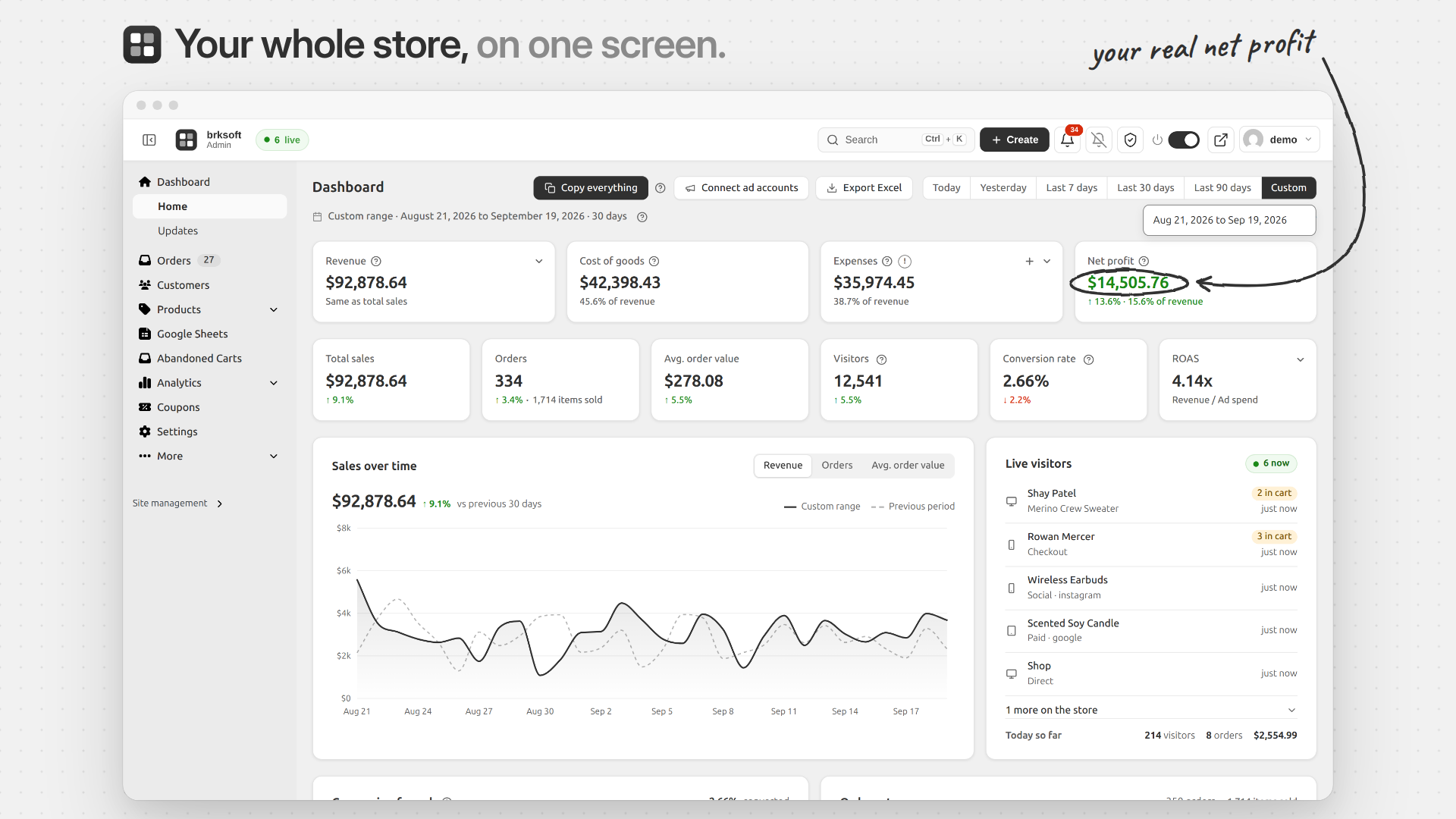
Modern WooCommerce Dashboard & Sales Report with Real-Time Analytics
The heart of BrikPanel is a modern WooCommerce dashboard, a true woocommerce admin panel plugin, not a styling layer.
- Total Sales, Total Orders, Average Order Value (AOV): today, yesterday, last 7/30 days, or any custom range, with ±% period-over-period delta on every metric
- Visitors counted from your own database (admins excluded), and Conversion Rate computed live from real visitors and real orders
- Beautiful sales chart powered by Chart.js, plus an order status donut (Successful, Failed, Returns & Refunds, Cancelled)
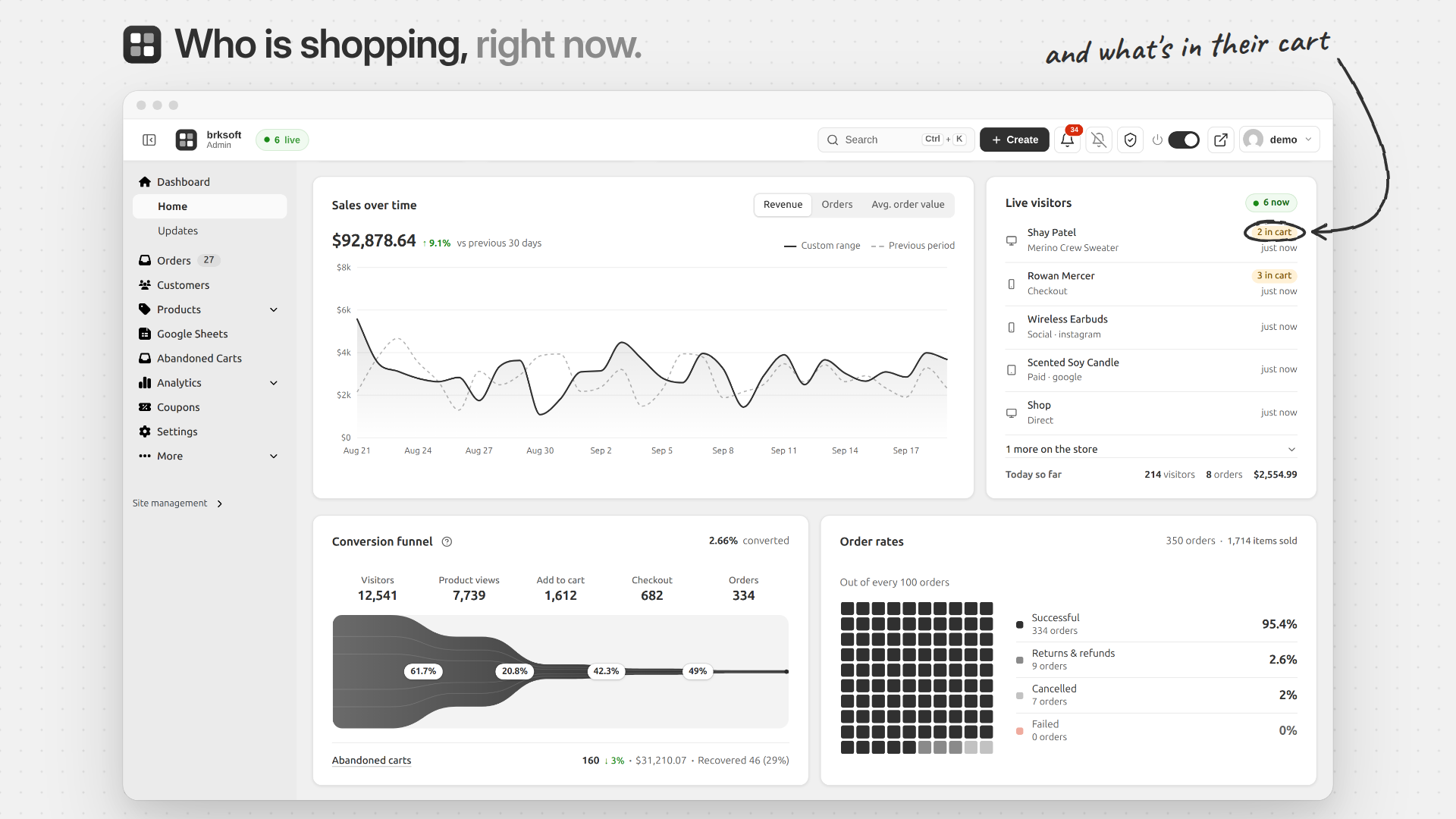
- WooCommerce conversion funnel: Visitors → Product Views → Add to Cart → Checkout → Orders, with counts at every step
This is a complete WooCommerce sales report and reporting layer: real-time sales reports, charts and KPIs inside a modern WooCommerce admin.
Customer Analytics: LTV, RFM Segmentation & Cohort Retention
BrikPanel ships a complete WooCommerce customer analytics suite, calculated from your store data and visualized in the dashboard.
- Customer Lifetime Value (LTV): total customers, average and top LTV, full LTV distribution histogram, and a ranked top-customers table
- RFM segmentation: every customer scored on Recency, Frequency, and Monetary, then bucketed into segments like Champions, Loyal Customers, At Risk, About to Sleep, Hibernating, and Lost, with average LTV and orders per segment
- Cohort retention: month-by-month cohort retention grid plus an average retention by month-offset trend line
- Advanced filtering and segmentation: combine spend range, product, location, date and more to build segments for both customers and orders
Live Visitors & Real-Time Conversion Tracking
BrikPanel ships a built-in WooCommerce live visitors widget, see who is on your store right now, what page they are on, and whether they have items in the cart.
- WooCommerce real time visitors widget with cart status (Browsing / Added to Cart / Order Received), current page, country and customer info
- WooCommerce conversion tracking in the same database that powers the dashboard
- Visitor IPs are never stored by tracking, only a salted SHA-256 hash, and live visitor data stays in a short-lived cache, never permanently in the database
- Privacy switches: make tracking wait for cookie consent (WordPress Consent API or your own banner), turn front-end tracking off entirely, or keep it on while excluding logged-in customer details from the Live view
- Most-viewed pages and most added-to-cart products reports
A free woocommerce statistics plugin and woocommerce sales tracker without external SaaS.
Geographic Analytics: WooCommerce Sales by Country
A 3D globe plots where your orders, customers and visitors come from: WooCommerce sales by country and city, with Top Countries and Top Cities tables. Click a country to open its sales map by state or province (49 countries); a store selling in one country opens on it.
Lightning-Fast Order Search: Cmd/Ctrl + K from Anywhere
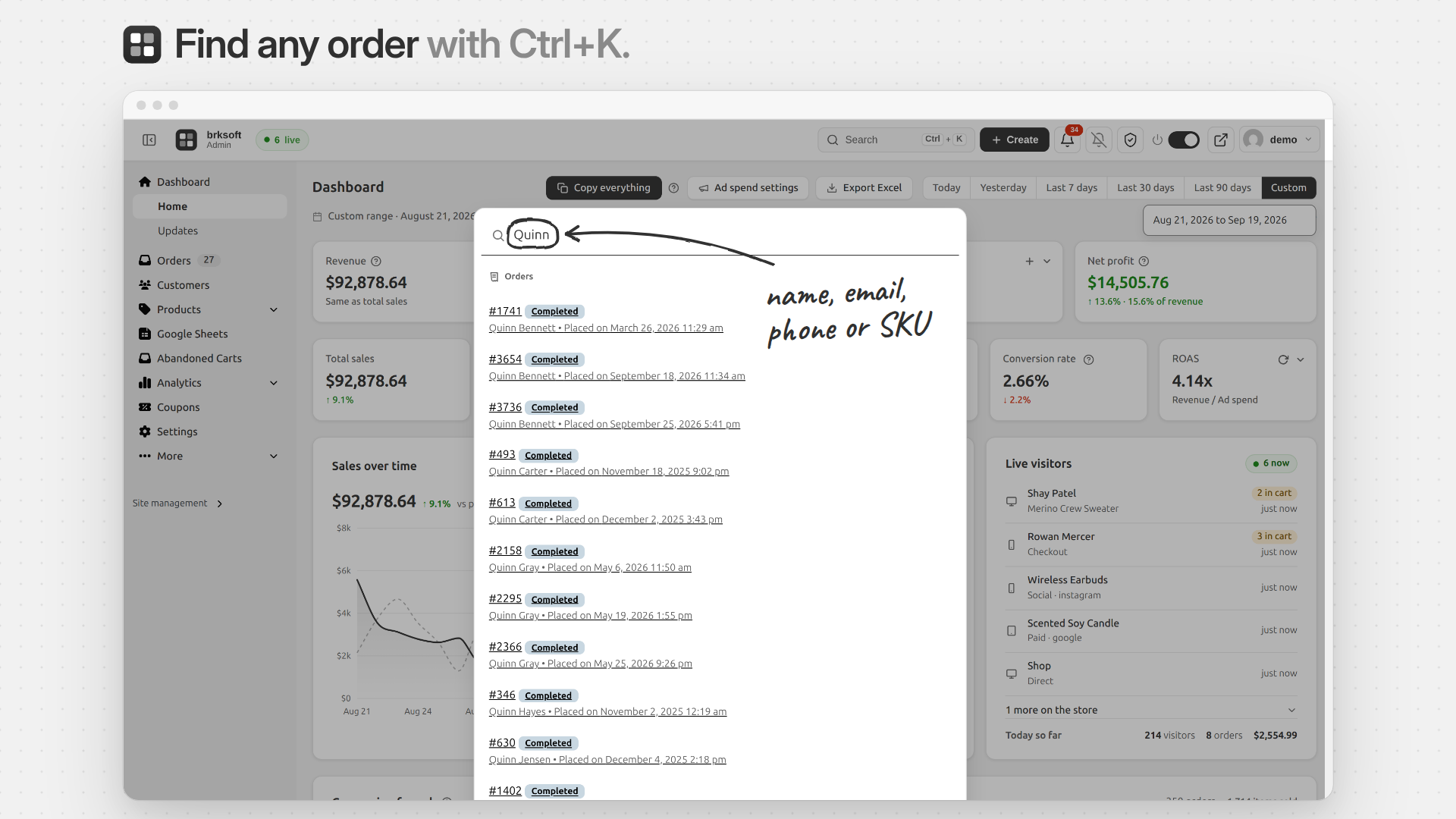
Hit Ctrl + K (or Cmd + K on Mac) anywhere in wp-admin and an order search overlay opens, the free woocommerce order search plugin. Searches order ID, customer name, email, phone and product SKU inside line items at once. True woocommerce quick search, with results as you type, status badges and dates.
WooCommerce Mobile App: Order Notifications on Your Phone
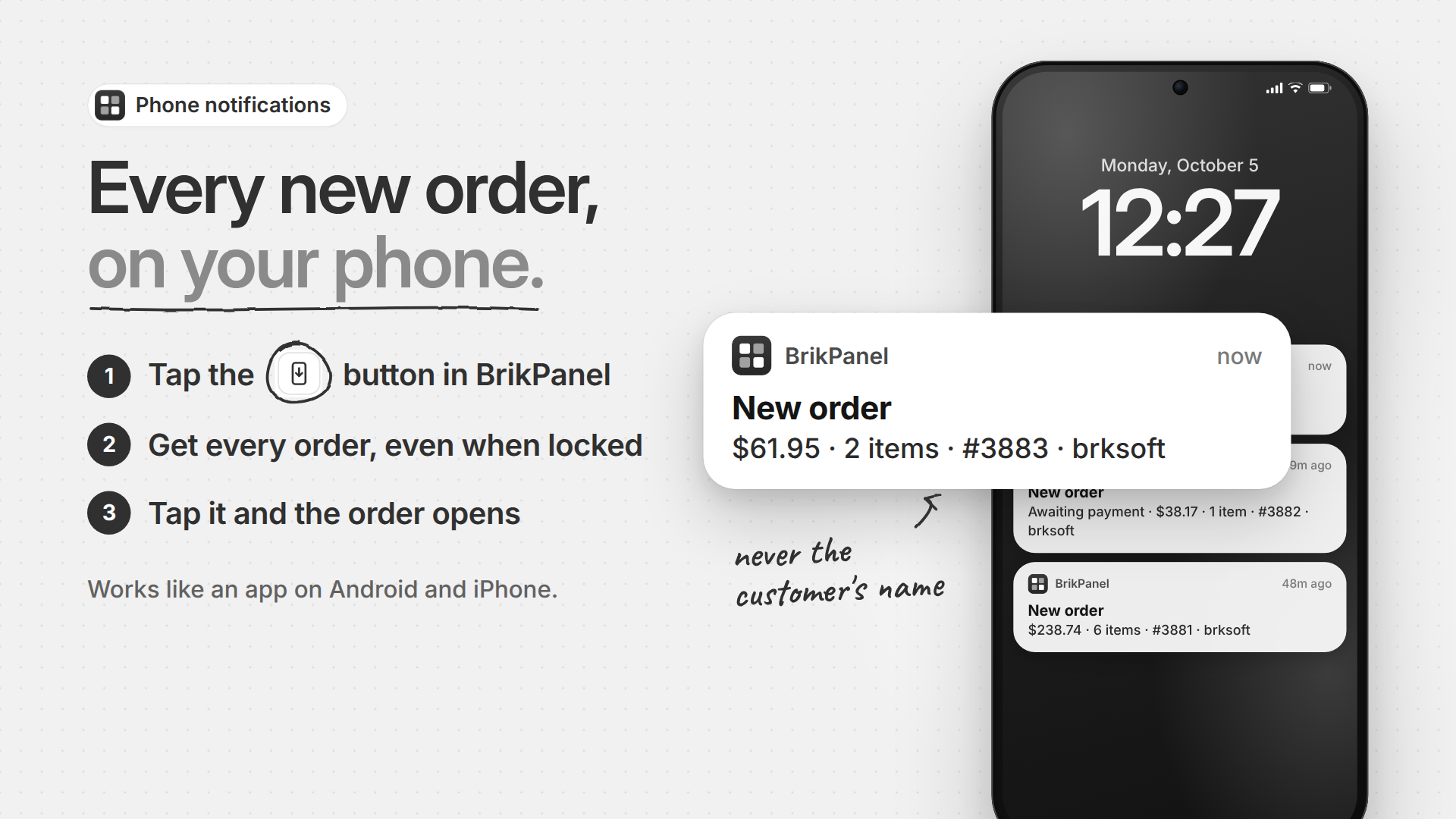
Open wp-admin on your phone and tap the phone button: BrikPanel works like a WooCommerce mobile app on Android and iPhone, with no app store and no account. Get a push notification for every new order, even when the phone is locked, with the order number, total and items, never the customer.
Modern WooCommerce Order Management, Export & Packing Slips
BrikPanel replaces the cluttered default orders page with a clean woocommerce order list plugin screen.
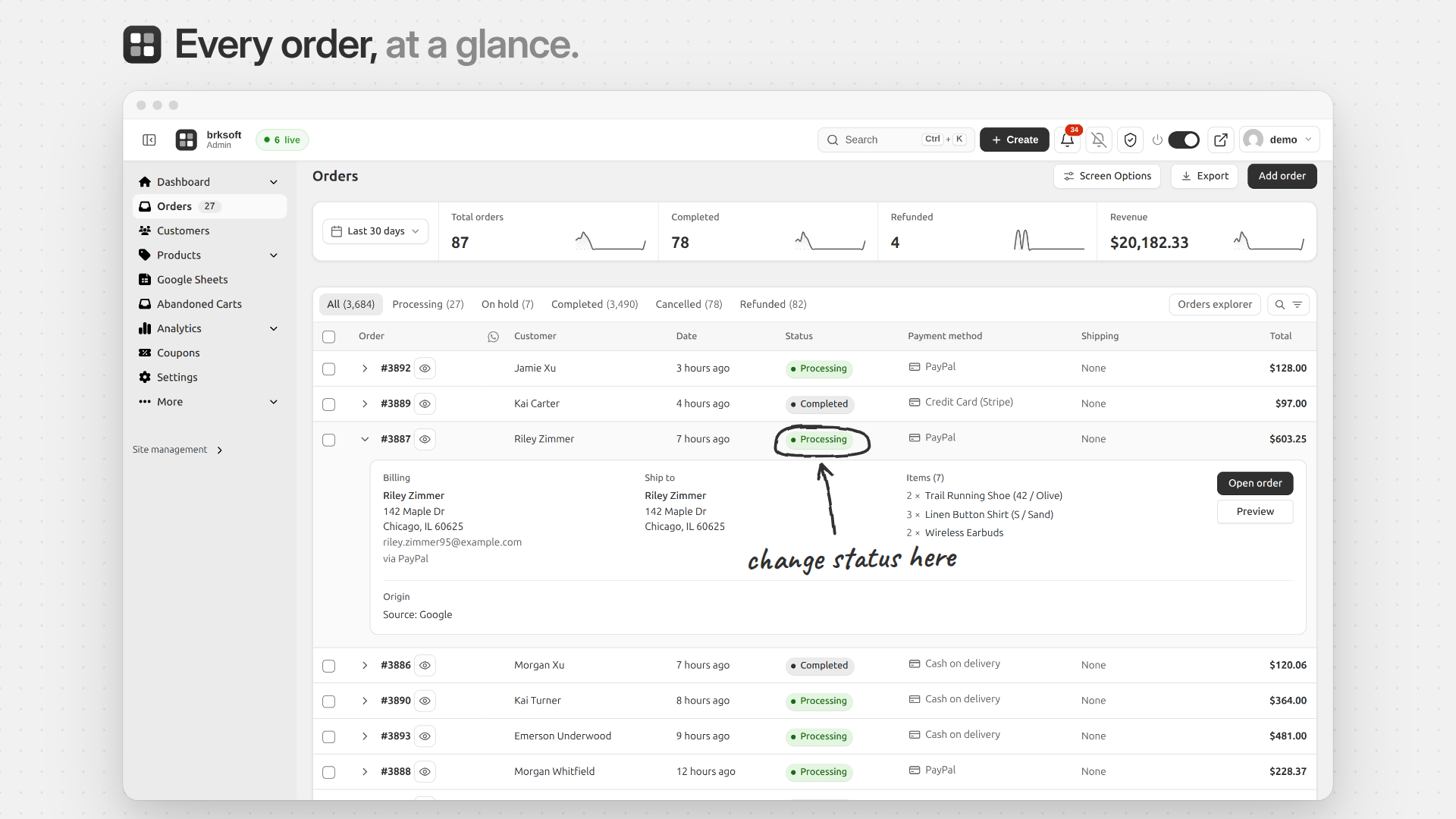
- 30-day overview bar: total orders, completed, refunded, revenue
- WooCommerce order export: the selected or filtered orders as Excel or CSV, with addresses, products, variations, SKUs and totals
- Print packing slips and order summaries with product images, one order or many at once
- Inline status change without opening the edit page
- WooCommerce sequential order numbers with an optional prefix, like WEB-1001
- Create your own order statuses, like Return Draft or Change
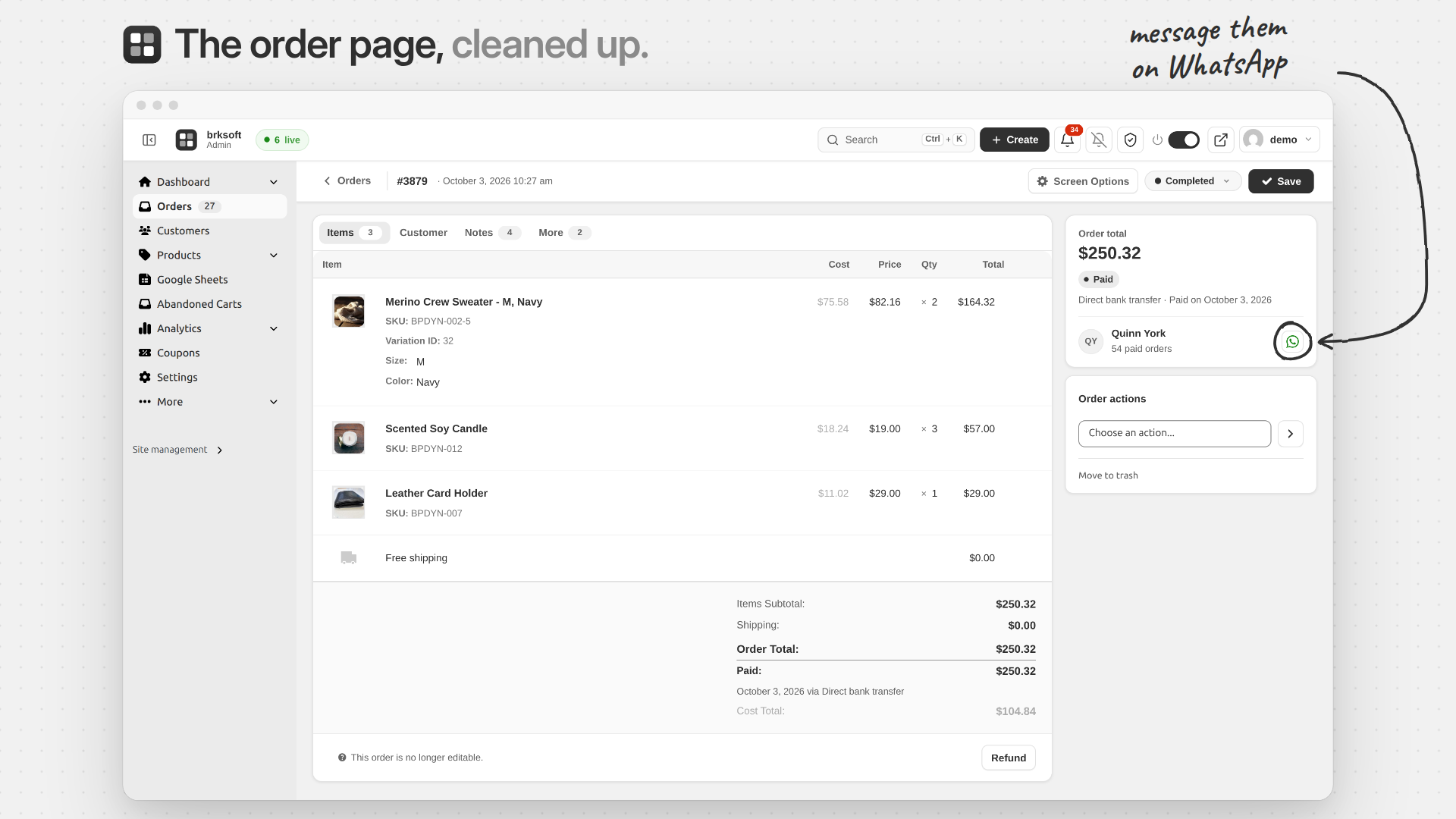
- Reskinned order edit page with copy-to-clipboard for billing/shipping
- Sold downloadable products on the order edit page
A real woocommerce order management plugin, not a reskin.
WooCommerce Returns & Refunds (RMA)
Customers request a WooCommerce return from My Account or as a guest: items and quantities (variations too), a reason and photos. You approve, mark the items received and refund with restock in one place. Optional EU withdrawal button (“Withdraw from contract here”).
WooCommerce Product List Plugin: Built for People Who Actually Edit Products
The default WooCommerce product list is fine for browsing, painful for editing. BrikPanel ships a complete woocommerce product list plugin that fixes it.
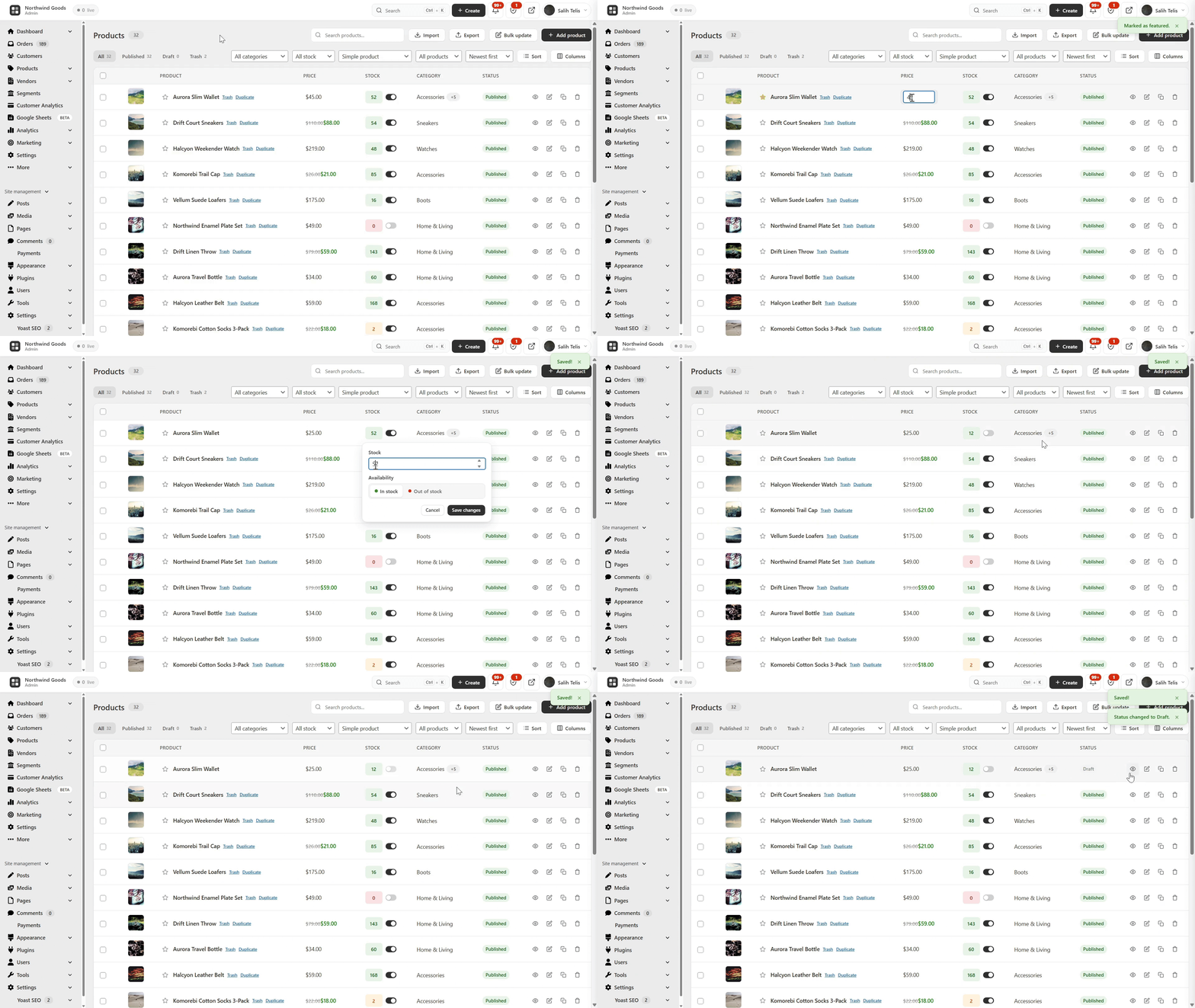
- Thumbnail, name, SKU, regular/sale price, stock badge, category
- Publish status toggle: flip draft ↔ published with one click, no reload
- Edit, Duplicate, Delete actions; bulk publish, draft, delete
- Status tabs (All / Published / Draft / Trash), live search by name or SKU
- Per-user toggles for any third-party / SEO column added by Yoast, Rank Math, ASE and other plugins
- Admin and Site Enhancements (ASE) custom columns are respected in the BrikPanel product, order and coupon lists
Quick Edit Sidebar: Edit Without Leaving the List
A slide-in panel from any product row to edit name, SKU, regular/sale price, stock and category, saved without leaving the list. The woocommerce quick edit WooCommerce should have shipped years ago: update woocommerce quick edit price, stock or category in two clicks.
Bulk Edit WooCommerce Products with the Variation Editor: Full Variation Support
This is where BrikPanel pulls ahead of almost every other free woocommerce bulk editor. Most free plugins only handle simple products and only “increase price by X%”. BrikPanel does far more, on variable products too.
- WooCommerce bulk price update (regular and sale): percentage, absolute value, or rounding, across the whole published catalog or filtered by category
- Bulk update WooCommerce products stock quantities (set quantity, add/subtract)
- WooCommerce bulk price by category: pick a category, set a rule, every published product updates
- WooCommerce bulk sale price updates (fixed or % off)
Now the part almost nobody else does for free: variation support.
- WooCommerce variation editor: open any variable product and edit every variation in one table (regular price, sale price, stock, SKU)
- Bulk edit variation prices WooCommerce: set the same price for all variations of an attribute (every “Red” variation, every “L” size), or apply a percentage rule
- Bulk update variation stock: set or adjust the stock of every variation in one click
- Attribute filter to narrow bulk updates to matching variations when a product has 50+ combinations
How to bulk edit WooCommerce products including variations without buying a $79/year plugin? BrikPanel handles both simple and variable products for free.
Simplified WooCommerce Product Editor
The default WooCommerce add-product screen has 11 metaboxes, 7 tabs and 40+ fields. BrikPanel ships a complete woocommerce product editor plugin with the noise removed.
- Featured image + product gallery with drag-and-drop upload, unlimited images, drag-to-reorder
- Searchable category picker with multi-select + quick create category without leaving the page
- Brand field: the WooCommerce
product_brandtaxonomy is now first-class alongside categories and tags - SEO fields: custom slug, meta title, meta description (SEO plugin needed), live Google SERP preview
- Full SEO plugin compatibility: Yoast SEO, Rank Math, All in One SEO and SEOPress metaboxes (including the SEO score panel) render and save inside the BrikPanel product editor
- Product type (Simple, Variable), attribute management with inline create
- Auto-generate variations from attribute combinations, per-variation price/sale/SKU/stock
On by default. Keep the default WooCommerce product page if you prefer.
WooCommerce Variation Gallery
Attach a separate image gallery to each product variation, the frontend swaps gallery automatically when a customer picks a variation. Image metadata (srcset, sizes, alt text) is fully preserved.
WooCommerce Categories Page: Drag-and-Drop Parent/Child Management
BrikPanel rebuilds the dated WooCommerce category screen with per-page settings (5 to 200) for both product_cat and product_tag, and drag-and-drop parent/child nesting with circular reference prevention (categories and brands).
Best WooCommerce Coupon Plugin: Free Coupon Manager
A complete WooCommerce coupon manager that makes coupons first-class in the admin, and we think the best WooCommerce coupon plugin in the free repository.
- Coupon table with code, discount type, amount, usage count, expiry highlighting, and status
- Slide-over coupon panel: create/edit without a reload
- Auto-generate random coupon codes; one-click duplicate
- Discount types: percentage, fixed cart, fixed product + free shipping toggle
- Expiry date picker, total + per-customer usage limits, min/max spend, individual use toggle, product/category include/exclude rules
WooCommerce Cart Abandonment & Cart Recovery
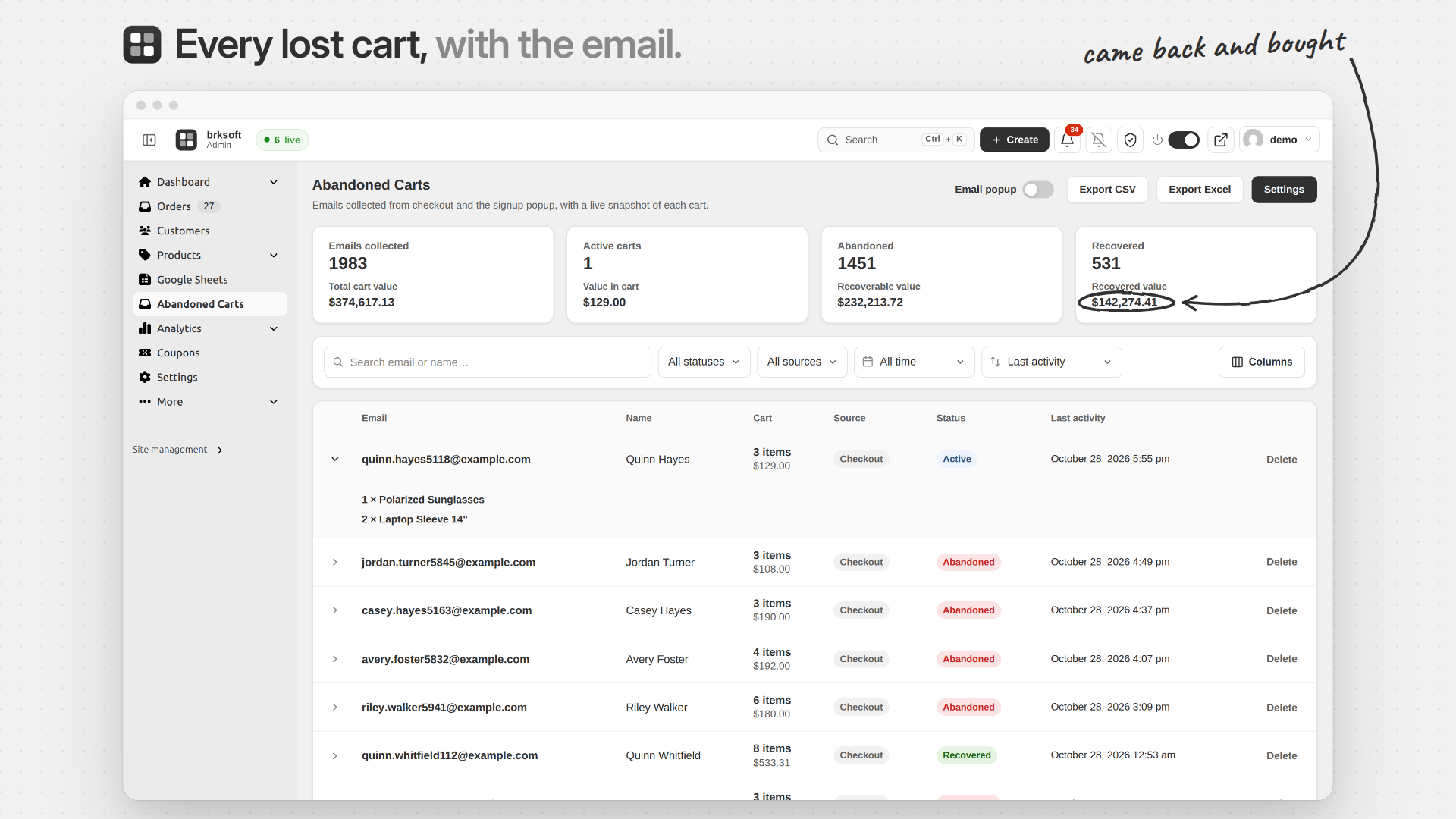
A built-in WooCommerce cart abandonment and cart recovery system, with no external email SaaS. A dedicated Abandoned Carts screen captures the checkout email of shoppers who do not finish (classic and block checkout, plus logged-in add-to-cart) and snapshots each cart down to the exact variation. Carts move Active to Abandoned to Recovered automatically, and an optional popup hands each subscriber a single-use cart recovery coupon. Search and date filters, plus CSV / Excel export.
Custom WordPress Login Page: Custom WP Login Page for WooCommerce
A custom WP login page that fully replaces the default wp-login.php look, a real WordPress login customizer for WooCommerce stores.
- Centered card layout with your logo and an optional site name heading
- Minimal, distraction-free fields, optional AJAX submission (no reload) with toast notification on errors
WooCommerce Inventory Management
A complete woocommerce inventory management workspace: the product list, bulk editor, variation editor and quick edit sidebar work together as one inventory workflow.
- Current stock for every product and variation in one place, with stock badges in the product list (in stock / low stock / out of stock)
- Update stock inline from the quick edit sidebar, or bulk update across categories and variations
A free woocommerce inventory management plugin that covers the daily workflow, no heavy stock control plugin needed.
Custom Top Admin Bar & Notifications
A Custom BrikPanel-styled top admin bar replaces the default WordPress toolbar with an e-commerce notification bell and quick links, toggleable from settings. Sound, confetti and a popup the moment a paid order arrives.
Google Sheets Sync: Real-Time WooCommerce Google Sheets Integration
BrikPanel ships a free WooCommerce Google Sheets sync, a fully native WooCommerce to Google Sheets integration that streams orders, customers and analytics into a Google Sheet you control. The free GSheetConnector alternative with no Zapier, no Make.
- Real-time order sync: every new WooCommerce order is appended within seconds, one row per order or line item so variations get their own rows. Free woocommerce order sync to google sheets with no external automation tool
- Scheduled WooCommerce Google Sheets export: hourly, every 4h or daily catch-up; idempotent so re-runs never duplicate rows
- Analytics report snapshots: Sales Summary, Daily KPIs, Top Products and Funnel tabs refreshed on an interval for pivots and dashboards in Sheets
- Customer + RFM snapshot: chained to the nightly RFM recompute
HPOS-compatible: a real google sheets woocommerce sync, free.
WooCommerce ROAS, Net Profit & Ad Spend: Google Ads + Meta Ads
BrikPanel pulls daily spend from Google Ads and Meta Ads (Facebook / Instagram) so you see real WooCommerce ROAS, Net Profit and ad spend next to revenue. Multi-currency aware. A free Triple Whale alternative and woocommerce profit tracking dashboard.
BrikMarket Marketplace Analytics
When BrikMarket is active, marketplace orders are excluded from the storefront conversion rate, and a dashboard block breaks down orders, share and top categories per marketplace.
Subscription & Membership Plugin Compatibility
Works alongside WooCommerce Subscriptions, MemberPress, Paid Memberships Pro and more: subscription products and member orders sold through WooCommerce show up in the same product list, order screens and customer analytics.
Developer Hooks & Filters
A developer hooks and filters system for agencies, actions and filters like brikpanel_after_product_save.
Navigation & Admin UI Cleanup
- Simplified mode (Modern navigation, on by default) folds the full WordPress menu into one Site management group, keeping BrikPanel + WooCommerce on top for non-technical clients
A Free, Self-Hosted WooCommerce Analytics & Inventory Suite
Store owners pay monthly SaaS fees for parts of what BrikPanel does free:
- Self-hosted WooCommerce analytics: sales, AOV, conversion, funnels, geo data, customer LTV, RFM, cohort retention, no third-party
- A free Metorik and Triple Whale alternative: analytics, ROAS and profit on your own server
- Shopify alternative for WooCommerce: the clean admin experience of Shopify with your storefront, customer data and orders on your own server
Why BrikPanel and not the default WooCommerce admin?
WooCommerce’s built-in analytics are slow, refresh on a delay, and have no live visitor tracking, conversion funnel, geographic globe, customer LTV / RFM / cohort reports, Cmd+K order search, quick edit sidebar, variation bulk editor, custom login or modern coupon manager. BrikPanel fixes every one of those gaps inside a single free WooCommerce admin plugin.
WooCommerce HPOS Compatibility & Performance
- Light on your storefront: admin screens load only inside wp-admin; shoppers get only the storefront features you keep on
- Hardened performance for low-resource hosting: heavy queries are batched, cached and run through Action Scheduler so the dashboard, customer analytics and bulk editor stay responsive on shared hosting
- HPOS (High-Performance Order Storage) fully supported
- WooCommerce 9.2 and newer; works alongside Admin Menu Editor, Slider Revolution, Yoast SEO, RankMath, WPML, Polylang
- Translated into 9 languages,
.potfile included - DB writes use prepared statements; admin activity excluded from analytics
Instalação
- Upload the plugin files to
/wp-content/plugins/brikpanel-admin-panel-dashboard-for-woocommerce, or install via Plugins → Add Plugin → Upload Plugin. - Activate through the Plugins menu.
- Open Dashboard in the admin sidebar, the BrikPanel dashboard loads immediately.
- (Optional) Visit WooCommerce → Settings → BrikPanel to enable or disable specific modules.
That is it. No license key, no email signup, no external account.
Phone notifications
Get a notification on your phone for every new order, also when it is locked. Open your store’s admin on your phone over https and tap the phone button in the top bar: it adds your store to the phone as an app, with your site’s own name and icon, and turns order notifications on. On Android, set the browser’s battery use to Unrestricted so notifications are not held back while the phone sleeps.
Each notification goes from your own server to the push service of the phone’s browser, encrypted so that only that phone can read it: Apple (terms, privacy), Google (terms, privacy), Mozilla (terms, privacy) or Microsoft (terms, privacy). By default it holds the order number, total and number of items; under Notification text you can add SKUs, the campaign and the store name, or change their order. It never holds the customer’s name or contact details. Nothing is sent until someone turns notifications on for a device, and Phone notifications in WooCommerce → Settings → BrikPanel → Notifications switches them off for the whole store.
Créditos
Region maps use boundaries from Natural Earth (public domain) and postal codes from GeoNames (CC BY 4.0).
Visitor countries: IP Geolocation by DB-IP, from its free IP to Country Lite list (CC BY 4.0).
Log de Changes
The full release history of every version is in changelog.txt, included with the plugin. The most recent releases are listed below.
3.3.57 (2026-11-24)
- New: Product categories in Google Sheets. The Products tab has a new “Categories” column and the Orders tab a “Product categories” column. A variation row shows its parent product’s categories.
- New: Publish or draft many products at once. The Bulk update window has a new Status group with “Publish” and “Set as draft”, for selected products, a category or the whole store.
- New: Bulk actions on everything the filters show. Bulk update and Bulk delete can apply to “All products matching the current filters”, on every page of the list.
- New: Products per page in Screen Options. On the products list, each user can pick 10, 20, 50 or 100 products per page. Users who never pick keep the number from the settings.
- Fix: Publishing a trashed product restores it properly. A trashed variable product now comes back with its variations. In the Trash tab, the selection bar shows “Restore” instead of “Move to trash”.
- Fix: Column choices in Screen Options are kept. Turning a column on and quickly off again no longer brings it back after a reload.
- Fix: Google Sheets no longer misses product changes. A product changed while a sync was running, or among more than 250 changed at once, now reaches the sheet right away. Category changes that do not save the product, such as bulk category actions and renamed categories, update the sheet too.
- Fix: Two-way product sync without a stock column. Price, cost and status edits in the sheet now apply even when the Products tab has no Stock or Stock status column. The tab’s help texts now name every column that syncs back.
3.3.56 (2026-11-23)
- New: Free help before you deactivate. When you deactivate BrikPanel because something did not work, it conflicted with another plugin or it slowed down your site, the window now offers free help on the support forum. “A feature I need is missing” links there too, to ask for it.
- New: A support button in the top bar. The headset button between Create and the order bell opens the support forum in a new tab. Turn it off or hide it from some roles in WooCommerce → Settings → BrikPanel → Dashboard → Top bar items.
- New: “Where did you first hear about BrikPanel?” On new installs, the welcome tour’s last screen asks this once per site. Nothing is sent unless you tap an answer.
- Fix: WhatsApp buttons on PagBank orders. PagBank’s official plugin keeps the customer’s mobile in its own “Celular” field and leaves WooCommerce’s phone empty, so the WhatsApp buttons did not show. The orders list, the order screen and the customer page now use that number when the phone is empty.
- Fix: WhatsApp links for Brazil’s area code 55. A number such as (55) 99123-4567 lost Brazil’s country code in the link. It now opens the right chat.
3.3.55 (2026-11-21)
- Fix: Coupons keep their discount type. Saving a coupon whose type comes from another plugin or your theme, in the coupon window or by changing its amount in the table, turned it into a percentage discount: a $10 coupon became 10% off. Saving now never changes the type, and the window always lists the coupon’s own type.
- New: Other plugins’ coupon fields in the coupon window. The discount types, fields, tabs and boxes that other plugins and your theme add to WooCommerce’s coupon screen now work in BrikPanel’s coupon window. Turn on “Auto-show fields other plugins add” in WooCommerce → Settings → BrikPanel → Coupons, or pick plugins in “Additional coupon data sections”.
- New: Fields from your other plugins in a folded box. Fields those settings do not show wait in a folded box at the bottom of the coupon window. Open it to edit them, or use “Always show these fields”. A duplicated coupon keeps their values.
- Tweak: Coupon types by name in “Copy everything”. The Store Summary lists each coupon’s type as WooCommerce names it, such as “Fixed cart discount”, instead of its code.
3.3.54 (2026-11-19)
- Fix: OpenPOS till sales on the dashboard. With HPOS, orders whose customer field was left empty, such as OpenPOS till sales, were missing from Total sales, Revenue, Orders, Avg. order value and Net profit. They now count as guest orders, on the dashboard and in Customers.
- Fix: The top bar follows “Polling interval”. The top bar, the Store Health shield, the dashboard’s Live visitors box and the Orders list now refresh at the pace set in WooCommerce → Settings → BrikPanel → Notifications, but never faster than before. In our test at 120 seconds, one open tab sent 15 BrikPanel requests in 9.5 minutes instead of 34. The default of 30 seconds changes nothing.
- Fix: Order status names in Dutch, Brazilian Portuguese and Turkish. The older “Change” (exchange) status had the wrong word in these languages, and “Return Draft” in Brazilian Portuguese. Stores that got a wrong name are corrected on update, unless you renamed the status yourself.
- Dev: New filter
brikpanel_variation_gallery_storefront. Return false to keep BrikPanel’s variation pictures off the product page, for a plugin that shows them itself. The product editor still saves them.
3.3.53 (2026-11-17)
- Tweak: A compact Marketplaces section. With BrikMarket, the marketplace part of the dashboard is two cards instead of three rows. “Marketplaces” shows sales, orders and average order value with their change, and marketplace sales day by day, or hour by hour for a single day. “Best sellers on marketplaces” has tabs for products and categories.
- New: Where your sales came from. A ring in the Marketplaces card splits the period’s sales between your website and each marketplace, with the amount and share of each. Each marketplace keeps its colour from one period to the next.
- Fix: Marketplace best sellers in your store’s currency. Product and category amounts were added up in each order’s own currency; they are now converted like the Sales figure. Products are listed by sales instead of units sold, with the units under each.
- Tweak: No Chart.js on the dashboard. The old marketplace pie was the last chart that needed it, so stores with BrikMarket load one file less too.
- Fix: BrikPanel on MailPoet and FluentCRM pages. MailPoet removes other plugins’ stylesheets and scripts from its pages, and FluentCRM their scripts, so BrikPanel’s side menu lost its look and the top bar’s menus and search stopped working there. BrikPanel now adds its own folder to their allow lists. On phones, MailPoet’s header sits right under the top bar.
3.3.52 (2026-11-14)
- New: Customer returns. Customers ask for a return from My Account, or as a guest with their order number and email. They choose the items and quantities, variations too, a reason and up to 5 photos, which are saved without their location data. It is off until you turn it on in WooCommerce → Settings → BrikPanel → Returns.
- New: A Returns page under Orders. Approve or reject a request and mark the items as received. The refund uses WooCommerce’s own refund, to the card when the payment method supports it, and puts the items back in stock. Waiting requests are counted in the menu and in “Needs attention”; the order screen has a Returns box and the orders list a badge.
- New: EU withdrawal button. A setting turns the button into the EU’s “Withdraw from contract here”, with a separate confirm step. The customer gets an email with their statement and the date and time they sent it.
- New: Four return emails. New request for you; request received, approved and rejected for the customer. Edit them in WooCommerce → Settings → Emails.
- Fix: Numbers no longer hide in closed sidebar menus. A closed menu item shows the total of the numbers in its list, such as Dashboard for Updates or Products for Reviews. “Site management” and your own headings show the total of their items while closed. Open one and each number is back on its own row.
- Fix: A long customer name no longer pushes Total off the orders list. When the table runs out of room, the customer column gives way first and the name ends with “…”. Point at it to see the full name. Names that fit look exactly as before.
Capturas de tela

Para desenvolvedores
Este é o seu plugin? Mostre os números.
Adicione um crachá ao vivo ao seu site, Documentos ou Readme do GitHub. Ele é atualizado por conta própria - nenhuma conta necessária.
Best BrikPanel: WooCommerce Dashbo… alternatives
All abandoned cart plugins →





FAQ
BrikPanel: WooCommerce Dashboard &…: quick answers
Respostas diretas, extraídas de dados ao vivo WordPress.org.
Fonte: WordPress.org
Is BrikPanel: WooCommerce Dashboar… free?
Yes. BrikPanel: WooCommerce Dashboar… is free to download and use from the official WordPress.org plugin directory.
Is BrikPanel: WooCommerce Dashboar… safe to use in 2026?
Yes — BrikPanel: WooCommerce Dashboar… is a safe, well-maintained plugin to use in 2026. It runs on 1K+ sites, is rated 5/5 and was last updated 24 hours ago, and scores 91/100 on our health check.
How many websites use BrikPanel: WooCommerce Dashboar…?
BrikPanel: WooCommerce Dashboar… is active on 1K+ WordPress websites and has been downloaded 61,207 times since it launched in March 2025. It was downloaded 12,549 times in the last 30 days.
Does BrikPanel: WooCommerce Dashboar… work with WordPress 7.1?
Yes. The developer has tested BrikPanel: WooCommerce Dashboar… up to WordPress 7.1.5, the latest release. It requires WordPress 6.0 or newer.
What PHP version does BrikPanel: WooCommerce Dashboar… need?
BrikPanel: WooCommerce Dashboar… requires PHP 7.4 or higher. Most hosts run PHP 8.x today, so it works on any modern WordPress hosting.
When was BrikPanel: WooCommerce Dashboar… last updated?
The latest version, 3.3.57, was released on November 24, 2026 (24 hours ago).
Who makes BrikPanel: WooCommerce Dashboar…?
BrikPanel: WooCommerce Dashboar… is developed and maintained by Brksoft.
What are the best alternatives to BrikPanel: WooCommerce Dashboar…?
The most popular alternatives to BrikPanel: WooCommerce Dashboar… are Booster for WooCommerce (30K+ installs), MWB HubSpot for WooCommerce (6K+ installs) and ActiveCampaign for WooComme… (5K+ installs).
Alimentado por PageForge
Um modelo e uma planilha. Uma página real para cada pesquisa.
PageForge Transforma cada linha de um CSV em uma página WordPress com seu próprio título, URL, SEO campos e esquema, construído no layout que você já desenhou. Gratuito em WordPress.org.
- CSV e XLSX, mais Google Sheets em Profissional e Empresarial
- Seu próprio título, URL, SEO campos e esquema para cada página
- Funciona com o editor de blocos, Elementor, Divi e Avada
- Gratuito em WordPress.org, sem cartão de crédito