


Bulk Content Toolkit
Custom meta fields in native Quick Edit and Bulk Edit. WooCommerce, LearnPress, ACF, any plugin. No CSV.

Escolha sólida
Bulk Content Toolkit is a solid plugin choice in 2026, with a few things worth checking first. It runs on 50+ sites, is rated 5/5 and was last updated 2 hours ago, and scores 75/100 on our health check.
- Actively developed — last update 2 hours ago
- Testado com as últimas WordPress (7.1)
- Pequena base de usuários (mais de 50 instalações ativas)
- Muito poucos comentários até agora
Como ele se acumula?
Lado a lado em instalações, atualizações, avaliações e suporte



Downloads diários
Os picos de download geralmente seguem uma nova versão — cada site que atualiza automaticamente é um download.
Rankings
Where Bulk Content Toolkit stands todayWordPress.org Classificações de pesquisa
Posição ao vivo na pesquisa de plugins, top 100| Palavra chave | Posição |
|---|---|
| edição em massa | #56 |
| Campos personalizados | >100 |
| meta fields | >100 |
| quick edit | #90 |
| WooCommerce | >100 |
Adoção da versão
Compartilhamento de sites ativos por lançamento.
Divisão de classificação
★★★★★ ★★★★★ 5 de 1 comentários
About Bulk Content Toolkit
From the official readme · v1.6.1Descrição
Bulk Content Toolkit adds any custom meta field to the native WordPress Quick Edit row and Bulk Edit panel — automatically, without writing a single line of code.
Most bulk edit plugins hardcode which fields they support. Bulk Content Toolkit reads your actual database and exposes every meta field that exists on your site, regardless of which plugin created it.
Como funciona
- Go to Settings → Bulk Edit.
- Pick a post type (products, courses, pages, custom types…).
- Move the fields you want into the “Selected Fields” column.
- Save — those fields now appear in Quick Edit and Bulk Edit inside the native WordPress UI.
Works with everything
Because the plugin reads directly from wp_postmeta, it works with any field from any plugin — without any integration code:
- WooCommerce: _price, _sale_price, _stock_status, _manage_stock, _tax_status, and all product meta
- LearnPress: _lp_price, _lp_coming_soon, _lp_max_students, _lp_passing_condition, and all course meta
- ACF (Advanced Custom Fields): any field saved to post meta
- Elementor, WPML, Yoast SEO, and any other plugin that writes to wp_postmeta
Automatic field type detection
The plugin samples your existing data and infers the correct input type — checkbox, select, number, date, color, URL, textarea, and more. Common WooCommerce and LearnPress fields are hardcoded to their correct type.
100% native
No new UI to learn. No external spreadsheet. No CSV. Fields appear in Quick Edit and Bulk Edit exactly where WordPress users already expect them.
WooCommerce variations (new)
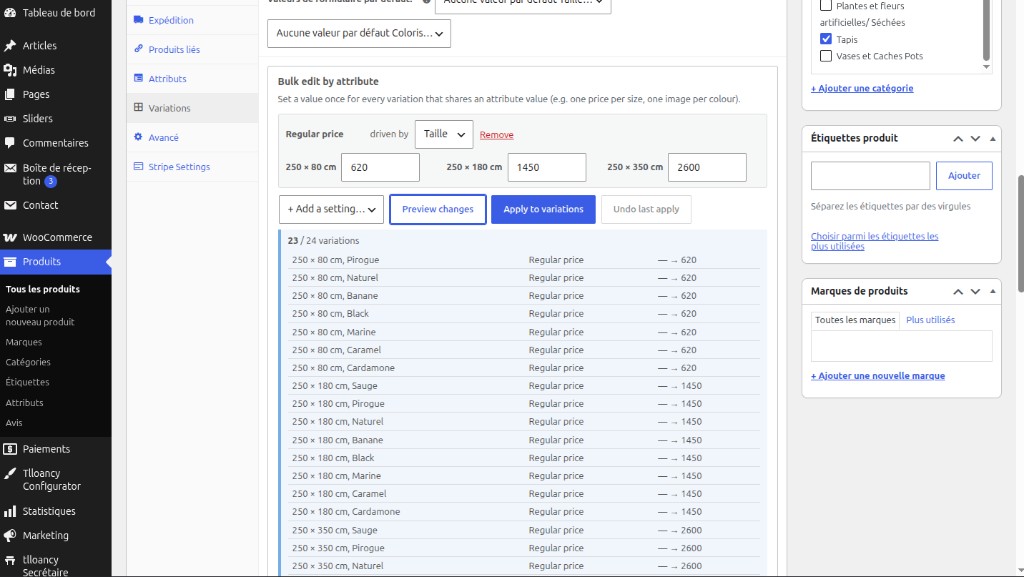
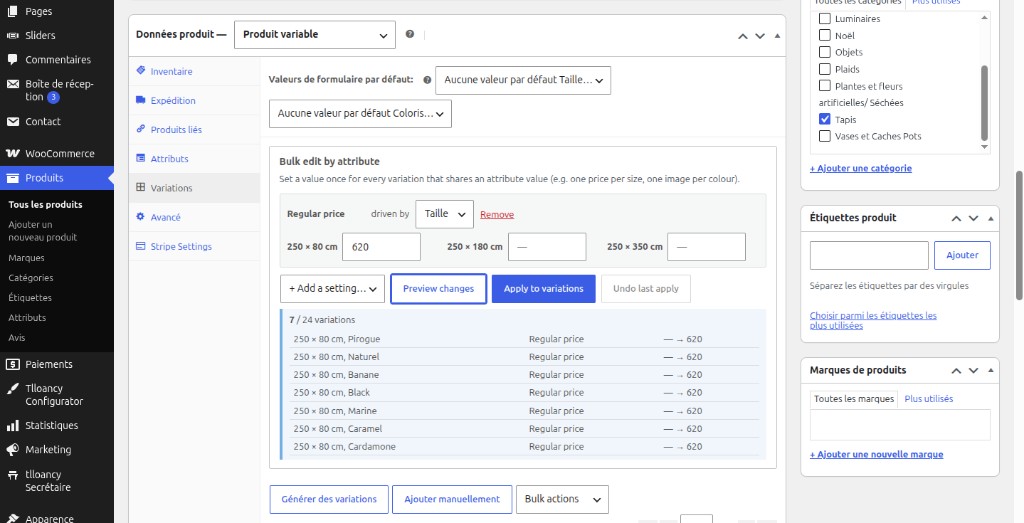
On a variable product, open the Variations tab: the “Bulk edit by attribute” panel lets you say “all 3×4 cost 49.90, all 6×8 cost 149, every banana variation gets the banana photo” in one go. One setting is driven by one attribute. Preview first, apply, undo if needed. Screenshots 1 and 2 show a price per size, then a partial apply. Nothing changes on sites without WooCommerce.
Instalação
- Upload the plugin folder to /wp-content/plugins/ or install via Plugins → Add New.
- Ative o plugin.
- Go to Settings → Bulk Edit and select which fields to expose for each post type.
Log de Changes
Unchecked Quick Edit boxes now save. LearnPress off values are stored empty. WooCommerce booleans stay yes or no. The switch stays in sync with its hidden input.
1.6.1
- Fix: “Bulk edit by attribute” now updates every matching variation on products with more than 25 variations (the batches used to skip some).
- Fix: Quick Edit can no longer blank a product’s fields when loading the current values fails; Update stays disabled and the save is ignored by the server.
- Fix: Bulk Edit now also works when started from the bottom “Bulk actions” menu.
- Fix: Serialized meta (such as _product_attributes) is never shown as text, rewritten or overwritten; the list table no longer errors on it.
- Fix: _sale_price_dates_from / _sale_price_dates_to (timestamps) are no longer editable as dates, so scheduled sales are never erased.
- Fix: Textarea fields keep their line breaks; values containing a backslash are saved and restored intact; untouched fields are no longer rewritten or created empty.
- Fix: WooCommerce product fields written by Quick/Bulk Edit now refresh the product lookup table, stock visibility and caches.
- Fix: Variations: a stock status is skipped on variations that manage stock, a sale price not below the regular price is skipped, and image rules only accept real images.
- Fix: Quick Edit uses the post’s real type, honours meta capabilities (auth_post_meta_*), and Bulk Edit skips posts being edited by someone else.
- Fix: Bulk Edit and Undo of WooCommerce regular/sale prices now go through the product object, so the displayed price (_price), the lookup table and the parent’s price range are recomputed instead of staying stale.
- Fix: Quick Edit no longer rewrites a field you did not touch: HTML and JSON in notes are kept (the stored value is compared before sanitizing).
- Fix: Quick Edit and Bulk Edit no longer create a “no” meta (such as _featured) on products where it did not exist.
- Fix: In WooCommerce Quick Edit, fields WooCommerce already provides natively (price, stock, SKU, weight…) are not duplicated, so they cannot overwrite each other.
- Fix: “Bulk edit by attribute” says how many changes were skipped (managed stock, sale price not below regular price) next to “Done”.
- Improvement: No database query on the front end. Known select fields (stock status, backorders, tax status) offer all their values. The field picker lists up to 1000 keys (filter bulkedittoolkit_max_available_fields).
- Improvement: Uninstalling the plugin removes its table, options and stored undo data. Settings screen: translatable strings, Enter in the filter box no longer moves fields.
1.6.0
- New: WooCommerce variations — “Bulk edit by attribute” panel in the Variations tab of a variable product. Set one value per attribute value (one price per size, one image per colour, also sale price, stock, weight, dimensions, shipping class), preview the changes, apply them to all matching variations, and undo the last apply. Only loaded when WooCommerce is active.
- Security: Bulk edit now requires the native list-table nonce and only writes to posts of the same type that the current user can edit.
- Security: Quick Edit / Bulk Edit AJAX readers check edit_post and only return fields configured for the post type.
- Fix: Meta keys with uppercase letters or dots are no longer altered, so Quick Edit pre-fill works for them. A real meta key starting with “custom_” is no longer mangled in bulk state detection.
- Fix: The “switch” input type is stored as “checkbox” (it is not a value of the settings table ENUM).
- New: Each selected field has a “Column” checkbox on the settings screen. Untick it to keep a field in Quick Edit / Bulk Edit without adding a column to the list table (useful on crowded lists such as WooCommerce products). Default: all fields shown, as before.
- Fix: Columns added to the list table are no longer squeezed to zero width on desktop (typical on WooCommerce products). Each gets a width suited to its type and header, and long values wrap inside the cell.
- Cleanup: Removed an unused admin-post handler.
1.5.0
- Compatibilidade: Testado até WordPress 7.1.
- New: Per-field input type dropdown on the settings screen.
- Fix: Saving the field list no longer re-samples types for fields you already configured.
- New: “Re-detect now” option when you explicitly want the sampler to run again.
- New: Undo the last bulk edit from the post list notice.
- New: Number fields can Increase / Decrease / Change by % without replacing the value.
1.4.3
- Fix: WooCommerce is optional; removed WC requires at least header.
1.4.2
- Bump: WP V7
- Fix: Bulk edit switches no longer double-prefix field names (custom_custom__*) — mixed yes/no now shows centered indeterminate state and saving without clicking leaves posts unchanged.
- Fix: Indeterminate switch styling via .bct-indeterminate class (works when native :indeterminate is not painted).
- Fix: PHP bulk checkbox save ignores any submitted value other than yes, no, or indeterminate.
- Improvement: More WooCommerce internal meta keys blocked from the field picker.
- Cleanup: Removed unused files (display.php, admin.js, bulk-actions.php, core-functions.php) and dead bulk-actions dropdown hooks.
- Dev: Central debug helper (bulkedittoolkit_log) — single PHPCS ignore; JS logs gated by UserScriptParams.debug (WP_DEBUG or BULKEDITTOOLKIT_DEBUG).
1.4.1
- Fix: Quick edit checkbox now uses a hidden input — unchecking reliably submits ‘no’ instead of being silently ignored.
- Fix: LearnPress boolean fields (_lp_coming_soon and 12 others) now write ” for false instead of ‘no’, matching LearnPress native storage convention.
- Fix: WooCommerce boolean fields normalized to ‘yes’/’no’ on write.
- Fix: Switch pre-population in quick edit now updates the hidden input, not just the visual checkbox.
- Fix: Delegated click handler keeps hidden input in sync with checkbox state after user interaction.
Capturas de tela
Para desenvolvedores
Este é o seu plugin? Mostre os números.
Adicione um crachá ao vivo ao seu site, Documentos ou Readme do GitHub. Ele é atualizado por conta própria - nenhuma conta necessária.
Best Bulk Content Toolkit alternatives
All bulk edit plugins →





FAQ
Bulk Content Toolkit: quick answers
Respostas diretas, extraídas de dados ao vivo WordPress.org.
Fonte: WordPress.org
Is Bulk Content Toolkit free?
Yes. Bulk Content Toolkit is free to download and use from the official WordPress.org plugin directory.
Is Bulk Content Toolkit safe to use in 2026?
Bulk Content Toolkit is a solid plugin choice in 2026, with a few things worth checking first. It runs on 50+ sites, is rated 5/5 and was last updated 2 hours ago, and scores 75/100 on our health check.
How many websites use Bulk Content Toolkit?
Bulk Content Toolkit is active on 50+ WordPress websites and has been downloaded 3,099 times since it launched in November 2024. It was downloaded 261 times in the last 30 days.
Does Bulk Content Toolkit work with WordPress 7.1?
Yes. The developer has tested Bulk Content Toolkit up to WordPress 7.1.5, the latest release. It requires WordPress 5.0 or newer.
What PHP version does Bulk Content Toolkit need?
Bulk Content Toolkit requires PHP 7.4 or higher. Most hosts run PHP 8.x today, so it works on any modern WordPress hosting.
When was Bulk Content Toolkit last updated?
The latest version, 1.6.1, was released on November 29, 2026 (2 hours ago).
Who makes Bulk Content Toolkit?
Bulk Content Toolkit is developed and maintained by Thomas Lloancy.
What are the best alternatives to Bulk Content Toolkit?
The most popular alternatives to Bulk Content Toolkit are Quick Featured Images (50K+ installs), BEAR (30K+ installs) and ACF Quick Edit Fields (30K+ installs).
Alimentado por PageForge
Um modelo e uma planilha. Uma página real para cada pesquisa.
PageForge Transforma cada linha de um CSV em uma página WordPress com seu próprio título, URL, SEO campos e esquema, construído no layout que você já desenhou. Gratuito em WordPress.org.
- CSV e XLSX, mais Google Sheets em Profissional e Empresarial
- Seu próprio título, URL, SEO campos e esquema para cada página
- Funciona com o editor de blocos, Elementor, Divi e Avada
- Gratuito em WordPress.org, sem cartão de crédito