


Smart Manager – WooCommerce Bulk Edit: Products, Orders, Users & More (Spreadsheet)
WooCommerce Bulk Edit for products, orders, coupons & any WordPress post type – all in one Excel-like spreadsheet. Manage stock & pricing too.

Escolha segura
Yes — Smart Manager is a safe, well-maintained plugin to use in 2026. It runs on 10K+ sites, is rated 4.4/5 and was last updated 21 hours ago, and scores 87/100 on our health check.
- Comprovado em escala em sites ativos de mais de 10 mil
- Actively developed — last update 21 hours ago
- Testado com as últimas WordPress (7.1)
- Momentum — downloads up 181.8% vs the previous 30 days
Como ele se acumula?
Lado a lado em instalações, atualizações, avaliações e suporte



Downloads diários
Os picos de download geralmente seguem uma nova versão — cada site que atualiza automaticamente é um download.
Rankings
Where Smart Manager stands todayWordPress.org Classificações de pesquisa
Posição ao vivo na pesquisa de plugins, top 100| Palavra chave | Posição |
|---|---|
| edição em massa | #11 |
| bulk edit products | #5 |
| bulk editor | #24 |
| inventory | #55 |
| prices | #88 |
Adoção da versão
Compartilhamento de sites ativos por lançamento.
Divisão de classificação
★★★★★★★★★★ 4.4 from 289 reviews
About Smart Manager
From the official readme · v9.2.0Descrição
One free editor for your whole WooCommerce store.
Edit products, variations, prices, stock, orders, coupons, posts, users; any WordPress post type and taxonomies (including custom) and custom fields in one Excel-like spreadsheet inside WordPress. Advanced search finds exactly what you need, so you can fix it in seconds instead of opening screen after screen. When you’re ready to change hundreds of records at once, Smart Manager Pro adds bulk edit and batch update.
Trusted by 10,000+ stores. Handles catalogs with 100,000+ records.
See how Smart Manager helps you save hours of work:
“It requires 10 different plugins to do what Smart Manager does with only 1 plugin.”
It is light, sleek, fast and I can manage coupons, users, products, orders, etc.
— Nuno Palha
✨ Smart Manager Lite – fast, efficient store management (Free)
Edit WooCommerce products and variations
Edit titles, SKUs, descriptions, categories, tags, attributes, tax class and tax status right in the grid. Turn on “Show Variations” and edit variations as easily as simple products. Add new products straight from the spreadsheet, or duplicate selected products, filtered products or your whole catalog in one click.
Edit prices and sale prices
Update regular and sale prices directly in the spreadsheet, with every product and variation in view, so you can spot and fix pricing mistakes at a glance.
Stock manager and inventory
Update stock quantity, stock status, manage stock and backorders in the grid. See a stock log for each product to know how fast stock moves, and sync stock log data from the Stock Manager for WooCommerce plugin. Export your stock columns to CSV whenever you need them.
Edit attributes, categories, tags and SKUs
Add or remove attributes, categories and tags, and fix SKUs, without leaving the spreadsheet.
Edit WooCommerce orders
Change order status, billing and shipping details, shipping method and currency from one screen. Customers get the usual WooCommerce emails when an order status changes. HPOS compatible.
Edit WooCommerce coupons
Update coupon amounts, types, usage limits and expiry dates, and create new coupons from the grid.
Edit custom fields and ACF
Smart Manager detects custom fields added by other plugins automatically, including ACF, Pods and Meta Box, so you can edit them next to your standard fields.
Edit WordPress posts and pages
Change titles, images and post status (draft to publish) for posts and pages in the same spreadsheet.
Find exactly what to edit
- Simple search across all columns
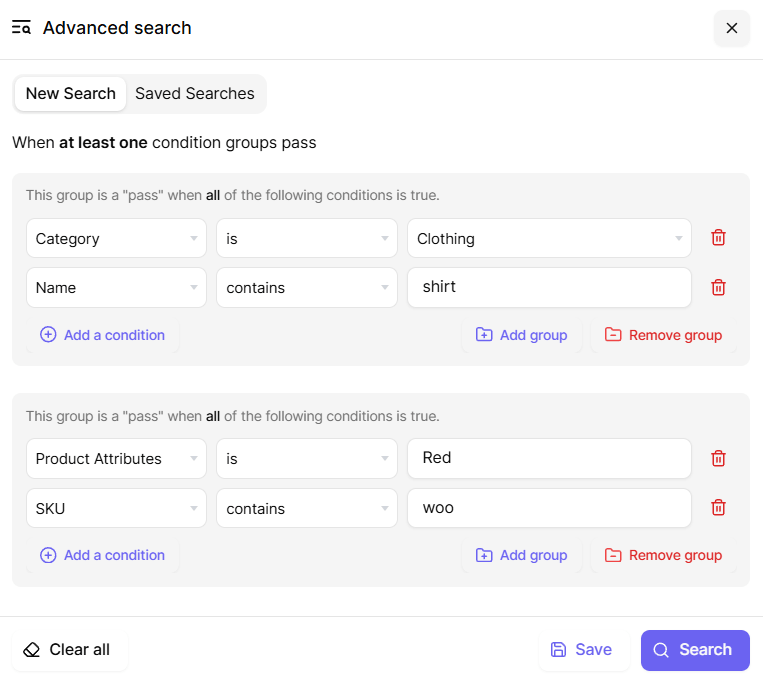
- Advanced Search with conditions like contains, is, greater than and less than
- Search, date and column filters
- Show, hide and sort columns, and reset to the default view
Work faster
- Import products from CSV
- Add, duplicate, trash and delete records
- Sticky headers, image previews and a distraction-free mode
- Works with 50+ popular WooCommerce and WordPress plugins
👤 Who uses Smart Manager
- Store owners and managers: fix prices, stock, SKUs and product details in minutes instead of days.
- Agencies and freelancers: manage large client catalogs from one spreadsheet.
- Marketers: manage coupons and sale prices for campaigns.
- Support teams: find and update any order without switching admin screens.
- Developers: manage custom fields without building custom admin panels.
⭐ Why stores choose Smart Manager
- One plugin instead of several: products, variations, stock, orders, coupons, posts and custom fields in one place.
- Built for big catalogs: handles 100,000+ records.
- Works with your stack: 50+ popular WooCommerce and WordPress plugins.
- Built by StoreApps, the team behind Smart Coupons and Affiliate for WooCommerce.
🏆 Smart Manager Pro: Edit hundreds of records in bulk
When editing record by record is no longer enough, Smart Manager Pro adds bulk edit, batch update and automation for growing stores.
Bulk edit and batch update
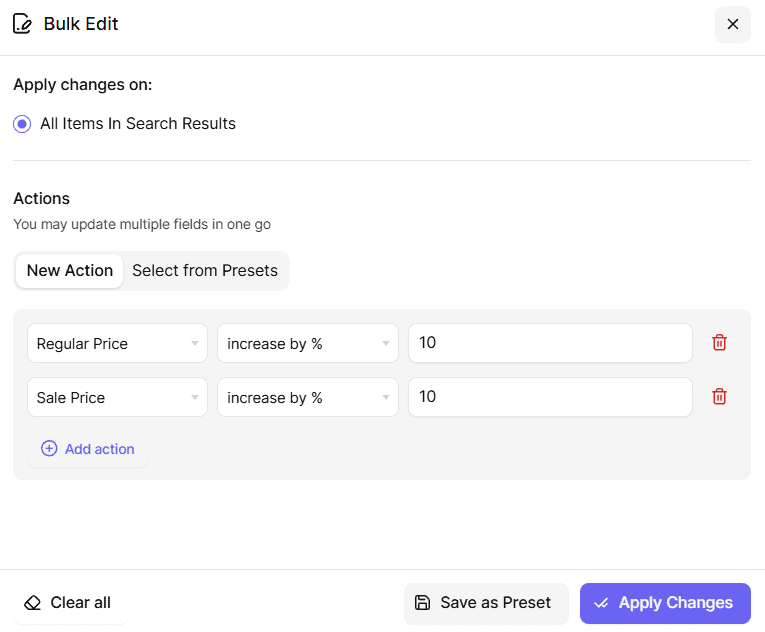
- Set to, increase or decrease by an amount or %
- Append, prepend, search and replace
- Copy values from another field
- Run on selected records, all search results or the whole store, across 100,000+ records in the background
- Unlimited inline edits
Bulk edit products, prices and stock
- Bulk edit prices and sale prices by category, attribute or any condition
- Bulk edit stock and backorders, with color-coded low stock levels
- Bulk assign, remove or replace attributes, categories and tags
- Auto-generate SKUs and copy fields from one variation to another
- Update featured and gallery images inline
Bulk edit orders, coupons and subscriptions
- Bulk edit WooCommerce orders and add, remove or copy line items
- Bulk edit coupons across your whole store
- Bulk edit WooCommerce Subscriptions; update existing subscriptions when a subscription product’s price changes
- Bulk edit ACF and other custom fields
Schedule, save and undo
- Schedule bulk edits to run later
- Save bulk edit actions and reuse them
- Undo bulk and inline edits from Edit History
More data, search and exports
- Users, media, memberships, bookings, custom post types and taxonomies
- AND/OR Advanced Search, saved searches and Custom Views
- Full CSV export of all or filtered records, and scheduled order exports
- Customer lifetime value, purchase history, PDF invoices and packing slips
- Role and user-based access to dashboards
- WPML compatible
“I would happily pay five times for this product!”
What really sold me on this was Bulk Edit. My assistant does not have to do any complex math now… Our repeat sales were up by 19.5%.
— Jeff Smith
$199/year. Get Smart Manager Pro →
🤝 Works with all your favorite plugins
Advanced Custom Fields (ACF), Pods, Meta Box, WooCommerce Subscriptions, WooCommerce Memberships, WooCommerce Bookings, Product Add-Ons, Cost of Goods, Product Vendors, Smart Coupons, Affiliate for WooCommerce, Yoast SEO, Rank Math, WPML, LifterLMS, Tutor LMS, GiveWP and Germanized for WooCommerce.
🤩 Case studies – Real customers, real results!
- Gold Coast Trading Cards manages 45,000 products without CSV files
- Pacho Keys cut store management time by 90%
- TOLYMP saves 8+ hours every week on product updates
“We updated the Tax class on all products in less than 3 minutes.”
We have over 6000 individual lines on our site and this has saved us huge amounts of time. Bulk edit works flawlessly… If you need to change all of your prices on the entire site by a % or value, you can with a couple of clicks!
— Kevin Goodchild, Obsolete Electronic Components
📒 How-to guides
- Bulk edit sale prices
- Bulk edit attributes
- Bulk assign product categories
- Export orders to CSV
- All Smart Manager docs →
Still evaluating bulk edit plugins?
More from StoreApps
- Smart Coupons – gift cards, store credit and coupons.
- Affiliate for WooCommerce – affiliate and referral programs.
- Smart Subscriptions – simple, Stripe-native subscriptions.
Using Smart Manager? An honest review helps other store owners decide.
Security issues: please report via the Patchstack Vulnerability Disclosure Program.
Privacy & Usage Tracking
Smart Manager respects your privacy. Usage tracking is completely optional and turned off by default. No data is sent unless you explicitly opt in via the in-plugin notice or settings.
When enabled, we only collect 100% anonymous usage patterns (such as feature clicks, plugin version, and general store size) to help guide our feature roadmap. We never collect store sales, customer details, product data, or personal info.
Data is sent to our analytics provider, PostHog. See the Telemetry & Privacy Policy for full details.
Instalação
- Go to Plugins > Add New, search for “Smart Manager”, then install and activate.
- Open Smart Manager from the WordPress admin menu.
- Pick a dashboard (Products, Orders, Coupons or Posts) and start editing.
Log de Changes
Fixes related to Advanced Custom Fields (ACF) True / False fields not saving correct values using Bulk Edit (Pro), Advanced Custom Fields (ACF) True / False fields showing '#bad-value#' instead of a checkbox and not editable using Inline Edit, Advanced Search returning no results when searching Advanced Custom Fields (ACF) True / False fields for unchecked values. Recommended upgrade.
9.2.0 (25.11.2026)
- Fix: Advanced Custom Fields (ACF) True / False fields not saving correct values using Bulk Edit (Pro)
- Fix: Advanced Custom Fields (ACF) True / False fields showing ‘#bad-value#’ instead of a checkbox and not editable using Inline Edit
- Fix: Advanced Search returning no results when searching Advanced Custom Fields (ACF) True / False fields for unchecked values
- Update: POT file
9.1.0 (23.11.2026)
- New: WordPress 7.1.5 compatible
- New: WooCommerce 11.3.1 compatible
- Update: POT file
9.0.0 (11.11.2026)
- New: WooCommerce 11.2.2 compatible
- Update: POT file
8.99.0 (04.11.2026)
- New: WordPress 7.1.4 compatible
- New: WooCommerce 11.2.1 compatible
- New: PHP 8.5 compatible
- Fix: Bulk Edit running very slowly when updating prices of product variations on large stores (Pro)
- Fix: Bulk Edit, Export CSV and other background processes getting stuck or failing on large stores (Pro)
- Fix: Interrupted background processes repeating records that were already processed (Pro)
- Fix: Stop option not cancelling all queued background actions (Pro)
- Fix: Undo data being saved multiple times for the same record in some cases during Bulk Edit (Pro)
- Fix: Daily cleanup of old Export CSV files failing (Pro)
- Fix: Stock log import check for the Stock Manager for WooCommerce plugin running database queries on every page load in admin and on the frontend
- Fix: Advanced Search and other panels not opening after clicking the ‘View’ action in the grid
- Fix: Large background processes not continuing after reaching server limits
- Update: Easy access to the default view from the Custom Views dashboard (Pro)
- Update: Minimum required versions are now WordPress 6.9 and PHP 7.2
- Update: Action Scheduler library to 4.2.0
- Update: POT file
8.98.0 (25.09.2026)
- New: WordPress 7.1.2 compatible
- New: WooCommerce 11.1.2 compatible
- Fix: CSV export file failing to download automatically when exporting more than 50 records (Pro)
- Fix: Privilege escalation vulnerability via SQL Injection in Access Privilege Settings [Thanks to Wordfence team] (Pro)
- Update: POT file
8.97.0 (17.09.2026)
- New: WooCommerce 11.1.0 compatible
- Fix: ‘Product Suggestions’ and ‘Edit Link’ modals not appearing in the Text Editor modal for Rich Text fields such as ‘Description’ and ‘Additional Description’
- Fix: PHP 8.5 deprecated warnings for optional parameters declared before required parameters
- Fix: CSV Export success message showing 0 records exported when exporting all records (Pro)
- Fix: Post field changes not reflecting on the frontend on some setups (Pro)
- Update: Automatically handle ‘Manage Stock’ when editing ‘Stock’ via Inline Edit and Bulk Edit, with warning prompts
- Update: UI/UX improvements in the grid and Column Manager
- Update: POT file
Capturas de tela


Para desenvolvedores
Este é o seu plugin? Mostre os números.
Adicione um crachá ao vivo ao seu site, Documentos ou Readme do GitHub. Ele é atualizado por conta própria - nenhuma conta necessária.
Best Smart Manager alternatives
All bulk edit plugins →





FAQ
Smart Manager: quick answers
Respostas diretas, extraídas de dados ao vivo WordPress.org.
Fonte: WordPress.org
Is Smart Manager free?
Yes. Smart Manager is free to download and use from the official WordPress.org plugin directory. The developer also sells premium add-ons or a Pro version with extra features.
Is Smart Manager safe to use in 2026?
Yes — Smart Manager is a safe, well-maintained plugin to use in 2026. It runs on 10K+ sites, is rated 4.4/5 and was last updated 21 hours ago, and scores 87/100 on our health check.
How many websites use Smart Manager?
Smart Manager is active on 10K+ WordPress websites and has been downloaded 1,486,048 times since it launched in January 2011. It was downloaded 14,890 times in the last 30 days.
Does Smart Manager work with WordPress 7.1?
Yes. The developer has tested Smart Manager up to WordPress 7.1.5, the latest release. It requires WordPress 6.9 or newer.
What PHP version does Smart Manager need?
Smart Manager requires PHP 7.2 or higher. Most hosts run PHP 8.x today, so it works on any modern WordPress hosting.
When was Smart Manager last updated?
The latest version, 9.2.0, was released on November 26, 2026 (21 hours ago).
Who makes Smart Manager?
Smart Manager is developed and maintained by storeapps.
What are the best alternatives to Smart Manager?
The most popular alternatives to Smart Manager are Quick Featured Images (50K+ installs), BEAR (30K+ installs) and ACF Quick Edit Fields (30K+ installs).
Alimentado por PageForge
Um modelo e uma planilha. Uma página real para cada pesquisa.
PageForge Transforma cada linha de um CSV em uma página WordPress com seu próprio título, URL, SEO campos e esquema, construído no layout que você já desenhou. Gratuito em WordPress.org.
- CSV e XLSX, mais Google Sheets em Profissional e Empresarial
- Seu próprio título, URL, SEO campos e esquema para cada página
- Funciona com o editor de blocos, Elementor, Divi e Avada
- Gratuito em WordPress.org, sem cartão de crédito