


BatchPilot
Bulk delete, edit, and duplicate WordPress content with preview, undo, and full audit history.

Use com cautela
BatchPilot works, but test it on a staging site before relying on it in 2026. Was last updated 3 weeks ago, and scores 59/100 on our health check.
- Desenvolvido ativamente — última atualização 3 semanas atrás
- Base de usuários pequenas (<10 instalações ativas)
- Muito poucos comentários até agora
Como ele se acumula?
Lado a lado em instalações, atualizações, avaliações e suporte



Downloads diários
Os picos de download geralmente seguem uma nova versão — cada site que atualiza automaticamente é um download.
Rankings
Where BatchPilot stands todayWordPress.org Classificações de pesquisa
Posição ao vivo na pesquisa de plugins, top 100| Palavra chave | Posição |
|---|---|
| bulk delete | >100 |
| edição em massa | >100 |
| bulk operations | >100 |
| duplicate posts | >100 |
| undo | >100 |
About BatchPilot
From the official readme · v1.2.0Descrição
BatchPilot is a single plugin that replaces the usual stack of bulk-delete, bulk-edit, and duplicate-post plugins. Every action is previewed before it runs, can be undone, and is recorded in a history log you can re-run.
Three operations on posts, pages, and any registered public post type:
- Delete. Trash by default, with a separate permanent option.
- Duplicate. Copies meta, taxonomies, featured image, and optionally child posts.
- Bulk edit. Change status, author, publish dates, taxonomies, password, comment status, or menu order.
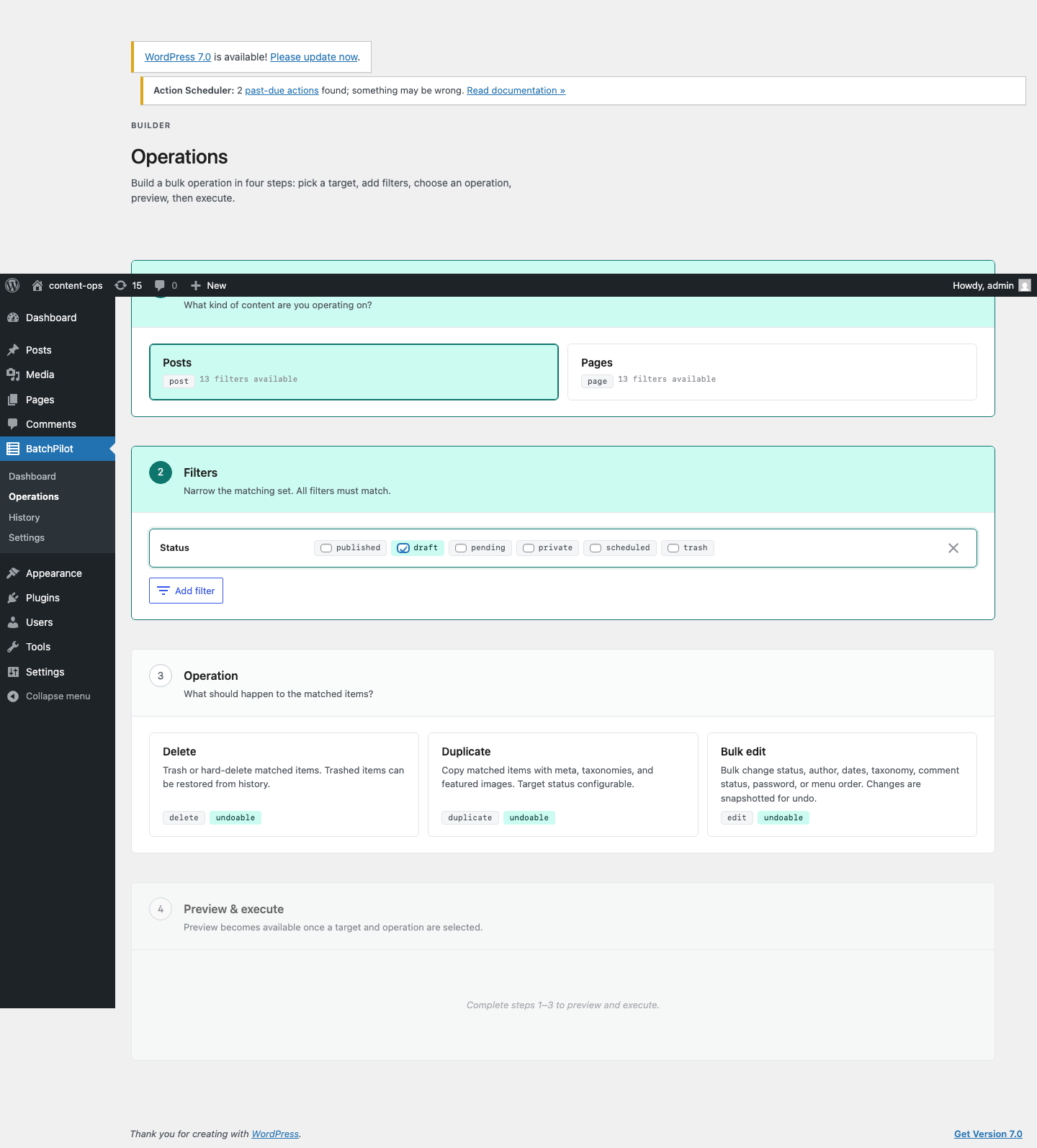
Thirteen filters narrow the matching set: specific IDs, post type, status, author, date ranges (modified, published), taxonomy terms, has comments, has featured image, parent, children.
Four ways to drive it:
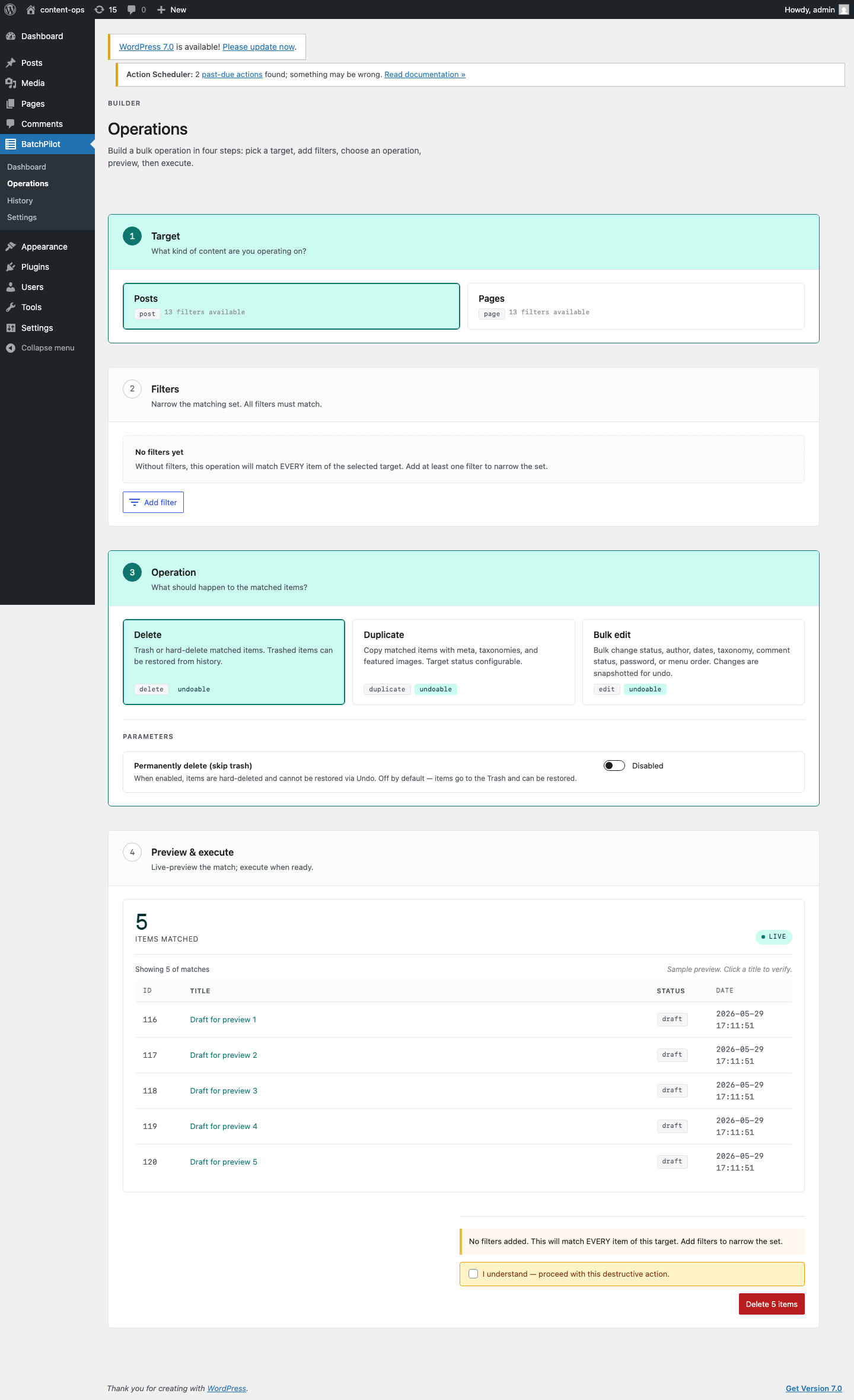
- Admin UI. Stepper-driven Operations Builder with live preview.
- WP-CLI.
wp batchpilot delete,duplicate,edit,rewrite,republish,history,undo,doctor. - REST API.
/wp-json/batchpilot/v1/*endpoints with capability-gated permissions. - WordPress Abilities API. Each Target × Operation pair is exposed as a registered ability so AI agents and other clients can drive operations.
Safety features:
- Every operation is previewed (count plus sample rows) before it runs.
- Preview tokens (HMAC-signed, 5-minute TTL) prevent stale state from being executed.
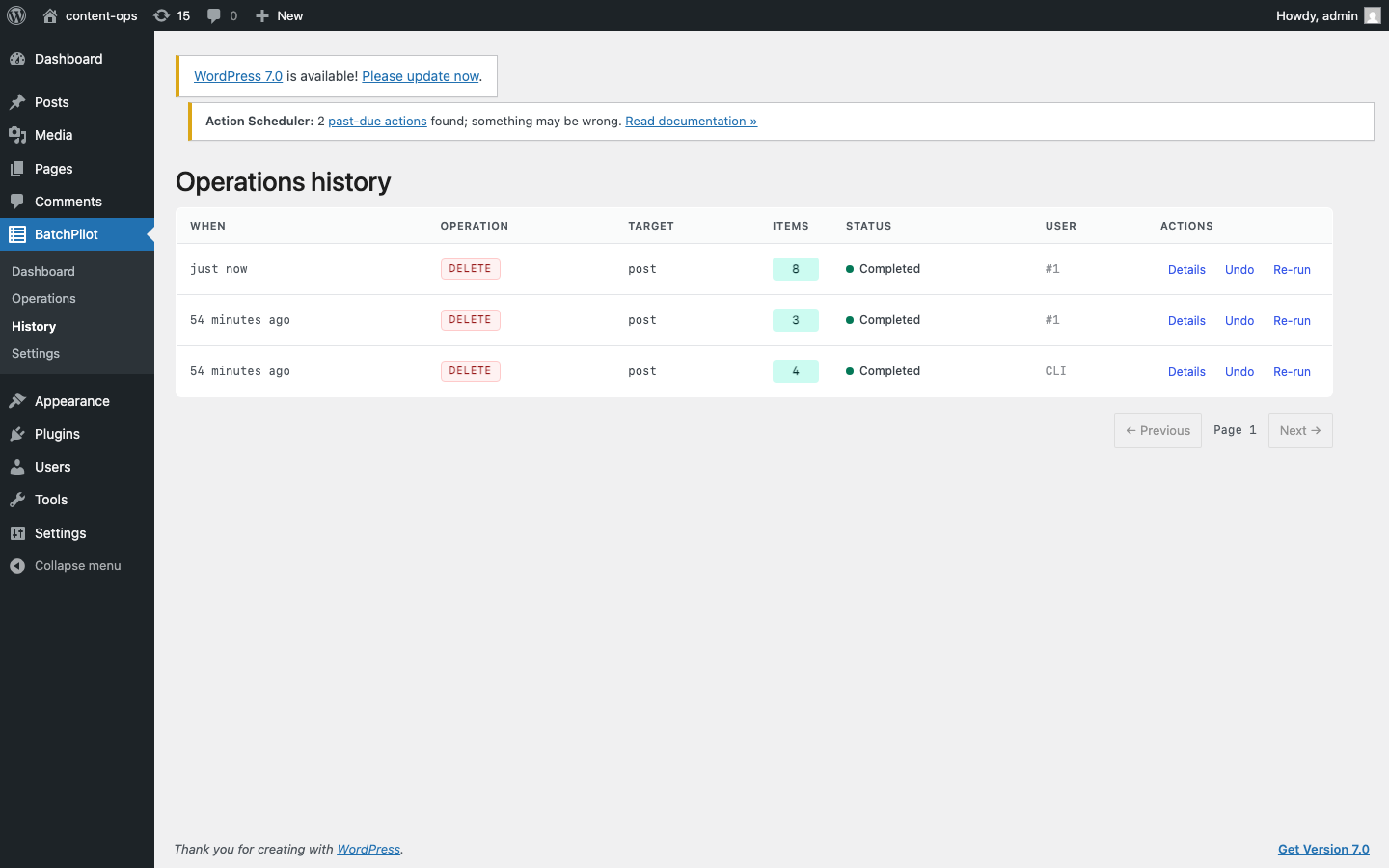
- Snapshots are written before mutation so Undo restores the previous state.
- Operations over a configurable threshold (default 100 items) run in the background via Action Scheduler.
- Per-operation capabilities:
batchpilot_delete,batchpilot_edit,batchpilot_duplicate. Grant per-role or per-user. WordPress’s own per-item rights (edit, delete, publish, assign terms) are checked on top.
Use cases:
- Trash old drafts, auto-drafts, or revisions.
- Re-attribute posts from a departing author.
- Shift publish dates on a backlog.
- Add or remove taxonomy terms across a content set.
- Duplicate templates or landing pages.
Development
Source code, including the un-minified JavaScript sources for the admin app, lives at https://github.com/jgalea/batchpilot
The compiled assets in assets/build/ are generated with @wordpress/scripts from the sources in assets/src/. To rebuild:
npm install && npm run build
PHP dependencies are managed with Composer (composer install).
Instalação
- Upload BatchPilot to
/wp-content/plugins/batchpilot/or install via the Plugins screen. - Ative o plugin.
- Open BatchPilot → Operations from the admin sidebar.
Log de Changes
History older than the retention setting (30 days by default) is now pruned daily. Pruning starts one retention window after you update.
1.2.0
- Fixed: the BatchPilot screens were blank on sites that installed 1.1.0 from WordPress.org, because the package was missing its built scripts.
- New: Settings option to delete all BatchPilot data when the plugin is uninstalled. Off by default.
- Fixed: History older than the retention window is now removed daily. Pruning starts one retention window after updating, so existing history isn’t deleted on the first run.
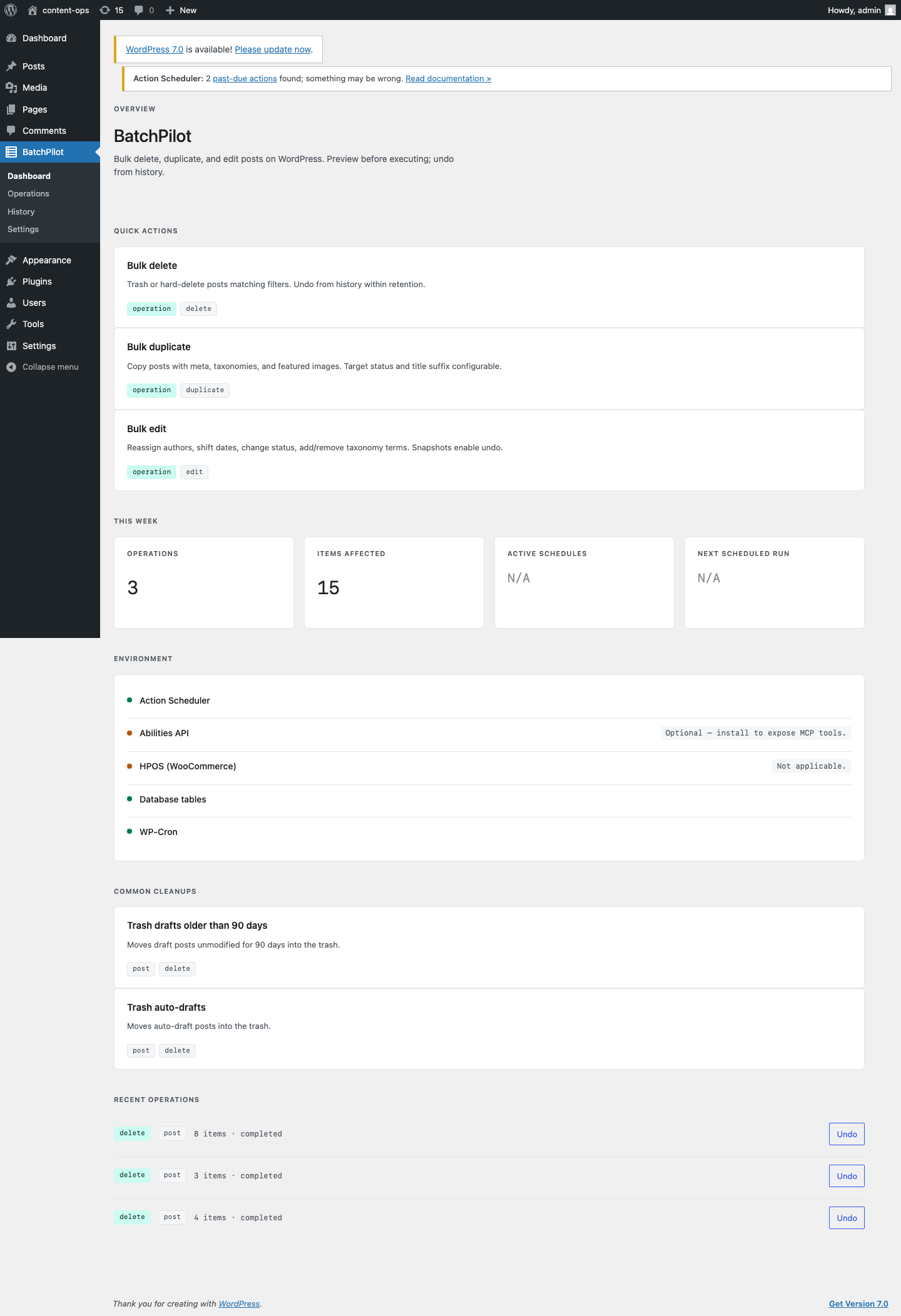
- Fixed: the dashboard shows real schedule counts instead of N/A.
1.1.0
- New: Duplicate a single post or page from the list’s row actions, or copy it to a new draft from the editor. Which post types and user roles can do this is set in Settings.
- New: Rewrite & Republish. Edit a draft copy of a live post, then publish or schedule it to replace the original’s content while keeping its ID and URL. A revision of the original is kept, and the change can be undone from History.
- New:
wp batchpilot rewriteandwp batchpilot republishcommands. - Changed: the “Duplicate with BatchPilot” row action is now “Bulk duplicate…”, to tell it apart from the new Duplicate.
- Changed: duplicating a post now requires permission to edit it, so password-protected and other users’ posts can’t be copied by people who can only read them.
- Fixed: duplicated post meta containing backslashes (JSON, block data) is no longer corrupted.
- Fixed: abilities now register correctly with the WordPress Abilities API. IDs use hyphens, for example
batchpilot/post-delete.
1.0.0
Lançamento inicial.
- Three operations on posts, pages, and any registered public post type: Delete (trash or permanent), Duplicate (meta, taxonomies, featured image, optional child posts), Bulk Edit (status, author, dates, taxonomies, password, comment status, menu order).
- Thirteen filters: specific IDs, post type, status, author, modified before/after, published before/after, taxonomy term, has comments, has featured image, post parent, has children.
- Stepper-driven Operations Builder with live preview, smart widgets per param type, and a destructive-action confirmation guard for unfiltered or large deletes.
- Snapshot-based undo for every operation except permanent deletes. Full audit history with one-click re-run.
- Preview tokens (HMAC-signed, 5-minute TTL) prevent stale state from being executed.
- Async execution via Action Scheduler when matched count exceeds the configurable threshold.
- Surfaces: admin UI, WP-CLI (
wp batchpilot), REST API (/wp-json/batchpilot/v1/*), WordPress Abilities API. - Post-list integration: row action (“Bulk duplicate…”) and bulk actions deep-link into the Operations Builder pre-filled with the selected IDs.
- Per-operation capability gates:
batchpilot_delete,batchpilot_edit,batchpilot_duplicate,batchpilot_move,batchpilot_schedule. - Doctor screen and
wp batchpilot doctorfor environment checks.
Capturas de tela
Para desenvolvedores
Este é o seu plugin? Mostre os números.
Adicione um crachá ao vivo ao seu site, Documentos ou Readme do GitHub. Ele é atualizado por conta própria - nenhuma conta necessária.
Best BatchPilot alternatives
All bulk delete plugins →





FAQ
BatchPilot: quick answers
Respostas diretas, extraídas de dados ao vivo WordPress.org.
Fonte: WordPress.org
Is BatchPilot free?
Yes. BatchPilot is free to download and use from the official WordPress.org plugin directory.
Is BatchPilot safe to use in 2026?
BatchPilot works, but test it on a staging site before relying on it in 2026. Was last updated 3 weeks ago, and scores 59/100 on our health check.
How many websites use BatchPilot?
BatchPilot is active on <10 WordPress websites and has been downloaded 519 times since it launched in July 2026. It was downloaded 133 times in the last 30 days.
Does BatchPilot work with WordPress 7.1?
BatchPilot is officially tested up to WordPress 7.0.9, while the latest release is 7.1.5. It may still work, but try it on a staging site first.
What PHP version does BatchPilot need?
BatchPilot requires PHP 7.4 or higher. Most hosts run PHP 8.x today, so it works on any modern WordPress hosting.
When was BatchPilot last updated?
The latest version, 1.2.0, was released on November 11, 2026 (3 weeks ago).
Who makes BatchPilot?
BatchPilot is developed and maintained by Jean Galea.
What are the best alternatives to BatchPilot?
The most popular alternatives to BatchPilot are WP Bulk Delete (90K+ installs), BEAR (30K+ installs) and Bulk Delete (30K+ installs).
Alimentado por PageForge
Um modelo e uma planilha. Uma página real para cada pesquisa.
PageForge Transforma cada linha de um CSV em uma página WordPress com seu próprio título, URL, SEO campos e esquema, construído no layout que você já desenhou. Gratuito em WordPress.org.
- CSV e XLSX, mais Google Sheets em Profissional e Empresarial
- Seu próprio título, URL, SEO campos e esquema para cada página
- Funciona com o editor de blocos, Elementor, Divi e Avada
- Gratuito em WordPress.org, sem cartão de crédito