


Automarticles Sync
Official integration between your WordPress site and the Automarticles platform: automatically publish, update and sync posts and categories.

Use com cautela
Automarticles Sync works, but test it on a staging site before relying on it in 2026. It runs on 60+ sites and was last updated 4 months ago, and scores 42/100 on our health check.
- Base de usuários pequenas (mais de 60 instalações ativas)
- Muito poucos comentários até agora
Como ele se acumula?
Lado a lado em instalações, atualizações, avaliações e suporte



Downloads diários
Os picos de download geralmente seguem uma nova versão — cada site que atualiza automaticamente é um download.
Rankings
Where Automarticles Sync stands todayWordPress.org Classificações de pesquisa
Posição ao vivo na pesquisa de plugins, top 100| Palavra chave | Posição |
|---|---|
| blog automation | >100 |
| content automation | >100 |
| publishing | >100 |
| SEO | >100 |
| webhook | >100 |
Adoção da versão
Compartilhamento de sites ativos por lançamento.
About Automarticles Sync
From the official readme · v1.6.10Descrição
Automarticles is a content generation and management platform for blogs. This plugin connects your WordPress site to your Automarticles account, so posts generated and scheduled on the platform are published automatically on your blog, with no manual copy-pasting required.
What the plugin does:
- Receives and creates published/scheduled/draft posts coming from Automarticles, with title, content, description, featured image and category.
- Updates an existing post when it is edited on Automarticles (content, image, status, category).
- Removes a post when it is deleted on Automarticles.
- Creates, updates and organizes categories automatically, avoiding duplicates when the category already exists on your blog.
- Returns the final published post URL back to Automarticles, enabling automatic sharing on social networks.
- Shares your blog’s category list with Automarticles, so you can link existing categories instead of creating new ones.
How it works:
Communication happens through a token-authenticated webhook: Automarticles sends events (post and category creation/update/deletion) directly to your WordPress site, which processes them and responds. No continuous read access to your blog or installation of external services is required — everything happens inside WordPress itself.
Serviços externos
This plugin connects your WordPress site to the Automarticles platform (https://automarticles.com), a content generation and management platform for blogs, so posts and categories created there can be published on your blog automatically.
It downloads the featured image of a post from the URL included in the webhook payload your own Automarticles account sends to your site, using wp_remote_get(), so the image can be attached to the WordPress post as its featured image. This only happens when Automarticles sends a POST_CREATED or POST_UPDATED event that includes a featured image; no other browsing or periodic data is sent to or fetched from Automarticles.
This service is provided by Automarticles: Terms of Service and Privacy Policy.
Instalação
- Upload the plugin
.zipfile under Plugins > Add New > Upload Plugin, or install it directly from the WordPress plugin search by looking for “Automarticles”. - Activate the plugin under Plugins > Installed Plugins.
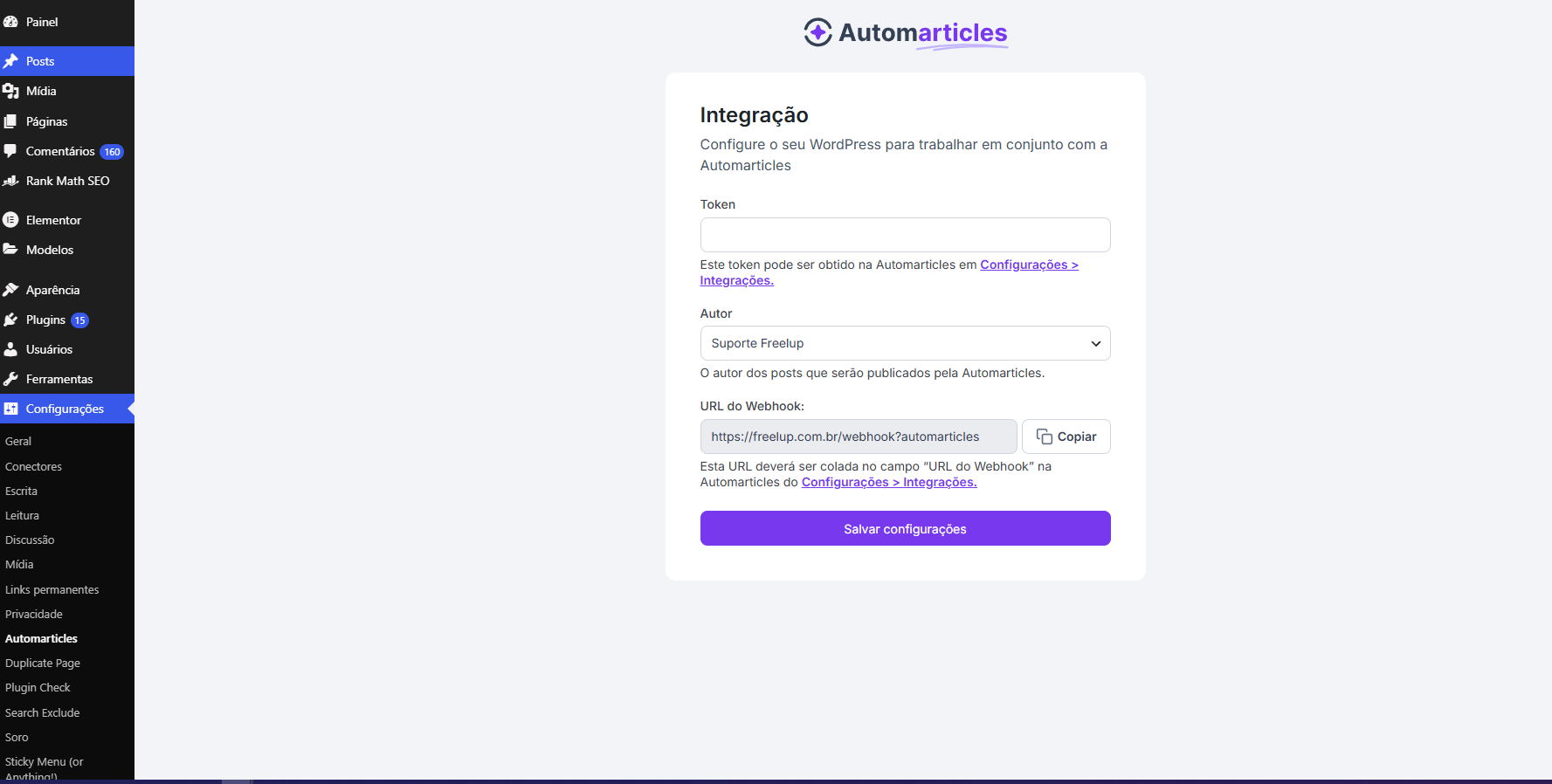
- In the WordPress admin menu, go to Settings > Automarticles.
- Copy the Token generated in your Automarticles account (under Settings > Integrations) and paste it into the “Token” field on this screen.
- Copy the Webhook URL shown on this screen and paste it into the matching field in Automarticles.
- Choose the default Author who will be credited on posts published by the plugin (optional).
- Clique em Salvar configurações.
- Go back to Automarticles and click Verify Integration.
That’s it — from then on, posts published/scheduled on Automarticles are automatically sent to your WordPress site.
Log de Changes
Important fix: resolves a fatal error that could silently break publishing of posts with a featured image. Recommended update for everyone. No reconfiguration required.
1.6.10
- Fixed: publishing a post with a featured image could crash with a fatal PHP error (“Call to undefined function wp_tempnam()”) on every request, because that WordPress core function wasn’t loaded in the webhook’s execution context. This was the root cause of posts silently failing to publish since image processing was introduced. Found and confirmed via the
GET_LAST_ERRORdiagnostic added in 1.6.8/1.6.9.
1.6.9
- Improved:
GET_LAST_ERRORnow returns the 10 most recent recorded errors (fatal PHP errors or image-processing failures), not just the last one, and each entry identifies which post it came from (Automarticles post id, slug, title). Detection of PHP fatals also now covers the entire event, not only image processing.
1.6.8
- Added: a new
GET_LAST_ERRORwebhook event (authenticated with the same token as everything else) that returns the last recorded fatal PHP error or image-processing failure, so it can be checked remotely without enablingWP_DEBUGor accessing the server. The error is now always recorded (not only whenWP_DEBUGis on).
1.6.7
- Fixed: garbled (mojibake) text in a few error messages (“category information not provided”, “invalid category name or id”) caused by a file encoding issue. Cosmetic only, no functional change.
1.6.6
- Fixed: featured-image processing during publish is now faster and lighter, staying within the plugin-to-Automarticles response window on slower/shared hosts. The image is resized to a smaller max width (1600px, down from 2000px) with a slightly lower JPEG quality, and only the thumbnail/medium sizes are generated synchronously for that attachment (custom theme sizes still generate normally for every other upload on the site).
- Hardened: requests extra memory from WordPress before decoding a large image, avoiding a silent PHP fatal error (out of memory) on hosts with a tight memory limit.
- Added: logs the underlying PHP fatal error (when
WP_DEBUGis on) if publishing a post crashes the request, instead of failing with no diagnostic trail.
1.6.5
- Fixed: large featured images (especially PNG) could make the site time out and return a 503 error when publishing, because generating all registered thumbnail sizes from a big, uncompressed image took longer than the server’s PHP execution limit. Featured images are now resized (max width 2000px) and recompressed to JPEG right after download, before thumbnails are generated, which drastically cuts processing time regardless of the original format/size. Falls back to the original file untouched if the server can’t process images (no GD/Imagick).
- Hardened: raised the featured-image download timeout (15s to 20s) and requests a longer PHP execution time budget for that step, when the host allows it.
Capturas de tela
Para desenvolvedores
Este é o seu plugin? Mostre os números.
Adicione um crachá ao vivo ao seu site, Documentos ou Readme do GitHub. Ele é atualizado por conta própria - nenhuma conta necessária.
Best Automarticles Sync alternatives
All blog automation plugins →





FAQ
Automarticles Sync: quick answers
Respostas diretas, extraídas de dados ao vivo WordPress.org.
Fonte: WordPress.org
Is Automarticles Sync free?
Yes. Automarticles Sync is free to download and use from the official WordPress.org plugin directory.
Is Automarticles Sync safe to use in 2026?
Automarticles Sync works, but test it on a staging site before relying on it in 2026. It runs on 60+ sites and was last updated 4 months ago, and scores 42/100 on our health check.
How many websites use Automarticles Sync?
Automarticles Sync is active on 60+ WordPress websites and has been downloaded 699 times since it launched in July 2026. It was downloaded 245 times in the last 30 days.
Does Automarticles Sync work with WordPress 7.1?
Automarticles Sync is officially tested up to WordPress 7.0.9, while the latest release is 7.1.5. It may still work, but try it on a staging site first.
What PHP version does Automarticles Sync need?
Automarticles Sync requires PHP 7.4 or higher. Most hosts run PHP 8.x today, so it works on any modern WordPress hosting.
When was Automarticles Sync last updated?
The latest version, 1.6.10, was released on August 5, 2026 (4 months ago).
Who makes Automarticles Sync?
Automarticles Sync is developed and maintained by Automarticles.
What are the best alternatives to Automarticles Sync?
The most popular alternatives to Automarticles Sync are ContentStudio (600+ installs), Bunzy (200+ installs) and AutoPost AI (100+ installs).
Alimentado por PageForge
Um modelo e uma planilha. Uma página real para cada pesquisa.
PageForge Transforma cada linha de um CSV em uma página WordPress com seu próprio título, URL, SEO campos e esquema, construído no layout que você já desenhou. Gratuito em WordPress.org.
- CSV e XLSX, mais Google Sheets em Profissional e Empresarial
- Seu próprio título, URL, SEO campos e esquema para cada página
- Funciona com o editor de blocos, Elementor, Divi e Avada
- Gratuito em WordPress.org, sem cartão de crédito