


Adminkeep – Site Lockdown & Admin Enhancements
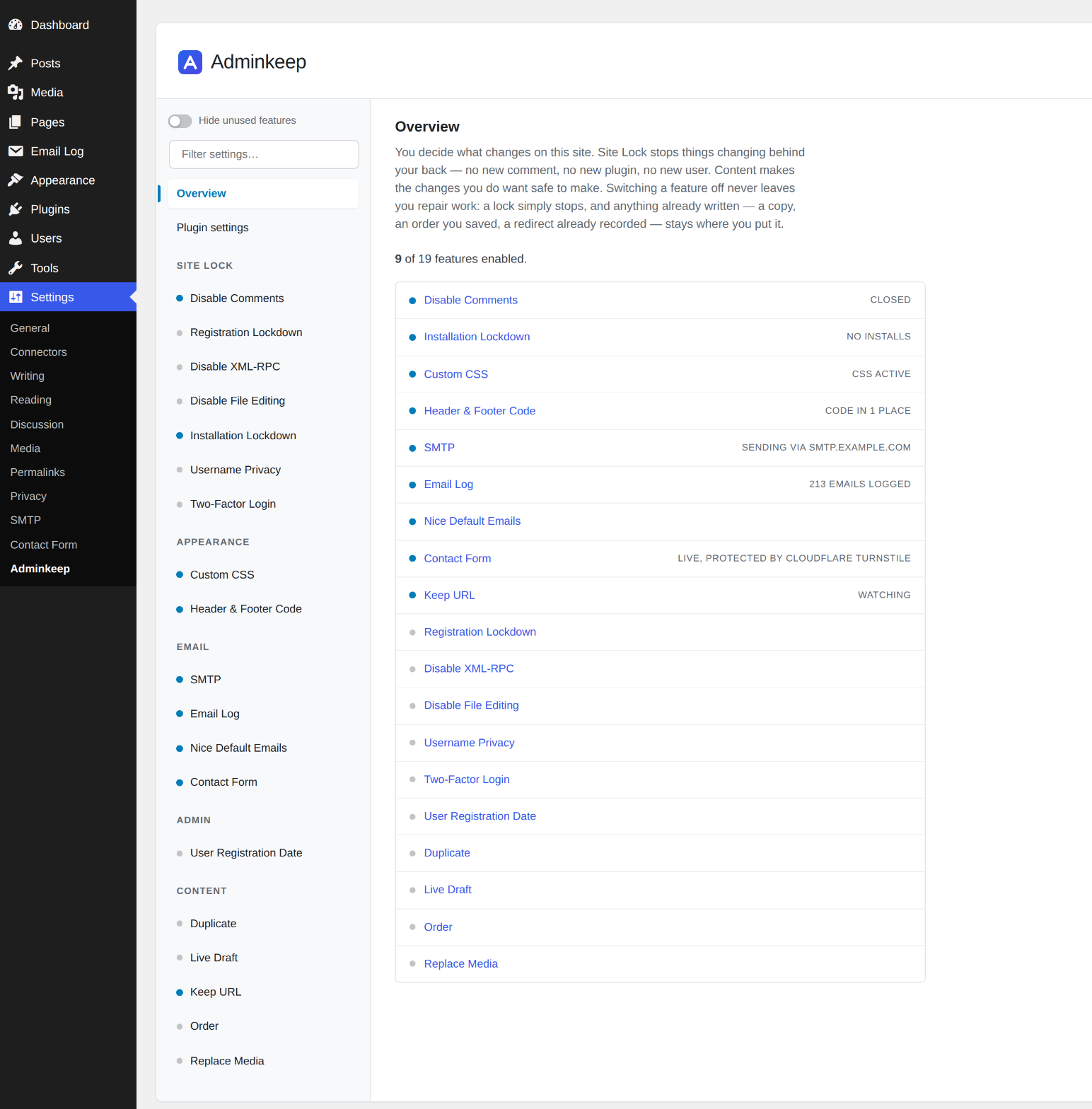
Site lockdown and admin enhancements for WordPress: email log, custom CSS, disable comments and more. Every feature is off until you switch it on.

Escolha sólida
Adminkeep is a solid plugin choice in 2026, with a few things worth checking first. It runs on 70+ sites and was last updated 3 weeks ago, and scores 68/100 on our health check.
- Desenvolvido ativamente — última atualização 3 semanas atrás
- Testado com as últimas WordPress (7.1)
- Small user base (70+ active installs)
- Muito poucos comentários até agora
Downloads diários
Os picos de download geralmente seguem uma nova versão — cada site que atualiza automaticamente é um download.
Rankings
Where Adminkeep stands todayWordPress.org Classificações de pesquisa
Posição ao vivo na pesquisa de plugins, top 100| Palavra chave | Posição |
|---|---|
| admin enhancements | #25 |
| Desative os comentários | >100 |
| enhancement | #56 |
| lockdown | #14 |
| site lockdown | #6 |
Adoção da versão
Compartilhamento de sites ativos por lançamento.
About Adminkeep
From the official readme · v2.6.2Descrição
Site lockdown and admin enhancements for WordPress, under one idea: you decide what changes on this site.
Site Lock stops things changing behind your back — no new comment, no new plugin, no new user, no new account with admin rights. The rest are admin enhancements that make the changes you do want safe to make: an email log, custom CSS, header and footer code, SMTP, a contact form, duplicate and reorder posts, replace a file in place.
Every feature is a single switch, off until you turn it on. Switching one off never leaves you repair work: the locks work through WordPress filters, so your site is exactly as it was (the devices Two-Factor Login remembers stay behind, doing nothing), and what you made with the Content features stays where you put it.
Site Lock
- Disable Comments — comments off everywhere, including direct POSTs from spam bots and the REST API. Nothing is written to your database, so switching it off brings every comment back. An optional cleanup button deletes spam and trashed comments, after showing you the exact count. Guide
- Registration Lockdown — stops new accounts being created, and refuses creation of or promotion to administrator. Blocked attempts are logged. Guide
- Disable XML-RPC — closes
xmlrpc.phpcompletely, including pingbacks andsystem.multicall. Guide - Disable File Editing — removes the built-in plugin and theme file editors, reversibly.
- Installation Lockdown — no new plugins or themes, from WordPress.org or a ZIP, and no replacing one by uploading a ZIP, for anyone. Updates keep working, so security releases still reach your site. Guide
- Username Privacy — keeps your usernames out of public view. Author pages, the
?author=1probe, the REST users list, author sitemaps and embed previews stop naming your accounts to visitors; anyone logged in sees everything as before. Nothing is written, so switching it off reopens it all. Guide - Two-Factor Login — users in the roles you choose enter a six-digit code emailed to them after their password, so a stolen password alone no longer opens the account. The code screen emails the code when the user presses its button, so they can warn whoever reads that mailbox first, and the code works once, for up to ten minutes. Five wrong codes lock the code step for that account for 15 minutes, doubling on repeat. At most five code emails go to one user in ten minutes, and wrong codes are reported as failed logins, so login-limiting plugins count them. “Remember this device” skips the code on that browser for 30 days, or the number you set. On multisite, super admins are asked whenever administrators are. The code is asked for on the main login screen; other login forms, such as WooCommerce’s My Account, send these users there. The REST API, application passwords and XML-RPC are not asked. Switching it on emails you a recovery link that turns Two-Factor Login off without logging in, in case you are ever locked out.
Appearance
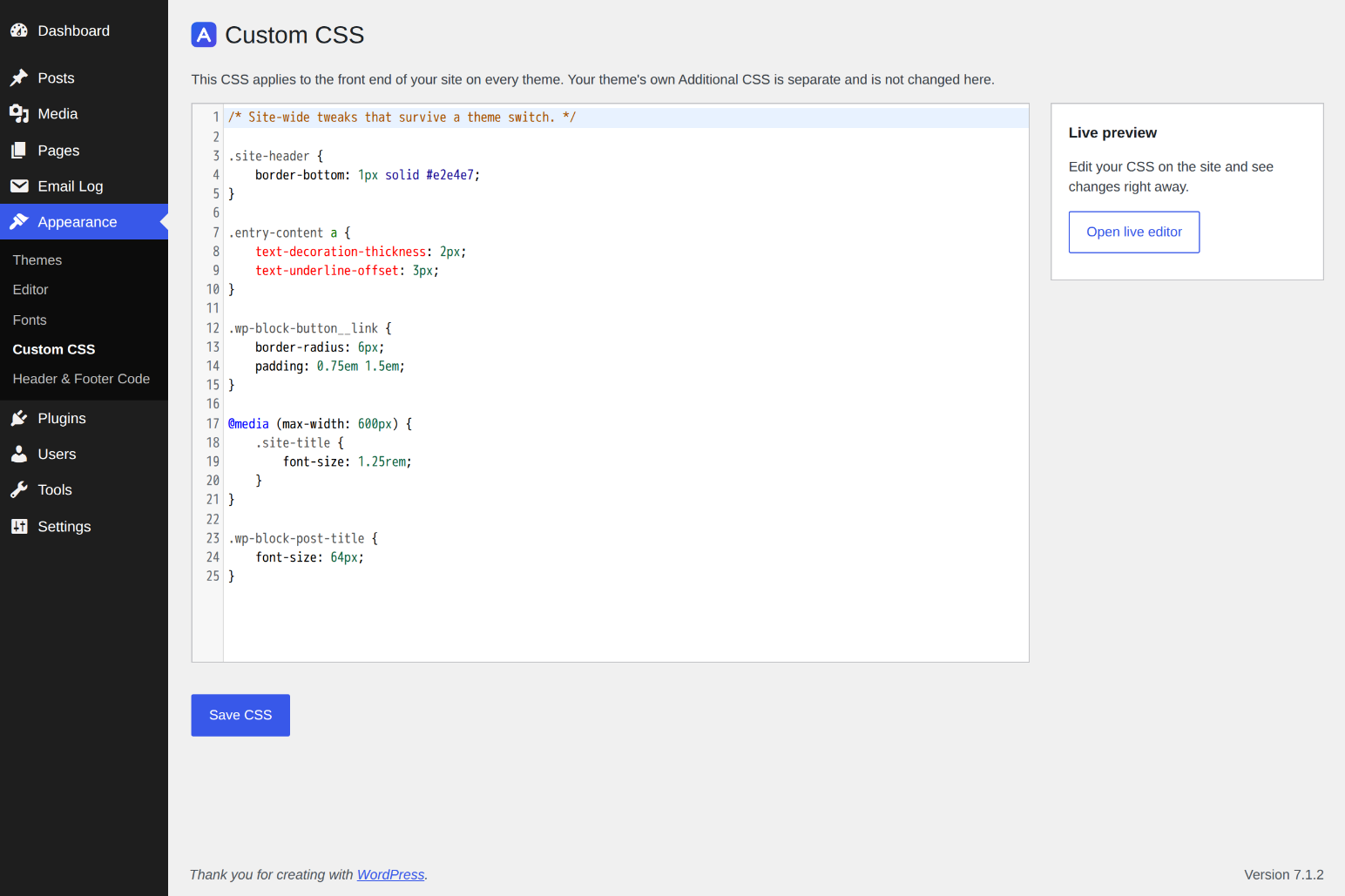
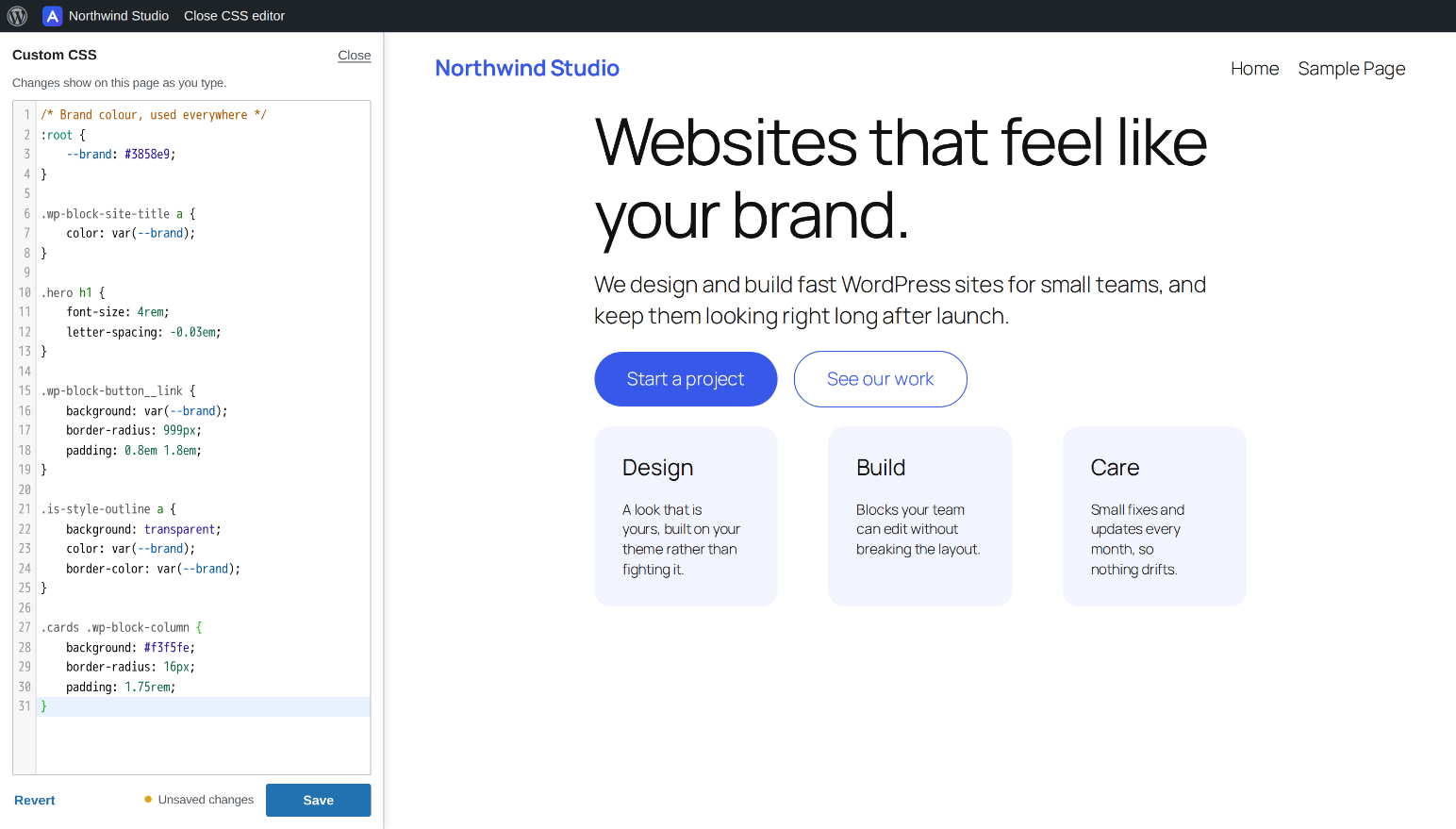
- Custom CSS — CSS that belongs to your site instead of your theme. Edit it under Appearance with WordPress’s own code editor, or open Edit CSS from the admin bar on any page and watch the page restyle as you type, the way the Customizer’s CSS box used to. It stays when you switch themes, and your theme’s Additional CSS is left alone.
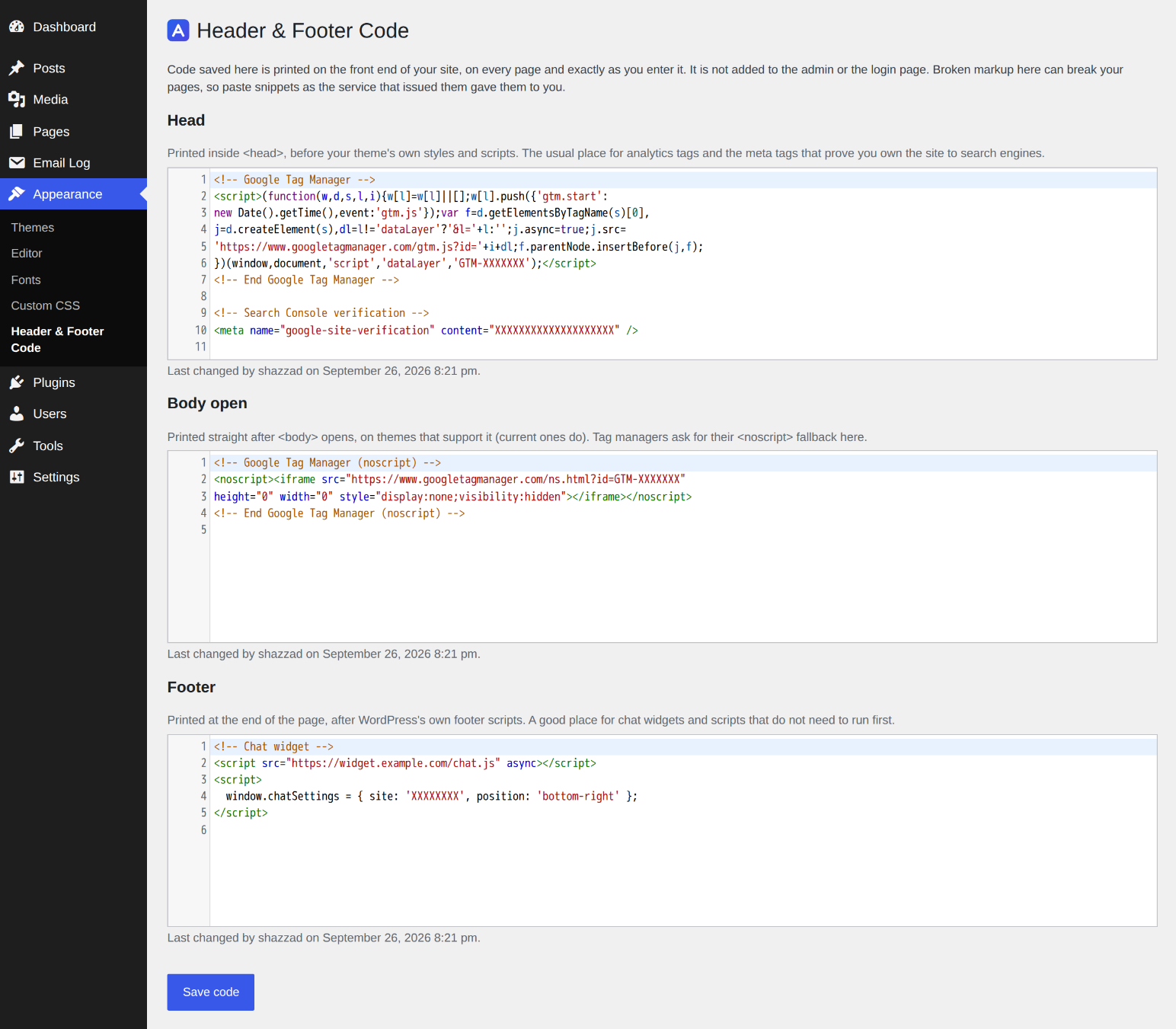
- Header & Footer Code — a home for the snippets services ask you to paste into your site: analytics and verification tags in the head, a tag manager’s fallback just after the body opens, chat widgets and scripts in the footer. Three boxes under Appearance with WordPress’s code editor, printed on the front end exactly as you saved them, and kept when you change or update your theme. Each box shows who last changed it and when. Only administrators allowed to post unfiltered HTML can edit them.
O email
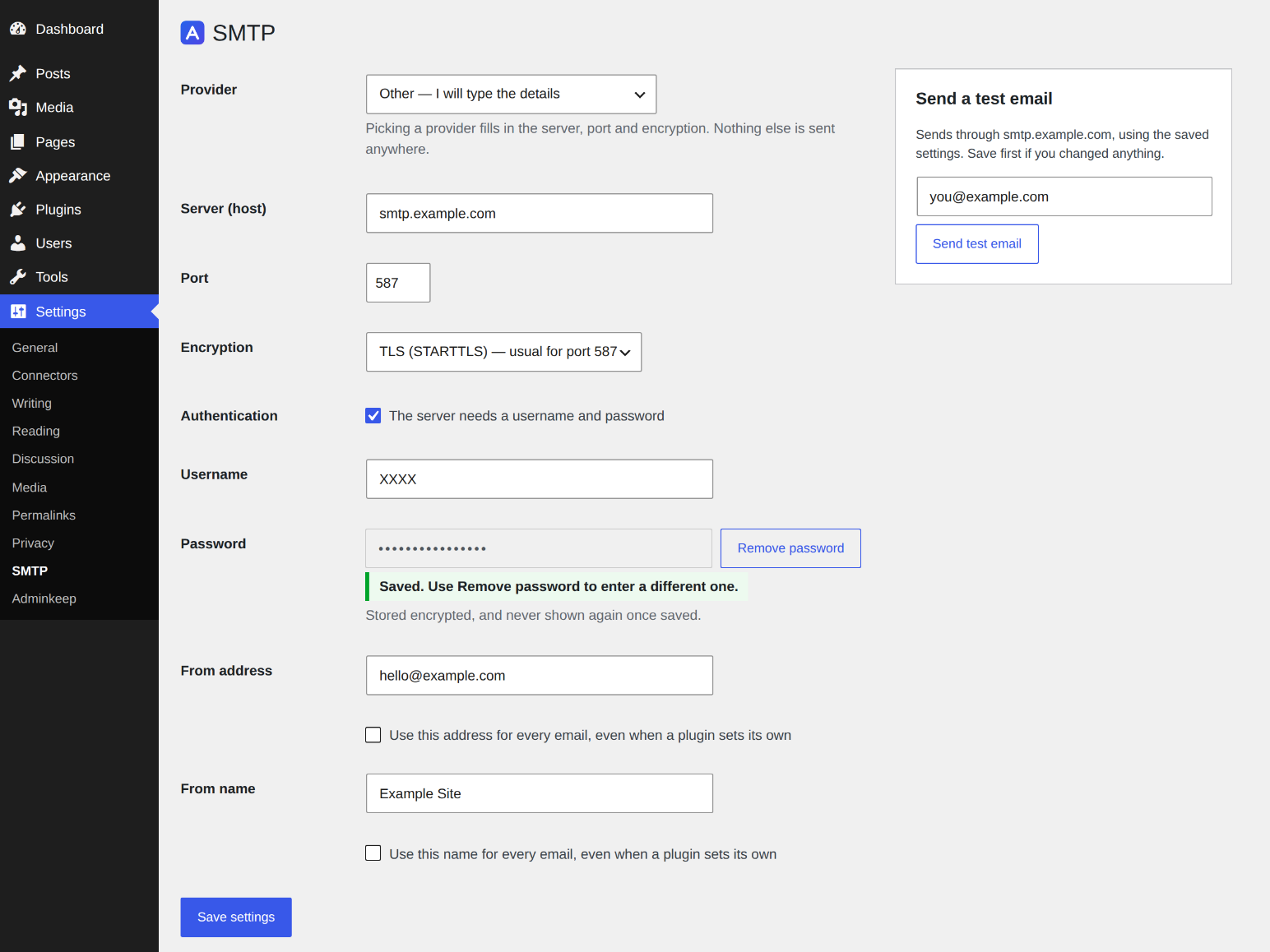
- SMTP — Send your site’s email through an SMTP server so password resets and form messages arrive. Presets for Amazon SES, Brevo, Mailgun, SendGrid, Postmark, Zoho and Gmail; a test email that shows the server’s own error; settings can live in wp-config.php. Moving from WP Mail SMTP? One click copies its SMTP connection settings. Guide
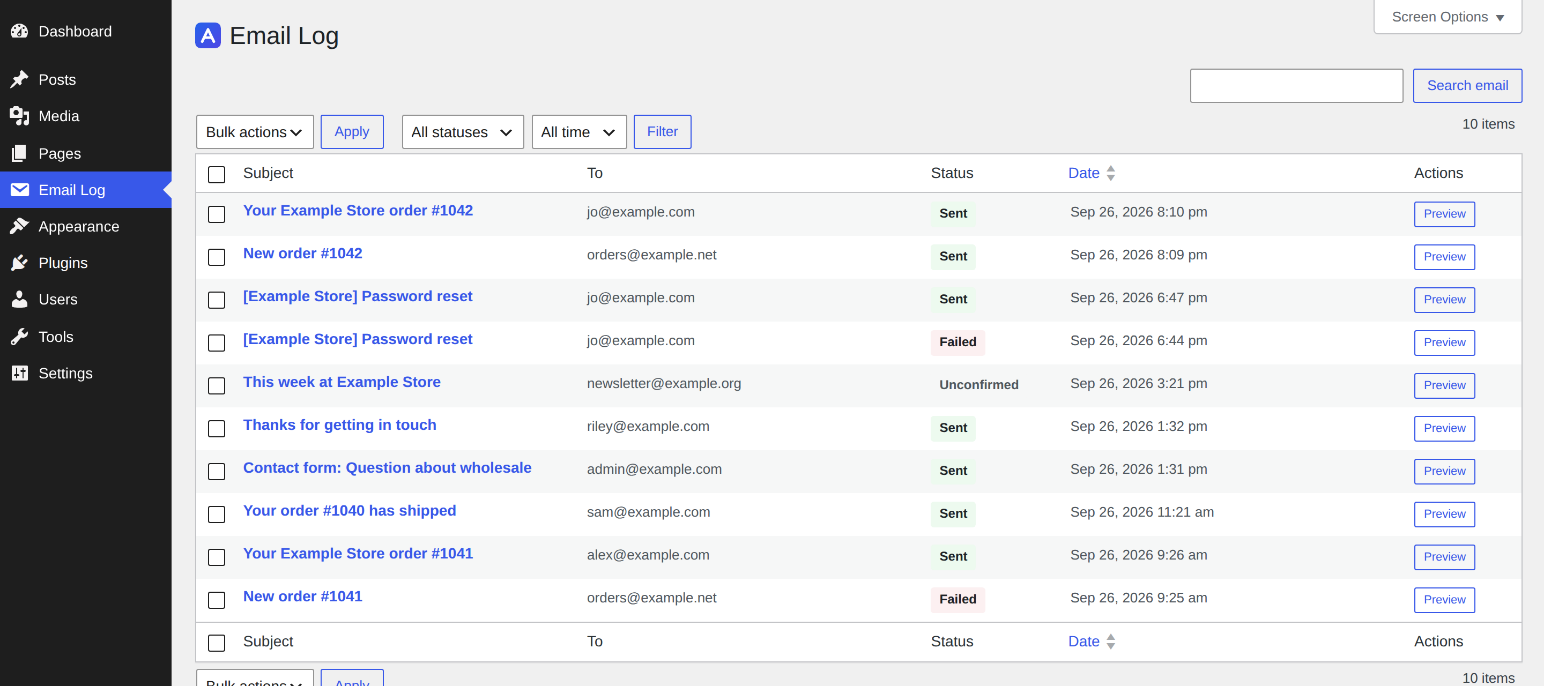
- Email Log — Email Log, in its own item in the admin menu by default (or under Tools, if you prefer), lists the email your site sends, with recipient, subject and whether it was sent or failed, plus filters by status and date and a search. Open any email to see its sender and headers, and the email itself the way it looked when it went out, with remote images blocked. Content storage can be switched off to keep only the envelope. Password-reset and sign-in links are removed before an email is stored, and a Two-Factor Login code email keeps only its envelope. Works with or without the SMTP feature, and with other SMTP plugins too.
- Nice Default Emails — WordPress’s own plain-text emails (password resets, new-user and comment notices, update reports, personal data requests, and multisite sign-ups), and Adminkeep’s own contact form, go out in one clean HTML layout headed by your site’s name, with links you can click. WooCommerce and other plugins’ emails, and anything already sent as HTML, are left exactly as they are. No settings.
wp adminkeep emails send --all --to=you@example.comshows every one of them in your own inbox. - Contact Form — one simple form for any page: name, email and message, as a block or the
[adminkeep_contact_form]shortcode. Messages are emailed to you through WordPress’s own mailer, so the SMTP feature delivers them and Email Log shows whether each one went out, with the server’s error if it did not. Works out of the box, protected by a WordPress nonce that needs no keys (not for sites that cache their pages), or by Cloudflare Turnstile or Google reCAPTCHA v3 with your own free keys. Nothing is stored. The form prints its own small style and script with itself, so nothing extra loads on other pages, and the spam check’s script loads only on pages that show the form.
Administrador
- User Registration Date — a sortable Registered column on the Users screen. WordPress records when every account was created but never shows it; this does, for every existing user, and newest-first sorting makes a wave of spam signups easy to spot. Guide
Conteúdo
- Duplicate — copy any post or page as a draft. Custom fields, taxonomies, the featured image and page builder layouts (Elementor, ACF) come along intact, and the original is never modified. Guide
- Live Draft — rework a published page in a private working copy, then publish it over the original. Same ID, same URL, and the old version is kept as a revision. Guide
- Keep URL — rename or move a page and its old address keeps working, child pages included. Fills the gaps WordPress leaves for pages and leaves posts to core. Guide
- Order — drag posts into the order you want on a dedicated Sort screen, one post type at a time. Lists that already ask for their own order, such as WooCommerce products and search results, are left alone. Guide
- Replace Media — upload a new version of a file over the old one. Same file type keeps the same URL; a different type updates the posts that use it and redirects the old address. Guide
Execução
A feature you have not enabled registers zero hooks and loads zero assets.
Links
Serviços externos
Adminkeep connects to no outside service unless you switch on a feature that needs one and set it up. Two features can: SMTP sends your site’s email through the mail server you enter, and the Contact Form uses the spam check you choose (its WordPress nonce option uses none). Nothing is sent to Adminkeep.
Cloudflare Turnstile (Contact Form, when you choose it). On pages that show the form, the visitor’s browser loads Cloudflare’s script from challenges.cloudflare.com, which receives the visitor’s IP address and browser details in order to tell people from bots. When the visitor presses Send, your site sends Cloudflare your secret key and the check’s one-time token, and nothing else, to confirm it. Terms: https://www.cloudflare.com/website-terms/ — Privacy policy: https://www.cloudflare.com/privacypolicy/
Google reCAPTCHA v3 (Contact Form, when you choose it). On pages that show the form, the visitor’s browser loads Google’s script from www.google.com (and the code it needs from www.gstatic.com), which receive the visitor’s IP address and browser details in order to score the visit. When the visitor presses Send, your site sends Google your secret key and the check’s one-time token, and nothing else, to confirm it. Terms: https://policies.google.com/terms — Privacy policy: https://policies.google.com/privacy
Wp-cli
Everything on the Adminkeep settings screen, plus the Custom CSS, Header & Footer Code, SMTP and Contact Form screens, can be done from a shell with wp adminkeep.
wp adminkeep feature list — every feature and whether it is on
wp adminkeep feature enable disable_comments — switch a feature on (or `disable` it)
wp adminkeep feature set order post_types=post,page — change a feature's settings
wp adminkeep feature set two_factor roles=administrator,editor — choose who is asked for a login code
wp adminkeep feature disable two_factor — a way back in if the site cannot send email
wp adminkeep feature enable two_factor — switches it on and says where the recovery link was emailed
wp adminkeep setting set hide_unused=true — change a plugin-level setting
wp adminkeep comments purge — delete spam and trashed comments, in batches
wp adminkeep css set site.css — replace the Custom CSS from a file
wp adminkeep code set head analytics.html — replace one Header & Footer Code box (head, body or footer) from a file
wp adminkeep smtp set --host=smtp.example.com --port=587 — configure SMTP
wp adminkeep smtp test you@example.com — send a test email and see the server's reply
wp adminkeep emails send --all --to=you@example.com — see WordPress's own emails in the Nice Default Emails layout
wp adminkeep smtp import wp-mail-smtp — copy the SMTP connection settings from WP Mail SMTP
wp adminkeep contact-form set --provider=turnstile --turnstile-site-key=<key> — set up the contact form's spam protection (the secret goes in with `--turnstile-secret-stdin`)
wp adminkeep contact-form get — the contact form's settings, and whether it is live
Run wp help adminkeep for the full reference. A change made here is cleaned and checked exactly as it is on the screen, and a mistyped value is refused rather than guessed at.
Instalação
- In your WordPress admin, go to Plugins → Add New Plugin, search for “Adminkeep” and click Install Now, then Activate.
- Open Settings → Adminkeep, or the Settings link under Adminkeep on the Plugins screen. Every feature starts off; switch on only the ones you want.
- To remove the plugin, deactivate and delete it as usual. Its settings and data are kept, so installing it again brings them back; to remove them as well, switch on Delete all Adminkeep data when the plugin is deleted under Settings → Adminkeep → Plugin settings before deleting. Nothing it changed while enabled outlives switching the feature off.
Or with WP-CLI:
wp plugin install adminkeep --activate
Log de Changes
2.6.2
- Changed: a login that another plugin completes on the login screen without a password, such as single sign-on or a magic link, is now asked for a code too when the user’s role is. A session that is already open is still never interrupted.
- Changed: after the code, a user who cannot write posts lands on their profile and a user with no site of their own on a network on their own dashboard, as after a password login.
- Changed: the “Session expired” window inside the admin now finishes a Two-Factor Login and closes itself, instead of leaving the admin open inside the window.
- Changed: resetting or changing a password also ends the limit on login code emails for that account.
- Fixed: on a site with a persistent object cache, a login waiting on its code keeps the time its code has left instead of getting ten fresh minutes with every step.
- Fixed: when a plugin or theme prints output before the login finishes, the login screen says so, instead of leading to a code screen that reports the login as expired.
2.6.1
- Fixed: resetting or changing a password now forgets every device that user had remembered for Two-Factor Login, so the next login on each asks for a code again.
- Fixed: the limit on login code emails (five per user in ten minutes) now holds when several are requested at once.
- Fixed: in the Email Log, an HTML email that starts with an XML declaration, a byte-order mark or a comment before its doctype now keeps its layout when the preview is opened in its own tab.
2.6.0
- New: Two-Factor Login, in Site Lock. Users in the roles you choose enter a six-digit code emailed to them after their password on the login screen. The code screen shows the account’s address, partly hidden, and sends the code when the user presses “Email me the code”. A code works once, for up to ten minutes, and a login waiting on its code ends 30 minutes after the password at the latest.
- New: five wrong codes lock the code step for that account for 15 minutes, doubling on repeat up to six hours. The login screen says how long is left, and a correct code clears the count. At most five code emails go to one user in ten minutes, and wrong codes are reported as failed logins, so login-limiting plugins count them.
- New: “Remember this device” skips the code on that browser for 30 days, or the number you set. A remembered device is not affected by a lock.
- New: switching Two-Factor Login on emails you a recovery link (to the site’s administration email address from WP-CLI). The link opens a page with one button that turns Two-Factor Login off without logging in and keeps the roles you chose. It does not expire, works once, and is replaced each time the feature is switched on. The feature’s panel shows which address holds the current link, partly hidden, or says that the email could not be sent, and
wp adminkeep feature enable two_factorprints where it went. When the link is used, every administrator of the site is emailed the time and the IP address it was used from. - New:
wp adminkeep feature disable two_factorand theADMINKEEP_DISABLE_TWO_FACTORconstant in wp-config.php also switch the code step off without logging in. - New: on multisite, super admins are asked for a code whenever administrators are. Other login forms, such as WooCommerce’s My Account, send users who owe a code to the main login screen. The REST API, application passwords and XML-RPC are not asked.
- New: the code email always goes out in the Nice Default Emails layout, whether or not that feature is on.
- Changed: the Email Log keeps only the envelope of a login-code or recovery-link email, never its body.
- Changed: deleting the plugin with “Delete all Adminkeep data” on also removes remembered devices, any login waiting on its code, any wrong-code lock and the recovery link.
2.5.0
- New: Settings → Contact Form warns when WordPress Nonce is chosen on a site where a caching plugin looks active, since the nonce does not work on cached pages. The feature’s state on the Adminkeep settings panel reads “Live, page cache detected”. A new
adminkeep_contact_form_page_cache_detectedfilter overrides the detection either way. - Fixed: the Email Log preview was empty in the wordpress.org Live Preview.
- Fixed: the help for
wp adminkeep setting,contact-formandemail-log listno longer shows a summary cut off mid-sentence.
2.4.0
- New: the Contact Form works out of the box, protected by a WordPress nonce: no keys and no outside service. Not for sites that cache their pages; choose Cloudflare Turnstile or Google reCAPTCHA there.
- Changed: the Contact Form’s “None (form hidden)” choice is gone. To take the form down, remove its block or shortcode, or switch the feature off.
- Improved: the contact form’s fields have a clean look of their own on themes that do not style form fields, such as Twenty Twenty-Five. Themes that do still win.
- Improved: the contact form’s email says which page it was sent from on any page of the site, archives and author pages included.
- Changed: Settings → Contact Form shows how to place the form in a side box, and warns only when the form is hidden.
- Fixed: after switching the contact form’s spam protection, the screen no longer shows the old provider’s last error.
2.3.0
- New: Contact Form, in the Email group. A name, email and message form for any page, as a block or the
[adminkeep_contact_form]shortcode, emailed to you through WordPress’s own mailer, so SMTP delivers it and Email Log shows whether it went out. Protected by Cloudflare Turnstile or Google reCAPTCHA v3 with your own keys, and hidden until they are set. Nothing is stored. The form carries its own small style and script, and the spam check’s script loads only on pages that show the form. Settings under Settings → Contact Form, orwp adminkeep contact-form get|set. - Changed: Nice Default Emails also dresses up the contact form’s own emails.
- New: the readme has an External services section. Adminkeep connects to an outside service only when you switch on SMTP or the contact form and set it up.
- Improved: the Live Preview on wordpress.org opens on Email Log with a few sample emails.
Capturas de tela


Para desenvolvedores
Este é o seu plugin? Mostre os números.
Adicione um crachá ao vivo ao seu site, Documentos ou Readme do GitHub. Ele é atualizado por conta própria - nenhuma conta necessária.
FAQ
Adminkeep: quick answers
Respostas diretas, extraídas de dados ao vivo WordPress.org.
Fonte: WordPress.org
Is Adminkeep free?
Yes. Adminkeep is free to download and use from the official WordPress.org plugin directory.
Is Adminkeep safe to use in 2026?
Adminkeep is a solid plugin choice in 2026, with a few things worth checking first. It runs on 70+ sites and was last updated 3 weeks ago, and scores 68/100 on our health check.
How many websites use Adminkeep?
Adminkeep is active on 70+ WordPress websites and has been downloaded 2,409 times since it launched in September 2026. It was downloaded 440 times in the last 30 days.
Does Adminkeep work with WordPress 7.1?
Yes. The developer has tested Adminkeep up to WordPress 7.1.5, the latest release. It requires WordPress 6.9 or newer.
What PHP version does Adminkeep need?
Adminkeep requires PHP 7.4 or higher. Most hosts run PHP 8.x today, so it works on any modern WordPress hosting.
When was Adminkeep last updated?
The latest version, 2.6.2, was released on November 6, 2026 (3 weeks ago).
Who makes Adminkeep?
Adminkeep is developed and maintained by Shazzad Hossain Khan.
Alimentado por PageForge
Um modelo e uma planilha. Uma página real para cada pesquisa.
PageForge Transforma cada linha de um CSV em uma página WordPress com seu próprio título, URL, SEO campos e esquema, construído no layout que você já desenhou. Gratuito em WordPress.org.
- CSV e XLSX, mais Google Sheets em Profissional e Empresarial
- Seu próprio título, URL, SEO campos e esquema para cada página
- Funciona com o editor de blocos, Elementor, Divi e Avada
- Gratuito em WordPress.org, sem cartão de crédito