


Admin Screenshots
Want to take a screenshot of any page in your admin Dashboard and share it with someone else? It couldn't be easier with Admin Screenshots!

Escolha sólida
Admin Screenshots is a solid plugin choice in 2026, with a few things worth checking first. It runs on 10+ sites, is rated 5/5 and was last updated 3 months ago, and scores 63/100 on our health check.
- Testado com as últimas WordPress (7.1)
- Pequena base de usuários (10+ instalações ativas)
- Muito poucos comentários até agora
Como ele se acumula?
Lado a lado em instalações, atualizações, avaliações e suporte



Downloads diários
Os picos de download geralmente seguem uma nova versão — cada site que atualiza automaticamente é um download.
Rankings
Where Admin Screenshots stands todayWordPress.org Classificações de pesquisa
Posição ao vivo na pesquisa de plugins, top 100| Palavra chave | Posição |
|---|---|
| Administrador | >100 |
| debug | >100 |
| screenshot | #16 |
| share | >100 |
Adoção da versão
Compartilhamento de sites ativos por lançamento.
Divisão de classificação
★★★★★ ★★★★★ 5 de 1 comentários
About Admin Screenshots
Do Readme oficial · v1.0.6Descrição
Summary
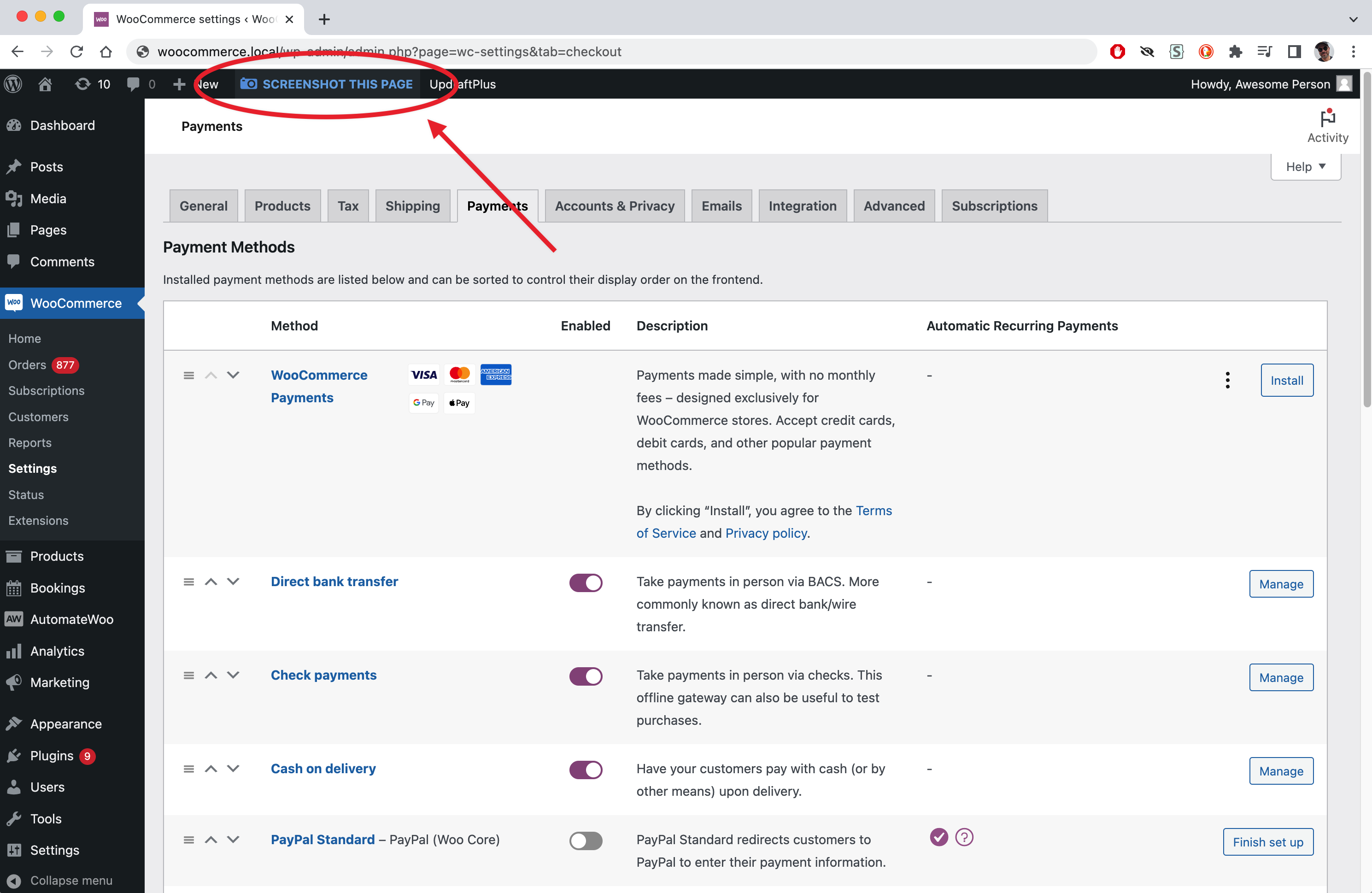
Admin Screenshots for WordPress will add a button to every page in the admin Dashboard, allowing you to take a screenshot of the page you’re on. The screenshot will be saved in your Media Library, and you will get a direct link to it to share. This will let you show how certain settings are, without giving them access to your backend.
If you’re on the other end (like a support agent) and you need to know how someone’s site settings without having to log in, tell your customer to install the plugin, take a screenshot of the page that you want to see, and send you the link.
Recursos
- Saves screenshots in Media Library: every image is saved in the /admin-screenshots/ subdirectory under /uploads.
- Gives you direct link to images: immediately after taking the screenshot, you get the link to it, easy to copy to your clipboard and share with others.
Instalação
- Upload the “admin-screenshot” directory to your “wp-content/plugins” directory.
- In your WordPress admin, go to PLUGINS and activate “Admin Screenshot”.
- Go to any page in your admin Dashboard.
- Select the “TAKE SCREENSHOT” button.
- Copy the link to the screenshot and share it with anyone.
- Party!
Log de Changes
Code updates
1.0.6
- All strings translateable.
1.0.5
- Adjusted some code to better adhere to plugin standards.
1.0.4
- Fix for a bug in HTML2CANVAS library that rendered text with wrong spacing: https://github.com/niklasvh/html2canvas/issues/3037
1.0.3
- Small bugfixes, typos, cleanup
1.0
- First public release
Capturas de tela

Para desenvolvedores
Este é o seu plugin? Mostre os números.
Adicione um crachá ao vivo ao seu site, Documentos ou Readme do GitHub. Ele é atualizado por conta própria - nenhuma conta necessária.
Best Admin Screenshots alternatives
Todos os plugins de administrador →




FAQ
Admin Screenshots: quick answers
Respostas diretas, extraídas de dados ao vivo WordPress.org.
Fonte: WordPress.org
Is Admin Screenshots free?
Yes. Admin Screenshots is free to download and use from the official WordPress.org plugin directory.
Is Admin Screenshots safe to use in 2026?
Admin Screenshots is a solid plugin choice in 2026, with a few things worth checking first. It runs on 10+ sites, is rated 5/5 and was last updated 3 months ago, and scores 63/100 on our health check.
How many websites use Admin Screenshots?
Admin Screenshots is active on 10+ WordPress websites and has been downloaded 1,970 times since it launched in March 2023. It was downloaded 78 times in the last 30 days.
Does Admin Screenshots work with WordPress 7.1?
Yes. The developer has tested Admin Screenshots up to WordPress 7.1.5, the latest release. It requires WordPress 5.0 or newer.
When was Admin Screenshots last updated?
The latest version, 1.0.6, was released on August 25, 2026 (3 months ago).
Who makes Admin Screenshots?
Admin Screenshots is developed and maintained by Senff - a11n.
What are the best alternatives to Admin Screenshots?
The most popular alternatives to Admin Screenshots are Loginizer (1M+ installs), Redux Framework (800K+ installs) and Admin Menu Editor (300K+ installs).
Alimentado por PageForge
Um modelo e uma planilha. Uma página real para cada pesquisa.
PageForge Transforma cada linha de um CSV em uma página WordPress com seu próprio título, URL, SEO campos e esquema, construído no layout que você já desenhou. Gratuito em WordPress.org.
- CSV e XLSX, mais Google Sheets em Profissional e Empresarial
- Seu próprio título, URL, SEO campos e esquema para cada página
- Funciona com o editor de blocos, Elementor, Divi e Avada
- Gratuito em WordPress.org, sem cartão de crédito