


Yada Wiki
Yada Wiki is a simple wiki for your WordPress site.

Utiliser avec prudence
Yada Wiki works, but test it on a staging site before relying on it in 2026. It runs on 2K+ sites, is rated 4.9/5 and was last updated 12 months ago, and scores 60/100 on our health check.
- Loved by users — 4.9/5 from 23 reviews
- Momentum — downloads up 72.4% vs the previous 30 days
- Uniquement testé jusqu'à WordPress 6,9 (le dernier est de 7,1)
Comment s'accumule-t-il ?
Côte à côte sur les installations, les mises à jour, les évaluations et le support



Téléchargements quotidiens
Les pics de téléchargement suivent généralement une nouvelle version - chaque site qui met à jour automatiquement compte comme un téléchargement.
Classements
Where Yada Wiki stands todayWordPress.org Classements de recherche
Position en direct dans la recherche de plugins, Top 100| Mot-clé | Position |
|---|---|
| FAQ | >100 |
| knowledge base | #77 |
| page links | >100 |
| shortcode | >100 |
| wiki | #2 |
Adoption de version
Part de sites actifs par version.
Répartition des notes
★★★★★★★★★★ 4.9 from 23 reviews
About Yada Wiki
From the official readme · v3.6Description
Yada Wiki provides a wiki post type, custom tags and categories, an index, and a table of contents option. The plugin allows you to link your wiki pages together using the wiki page titles.
Note: As of Yada Wiki 3.6, for current users who have been manually adding HTML tags or special characters to their shortcodes, for security reasons these must be filtered on save. An exception was added for the EM tag because I saw support tickets where users said they were using this tag. If you have been manually editing the shortcodes then you may want to test before installing version 3.6.
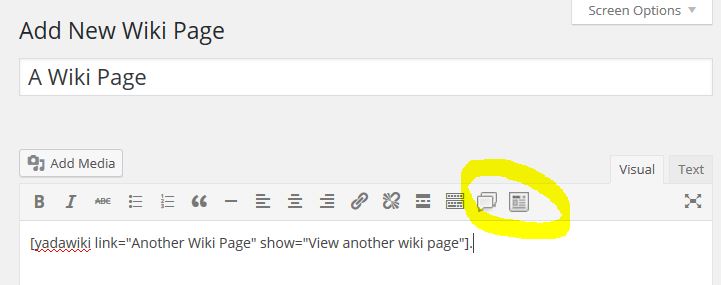
There are two easy to use shortcode buttons available on the editor toolbar. Rather than try to remember the shortcodes and their values, it is recommended that you use these buttons to generate the shortcodes for you.
The “Add Wiki Link” Button:
When you click the first button, the add wiki link button, a pop-up opens where you enter the title of the wiki page you are linking to in the “Link” text box. You can optionally enter text into the “Show” text box that you want to show for the link, or leave that blank to just show the title. There is the ability to manually add an “anchor” parameter for on-page links. Please see the documentation for more information on this.
When you click “OK”, a shortcode is inserted into your edit window at the cursor location. For example to link to a wiki page called “How To Make Iced Coffee” but show the text for the link as “How To Make My Favorite Drink”:
[yadawiki link=”How To Make Iced Coffee” show=”How To Make My Favorite Drink”]
You use Wiki Link shortcodes to create the structure of linked pages.
The “Add Wiki Listing” Button:
The Add Wiki Listing button gives you three options for adding some collected output.
Output TOC Page
The first option inserts a shortcode that will output your “TOC” page. With Yada Wiki, you can create a special wiki page with the title of “TOC” that will serve as the table of contents for your wiki. You can use wiki links and style the table of contents as you like in the post editor. Selecting this option allows you to embed the TOC page in another page. For example:
[yadawikitoc show_toc=”true”]
Output Wiki Category
The second option inserts a list of the wiki pages for one of your wiki categories. You can optionally choose to output the list by title or by creation date. For example:
[yadawikitoc show_toc=”true” category=”Drinks” order=”title”]
Output Index
The third option inserts a grid of your wiki pages or categories. The output is in a responsive table-like grid and you can choose the number of columns. For example, to output wiki pages:
[yadawiki-index type=”pages” columns=”4″]
An example for listing a single wiki category by title:
[yadawiki-index type=”category-name” category=”States” columns=”3″]
An example for listing all wiki categories by title:
[yadawiki-index type=”all-categories-name” columns=”3″]
Note that in the index listing the category hierarchy only goes down one level deep from to the top.
Sidebar Widgets:
There are two Yada Wiki widgets. One for showing the TOC page and a list of article titles for a given category in the sidebar and the other for showing recent wiki articles. Please see the FAQ section for information about using the sidebar widgets.
Documentation:
Documentation is available at https://www.webtng.com/yada-wiki-documentation/
The FAQs below also have good information.
Video Walk-through:
This video provides a walk-though of all of the features:
** Translations **
The plugin is available in:
* English
* Spanish
Remerciements
The user @JulianSMoore has been very helpful in suggesting improvements and reviewing changes. Thanks to the user @simplyletgo who contributed the recent wiki post widget.
Installation
You can install the Yada Wiki plugin either via the WordPress.org plugin directory or by uploading the files to your server. Once the plugin is installed, you can activate the plugin through the Plugins menu in WordPress.
Journal de modifications
3.6
- Sanitized shortcode inputs on save. Allowed em tags.
- Tested for WordPress 6.9 compatibility.
3.5
- Fixed shortcode index options which were not working correctly.
- Added esc_url() to some wiki post permalinks where it was missing.
- Tested Yada Wiki for compatibility with WordPress 6.5.
3.4.3
- Update Yada Wiki for compatibility with WordPress 6.2.
3.4.2
- Update Yada Wiki TOC widget for compatibility with Thrive Architect.
3.4.1
- Filtered shortcode “anchor” attribute to prevent cross-site scripting.
3.4
- Added option for wiki pages to be hierarchical and have a page order set. Be careful changing this setting on a site where the wiki already has content.
Captures d'écran
Pour les développeurs
Est-ce votre plugin ? Montrez les chiffres.
Ajoutez un badge en direct à votre site, docs ou github readme. Il se met à jour par lui-même - aucun compte n'est nécessaire.
Best Yada Wiki alternatives
All faq plugins →





FAQ
Yada Wiki: quick answers
Réponses directes, extraites des données en direct WordPress.org.
Source : WordPress.org
Is Yada Wiki free?
Yes. Yada Wiki is free to download and use from the official WordPress.org plugin directory.
Is Yada Wiki safe to use in 2026?
Yada Wiki works, but test it on a staging site before relying on it in 2026. It runs on 2K+ sites, is rated 4.9/5 and was last updated 12 months ago, and scores 60/100 on our health check.
How many websites use Yada Wiki?
Yada Wiki is active on 2K+ WordPress websites and has been downloaded 70,618 times since it launched in March 2015. It was downloaded 669 times in the last 30 days.
Does Yada Wiki work with WordPress 7.1?
Yada Wiki is officially tested up to WordPress 6.9.12, while the latest release is 7.1.5. It may still work, but try it on a staging site first.
When was Yada Wiki last updated?
The latest version, 3.6, was released on November 22, 2025 (12 months ago).
Who makes Yada Wiki?
Yada Wiki is developed and maintained by dmccan.
What are the best alternatives to Yada Wiki?
The most popular alternatives to Yada Wiki are VK Blocks (100K+ installs), Easy Accordion (70K+ installs) and Accordion FAQ (30K+ installs).
Propulsé par PageForge
Un modèle et une feuille de calcul. Une vraie page pour chaque recherche.
PageForge transforme chaque ligne d'un CSV en une page WordPress avec son propre titre, URL, SEO et schéma, construit sur la mise en page que vous Déjà conçu. Gratuit sur WordPress.org.
- CSV et XLSX, plus Google Sheets sur les professionnels et les entreprises
- Son propre titre, URL, SEO champs et schéma pour chaque page
- Fonctionne avec l'éditeur de blocs, Elementor, Divi et Avada
- Gratuit sur WordPress.org, pas de carte de crédit