


Plugin d'accordéon FAQ ultime
Full-featured FAQ and accordion plugin with advanced search, simple UI and easy-to-use FAQ blocks and shortcodes.

Choix
Yes — Ultimate FAQ Accordion Plugin is a safe, well-maintained plugin to use in 2026. It runs on 30K+ sites, is rated 4.6/5 and was last updated 1 month ago, and scores 89/100 on our health check.
- Prouvé à grande échelle sur plus de 30 000 sites actifs
- Loved by users — 4.6/5 from 440 reviews
- Testé avec le dernier WordPress (7.1)
Comment s'accumule-t-il ?
Côte à côte sur les installations, les mises à jour, les évaluations et le support



Téléchargements quotidiens
Les pics de téléchargement suivent généralement une nouvelle version - chaque site qui met à jour automatiquement compte comme un téléchargement.
Classements
Where Ultimate FAQ Accordion Plug… stands todayWordPress.org Classements de recherche
Position en direct dans la recherche de plugins, Top 100| Mot-clé | Position |
|---|---|
| Accordéon | #10 |
| FAQ | #5 |
| faq block | #6 |
| FAQ | #3 |
| woocommerce faq | #7 |
Adoption de version
Part de sites actifs par version.
Répartition des notes
★★★★★★★★★★ 4.6 from 440 reviews
About Ultimate FAQ Accordion Plugin
À partir du Lisezmoi officiel · v2.6.0Description
Having an FAQ section or knowledge base on your site is essential to make sure you are not losing customers and to reduce your support load.
With the Ultimate FAQ plugin and its simple UI, you can quickly create FAQs and add them to your site using the included blocks, patterns or shortcodes. It works with WordPress’s built-in editor as well as third-party editors like Elementor and is translation-ready, with many already available here.
All this in an accordion layout that is automatically responsive and adapts your FAQs to any site!
👩💻 Demo | 🌟 Premium | ℹ️ Support
Principales caractéristiques
- Add an unlimited number of FAQ entries, categories, tags and pages.
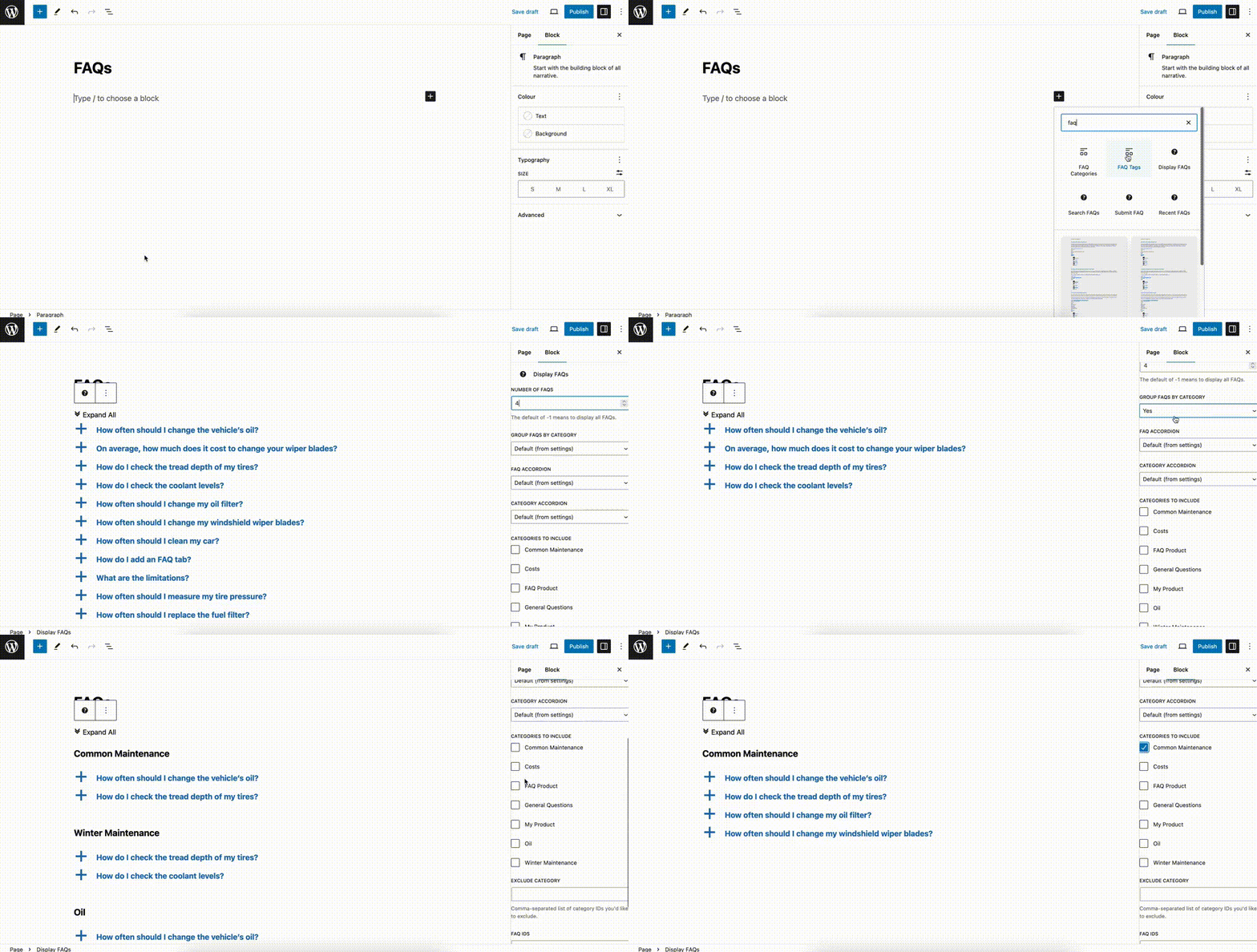
- Display your FAQs anywhere with the included Gutenberg blocks and shortcodes.
- Create, select, reorder, and safely reuse FAQs directly in the Display FAQs block.
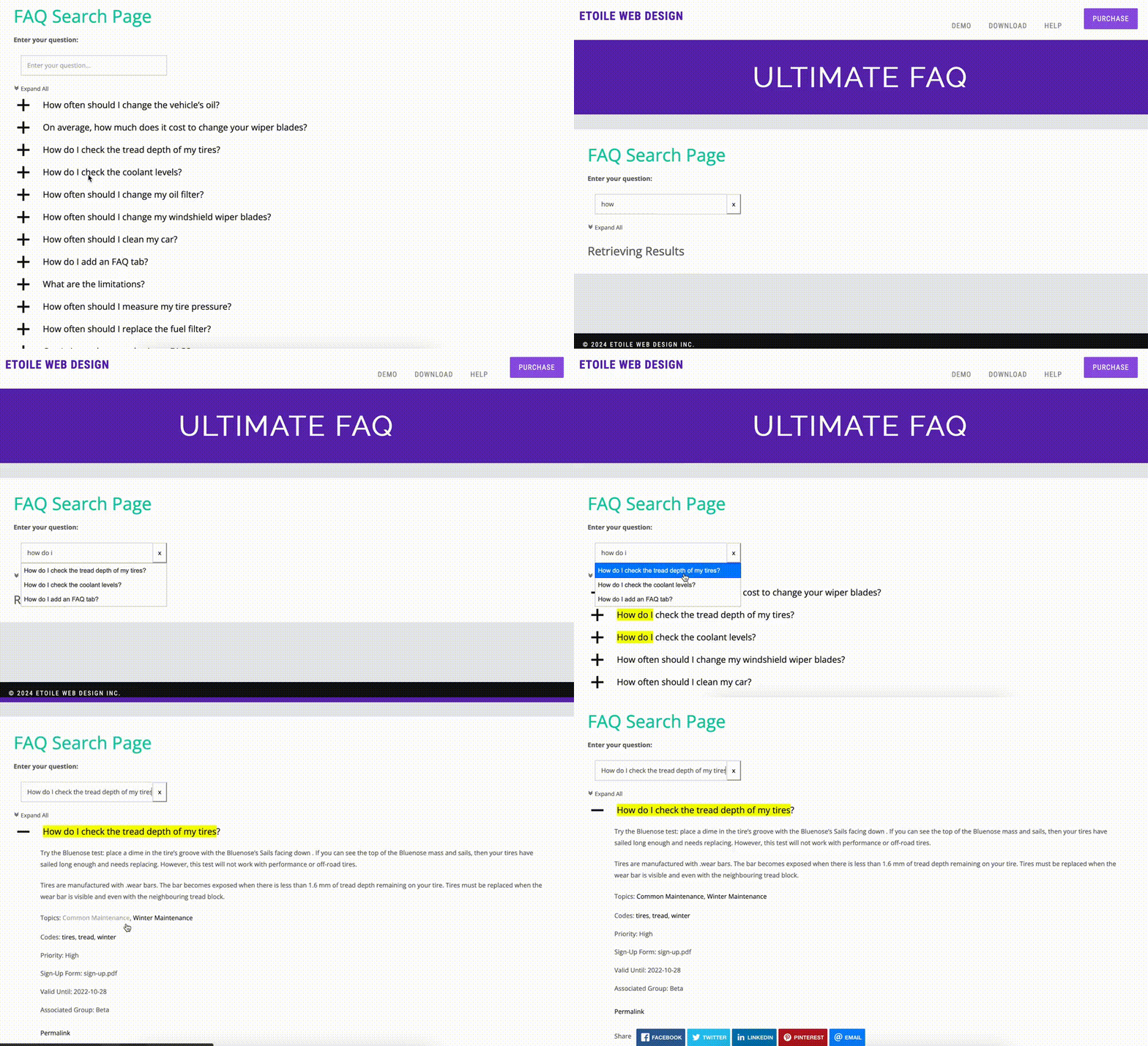
- Search published FAQs with a page-load form in Free; premium adds live AJAX search, highlighting, and autocomplete.
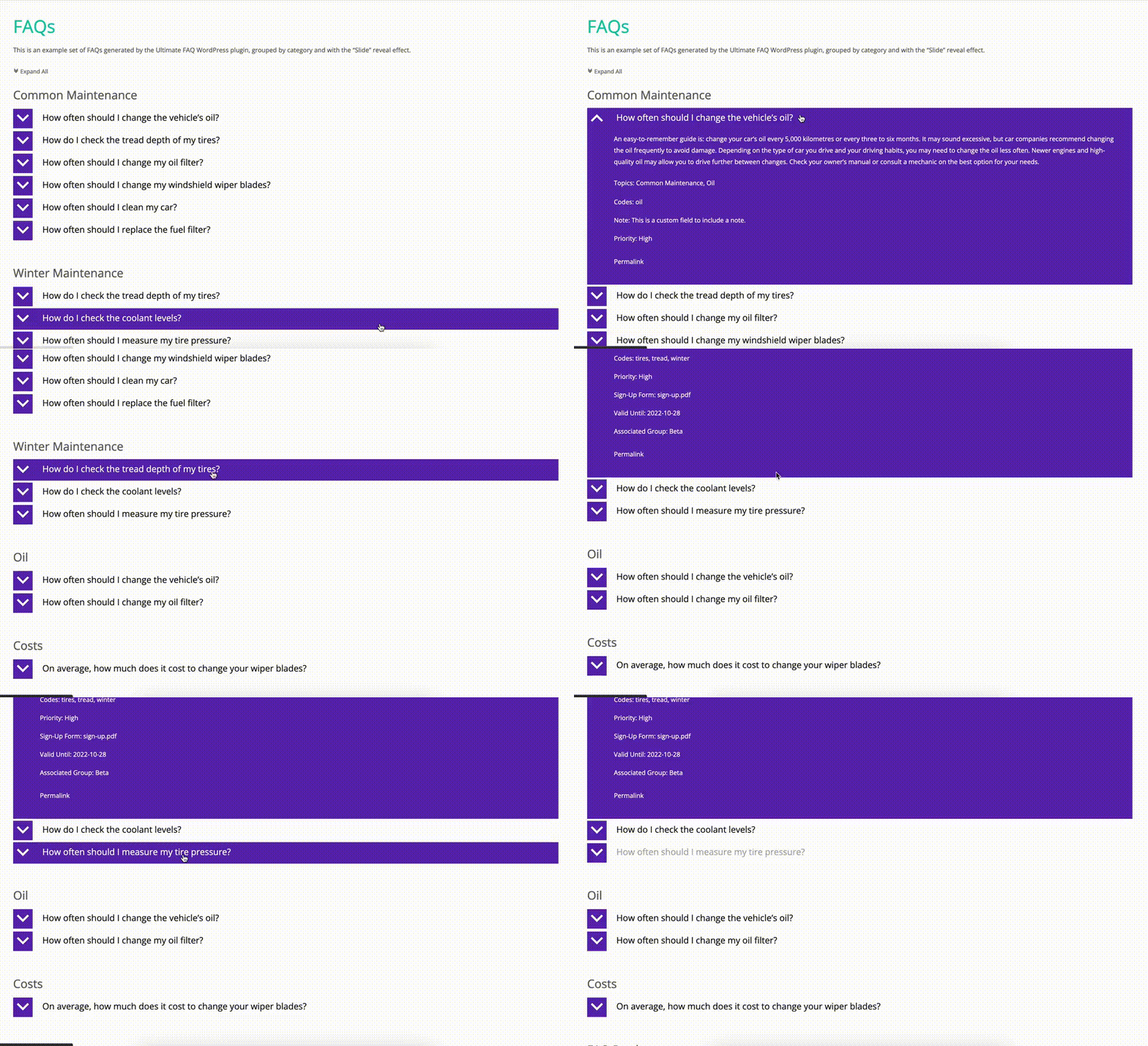
- FAQ accordion layout that automatically adapts to fit in any site and on any device.
- Works with third-party editors like Elementor.
- Easily translate FAQ entries using WPML, Loco Translate, Polylang, etc. With many translations already available here!
- Automatically adds FAQ and FAQPage structured data.
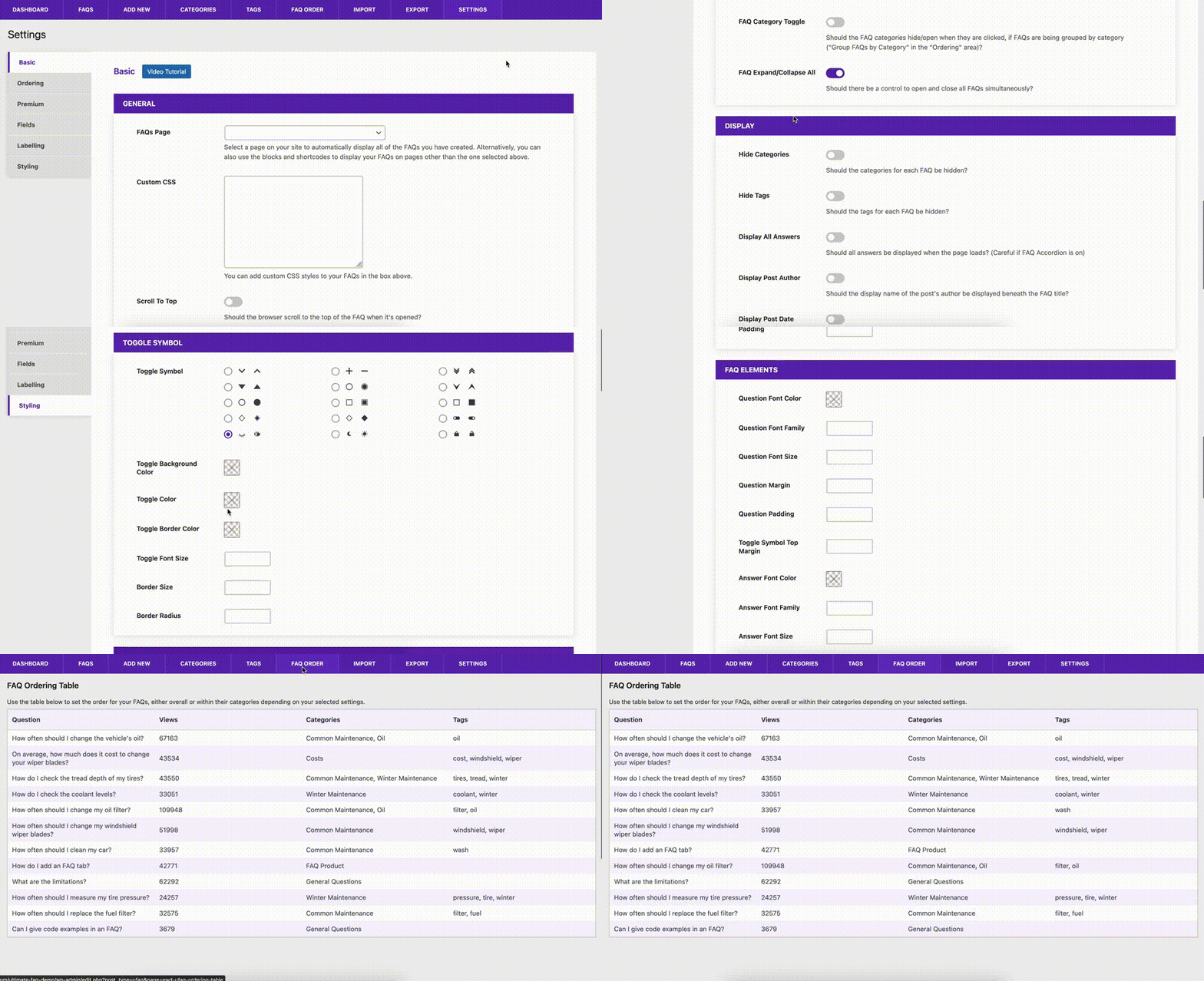
- Advanced FAQ and category sorting and ordering options.
- Zero coding!
Get Set Up in No Time!
When you first activate the Ultimate FAQ plugin, it will automatically run a walk-through, which will help you create your FAQs and add them to a page.
Google Optimized
The plugin includes full FAQPage and FAQ schema structured data markup, in LD+JSON format. So, when your page is indexed, Google will know it’s an FAQ page and can list it accordingly in search results.
Multiple Languages? We’ve got you covered!
Your FAQs are created using a post type. This means it works out of the box with language plugins like WPML, Loco Translate and Polylang. There are also many community translations already available here. And, of course, we include an up-to-date .pot for good measure, in case you like to create your own custom translations for your FAQs.
FAQ Customization Options
We’ve included (in the free version!) advanced customization features that let you choose what elements show for each FAQ (e.g. categories, tags, author, date, etc.), set the order of your FAQs and categories, fine tune accordion behavior, add your own custom CSS and more!
Use AI to Generate FAQs
You no longer need to manually create all your FAQs. Let the plugin do the heavy lifting for you! We now offer Open AI integration, via which the plugin will automatically generate new FAQs for you. You just need to specify which page or post should be used and the plugin will automatically create the FAQ based on the content of it. You can also choose to automatically assign an FAQ to a category. You then get a chance to review the generated content before publishing it to your site.
Premium AI-generated FAQs
In the premium version you will get access to create up to 20 AI-generated FAQs at a time as well as to specify multiple pages and/or posts from which the content should be pulled to generate the FAQs.
Privacy note: Only when an administrator confirms and starts AI Assist, selected public post/page text is sent to Etoile Web Design and relayed to OpenAI. Private, draft, future, pending, and password-protected content is rejected server-side. No other data is sent to external sources.
FAQ Search
Have a lot of FAQs? Our powerful search engine eliminates the need for your customers to scroll through endless FAQ entries to find the info they need. Just add the search shortcode or block to any page on your site.
FAQ Search Premium
The premium version of the plugin adds the following power features to the FAQ search functionality.
- It uses asynchronous requests to search your whole database of FAQs in real time, without having to reload the page.
- It comes with an option to display your FAQs on page load, so you can use one block for everything. No duplicates. No mess. Super easy for your users!
- Enable highlighting and auto-complete options for an even better FAQ search experience.
FAQ Statistics
Statistics and view counts are automatically enabled, so you can easily keep track of which FAQs are the most popular.
FAQ Comments
We’ve included the ability for you to enable comments on FAQs, giving you a platform to communicate with your users/customers and help improve not only your knowledge base, but your overall product or service. The FAQ comments make use of WordPress’s built-in comment engine, which means seamless integration and you can use WordPress’s comment and moderation settings to fine tune the experience.
Local Analytics and Automatic AI-Generated FAQs (Requires Premium)
The Ultimate FAQ premium version now comes with a whole new governed analytics functionality that can also automatically create new FAQ drafts based on identified content gaps.
When an administrator opts in, the site stores bounded daily local counts for normalized search text, no-result searches, FAQ opens, and helpfulness responses for 7, 30, 60, or 90 days. Raw IP addresses and user-agent strings are not retained. And administrators can clear analytics explicitly.
Based on this data, the plugin will use AI to automatically suggest FAQs to fill content gaps it has identified. From there, you can decide to let it automatically generate these FAQs using AI or you can set it so that you can manually generate and review the ones that make sense.
You need to configure an AI provider in WordPress’s Settings > Connectors for this to work.
WooCommerce FAQ Support (Requires Premium)
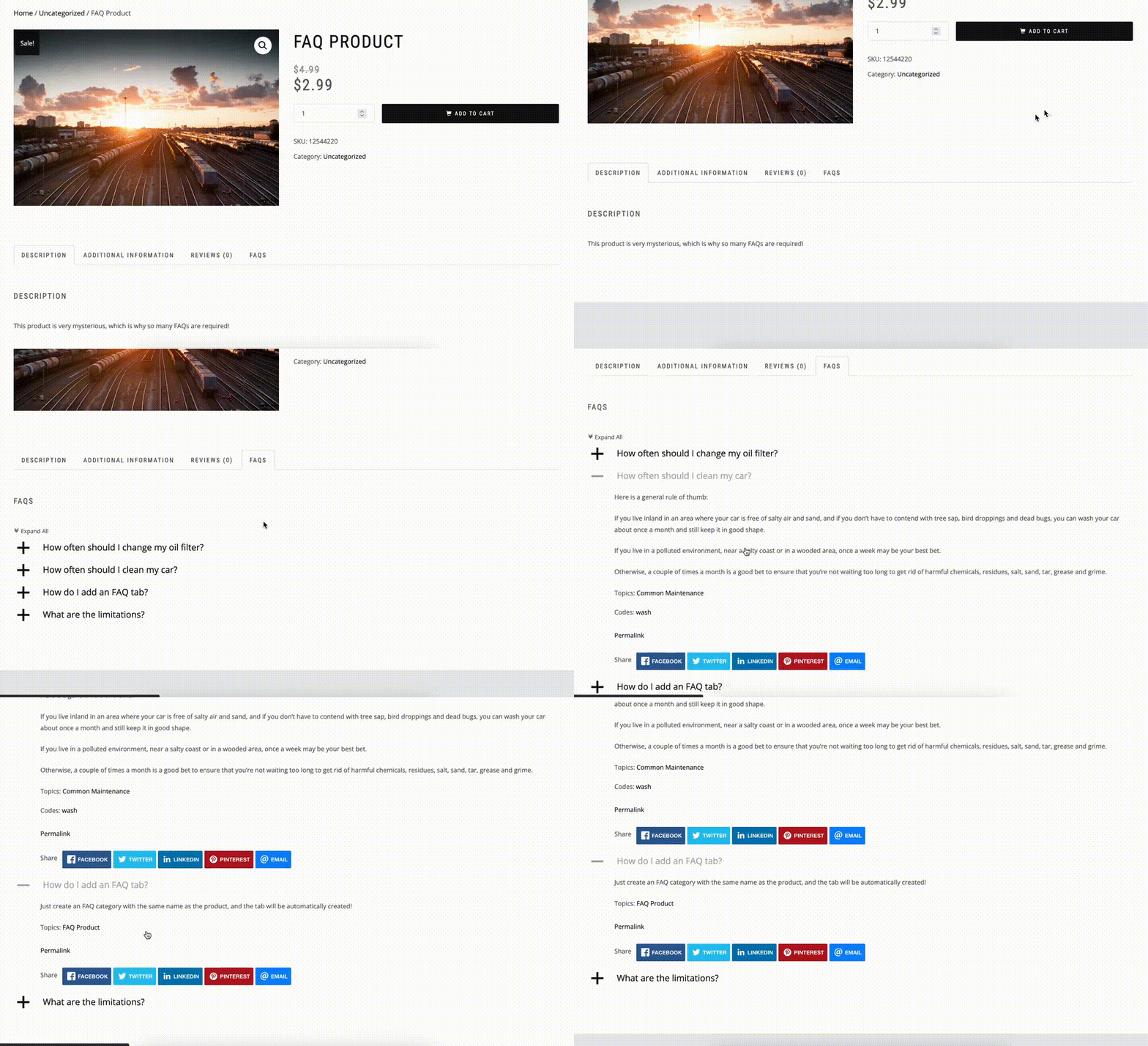
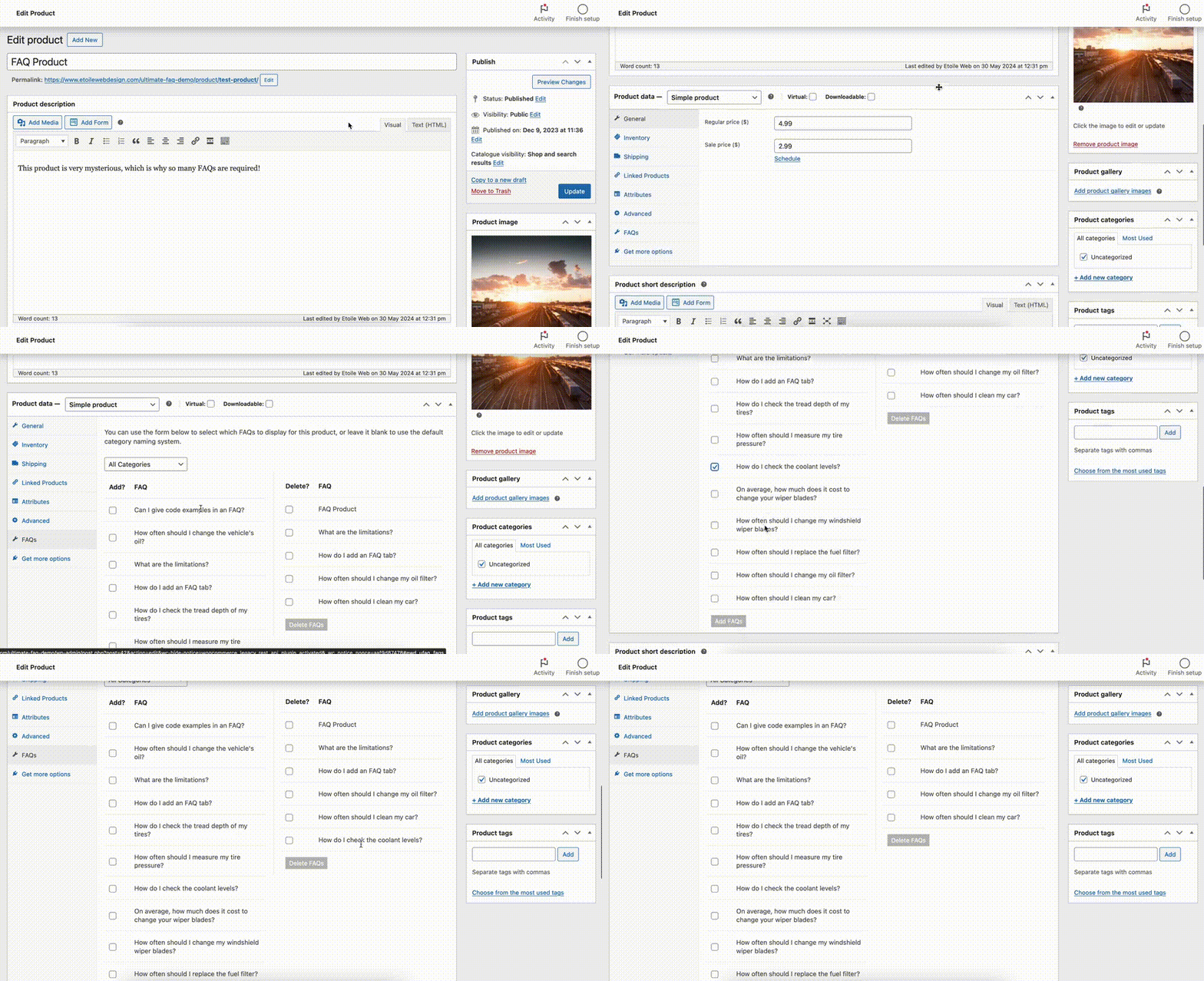
With our built-in WooCommerce integration, you can easily add FAQs to your product pages.
- Adds an FAQs tab to product pages.
- Uses the same adaptive FAQ layout for seamless integration with any theme.
- Options to automatically or manually add FAQs to a product.
- Automatically: Just create an FAQ category that matches the name of a category or product from your WooCommerce.
- Manually: Go to the WooCommerce product edit screen and add the FAQs you want.
Let People Submit Their Own FAQ Ideas (Requires Premium)
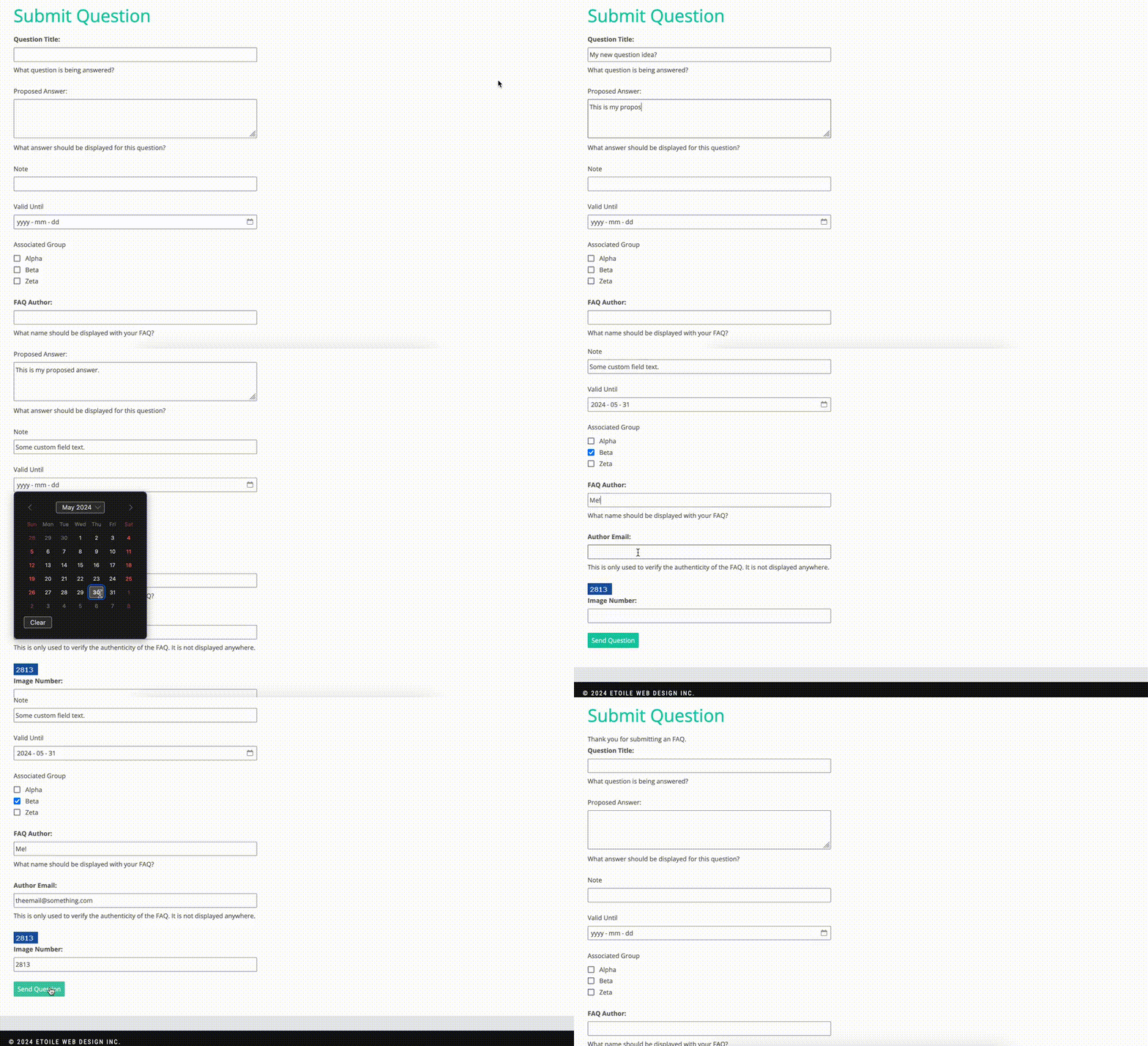
Want to give your customers the power to make your knowledge base better? Add an FAQ submission form anywhere on your site using the included block or shortcode, so people can give new FAQ ideas and even optionally include a suggested answer.
Need More? We’ve Got You Covered with the Ultimate FAQ Premium Version!
Enhance your user experience by customizing the Ultimate FAQ plugin to your exact needs with the following premium features:
- Additional FAQ layouts
- 15 icon sets for the FAQ toggle symbol
- WP Forms Integration that automatically loads matching FAQs as people type in the form.
- Drag and drop FAQ ordering
- Social media sharing for your FAQs
- FAQ animation options
- Add custom fields to your FAQs (e.g. links, text areas, dates, files, etc.)
- SEO-Friendly FAQ pretty permalinks
- FAQ export and import via spreadsheet
- Export all FAQs to a PDF (e.g. to create a user manual)
- Advanced FAQ styling options
- FAQ labelling options
For further information and purchasing options, please visit our WordPress FAQ plugin homepage.
Want to Try Out the Ultimate FAQ Premium Version for Free?
We’re happy to offer a free 7-day trial of the premium version of the Ultimate FAQ plugin, which you can use to test out features like the FAQ search form, custom fields and styling options!**
Customize Your FAQs with the Included Template System
The Ultimate FAQ plugin front end is built on a series of templates that can be customized by creating your own version of the template files (to modify and/or overwrite the existing ones). This gives you a powerful and non-destructive way to customize the look and functionality to your exact needs. More info about this can be found in our documentation.
For FAQ help and support
Installation
- Upload the ‘ultimate-faqs’ folder to the ‘/wp-content/plugins/’ directory
- Activez le plugin via le menu « Plugins » dans WordPress
ou alors
- Go to the ‘Plugins’ menu in WordPress and click ‘Add New’
- Search for ‘Ultimate FAQ’ and select ‘Install Now’
- Activate the plugin when prompted
Commencer
After you activate the plugin, a walk-through will run automatically that will help you create your first FAQs and set a few key options.
For more info on installing and activating the plugin, and on the walk-through, please see here: https://doc.etoilewebdesign.com/plugins/ultimate-faq/user/getting-started/install
For FAQ help and support
Journal de modifications
This update includes changes to the functionality that lets you create FAQs directly in the block, as well as to the interaction between this plugin and the Premium Helper. If you make use of this functionality in the block or your site uses the Premium Helper, we recommend testing the update on a staging site before updating your production site.
2.6.0 (2026-10-12)
- Added the ability to assign FAQ categories when creating FAQs directly in the Display FAQs block.
- Added a separate “Move FAQ to Trash” action in the block editor, distinct from removing an FAQ from a page.
- Improved FAQ library management and selection for sites with larger numbers of FAQs.
- Improved validation, reliability, and error handling for FAQ import/export operations.
- Updated Premium license validation and entitlement handling, including improved license status, recovery, and compatibility checks.
- Improved preservation of existing FAQ content and settings when Premium access is unavailable.
2.5.0 (2026-09-20)
- This is a major update with many changes, including some big changes. We suggest testing this update in a staging environment before updating your live environment. Or wait a few days before updating in the event that an issue is identified that requires a fix/new update.
- Added the ability to create and manage FAQs directly in the Display FAQs block.
- Added new local analytics functionality that can identify content gaps and use AI to suggest or automatically generate new FAQs to fill the gaps. You need to specify an AI provider in WP Settings > Connectors for this to work.
- Updated the search functionality available in the free version.
- Hardened public counters and AI Assist privacy, validation, and error handling.
- Updated the bundled PhpSpreadsheet runtime to the PHP 7.4-compatible 1.30.6 security release and hardened CSV/XLS/XLSX imports.
Captures d'écran

Pour les développeurs
Est-ce votre plugin ? Montrez les chiffres.
Ajoutez un badge en direct à votre site, docs ou github readme. Il se met à jour par lui-même - aucun compte n'est nécessaire.
Best Ultimate FAQ Accordion Plugin alternatives
Tous les plugins d'accordéon →




FAQ
Ultimate FAQ Accordion Plugin: quick answers
Réponses directes, extraites des données en direct WordPress.org.
Source : WordPress.org
Is Ultimate FAQ Accordion Plugin free?
Yes. Ultimate FAQ Accordion Plugin is free to download and use from the official WordPress.org plugin directory.
Is Ultimate FAQ Accordion Plugin safe to use in 2026?
Yes — Ultimate FAQ Accordion Plugin is a safe, well-maintained plugin to use in 2026. It runs on 30K+ sites, is rated 4.6/5 and was last updated 1 month ago, and scores 89/100 on our health check.
How many websites use Ultimate FAQ Accordion Plugin?
Ultimate FAQ Accordion Plugin is active on 30K+ WordPress websites and has been downloaded 2,407,820 times since it launched in July 2014. It was downloaded 11,605 times in the last 30 days.
Does Ultimate FAQ Accordion Plugin work with WordPress 7.1?
Yes. The developer has tested Ultimate FAQ Accordion Plugin up to WordPress 7.1.5, the latest release. It requires WordPress 6.0 or newer.
What PHP version does Ultimate FAQ Accordion Plugin need?
Ultimate FAQ Accordion Plugin requires PHP 7.4 or higher. Most hosts run PHP 8.x today, so it works on any modern WordPress hosting.
When was Ultimate FAQ Accordion Plugin last updated?
The latest version, 2.6.0, was released on October 13, 2026 (1 month ago).
Who makes Ultimate FAQ Accordion Plugin?
Ultimate FAQ Accordion Plugin is developed and maintained by Rustaurius.
What are the best alternatives to Ultimate FAQ Accordion Plugin?
The most popular alternatives to Ultimate FAQ Accordion Plugin are Accordion FAQ (30K+ installs), Read More Without Refresh (20K+ installs) and Accordions (20K+ installs).
Propulsé par PageForge
Un modèle et une feuille de calcul. Une vraie page pour chaque recherche.
PageForge transforme chaque ligne d'un CSV en une page WordPress avec son propre titre, URL, SEO et schéma, construit sur la mise en page que vous Déjà conçu. Gratuit sur WordPress.org.
- CSV et XLSX, plus Google Sheets sur les professionnels et les entreprises
- Son propre titre, URL, SEO champs et schéma pour chaque page
- Fonctionne avec l'éditeur de blocs, Elementor, Divi et Avada
- Gratuit sur WordPress.org, pas de carte de crédit