


WP Image Borders
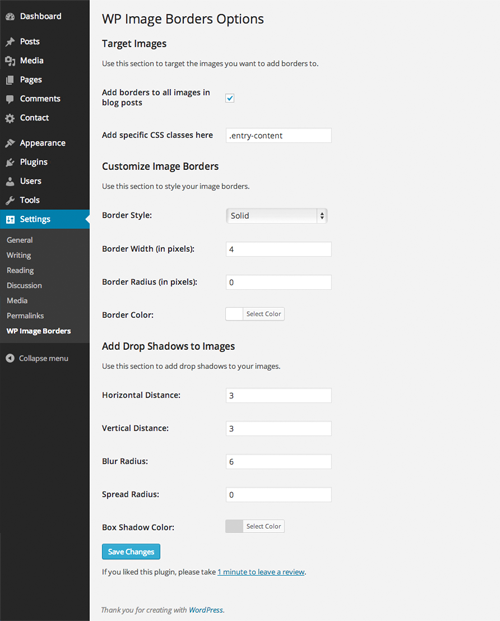
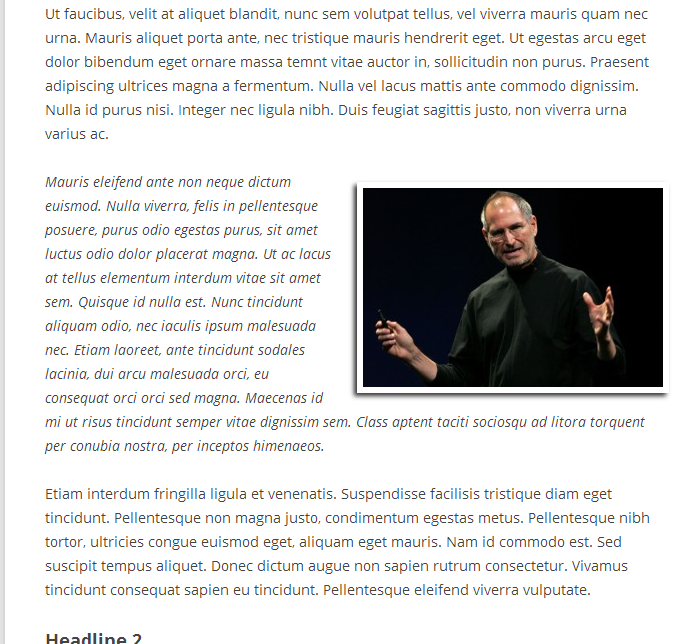
To add borders around images in your posts, simply check the checkbox in the settings titled “Add borders to all images in blog posts.” This will automatically add the borders you’ve created to all images in your blog…

Envisager une alternative
WP Image Borders shows warning signs in 2026 — compare the alternatives below before installing. It runs on 2K+ sites, is rated 4.2/5 and was last updated 9 years ago, and scores 41/100 on our health check.
- Pas de mise à jour dans 8 ans
- Uniquement testé jusqu'à WordPress 4,2 (le dernier est de 7,1)
Comment s'accumule-t-il ?
Côte à côte sur les installations, les mises à jour, les évaluations et le support


Téléchargements quotidiens
Les pics de téléchargement suivent généralement une nouvelle version - chaque site qui met à jour automatiquement compte comme un téléchargement.
Classements
Where WP Image Borders stands todayWordPress.org Classements de recherche
Position en direct dans la recherche de plugins, Top 100| Mot-clé | Position |
|---|---|
| Blog | >100 |
| image | >100 |
| images | >100 |
| poster | >100 |
| des postes | >100 |
Adoption de version
Part de sites actifs par version.
Répartition des notes
★★★★★★★★★★ 4.2 from 45 reviews
About WP Image Borders
From the official readme · v2.02Description
WP Image Borders makes it easy to:
- automatically add borders around images in posts
- selectively add borders around images in any part of your site
- change image border styles
- change image border colors
- change image border width
- add shadows to images in your posts
To add borders around images in your posts, simply check the checkbox in the settings titled “Add borders to all images in blog posts.” This will automatically add the borders you’ve created to all images in your blog posts.
To add borders around images in specific parts of your site, you can add a comma-delimited list of CSS classes of the image containers. You can use this to add borders to images in a certain part of your site, or in addition to adding borders to all images in your blog posts.
WP Image Borders comes with the following options for you to style your image borders with:
- 8 Border styles (solid, dotted, dashed, double, groove, ridge, inset, outset)
- Border width (in px)
- Border radius (in px)
- Border color (color picker)
- Drop shadows (distance, blur, spread, and color options)
Additionally, you can use this plugin to remove unwanted borders on images by leaving all border style options at their default values.
Installation
- Télécharger le plugin
- Go to your Plugins page, then click on Add new and select the plugin’s .zip file
- Alternatively, you can extract the contents of the zip file directly to your wp-content/plugins/ folder
- Finally, go to your Plugins page and activate WP Image Borders
Journal de modifications
Fixed error in previous update
2.02
- updated incorrect namespace for color picker function
2.01
- fixed 404 to stylesheet
2.0
- improved image targeting
- simplified how custom css classes are handled
- internationalized
- minor style & copy updates to settings page
- codebase refactored and reorganized
- added additional sanitization and now preventing direct access to php files
1.5.3
- Fixed CSS 404 error
1.5.2
- Fixed bug with styles not enqueueing
1.5
- removed Support Dash
- added a default ‘add’ instead of default ‘remove’ checkbox
- added option to add image borders based on specific CSS classes
- now correctly enqueueing and adding inline styles
- updated plugin banner
Captures d'écran
Pour les développeurs
Est-ce votre plugin ? Montrez les chiffres.
Ajoutez un badge en direct à votre site, docs ou github readme. Il se met à jour par lui-même - aucun compte n'est nécessaire.
Best WP Image Borders alternatives
All blog plugins →





FAQ
WP Image Borders: quick answers
Réponses directes, extraites des données en direct WordPress.org.
Source : WordPress.org
Is WP Image Borders free?
Yes. WP Image Borders is free to download and use from the official WordPress.org plugin directory.
Is WP Image Borders safe to use in 2026?
WP Image Borders shows warning signs in 2026 — compare the alternatives below before installing. It runs on 2K+ sites, is rated 4.2/5 and was last updated 9 years ago, and scores 41/100 on our health check.
How many websites use WP Image Borders?
WP Image Borders is active on 2K+ WordPress websites and has been downloaded 65,649 times since it launched in July 2013. It was downloaded 409 times in the last 30 days.
Does WP Image Borders work with WordPress 7.1?
WP Image Borders is officially tested up to WordPress 4.2.39, while the latest release is 7.1.5. It may still work, but try it on a staging site first.
When was WP Image Borders last updated?
The latest version, 2.02, was released on November 28, 2017 (9 years ago).
Who makes WP Image Borders?
WP Image Borders is developed and maintained by Ben Sibley.
What are the best alternatives to WP Image Borders?
The most popular alternatives to WP Image Borders are SiteOrigin Widgets Bundle (400K+ installs), All In One Favicon (60K+ installs) and Gum Addon for Elementor (50K+ installs).
Propulsé par PageForge
Un modèle et une feuille de calcul. Une vraie page pour chaque recherche.
PageForge transforme chaque ligne d'un CSV en une page WordPress avec son propre titre, URL, SEO et schéma, construit sur la mise en page que vous Déjà conçu. Gratuit sur WordPress.org.
- CSV et XLSX, plus Google Sheets sur les professionnels et les entreprises
- Son propre titre, URL, SEO champs et schéma pour chaque page
- Fonctionne avec l'éditeur de blocs, Elementor, Divi et Avada
- Gratuit sur WordPress.org, pas de carte de crédit