

Word Counter Plus – Word Count Filter & Post Views
Sortable Word Count and Views columns for the Posts screen, plus a filter to find posts by word count range.

Choix solide
Word Counter Plus is a solid plugin choice in 2026, with a few things worth checking first. It runs on 70+ sites, is rated 5/5 and was last updated 6 days ago, and scores 75/100 on our health check.
- Développé activement — Dernière mise à jour il y a 6 jours
- Testé avec le dernier WordPress (7.1)
- Petite base d'utilisateurs (plus de 70 installations actives)
- Très peu de critiques jusqu'à présent
Comment s'accumule-t-il ?
Côte à côte sur les installations, les mises à jour, les évaluations et le support


Téléchargements quotidiens
Les pics de téléchargement suivent généralement une nouvelle version - chaque site qui met à jour automatiquement compte comme un téléchargement.
Classements
Where Word Counter Plus stands todayWordPress.org Classements de recherche
Position en direct dans la recherche de plugins, Top 100| Mot-clé | Position |
|---|---|
| admin columns | #97 |
| post views | #60 |
| View Counter | #18 |
| word count | #3 |
| word counter | #1 |
Adoption de version
Part de sites actifs par version.
Répartition des notes
★★★★★ ★★★★★ 5 sur 1 avis
About Word Counter Plus
À partir du Lisezmoi officiel · v1.4.1Description
Word Counter Plus shows how long each post is and how many people read it, right in your admin Posts list. No settings page and no extra screens.
It is built for bloggers, editors, and content teams who want to find thin content, spot their most-read posts, and plan updates without leaving the dashboard.
Word Count column
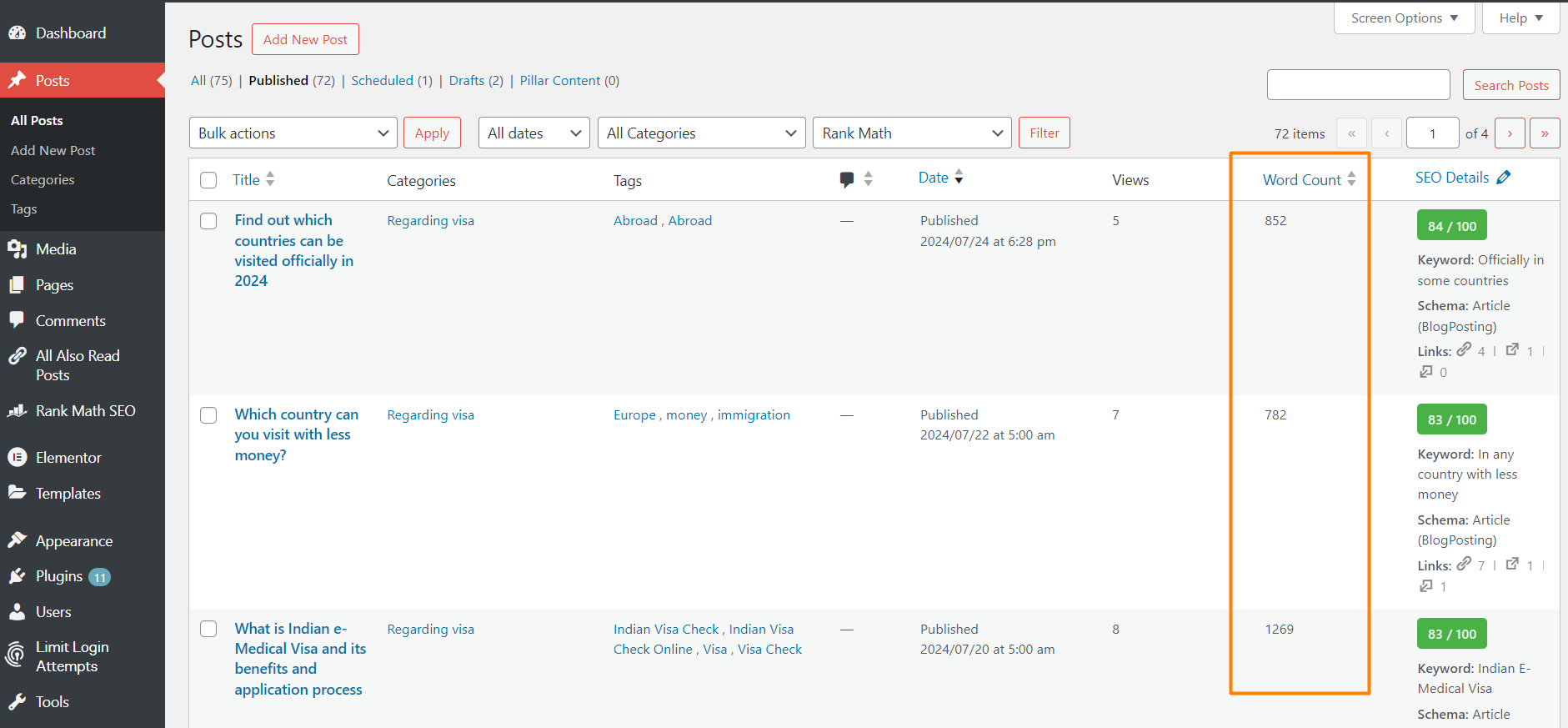
Every post gets a Word Count column that you can sort. Words are counted when you save a post. Posts that existed before you installed the plugin are counted automatically in the background.
Word Count filter
A word count dropdown next to the date and category filters lets you show only posts within a range:
- 0–600 words
- 601–1000 words
- 1001–2000 words
- 2001–3000 words
- 3001–4000 words
- 4001+ words
Combine it with the category filter, search, or sorting. For example, find short posts in one category that need expanding.
Post Views column
A sortable Views column counts how many times each post is opened on your site. To keep the numbers honest it skips:
- Search engine bots and other crawlers
- Browser prefetch and prerender requests (such as WordPress speculative loading)
- Post previews
- Logged-in users who can edit the post, such as the author or an admin
Sort by Views to see your most popular posts, or combine it with the word count filter to compare long and short posts.
Show views to your visitors
Under Settings → Word Counter Plus you can show the view count (for example “1,204 views”) to your visitors on single posts, on post archives (the blog page, categories, tags, authors and search results), or both. It is off by default.
Choose where it appears:
- After the title, next to the author, date and categories (default). For example, “Written by Admin in News · 1,204 views”.
- Before the content
- After the content
Works with block themes such as Twenty Twenty-Five, and with classic themes.
Lightweight
- Word counts are calculated only when a post is saved.
- A view is a single post meta update. No extra database tables, external services, or tracking scripts.
- Each column can be hidden from Screen Options.
Installation
- Install the plugin from Plugins → Add New, or upload the
word-counter-plusfolder to/wp-content/plugins/. - Activate it from the Plugins screen.
- Go to Posts → All Posts to see the Word Count and Views columns and the word count filter.
- Optional: go to Settings → Word Counter Plus to show view counts on your site.
Journal de modifications
Adds rating, support and author links on the Plugins screen.
1.4.1
- New: “Rate Word Counter Plus”, “Support” and “Visit author” links on the plugin’s row on the Plugins screen.
1.4.0
- New: Settings → Word Counter Plus page. Choose whether visitors see the view count on single posts, post archives, or both. Off by default.
- New: choose where the count appears: next to the post meta (default), before the content, or after the content.
- New: a Settings link on the Plugins screen.
- New:
wcp_post_views_htmlfilter for the front-end view count markup.
1.3.1
- New: after 7 days, admins see a dismissible request to rate the plugin on WordPress.org, on the Dashboard and Posts screens only. “Maybe later” hides it for 30 days.
1.3.0
- New: sortable Views column that counts post views, skipping bots, prefetch requests, previews, and post editors.
- New: older posts are counted automatically in the background after you activate or update the plugin.
- Fix: sorting by the Word Count column now sorts by word count.
- Fix: the “4001+ words” filter now shows every post with 4001 or more words.
- Improved: the filter input is sanitized and the dropdown has an accessible label.
- Changed: requires PHP 8.0 or later. The plugin already needed it, and the readme now says so.
1.2.7
Tested up to WordPress 7.1. Fixed the readme short description.
1.2.1
Added post-filter screenshot and edited the plugin description.
Captures d'écran


Pour les développeurs
Est-ce votre plugin ? Montrez les chiffres.
Ajoutez un badge en direct à votre site, docs ou github readme. Il se met à jour par lui-même - aucun compte n'est nécessaire.
Best Word Counter Plus alternatives
All admin columns plugins →





FAQ
Word Counter Plus: quick answers
Réponses directes, extraites des données en direct WordPress.org.
Source : WordPress.org
Is Word Counter Plus free?
Yes. Word Counter Plus is free to download and use from the official WordPress.org plugin directory.
Is Word Counter Plus safe to use in 2026?
Word Counter Plus is a solid plugin choice in 2026, with a few things worth checking first. It runs on 70+ sites, is rated 5/5 and was last updated 6 days ago, and scores 75/100 on our health check.
How many websites use Word Counter Plus?
Word Counter Plus is active on 70+ WordPress websites and has been downloaded 2,485 times since it launched in July 2024. It was downloaded 450 times in the last 30 days.
Does Word Counter Plus work with WordPress 7.1?
Yes. The developer has tested Word Counter Plus up to WordPress 7.1.5, the latest release. It requires WordPress 5.0 or newer.
What PHP version does Word Counter Plus need?
Word Counter Plus requires PHP 8.0 or higher. Most hosts run PHP 8.x today, so it works on any modern WordPress hosting.
When was Word Counter Plus last updated?
The latest version, 1.4.1, was released on November 15, 2026 (6 days ago).
Who makes Word Counter Plus?
Word Counter Plus is developed and maintained by Mofizul Islam.
What are the best alternatives to Word Counter Plus?
The most popular alternatives to Word Counter Plus are Admin Columns (100K+ installs), Admin Columns for ACF Fields (8K+ installs) and Adminify (6K+ installs).
Propulsé par PageForge
Un modèle et une feuille de calcul. Une vraie page pour chaque recherche.
PageForge transforme chaque ligne d'un CSV en une page WordPress avec son propre titre, URL, SEO et schéma, construit sur la mise en page que vous Déjà conçu. Gratuit sur WordPress.org.
- CSV et XLSX, plus Google Sheets sur les professionnels et les entreprises
- Son propre titre, URL, SEO champs et schéma pour chaque page
- Fonctionne avec l'éditeur de blocs, Elementor, Divi et Avada
- Gratuit sur WordPress.org, pas de carte de crédit