


Web3 – Crypto wallet Login & NFT token gating
The [Web3 – Crypto wallet Login & NFT token gating] plugin allows users to Sign Up/log in to a WordPress website using their cryptocurrency wallet. It also helps to NFT token gate exclusive content of the WordPress…

Envisager une alternative
Web3 shows warning signs in 2026 — compare the alternatives below before installing. It runs on 100+ sites, is rated 4.7/5 and was last updated 3 years ago, and scores 41/100 on our health check.
- Loved by users — 4.7/5 from 23 reviews
- Petite base d'utilisateurs (plus de 100 installations actives)
- Pas de mise à jour dans 2 ans
- Uniquement testé jusqu'à WordPress 6,5 (le dernier est de 7,1)
Comment s'accumule-t-il ?
Côte à côte sur les installations, les mises à jour, les évaluations et le support

Téléchargements quotidiens
Les pics de téléchargement suivent généralement une nouvelle version - chaque site qui met à jour automatiquement compte comme un téléchargement.
Classements
Where Web3 stands todayWordPress.org Classements de recherche
Position en direct dans la recherche de plugins, Top 100| Mot-clé | Position |
|---|---|
| ethereum | >100 |
| nft | #18 |
| polygon | #80 |
| solana | #48 |
| web3 | #14 |
Adoption de version
Part de sites actifs par version.
Répartition des notes
★★★★★★★★★★ 4.7 from 23 reviews
About Web3
From the official readme · v3.1.4Description
The [Web3 – Crypto wallet Login & NFT token gating] plugin allows users to Sign Up/log in to a WordPress website using their cryptocurrency wallet. It also helps to NFT token gate exclusive content of the WordPress site. Here only users who have specified NFTs in their crypto wallet can access locked content.
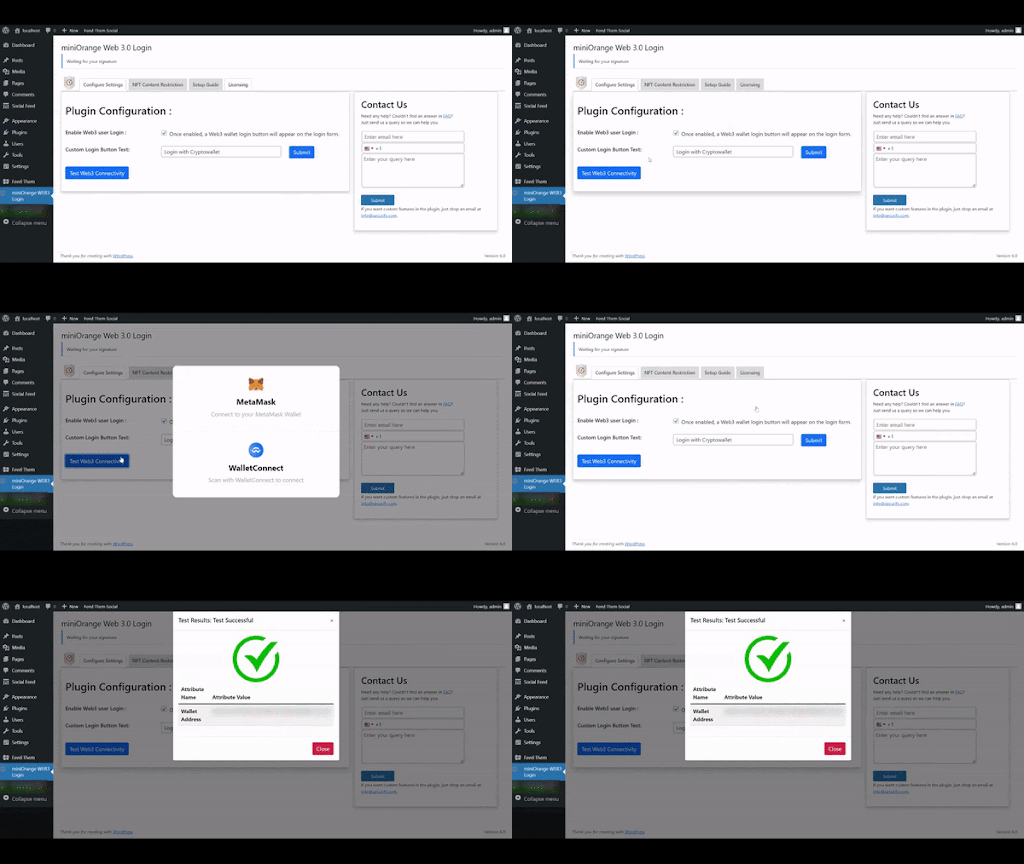
To understand the functionality and flow of your Web3 wallet login button, please refer to the Setup Guide [here].
Our Web3 Authentication plugin uses digital signature verification for crypto login. This increases the security of WordPress crypto login.
During crypto wallet signup, our Web3 plugin creates a regular WordPress user account, so existing plugins, and customizations will continue to work as intended.
Watch video embedded below to get an overview of the plugin functionality
The key takeaways from the video you shouldn’t miss:
- The miniOrange Web3 Authentication Plugin allows for secure access to gated content using NFT tokens.
- Website owners can control access to specific pages by configuring token details and content gating.
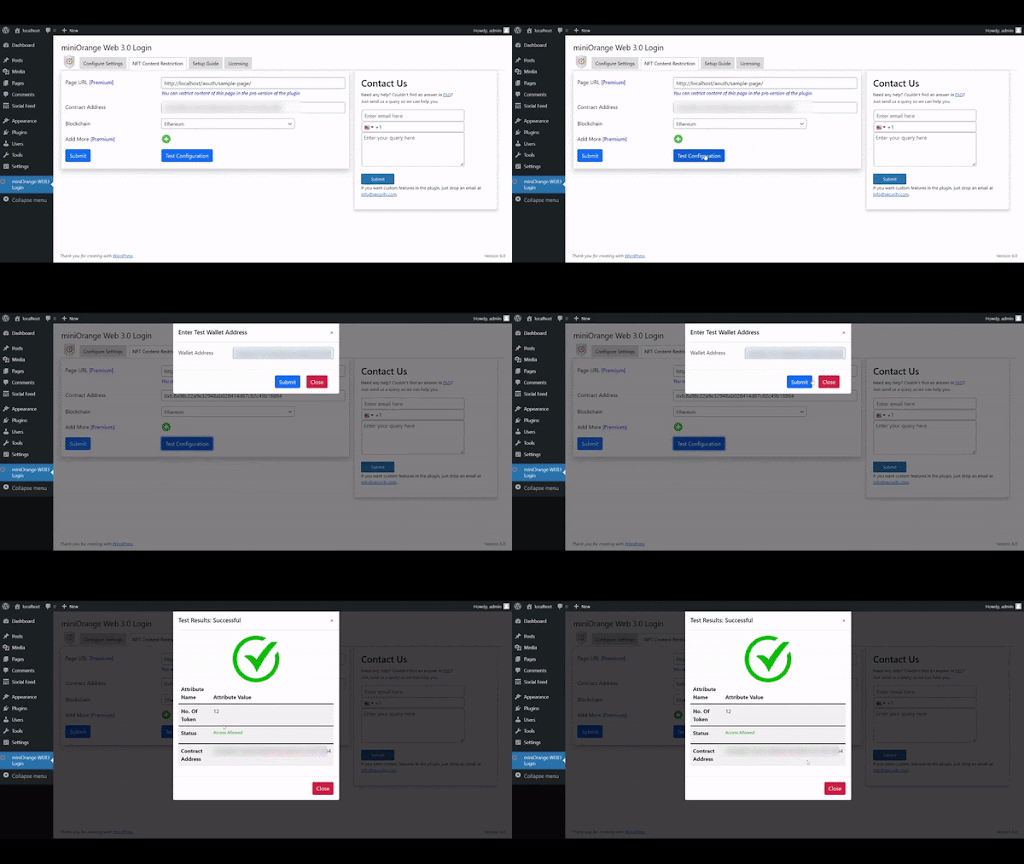
- Testing the configuration ensures that only users with the required NFT token can access the content.
- Users can easily log in with their crypto wallets, simplifying the authentication process.
- Error pages are displayed when users don’t have the necessary NFT token in their wallets.
- The plugin provides flexibility to enable or disable profile completion forms for new crypto users.
The Web3 authentication login plugin supports both Hot and Cold Wallet Log in.
Hot Wallets Supported for Crypto Login
MetaMask, WalletConnect, Coinbase, Trust, Edge, XUMM, MyAlgo, Pera Wallet, Nami, Typhon, Flint, VeWorld Electrum, Robinhood, Binance, Mycelium, AtomicDEX, Jaxx, Samourai, Huobi, Luno, ZenGo, Crypto.com, Bitcoin IRA, Exodus etc
Cold Wallets Supported for Crypto Login
Ledger Nano S, Ledger Nano X, Gamestop, Trezor, KeepKey, CoolWallet Pro, Safepal S1, Keystone Pro, Ellipal Titan, etc
Supported Blockchains
[Ethereum], [Polygon], [Algorand], [Solana], [Loopring Layer 2], [Chronos], [XRPL], Binance, Avalanche, , Base Layer 2, Cardano, All EVM based blockchains, Vechain etc
Supported Token Standards
ERC20, ERC721, ERC1155, BEP20, BEP721, BEP1155, SPL Token, Algorand’s asset IDs etc.
To know more about our plugin please click [here].
FREE VERSION FEATURES
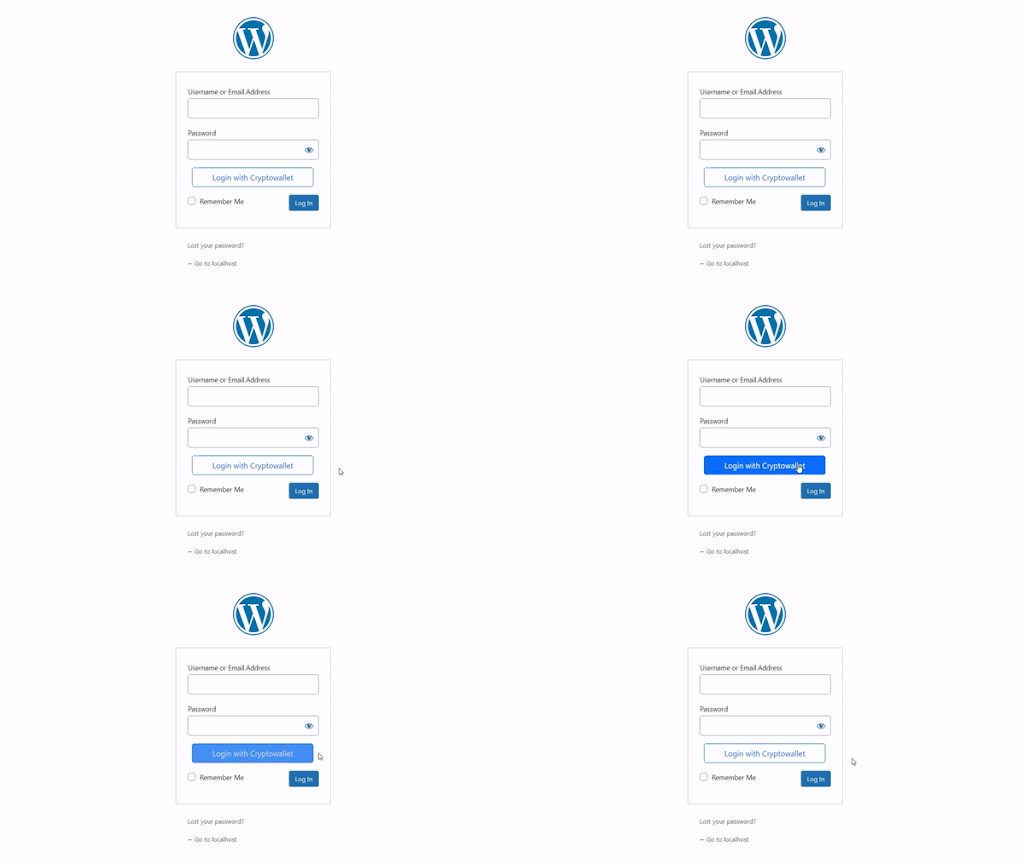
In the free version of the plugin, you can log in to the WordPress website using a crypto wallet. The login with Crypto Wallet button can be displayed on the WP login default page. List of features-
- Login with Crypto wallet button available at WP login default page
- Option to hide the Login with Crypto wallet button
- Login with Crypto wallet support for MetaMask, Wallet Connect, Coinbase, Phantom, MyAlgo Wallet.
Explore comprehensive feature lists and pricing plans for all premium versions by clicking [here]
STANDARD VERSION FEATURES
- All free version features are included
- Shortcode for Login with Crypto Wallet button
- Custom styling for Login Button
- Custom Redirect after login
- Enable/Disable profile completion for new users that signup to your site using crypto wallet
PREMIUM VERSION FEATURES
The premium version of the plugin has additional features where you can also restrict/lock/gate specific pages, posts, and videos on their WP website and allow users to access the content based on the NFTs owned in their Crypto Wallet. List of features-
- All Standard version features are included
- NFT Token gated content
- Multiple NFT contract addresses supported
- Regex based rule(All child pages will block automatically under the configured URL)
- Support cold wallets like ledger, trezor, etc
- Support Added for Hedera, Algorand and Solana Blockchain
- Connect wallet to existing WordPress profile
ENTERPRISE VERSION FEATURES
The enterprise version of the plugin additionally lets you assign roles based on the NFT collection owned in their crypto wallets. Users who login in with a crypto wallet to the WordPress website is assigned a role based on their NFT collection.
- All Premium version features are included
- WordPress role mapping based on NFT owned by crypto user
- NFT token gated section of page/post
- Disconnect Button
- Customize end user experience for NFT gated content access flow
ALL-INCLUSIVE VERSION FEATURES
All-in-one WordPress management with the support of add-ons / Third Party Plugin compatibility.
- WooCommerce Coupon mapping based on NFTs ownership
- BuddyBoss/BuddyPress Profile Mapping based NFTs owned by end user
- LearnDash Attribute/Group/Course Mapping based on NFTs owned by user
- MemberPress membership mapping based on NFTs held by crypto user
- Crypto wallet user video analytics for Brandmax plugin
WooCommerce – Web3 Integration Add-on
The add-on can be used for Crypto wallet login/Wallet connect to WooCommerce login and registration page. You can create NFT token gating and NFT gated WooCommerce stores where access can be restricted. Users who have required NFT collection in their wallet have access to the restricted products on WooCommerce stores.
You can also employ NFT gated WooCommerce for giving discounts, here users who have specific NFT or token collection in their wallet are given discounts or certain benefits.
You can restrict access to WooCommerce coupon affiliate programs based on the NFTs owned by the user wallet.
Add NFT images to the user media library so that they print that NFT on WooCommerce Products like T-shirt, Mugs, Canvas, etc.
- NFT/Token gating WooCommerce-discount based on token owned in wallet [Setup Guide] [Video]
- Gate exclusive products for the NFT users [Setup Guide] [Video]
MemberPress – Web3 Integration Add-on
MemberPress will give you the ability to confidently create, manage and track membership subscriptions. Admin can now add NFT Token Gating to Memberpress Memberships created.[Setup Guide] [Video]
BuddyBoss – Web3 Integration Add-on
Profiles created in BuddyBoss can be NFT Token Gated using miniOrange BuddyBoss Integration Addon. Admin can now add NFT Token Gating to BuddyBoss Profile Types created. [Setup Guide] [Video]
LearnDash – Web3 Integration Add-on
Admin can now Restrict Access to the Courses published on LearnDash.
When a User logins using our Web3 Login Button, then the user will be assigned courses in LearnDash based on the NFT owned by the user.[Setup Guide] [Video]
Use cases for Web3 authentication plugin
-
Login with web3 Cryptocurrency wallet: Use one of a variety of hot wallet like MetaMask, WalletConnect, Edge, Electrum, Coinbase, Trust, Robinhood, Binance, Mycelium, AtomicDEX, Jaxx, Samourai, Huobi, Luno, ZenGo, Crypto.com, Bitcoin IRA, and Exodus for WordPress website login. Popular cold wallets like Ledger Nano S, Ledger Nano X, Trezor, KeepKey, CoolWallet Pro, Safepal S1, Keystone Pro, and Ellipal Titan can also be used for WordPress website login
-
Token gated content: Restrict posts, pictures, content, and videos on your website based on NFT collection in web3 wallet. Make it mandatory for users to buy specific NFT collections to access the restricted content. For purchasing NFT collections redirected the users to famous NFT marketplaces like OpenSea, Rarible, and Mintable
-
Sensitive documentation: Ownership of NFTs in your crypto wallet allows you to access secure and sensitive information in an organization
-
Role Assigning: WordPress website owners can assign roles to the users of their website according to the NFT collection in their wallet
-
Restrict access: You can even choose to restrict users who hold certain NFTs from gaining access to pages, images, videos, or documents that you do not want them to see.
-
Token-gated communities: The plugin can be used to restrict access on [Zoom], [Discord], [Google Drive], [Circle], and gaming channels based on NFT collection.
Customer Use-cases:
Explore our customer use-case pages for insights into our Web3 authentication solutions below:
NFT Marketplace
Please try out our NFT Marketplace solution [here].
Explore our customer use-case pages for insights into our NFT Marketplace solutions below:
Intimité
miniOrange Web3 login plugin does not store anything other than the wallet address, on your server.
Contact Us
Feel free to reach out to us. Send an email at web3@xecurify.com for any inquiries.
User can now also connect to us on Discord
Installation
This section describes how to install the WEB3 authentication plugin.
À partir de votre tableau de bord WordPress
- Visit
Plugins > Add New - Search for
WEB3 authentication plugin. Find and Install theWEB3 authentication pluginplugin by miniOrange - Activer le plugin
De WordPress.org
- Download the WEB3 authentication plugin.
- Unzip and upload the
WEB3 authentication plugindirectory to your/wp-content/plugins/directory. - Activate the WEB3 authentication plugin from your Plugins page.
Journal de modifications
Compatability with WordPress 6.5
=3.1.4=
* Compatability with WordPress 6.5
=3.1.3=
* Readme Update
=3.1.2=
* Fixed NFT balance check Bug for Polygon
* Readme Update
=3.1.1=
* Compatability with wordpress 6.4.0
* Fixed Bug for enabling default wallet on activation
=3.1.0=
* Fixed Bug in phantom and alogrand wallet login flow
=3.0.0=
* Fixed nonce vulnerability
=2.8.0=
* Licensing update
=2.7.0=
* Fixed hidden form vulnerability
=2.6.0=
* Added Binance Blockchain support
* Free Demo Trial of paid plugins
=2.5.0=
* Added PHPCS Fixes and support phantom wallet login
=2.3.6=
* added support for solana
* Advertising add-on
=2.3.5=
* Loader class issue fixes.
= 2.1.2=
* Advertising show nft hold by user feature in shortcode info tab
* Web3 library(Elliptic) fixes
* fixing purchasing plan UI
* Readme update
= 2.1.0=
* Advertising Premium Tabs UI
* Web3 library(Elliptic) fixes
* Adding multiple purchasing plan
2.0.1
- Test option to check NFTs held by wallet
- Licensing Plan
- UI improvement
- Readme updated
1.0.4
- Compatibility with WordPress 6.0.0
- Readme updated
1.0.3
- Added support to change text of web3 login button
- Added test functionality for web3 connectivity
- Improved UI of the plugin
1.0.2
- Added support for crypto wallets
- Added feedback form
1.0.1
- Readme Update
1.0.0
- First release of the plugin
- Compatibility with WordPress 5.9
Captures d'écran
Pour les développeurs
Est-ce votre plugin ? Montrez les chiffres.
Ajoutez un badge en direct à votre site, docs ou github readme. Il se met à jour par lui-même - aucun compte n'est nécessaire.
Best Web3 alternatives
All ethereum plugins →



FAQ
Web3: quick answers
Réponses directes, extraites des données en direct WordPress.org.
Source : WordPress.org
Is Web3 free?
Yes. Web3 is free to download and use from the official WordPress.org plugin directory.
Is Web3 safe to use in 2026?
Web3 shows warning signs in 2026 — compare the alternatives below before installing. It runs on 100+ sites, is rated 4.7/5 and was last updated 3 years ago, and scores 41/100 on our health check.
How many websites use Web3?
Web3 is active on 100+ WordPress websites and has been downloaded 14,289 times since it launched in April 2022. It was downloaded 297 times in the last 30 days.
Does Web3 work with WordPress 7.1?
Web3 is officially tested up to WordPress 6.5.15, while the latest release is 7.1.5. It may still work, but try it on a staging site first.
What PHP version does Web3 need?
Web3 requires PHP 7.0 or higher. Most hosts run PHP 8.x today, so it works on any modern WordPress hosting.
When was Web3 last updated?
The latest version, 3.1.4, was released on April 3, 2024 (3 years ago).
Who makes Web3?
Web3 is developed and maintained by miniOrange.
What are the best alternatives to Web3?
The most popular alternatives to Web3 are NOWPayments for WooCommerce (3K+ installs), Accept Cryptocurrencies wit… (700+ installs) and Crypto Price Widgets (500+ installs).
Propulsé par PageForge
Un modèle et une feuille de calcul. Une vraie page pour chaque recherche.
PageForge transforme chaque ligne d'un CSV en une page WordPress avec son propre titre, URL, SEO et schéma, construit sur la mise en page que vous Déjà conçu. Gratuit sur WordPress.org.
- CSV et XLSX, plus Google Sheets sur les professionnels et les entreprises
- Son propre titre, URL, SEO champs et schéma pour chaque page
- Fonctionne avec l'éditeur de blocs, Elementor, Divi et Avada
- Gratuit sur WordPress.org, pas de carte de crédit