

NFT Maker
DEPRECATED / NOT MAINTAINED: Please be aware that we have stopped the development of this WordPress plugin and recommend to use our API or SDK directly. Visit Tatum.

Envisager une alternative
NFT Maker shows warning signs in 2026 — compare the alternatives below before installing. It runs on 100+ sites, is rated 4/5 and was last updated 3 years ago, and scores 33/100 on our health check.
- Petite base d'utilisateurs (plus de 100 installations actives)
- Pas de mise à jour dans 2 ans
- Uniquement testé jusqu'à WordPress 5,8 (le dernier est de 7,1)
Comment s'accumule-t-il ?
Côte à côte sur les installations, les mises à jour, les évaluations et le supportTéléchargements quotidiens
Les pics de téléchargement suivent généralement une nouvelle version - chaque site qui met à jour automatiquement compte comme un téléchargement.
Classements
Where NFT Maker stands todayWordPress.org Classements de recherche
Position en direct dans la recherche de plugins, Top 100| Mot-clé | Position |
|---|---|
| bsc | #33 |
| celo | #4 |
| erc721 | #3 |
| ethereum | >100 |
| nft | #25 |
Adoption de version
Part de sites actifs par version.
Répartition des notes
★★★★★ ★★★★★ 4 sur 5 avis
About NFT Maker
From the official readme · v2.0.37Description
DEPRECATED / NOT MAINTAINED: Please be aware that we have stopped the development of this WordPress plugin and recommend to use our API or SDK directly. Visit Tatum.
If you want to sell NFTs but don’t want to build an entire NFT marketplace from scratch, then NFT Maker is the plugin you’ve been waiting for. Lazy Minting. WordPress integration. Free IPFS Storage, forever.
NFT Maker supports the following blockchains:
Ethereum
Polygon
Binance Smart Chain
Celo
Harmony
NFT Maker allows you to turn your Woocommerce store into an NFT store with a simple plugin. Just install, follow your usual WordPress product publishing flow, and tick which blockchain you’d like to mint your NFTs on. It’s so easy, you’ll be up and running in no time!
Lazy Minting
Put simply, lazy minting is when an NFT is available off the blockchain and only gets minted when someone buys it. This means that you, the seller, don’t have to pay any upfront gas fees to mint your NFTs. Gas fees are only paid once the NFT is purchased and then minted on the blockchain.
Free IPFS Storage, forever.
With native IPFS integration, you can store your images, videos, audio files, or whatever other metadata you’d like to include in your NFT at no cost whatsoever. Like the NFTs themselves, files stored on IPFS cannot be tampered with or changed, so your NFT will always be connected to their original metadata, forever.
NFT Maker Tutorial
Check out our full video tutorial on how to get started..
Here’s it works:
1. Install the plugin.
2. Sign up for a Tatum API key. The Tatum is an external service which provides access for the blockchain infrastructure. The credits from your plan are used to pay for the gas fees to mint NFTs. You can try NFT Maker with Test API keys for free, but NFT minted with Test API keys will not have any value, because they are minted on Testnet network.
3. Create your NFT by uploading an image. This won’t consume any credits until someone buys it.
4. When someone buys your NFT, the metadata is uploaded to IPFS, and the NFT is minted to the blockchain address provided by the customer at checkout.
5. Credits to pay the gas fees for minting are deducted from your Tatum plan.
IMPORTANT NOTICE
NFT Maker works with the both free and paid Tatum plans. You can try NFT Maker with Test API keys for free, but NFTs minted with Test API keys will not have any value, because they are minted on Testnet network.
The paid Tatum API key plan works with blockchain Mainnet networks, and it pays for the gas fees to mint your NFTs from your Tatum API key plan.
Please note, you can cancel your plan at any time, but Tatum DOES NOT offer refunds for received payments.
Due to high ETH fees, minting NFTs with ETH is available only with enterprise API keys.
If you want to know which smart contracts are used for minting NFTs you can find them inside the admin section of the NFT Maker plugin in the help section.
You are welcome to add your pull request to our Github repository. If you have any questions just drop us a line on the Tatum Discord.
Or feel free to contact developer via Telegram.
Installation
This section describes how to install the Tatum plugin and get it working.
- Download and install the Woocommerce plugin if you haven’t already.
- Click “Get your Tatum API key.”
- Login to the Tatum dashboard and purchase a paid plan. The Tatum is an external service which provides access for the blockchain infrastructure.
- When you have completed your purchase, you will be directed back to the Tatum dashboard. Next to your newly created API key, click “Show” and copy your API key.
- Now, back in the NFT Maker dashboard, paste your API key in the field labeled “Paste your API key below.”
- Okay, you’re all ready to mint NFT tokens! In the overview, you can see info about your API key.
- Open the “Product” tab in the left-hand column of your WordPress dashboard.
- Click “Add product.”
- Name your NFT.
- Set its price in the “General” tab of the “Product data” box.
- In the “NFT Maker” tab of the same box, select the blockchain on which to mint the NFT upon purchase.
- Upload an image by clicking “Set product image” in the “Product Image” field in the right-hand column of the screen.
- Click “Publish” to create your product. Now it is available for purchase in your e-shop. You can also view it in your list of lazy-minted NFTs. You will not consume any credits from your paid plan for gas fees until someone purchases your NFT and it is minted on the blockchain you have selected.
- When a buyer adds the NFT to their cart and proceeds to checkout, they will have to enter a blockchain address on the blockchain to which the NFT will be minted.
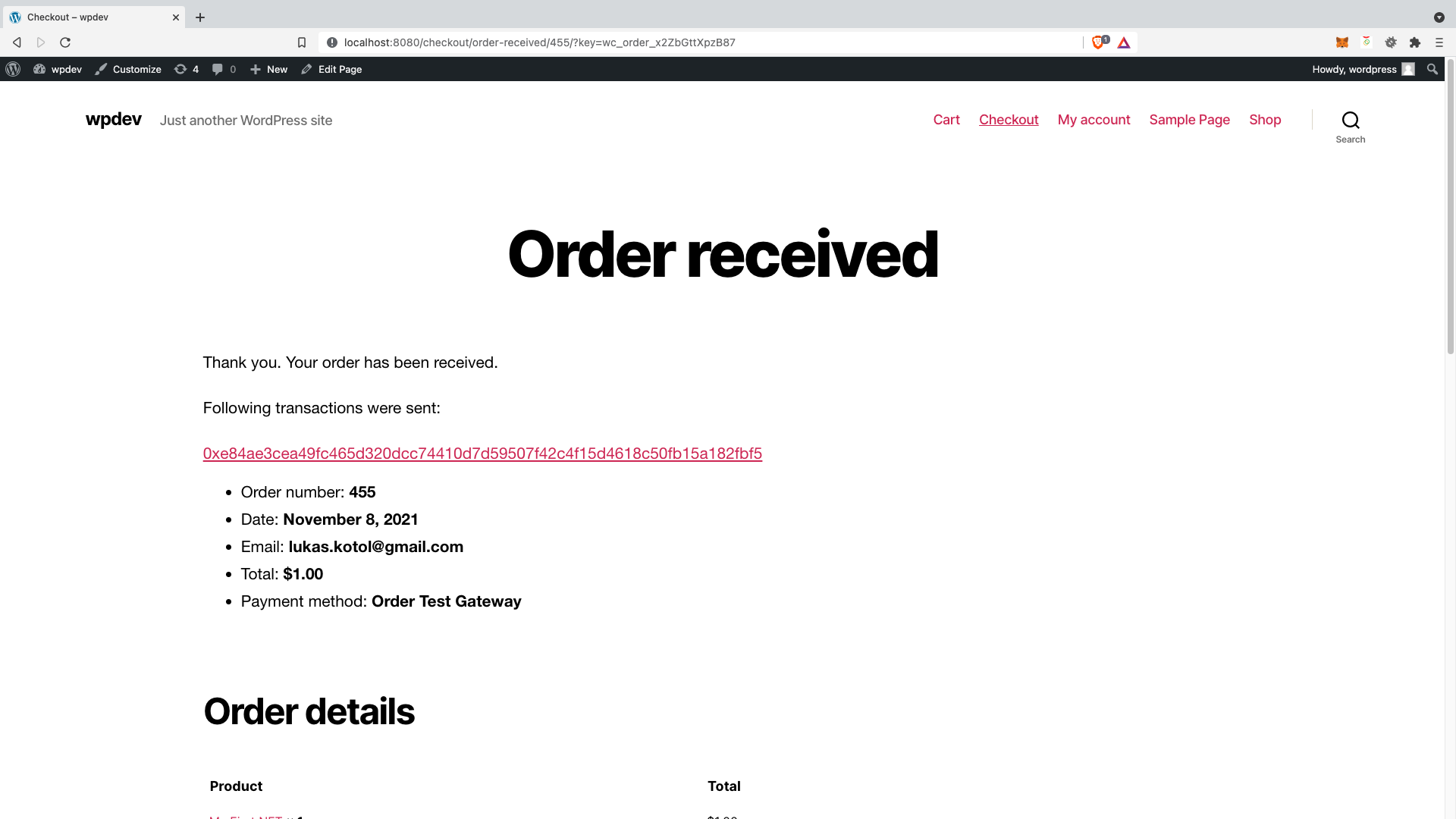
- After a successful purchase of the NFT, the customer will be shown a link to the blockchain transaction.
- The blockchain transaction link redirects the customer to the blockchain explorer of the respective blockchain where they can view NFT mint transaction details.
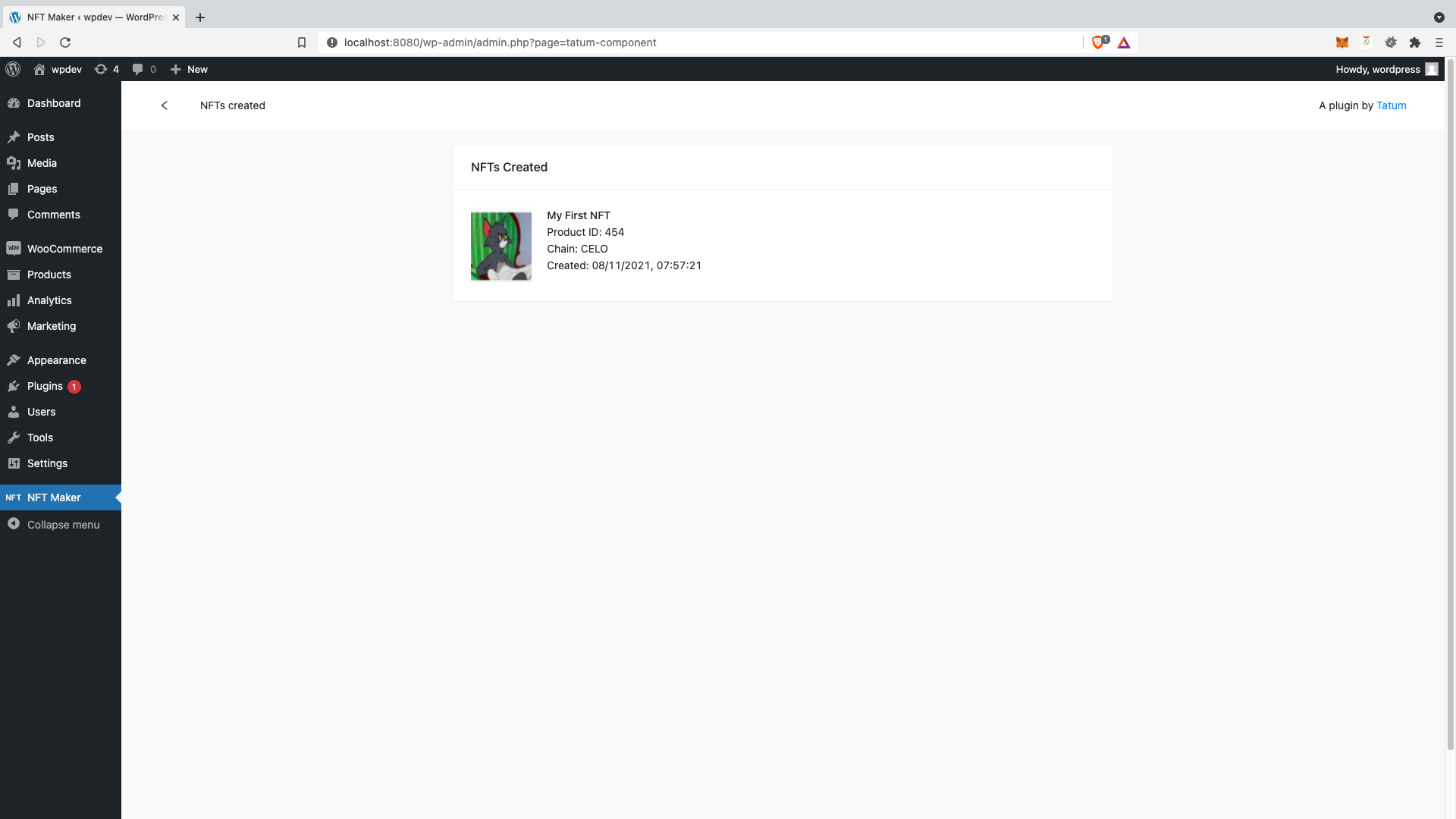
- Admins of the WordPress shop can also view all lazy-minted and sold NFTs.
Journal de modifications
No upgrade notice yet
1.0.0
- Version initiale
1.0.1
- Added deploy smart contract enough balance validation
1.0.2
- Added information about fees cost
1.0.3
- Fixed deploy NFT minor bug
1.0.5
- Fixed minor bugs
2.0.0
- Completely new version with IPFS and lazy minting support
Captures d'écran



Pour les développeurs
Est-ce votre plugin ? Montrez les chiffres.
Ajoutez un badge en direct à votre site, docs ou github readme. Il se met à jour par lui-même - aucun compte n'est nécessaire.
Best NFT Maker alternatives
All bsc plugins →| Rang | Plugin | Installations actives |
|---|---|---|
| 2 |
 Enefti NFT Marketplace Core lite
 is a starting point for NFT Marketplaces based on… |
10+ |
FAQ
NFT Maker: quick answers
Réponses directes, extraites des données en direct WordPress.org.
Source : WordPress.org
Is NFT Maker free?
Yes. NFT Maker is free to download and use from the official WordPress.org plugin directory.
Is NFT Maker safe to use in 2026?
NFT Maker shows warning signs in 2026 — compare the alternatives below before installing. It runs on 100+ sites, is rated 4/5 and was last updated 3 years ago, and scores 33/100 on our health check.
How many websites use NFT Maker?
NFT Maker is active on 100+ WordPress websites and has been downloaded 25,187 times since it launched in May 2021. It was downloaded 195 times in the last 30 days.
Does NFT Maker work with WordPress 7.1?
NFT Maker is officially tested up to WordPress 5.8.20, while the latest release is 7.1.5. It may still work, but try it on a staging site first.
What PHP version does NFT Maker need?
NFT Maker requires PHP 7.0 or higher. Most hosts run PHP 8.x today, so it works on any modern WordPress hosting.
When was NFT Maker last updated?
The latest version, 2.0.37, was released on March 18, 2024 (3 years ago).
Who makes NFT Maker?
NFT Maker is developed and maintained by lukaskotol.
What are the best alternatives to NFT Maker?
The most popular alternatives to NFT Maker are Enefti NFT Marketplace Core… (10+ installs).
Propulsé par PageForge
Un modèle et une feuille de calcul. Une vraie page pour chaque recherche.
PageForge transforme chaque ligne d'un CSV en une page WordPress avec son propre titre, URL, SEO et schéma, construit sur la mise en page que vous Déjà conçu. Gratuit sur WordPress.org.
- CSV et XLSX, plus Google Sheets sur les professionnels et les entreprises
- Son propre titre, URL, SEO champs et schéma pour chaque page
- Fonctionne avec l'éditeur de blocs, Elementor, Divi et Avada
- Gratuit sur WordPress.org, pas de carte de crédit