

Chronologie Express
Timeline Express creates a beautiful vertical animated and responsive timeline of posts, in chronological order.

Utiliser avec prudence
Timeline Express works, but test it on a staging site before relying on it in 2026. It runs on 8K+ sites, is rated 4.3/5 and was last updated 4 years ago, and scores 43/100 on our health check.
- Momentum — downloads up 75.2% vs the previous 30 days
- Pas de mise à jour dans 3 ans
- Uniquement testé jusqu'à WordPress 6,2 (le dernier est de 7,1)
Comment s'accumule-t-il ?
Côte à côte sur les installations, les mises à jour, les évaluations et le support


Téléchargements quotidiens
Les pics de téléchargement suivent généralement une nouvelle version - chaque site qui met à jour automatiquement compte comme un téléchargement.
Classements
Where Timeline Express stands todayWordPress.org Classements de recherche
Position en direct dans la recherche de plugins, Top 100| Mot-clé | Position |
|---|---|
| animated | >100 |
| company | >100 |
| sensible | >100 |
| ligne du temps | >100 |
| vertical | >100 |
Adoption de version
Part de sites actifs par version.
Répartition des notes
★★★★★★★★★★ 4.3 from 165 reviews
About Timeline Express
From the official readme · v1.8.1Description
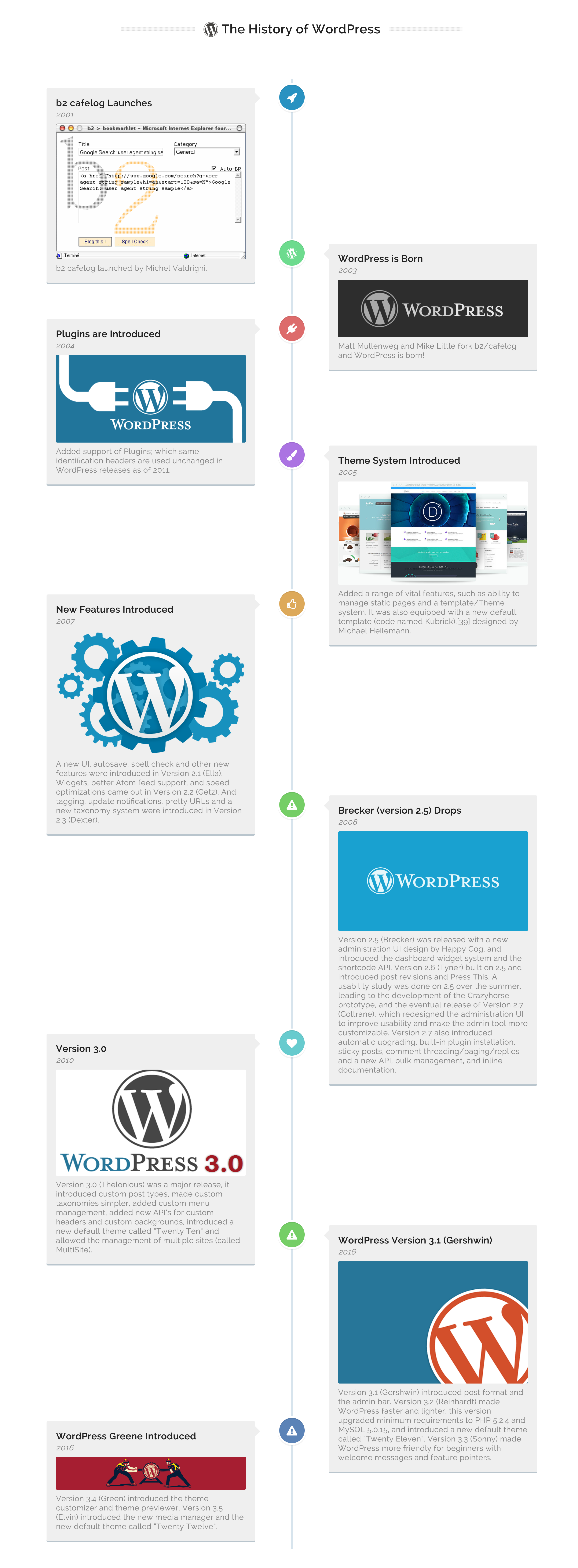
Timeline Express is the best WordPress timeline plugin, which allows you to create a beautiful animated vertical timeline on your site. Populate your site with announcements, set the date and Timeline Express will load the latest and greatest announcements in proper chronological order.
Use the included shortcode ([timeline-express]) to place Timeline Express timeline anywhere on your site.
If you’re looking for power, flexibility and top tier support – look no further.
Timeline Express Features
- Easy to use shortcode to place the timeline anywhere on your site (
[timeline-express]) - Responsive timelines, that look great on all devices.
- Cross browser tested, and mobile friendly.
- Hundreds of Font Awesome icons included. Specify a different icon for each announcement.
- Beautiful CSS3 animations.
- Specify the timeline announcement excerpt length.
- Hide the date of the announcement on the timeline.
- Hide the ‘read more’ link for each announcement on the timeline.
- Specify a custom image to display for each announcement on the timeline.
- Specify ‘Ascending’ vs ‘Descending’ display order for announcements on the timeline.
- Powerful extensions (both free and paid).
- Localized date formatting, for international users.
- i18n ready – Translated for international users.
Fonctionnalités Pro
- Setup multiple timelines and assign announcements to any, or all, of the timelines.
- Tighter layout, less distance between each announcement on the timeline.
- Create and assign categories to your announcements.
- Timeline sorting features. Sort timelines by categories, timeline or a combination of the two.
- Priority support, code snippets provided when needed etc.
Timeline Express has been successfully used on a number small and large scale sites. Our users have created a number of amazing things with our plugin.
Timeline Express has been used to create:
- Company History Timeline
- Personal Achievement Timeline
- Product Announcement Timeline (Roadmap/Release Cycles)
- Event Timeline
- Police/Fire History
- Twitter Feed Timeline
- Post/Page/Custom Post Timeline
- Customer History Timeline
The small list above demonstrates the flexibility and power behind Timeline Express. Check out our documentation for some helpful code snippets,
Timeline Express Add-Ons
We have built out some powerful add-ons that extend Timeline Express beyond it’s core capabilities. Many of the add-ons have been user requested features, which we’ve spun off into add-ons. If your looking for some advanced feature that you don’t see in the base plugin, checkout a list of our add-ons.
- Timeline Express – HTML Excerpts
- Timeline Express – No Icons
- Timeline Express – White Label Branding
- Timeline Express – Single Column Timeline
- Timeline Express – Timeline Post Types
- Timeline Express – Historical Dates
- Timeline Express – AJAX Limits
- Timeline Express – Twitter Feed
- Timeline Express – Toolbox
Timeline Express Translations
Timeline Express comes ready for translation! With all of the proper i18n functions in place, 100% of our plugin is ready for translation. If you’re multi-lingual, and interested in translating the plugin into one of the languages not yet available, we’re willing to pass a long Single Site license of Timeline Express Pro, which is good for one full year. We’re huge fans of the open source community, and believe that this plugin should be available to everyone, in their native language. If this is something you would be interested in, please get in touch with us on our Contact Page.
The Timeline Express polyglot project can be found here.
Looking for additional documentation? Check out the knowledge base.
Multi-lingual Sites & Timeline Express
Timeline Express has been thoroughly tested with some of the top rated, and widely used translation plugins.
Two multi-lingual plugins which we are fully, 100% compatible with are WPML and Polylang.
Timeline Express may be compatible with other multi-lingual plugins, we just haven’t thoroughly tested it with otheres. If you find it’s compatible with other plugins, please get in touch and let us know and we can add it to this list.
This plugin was originally inspired by the great folks at CodyHouse.io.
Have an idea for a feature you want to see added to Timeline Express? We love hearing about new ideas! You can get in contact with us through the contact form on our website, WP Timeline Express.
Developer Documentation
Hooks + Filters
Use Custom Images Instead of Font Awesome Icons (New v1.1.6.7)
Users can now use the custom announcement image in place of the font awesome icons by using the following filter. Huge thanks to Pete Nelson for the pull request and making this possible and available for everyone.
Filter – timeline-express-custom-icon-html
Usage Example: https://gist.github.com/EvanHerman/6bbc8de82f34b4cb3c5c
Use Alternate Image Size For Announcements (New v1.1.5.5)
By default Timeline Express generates a custom image size to use within the timeline. If you would like to use another image size, you can use the following filter.
Exemple :
function change_timeline_express_announcement_image_size( $image_size ) {
    $image_size = 'full';
    return $image_size;
}
add_filter( 'timeline-express-announcement-img-size' , 'change_timeline_express_announcement_image_size' );
Define your own custom fields to use in Announcement posts (New v1.1.5)
Users can now add custom fields to Timeline Express announcement posts. This allows for greater control over the announcements and the front end display. Using this hook in conjunction with a custom single announcement template will give you the greatest control.
Exemple :
function add_custom_timeline_express_field( $custom_fields ) {
    $custom_fields = array(
        array(
            'name' => __( 'Example Text Field', 'timeline-express' ),
            'desc' => __( 'this is an example user defined text field.', 'timeline-express' ),
            'id'   => 'announcement_user_defined_text',
            'type' => 'text_medium',
        ),
        array(
            'name' => __( 'Example WYSIWYG', 'timeline-express' ),
            'desc' => __( 'this is an example wysiwyg field.', 'timeline-express' ),
            'id'   => 'announcement_user_defined_wysiwyg',
            'type' => 'wysiwyg',
        ),
        array(
            'name' => __( 'Example Email Field', 'timeline-express' ),
            'desc' => __( 'this is an example user defined email field.', 'timeline-express' ),
            'id'   => 'announcement_user_defined_money',
            'type' => 'text_email',
        )
    );
    return $custom_fields;
}
add_filter( 'timeline_express_custom_fields' , 'add_custom_timeline_express_field' );
This example would add 3 new fields below the ‘Announcement Image’ field on the announcement post.
The first field is a simple text field. The second field is an example WYSIWYG, and the third is an email field.
Note: You can add as many fields as you would like, and display them on the front end using the get_post_meta() function.
Customize the ‘announcement’ slug (New v1.1.4)
Users can now define their own slug for announcement posts using the provided filter 'timeline-express-slug'. This alters the URL structure of the announcement, possibly for SEO purposes. You would enter the following code into your active themes functions.php file.
After you enter the code into the functions.php file, you’ll want to refresh your permalinks. You can do so by going to ‘Settings > Permalinks’ and simply clicking save. That will prevent the 404 page you may see upon altering the slug.
Exemple :
// alter '/announcement/' to be '/event/'
function timeline_express_change_announcement_slug( $slug ) {
    $slug = 'event';
    return $slug;
}
add_filter('timeline-express-slug', 'timeline_express_change_announcement_slug' );
This example would change the default /announcement/ slug, to /event/.
Alter the ‘Read More’ button text (New v1.1.3.1)
Users can now alter the ‘Read More’ button text using the provided gettext filter and the ‘timeline-express’ text domain.
Exemple :
// alter 'Read more' to say 'View Announcement'
function timeline_express_change_readmore_text( $translated_text, $untranslated_text, $domain ) {
    switch( $untranslated_text ) {
        case 'Read more':
          $translated_text = __( 'View Announcement','timeline-express' );
        break;
     }
   return $translated_text;
}
add_filter('gettext', 'timeline_express_change_readmore_text', 20, 3);
This example would alter ‘Read more’ to say ‘View Announcement’.
Add custom classes to the ‘Read More’ button (New v1.1.3.1)
Users can now add custom classes to the ‘Read More’ announcement button. This allows for greater control in fitting the Timeline into your currently active theme.
Parameters :
$button_classes = default button classes assigned to the ‘Read More’ button
Exemple :
// add a custom class to the Timeline Express readmore link
function timeline_express_custom_readmore_class( $button_classes ) {
    return $button_classes . 'custom-class-name';
}
add_filter( 'timeline-express-read-more-class' , 'timeline_express_custom_readmore_class' );
This example would print the following ‘Read More’ button HTML onto the page :
<a href="http://site.com/link-to-announcement" class="cd-read-more btn btn-primary custom-class-name">Read more</a>
Setup a custom date format for front end display (New v1.0.9)
New in version 1.0.9 is the localization of dates on the front end. The date format is now controlled by your date settings inside of ‘General > Settings’.
If, for one reason or another, you’d like to specify a different date format than provided by WordPress core you can use the provided filter timeline_express_custom_date_format.
The one parameter you need to pass into your function is $date_format, which is (as it sounds) the format of the date.
Some formatting examples:
m.d.Y– 11.19.2014d-m-y– 11-19-14d M y– 19 Nov 2014D j/n/Y– Wed 11/19/2014l jS \of\ F– Wednesday 19th of November
Exemple :
function custom_te_date_format( $date_format ) {
    $date_format = "M d , Y"; // will print the date as Nov 19 , 2014
    return $date_format;
}
add_filter( 'timeline_express_custom_date_format' , 'custom_te_date_format' , 10 );
- d – Numeric representation of a day, with leading zeros 01 through 31.
- m – Numeric representation of a month, with leading zeros 01 through 12.
-
y – Numeric representation of a year, two digits.
-
D – Textual representation of a day, three letters Mon through Sun.
- j – Numeric representation of a day, without leading zeros 1 through 31.
- n – Numeric representation of a month, without leading zeros 1 through 12.
-
Y – Numeric representation of a year, four digits.
-
S – English ordinal suffix for the day of the month. Consist of 2 characters st, nd, rd or th.
-
F – Textual representation of a month, January through December.
-
M – Textual representation of a month, three letters Jan through Dec.
view more date formatting parameters
Load Your Own Single Announcement Template File (New v1.0.8)
By default all single announcements will try and load a single.php template file. If that can’t be found, we’ve done our best to implement a template for you. If your unhappy with the template file we’ve provided you have two options. Your first option is to copy over the single-announcement-template directory contained within the plugin into your active themes root. This will trigger the plugin to load that file instead. You can then customize this file to your hearts content without fear of losing any of your changes in the next update.
Your next option is to use our new filter for loading your own custom template file. If for whatever reason you’ve designed or developed your own single.php file which you would rather use, or you just want to use your themes page.php template instead, you can use the provided filter to change the loaded template. Here is an example ( you want to drop this code into your active theme’s functions.php file ) :
Exemple :
// By default Timeline Express uses single.php for announcements
// you can load page.php instead
// just change page.php to whatever your template file is named
// keep in mind, this is looking in your active themes root for the template
function custom_timeline_express_template_file( $template_file ) {
    $template_file = 'page.php';
    return $template_file;
}
add_filter( 'timeline_express_custom_template' , 'custom_timeline_express_template_file' , 10 );
Specify Font Awesome Version (New 1.1.7.8)
Users can now specify which version of font awesome to load from the font awesome CDN. Alternatively, if the font awesome version is not found – the bundled fall back (version 4.6.1) will be used.
Exemple :
// use a different version of Font Awesome
function timeline_express_alter_font_awesome_version( $version ) {
    $version = '4.4.0';
    return $version;
}
add_filter( 'timeline_express_font_awesome_version', 'timeline_express_alter_font_awesome_version' );
The above example will load font awesome version 4.4.0 instead of the current stable version from the font awesome CDN.
Installation
- Download the plugin .zip file, and keep in mind where on your computer you saved it.
- Log in to your website (ie: yourdomain.com/wp-admin), and head into Plugins > Add New
- On the following screen, click the ‘Upload Plugin’ link at the top of the page.
- Browse your computer to the location you downloaded the .zip file in step one, select it and click the ‘Install Now’ button.
- After the plugin has successfully installed, click “Activate Plugin” and enjoy!
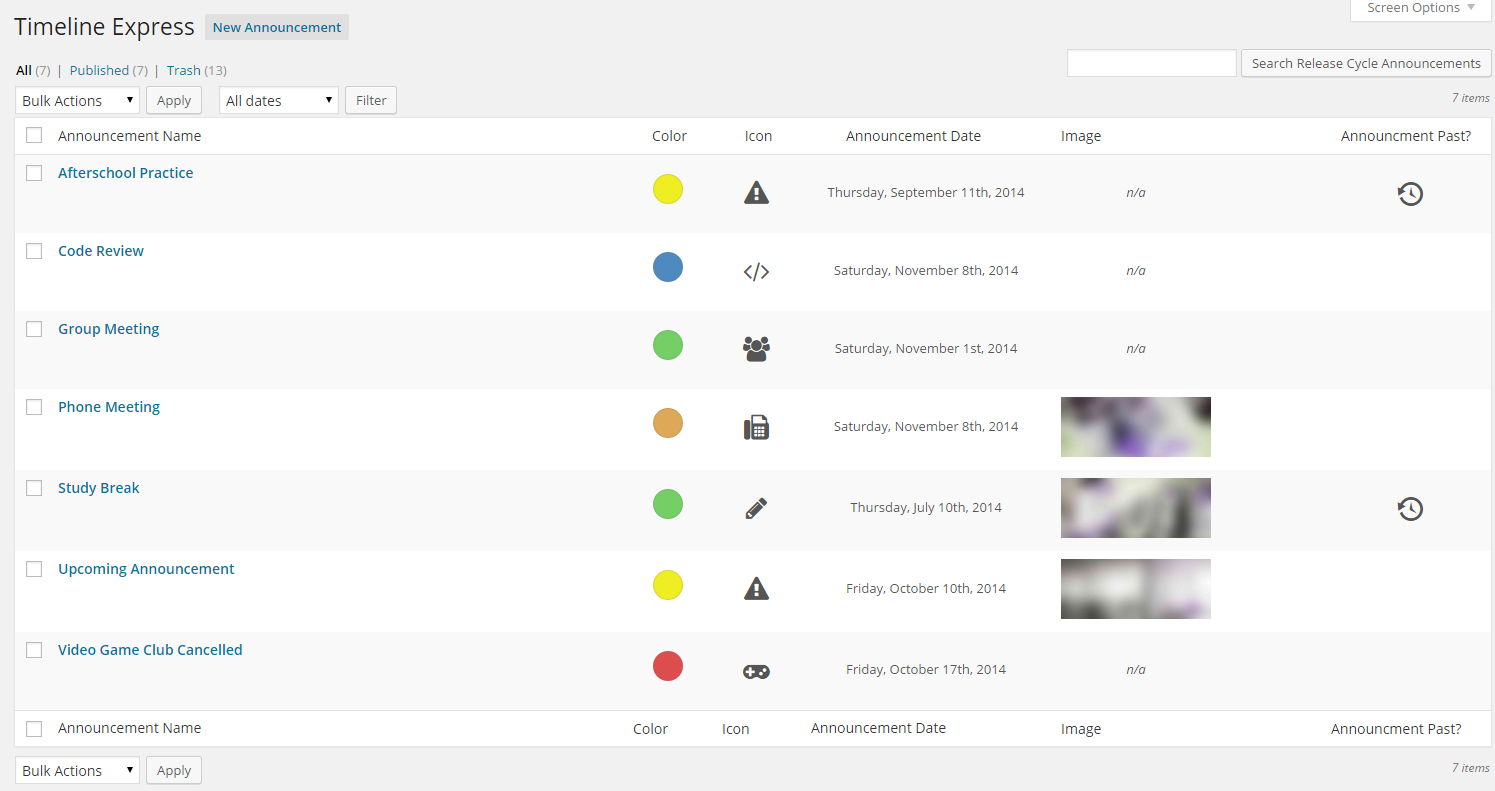
- On the left hand menu, hover over ‘Timeline Express’ and click ‘New Announcement’
- Begin populating the timeline with announcements. (Note: Announcements will appear in chronological order according to the announcement date that you set)
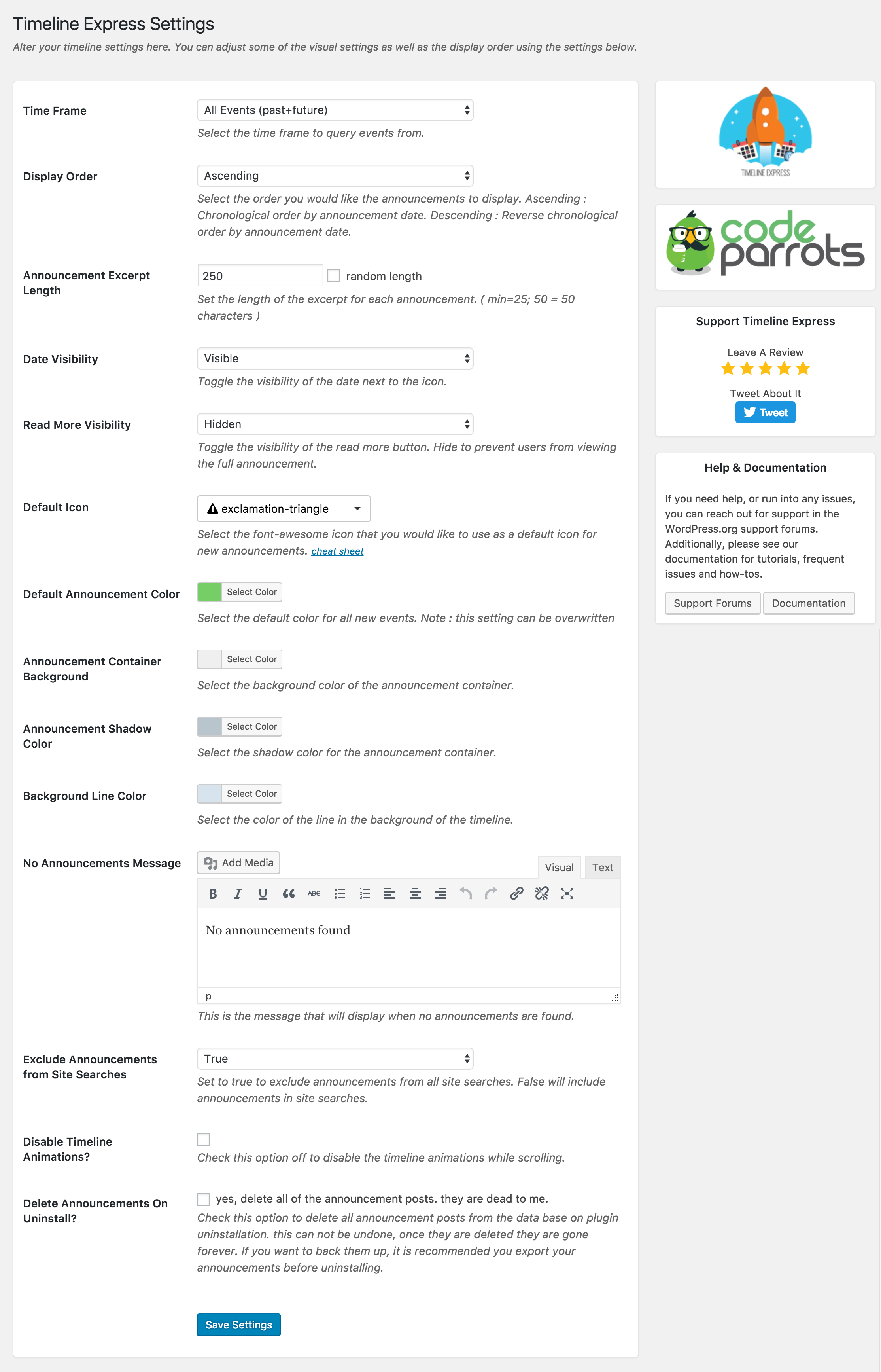
- Once you have create your announcements, head over to the settings page (Settings > Timeline Express) to customize your timeline settings.
- Create a new page, and enter the shortcode
[timeline-express]to display the responsive, animated timeline. (Note: Timeline Express displays best on full width pages)
Journal de modifications
New: Introduced qtranslate-x compatibility files. Timeline Express cache is cleared when using qtranslate, to ensure translations load properly. Tweak: Remove shorthand array syntax [] to maintain backwards compatibility with PHP < 5.6.
1.8.1 – April 4th, 2020
- New: Prevent clicking announcement container links in the editor.
- Fix: Fix various block errors.
- Fix: Remove reference to
$in favor ofjQuery. - Tweak: Adjust welcome page styles.
- Tweak: Various fixes for WordPress 5.4 compatibility.
1.8.0 – December 15th, 2018
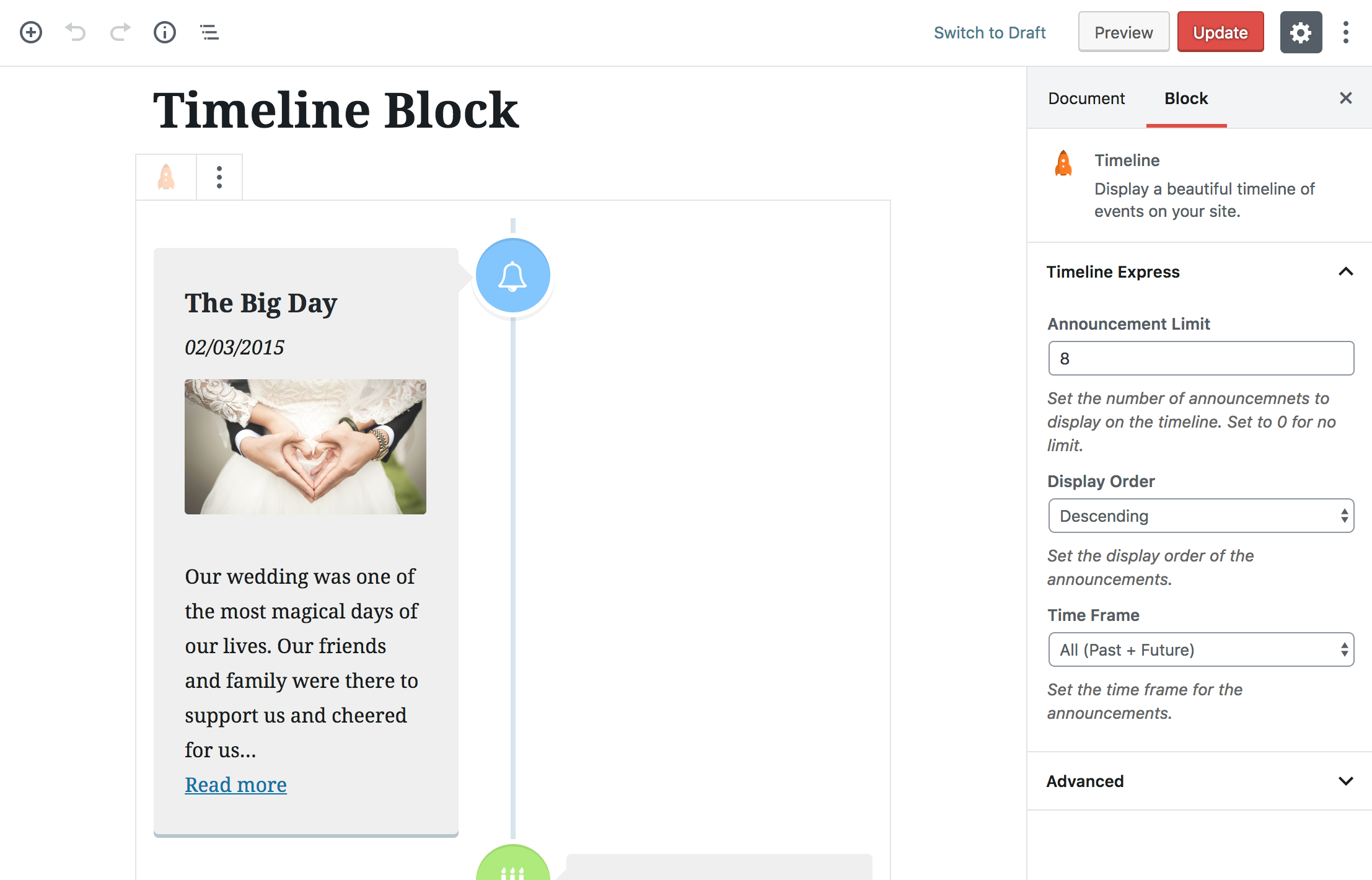
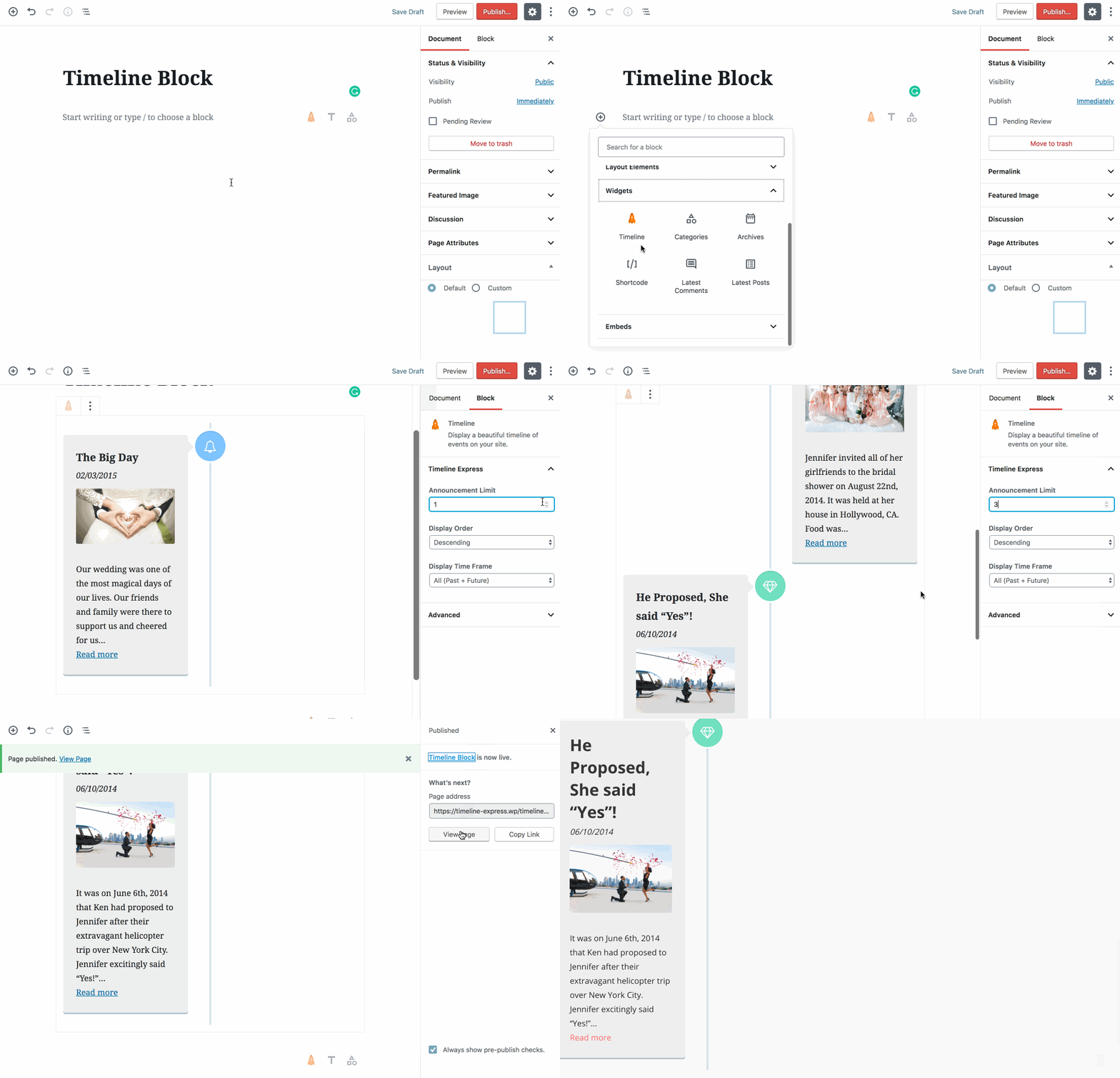
- New: Introduce new Timeline content block (inside of the widget content blocks).
- Tweak: Remove unused jquery masonry script enqueue.
1.7.4 – December 10th, 2018
- New: Disable the block editor for announcements.
- New: Introduce new filters for better control over caching.
1.7.3 – November 3rd, 2018
- View Changes
- New: Introduce support for new Timeline Express – This Day in History Add-On and Timeline Express – Sliders Add-On.
- New: Introduce timeline_express_transient_name filter to customize the transient name
- New: Introduce JavaScript events during specific points of execution: timelineLayoutStart, timelineLayoutComplete
- Tweak: Adjust CSS styles on certain elements on the timeline.
1.7.2 – September 24th, 2018
- New: Introduce a method for toggling on/off the built-in caching. This new toggle is in the sidebar on the Timeline Express settings page.
- New: Introduce timeline_express_disable_cache filter to disable caching.
- New: Add functionality to disable cache when timeline_express_disable_cache is true, or when WP_DEBUG is true.
1.7.1 – September 12th, 2018
- Tweak: Add class
year-iconto the announcement container whenTIMELINE_EXPRESS_YEAR_ICONSis defined and true. - Tweak: Tweak admin table announcement image thumbnail height.
- Tweak: Resolve PHP warnings on add-ons page.
Captures d'écran



Pour les développeurs
Est-ce votre plugin ? Montrez les chiffres.
Ajoutez un badge en direct à votre site, docs ou github readme. Il se met à jour par lui-même - aucun compte n'est nécessaire.
Best Timeline Express alternatives
All animated plugins →



FAQ
Timeline Express: quick answers
Réponses directes, extraites des données en direct WordPress.org.
Source : WordPress.org
Is Timeline Express free?
Yes. Timeline Express is free to download and use from the official WordPress.org plugin directory.
Is Timeline Express safe to use in 2026?
Timeline Express works, but test it on a staging site before relying on it in 2026. It runs on 8K+ sites, is rated 4.3/5 and was last updated 4 years ago, and scores 43/100 on our health check.
How many websites use Timeline Express?
Timeline Express is active on 8K+ WordPress websites and has been downloaded 525,139 times since it launched in October 2014. It was downloaded 1,328 times in the last 30 days.
Does Timeline Express work with WordPress 7.1?
Timeline Express is officially tested up to WordPress 6.2.16, while the latest release is 7.1.5. It may still work, but try it on a staging site first.
When was Timeline Express last updated?
The latest version, 1.8.1, was released on March 22, 2023 (4 years ago).
Who makes Timeline Express?
Timeline Express is developed and maintained by Evan Herman.
What are the best alternatives to Timeline Express?
The most popular alternatives to Timeline Express are WP CountUP JS (1K+ installs), Jellyfish Counter Widget (1K+ installs) and WEN Skill Charts (600+ installs).
Propulsé par PageForge
Un modèle et une feuille de calcul. Une vraie page pour chaque recherche.
PageForge transforme chaque ligne d'un CSV en une page WordPress avec son propre titre, URL, SEO et schéma, construit sur la mise en page que vous Déjà conçu. Gratuit sur WordPress.org.
- CSV et XLSX, plus Google Sheets sur les professionnels et les entreprises
- Son propre titre, URL, SEO champs et schéma pour chaque page
- Fonctionne avec l'éditeur de blocs, Elementor, Divi et Avada
- Gratuit sur WordPress.org, pas de carte de crédit