


SFR Analytics
Lightweight, privacy-focused WordPress analytics. Track pageviews, visitors, campaigns and more — all data stored locally in your own database.

Choix solide
SFR Analytics is a solid plugin choice in 2026, with a few things worth checking first. It runs on 20+ sites and was last updated 3 months ago, and scores 67/100 on our health check.
- Testé avec le dernier WordPress (7.1)
- Petite base d'utilisateurs (20+ installations actives)
- Très peu de critiques jusqu'à présent
Comment s'accumule-t-il ?
Côte à côte sur les installations, les mises à jour, les évaluations et le support



Téléchargements quotidiens
Les pics de téléchargement suivent généralement une nouvelle version - chaque site qui met à jour automatiquement compte comme un téléchargement.
Classements
Where SFR Analytics stands todayWordPress.org Classements de recherche
Position en direct dans la recherche de plugins, Top 100| Mot-clé | Position |
|---|---|
| analytique | >100 |
| pageviews | #75 |
| intimité | >100 |
| statistiques | >100 |
| poursuite | >100 |
Adoption de version
Part de sites actifs par version.
About SFR Analytics
À partir du Lisezmoi officiel · v1.1.2Description
SFR Analytics is a self-hosted analytics plugin for WordPress. All visitor data is stored in your own database — nothing is sent to third-party services. No cookies, no external scripts, no tracking pixels.
Get a clear picture of your site’s traffic without compromising your visitors’ privacy.
Need a central multi-site dashboard? Use the free SFR Analytics Hub plugin to aggregate analytics from multiple WordPress sites.
What’s new in 1.1
- Database usage in Settings — see table size, bot vs human rows, and reclaim unused MySQL space
- Shorter bot retention — keep verified visits for months or years; bots can expire in days
- Top Referring Sites — group Facebook, Reddit and Pinterest hosts, show every referring domain, and spot AI referrers (ChatGPT, Perplexity, Claude, and similar) at a glance
- On-site vs Direct — clicks between pages on your own site are no longer counted as Direct for new visits
Dashboard at a Glance
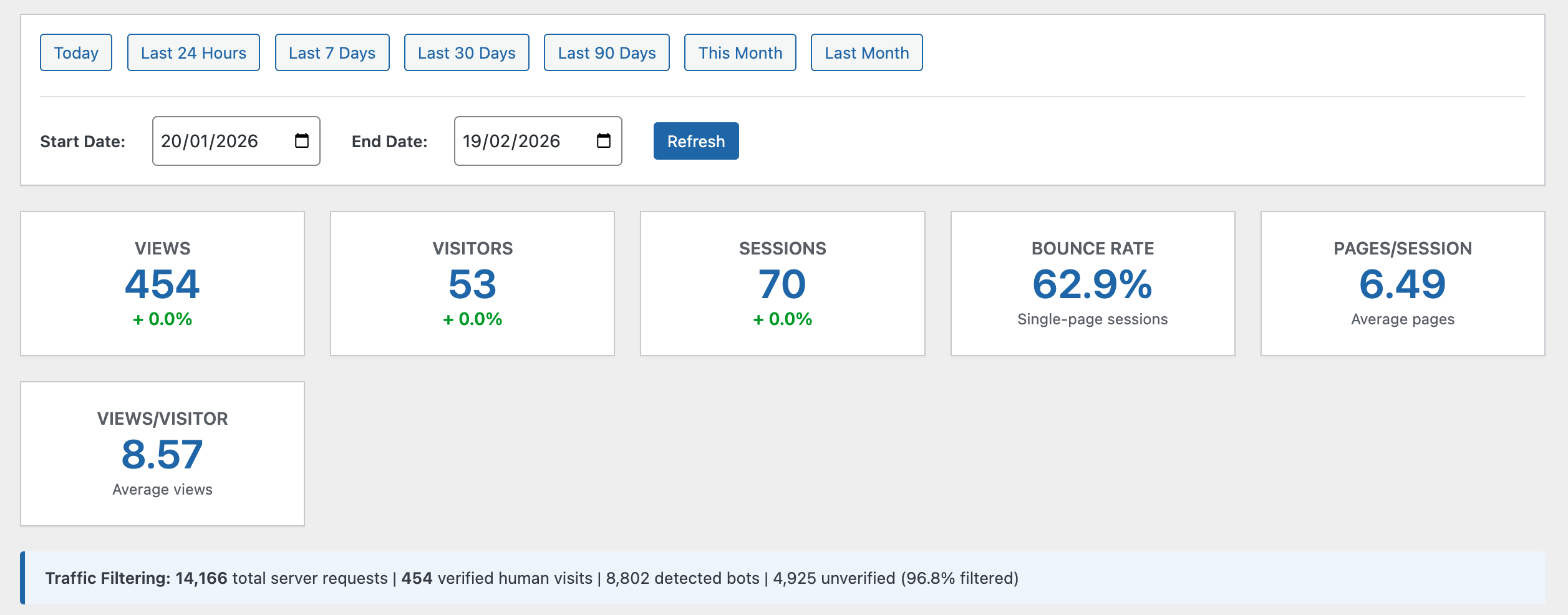
- Views, Visitors, Sessions — core metrics with period-over-period comparison
- Bounce Rate & Pages per Session — engagement indicators
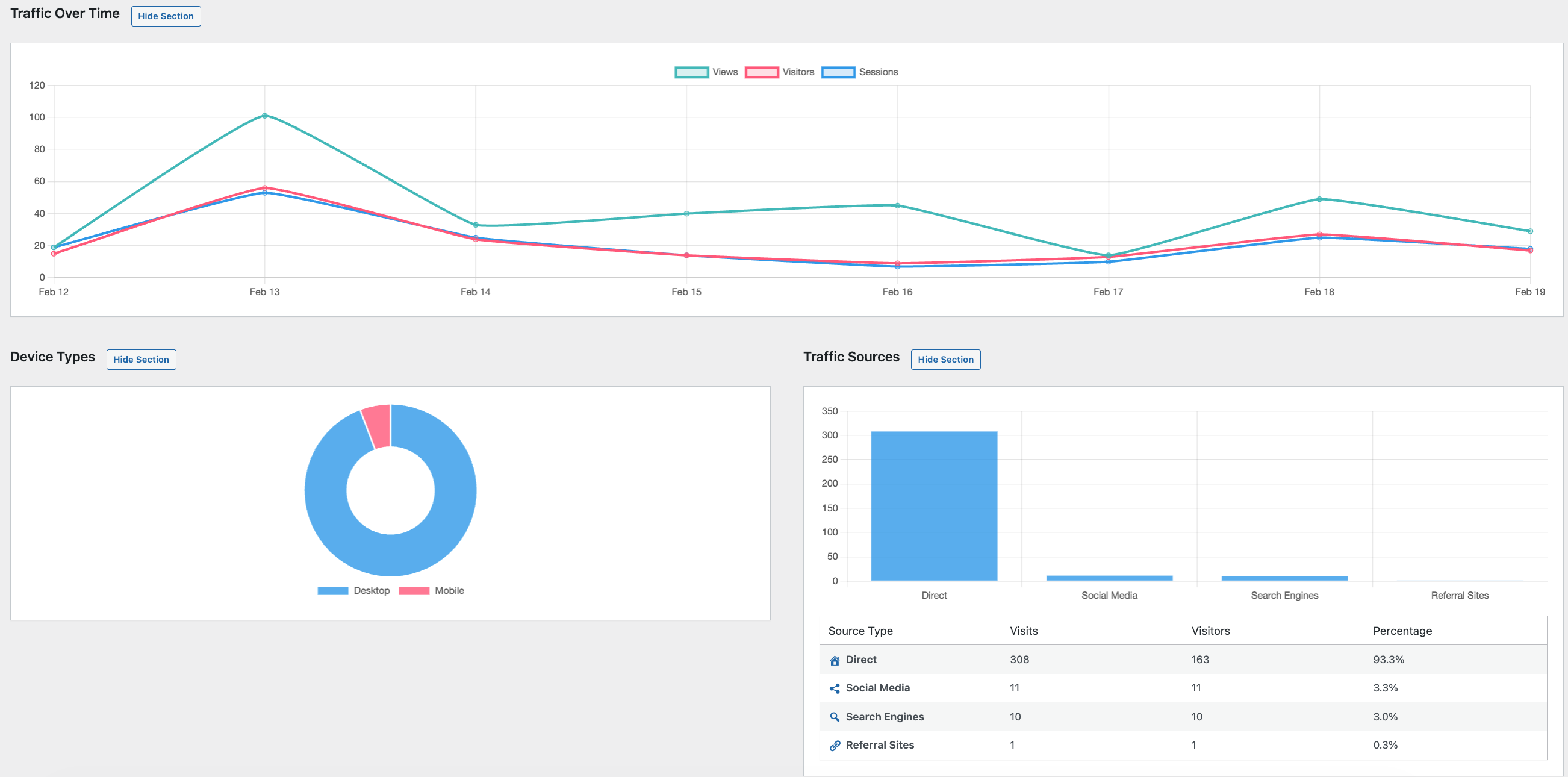
- Traffic Over Time — interactive line chart with date range presets
- Top Content — your most viewed posts and pages
- Traffic Sources — where your visitors are coming from
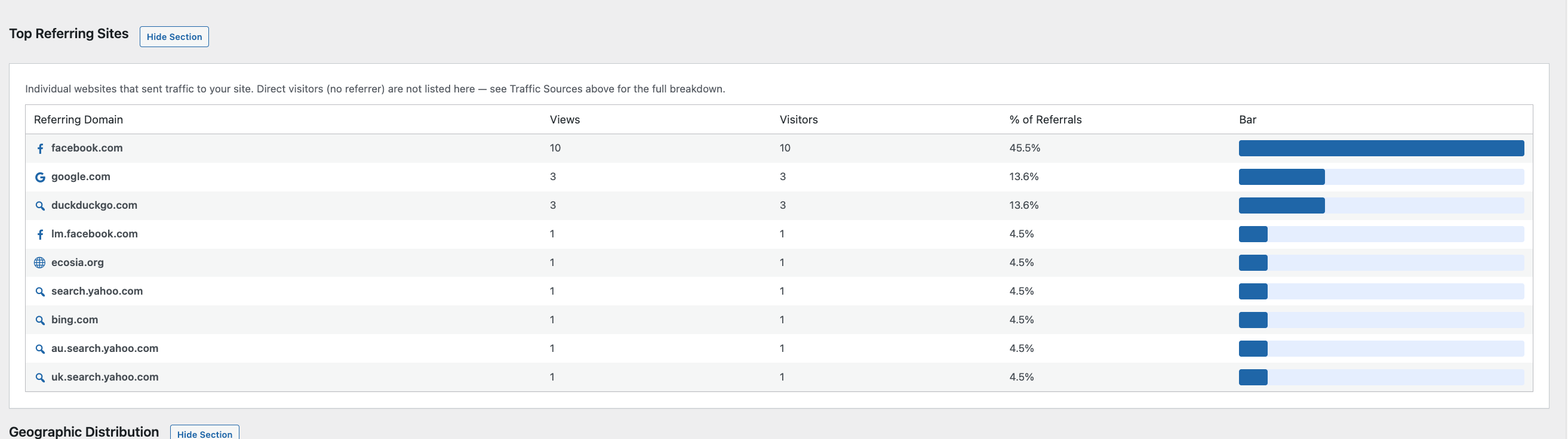
- Top Referring Sites — individual domains sending you traffic, with optional grouping for Facebook, Reddit and Pinterest, and a chat icon for AI assistants
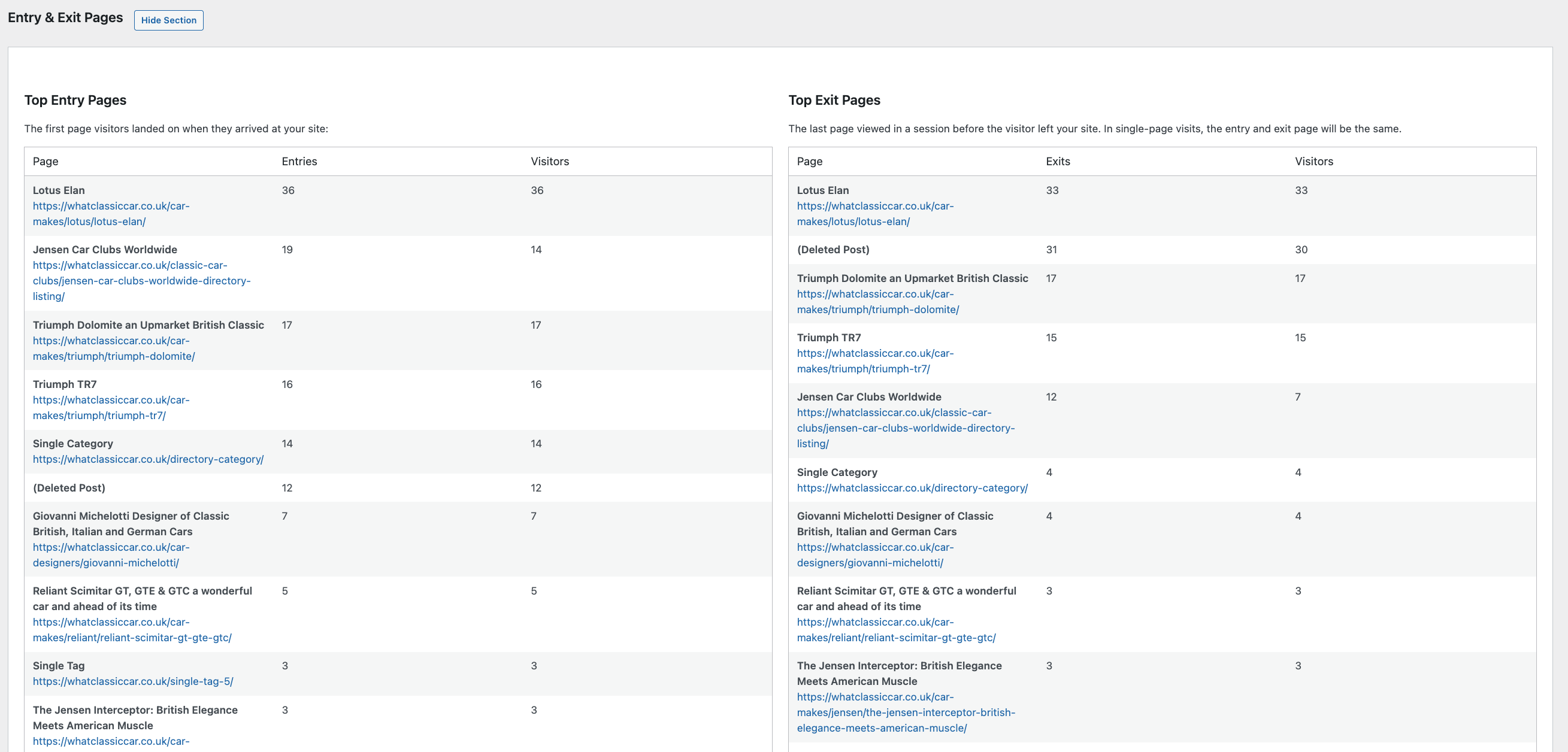
- Entry & Exit Pages — first and last pages in each visit
- Device Types — desktop, mobile and tablet breakdown
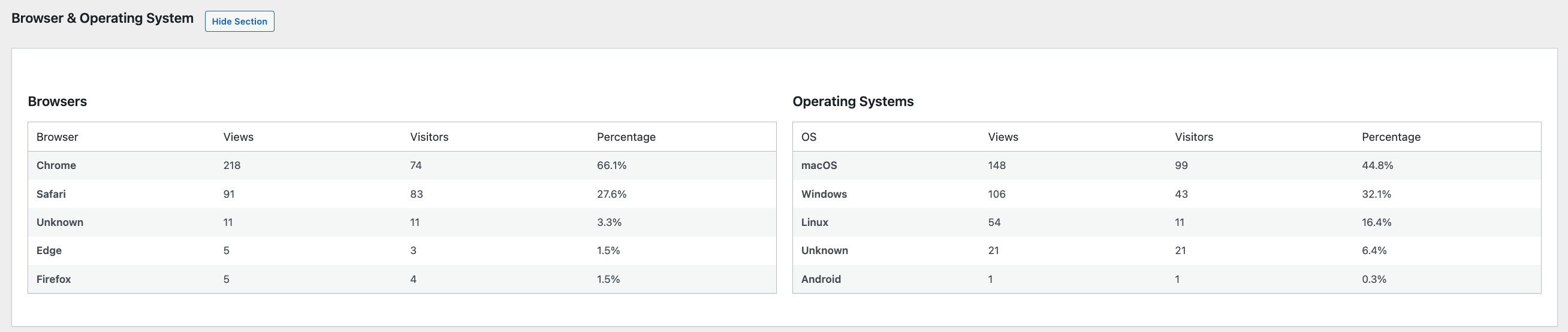
- Browsers & Operating Systems — which browsers and OS your visitors use
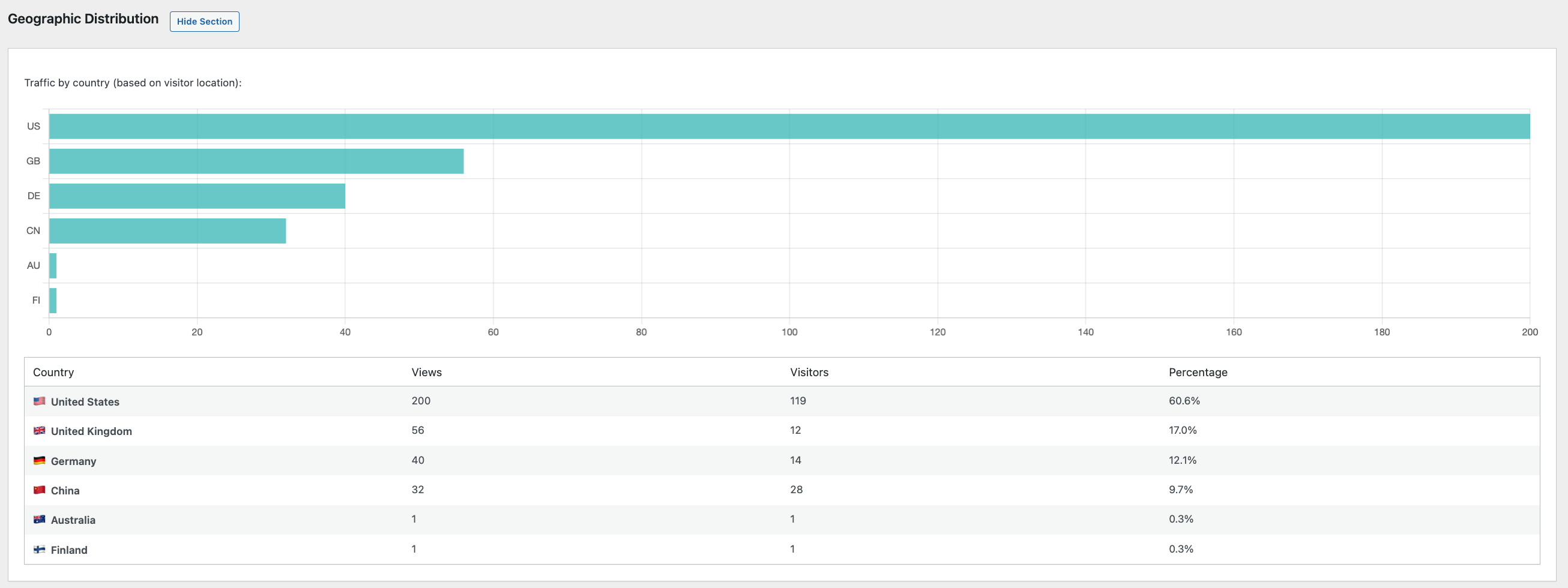
- Geographic Distribution — visitor countries (only available if using a CDN like Cloudflare that provides country headers; all other tracking works without a CDN)
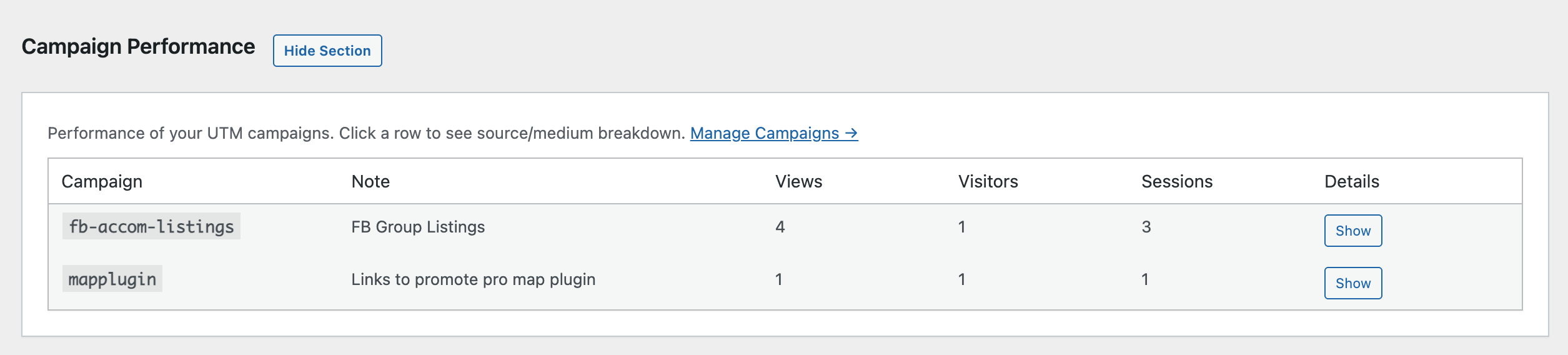
- Campaign Performance — UTM campaign results with source/medium drill-down
- Online Now — on-demand live visitor count with optional online-only auto-refresh in the dashboard
All dashboard sections are collapsible — show only what matters to you.
Campaign Manager & UTM Link Builder
Plan and track marketing campaigns without leaving WordPress:
- Create campaigns with notes and track their performance over time
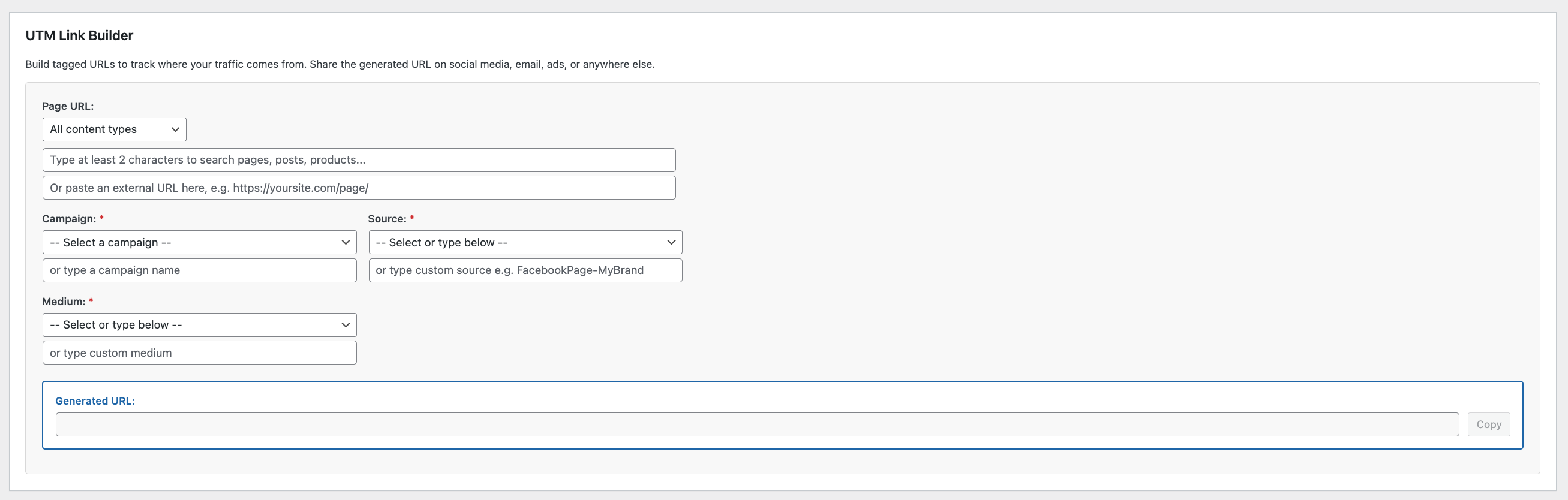
- Build UTM links with a visual tool — pick a page, choose source/medium/campaign, and get a ready-to-use URL
- Smart page picker — search across all your content types with post type and category filtering
- Preset sources and mediums — common options (Facebook, Google, newsletter, etc.) with clear descriptions
- Save generated links for quick reference and reuse
- Custom sources and mediums — add your own and they’re saved for next time
- Auto-lowercase campaign names to prevent data fragmentation
Smart Bot Detection
Not all traffic is human. SFR Analytics filters out noise automatically:
- 200+ known bot patterns — search engines, AI crawlers, SEO tools, monitoring bots, headless browsers, security scanners and more
- JavaScript verification — a lightweight inline script confirms real browser execution, so bots that don’t run JavaScript are never counted
- Missing header detection — flags requests without User-Agent or Accept-Language headers
- Filterable patterns — add your own via the
sfran_bot_patternsfilter
The dashboard shows you exactly how much traffic was filtered: total requests vs verified human visits.
Privacy First
- No cookies — visitor identification uses anonymous hashed fingerprints
- No PII stored — IP addresses are hashed (SHA-256), never stored in plain text
- Optional IP anonymisation — strip the last octet before hashing
- Do Not Track support — respects the browser DNT header when enabled
- Local storage only — your data never leaves your server
- Configurable retention — keep verified visits for 30 to 3,650 days; bots and unverified requests can expire much sooner
- Database usage in Settings — see table size, what takes the space, and reclaim unused MySQL overhead
- GDPR-ready privacy text — copy-paste paragraph for your privacy policy
IP & Country Filtering
- Exclude specific IP addresses or CIDR ranges (e.g.
192.168.1.0/24) - One-click “Ignore My IP” button
- Exclude entire countries by country code
- Exclude logged-in users by role (administrators, editors, etc.)
Reste API
A full set of authenticated REST API endpoints lets you access your analytics data programmatically:
/sfran/v1/summary— overview stats with optional comparison/sfran/v1/top-content— most viewed content with pagination/sfran/v1/traffic-sources— referrer breakdown/sfran/v1/time-series— daily views/visitors/sessions/sfran/v1/campaigns— campaign performance/sfran/v1/entry-pageset/sfran/v1/exit-pages/sfran/v1/referrers— top referring domains/sfran/v1/devices,/sfran/v1/browsers,/sfran/v1/geographic/sfran/v1/online-now— current active visitor count for the last N minutes (default 5)
All endpoints require authentication (WordPress Application Passwords or other REST API auth) and the manage_options capability. Use these to build custom dashboards, export data, or integrate with other tools.
Performance
- Batch processing — pageviews are buffered and written in batches, reducing database load
- Indexed tables — optimised queries for fast dashboard rendering
- Lightweight frontend — a single inline verification script, no external files loaded for visitors
- No impact on page speed — tracking uses
navigator.sendBeacon(non-blocking)
Works with SFR Analytics Hub
SFR Analytics collects data on each individual site.
For cross-site reporting, install the free SFR Analytics Hub on your main site.
With SFR Analytics Hub, you can also view live online visitors across all connected sites from one central dashboard.
The WordPress.org Hub edition supports up to 3 connected sites.
Need more than 3 sites with the same workflow? See SFR Analytics Hub Pro.
Installation
- Upload the
sfr-analyticsfolder to/wp-content/plugins/, or install directly from the WordPress plugin screen. - Activate the plugin through the Plugins screen.
- Database tables are created automatically on activation.
- Visit Analytics → Dashboard to see your data.
- If you manage multiple websites, install SFR Analytics Hub to view aggregated reporting in one dashboard.
That’s it — tracking begins immediately for all published pages and posts.
Journal de modifications
Groups Facebook, Reddit, and Pinterest referring hosts, lists every referring domain, and adds AI referrer icons. After updating, nothing is deleted automatically. If Settings shows a large table, you can optionally remove bots and reclaim disk space.
1.1.2
- Added: Group Facebook & Reddit button on Top Referring Sites (also combines Pinterest hosts such as pin.it)
- Added: Show all referring domains (the table previously listed the top 20 only)
- Added: On-site traffic source for clicks between pages on your own site
- Added: Chat icon for AI referring sites (ChatGPT, Perplexity, Claude, Gemini, Copilot, and similar)
- Added: Optional admin notice when the analytics table is large, pointing to Delete Bots & Unverified Now (nothing is deleted automatically)
- Improved: Pinterest short links (pin.it) and country domains now count as Social Media
- Improved: Direct no longer includes new on-site clicks (older on-site hits still appear as Direct)
- Fixed: Delete Bots on large tables no longer looks like a no-op (cached figures, timeout during OPTIMIZE). Each pass reports how many rows were removed and whether to click again; Reclaim Disk Space is a separate step.
1.1.1
- Fixed: Referring domain icons no longer treat “t.co” / “x.com” as a substring, so reddit.com, chatgpt.com, and sites like cozycrimeindex.com no longer show the Twitter bird
1.1.0
- Added: Database usage panel on Settings showing table size, index size, reclaimable overhead, and row counts (verified / bots / unverified)
- Added: Separate, shorter retention for detected bots and unverified requests (default 7 days)
- Added: Option to stop storing known bot hits at all
- Added: One-click minimize storage (delete bots and unverified, keep verified human visits)
- Added: Reclaim Disk Space (OPTIMIZE TABLE) so deletions actually shrink MySQL usage
- Improved: Cleanup now runs in batches and reclaims unused InnoDB space after large deletes
- Updated: Tested up to WordPress 7.1
0.7.3
- Fixed: False conflict warnings on plugin re-activation (constants, options, and database tables from a previous install/upgrade)
- Fixed: Plugin Check compliance (i18n translators comments, redirect safety, database sniff annotations)
- Updated: Tested up to WordPress 7.0
0.7.2
- Fixed: Geographic country flags no longer require PHP mbstring (
mb_chr) — avoids fatal errors on hosts without that extension
0.7.1
- Fixed: Top Referring Sites % now correctly represents % of referral visitors (not views)
- Updated: Hub-aligned Online Now + UI wording and review prompt improvements for admins
- Updated: Referral and traffic-source percentage labels for clarity
Captures d'écran
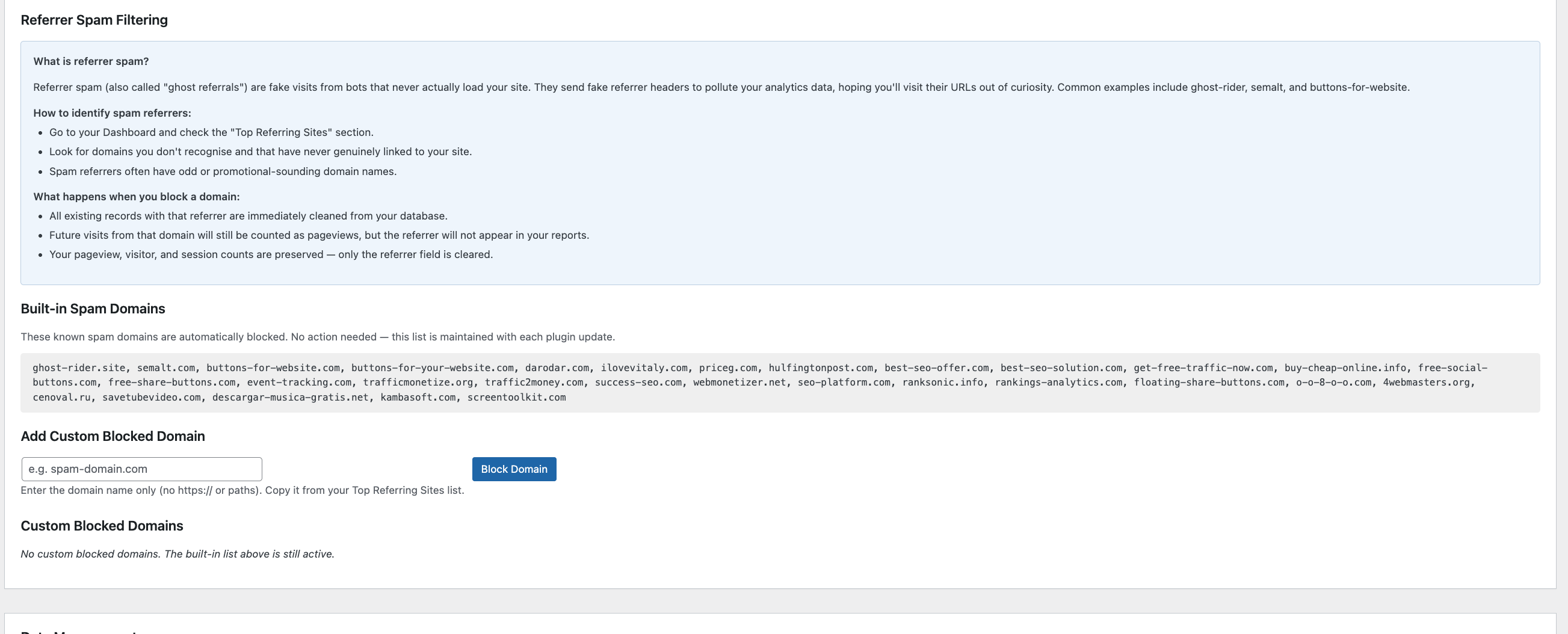
Pour les développeurs
Est-ce votre plugin ? Montrez les chiffres.
Ajoutez un badge en direct à votre site, docs ou github readme. Il se met à jour par lui-même - aucun compte n'est nécessaire.
Best SFR Analytics alternatives
Tous les plugins d'analyse →





FAQ
SFR Analytics: quick answers
Réponses directes, extraites des données en direct WordPress.org.
Source : WordPress.org
Is SFR Analytics free?
Yes. SFR Analytics is free to download and use from the official WordPress.org plugin directory.
Is SFR Analytics safe to use in 2026?
SFR Analytics is a solid plugin choice in 2026, with a few things worth checking first. It runs on 20+ sites and was last updated 3 months ago, and scores 67/100 on our health check.
How many websites use SFR Analytics?
SFR Analytics is active on 20+ WordPress websites and has been downloaded 1,920 times since it launched in February 2026. It was downloaded 220 times in the last 30 days.
Does SFR Analytics work with WordPress 7.1?
Yes. The developer has tested SFR Analytics up to WordPress 7.1.5, the latest release. It requires WordPress 6.0 or newer.
What PHP version does SFR Analytics need?
SFR Analytics requires PHP 7.4 or higher. Most hosts run PHP 8.x today, so it works on any modern WordPress hosting.
When was SFR Analytics last updated?
The latest version, 1.1.2, was released on September 1, 2026 (3 months ago).
Who makes SFR Analytics?
SFR Analytics is developed and maintained by SupportFromRichard.
What are the best alternatives to SFR Analytics?
The most popular alternatives to SFR Analytics are Site Kit by Google (5M+ installs), MonsterInsights (2M+ installs) and WP Statistics (500K+ installs).
Propulsé par PageForge
Un modèle et une feuille de calcul. Une vraie page pour chaque recherche.
PageForge transforme chaque ligne d'un CSV en une page WordPress avec son propre titre, URL, SEO et schéma, construit sur la mise en page que vous Déjà conçu. Gratuit sur WordPress.org.
- CSV et XLSX, plus Google Sheets sur les professionnels et les entreprises
- Son propre titre, URL, SEO champs et schéma pour chaque page
- Fonctionne avec l'éditeur de blocs, Elementor, Divi et Avada
- Gratuit sur WordPress.org, pas de carte de crédit