


SERVIT Analytics
Cookieless, privacy-friendly visitor analytics for WordPress — with dashboard, visitor flow, conversion and campaign tracking.

Utiliser avec prudence
SERVIT Analytics works, but test it on a staging site before relying on it in 2026. It runs on 10+ sites and was last updated 2 months ago, and scores 57/100 on our health check.
- Petite base d'utilisateurs (plus de 10 installations actives)
- Très peu de critiques jusqu'à présent
Comment s'accumule-t-il ?
Côte à côte sur les installations, les mises à jour, les évaluations et le support



Téléchargements quotidiens
Les pics de téléchargement suivent généralement une nouvelle version - chaque site qui met à jour automatiquement compte comme un téléchargement.
Classements
Where SERVIT Analytics stands todayWordPress.org Classements de recherche
Position en direct dans la recherche de plugins, Top 100| Mot-clé | Position |
|---|---|
| analytique | >100 |
| cookieless | #58 |
| GDPR | >100 |
| intimité | >100 |
| statistiques | >100 |
Adoption de version
Part de sites actifs par version.
About SERVIT Analytics
À partir du Lisez-moi officiel · v1.0.2Description
SERVIT Analytics records visits server-side without cookies, without external services and without storing personal data (IP addresses). All data stays in your own WordPress database.
Dashboard features
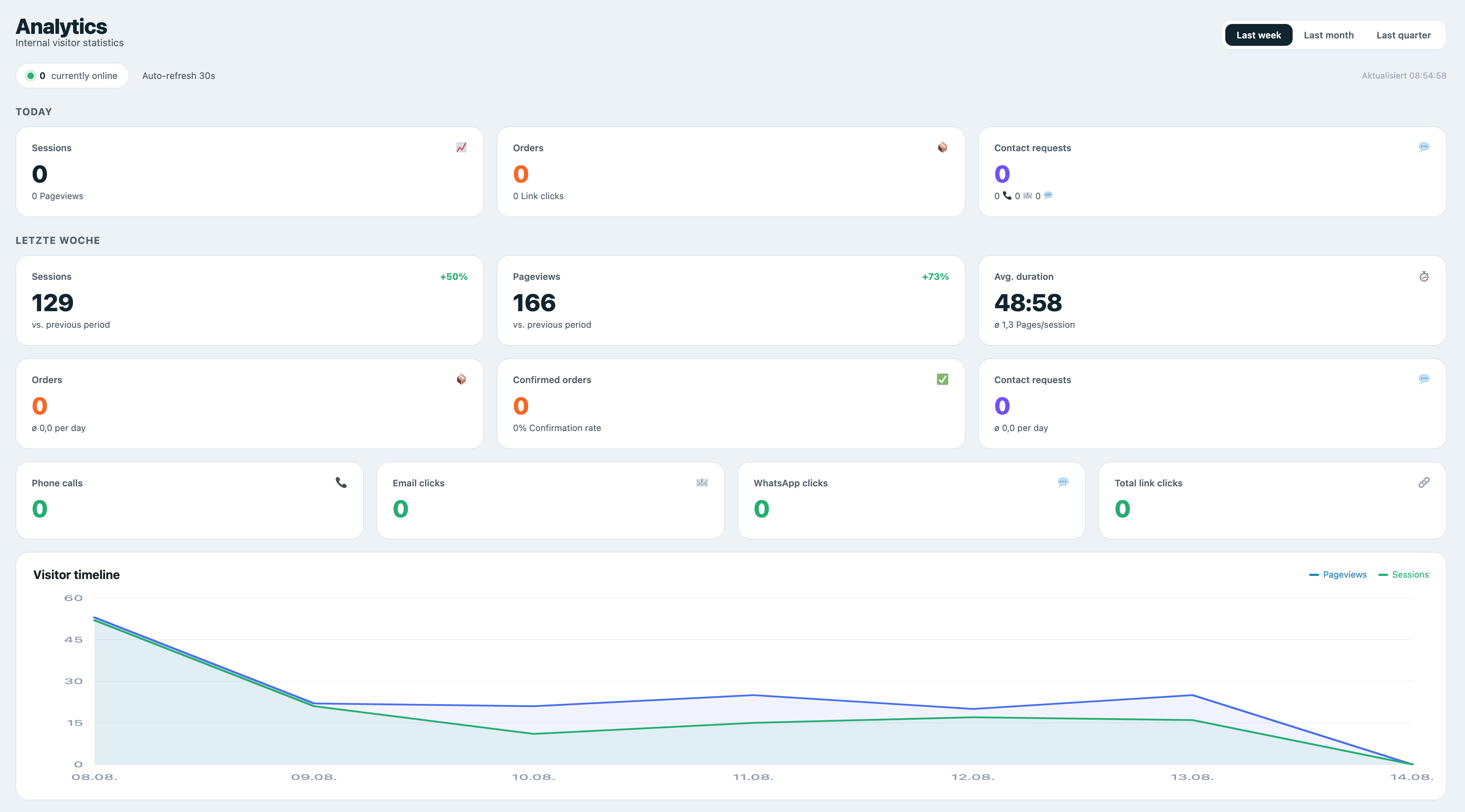
- KPI tiles: sessions today/total, pageviews, average duration, pages/session, online visitors (live)
- Conversions: orders, confirmed orders, confirmation rate, contact requests
- Visitor timeline (pageviews & sessions) as area chart
- Orders & contact requests as bar chart
- Traffic sources (Google, Bing, Direct, Referral, …)
- Page types (freely configurable via regex)
- Devices (mobile/desktop/tablet) as donut chart
- Top pages today
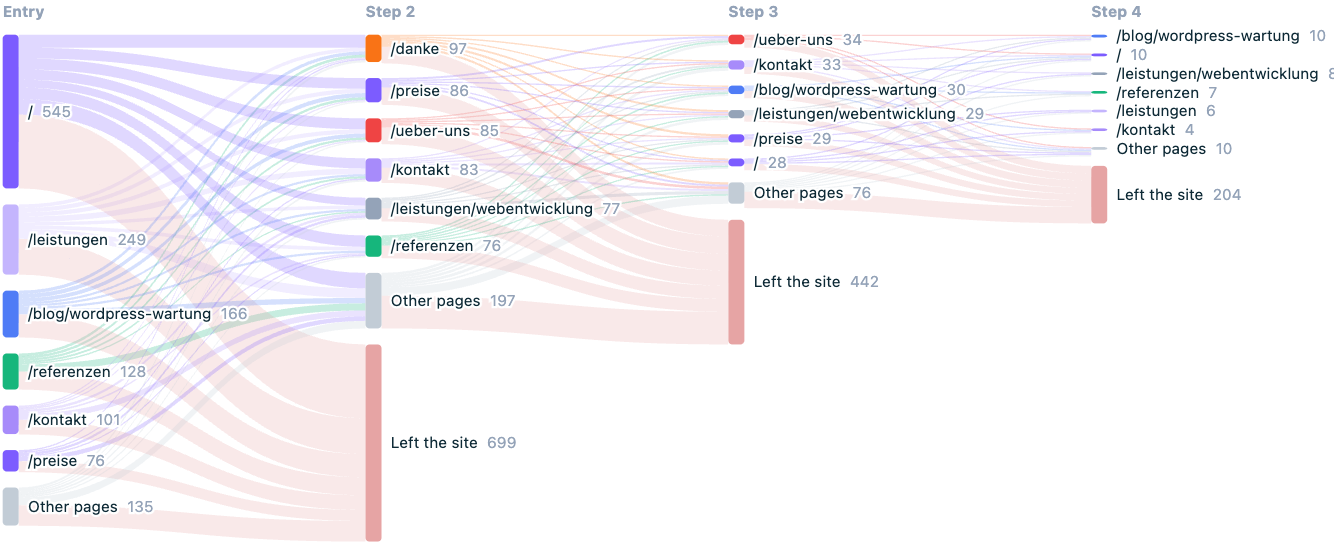
- Visitor flow: entry page, the pages visited next and where sessions end, as a Sankey diagram
- Entry and exit pages with bounce rate and exit rate
- Daily details table
- Period switcher (week / month / quarter) and auto-refresh every 30 s
Visitor flow
The visitor flow shows the path visitors take through your site: which page they arrive on, which pages they open next and at which point they leave. It is drawn as a Sankey diagram over the first four steps of a session, with the most-used pages per step and everything else merged into one node.
Below it, two tables list the entry pages with their bounce rate and the exit pages with their exit rate, so you can see which pages bring visitors in and which ones end the visit.
This works on data you have already collected — no extra tracking and no additional data is stored for it. Pages imported from Statify are not included, because an imported row is a single view without a real session.
Privacy (GDPR)
- Cookieless — the session ID is stored only in the browser’s sessionStorage and is cleared when the tab closes.
- No IP storage — a daily-rotating, non-reversible hash is used to count unique visitors.
- Optional: respect Do-Not-Track, exclude logged-in roles, bot filter.
- No external scripts, no CDN, no Chart.js — all charts are rendered locally as SVG.
Conversions / Events
Track conversions via PHP (e.g. after a contact form submission):
do_action( 'servit_analytics_event', 'contact', array( 'label' => 'Contact Form' ) );
do_action( 'servit_analytics_event', 'order', array( 'value' => 49.90 ) );
do_action( 'servit_analytics_event', 'order_confirmed', array( 'value' => 49.90 ) );
Or via JavaScript on the frontend:
ServitAnalytics.track( 'contact', { label: 'Contact Form' } );
The JavaScript helper is limited to non-monetary events (contact requests and tel/mailto/WhatsApp clicks) and is rate limited. Orders and their values are recorded server-side only — via the PHP hook above or the automatic shop integrations — so revenue figures cannot be forged from the browser.
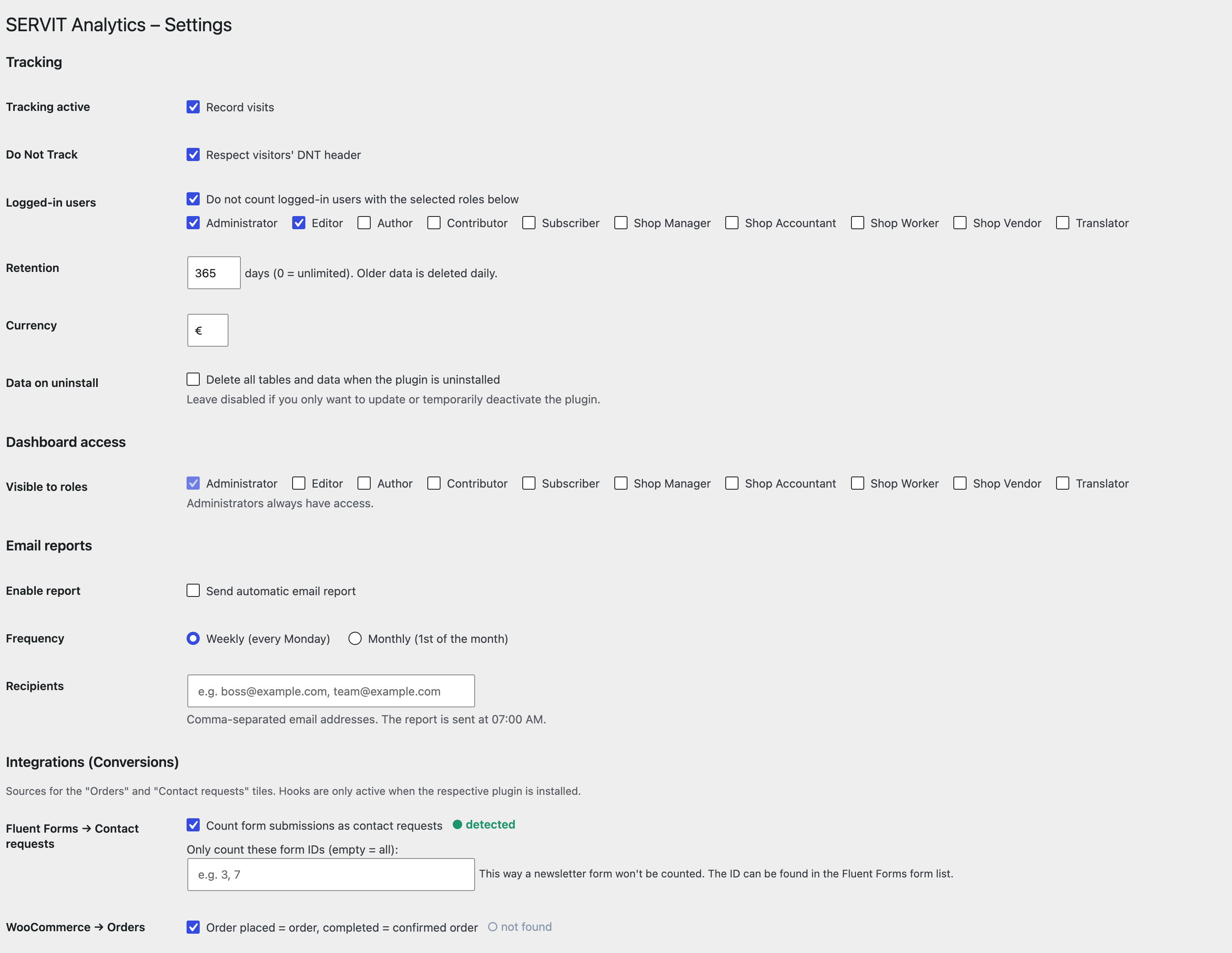
Automatic integrations (individually toggleable under Analytics > Settings):
- Fluent Forms — each form submission counts as a contact request (optionally limited to specific form IDs).
- WooCommerce — new order = order event, completed = confirmed order.
- Easy Digital Downloads — purchase = order, completed = confirmed order.
- FluentBooking — booking = order, confirmed = confirmed order.
Hooks are only active when the respective plugin is installed. The status (detected / not found) is shown in the settings.
Ads / Campaign Tracking
Tag your ads with UTM parameters (e.g. ?utm_source=google&utm_medium=cpc&utm_campaign=summer_sale) or rely on automatically detected click IDs (gclid, gbraid/wbraid, fbclid, msclkid, ttclid, li_fat_id).
- The campaign is stored cookieless in localStorage (last-touch) and attributed to a later order/contact within the attribution window — including server-side conversions (Fluent Forms, WooCommerce) via visitor-hash backfill.
- Paid clicks appear cleanly separated in the traffic sources (e.g. “Google Ads” instead of “Google”).
- The dashboard shows a campaign table: sessions, orders, contacts, conversion rate, cost, revenue, ROAS and CPA.
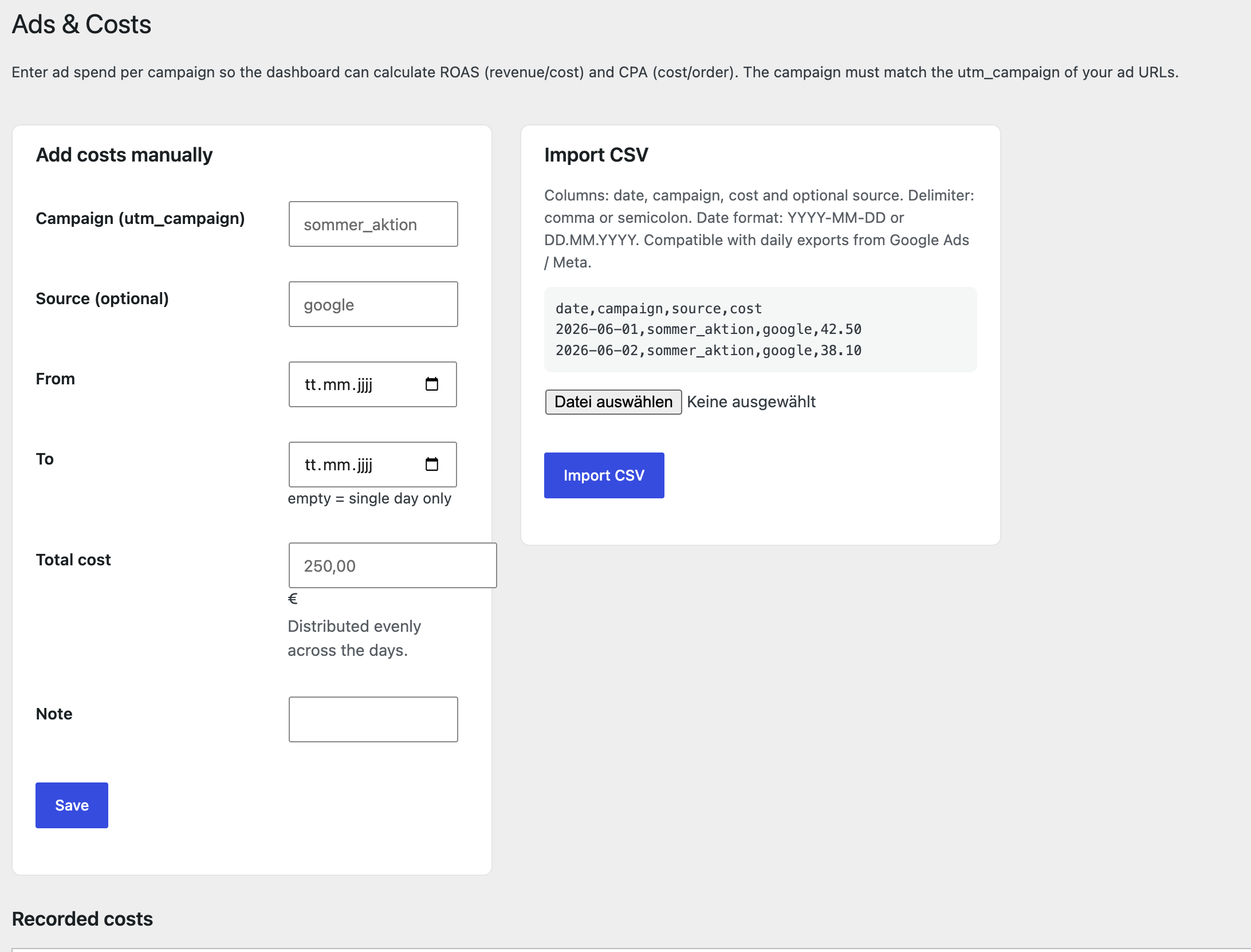
Manage ad spend under Analytics > Ads & Costs — either manually per campaign/period or via CSV import (columns: date, campaign, cost, optional source; compatible with the daily export from Google Ads / Meta). The dashboard then calculates ROAS (revenue/cost) and CPA (cost/order).
Privacy note: click IDs and localStorage attribution may require consent in some jurisdictions. This implementation is deliberately cookieless and without a consent banner; legal classification is the responsibility of the site operator.
Import from Statify
Under Analytics > Statify Import, existing Statify data can be migrated. For each Statify row, the date, path (mapped to page type) and referrer (mapped to source) are imported. The import runs in batches (even for very large tables) and is repeatable without creating duplicates.
Important: Statify tracks neither devices nor sessions. Imported days therefore show no device breakdown; each historical pageview counts as one session. Sources and page types are fully preserved. Do not uninstall Statify before importing — otherwise the data is lost.
Third-Party Services
This plugin does not connect to any external service, API or CDN. All data is processed and stored locally in your WordPress database. No data is sent to or received from third-party servers. There are no remote requests of any kind.
Data Storage
The plugin creates three custom database tables ({prefix}_servit_analytics_views, {prefix}_servit_analytics_events, {prefix}_servit_analytics_ad_costs) to store pageviews, conversion events and ad spend data. No personal data (IP addresses, usernames) is stored. Visitor uniqueness is determined by a daily-rotating, non-reversible SHA-1 hash that cannot be traced back to an individual.
All data can be deleted by enabling “Delete all tables and data when the plugin is uninstalled” in the settings before uninstalling the plugin.
Installation
- Upload the
servit-analyticsfolder to/wp-content/plugins/or install the ZIP via Plugins > Add New > Upload. - Activate the plugin. The database tables are created automatically.
- Open the Analytics menu item in the admin sidebar.
- Under Analytics > Settings, configure page-type rules, excluded roles and data retention.
Journal de modifications
Adds the visitor flow view. No database changes — it is built from the pageviews you have already collected, so the history is there right after the update.
1.0.2
- New: Visitor flow — a Sankey diagram showing entry page, the pages visited next and where sessions end.
- New: Entry pages table with bounce rate, exit pages table with exit rate.
- Overall bounce rate for the selected period.
1.0.1
- All UI strings translated to English; German available via language files.
- Readme rewritten in English per WordPress.org guidelines.
- Plugin Check compatibility improvements.
- Added “Delete data on uninstall” setting to prevent accidental data loss.
1.0.0
- Version initiale.
Captures d'écran

Pour les développeurs
Est-ce votre plugin ? Montrez les chiffres.
Ajoutez un badge en direct à votre site, docs ou github readme. Il se met à jour par lui-même - aucun compte n'est nécessaire.
Best SERVIT Analytics alternatives
Tous les plugins d'analyse →





FAQ
SERVIT Analytics: quick answers
Réponses directes, extraites des données en direct WordPress.org.
Source : WordPress.org
Is SERVIT Analytics free?
Yes. SERVIT Analytics is free to download and use from the official WordPress.org plugin directory.
Is SERVIT Analytics safe to use in 2026?
SERVIT Analytics works, but test it on a staging site before relying on it in 2026. It runs on 10+ sites and was last updated 2 months ago, and scores 57/100 on our health check.
How many websites use SERVIT Analytics?
SERVIT Analytics is active on 10+ WordPress websites and has been downloaded 295 times since it launched in August 2026. It was downloaded 67 times in the last 30 days.
Does SERVIT Analytics work with WordPress 7.1?
SERVIT Analytics is officially tested up to WordPress 7.0.9, while the latest release is 7.1.5. It may still work, but try it on a staging site first.
What PHP version does SERVIT Analytics need?
SERVIT Analytics requires PHP 7.4 or higher. Most hosts run PHP 8.x today, so it works on any modern WordPress hosting.
When was SERVIT Analytics last updated?
The latest version, 1.0.2, was released on September 8, 2026 (2 months ago).
Who makes SERVIT Analytics?
SERVIT Analytics is developed and maintained by SERVIT Software Solutions.
What are the best alternatives to SERVIT Analytics?
The most popular alternatives to SERVIT Analytics are Site Kit by Google (5M+ installs), MonsterInsights (2M+ installs) and WP Statistics (500K+ installs).
Propulsé par PageForge
Un modèle et une feuille de calcul. Une vraie page pour chaque recherche.
PageForge transforme chaque ligne d'un CSV en une page WordPress avec son propre titre, URL, SEO et schéma, construit sur la mise en page que vous Déjà conçu. Gratuit sur WordPress.org.
- CSV et XLSX, plus Google Sheets sur les professionnels et les entreprises
- Son propre titre, URL, SEO champs et schéma pour chaque page
- Fonctionne avec l'éditeur de blocs, Elementor, Divi et Avada
- Gratuit sur WordPress.org, pas de carte de crédit