


Sentrixa Analytics
Privacy-first, self-hosted analytics: cookieless visitor tracking, visitor map, top countries, referrers and search terms, stored on your site.

Choix solide
Sentrixa Analytics is a solid plugin choice in 2026, with a few things worth checking first. Was last updated 3 weeks ago, and scores 64/100 on our health check.
- Développé activement — Dernière mise à jour il y a 3 semaines
- Testé avec le dernier WordPress (7.1)
- Petite base d'utilisateurs (<10 installations actives)
- Très peu de critiques jusqu'à présent
Comment s'accumule-t-il ?
Côte à côte sur les installations, les mises à jour, les évaluations et le support



Téléchargements quotidiens
Les pics de téléchargement suivent généralement une nouvelle version - chaque site qui met à jour automatiquement compte comme un téléchargement.
Classements
Where Sentrixa Analytics stands todayWordPress.org Classements de recherche
Position en direct dans la recherche de plugins, Top 100| Mot-clé | Position |
|---|---|
| analytique | >100 |
| cookieless | #92 |
| GDPR | >100 |
| intimité | >100 |
| statistiques | >100 |
About Sentrixa Analytics
From the official readme · v1.9.4Description
Sentrixa Analytics is a complete, self-contained analytics engine for
WordPress, built by Sentrixa. Your visitor data is written to custom tables
in your own database and is never sent anywhere else.
Ce que vous obtenez
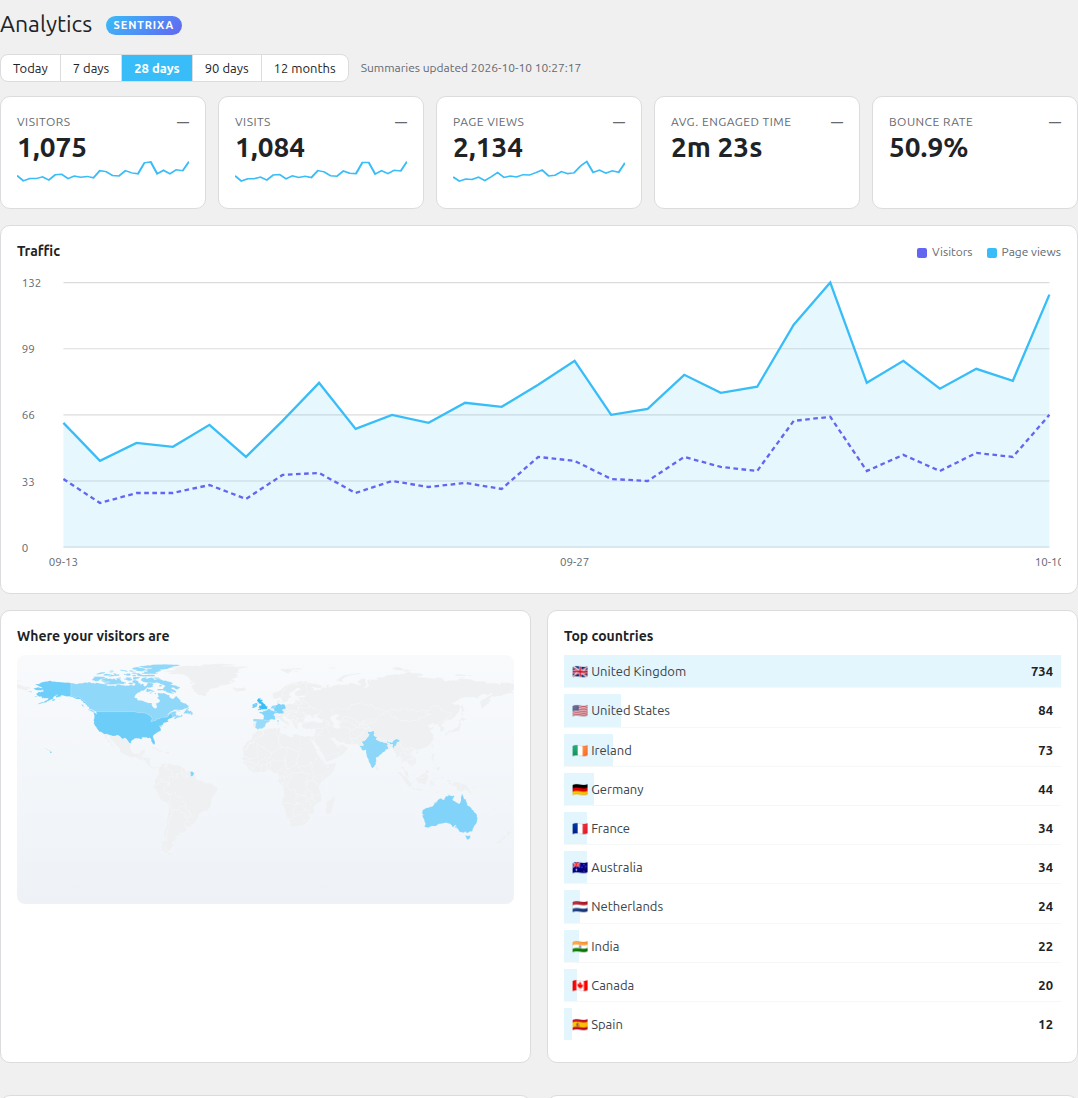
- Headline numbers: visitors, visits, page views, average engaged time,
bounce rate — each with a trend sparkline and a change vs. the previous
period. - A world visitor map (choropleth) and a top-10 countries list.
- Referrer breakdown: search engines, social media, other websites, direct,
campaigns — with drill-down to named sources, referring domains and UTM
campaigns. - On-site search terms (what people type into your site’s search box).
- A slot for Google Search Console query data, filled in automatically once
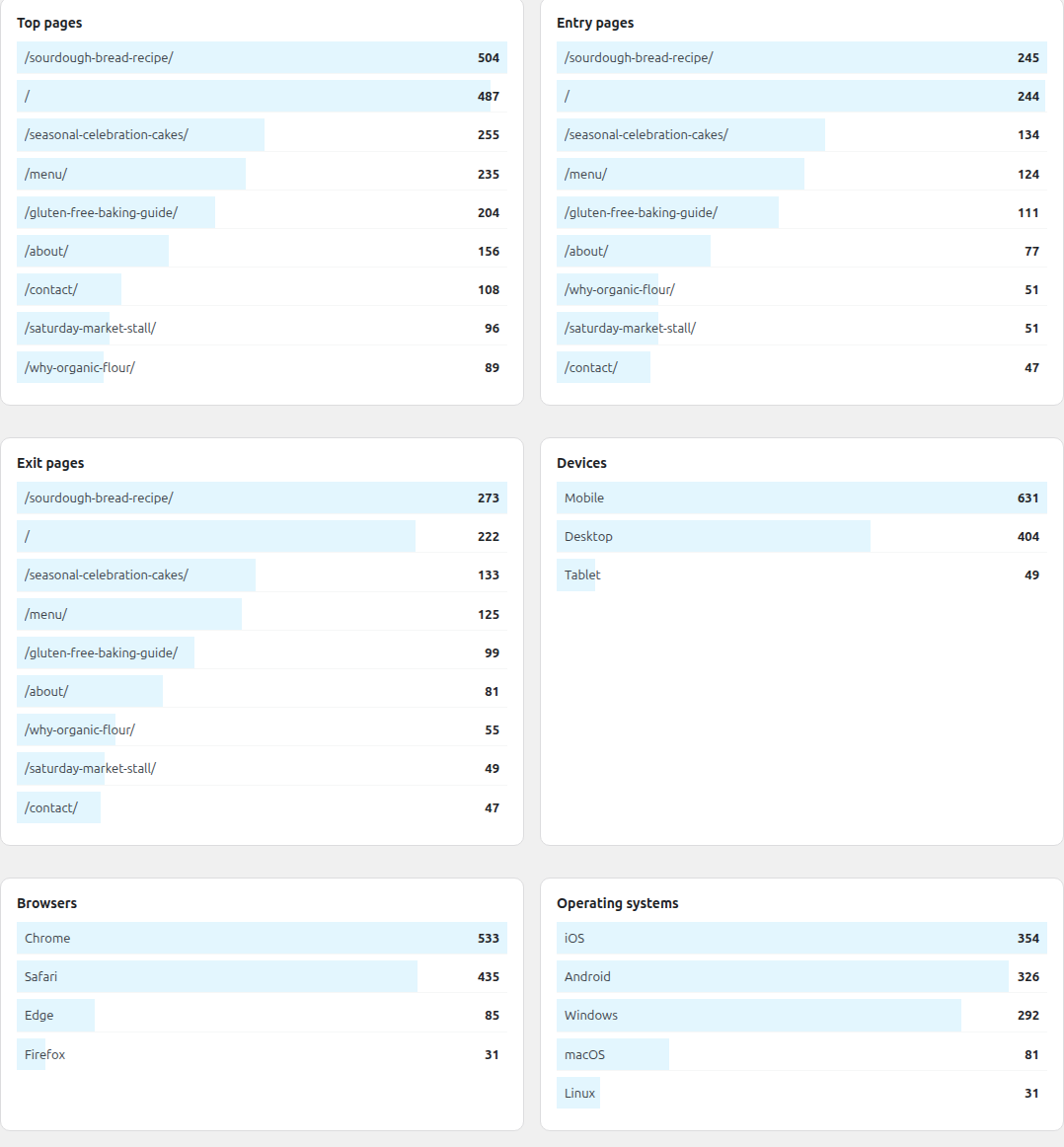
Sentrixa SiteHub is connected (coming soon). - Top pages, entry pages, exit pages, devices, browsers, operating systems.
- wp-admin Dashboard widgets so the key numbers are the first thing you
see when you log in. - A read REST API for the Sentrixa Sites mobile app.
How the tracking works
The plugin adds a tiny (~3 KB) first-party JavaScript beacon. It runs in the
visitor’s browser, so it keeps working even when your pages are served from a
full-page cache (LiteSpeed, Cloudflare, WP Rocket, etc.) and PHP never runs —
which is where server-side analytics silently lose most of their data. A
no-JavaScript <img> pixel covers the small share of visitors without JS.
Intimité
- No cookies. No cross-site tracking. No fingerprinting.
- Unique visitors are counted with a salted hash of IP + user agent, where
the salt is regenerated every day and never stored — so yesterday’s visitors
can’t be recognised today and nobody can be re-identified from the data. - The IP address is used only for the country lookup and that daily hash, then
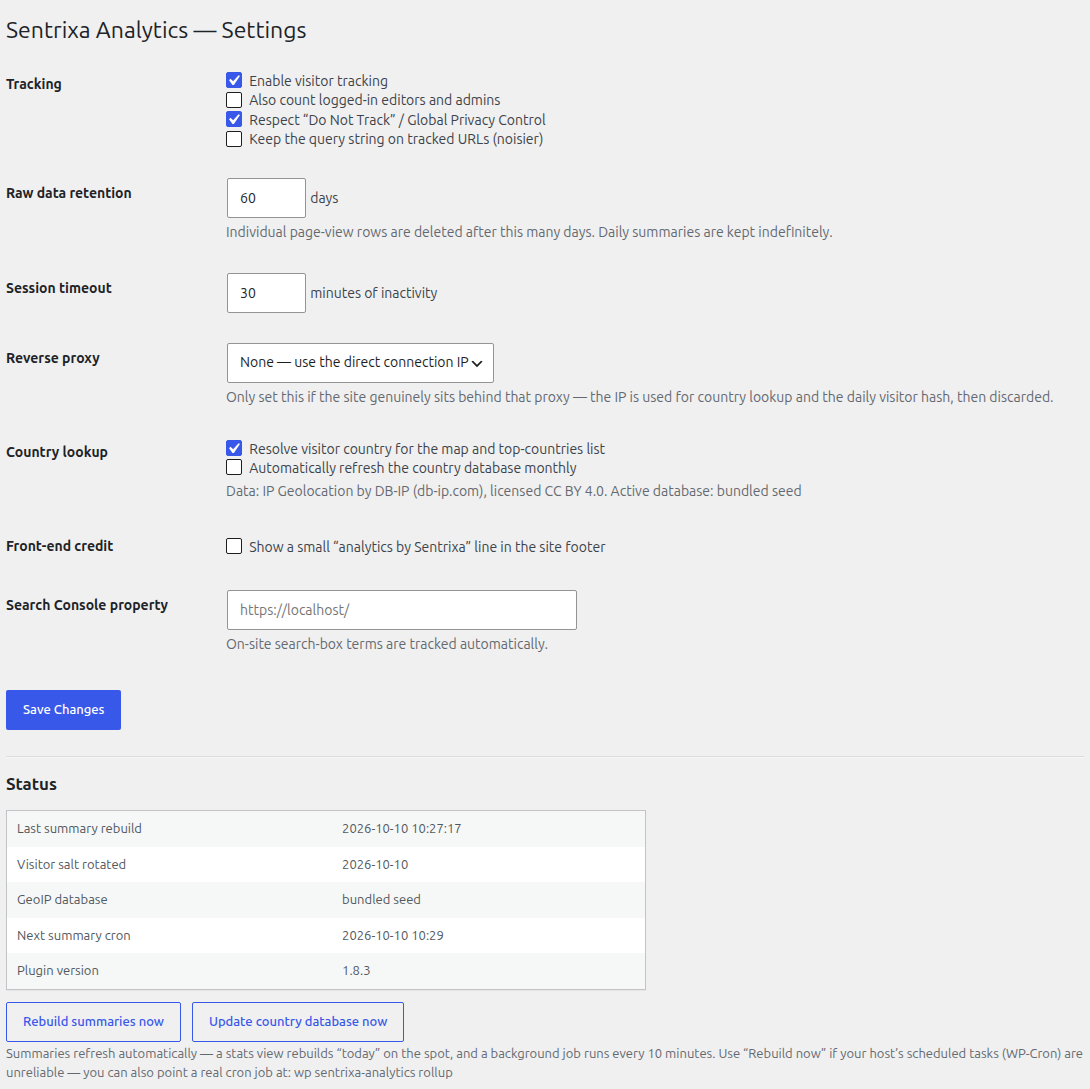
discarded. It is never written to the database. - “Do Not Track” and Global Privacy Control are honoured by default.
- With the default settings no cookie/consent banner is required, but you
should still mention analytics in your site’s privacy policy.
Country data
IP-to-country lookups use the DB-IP IP-to-Country Lite database
(https://db-ip.com), licensed CC BY 4.0. It is bundled with the plugin and
refreshed monthly. No third-party service is contacted for a lookup.
Services externes
Your visitor data stays in your own database and is never sent anywhere. The only optional external call:
- Country database download (repo.sentrixa.co.uk). Off by default. If you switch on “Update the country database automatically” under Analytics > Settings, the plugin periodically downloads a small prebuilt country-lookup file (based on DB-IP Lite, CC BY 4.0, https://db-ip.com). Only a plain request is made; no site or visitor data is sent. The service is provided by Sentrixa Systems Ltd: terms at https://sentrixa.co.uk/legal/plugin-and-website-terms/ and privacy policy at https://sentrixa.co.uk/privacy-policy/. A current database is already bundled with the plugin, and you can also update it manually with the button on the same screen.
Installation
- Upload the
sentrixa-analyticsfolder to/wp-content/plugins/, or install
the zip from Plugins → Add New → Upload. - Activate. Tracking starts immediately.
- Open Analytics in the admin menu. Figures update within a couple of
minutes of a visit.
If WP-Cron is disabled on your host, point a real cron job at:
wp sentrixa-analytics rollup        # every 10 min
wp sentrixa-analytics geoip-update  # daily (acts monthly)
Journal de modifications
1.9.4
- Database: every index now fits the legacy 767-byte InnoDB limit so tables are created on older MySQL/MariaDB. Existing installs migrate automatically.
- The database version is only recorded once all tables exist; if they cannot be created an administrator notice explains why.
1.9.3
- Plugin-wide unique prefix (sxanl_ / SXANL_) for all functions, classes, options, cron hooks and transients; existing settings and data are carried over automatically.
- Faster, quieter activation: it only creates the database tables and default settings. The bundled country database is copied into place shortly afterwards in the background, and nothing contacts an external server on activation.
- WP-CLI geoip-build now writes only inside the plugin’s own uploads folder.
1.9.2
- Menu moved lower in the admin; GeoIP service terms and privacy links added to the readme; WP-CLI geoip-build checks its output path.
1.9.1
- The Sentrixa Sites app can now read and edit the shared Sentrixa site profile (business details, social profiles, Search Console codes) for the site.
1.9.0
- New shared Sentrixa site profile (Settings > Sentrixa site): business details, social profiles and Search Console / webmaster codes are entered once and shared by every Sentrixa plugin. On update, anything this plugin already held is copied into it; nothing is overwritten.
1.8.6
- The Sentrixa Sites app now adapts to the licence: posting from the app needs an active Sentrixa licence; viewing stats does not.
Captures d'écran



Pour les développeurs
Est-ce votre plugin ? Montrez les chiffres.
Ajoutez un badge en direct à votre site, docs ou github readme. Il se met à jour par lui-même - aucun compte n'est nécessaire.
Best Sentrixa Analytics alternatives
Tous les plugins d'analyse →





FAQ
Sentrixa Analytics: quick answers
Réponses directes, extraites des données en direct WordPress.org.
Source : WordPress.org
Is Sentrixa Analytics free?
Yes. Sentrixa Analytics is free to download and use from the official WordPress.org plugin directory.
Is Sentrixa Analytics safe to use in 2026?
Sentrixa Analytics is a solid plugin choice in 2026, with a few things worth checking first. Was last updated 3 weeks ago, and scores 64/100 on our health check.
How many websites use Sentrixa Analytics?
Sentrixa Analytics is active on <10 WordPress websites and has been downloaded 397 times since it launched in November 2026. It was downloaded 407 times in the last 30 days.
Does Sentrixa Analytics work with WordPress 7.1?
Yes. The developer has tested Sentrixa Analytics up to WordPress 7.1.5, the latest release. It requires WordPress 5.6 or newer.
What PHP version does Sentrixa Analytics need?
Sentrixa Analytics requires PHP 7.4 or higher. Most hosts run PHP 8.x today, so it works on any modern WordPress hosting.
When was Sentrixa Analytics last updated?
The latest version, 1.9.4, was released on November 1, 2026 (3 weeks ago).
Who makes Sentrixa Analytics?
Sentrixa Analytics is developed and maintained by Sentrixa Systems Ltd.
What are the best alternatives to Sentrixa Analytics?
The most popular alternatives to Sentrixa Analytics are Site Kit by Google (5M+ installs), MonsterInsights (2M+ installs) and WP Statistics (500K+ installs).
Propulsé par PageForge
Un modèle et une feuille de calcul. Une vraie page pour chaque recherche.
PageForge transforme chaque ligne d'un CSV en une page WordPress avec son propre titre, URL, SEO et schéma, construit sur la mise en page que vous Déjà conçu. Gratuit sur WordPress.org.
- CSV et XLSX, plus Google Sheets sur les professionnels et les entreprises
- Son propre titre, URL, SEO champs et schéma pour chaque page
- Fonctionne avec l'éditeur de blocs, Elementor, Divi et Avada
- Gratuit sur WordPress.org, pas de carte de crédit