


Ruby Markup Converter
Converts ruby and emphasis mark notation from Japanese novel-sharing sites for WordPress, without modifying the original text.

Choix solide
Ruby Markup Converter is a solid plugin choice in 2026, with a few things worth checking first. It runs on 10+ sites and was last updated 1 month ago, and scores 62/100 on our health check.
- Testé avec le dernier WordPress (7.1)
- Petite base d'utilisateurs (plus de 10 installations actives)
- Très peu de critiques jusqu'à présent
Comment s'accumule-t-il ?
Côte à côte sur les installations, les mises à jour, les évaluations et le support



Téléchargements quotidiens
Les pics de téléchargement suivent généralement une nouvelle version - chaque site qui met à jour automatiquement compte comme un téléchargement.
Classements
Where Ruby Markup Converter stands todayWordPress.org Classements de recherche
Position en direct dans la recherche de plugins, Top 100| Mot-clé | Position |
|---|---|
| bloc | >100 |
| converter | >100 |
| Japonais | >100 |
| Ruby | #3 |
| typographie | >100 |
Adoption de version
Part de sites actifs par version.
About Ruby Markup Converter
From the official readme · v1.3.0Description
Want to Publish Your Manuscripts Written for Japanese Novel-Sharing Sites on WordPress, Too?
Ruby Markup Converter is a plugin that automatically converts ruby (furigana) and emphasis mark (bouten) notation used on Japanese novel-sharing sites and elsewhere into a format that displays correctly in WordPress, without modifying the original text.
Simply copy and paste your manuscript from a text file. There’s no need to add ruby annotations or emphasis marks one by one. Of course, you can also type the same notation directly into the WordPress editor.
Principales caractéristiques
- Convert by category or by post: Select a category to convert every post in it, or choose for each post and page whether to convert it. No need to add blocks to each post.
- Use your original manuscripts as they are: Supported ruby and bouten notation is converted automatically, so there’s no need to rewrite your text.
- Easy to use: Simply paste your manuscript into a post in a selected category, or into the Ruby Markup Converter block.
- Choose where to convert: Convert only part of a post with a dedicated block, or convert all posts and pages.
- Flexible settings: Enable or disable individual markup rules and choose how bouten marks are displayed.
Support for Languages Other Than Japanese
Although Ruby Markup Converter is designed with Japanese typography and novel-writing conventions in mind, it is not limited to Japanese. Text in other languages can also be converted as long as it follows the supported markup rules.
Supported Markup Styles
-
Ruby:
|BaseText《RubyAnnotation》BaseText《RubyAnnotation》BaseText(RubyAnnotation)[[rb:BaseText > RubyAnnotation]]#BaseText__RubyAnnotation__#{{ruby|BaseText|RubyAnnotation}}
-
Bouten (Emphasis):
《《Emphasis》》
Usage
Ruby Markup Converter offers several ways to choose where ruby and bouten notation is converted:
By Category
Open Posts > Categories, edit a category, and check the Ruby Markup Converter option. The full text of posts in that category and its child categories is converted.
By Post or Page
In the block editor, open the Ruby Markup Converter panel in the sidebar. You can convert the full text of that post or page, or turn conversion off for it, regardless of other settings.
Ruby Markup Converter Block
Add the Ruby Markup Converter block to a post or page, then paste or type your text inside it. Supported notation within the block is converted when the content is displayed.
Shortcode
Wrap your text in [rubymaco]...[/rubymaco] to convert supported notation within that section. This method is also available in the Classic Editor.
Entire Post Content
Enable Apply to Entire Post Content in the plugin settings to convert supported notation throughout all posts and pages, except those set not to be converted.
Documentation
For detailed instructions, examples, configuration options, and troubleshooting, see the Ruby Markup Converter User Guide.
Installation
- Install the plugin using the built-in WordPress plugin installer, or manually upload the extracted files to the
wp-content/plugins/directory. - Activez le plugin via le menu
Pluginsdans WordPress. - Go to
Settings > Ruby Markup Converter. - Select the conversion scope and markup rules you want to use.
- Save your settings.
Journal de modifications
Adds category and per-post conversion settings. Ruby notation without an explicit base text now recognizes more kanji, and shortcodes nested inside [rubymaco] are now processed, so some existing content may display differently.
1.3.0
- Added an option to convert the full text of posts in selected categories.
- Added per-post and per-page conversion settings in the block editor.
- Fixed some kanji, such as 𠮟 and 﨑, not being recognized as base text in ruby notation without an explicit base text.
- Fixed shortcodes nested inside [rubymaco]…[/rubymaco] not being processed.
- Fixed settings failing to save after the settings screen had been left open for a long time.
- Improved conversion performance, especially for long posts.
- Fixed typos and improved overall stability.
1.2.0
- Redesigned the settings screen for easier navigation and configuration.
- Improved feedback when saving settings or making changes.
- Moved the custom bouten rendering option to Compatibility Settings.
- Improved internal reliability while preserving existing settings and conversion behavior.
- Corrected the documentation to remove an inaccurate statement about built-in ruby support in WordPress.
1.1.0
- Added the Ruby Markup Converter block for easier use in the block editor.
- Changed the default bouten rendering method to CSS text-emphasis.
- Prevented markup conversion inside HTML tags and attributes to avoid potential display issues.
- Fixed bouten markup immediately following kanji being incorrectly interpreted as ruby markup.
- Fixed incorrect display of ampersands when using the custom bouten renderer.
- Fixed an issue where disabling all markup rules caused the settings to revert to their defaults.
- Updated the minimum required WordPress version to 6.8.
1.0.1
- Improved internal settings management.
1.0.0
- Communiqué public initial.
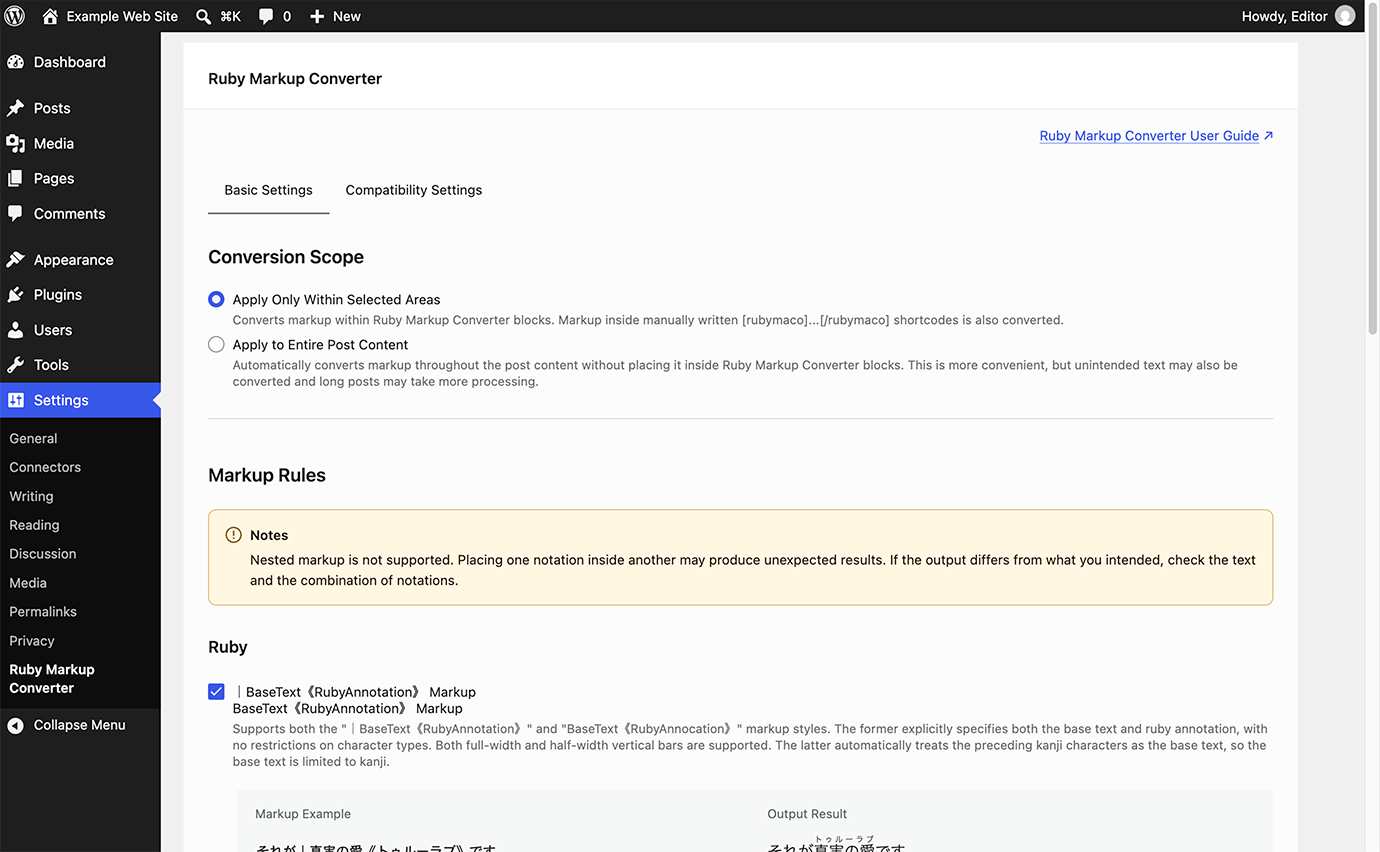
Captures d'écran


Pour les développeurs
Est-ce votre plugin ? Montrez les chiffres.
Ajoutez un badge en direct à votre site, docs ou github readme. Il se met à jour par lui-même - aucun compte n'est nécessaire.
Best Ruby Markup Converter alternatives
Tous les plugins de blocs →





FAQ
Ruby Markup Converter: quick answers
Réponses directes, extraites des données en direct WordPress.org.
Source : WordPress.org
Is Ruby Markup Converter free?
Yes. Ruby Markup Converter is free to download and use from the official WordPress.org plugin directory.
Is Ruby Markup Converter safe to use in 2026?
Ruby Markup Converter is a solid plugin choice in 2026, with a few things worth checking first. It runs on 10+ sites and was last updated 1 month ago, and scores 62/100 on our health check.
How many websites use Ruby Markup Converter?
Ruby Markup Converter is active on 10+ WordPress websites and has been downloaded 584 times since it launched in May 2026. It was downloaded 80 times in the last 30 days.
Does Ruby Markup Converter work with WordPress 7.1?
Yes. The developer has tested Ruby Markup Converter up to WordPress 7.1.5, the latest release. It requires WordPress 6.8 or newer.
What PHP version does Ruby Markup Converter need?
Ruby Markup Converter requires PHP 7.4 or higher. Most hosts run PHP 8.x today, so it works on any modern WordPress hosting.
When was Ruby Markup Converter last updated?
The latest version, 1.3.0, was released on October 28, 2026 (1 month ago).
Who makes Ruby Markup Converter?
Ruby Markup Converter is developed and maintained by Foriba.
What are the best alternatives to Ruby Markup Converter?
The most popular alternatives to Ruby Markup Converter are Spectra Legacy (1M+ installs), Breadcrumb NavXT (700K+ installs) and PDF Embedder (300K+ installs).
Propulsé par PageForge
Un modèle et une feuille de calcul. Une vraie page pour chaque recherche.
PageForge transforme chaque ligne d'un CSV en une page WordPress avec son propre titre, URL, SEO et schéma, construit sur la mise en page que vous Déjà conçu. Gratuit sur WordPress.org.
- CSV et XLSX, plus Google Sheets sur les professionnels et les entreprises
- Son propre titre, URL, SEO champs et schéma pour chaque page
- Fonctionne avec l'éditeur de blocs, Elementor, Divi et Avada
- Gratuit sur WordPress.org, pas de carte de crédit