


One User Avatar | User Profile Picture
Use any image from your WordPress Media Library as a custom user avatar or user profile picture. Add your own Default Avatar.

Choix solide
One User Avatar is a solid plugin choice in 2026, with a few things worth checking first. It runs on 100K+ sites, is rated 4.7/5 and was last updated 3 months ago, and scores 76/100 on our health check.
- Proven at scale on 100K+ active sites
- Loved by users — 4.7/5 from 41 reviews
- Testé avec le dernier WordPress (7.1)
Comment s'accumule-t-il ?
Côte à côte sur les installations, les mises à jour, les évaluations et le support



Téléchargements quotidiens
Les pics de téléchargement suivent généralement une nouvelle version - chaque site qui met à jour automatiquement compte comme un téléchargement.
Classements
Where One User Avatar stands todayWordPress.org Classements de recherche
Position en direct dans la recherche de plugins, Top 100| Mot-clé | Position |
|---|---|
| avatar | #1 |
| bbPress | #36 |
| gravatar | #8 |
| profile | #10 |
| users | #16 |
Adoption de version
Part de sites actifs par version.
Répartition des notes
★★★★★★★★★★ 4.7 from 41 reviews
About One User Avatar | User Profile Picture
From the official readme · v2.5.6Description
WordPress currently only allows you to use custom avatars that are uploaded through Gravatar. One User Avatar enables you to use any photo uploaded into your Media Library as an avatar. This means you use the same uploader and library as your posts. No extra folders or image editing functions are necessary. This plugin is a fork of WP User Avatar v2.2.16.
One User Avatar also lets you:
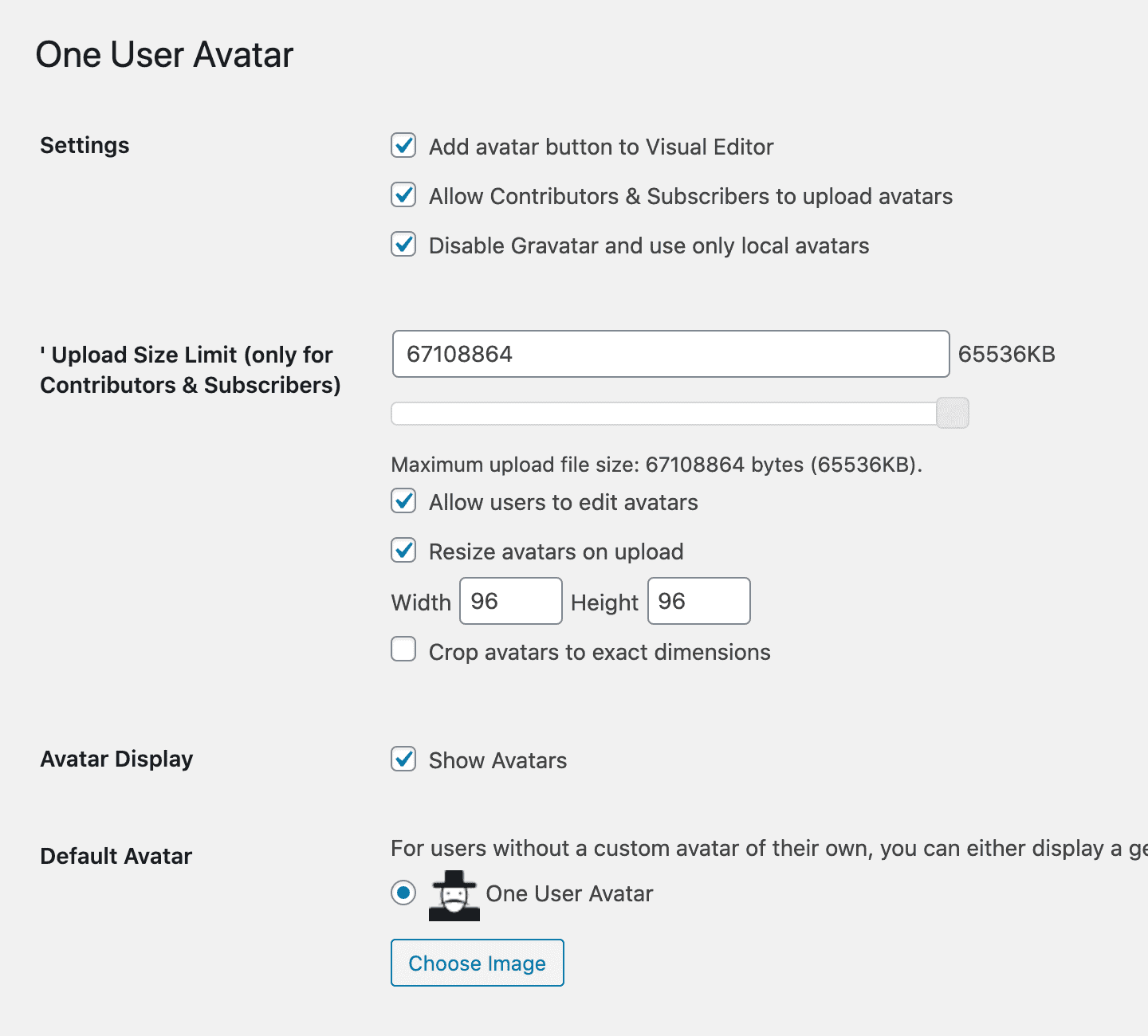
- Upload your own Default Avatar in your One User Avatar settings.
- Show the user’s Gravatar avatar or Default Avatar if the user doesn’t have a One User Avatar image.
- Disable Gravatar avatars and use only local avatars.
- Use the
[avatar_upload]shortcode to add a standalone uploader to a front page or widget. This uploader is only visible to logged-in users. - Use the
[avatar]shortcode in your posts. These shortcodes will work with any theme, whether it has avatar support or not. - Allow Contributors and Subscribers to upload their own avatars.
- Limit upload file size and image dimensions for Contributors and Subscribers.
Copyright
One User Avatar
Copyright (c) 2023 One Designs https://onedesigns.com/
License: GPLv2
Source: https://github.com/onedesigns/one-user-avatar
One User Avatar is based on WP User Avatar v2.2.16
Copyright (c) 2020-2021 ProfilePress https://profilepress.net/
Copyright (c) 2014-2020 Flippercode https://www.flippercode.com/
Copyright (c) 2013-2014 Bangbay Siboliban http://bangbay.com/
License: GPLv2
Source: https://github.com/profilepress/wp-user-avatar
One User Avatar is distributed under the terms of the GNU GPL
This program is free software: you can redistribute it and/or modify
it under the terms of the GNU General Public License as published by
the Free Software Foundation, either version 2 of the License, or
(at your option) any later version.
This program is distributed in the hope that it will be useful,
but WITHOUT ANY WARRANTY; without even the implied warranty of
MERCHANTABILITY or FITNESS FOR A PARTICULAR PURPOSE. See the
GNU General Public License for more details.
Advanced Settings
Add One User Avatar to your own profile edit page
You can use the [avatar_upload] shortcode to add a standalone uploader to any page. It’s best to use this uploader by itself and without other profile fields.
If you’re building your own profile edit page with other fields, One User Avatar is automatically added to the show_user_profile and edit_user_profile hooks. If you’d rather have One User Avatar in its own section, you could add another hook:
do_action( 'edit_user_avatar', $current_user );
Then, to add One User Avatar to that hook and remove it from the other hooks outside of the administration panel, you would add this code to the functions.php file of your theme:
function my_avatar_filter() {
    // Remove from show_user_profile hook
    remove_action( 'show_user_profile', array( 'wp_user_avatar', 'wpua_action_show_user_profile' ) );
    remove_action( 'show_user_profile', array( 'wp_user_avatar', 'wpua_media_upload_scripts' ) );

    // Remove from edit_user_profile hook
    remove_action( 'edit_user_profile', array( 'wp_user_avatar', 'wpua_action_show_user_profile' ) );
    remove_action( 'edit_user_profile', array( 'wp_user_avatar', 'wpua_media_upload_scripts' ) );

    // Add to edit_user_avatar hook
    add_action( 'edit_user_avatar', array( 'wp_user_avatar', 'wpua_action_show_user_profile' ) );
    add_action( 'edit_user_avatar', array( 'wp_user_avatar', 'wpua_media_upload_scripts' ) );
}

// Loads only outside of administration panel
if ( ! is_admin() ) {
    add_action( 'init','my_avatar_filter' );
}
HTML Wrapper
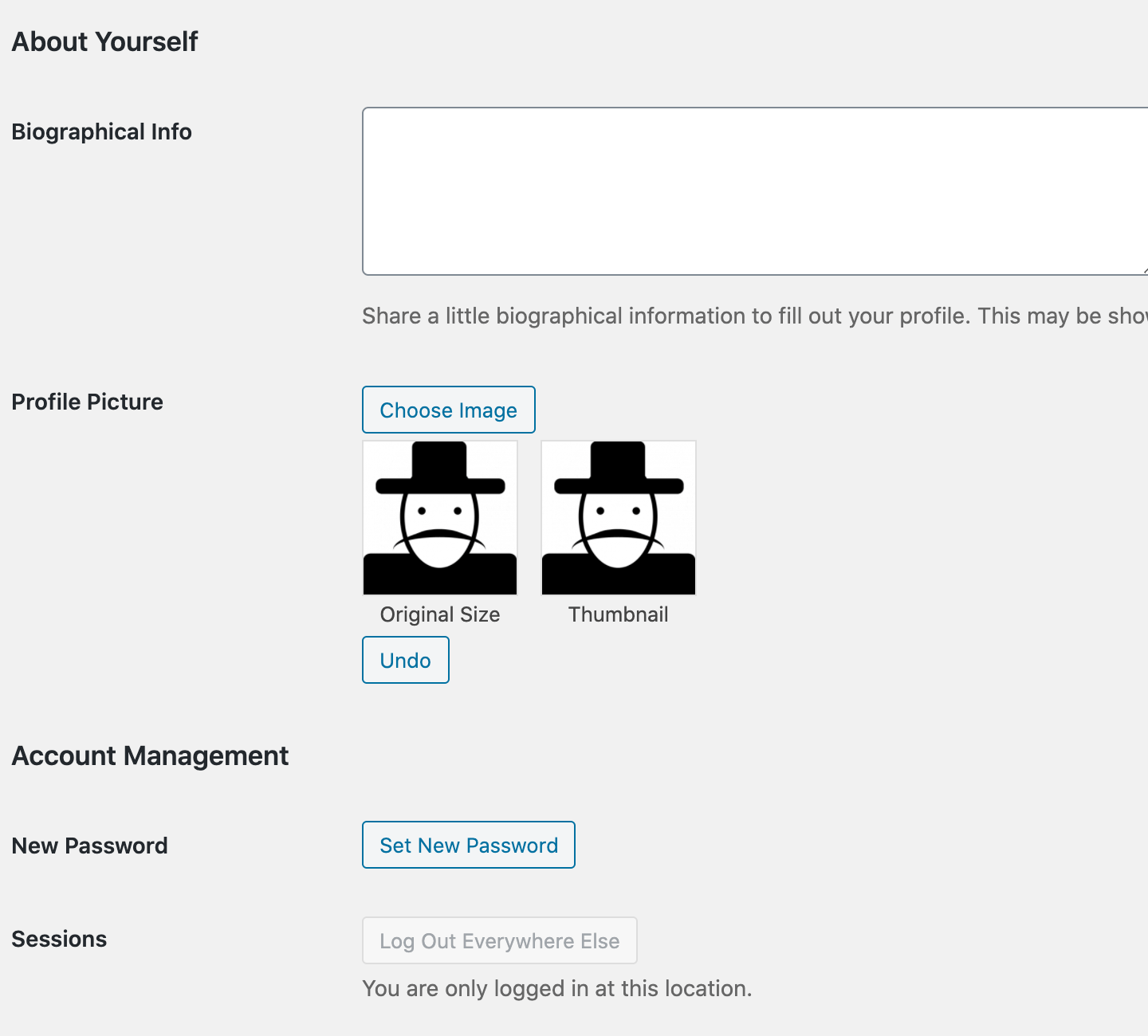
You can change the HTML wrapper of the One User Avatar section by using the functions wpua_before_avatar and wpua_after_avatar. By default, the avatar code is structured like this:
<div class="wpua-edit-container">
    <h3>Avatar</h3>
    <input type="hidden" name="wp-user-avatar" id="wp-user-avatar" value="{attachmentID}" />
    <p id="wpua-add-button">
        <button type="button" class="button" id="wpua-add" name="wpua-add">Edit Image</button>
    </p>
    <p id="wpua-preview">
        <img src="{imageURL}" alt="" />
        Original Size
    </p>
    <p id="wpua-thumbnail">
        <img src="{imageURL}" alt="" />
        Thumbnail
    </p>
    <p id="wpua-remove-button">
        <button type="button" class="button" id="wpua-remove" name="wpua-remove">Default Avatar</button>
    </p>
    <p id="wpua-undo-button">
        <button type="button" class="button" id="wpua-undo" name="wpua-undo">Undo</button>
    </p>
</div>
To strip out the div container and h3 heading, you would add the following filters to the functions.php file in your theme:
remove_action( 'wpua_before_avatar', 'wpua_do_before_avatar' );
remove_action( 'wpua_after_avatar', 'wpua_do_after_avatar' );
To add your own wrapper, you could create something like this:
function my_before_avatar() {
    echo '<div id="my-avatar">';
}
add_action( 'wpua_before_avatar', 'my_before_avatar' );

function my_after_avatar() {
    echo '</div>';
}
add_action( 'wpua_after_avatar', 'my_after_avatar' );
This would output:
<div id="my-avatar">
    <input type="hidden" name="wp-user-avatar" id="wp-user-avatar" value="{attachmentID}" />
    <p id="wpua-add-button">
        <button type="button" class="button" id="wpua-add" name="wpua-add">Edit Image</button>
    </p>
    <p id="wpua-preview">
        <img src="{imageURL}" alt="" />
        <span class="description">Original Size</span>
    </p>
    <p id="wpua-thumbnail">
        <img src="{imageURL}" alt="" />
        <span class="description">Thumbnail</span>
    </p>
    <p id="wpua-remove-button">
        <button type="button" class="button" id="wpua-remove" name="wpua-remove">Default Avatar</button>
    </p>
    <p id="wpua-undo-button">
        <button type="button" class="button" id="wpua-undo" name="wpua-undo">Undo</button>
    </p>
</div>
Installation
- Download, install, and activate the One User Avatar plugin.
- On your profile edit page, click “Edit Image”.
- Choose an image, then click “Select Image”.
- Click “Update Profile”.
- Upload your own Default Avatar in your One User Avatar settings (optional). You can also allow Contributors & Subscribers to upload avatars and disable Gravatar.
- Choose a theme that has avatar support. In your theme, manually replace
get_avatarwithget_wp_user_avataror leaveget_avataras-is. Read about the differences here. - You can also use the
[avatar_upload]and[avatar]shortcodes in your posts. These shortcodes will work with any theme, whether it has avatar support or not.
Warning
If you are using One User Avatar to replace an existing installation of WP User Avatar, do not delete the old WP User Avatar plugin from the WordPress plugin administration screen, otherwise you will lose all your existing avatars. Instead, deactivate the WP User Avatar plugin and then manually delete it using FTP. If you can’t access your files directly, contact your hosting provider and ask them to delete it for you or simply leave the old plugin deactivated.
Example Usage
Posts
Within The Loop, you may be using:
<?php echo get_avatar( get_the_author_meta( 'ID' ), 96 ); ?>
Replace this function with:
<?php echo get_wp_user_avatar( get_the_author_meta( 'ID' ), 96 ); ?>
You can also use the values “original”, “large”, “medium”, or “thumbnail” for your avatar size:
<?php echo get_wp_user_avatar( get_the_author_meta( 'ID' ), 'medium' ); ?>
You can also add an alignment of “left”, “right”, or “center”:
<?php echo get_wp_user_avatar( get_the_author_meta( 'ID' ), 96, 'left' ); ?>
Author Page
On an author page outside of The Loop, you may be using:
<?php
    $user = get_user_by( 'slug', $author_name );
    echo get_avatar( $user->ID, 96 );
?>
Replace this function with:
<?php
    $user = get_user_by( 'slug', $author_name );
    echo get_wp_user_avatar( $user->ID, 96 );
?>
If you leave the options blank, One User Avatar will detect whether you’re inside The Loop or on an author page and return the correct avatar in the default 96×96 size:
<?php echo get_wp_user_avatar(); ?>
The function get_wp_user_avatar can also fall back to get_avatar if there is no One User Avatar image. For this to work, “Show Avatars” must be checked in your One User Avatar settings. When this setting is enabled, you will see the user’s Gravatar avatar or Default Avatar.
Comments
For comments, you might have in your template:
<?php echo get_avatar($comment, 32); ?>
Replace this function with:
<?php echo get_wp_user_avatar($comment, 32); ?>
For comments, you must specify the $comment variable.
Other Available Functions
[avatar_upload] shortcode
You can use the [avatar_upload] shortcode to add a standalone uploader to a front page or widget. This uploader is only visible to logged-in users.
You can specify a user with the shortcode, but you must have edit_user capability for that particular user.
[avatar_upload user="admin"]
[avatar] shortcode
You can use the [avatar] shortcode in your posts. It will detect the author of the post or you can specify an author by username. You can specify a size, alignment, and link, but they are optional. For links, you can link to the original image file, attachment page, or a custom URL.
[avatar user="admin" size="medium" align="left" link="file" /]
You can also add a caption to the shortcode:
[avatar user="admin" size="medium" align="left" link="file"]Photo Credit: Your Name[/avatar]
Note: If you are using one shortcode without a caption and another shortcode with a caption on the same page, you must close the caption-less shortcode with a forward slash before the closing bracket: [avatar /] instead of [avatar]
get_wp_user_avatar_src
Works just like get_wp_user_avatar but returns just the image src. This is useful if you would like to link a thumbnail-sized avatar to a larger version of the image:
<a href="<?php echo get_wp_user_avatar_src( $user_id, 'large' ); ?>">
    <?php echo get_wp_user_avatar( $user_id, 'thumbnail' ); ?>
</a>
has_wp_user_avatar
Returns true if the user has a One User Avatar image. You must specify the user ID:
<?php
    if ( has_wp_user_avatar( $user_id ) ) {
        echo get_wp_user_avatar( $user_id, 96 );
    } else {
        echo '<img src="my-alternate-image.jpg" />';
    }
?>
Journal de modifications
New Feature: Front page uploader New Feature: Media Library view of all avatars
2.5.6
- Fix avatar post-processing fatal error
2.5.5
- Fix upload validation XSS vulnerability
- Improve Portuguese translation
2.5.4
- Add compatibility for WordPress 6.9
- Limit plugin tags to 5
- Fix avatar class name
2.5.3
- Add compatibility for WordPress 6.9
- Limit plugin tags to 5
- Fix avatar class name
2.5.1
- Add compatibility for WordPress 6.8.2
2.5.0
- Add compatibility for WordPress 6.6
- Add support for retina avatars
- Add trashed avatars view to library
- Don’t show confirmation dialog when moving avatar to the trash
- Fix deprecated notices in avatars library
- Fix avatar library counters
- Fix undefined reference error in TinyMCE
- Fix alert when uploading avatar using browser file uploader
- Fix default avatars in admin when Gravatar is disabled
- Fix PHP warnings in add user form
- Fix activation and deactivation hooks
- Fix unable to get user by slug or email in avatar shortcode
- Fix unattached avatars showing for users with empty avatar meta
- Fix avatar dimensions in BuddyPress
Captures d'écran
Pour les développeurs
Est-ce votre plugin ? Montrez les chiffres.
Ajoutez un badge en direct à votre site, docs ou github readme. Il se met à jour par lui-même - aucun compte n'est nécessaire.
Best One User Avatar alternatives
All avatar plugins →





FAQ
One User Avatar: quick answers
Réponses directes, extraites des données en direct WordPress.org.
Source : WordPress.org
Is One User Avatar free?
Yes. One User Avatar is free to download and use from the official WordPress.org plugin directory.
Is One User Avatar safe to use in 2026?
One User Avatar is a solid plugin choice in 2026, with a few things worth checking first. It runs on 100K+ sites, is rated 4.7/5 and was last updated 3 months ago, and scores 76/100 on our health check.
How many websites use One User Avatar?
One User Avatar is active on 100K+ WordPress websites and has been downloaded 621,308 times since it launched in May 2021. It was downloaded 14,156 times in the last 30 days.
Does One User Avatar work with WordPress 7.1?
Yes. The developer has tested One User Avatar up to WordPress 7.1.5, the latest release. It requires WordPress 4.0 or newer.
When was One User Avatar last updated?
The latest version, 2.5.6, was released on August 21, 2026 (3 months ago).
Who makes One User Avatar?
One User Avatar is developed and maintained by One Designs.
What are the best alternatives to One User Avatar?
The most popular alternatives to One User Avatar are Gravatar Enhanced (200K+ installs), Simple Local Avatars (100K+ installs) and User Profile Picture (30K+ installs).
Propulsé par PageForge
Un modèle et une feuille de calcul. Une vraie page pour chaque recherche.
PageForge transforme chaque ligne d'un CSV en une page WordPress avec son propre titre, URL, SEO et schéma, construit sur la mise en page que vous Déjà conçu. Gratuit sur WordPress.org.
- CSV et XLSX, plus Google Sheets sur les professionnels et les entreprises
- Son propre titre, URL, SEO champs et schéma pour chaque page
- Fonctionne avec l'éditeur de blocs, Elementor, Divi et Avada
- Gratuit sur WordPress.org, pas de carte de crédit