


Omea Analytics
Fast, cookieless analytics in your own database: visits, sources, campaigns, conversions and revenue. With consent, returning visitors too.

Choix solide
Omea Analytics is a solid plugin choice in 2026, with a few things worth checking first. Was last updated 2 days ago, and scores 64/100 on our health check.
- Développé activement — Dernière mise à jour il y a 2 jours
- Testé avec le dernier WordPress (7.1)
- Petite base d'utilisateurs (<10 installations actives)
- Très peu de critiques jusqu'à présent
- Nécessite PHP 8.1 ou plus récent
Comment s'accumule-t-il ?
Côte à côte sur les installations, les mises à jour, les évaluations et le support



Téléchargements quotidiens
Les pics de téléchargement suivent généralement une nouvelle version - chaque site qui met à jour automatiquement compte comme un téléchargement.
Classements
Where Omea Analytics stands todayWordPress.org Classements de recherche
Position en direct dans la recherche de plugins, Top 100| Mot-clé | Position |
|---|---|
| analytique | >100 |
| cookieless | #85 |
| GDPR | >100 |
| intimité | >100 |
| statistiques | >100 |
About Omea Analytics
From the official readme · v0.7.3Description
Omea Analytics measures your WordPress site without sending anything to third parties – the data stays in your own database. Without consent it is cookieless (the same approach as Matomo’s cookieless mode); with a visitor’s Statistics consent it also recognises returning visitors and credits conversions to the campaign that first brought them.
It is built to be the fastest analytics plugin for WordPress: a 1.8 KB tracker (gzip) that sends two requests per page, a collector that stores hits without loading WordPress, and reports read from daily rollups – a 30-day dashboard on a busy site loads in milliseconds, and history stays exact after visit-level data is deleted.
Ce que vous obtenez
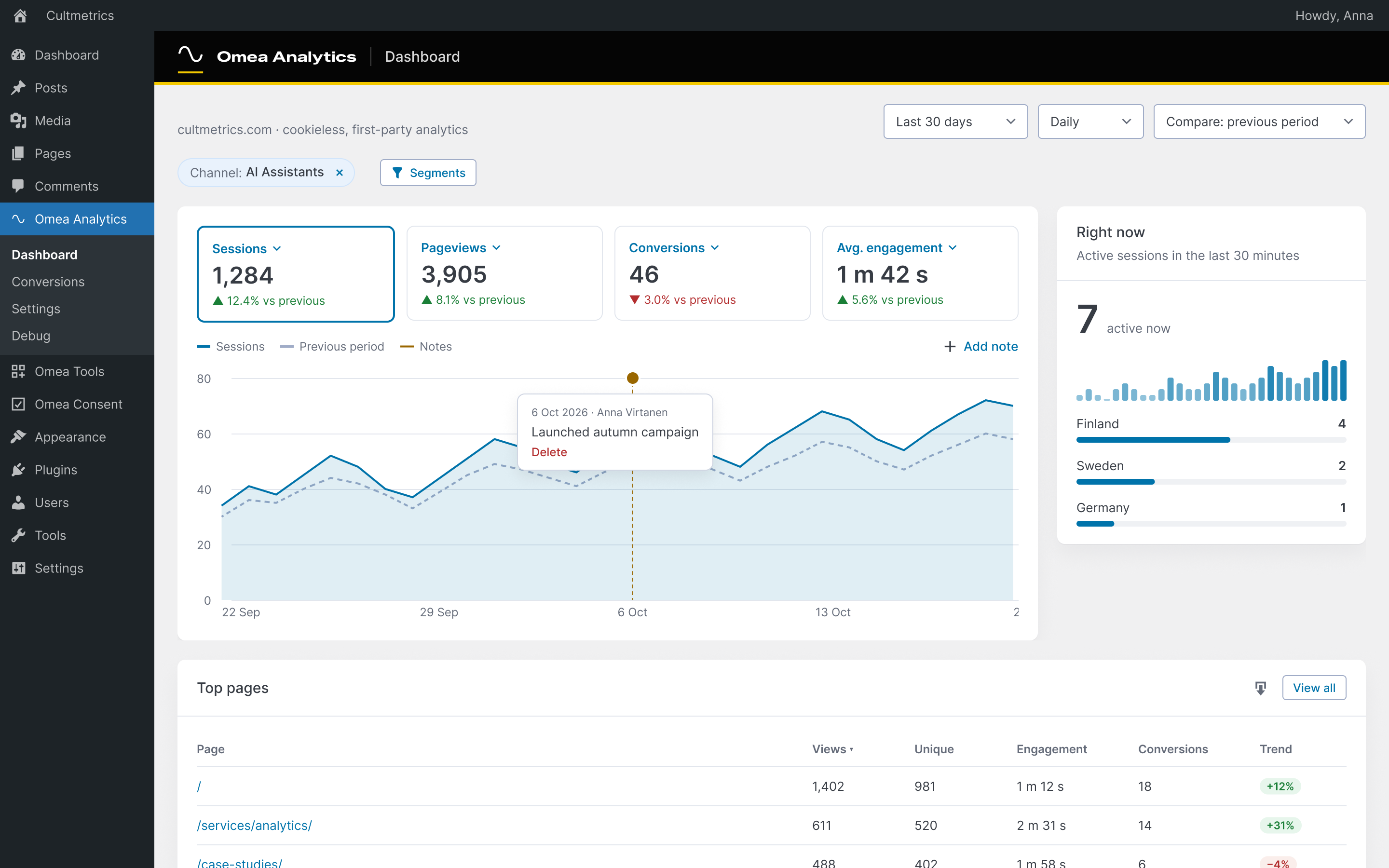
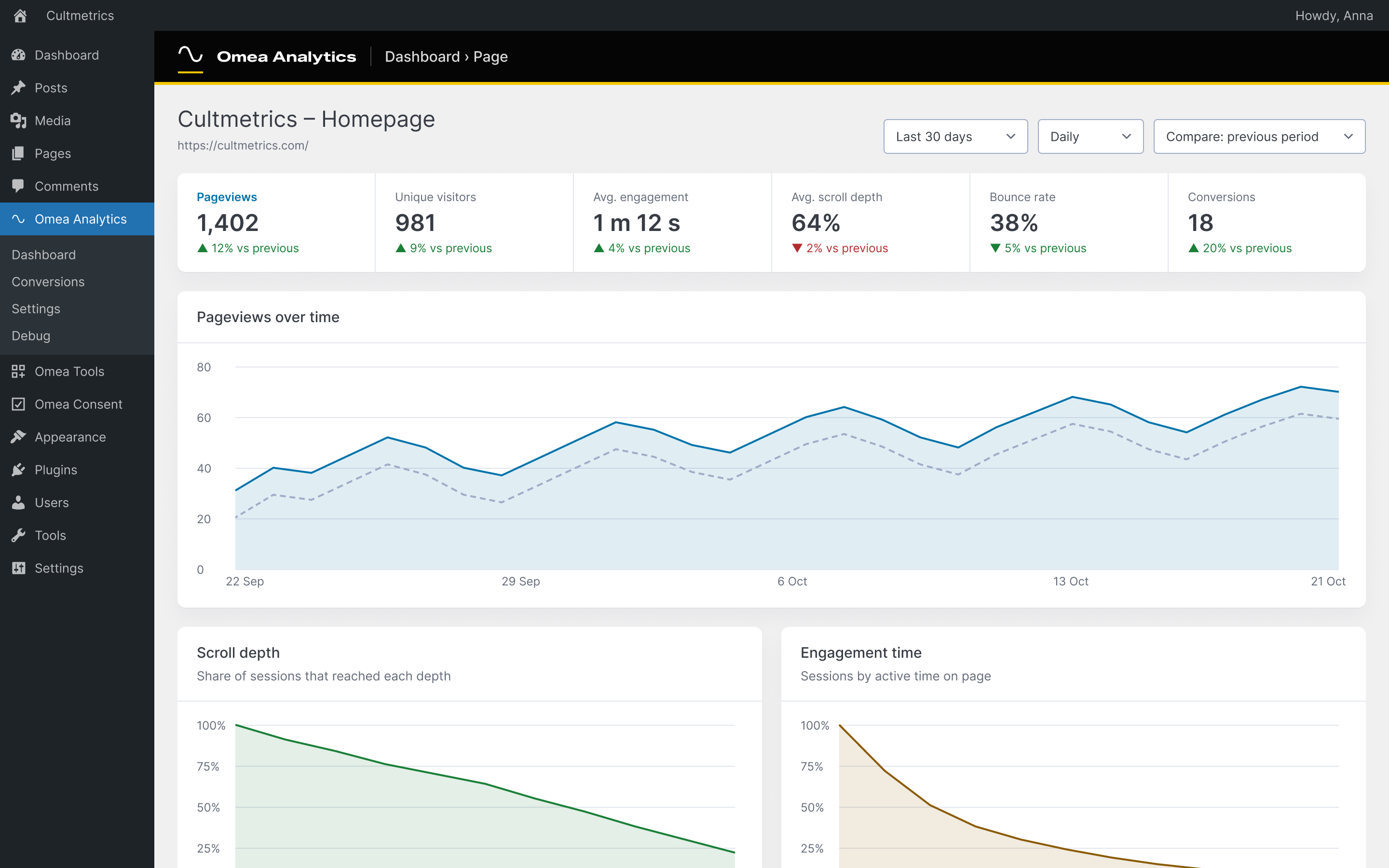
- Visits, visitors, pageviews, bounce and engagement rate, time on page and scroll depth, in your site’s time zone.
- Channels aligned with GA4 – including AI Assistants (ChatGPT, Perplexity, Gemini, Copilot, Claude) – plus source, medium, campaign, term and content, referring domains and ad click IDs (Google, Microsoft, Meta, TikTok, LinkedIn, X).
- Entry and exit pages, page detail with where visitors came from and went next.
- Goals and conversions from page visits, clicks, forms and custom events (
omea.trackEvent(),data-omea-event), with conversion rate and revenue per goal and channel. WooCommerce purchases, checkouts and add-to-carts are recorded on the server – a purchase counts even when the buyer never returns to the thank-you page. - Countries, regions and cities from a local database on your server; browsers, operating systems (including Windows 11) and screen sizes.
- New vs returning visitors and visit frequency for visitors who gave Statistics consent.
- Bot traffic filtered before anything is stored – crawlers, scripts, automated browsers and vulnerability scanners – with a counter of what was filtered.
- Automatic outbound-link, download, email/phone-click and site-search tracking, pages not found (404), and Content reports by author, category and post type.
- AI crawlers: how often GPTBot, ClaudeBot, PerplexityBot and others fetch your pages – next to the visits AI assistants send you.
- Core Web Vitals from real visitors (sampled): LCP, INP, CLS and TTFB per page.
- Import your history from Koko Analytics, WP Statistics, Burst Statistics, Independent Analytics, Statify, Slimstat, Jetpack Stats, Plausible or Google Analytics 4.
- CSV export of every report, chart notes, saved segments, a weekly email report, a dashboard widget, a Views column, a Popular posts block, WP-CLI, a read-only Reporting API (Google Sheets, Looker Studio) and MCP abilities for AI assistants.
- View-only access for the roles you choose; multisite network overview.
- A “Get set up” checklist that tells you when something needs attention: geolocation database, tracking, collector, visitor IP behind a CDN, consent setup, conversions, privacy policy.
Intimité
Without consent (default): cookieless. Nothing is stored in the browser – no cookies, no localStorage. The tracker reads a few values in the browser (screen-width bucket, touch support, referrer, scroll depth and active time) and sends them to your own server. A visit is recognised on your server by a one-way hash of the IP address (the /64 network for IPv6), browser, language and site under a random key that is replaced every day; the old key is deleted half an hour after midnight, after which visits can’t be linked across days or matched to an IP address. Omea Analytics never stores the IP address. Whether this needs consent depends on your country: some regulators, such as France’s CNIL and Spain’s AEPD, exempt audience measurement from consent when strict conditions are met (your own site only, aggregated statistics, nothing combined with other data); others, such as Germany’s and Finland’s, generally expect consent. Omea Analytics is designed with those conditions in mind, but no regulator has approved it – check your country’s rules.
You choose what a “no” stops (Settings › Privacy): count every visit cookieless (default – also after a visitor rejects Statistics), stop counting a visitor who rejects Statistics (the rejection works as an objection, as the UK statistics exception requires), or record nothing before Statistics consent. Both stricter modes are enforced on the server too. Optionally, IPv4 addresses are shortened (last part dropped) before hashing.
With Statistics consent: returning visitors. When a visitor explicitly accepts Statistics in Omea Consent or a plugin that uses the WordPress Consent API, the server sets a first-party HttpOnly cookie omea_vid holding a random ID (13 months by default; 1–25 months, or turn it off). Only a keyed hash of that ID is stored. Withdrawing consent removes the cookie.
What is stored: page path (no query string), referrer host and path, UTM parameters, the type of ad click ID (never its value), coarse device type, OS and browser family, screen-size bucket, ISO country code, region and city. No IP addresses, no coordinates. Server-side events (purchases, sign-ups) store no user, order or contact IDs in the analytics tables. With WooCommerce, each order stores the ID of the visit it came from (order meta _omea_analytics_session), so an order can be connected to that visit’s pages and source – or, with “Link orders only with Statistics consent”, only for buyers who allowed Statistics.
Retention: visit-level hits are deleted after 30 days and visits after 395 days by default (both configurable); daily reports without visitor data are kept.
Services externes
Omea Analytics makes no external requests while it measures – visits are recognised on your server, and locations come from a local database file or your host’s/CDN’s headers.
- DB-IP City Lite (default geolocation) – After activation, when you select DB-IP, and once a month when a new release is published, the plugin downloads the free DB-IP City Lite database from https://download.db-ip.com/free/ via WP-Cron. Only the download request is made: no visitor data and no site address is sent. Lookups then run locally. The file is stored in a private, randomly named folder in uploads. Choose “Proxy / CDN headers only” in Settings › Geolocation to avoid this. IP geolocation by DB-IP (https://db-ip.com), licensed under CC BY 4.0.
-
MaxMind GeoLite2 / GeoIP2 (optional) – Only when selected and your own MaxMind account ID and licence key are entered: the database is downloaded from https://download.maxmind.com/ and refreshed weekly. MaxMind’s licence requires using a release no older than 30 days, so a copy that cannot be updated for 30 days is removed. Terms: https://www.maxmind.com/en/geolite2/eula
-
Jetpack Stats import (optional) – Only when an administrator starts an import from Jetpack Stats on a site connected to WordPress.com: the plugin asks WordPress.com, through Jetpack’s own connection, for that site’s daily views, visitors, top posts, referrers and countries. Nothing else is sent. WordPress.com terms: https://wordpress.com/tos/ – privacy: https://automattic.com/privacy/
- Upgrade to Pro checkout (optional) – The “Upgrade to Pro” admin page and the dashboard’s Pro card offer the paid Omea Analytics Pro add-on (or the Omea Pro bundle). Clicking “Start free trial” opens a window (or, as a fallback, a new tab) with the checkout page at account.cultmetrics.com (operated by Cultmetrics Oy), where payment is handled by Stripe. The page receives the site’s domain, the admin address it was opened from and the plugin version, so it can show the new license key in that window. Nothing is loaded or sent until an administrator clicks the button; card details are entered only in Stripe’s fields, never inside WordPress. Hide the upsell with the
omea_analytics_show_pro_upsellfilter. Cultmetrics terms of sale: https://www.cultmetrics.com/terms/ – privacy: https://www.cultmetrics.com/privacy-policy/ – Stripe terms: https://stripe.com/legal – Stripe privacy: https://stripe.com/privacy
Files the plugin writes
omea-analytics-collect.phpin the site root – a few lines that pass tracker hits to the plugin’s collector without loading WordPress (the same approach as other fast analytics plugins). It is removed when the plugin is deactivated. If the site root isn’t writable, or on multisite, hits go to the plugin’s REST endpoint instead. DefineOMEA_ANALYTICS_NO_COLLECTORto turn it off.wp-content/omea-analytics/– the collector’s settings and a short-lived buffer of hits (stored into the database every minute), in randomly named files that deny web access.wp-content/uploads/omea-analytics/– the geolocation database.
Installation
- Upload the plugin through the Plugins screen, or copy the plugin folder into
wp-content/plugins/. - Activate Omea Analytics. The geolocation database downloads in the background.
- Open Omea Analytics › Dashboard and follow the “Get set up” checklist.
The plugin ships with all compiled assets and required libraries; no build tools are needed to run it.
Journal de modifications
0.7.3
- Fixed: with Omea Consent, a visitor who accepted Statistics stayed recognised for only 30 days instead of as long as their choice is valid.
- Fixed: when a visitor withdraws Statistics consent, the omea_vid cookie is now removed on their next page view in every privacy mode (before, it could stay in “Record nothing before consent” and “Count cookieless until the visitor says no”).
- Fixed: in “Record nothing before consent” without a consent plugin, the backup collection route recorded visits.
- Fixed: a PHP warning in Reports › Core Web Vitals; the upgrade screen now says the Omea Pro bundle is also available for 5 and 25 sites.
0.7.2
- New: you choose what a visitor’s “no” stops (Settings › Privacy): count every visit cookieless (default), stop counting a visitor who rejects Statistics, or record nothing before consent. The setup checklist asks you to choose.
- New: orders (WooCommerce; EDD and FluentCart with Pro) are linked to their visit always (default) or only with Statistics consent.
- New: optionally shorten IPv4 addresses before hashing.
- The suggested privacy-policy text names the legal basis, the right to object and the order link; privacy wording in the settings and this readme corrected after a legal accuracy review.
0.7.1
- New: Omea Analytics Pro, an optional paid add-on – revenue attribution for WooCommerce, Easy Digital Downloads and FluentCart, funnels, segment comparison, white-label client reports and share links, live visitors, alerts and a Looker Studio connector. Revenue, Funnels and Client reports previews in the menu, Omea Analytics › Upgrade to Pro and one card on the dashboard, which you can hide. The free plugin stays complete.
- For add-ons: dashboard extension API, new filters and a faster “active now” query (database index).
- Fixed: an email report change with no value could show a broken dash.
- Upgrading from an older version? The “Get set up” checklist finds bot visits stored before 0.6 (vulnerability scanners, visits logged without a browser) and removes them in one click, rebuilding the reports for those days. It also offers to turn bot filtering back on if it is off.
0.7.0
- Rebuilt for correct numbers: one record per visit with its source decided once, no lost events or conversions, server-side revenue, site time zone, accurate sources (AI Assistants channel, ad click IDs, search engines in every country), Cloudflare/proxy-aware visitor IPs.
- With Statistics consent: returning visitors, visit frequency and first-touch attribution (first-party HttpOnly cookie, only with consent). Without consent: cookieless as before.
- Faster: 1.8 KB tracker with two requests per page, a collector that stores hits without loading WordPress, and lossless daily rollups (dashboard in milliseconds).
- New reports: cities and regions, browsers, operating systems, screen sizes, campaigns, referring domains, entry and exit pages, goals with revenue, events, hour of day, new vs returning visitors.
- “Get set up” checklist; the geolocation database downloads and updates automatically; WooCommerce purchases count even without the thank-you page.
- Outbound links, downloads, site search, 404s, Content by author/category/post type, AI crawlers and Core Web Vitals.
- Importers (Koko, WP Statistics, Burst, Independent Analytics, Statify, Slimstat, Jetpack, Plausible, GA4), CSV export, chart notes, saved segments, email reports, dashboard widget, Views column, Popular posts block, WP-CLI, Reporting API, MCP abilities and view-only roles.
- Translatable everywhere; Polylang/WPML: Languages report, Popular posts in the page’s language, email report in each recipient’s language. Fixed: visits on a language’s own domain (Polylang/WPML) were dropped.
0.6.0
- Cookieless by design: no cookies or browser storage. Visits are recognised by a daily-rotating salted hash (Matomo-style); the IP address is never stored.
- Pageviews always come from the browser tracker – works with page caching, and bots that don’t run JavaScript are never counted.
- Bot traffic excluded: crawlers, scripts, automated browsers and vulnerability scanners are filtered, with a 30-day counter and a one-click cleanup of bot visits already in your history.
- New: choose what happens before Statistics consent – measure cookieless (default) or record nothing (now enforced on the server too, and the page is counted as soon as the visitor allows statistics).
- Data minimisation: referrers without query strings, no coordinates, no user/order/contact ids in server-side events, geolocation debug never stores the IP or request headers.
- Hardened event endpoint: own-site hits only, rate limit per visitor, smaller batches, no location data in responses, proxy headers trusted only from private/known proxies.
- Retention now also clears visit links from daily totals and conversions; uninstall removes downloaded geolocation databases.
- Faster: schema checks run once per version instead of on every request; bot counts use atomic updates in their own table.
- Settings › General shows when old data was last cleaned up.
0.5.0
- New: Conversions screen – count a visit to a thank-you page, a click, a form submission or an event as a conversion, with an optional value. Turn any logged event into a conversion in one click.
- New: Server-side events moved to the Conversions screen; WooCommerce purchases, checkouts and add-to-carts are listed automatically when WooCommerce is active.
- New: One JavaScript API for all Omea plugins – omea.trackEvent(‘name’) and data-omea-event=”name”.
- New: Works together with Omea Consent Pro, which can send the same conversions to ad platforms with the visitor’s consent.
- Redesigned admin screens.
Captures d'écran

Pour les développeurs
Est-ce votre plugin ? Montrez les chiffres.
Ajoutez un badge en direct à votre site, docs ou github readme. Il se met à jour par lui-même - aucun compte n'est nécessaire.
Best Omea Analytics alternatives
Tous les plugins d'analyse →





FAQ
Omea Analytics: quick answers
Réponses directes, extraites des données en direct WordPress.org.
Source : WordPress.org
Is Omea Analytics free?
Yes. Omea Analytics is free to download and use from the official WordPress.org plugin directory.
Is Omea Analytics safe to use in 2026?
Omea Analytics is a solid plugin choice in 2026, with a few things worth checking first. Was last updated 2 days ago, and scores 64/100 on our health check.
How many websites use Omea Analytics?
Omea Analytics is active on <10 WordPress websites and has been downloaded 577 times since it launched in August 2026. It was downloaded 365 times in the last 30 days.
Does Omea Analytics work with WordPress 7.1?
Yes. The developer has tested Omea Analytics up to WordPress 7.1.5, the latest release. It requires WordPress 6.0 or newer.
What PHP version does Omea Analytics need?
Omea Analytics requires PHP 8.1 or higher. Most hosts run PHP 8.x today, so it works on any modern WordPress hosting.
When was Omea Analytics last updated?
The latest version, 0.7.3, was released on November 18, 2026 (2 days ago).
Who makes Omea Analytics?
Omea Analytics is developed and maintained by Cultmetrics.
What are the best alternatives to Omea Analytics?
The most popular alternatives to Omea Analytics are Site Kit by Google (5M+ installs), MonsterInsights (2M+ installs) and WP Statistics (500K+ installs).
Propulsé par PageForge
Un modèle et une feuille de calcul. Une vraie page pour chaque recherche.
PageForge transforme chaque ligne d'un CSV en une page WordPress avec son propre titre, URL, SEO et schéma, construit sur la mise en page que vous Déjà conçu. Gratuit sur WordPress.org.
- CSV et XLSX, plus Google Sheets sur les professionnels et les entreprises
- Son propre titre, URL, SEO champs et schéma pour chaque page
- Fonctionne avec l'éditeur de blocs, Elementor, Divi et Avada
- Gratuit sur WordPress.org, pas de carte de crédit