


Manage – Centralized site maintenance and monitoring
Manage provides a centralized dashboard to monitor, optimize, and maintain your WordPress sites without switching between individual sites.

Utiliser avec prudence
Manage works, but test it on a staging site before relying on it in 2026. It runs on 100K+ sites, is rated 2/5 and was last updated 6 days ago, and scores 50/100 on our health check.
- Prouvé à grande échelle sur plus de 100 000 sites actifs
- Développé activement — Dernière mise à jour il y a 6 jours
- Momentum — downloads up 54.5% vs the previous 30 days
- Très peu de critiques jusqu'à présent
- Uniquement testé jusqu'à WordPress 6,9 (le dernier est de 7,1)
Comment s'accumule-t-il ?
Côte à côte sur les installations, les mises à jour, les évaluations et le support



Téléchargements quotidiens
Les pics de téléchargement suivent généralement une nouvelle version - chaque site qui met à jour automatiquement compte comme un téléchargement.
Classements
Where Manage stands todayWordPress.org Classements de recherche
Position en direct dans la recherche de plugins, Top 100| Mot-clé | Position |
|---|---|
| masse | >100 |
| élémentorateur | >100 |
| monitoring | #10 |
| performance | >100 |
| mises à jour | #98 |
Adoption de version
Part de sites actifs par version.
Répartition des notes
★★★★★★★★★★ 2 from 1 reviews
About Manage
À partir du Lisezmoi officiel · v1.0.13Description
Manage is a centralized dashboard for monitoring, optimizing, and maintaining multiple WordPress sites without switching between individual site admins.
CENTRALIZED SITE STATUS VISIBILITY
Get full visibility into all your sites’ performance and identify security risks at a glance. Manage gives you one place to monitor site health, maintenance needs, and operational status across your portfolio.
OPTIMIZE PERFORMANCE WITHOUT THE EFFORT
Keep your sites lean, clutter-free, and performant in a click. Run database optimizations and performance scans across your portfolio without having to log in to each site separately.
SAVE HOURS ON MAINTENANCE TASKS
Eliminate site-by-site maintenance overhead by handling updates and optimizations for multiple sites from one dashboard, helping agencies, freelancers, and site owners work more efficiently at scale.
Traits
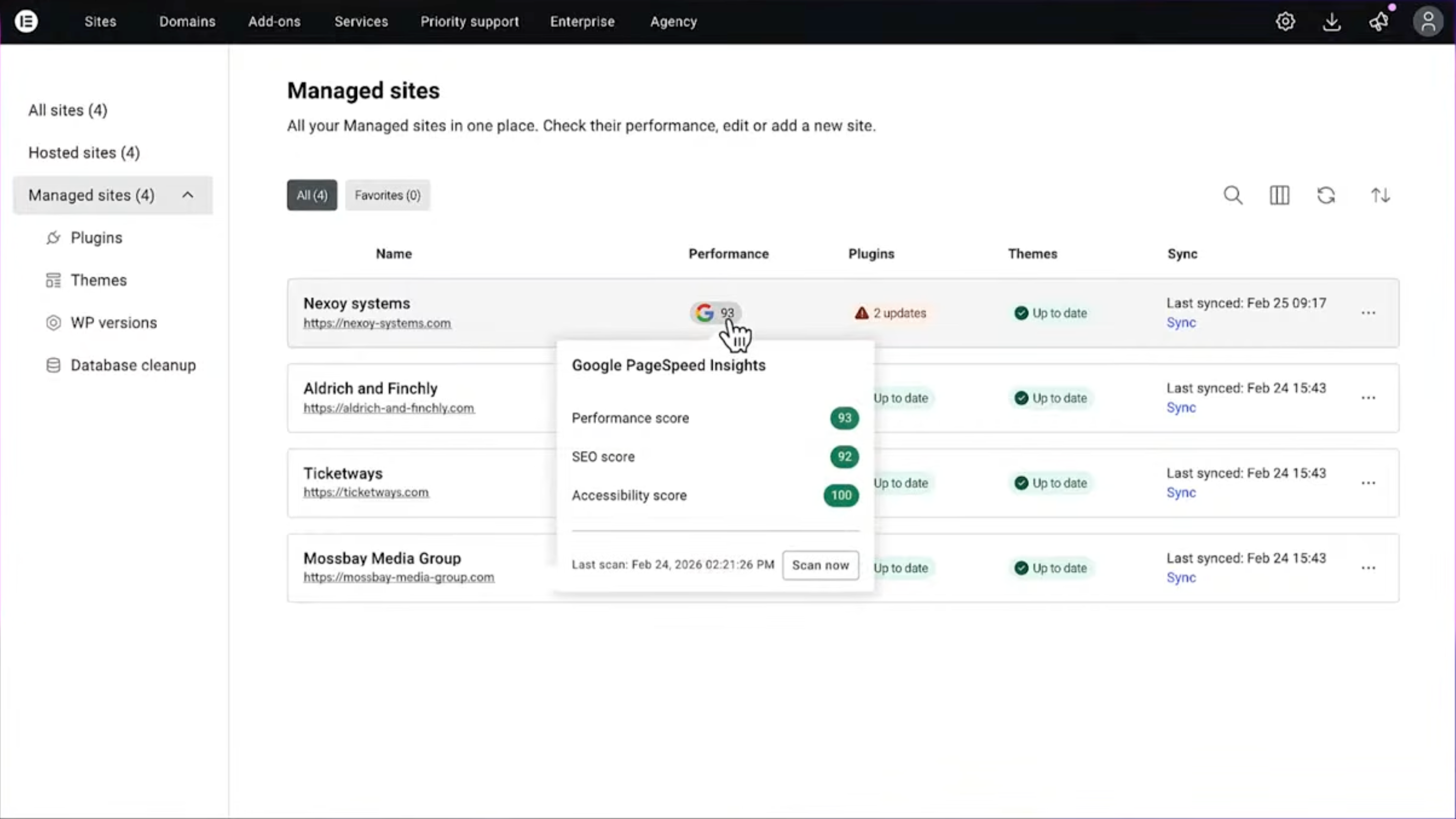
- Performance monitoring: Track performance scores for speed, SEO, and accessibility to help maintain consistent site quality.
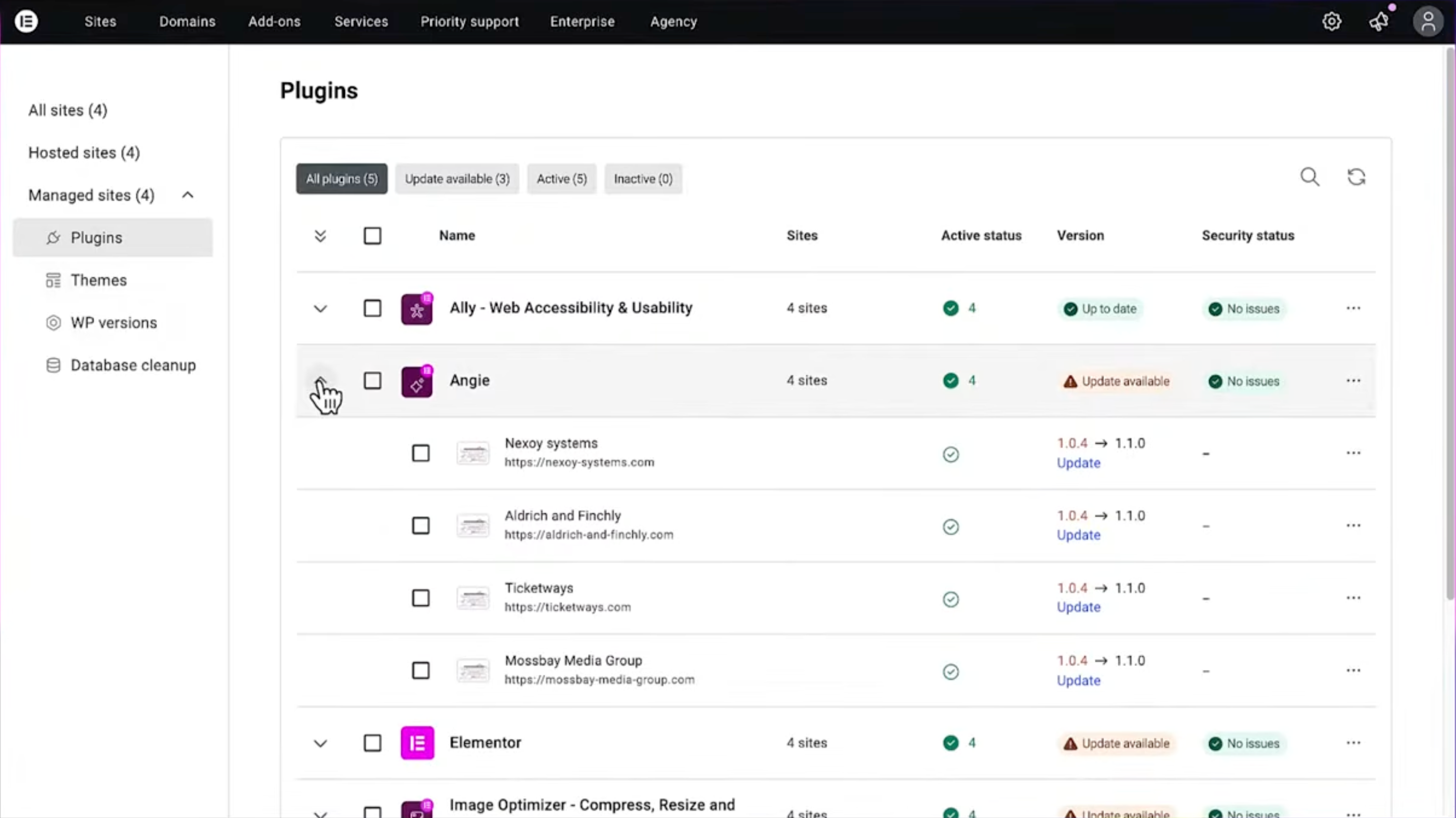
- Bulk actions: Update plugins, themes, and WordPress versions across all sites simultaneously.
- One-click login: Access any site’s admin instantly without needing to manage or retrieve credentials externally.
- Security risk detection: Stay ahead of risks with real-time alerts for plugin security issues.
- Database cleanup: Remove transients, comments, post revisions, and auto-drafts to keep sites lean and running fast.
- Safe updates & rollback: Update with confidence. If a plugin update causes an issue, quickly revert to the previous version.
WHY USE MANAGE?
Manage acts as a professional maintenance checklist, surfacing maintenance issues that are often missed when working only within the standard WordPress admin.
Efficiency at scale: Perform bulk updates and optimizations across all sites to eliminate repetitive manual work and reclaim hours of your work week.
Proactively improve site health: Improve performance and accessibility directly from the dashboard by leveraging integrated tools like image optimization and accessibility remediation, available only in the premium version.
Professional workflow: Maintain a clear history of actions and monitor site health so your sites stay updated, optimized, and secure.
WHAT’S BEING ADDED NEXT?
- Proactive alerting: Receive real-time notifications for newly detected security risks or critical updates.
- Uptime monitoring: Get notified the moment a site goes down so you can resolve issues immediately.
- Bulk plugin installation: Effortlessly install and activate new plugins across multiple sites in a single action.
- Client reporting: Generate comprehensive maintenance and performance summaries to demonstrate the value of your services to clients.
Get Started
For more details, visit our Help Center.
Get started with a few easy steps
- Install the Manage plugin on your WordPress site.
- Connect the plugin to your Elementor account via Elementor -> Site Management -> Settings.
- Manage your sites from the “Managed Sites” dashboard at https://my.elementor.com/websites/sites/manage/all/
This plugin requires a connection to an active Elementor account. This connection is initiated manually by the user.
Related Plugins
Image Optimizer: Superior image compression for faster, high-quality website performance.
Ally: Simplify web accessibility with Ally. Detect violations, apply guided fixes, empower visitors with personalization tools, and publish your accessibility statement in minutes.
Journal de modifications
1.0.13
- New: Added the ability to find and restore trashed posts from a broken URL.
- Tweak: Improved Manage system user handling on connected sites.
1.0.12
- Tweak: Prevented plugins from being deactivated after a rollback.
1.0.11
- Tweak: Improved display of HTML error messages in the Manage admin dashboard widget.
1.0.10
- Fix: Fixed Manage sidebar layering in the admin dashboard.
- Tweak: Updated Elementor One header.
1.0.9
- Tweak: Improved Manage site sync after plugin/theme install and activation changes.
1.0.8
- Tweak: Improved Manage site sync after WordPress updates.
Captures d'écran
Pour les développeurs
Est-ce votre plugin ? Montrez les chiffres.
Ajoutez un badge en direct à votre site, docs ou github readme. Il se met à jour par lui-même - aucun compte n'est nécessaire.
Best Manage alternatives
All bulk plugins →





FAQ
Manage: quick answers
Réponses directes, extraites des données en direct WordPress.org.
Source : WordPress.org
Is Manage free?
Yes. Manage is free to download and use from the official WordPress.org plugin directory.
Is Manage safe to use in 2026?
Manage works, but test it on a staging site before relying on it in 2026. It runs on 100K+ sites, is rated 2/5 and was last updated 6 days ago, and scores 50/100 on our health check.
How many websites use Manage?
Manage is active on 100K+ WordPress websites and has been downloaded 613,748 times since it launched in March 2026. It was downloaded 125,588 times in the last 30 days.
Does Manage work with WordPress 7.1?
Manage is officially tested up to WordPress 6.9.12, while the latest release is 7.1.5. It may still work, but try it on a staging site first.
What PHP version does Manage need?
Manage requires PHP 7.4 or higher. Most hosts run PHP 8.x today, so it works on any modern WordPress hosting.
When was Manage last updated?
The latest version, 1.0.13, was released on November 23, 2026 (6 days ago).
Who makes Manage?
Manage is developed and maintained by Elementor.
What are the best alternatives to Manage?
The most popular alternatives to Manage are WP Bulk Delete (90K+ installs), Bulk Delete (30K+ installs) and Bulk Post Update Date (10K+ installs).
Propulsé par PageForge
Un modèle et une feuille de calcul. Une vraie page pour chaque recherche.
PageForge transforme chaque ligne d'un CSV en une page WordPress avec son propre titre, URL, SEO et schéma, construit sur la mise en page que vous Déjà conçu. Gratuit sur WordPress.org.
- CSV et XLSX, plus Google Sheets sur les professionnels et les entreprises
- Son propre titre, URL, SEO champs et schéma pour chaque page
- Fonctionne avec l'éditeur de blocs, Elementor, Divi et Avada
- Gratuit sur WordPress.org, pas de carte de crédit