


Activity Logs, User Activity Tracking, Multisite Activity Log from Logtivity
Logtivity is the activity log service for WordPress admins. Track user activity and site events across every WordPress site you maintain.

Choix
Yes — Activity Logs, User Activity Tr… is a safe, well-maintained plugin to use in 2026. It runs on 2K+ sites, is rated 5/5 and was last updated 2 weeks ago, and scores 82/100 on our health check.
- Développé activement — Dernière mise à jour il y a 2 semaines
- Testé avec le dernier WordPress (7.1)
- Très peu de critiques jusqu'à présent
Comment s'accumule-t-il ?
Côte à côte sur les installations, les mises à jour, les évaluations et le support



Téléchargements quotidiens
Les pics de téléchargement suivent généralement une nouvelle version - chaque site qui met à jour automatiquement compte comme un téléchargement.
Classements
Where Activity Logs, User Activit… stands todayWordPress.org Classements de recherche
Position en direct dans la recherche de plugins, Top 100| Mot-clé | Position |
|---|---|
| Activity Log | #5 |
| journal de vérification | #15 |
| event monitoring | #10 |
| logs | #9 |
| user activity | #3 |
Adoption de version
Part de sites actifs par version.
Répartition des notes
★★★★★ ★★★★★ 5 sur 4 avis
About Activity Logs, User Activity Tracking,…
From the official readme · v3.3.13Description
When you set up Logtivity to monitor your WordPress sites, you can relax. We track everything that happens on the sites you maintain, and Logtivity also sends you alerts for important events!
Logtivity is a unified platform that tracks activity across all your WordPress sites. We record everything that happens, and then send you alerts for important events! You can install Logtivity’s plugin and then use our service to keep a close eye on everything that happens on your sites.
If you work with clients, they never have to know that you’re using Logtivity. You can either show a white label version of the activity logs, or you can hide Logtivity entirely.
WordPress Activity Logs
Logtivity provides the best activity logs for WordPress agencies. You can record all the user activity on your clients’ sites. Then you can use the activity log data to send notifications to email or Slack. Plus, you can easily search and export the information. And you can turn the activity log data into beautiful, useful charts.
If you have customers on your clients’ WordPress site, you’ll find Logtivity to be invaluable. Because Logtivity records all the important activity, you can see real customer journeys across the WordPress sites. This can be incredibly helpful for customer support: the activity log will show exactly what a user has done on your site.
To get started, simply install the Logtivity plugin and then connect your site to Logtivity. You’ll immediately start to see the results.
Click here to see more about activity logs.
Instant Alerts for WordPress Sites
With Logtivity alerts, you can keep an eye on all your clients’ sites. You can set up flexible alerts for single sites or all your clients’ sites.
These notifications can go directly to your email inbox or to Slack channels.
If you have many sites, you can set up global alerts. For example, even if you have 100 sites, you only need to configure the alert once.
One Logtivity customer chooses to receive an email every time a plugin or theme is updated. Another WordPress agency has a Slack alert for every time an administrator logs in.
Click here to see more about alerts.
Charts from Your Activity Logs
Logtivity is a WordPress activity log with a big difference. You can track all the activity on your clients’ sites, and you can also turn that information into beautiful and useful charts.
Displaying data in charts gives you a helpful and organized overview of your clients’ key metrics. You can use these charts to show logins, purchases, subscriptions, cancellations, downloads, or any other key events. If it happens in WordPress site, Logtivity can turn it into a bar chart or a line chart.
You can also customize the date range for charts. Your charts have advanced date ranges, so you can zoom in to view any time period.
Click here to see more about charts.
Large Activity Log Exports
Normal WordPress activity plugins can not handle large amounts of data.
Logtivity is able to handle exports for even the biggest WordPress sites! If your clients’ site uses Logtivity, you can export millions and millions of logs.
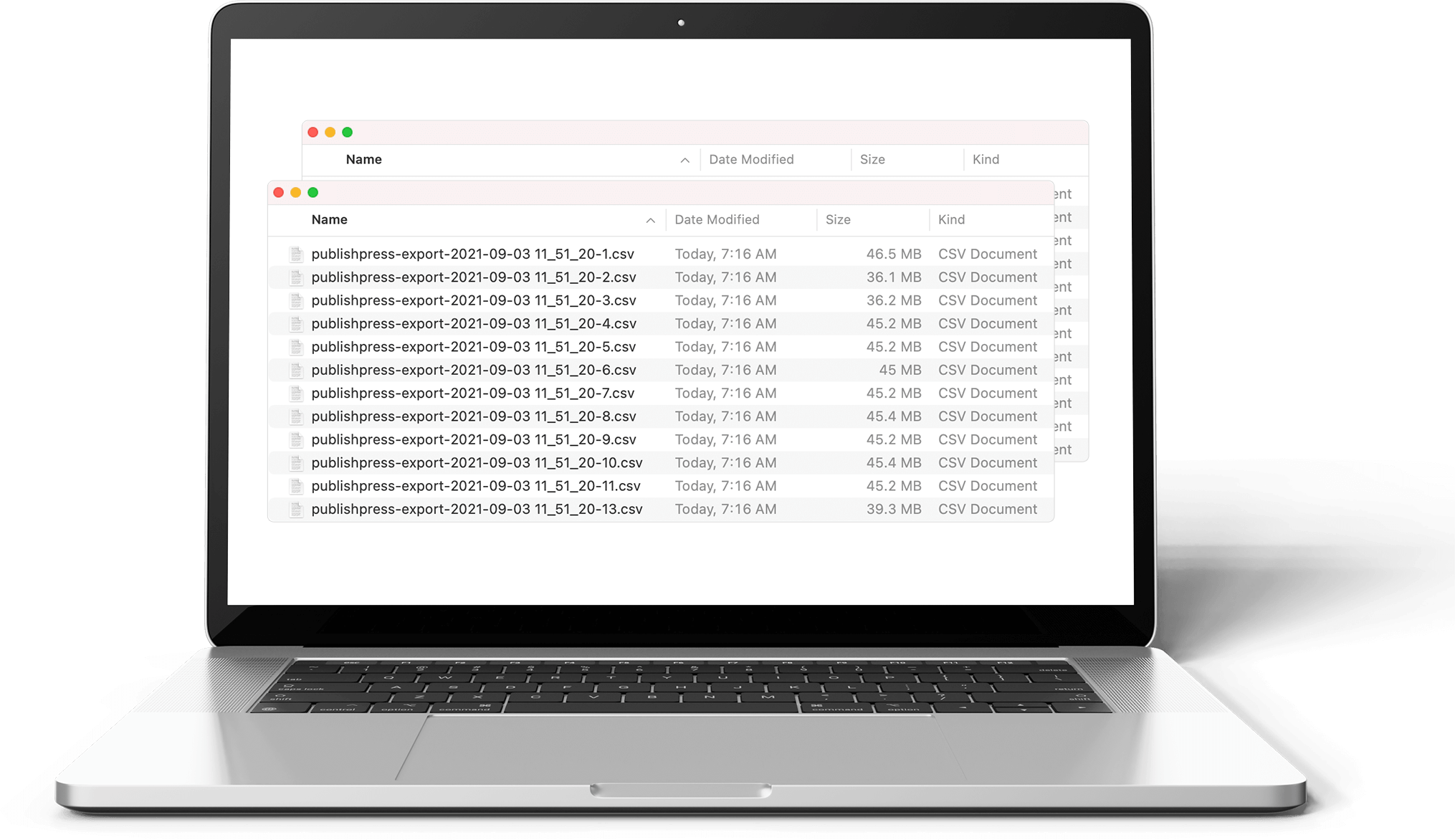
In the image next to this text, you can see over a dozen CSV files. Each of these files is a Logtivity export that contains 100,000 logs. This export has 13 files, so it’s over 1,300,000 million logs in total.
Logtivity is the activity log solution for large WordPress sites!
Click here to see more about log exports.
View Activity Logs Inside WordPress
Logtivity has a central dashboard where you can see the logs for all your clients’ WordPress sites.
Plus, you and your clients can also view and search the logs from inside each WordPress site.
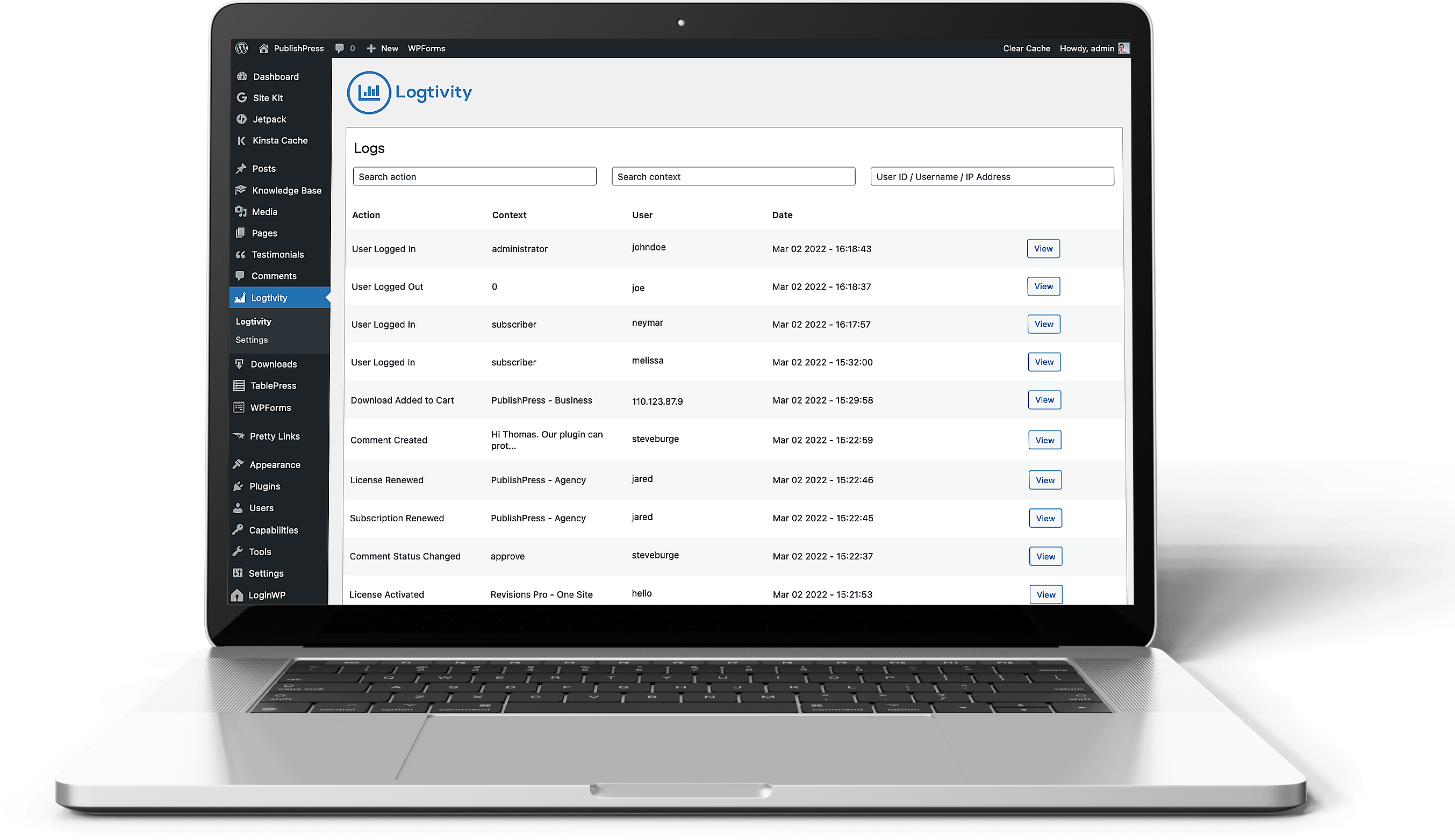
The image on this screen shows what you’ll see inside WordPress after installing the Logtivity plugin.
All of the activity log data is visible and searchable in the WordPress admin area. And if you want more information on any specific log entry, you can click the “View” button next to each log.
Click here to see more about the WordPress integration.
Logtivity has a White Label Mode for Agencies
The most frequent users of Logtivity are WordPress agencies and maintenance services who want to keep an eye on lots of websites.
Agencies and maintenance services often white label the services they use, and so we’ve made this possible for Logtivity also.
There’s a “White Label Mode” in Logtivity, so you can provide the smoothest experience possible for clients. You can remove all the references to Logtivity from the WordPress admin area.
Click here to see more about the White Label mode.
Join Logtivity and Start Your Monitoring
Logtivity is a SaaS service
You will need to create a Logtivity account to store your activity logs and create alerts. Click here to get started with Logtivity!
Installation
À partir de votre tableau de bord WordPress
Visit ‘Plugins > Add New’
Search for ‘logtivity’
Activate Logtivity from your Plugins page.
De WordPress.org
Download logtivity.
Upload the ‘logtivity’ directory to your ‘/wp-content/plugins/’ directory, either through the UI (Plugins > Add new) or via SFTP or example.
Activate Logtivity from your Plugins page.
Une fois activé
Visit ‘Tools > Logtivity’ to view the settings page.
Enter your Logtivity API Key, configure your options and your event monitoring will start!
Journal de modifications
3.3.13 03 Nov 2026
- Fix fatal error on update from 3.3.11 caused by a leftover class file
3.3.12 03 Nov 2026
- Consolidate settings into single option key
- Fix action filter on log listing
- Cleanup of request/response process
- Fix plugin list cut short on sites with many plugins
3.3.11 Oct 2026
- Prevent sending confidential user data
- Fix all phpcs warnings and errors
- User logs always use target user for context
3.3.10 07 Oct 2026
- Improved debugging option
- Send inventory on all plugin/theme changes
3.3.9 22 Sep 2026
- Update Code Snippet Logger for newest version
- Stricter test for production/development configurations
- Improved plugin status logging
- Various security/accessibility fixes
3.3.8 02 Sep 2026
- Security updates / sanitize all inputs
- Never log draft posts
- Always use user role for contexts
- Display notice if not using production application.
- Remove error logging/capture
- Accessibility improvements
Captures d'écran



Pour les développeurs
Est-ce votre plugin ? Montrez les chiffres.
Ajoutez un badge en direct à votre site, docs ou github readme. Il se met à jour par lui-même - aucun compte n'est nécessaire.
Best Activity Logs, User Activity… alternatives
All Activity Log plugins →





FAQ
Activity Logs, User Activity Tracki…: quick answers
Réponses directes, extraites des données en direct WordPress.org.
Source : WordPress.org
Is Activity Logs, User Activity Tr… free?
Yes. Activity Logs, User Activity Tr… is free to download and use from the official WordPress.org plugin directory.
Is Activity Logs, User Activity Tr… safe to use in 2026?
Yes — Activity Logs, User Activity Tr… is a safe, well-maintained plugin to use in 2026. It runs on 2K+ sites, is rated 5/5 and was last updated 2 weeks ago, and scores 82/100 on our health check.
How many websites use Activity Logs, User Activity Tr…?
Activity Logs, User Activity Tr… is active on 2K+ WordPress websites and has been downloaded 63,081 times since it launched in March 2021. It was downloaded 3,949 times in the last 30 days.
Does Activity Logs, User Activity Tr… work with WordPress 7.1?
Yes. The developer has tested Activity Logs, User Activity Tr… up to WordPress 7.1.5, the latest release. It requires WordPress 6.6 or newer.
What PHP version does Activity Logs, User Activity Tr… need?
Activity Logs, User Activity Tr… requires PHP 7.4 or higher. Most hosts run PHP 8.x today, so it works on any modern WordPress hosting.
When was Activity Logs, User Activity Tr… last updated?
The latest version, 3.3.13, was released on November 4, 2026 (2 weeks ago).
Who makes Activity Logs, User Activity Tr…?
Activity Logs, User Activity Tr… is developed and maintained by Logtivity Activity Logs.
What are the best alternatives to Activity Logs, User Activity Tr…?
The most popular alternatives to Activity Logs, User Activity Tr… are WP Activity Log (300K+ installs), Activity Log (200K+ installs) and Stream (70K+ installs).
Propulsé par PageForge
Un modèle et une feuille de calcul. Une vraie page pour chaque recherche.
PageForge transforme chaque ligne d'un CSV en une page WordPress avec son propre titre, URL, SEO et schéma, construit sur la mise en page que vous Déjà conçu. Gratuit sur WordPress.org.
- CSV et XLSX, plus Google Sheets sur les professionnels et les entreprises
- Son propre titre, URL, SEO champs et schéma pour chaque page
- Fonctionne avec l'éditeur de blocs, Elementor, Divi et Avada
- Gratuit sur WordPress.org, pas de carte de crédit