


Shield Security – Smart Bot Blocking, Brute-Force Login Protection & File Scanning
Smart WordPress security that blocks bots automatically, guides you to what matters, and repairs problems — without drowning you in noise.

Choix
Yes — Shield Security is a safe, well-maintained plugin to use in 2026. It runs on 30K+ sites, is rated 4.8/5 and was last updated 3 weeks ago, and scores 87/100 on our health check.
- Proven at scale on 30K+ active sites
- Loved by users — 4.8/5 from 1,039 reviews
- Développé activement — Dernière mise à jour il y a 3 semaines
- Testé avec le dernier WordPress (7.1)
Comment s'accumule-t-il ?
Côte à côte sur les installations, les mises à jour, les évaluations et le support


Téléchargements quotidiens
Les pics de téléchargement suivent généralement une nouvelle version - chaque site qui met à jour automatiquement compte comme un téléchargement.
Classements
Where Shield Security stands todayWordPress.org Classements de recherche
Position en direct dans la recherche de plugins, Top 100| Mot-clé | Position |
|---|---|
| 2FA | #26 |
| Activity Log | #17 |
| bots | #11 |
| firewall | #17 |
| security | #39 |
Adoption de version
Part de sites actifs par version.
Répartition des notes
★★★★★★★★★★ 4.8 from 1,039 reviews
About Shield Security
From the official readme · v22.3.4Description
Most security plugins hand you a dashboard full of alerts and expect you to know what to do next. Shield works differently.
It blocks threats automatically, repairs what it can on its own, and then shows you exactly what still needs your attention — ranked by impact, not volume. Less noise. More action.
🤖 Security That Runs Itself
The most powerful thing Shield does is what it handles without you:
- Automatic IP Blocking — every visitor is quietly scored as they interact with your site. Failed logins, firewall blocks, silentCAPTCHA failures, and other signals accumulate into a reputation score. When a visitor’s score crosses the threshold, Shield blocks them — automatically, without you lifting a finger
- Automatic File Repair — when a file integrity scan finds a changed WordPress core file, Shield pulls the original from WordPress.org and restores it. Detected and fixed, without waiting for you to act
- Automatic Bot Recognition — Shield identifies legitimate crawlers (Google, Bing, DuckDuckGo, Yandex, Apple) and known services (ManageWP, Pingdom, Stripe, CloudFlare) and never blocks them. Your SEO and monitoring tools keep working
🧭 Guided Security, Not Just a Dashboard
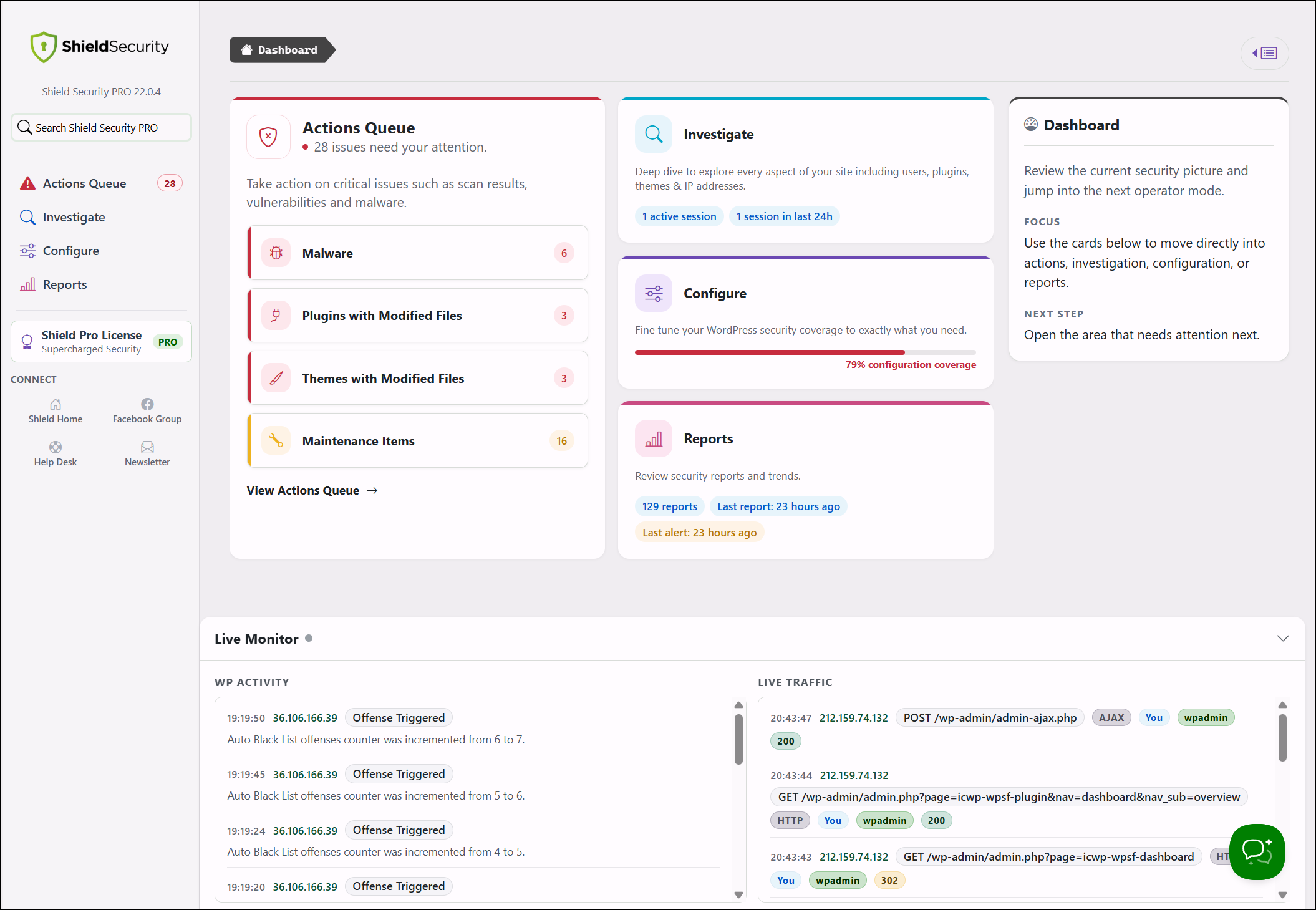
Shield organises your security into four focused areas so you always know where to look:
- Queue — things that need your attention, ranked by priority. Not everything at once — just what matters right now
- Investigate — dig into blocked IPs, security events, and the specific signals that triggered each one
- Configure — guided setup for each protection area, with clear recommendations matched to your site
- Reports — a clear view of what Shield has blocked, detected, and repaired over time
The goal: guide you quickly towards action, not bury you in data.
🛡️ Free Protection
Bot Blocking & Firewall
silentCAPTCHA— blocks bad bots on login, registration, lost password, and comment forms using passive signals invisible to real visitors. No CAPTCHA keys. No external requests. No JavaScript that breaks your forms. Everything runs on your server (GDPR friendly).- Firewall rules blocking common WordPress attack patterns — SQL injection probes, known exploit signatures, suspicious request parameters
- XML-RPC protection — disable or restrict entirely, including pingbacks and trackbacks
- REST API firewall — block unauthenticated requests
- Fake crawler detection — identifies bots spoofing legitimate search engines
Login & Account Security
- Two-factor authentication (2FA) — email codes, Google Authenticator, or YubiKey OTP for all users
- Brute force protection with configurable login attempt limits and cooldown
- Session locking — tie sessions to a browser or IP to stop account theft after a successful login
- User enumeration blocking — closes off
?author=probes used to harvest usernames before an attack
Scanning & Integrity
- Core file scanning — compares WordPress core against official checksums and repairs changed files automatically
- Suspicious PHP detection — flags PHP files in locations where they have no business being
- Abandoned plugin detection — identifies unmaintained plugins most likely to carry unpatched vulnerabilities
Visibility & Control
- Security Admin PIN — lock Shield’s own settings so other administrators cannot quietly weaken your configuration
- Security activity log — logins, user changes, plugin and theme events, post edits, and suspicious requests: Everything in one clear view
- IP Rules — automatic & manual block and bypass rules, CIDR range support, full per-IP request history
🤝 CrowdSec Integration
Shield is the only WordPress security plugin with a native CrowdSec integration. CrowdSec aggregates threat signals from millions of sites into a shared IP reputation network — your site blocks known attackers before they ever probe you, using intelligence far beyond your own traffic history.
ShieldBACKUPS Disaster Recovery
ShieldPRO includes ShieldBACKUPS: fast, off-site WordPress backups built for recovery after hacks, broken updates, or server failure.
Your backup is kept away from the site it protects, so you have a clean recovery path when WordPress itself is down, damaged, or under attack.
There are no cloud storage costs, backups are encrypted and copied securely, and there are no storage API keys or authentication details stored on your WordPress site.
✨ ShieldPRO
- ShieldBACKUPS — off-site backups and disaster recovery for WordPress sites
- Passkeys — phishing-resistant, passwordless login for users
- Backup login codes — emergency 2FA access when a device is lost
- AI-based malware scanner — detects known and unknown PHP malware
- Plugin & theme file scanning — compares installed files against WordPress.org originals, flagging unauthorised changes
- Vulnerability scanning — active checks across all installed plugins and themes
- Broader spam protection — WooCommerce, EDD, Contact Form 7, Ninja Forms, Elementor, and more
- Traffic rate limiting — cap request rates per IP to absorb high-volume bot floods
- User suspension — manual or automatic suspension of idle accounts
- MainWP integration
- White Label — rename and rebrand Shield for client sites
Who It’s For
Shield suits site owners, agencies, and MSPs who want protection that runs itself — not a plugin that demands constant attention to be useful.
If you have been burned by security plugins that generate more noise than protection, or dashboards that tell you everything is wrong without telling you what to fix, Shield was built to be the alternative.
Partnerships & Integrations
We believe that silentCAPTCHA is one of the simplest and most powerful solutions available today for all WordPress site owners to block and eliminate automated bot spam.
That’s why we’ve started a collaboration campaign with other WordPress plugin developers to adapt their plugins to natively support Shield’s silentCAPTCHA solution, alongside Google reCAPTCHA & Cloudflare Turnstile.
When you use one of the products from any of our partners, you will be able to activate Shield’s silentCAPTCHA bot spam protection so that your forms are protected from automated spam. You won’t need any site/API keys, custom integrations, or JavaScript that can break your forms. It all works automatically for you when you enable the feature.
As of this release, we have partnered with the following WordPress form providers:
- Everest Forms v3.5+
- Easy Form Builder v4+
Installation
- Browse to Plugins -> Add New in your WordPress admin area.
- Search for
Shield Security. - Click Install Now, then Activate.
- Open
Shieldfrom the admin menu and follow the guided setup.
Journal de modifications
Captures d'écran
Pour les développeurs
Est-ce votre plugin ? Montrez les chiffres.
Ajoutez un badge en direct à votre site, docs ou github readme. Il se met à jour par lui-même - aucun compte n'est nécessaire.
Best Shield Security alternatives
All 2FA plugins →





FAQ
Shield Security: quick answers
Réponses directes, extraites des données en direct WordPress.org.
Source : WordPress.org
Is Shield Security free?
Yes. Shield Security is free to download and use from the official WordPress.org plugin directory.
Is Shield Security safe to use in 2026?
Yes — Shield Security is a safe, well-maintained plugin to use in 2026. It runs on 30K+ sites, is rated 4.8/5 and was last updated 3 weeks ago, and scores 87/100 on our health check.
How many websites use Shield Security?
Shield Security is active on 30K+ WordPress websites and has been downloaded 12,939,706 times since it launched in July 2013. It was downloaded 44,593 times in the last 30 days.
Does Shield Security work with WordPress 7.1?
Yes. The developer has tested Shield Security up to WordPress 7.2, the latest release. It requires WordPress 5.7 or newer.
What PHP version does Shield Security need?
Shield Security requires PHP 7.4 or higher. Most hosts run PHP 8.x today, so it works on any modern WordPress hosting.
When was Shield Security last updated?
The latest version, 22.3.4, was released on October 27, 2026 (3 weeks ago).
Who makes Shield Security?
Shield Security is developed and maintained by Paul.
What are the best alternatives to Shield Security?
The most popular alternatives to Shield Security are Wordfence Security (5M+ installs), Really Simple Security (3M+ installs) and Limit Login Attempts Securi… (1M+ installs).
Propulsé par PageForge
Un modèle et une feuille de calcul. Une vraie page pour chaque recherche.
PageForge transforme chaque ligne d'un CSV en une page WordPress avec son propre titre, URL, SEO et schéma, construit sur la mise en page que vous Déjà conçu. Gratuit sur WordPress.org.
- CSV et XLSX, plus Google Sheets sur les professionnels et les entreprises
- Son propre titre, URL, SEO champs et schéma pour chaque page
- Fonctionne avec l'éditeur de blocs, Elementor, Divi et Avada
- Gratuit sur WordPress.org, pas de carte de crédit