


Plugin de prise de rendez-vous – LatePoint | Calendrier et planification pour WordPress
Appointment scheduling & event booking plugin for WordPress. Let clients self-schedule 24/7, register for events, and pay at booking.

Choix
Yes — Appointment Booking Plugin is a safe, well-maintained plugin to use in 2026. It runs on 100K+ sites, is rated 4.9/5 and was last updated 3 days ago, and scores 96/100 on our health check.
- Prouvé à grande échelle sur plus de 100 000 sites actifs
- Loved by users — 4.9/5 from 109 reviews
- Développé activement — Dernière mise à jour il y a 3 jours
- Testé avec le dernier WordPress (7.1)
- Momentum — Téléchargements en hausse de 17 % par rapport aux 30 jours précédents
Comment s'accumule-t-il ?
Côte à côte sur les installations, les mises à jour, les évaluations et le support



Téléchargements quotidiens
Les pics de téléchargement suivent généralement une nouvelle version - chaque site qui met à jour automatiquement compte comme un téléchargement.
Classements
Where Appointment Booking Plugin stands todayWordPress.org Classements de recherche
Position en direct dans la recherche de plugins, Top 100| Mot-clé | Position |
|---|---|
| prise de rendez-vous | #10 |
| appointment scheduling | #6 |
| système de réservation | #13 |
| event booking system | #11 |
| horaire | #3 |
Adoption de version
Part de sites actifs par version.
Répartition des notes
★★★★★★★★★★ 4.9 from 109 reviews
About Appointment Booking Plugin
From the official readme · v5.7.11Description
LatePoint – The Lightweight Appointment Booking Plugin for WordPress
★★★★★
LatePoint is an appointment scheduling and booking plugin for WordPress that lets your clients schedule, reschedule, and pay for appointments without a single back-and-forth email.
It’s the WordPress booking plugin built for coaches, salons, consultants, clinics, and event hosts who rely on appointments and group bookings.
Now with Events. Alongside appointments, LatePoint lets you publish and sell tickets for workshops, classes, and group events, right from the same booking flow your clients already use. Add an events list, or drop a registration button, anywhere with a shortcode, set capacity, and let attendees register and pay in a few clicks. With LatePoint Pro, offer multiple ticket types per event (like General or VIP) at different prices, and every ticket comes with a QR code for fast check-in at the door. Every registration becomes an order, so you manage your event booking system the same way you manage appointment bookings.
Used on 100,000+ WordPress sites, LatePoint gives service businesses a fully branded booking experience that works 24/7. Your clients book from any device. You get paid upfront. No-shows drop. Admin time disappears.
Whether you’re a coach, salon, consultant, or clinic, if your business runs on bookings, LatePoint makes it easy to manage your schedule, take payments, and let clients book online 24/7.
Set it up in 10 minutes. Look professional. Automate the boring stuff. Let LatePoint handle the heavy lifting so you can focus on your business.
Features available with the free plugin
Booking & scheduling
- Unlimited appointments
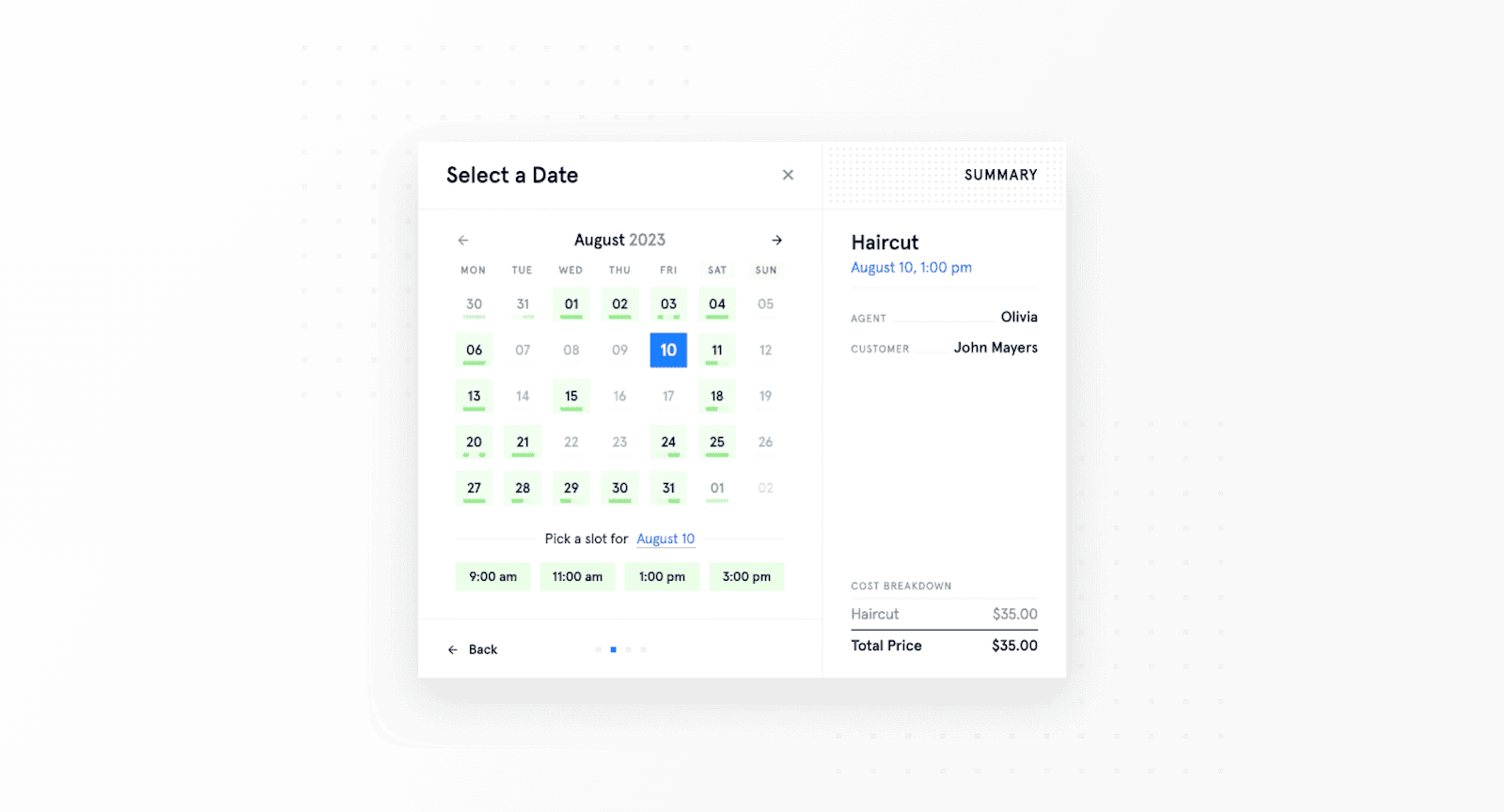
- Multi-step booking form & step-by-step wizard
- Instant booking forms
- Booking form customization
- Custom schedules, holidays & days off
- Time restrictions & timeslot logic
- Cancellation
- Clone service
Event booking
- Create and publish events – workshops, classes, or ticketed gatherings
- Catégories d'événement
- Event list and event button shortcodes
- Capacity and pricing per event
- Registrations flow through the same cart, checkout, and payment process as appointments
- Automatic registration confirmation and cancellation emails
Paiements
- Stripe payments
- PayPal payments
- Razorpay payments
- Manual payments (Pay Later)
Notifications
- Email notifications
Management & admin
- Single location
- Customer dashboard
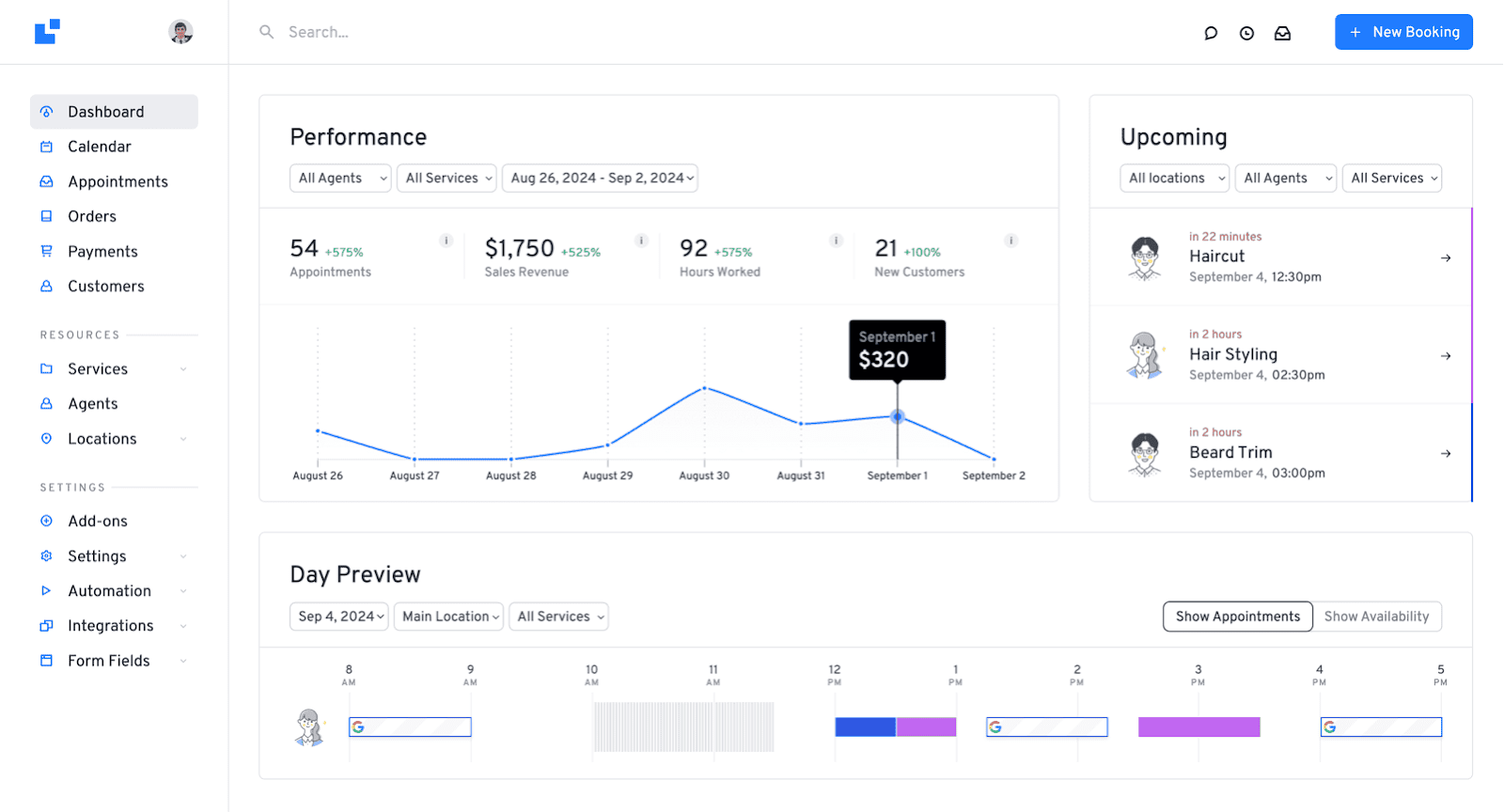
- Admin analytics dashboard
- Journal d'activité
- Scheduled jobs
- Conversion tracking through tracking code configuration
- Import / export functionality
- Event registrations dashboard with CSV export
Features available with LatePoint Pro
Booking & scheduling
- Multiple locations & multi-location management
- Multiple staff & agents
- Recurring appointments
- Group bookings
- Custom service durations
- Service categories
- Service extras / add-ons
- Service packages
- Quick time blocking
- Shopping cart (book multiple appointments at once)
- Rescheduling
Event booking
- Multiple ticket types per event (e.g. General, VIP), each with its own price
- QR code issued per ticket, scan or enter the code manually to check attendees in
Paiements
- Square, Mollie, MercadoPago, Flutterwave, Braintree, PayStack, SureCart
- WooCommerce integration
- Local payment (pay later)
- Pay via a link
- Refund processing
- Invoices
- Tax support
Notifications
- SMS notifications
- WhatsApp notifications
- Email & SMS scheduled notifications
- Reminder notifications
Intégrations
- Google Calendar sync
- Zoom, Google Meet, and Microsoft Teams integration
- Mailchimp integration
- Webhook functionality
Forms & customization
- Custom fields for booking forms
- Address autocomplete
- Custom roles (e.g. Manager)
- Security & spam protection
- Agent dashboard
See the Full Free vs Pro Feature Comparison
Accept payments at the time of booking
LatePoint lets you collect payment the moment a client books, no due invoices, no chasing, no unpaid appointments. Connect Stripe, PayPal or Razorpay in about 10 minutes and start accepting payments on the free plan.
Choose how you get paid:
- Full payment at booking: Client pays the complete service fee upfront
- Deposit at booking: collect a fixed amount or percentage to hold the slot, balance due later
- Pay later: Send a payment link after the appointment via the invoicing feature
Payments are processed directly by your payment gateway. LatePoint never holds your funds.
Card data is handled entirely by Stripe or your chosen processor. PCI-DSS compliant by default.
Accept payments with Razorpay | Accept payments with Stripe
Why accept payments at the time of booking?
Accepting a deposit is the single most effective way to reduce no-shows. When a client has paid to hold their slot, they show up. LatePoint makes it a one-step process at checkout.
- Supported payment gateways (free plugin): Stripe, PayPal and Razorpay
- Supported payment gateways (Pro): Square, Mollie, MercadoPago, Flutterwave, Braintree, PayStack, SureCart, WooCommerce Payments, Stripe, and Razorpay
Who Is LatePoint For?
LatePoint is built for small businesses and independent professionals who run on appointments. Whether you’re a solo practitioner or managing a small team, if your business depends on clients booking time with you, LatePoint saves you the back-and-forth and gets you paid faster.
Salons & Studios
If you run a personal care studio, hair or nail salon, spa, massage therapist or tattoo studio, you’ll know how important it is to avoid no-shows, double-bookings, and awkward payment moments.
With LatePoint:
- Customers can book online anytime
- You can send automatic reminders so clients actually show up
- Accept payments upfront or after the session
- Sync your bookings with Google Calendar
▶️ How To Set Up LatePoint for Salons
Coaches, Consultants & Trainers
If you run 1:1 sessions, group coaching, or online workshops, LatePoint keeps your schedule organized and sessions full.
- Let clients pick time slots based on availability
- Accept payments or deposits at the time of booking
- Offer in-person or Zoom sessions
- Sell service packages and recurring appointments
How to Setup LatePoint for Consultants
Clinics, Therapists & Healthcare Pros
For medical, wellness, or therapy practices, LatePoint helps you stay professional while giving patients a smooth experience.
- Collect patient information with custom fields
- Offer multiple services with different specialists
- Manage multiple staff calendars and locations
Education & Classes
Whether you’re a tutor, language teacher, or run in-person classes, you can:
- Let students book 1:1 or group sessions
- Handles sessions with upfront payment so you’re never chasing payments post classes
- Limit bookings to your preferred hours
- Automate reminders and payments
How to Setup LatePoint for Private Tutors
Local Services & Agencies
Photographers, cleaners, auto services, pet services, repair shops, if your business depends on appointments, LatePoint makes it simple.
- Show real-time availability
- Set different schedules by service or team member
- Let clients book 24/7, no calls or emails needed
Tours, Rentals & Experiences
If you run a jet ski rental, dive school, boat tour, or any activity business, LatePoint handles slot-based bookings with upfront payment so you’re never chasing deposits last minute.
- Let customers book specific time slots for activities or guided sessions
- Require full payment or a deposit at booking to confirm the reservation
- Send automatic reminders so customers show up prepared
- Set capacity limits per session for group tours
Legal & Law Firms
If you run a law firm, notary practice, or offer legal consultations, LatePoint helps you manage client appointments professionally without the back-and-forth.
- Let clients book consultations directly from your website
- Collect intake information upfront with custom booking fields
- Send automatic reminders to reduce missed appointments
- Manage schedules across multiple attorneys or staff members
Pet Services
Whether you run a grooming salon, doggy daycare, or mobile pet care service, LatePoint keeps your bookings organised and your clients coming back.
- Let pet owners book appointments online anytime
- Accept payments or deposits at the time of booking
- Set different availability for different services or staff
- Send reminders so clients never miss a grooming slot
HVAC & Home Services
For HVAC technicians, plumbers, electricians, and other trade businesses, LatePoint makes it easy for customers to book service visits without a phone call.
- Let customers request appointments directly from your website
- Set availability by service type or team member
- Send automatic confirmations and reminders before the visit
- Manage jobs across multiple technicians from one dashboard
What Makes LatePoint Unique?
LatePoint isn’t just another booking plugin, it’s designed to solve real-world scheduling problems with a smart, flexible approach.
- Purpose-built for service providers: From solo pros to teams across locations, LatePoint adapts to your business.
- Quick to launch, simple to manage: The built-in onboarding wizard walks you through the entire setup. You’ll go from install to taking bookings in under 10 minutes.
- Mobile-first booking experience: Clients see clean, intuitive forms that work beautifully on phones, tablets, and desktops. Fewer clicks = fewer drop-offs.
- Automation built-in: LatePoint handles confirmations, reminders, follow-ups, and payments. Skip the admin and focus on delivering your services.
- Affordable, with a forever-free plan: You won’t get trapped in expensive subscriptions. Start with the free version, and upgrade when you need advanced features.
- Native to WordPress: Built to feel like a natural part of your site, LatePoint works with most popular themes and page builders out of the box.
LatePoint Review: Is It the Right Booking Plugin for Your Service?
Comment cela fonctionne
- Install the plugin: Download LatePoint from the WordPress plugin repository and activate it on your site.
- Complete the setup wizard: Walk through a simple onboarding process to set your services and availability.
- Customize your booking form: Add fields to collect the information you need before a session. Choose which details to make required or optional.
- Add booking to your site: Use a shortcode or LatePoint widget to place the booking interface into any page or post.
- Start accepting bookings: Customers can now see your real-time availability, book appointments, pay, and receive confirmation emails.
- Manage everything in your dashboard: View and manage appointments, customer information, payments, and notifications directly from your agent dashboard.
- Customer dashboard: Let customers manage their appointments through a dedicated customer dashboard.
Features You’ll Love With the Plugin
✅ Appointment booking form builder – Build the form customers will fill while scheduling their appointments.
✅ Stripe, PayPal and Razorpay payments at booking – Accept a deposit the moment a client books.
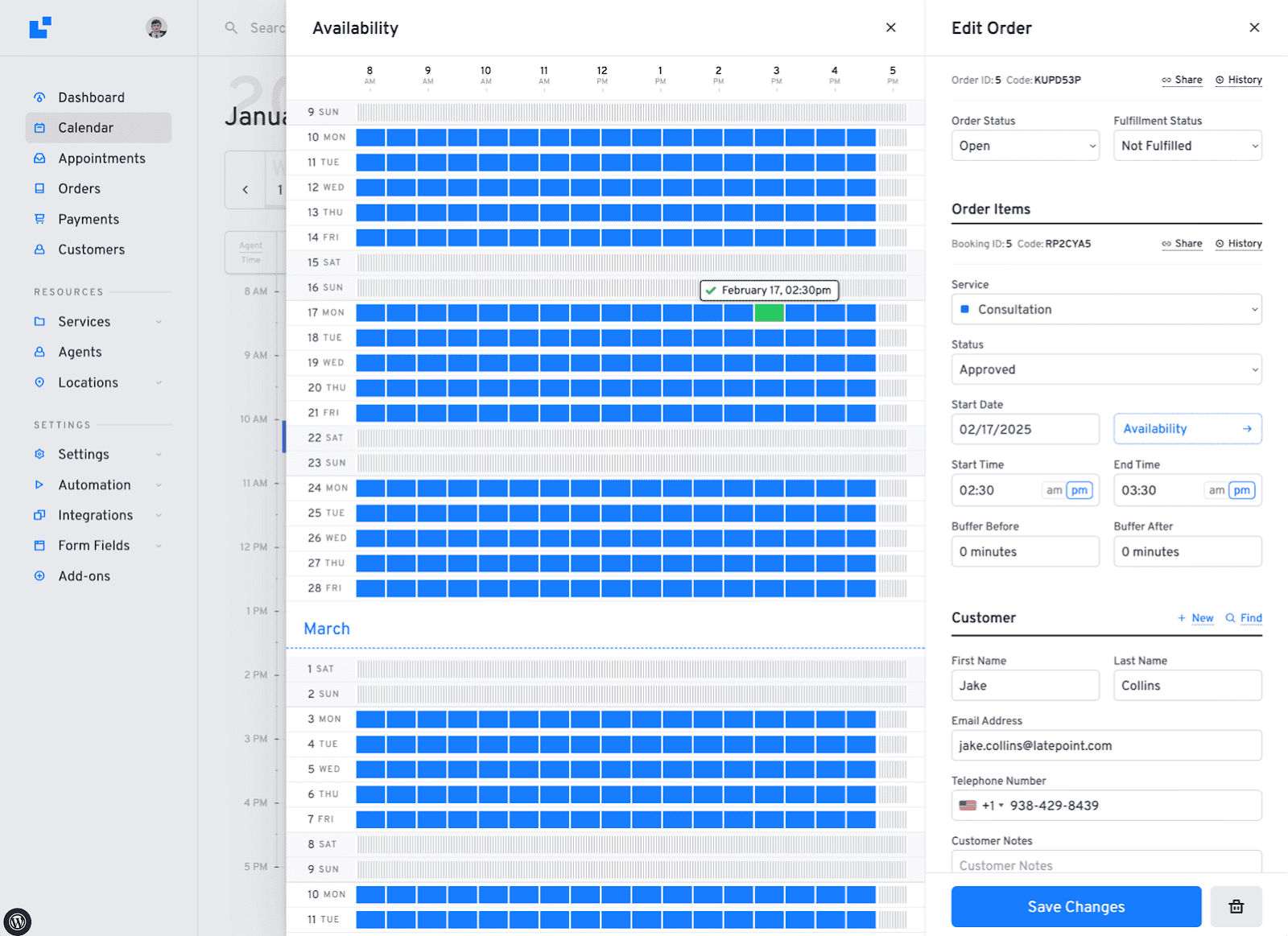
✅ Admin dashboard – Full calendar view with filters for appointments and services.
✅ Multi-step booking wizard – A clean, guided booking flow that works on any device without configuration.
✅ Email notifications – Automatic confirmations sent to both you and your client at booking.
✅ Cancellation management – Let clients cancel their own appointments without emailing you.
✅ Custom schedules & holidays – Set your working hours, block off days, and manage time off without workarounds.
✅ Conversion tracking – Track how many visitors turn into bookings by configuring third-party tracking code.
✅ Import / export – Move your data in and out without needing a developer.
✅ Activity log – See a full history of every action taken on your account.
Want To Unlock More?
LatePoint’s free plugin is a solid starting point – unlimited appointments, Stripe, PayPal & Razorpay payments, and a full booking experience out of the box. When your business grows and you need more power, Pro has you covered.
Here’s what you unlock with LatePoint Pro:
- Manage multiple locations, staff members, and agents
- Accept payments via Square, Mollie, MercadoPago, Flutterwave, Braintree, PayStack, and SureCart along with Stripe, PayPal and Razorpay
- Accept local payments via WooCommerce integration. If you want to use any local payments you can use LatePoint Woo
- Sync with Google Calendar, Outlook, and Apple Calendar
- Clients can view, manage, reschedule, and cancel bookings without contacting you
- Send SMS and WhatsApp notifications and scheduled reminders
- Offer recurring appointments, group bookings, and service packages
- Add custom fields, address autocomplete, and custom roles
- Connect Zoom, Google Meet, and Microsoft Teams for automatic video meeting links
- Clients book in their local time zone, no confusion on either side
- Block out time on your calendar in seconds when something comes up
- Issue invoices, send payment links, process refunds, and setup tax
- Integrate with WooCommerce and Mailchimp
Works With Your Stack
- Works with most Popular WordPress themes (Astra, Kadence, GeneratePress and others)
- Fully compatible with Elementor, Gutenberg, and page builders
- LatePoint is compatible with WooCommerce but doesn’t need it to work. To collect payments using local payment methods (pay later), you can use LatePoint Woo
- Extendable with LatePoint Pro (Calendar integrations, Zoom, WhatsApp, etc.)
Blocs
This plugin provides 6 blocks.
- Customer dashboard: Adds a customer dashboard for LatePoint
- Booking button: Adds a booking button
- List of resources: Adds a list of bookable resources by type
- Booking form: Adds a LatePoint booking form
- Customer login: Adds a customer login form
- Latepoint calendar: Adds a calendar of events
Trusted by 100,000+ Businesses
LatePoint is trusted by 100,000+ businesses worldwide, from solo freelancers and independent practitioners to fitness chains and the Nigerian Embassy. Join a growing community of service businesses that have simplified their scheduling with LatePoint.
If you want a modern, effortless way to let your customers book online, give LatePoint a try today.
Directives de marque
LatePoint® is a registered trademark. Please use the following format when mentioning LatePoint anywhere:
- LatePoint [correct]
- Late Point [incorrect]
- Latepoint [incorrect]
- Late point [incorrect]
Installation
- Téléchargez
latepoint.zipdans le répertoire/wp-content/plugins/ - Activez le plugin via le menu « Plugins » dans WordPress
- Make sure to disable caching on your customer cabinet page
Journal de modifications
5.7.11 – November 27, 2026
-
Améliorations
- Added Colombia to the PayPal Country list.
- The Import Data file picker now accepts the .json file created by Export Data, and only .json files.
-
Corrections
- Fixed the admin Calendar getting stuck loading when “Overlay service hours” is turned on.
-
La sécurité
- Hardened the security of the plugin. Props to WordFence and Patchstack for reporting them.
5.7.10 – November 19, 2026
- Nouveau
- Added Appointment Waiting List support for the upcoming premium release
- Added a Display Order field for Agents, so you can control the order they appear in on the booking form. Higher numbers show first; default is 10 for every agent.
5.7.9 – November 16, 2026
-
Nouveau
- Added Cart Abandonment Reminders support for the upcoming premium release
- Added Activity Log entries and “Order Deleted” / “Booking Deleted” workflow events for orders, order items and appointments that are deleted.
- Added the latepoint_enable_all_customer_to_agent filter, off by default, which lets agents view, select and book any existing customer, not only those who already have a booking with them. Deleting a customer remains limited to the agent’s own customers.
-
Corrections
- Fixed Razorpay payments not creating the booking when the customer never returned to the booking form, for example after closing the tab or switching to a UPI app. The same applies to invoice payments.
- Fixed the [latepoint_calendar] Weekly view showing only one service when several were available at the same time. It now lists them all, as the Monthly view does.
- Fixed a saved cart link opening an empty cart with the Checkout button disabled, which left no way to complete the booking.
- Fixed the reschedule calendar showing “In order to generate the calendar, a service must be selected.” when moving to later months in the Customer Cabinet and the manage appointment link.
-
La sécurité
- Hardened the security of the plugin.
5.7.8 – November 03, 2026
-
Corrections
- Fixed invoice totals being multiplied when creating an invoice from an order while the Decimal Separator is set to a comma.
- Fixed opening an invoice link with an unrecognised access key returning a server error instead of an “Invoice not found” message.
-
La sécurité
- Addressed a security bug. Props to WordFence for reporting it.
5.7.7 – November 02, 2026
-
Améliorations
- Greyed out the Time Left countdown for cancelled appointments in the Bookings list so they no longer look like upcoming ones.
-
Corrections
- Fixed the Booking Form “Change Order” modal failing to save a new step order when Events is enabled.
-
La sécurité
- Hardened the security of the plugin. Props to WordFence for reporting it.
5.7.6 – October 26, 2026
-
Nouveau
- Added Events Waiting List support for the upcoming premium release
-
Corrections
- Fixed bundle sessions not being schedulable from the admin Edit Order panel when “Disable Shopping Cart Functionality” is enabled.
- Fixed the booking form not resetting when the only cart item was removed, which could leave the removed item in the summary and allow an empty order to be submitted.
- Fixed paying an invoice online charging the full invoice total instead of the remaining balance when a partial payment had already been applied.
- Fixed bundle bookings inflating Dashboard Sales Revenue by counting the full bundle price for every scheduled session.
-
La sécurité
- Hardened the security of the plugin.
Captures d'écran






Pour les développeurs
Est-ce votre plugin ? Montrez les chiffres.
Ajoutez un badge en direct à votre site, docs ou github readme. Il se met à jour par lui-même - aucun compte n'est nécessaire.
Best Appointment Booking Plugin alternatives
Tous les plugins de prise de rendez-vous →





FAQ
Appointment Booking Plugin: quick answers
Réponses directes, extraites des données en direct WordPress.org.
Source : WordPress.org
Is Appointment Booking Plugin free?
Yes. Appointment Booking Plugin is free to download and use from the official WordPress.org plugin directory.
Is Appointment Booking Plugin safe to use in 2026?
Yes — Appointment Booking Plugin is a safe, well-maintained plugin to use in 2026. It runs on 100K+ sites, is rated 4.9/5 and was last updated 3 days ago, and scores 96/100 on our health check.
How many websites use Appointment Booking Plugin?
Appointment Booking Plugin is active on 100K+ WordPress websites and has been downloaded 1,946,698 times since it launched in January 2025. It was downloaded 161,930 times in the last 30 days.
Does Appointment Booking Plugin work with WordPress 7.1?
Yes. The developer has tested Appointment Booking Plugin up to WordPress 7.1.5, the latest release. It requires WordPress 6.5 or newer.
What PHP version does Appointment Booking Plugin need?
Appointment Booking Plugin requires PHP 7.4 or higher. Most hosts run PHP 8.x today, so it works on any modern WordPress hosting.
When was Appointment Booking Plugin last updated?
The latest version, 5.7.11, was released on November 27, 2026 (3 days ago).
Who makes Appointment Booking Plugin?
Appointment Booking Plugin is developed and maintained by LatePoint.
What are the best alternatives to Appointment Booking Plugin?
The most popular alternatives to Appointment Booking Plugin are Online Scheduling and Appoi… (60K+ installs), Simply Schedule Appointments (50K+ installs) and Booking Calendar (40K+ installs).
Propulsé par PageForge
Un modèle et une feuille de calcul. Une vraie page pour chaque recherche.
PageForge transforme chaque ligne d'un CSV en une page WordPress avec son propre titre, URL, SEO et schéma, construit sur la mise en page que vous Déjà conçu. Gratuit sur WordPress.org.
- CSV et XLSX, plus Google Sheets sur les professionnels et les entreprises
- Son propre titre, URL, SEO champs et schéma pour chaque page
- Fonctionne avec l'éditeur de blocs, Elementor, Divi et Avada
- Gratuit sur WordPress.org, pas de carte de crédit