

Calendrier de réservation
WP Booking Calendar lets you show availability, accept full-day rental bookings and time-slot appointments, and manage them in a visual timeline.

Choix
Yes — Booking Calendar is a safe, well-maintained plugin to use in 2026. It runs on 40K+ sites, is rated 4.8/5 and was last updated 1 day ago, and scores 94/100 on our health check.
- Prouvé à grande échelle sur plus de 40 000 sites actifs
- Loved by users — 4.8/5 from 657 reviews
- Développé activement — Dernière mise à jour il y a 1 jour
- Testé avec le dernier WordPress (7.1)
Comment s'accumule-t-il ?
Côte à côte sur les installations, les mises à jour, les évaluations et le support



Téléchargements quotidiens
Les pics de téléchargement suivent généralement une nouvelle version - chaque site qui met à jour automatiquement compte comme un téléchargement.
Classements
Where Booking Calendar stands todayWordPress.org Classements de recherche
Position en direct dans la recherche de plugins, Top 100| Mot-clé | Position |
|---|---|
| prise de rendez-vous | #12 |
| availability calendar | #5 |
| booking calendar | #3 |
| booking form | #9 |
| reservations | #14 |
Adoption de version
Part de sites actifs par version.
Répartition des notes
★★★★★★★★★★ 4.8 from 657 reviews
About Booking Calendar
From the official readme · v12.0.1Description
WP Booking Calendar adds an availability calendar and booking form to your WordPress site for rental reservations and appointment booking. Visitors can see which dates are free, reserve a property or equipment for one or more days, or choose a time slot for a service.
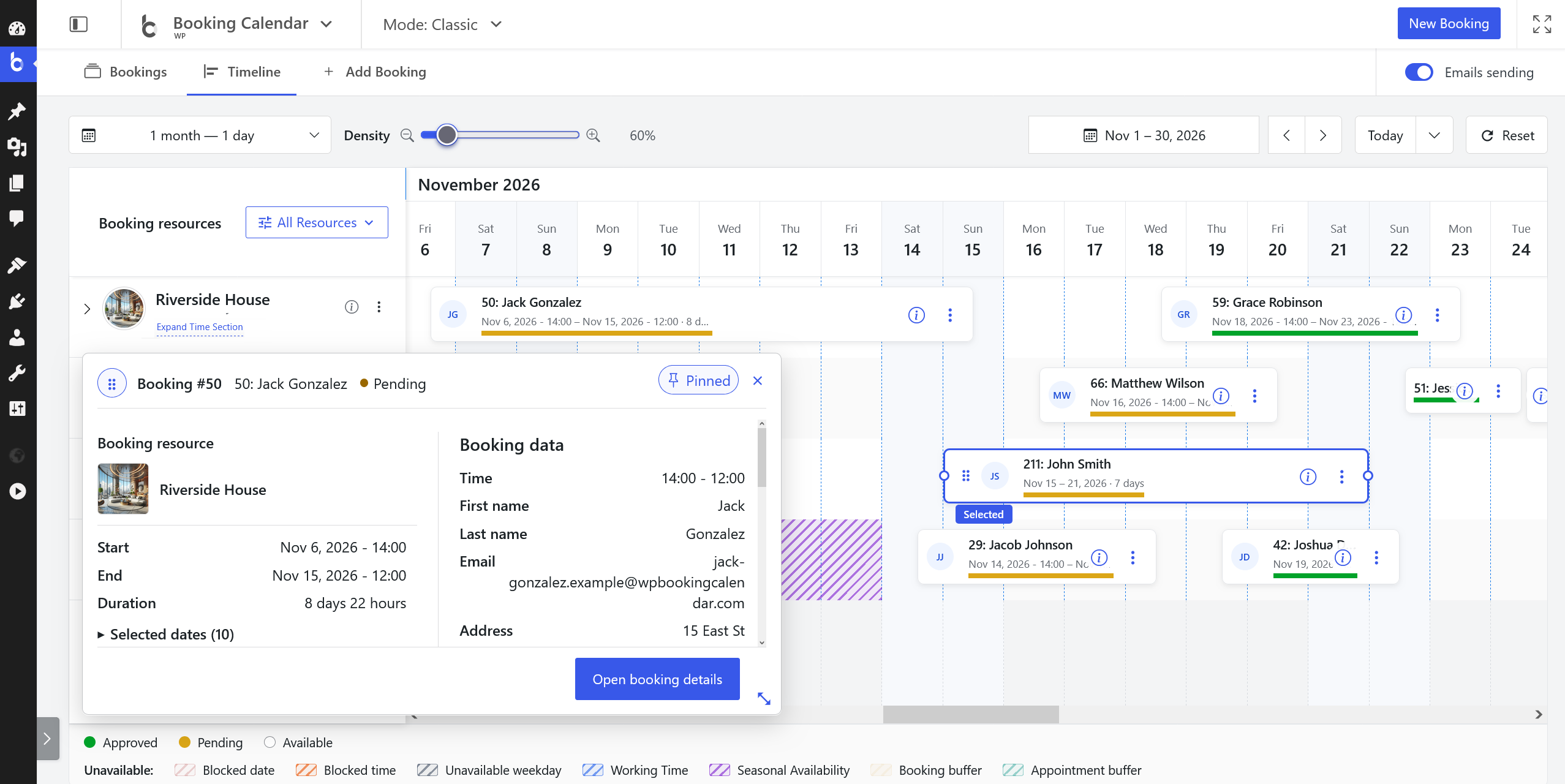
Manage bookings from a visual Timeline in WordPress. Open a reservation to review its details, select an available time to create an appointment, or drag a booking to a new date and review the change before saving.
Features | See Demos | FAQ | Get Support
Booking Calendar for Different Businesses
- Property and equipment rentals. Let visitors reserve a holiday cottage for several days or hire equipment for a single day.
- Appointments and services. Offer consultations, lessons, or treatments in available time slots. Set working hours, allow time between appointments, and keep lunch breaks free.
- Booking inquiries. When you need to agree on dates first, use a form without a calendar to collect the details and manage requests in WordPress.
The Free edition includes one bookable calendar. You can offer several services and use different forms on different pages while sharing the same availability. Paid editions add independent calendars for rooms, properties, or staff, with payments, seasonal pricing, and availability search available by edition.
What’s New: The Redesigned Timeline
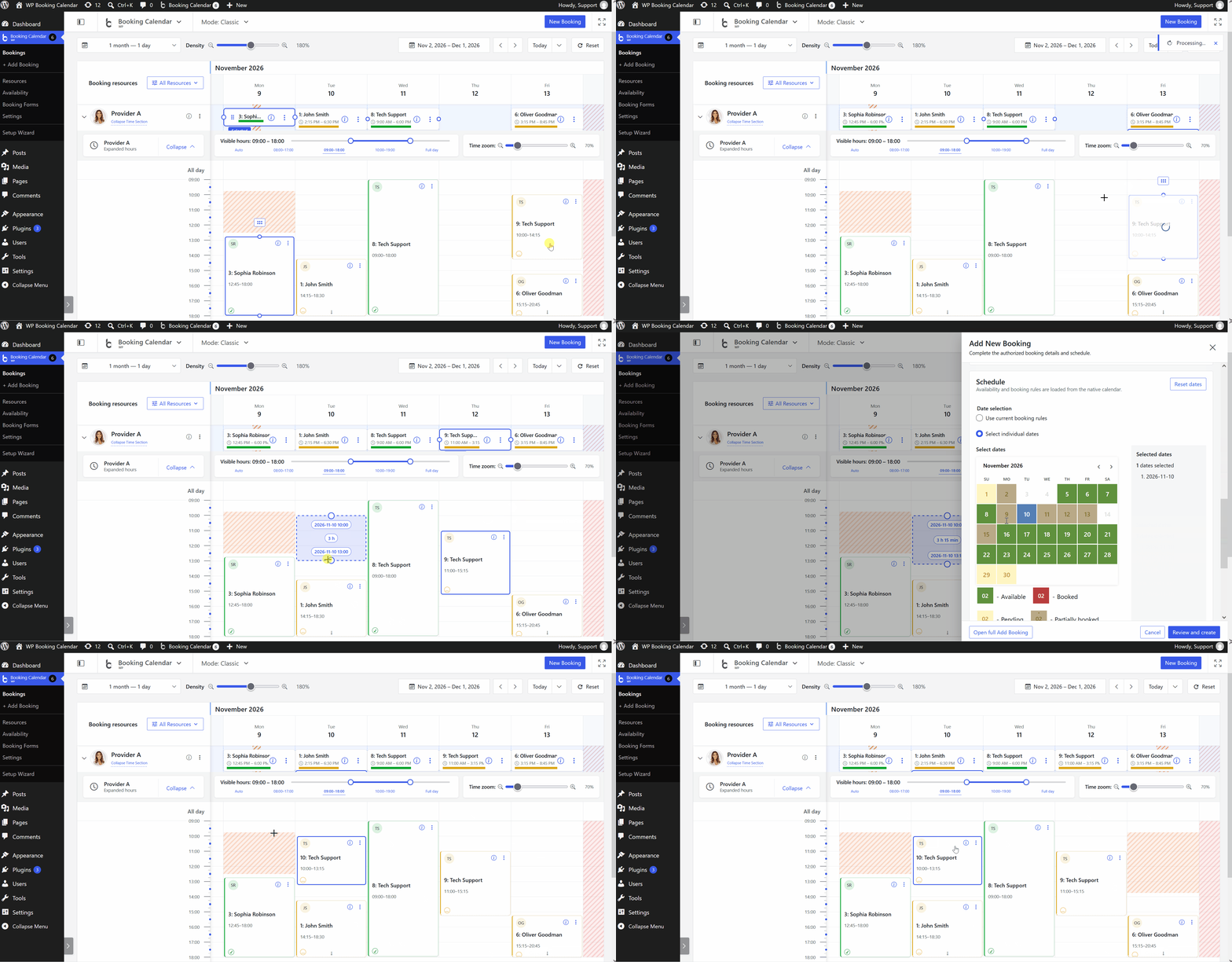
See full-day reservations and hourly appointments in the same Timeline. Select an opening to create a booking, or drag or resize an eligible booking and review the proposed schedule before saving.
The video shows Booking Calendar Pro with multiple booking resources. In Booking Calendar Free, you can follow the same steps on your single calendar.
Booking Calendar Free Features
- Take bookings on one calendar. Let visitors book a single day, select several dates independently, or click the first and last day of a continuous stay. Show one or more months, choose a calendar skin, and add a legend for available, pending, and booked dates.
- Offer appointments. Publish fixed time slots or let customers choose a service and an available start time. You can offer several services on the same provider calendar, each with its own duration and optional preparation or cleanup time.
- Set working hours and exceptions. Set a weekly schedule, split a day into morning and afternoon hours, mark dates off, or block part of a particular day. For example, close next Tuesday afternoon while keeping the usual Tuesday hours for the rest of the month.
- Choose when a booking closes availability. By default, a booking reserves its dates or time slot as soon as the request arrives. You can keep dates open until approval or allow unlimited requests for the same dates.
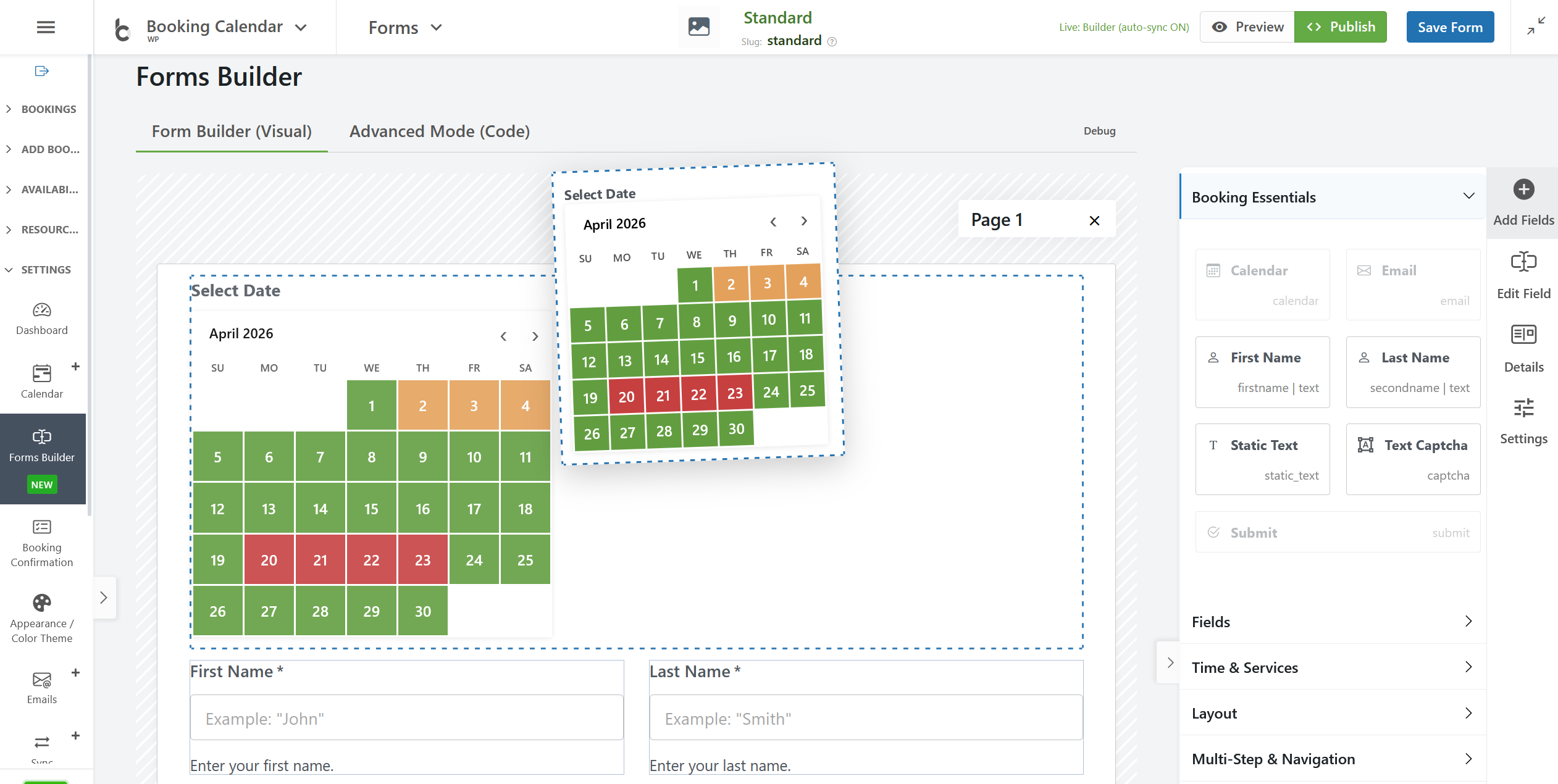
- Build forms for different jobs. Create and save multiple forms with the drag-and-drop editor. Arrange fields in columns or steps, mark questions as required, add a CAPTCHA, and preview the result. Use a form without a calendar for a contact request or inquiry.
- Publish a form or just show availability. The Setup Wizard guides you through scheduling, form design, and publishing. Add a Booking Calendar block in the WordPress editor, or place the
[booking]shortcode on a page. Use[bookingcalendar]for an availability-only calendar. - Manage requests in the Booking Listing. Search and filter bookings, open the Booking Inspector to see the submitted details and activity, approve or decline requests, and print a booking list. Customize the emails that visitors and administrators receive.
- Work directly in the Timeline. See full-day reservations and expand the hourly schedule for appointments. Select an opening to create a booking, or drag or resize an eligible booking and review the new dates and times before applying the change.
- Connect another calendar. Import events from Google Calendar or open a booking as a new Google Calendar event. For iCalendar (.ics) feed import and export, install the free Booking Manager companion plugin. Feed refresh times depend on the receiving service.
Premium Features in paid versions
Each edition below adds to the preceding edition.
- Personal adds independent calendars for properties, rooms, equipment, or staff. Visitors can pick a resource or provider. Staff can move eligible bookings between calendars and export bookings to CSV. Customers can verify their email to view a My Bookings page or use a private link to edit their reservation.
- Business Small adds resource and service prices, online payments through gateways such as Stripe and PayPal, automatic approval, and cancellation of unpaid pending bookings. For rentals, set fixed stays, minimum or maximum lengths, permitted arrival weekdays, and per-resource check-in and check-out times so one guest can leave on the day another arrives.
- Business Medium adds seasonal availability and rates, prices based on length of stay, early-booking and last-minute discounts, charges for selected form options, and fixed or percentage deposits. Vary arrival rules and time slots by weekday or season, or reserve time between bookings for cleaning.
- Business Large adds capacity for interchangeable units, such as several rooms of the same type. Visitors can search resources by dates, guest count, and configured amenities, then book an available result. Add discount coupons or automatically cancel competing pending requests when one is approved.
- MultiUser gives activated WordPress users their own booking administration. Each booking manager can manage assigned resources and bookings with their own forms, notification settings, and payment accounts. A booking super administrator manages access across accounts.
Compare editions and view demos
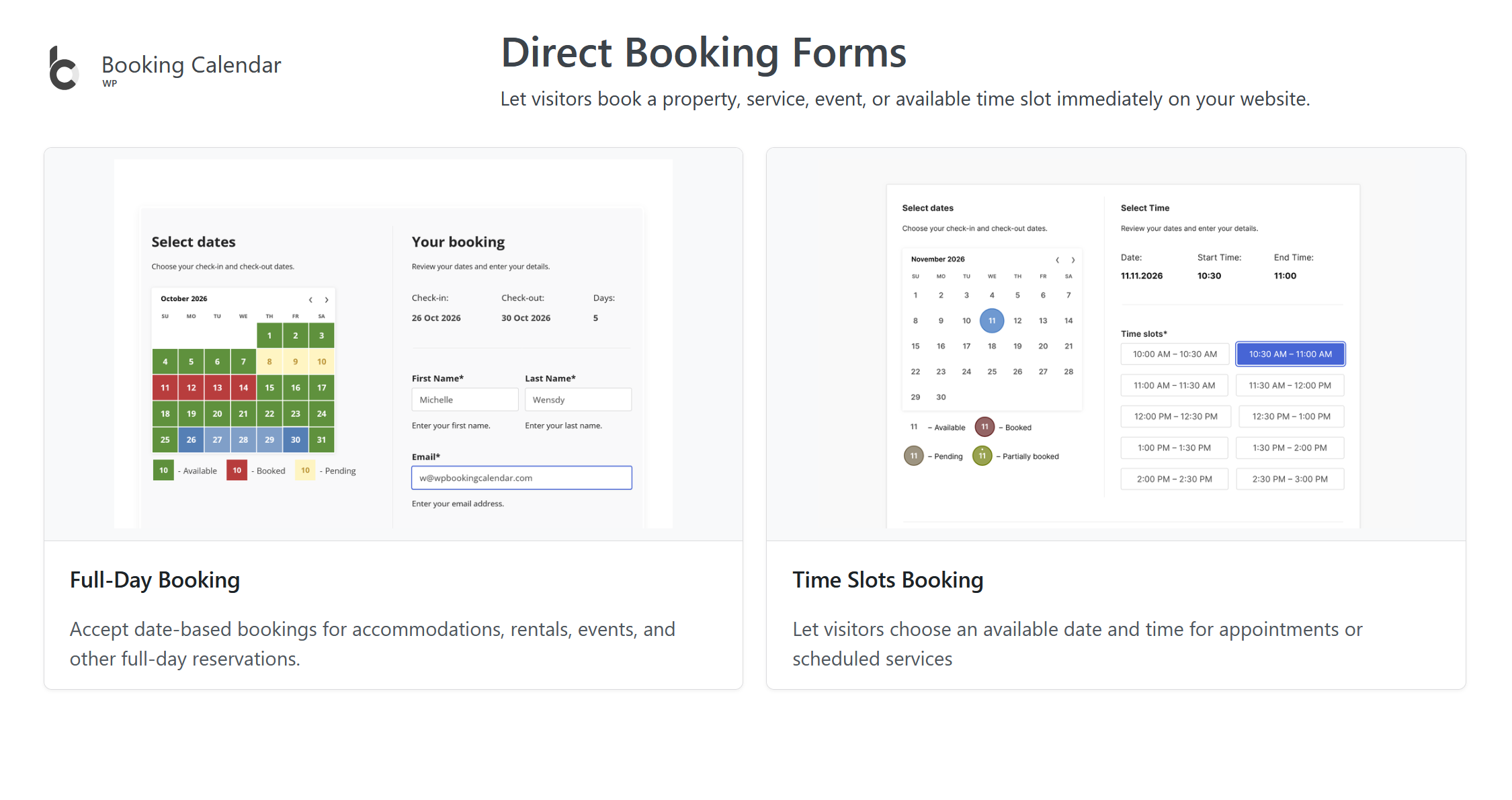
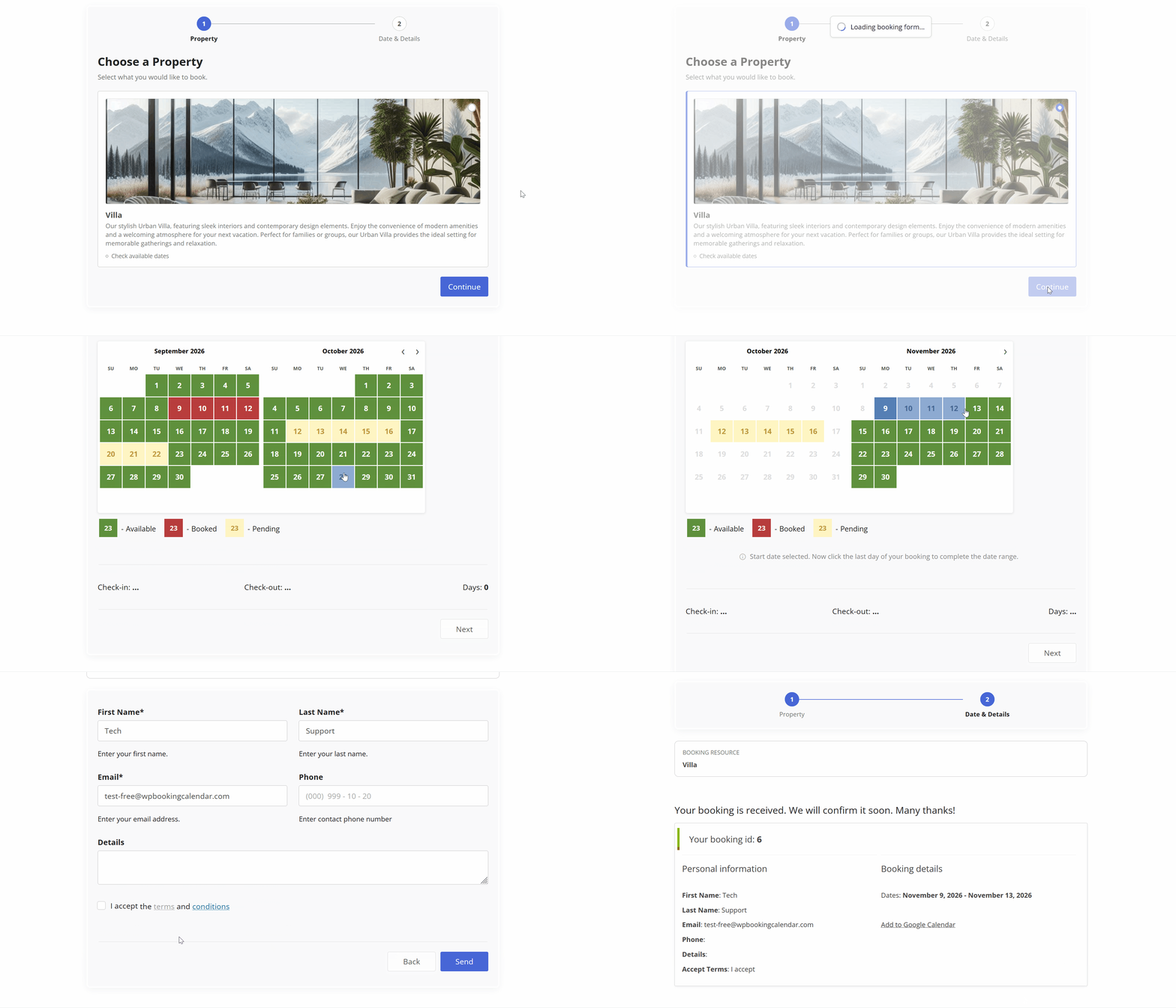
Full-Day Booking Process in Booking Calendar Free
Visitors check the property’s availability, select their dates, then enter their contact details and submit the request. The confirmation shows the booking summary and offers a link to add the dates to Google Calendar.
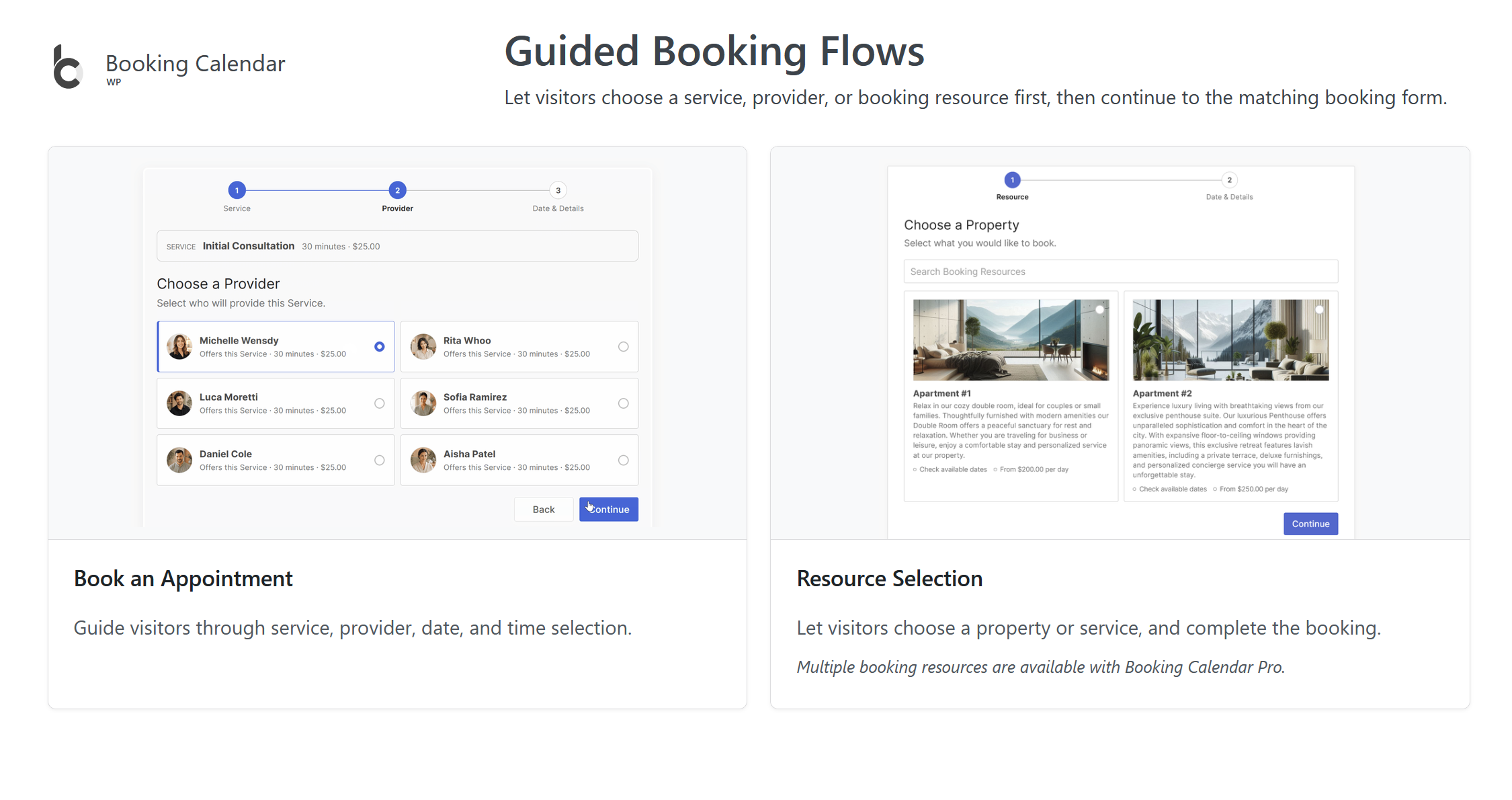
Appointment Booking with Services and Providers
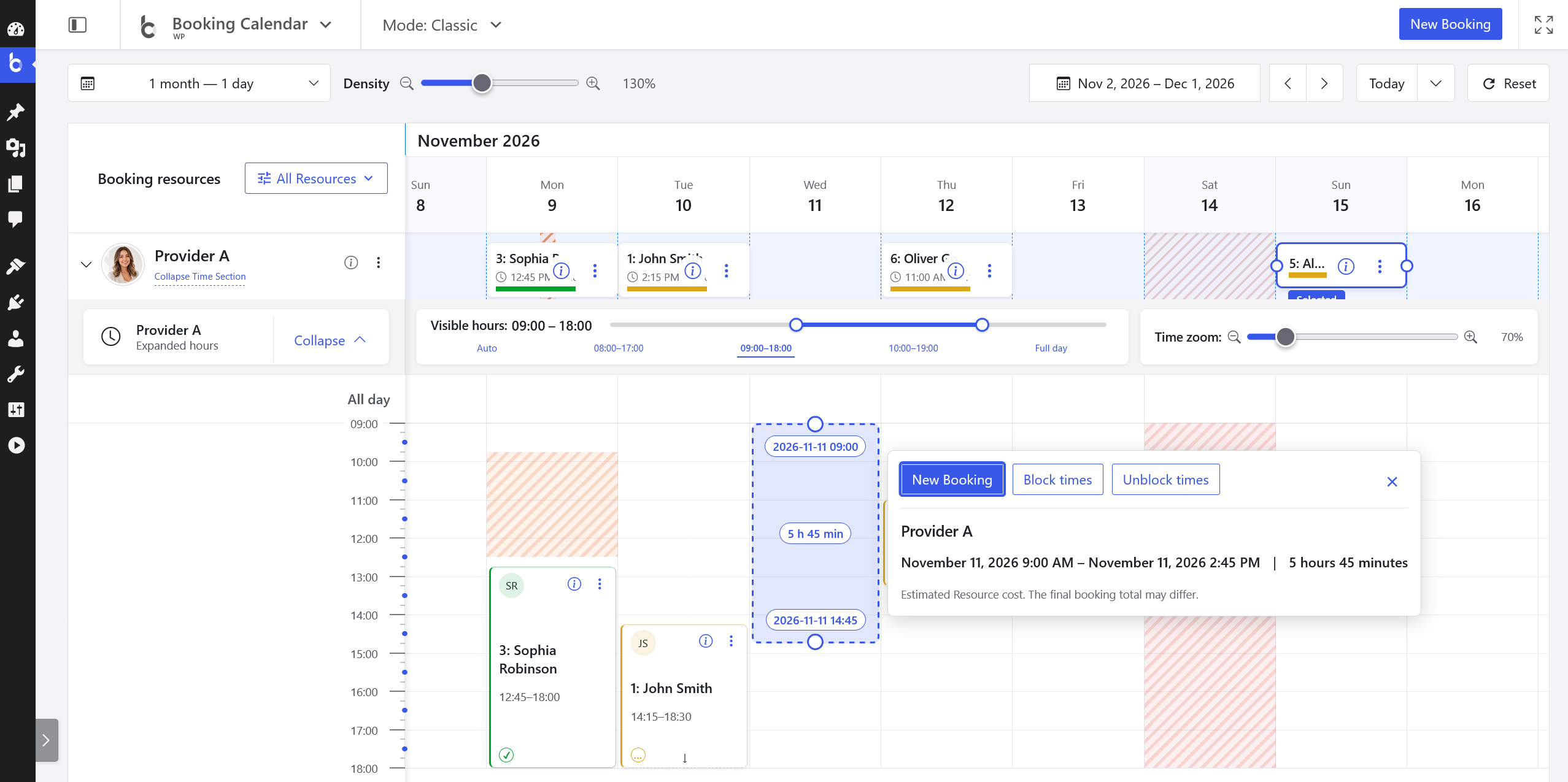
Visitors choose a service, select an available date and start time, then enter their contact details. Free uses one provider calendar. In paid editions with several providers, visitors can also choose who they want to book with. The confirmation shows the appointment details and offers a link to add it to Google Calendar.
Installation
Installing the plugin is easy. Just follow one of the following methods:
Install Booking Calendar from within WordPress
- Visit the plugins page within your dashboard and select ‘Add New’
- Search for “Booking Calendar by oplugins”
- Activate Booking Calendar from your Plugins page
- Vous avez terminé !
Install Booking Calendar Manually
- From the dashboard of your site, navigate to Plugins –> Add New.
- Select the Upload option and hit “Choose File.”
- When the popup appears select the booking.zip or booking-x.x.zip file from your desktop. (The ‘x.x’ will change depending on the current version number).
- Suivez les instructions à l'écran et attendez la fin du téléchargement.
- When it’s finished, activate the plugin via the prompt. A message will show confirming activation was successful.
That’s it! Just configure your settings and insert booking form shortcode into a page, and you’re on your way to receive the bookings. Need help getting things started? Check out our FAQ and video guides for help with settings and features.
Journal de modifications
Introduces the redesigned Timeline with scrolling date navigation, saved Resource workspaces, booking creation, Booking Overview and Inspector, drag-and-drop movement, resizing, reviewed date or Resource changes, and expandable Time Sections. Also improves Add Booking and administration navigation. Timeline Legacy remains available.
12.0.1
- Changes in all versions:
- Improvement: Added a Form Messages setting to control how long booking-form validation errors remain visible, including an option to keep them displayed without automatic dismissal.
- Improvement: Added What’s New to the native Booking Calendar menu after Settings and Setup Wizard, using the same configured Settings access role and remaining before Upgrade to Pro in Free.
- Improvement: Added a consistent divider above Setup Wizard in the native Booking Calendar menu across Free and paid editions, independent of menu length or Upgrade visibility.
- Improvement: Renamed the Advanced compatibility choice to Use legacy pages and now shows Timeline Legacy in administration navigation only while legacy pages are selected. The direct legacy Timeline URL remains available for compatibility.
- Security: Prevented authenticated post authors from using Booking Form shortcode options to rewrite Form Builder HTML attributes, while preserving escaped custom defaults for supported form fields.
- Fix: Made Setup Wizard Booking Form previews use a scalar WordPress AJAX request and show clear live-demo, server-blocked, or unexpected-response guidance instead of a raw JSON parsing error.
- Fix: Kept calendar date selection and previous or next month controls on the current page in WordPress Playground and other embedded environments.
- Fix: Kept Booking Calendar action controls on the current page across public multi-step forms, administration menus, dynamically updated interfaces, and other embedded WordPress environments without changing real navigation links.
- Fix: Updated the WordPress admin bar to use the effective Timeline and Seasons pages, preserve the configured default Bookings destination, respect Appointment and Rental menu choices, and keep edition-specific page access.
- Changes in Business Medium / Business Large / MultiUser versions:
- Fix: Restored visitor editing for bookings created with different custom Booking Forms, so one
[bookingedit]page now loads each booking’s saved form while retaining strict form and calendar validation.
- Fix: Restored visitor editing for bookings created with different custom Booking Forms, so one
- Changes in Business Small / Business Medium / Business Large / MultiUser versions:
- New: Added per-Resource changeover policies with global, custom, Booking Form, and parent-inherited check-in/check-out behavior across booking forms, calendars, capacity, Google Calendar import, and availability search.
- Fix: Moved Payment Description to the payment area of booking confirmations, after customer and booking information and immediately before the payment gateways.
12.0
- Changes in all versions:
- New: Introduced a redesigned administration Timeline with a fixed Resource pane, compact collision-aware booking cards, responsive day-to-month views, zoom and density controls, site-local time markers, keyboard navigation, mobile and RTL support, and clear unavailable-time backgrounds. The previous Timeline remains available as Timeline Legacy.
- Improvement: Added smooth date navigation with Previous, Next, Today, and date-jump controls, plus bounded earlier and later period loading while scrolling. Timeline preserves the visible date, reports loading and retry states, and caches nearby periods for quick return navigation.
- New: Added a per-user Timeline Resource workspace with authorized search and selection, saved ordering and page size, Business Large group-safe pagination, mobile Resource selection, and per-Resource booking-title preferences.
- New: Added empty-range selection with pointer, touch, or keyboard controls. Review the exact Resource, dates, times, duration, availability, capacity, overlaps, and estimated Resource cost before creating a booking or using an authorized Block or Unblock action.
- New: Added the Timeline Add New Booking Inspector with authorized Resource and Booking Form choices, exact full-day or timed schedules, field validation, server-checked Review, cost preview in supported editions, normal booking creation, and automatic Timeline refresh. Free and Personal can create bookings without the paid cost tools.
- New: Added quick Booking Overviews and a reusable Booking Inspector shared by Timeline, Booking Listing, Calendar, and Schedule. The Inspector provides Booking Details, exact Dates, Costs where supported, Public and Private notes, Booking Actions, and paginated Activity while preserving the form and field order saved with each booking.
- New: Added reviewed booking schedule changes from Timeline: drag eligible bookings to another date or visible authorized Resource, resize supported start or end boundaries, change dates with the native calendar, or use the keyboard-friendly Reschedule dialog. Every Apply repeats current authorization, availability, capacity, hierarchy, Appointment, and conflict checks before canonical refresh.
- New: Added expandable Time Sections for authorized Resources with an All day band, vertical hour-and-minute schedule, visible-hours presets and sliders, Time zoom, overlapping timed bookings, unavailable intervals, empty-time selection, and supported booking movement or resizing. Appointment mode opens the first authorized Resource automatically; Classic and Rentals begin collapsed.
- Improvement: Added labelled unavailable-time backgrounds for blocked dates and times, unavailable weekdays, Working Time, Seasonal Availability, booking buffers, and Appointment buffers, including exact site-timezone handling around daylight-saving changes.
- Improvement: Reorganized Add Booking so Booking Resource and Booking Form choices appear together above the form, Emails sending remains easy to reach, and the Settings Inspector groups Date selection, Booking tools, and Calendar view without changing established validation or edition rules.
- Improvement: Made Booking Calendar administration navigation context-aware, with independent side-menu preferences for work pages, Settings, and fullscreen, consistent horizontal navigation and breadcrumbs, responsive page spacing, and a native WordPress submenu link to Booking Forms.
- Improvement: Added privacy-aware booking Activity for successful booking, date, Resource, note, cost, and payment changes, with WordPress privacy export and erasure support and bounded background cleanup.
- Security: Strengthened reusable Booking Inspector authorization and MultiUser or multisite isolation, removed internal Resource and capacity diagnostics from customer-facing conflict messages, and normalized Booking IDs at the shared booking-date database query boundary.
- Fix: Kept Timeline, Booking Overview, Booking Inspector, Activity, and unavailable backgrounds synchronized after booking creation, editing, dragging, resizing, rescheduling, status changes, duplication, or removal without repeating a successful mutation.
- Fix: Kept Appointment Service buffer backgrounds at their exact saved times in both Timeline layouts when the WordPress site timezone differs from the web server timezone.
- Fix: Prevented Timeline from showing a destination preview where cross-Resource movement is unavailable, and added specific guidance when an Appointment cannot be dragged to another Provider.
- Translations: Completed 100% local translations: German, Dutch, Spanish (Spain), French (France), Italian, Norwegian (Bokmål), Danish, Belgian (nl_BE), Japanese, Portuguese (Brazil), Ukrainian, Polish, Czech.
- Changes in Business Medium / Business Large / MultiUser versions:
- New: Added Duplicate Season for creating an independent copy of a Conditional or Specific-date Season. An authorized MultiUser super administrator can assign the copy to another activated owner without changing the source Season.
- Fix: Restored complete multi-date selection in calendar-only administration views for conditional form and cost rules.
- Fix: Kept
[additional_cost_hint]accurate when Early Booking or Last-minute adjustments apply, so fixed Form Option Costs are no longer reduced or displayed as zero while the final total remains correct. - Fix: Restored Block Times timeline access for authorized administrators and Availability managers while retaining Resource and MultiUser ownership checks.
Captures d'écran


Pour les développeurs
Est-ce votre plugin ? Montrez les chiffres.
Ajoutez un badge en direct à votre site, docs ou github readme. Il se met à jour par lui-même - aucun compte n'est nécessaire.
Best Booking Calendar alternatives
Tous les plugins de prise de rendez-vous →





FAQ
Booking Calendar: quick answers
Réponses directes, extraites des données en direct WordPress.org.
Source : WordPress.org
Is Booking Calendar free?
Yes. Booking Calendar is free to download and use from the official WordPress.org plugin directory.
Is Booking Calendar safe to use in 2026?
Yes — Booking Calendar is a safe, well-maintained plugin to use in 2026. It runs on 40K+ sites, is rated 4.8/5 and was last updated 1 day ago, and scores 94/100 on our health check.
How many websites use Booking Calendar?
Booking Calendar is active on 40K+ WordPress websites and has been downloaded 5,508,968 times since it launched in August 2009. It was downloaded 61,121 times in the last 30 days.
Does Booking Calendar work with WordPress 7.1?
Yes. The developer has tested Booking Calendar up to WordPress 7.2, the latest release. It requires WordPress 5.3 or newer.
What PHP version does Booking Calendar need?
Booking Calendar requires PHP 5.6 or higher. Most hosts run PHP 8.x today, so it works on any modern WordPress hosting.
When was Booking Calendar last updated?
The latest version, 12.0.1, was released on November 28, 2026 (1 day ago).
Who makes Booking Calendar?
Booking Calendar is developed and maintained by wpdevelop.
What are the best alternatives to Booking Calendar?
The most popular alternatives to Booking Calendar are Appointment Booking Plugin (100K+ installs), Online Scheduling and Appoi… (60K+ installs) and Simply Schedule Appointments (50K+ installs).
Propulsé par PageForge
Un modèle et une feuille de calcul. Une vraie page pour chaque recherche.
PageForge transforme chaque ligne d'un CSV en une page WordPress avec son propre titre, URL, SEO et schéma, construit sur la mise en page que vous Déjà conçu. Gratuit sur WordPress.org.
- CSV et XLSX, plus Google Sheets sur les professionnels et les entreprises
- Son propre titre, URL, SEO champs et schéma pour chaque page
- Fonctionne avec l'éditeur de blocs, Elementor, Divi et Avada
- Gratuit sur WordPress.org, pas de carte de crédit