


Inline Image Upload for BBPress
Upload inline images to BBPress forum topics and replies.

Choix solide
Inline Image Upload for BBPress is a solid plugin choice in 2026, with a few things worth checking first. It runs on 3K+ sites, is rated 4.6/5 and was last updated 3 weeks ago, and scores 75/100 on our health check.
- Loved by users — 4.6/5 from 65 reviews
- Développé activement — Dernière mise à jour il y a 3 semaines
- Testé avec le dernier WordPress (7.1)
Comment s'accumule-t-il ?
Côte à côte sur les installations, les mises à jour, les évaluations et le support



Téléchargements quotidiens
Les pics de téléchargement suivent généralement une nouvelle version - chaque site qui met à jour automatiquement compte comme un téléchargement.
Classements
Where Inline Image Upload for BBP… stands todayWordPress.org Classements de recherche
Position en direct dans la recherche de plugins, Top 100| Mot-clé | Position |
|---|---|
| bbpress | #6 |
| image | #81 |
| images | >100 |
| inline | #4 |
| médias | >100 |
Adoption de version
Part de sites actifs par version.
Répartition des notes
★★★★★★★★★★ 4.6 from 65 reviews
About Inline Image Upload for BBPress
À partir du Lisez-moi officiel · v1.2.2Description
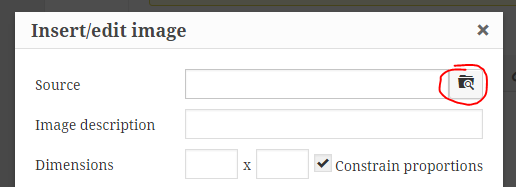
This plugin enables the TinyMCE WYSIWYG editor for BBPress forum topics and replies and adds a button to the editor’s “Insert/edit image” dialog that allows forum users to upload images from their computer and insert them inline into their posts.
Image storage and compatibility
Uploaded images can be stored using a pluggable storage engine, selectable under Forum Images in the BerryPress menu:
- Filesystem (default) – images are stored in your WordPress uploads directory. You can change the storage directory path and URL in the settings (use
{uploads}as a placeholder for the uploads directory). Changing it only affects future uploads; existing images stay where they are. - Infinite Uploads – when the Infinite Uploads plugin is active, forum images are automatically offloaded to cloud storage, served through its CDN and optimized. No extra setup is required, and the “Cleanup Unnecessary Files” tool also removes unused images from the cloud.
- Amazon S3™ – available with the optional S3 Image Storage for bbPress add-on (paid).
The plugin also works with BuddyPress.
Entretien
The “Cleanup Unnecessary Files” button removes temporary uploads older than 24 hours, images that were removed from existing topics and replies, and image folders of deleted posts, on whichever storage engine is active.
A pro version with the following additional features is also available:
- Limit which user roles are permitted to upload images.
- Limit the number of uploaded images allowed per post.
- Automatically downsize images to fit specified maximum dimensions.
- Convert all uploaded images to the same image format, if desired.
- Set PNG and JPEG compression levels so images take up less disk space.
- Allow users to view enlarged images in a lightbox by clicking on them within the post.
- View total image count and file size statistics.
- Use Amazon S3™ to store and serve uploaded images in submitted forum posts (optional; requires add-on plugin purchase).
Amazon Web Services, the “Powered by Amazon Web Services” logo, AWS, Amazon Simple Storage Service, and Amazon S3 are trademarks of Amazon.com, Inc. or its affiliates in the United States and/or other countries. Potent Plugins is not affiliated with Amazon.com, Inc. or Amazon Web Services.
If you like this plugin, please consider leaving a comment or review.
You may also like these plugins
BerryPress has built a range of powerful plugins for WooCommerce and WordPress. Check out some of our favorites below – and don’t forget to leave a ⭐⭐⭐⭐⭐ review to help others in the community discover them!
- Ninjalytics – Report, analyze, and visualize your store’s data to gain actionable insights for growth, support operations, and satisfy customers!
- Live Carts for WooCommerce – Free plugin to view and analyze live shopping carts in real time to understand user behavior and optimize conversions (Pro version also available). Integrates with Ninjalytics to add 4 specialized cart reporting templates.
- Export Order Items for WooCommerce – Export detailed order data for every sale in your WooCommerce store. Simplify fulfillment, create accounting reports in just a few clicks, and download CSV files for easy sharing and compatibility.
- PhotoBerry Studio – A complete solution to enhance and streamline your photography workflow, with tools for image organization, gallery management, and client proofing.
- Automatic Product Categories – Available as a free version and Pro. Automatically assign products to categories and tags, based on custom rules, saving you time and keeping your store organized.
- Advanced Order Editor for WooCommerce – Add editable Paid date, Completed date and Payment method fields in the WooCommerce order admin screen.
- LoginBerry – Bundles account verification, two-factor authentication (2FA), passwordless login, and login logs. Each feature can be enabled or disabled independently.
- Customer Address Change Notification for WooCommerce – Get instant notifications when customers update their shipping or billing address, helping you stay on top of changes and prevent delivery issues.
To view BerryPress’s premium WordPress plugins and themes, visit our WordPress products catalog page.
Installation
- Click “Plugins” > “Add New” in the WordPress admin menu.
- Search for “Image Upload for BBPress”.
- Click “Install Now”.
- Click “Activate Plugin”.
Alternatively, you can manually upload the plugin to your wp-content/plugins directory.
Journal de modifications
1.2.2
- Admin styling fixes
1.2.1
- Fix: Cleanup Unnecessary Files could use the wrong storage engine, and now works correctly with Infinite Uploads
- Readme: added storage engine and Infinite Uploads compatibility information
1.2.0
- Added a pluggable image storage engine, matching the Pro version’s architecture
- Added native Infinite Uploads support as a selectable storage engine, with its own settings panel
- Cleanup now also removes images that were deleted from existing posts, not just orphaned post directories
- Plugin redesign
1.1.26
- Redesigned the settings page with the BerryPress admin framework
- Added a Compatible Plugins section
1.1.25
- Fix: broken logo path
1.1.24
- Improvement: Better caching support
Captures d'écran

Pour les développeurs
Est-ce votre plugin ? Montrez les chiffres.
Ajoutez un badge en direct à votre site, docs ou github readme. Il se met à jour par lui-même - aucun compte n'est nécessaire.
Best Inline Image Upload for BBPre… alternatives
All bbPress plugins →





FAQ
Inline Image Upload for BBPress: quick answers
Réponses directes, extraites des données en direct WordPress.org.
Source : WordPress.org
Is Inline Image Upload for BBPress free?
Yes. Inline Image Upload for BBPress is free to download and use from the official WordPress.org plugin directory.
Is Inline Image Upload for BBPress safe to use in 2026?
Inline Image Upload for BBPress is a solid plugin choice in 2026, with a few things worth checking first. It runs on 3K+ sites, is rated 4.6/5 and was last updated 3 weeks ago, and scores 75/100 on our health check.
How many websites use Inline Image Upload for BBPress?
Inline Image Upload for BBPress is active on 3K+ WordPress websites and has been downloaded 86,018 times since it launched in January 2016. It was downloaded 3,213 times in the last 30 days.
Does Inline Image Upload for BBPress work with WordPress 7.1?
Yes. The developer has tested Inline Image Upload for BBPress up to WordPress 7.1.5, the latest release. It requires WordPress 6.5.0 or newer.
What PHP version does Inline Image Upload for BBPress need?
Inline Image Upload for BBPress requires PHP 7.0 or higher. Most hosts run PHP 8.x today, so it works on any modern WordPress hosting.
When was Inline Image Upload for BBPress last updated?
The latest version, 1.2.2, was released on October 26, 2026 (3 weeks ago).
Who makes Inline Image Upload for BBPress?
Inline Image Upload for BBPress is developed and maintained by BerryPress.
What are the best alternatives to Inline Image Upload for BBPress?
The most popular alternatives to Inline Image Upload for BBPress are One User Avatar (100K+ installs), Content Aware Sidebars (30K+ installs) and wpForo Forum (20K+ installs).
Propulsé par PageForge
Un modèle et une feuille de calcul. Une vraie page pour chaque recherche.
PageForge transforme chaque ligne d'un CSV en une page WordPress avec son propre titre, URL, SEO et schéma, construit sur la mise en page que vous Déjà conçu. Gratuit sur WordPress.org.
- CSV et XLSX, plus Google Sheets sur les professionnels et les entreprises
- Son propre titre, URL, SEO champs et schéma pour chaque page
- Fonctionne avec l'éditeur de blocs, Elementor, Divi et Avada
- Gratuit sur WordPress.org, pas de carte de crédit