


FluentComments – AJAX Comments, Anti-Spam & Comment Email Notifications
AJAX comments with layered spam protection and no CAPTCHA. Threaded replies, load more, and 5 editable notification emails. Free, no pro version.

Choix solide
FluentComments is a solid plugin choice in 2026, with a few things worth checking first. It runs on 800+ sites, is rated 4.4/5 and was last updated 3 months ago, and scores 76/100 on our health check.
- Testé avec le dernier WordPress (7.1)
- Momentum — downloads up 27.4% vs the previous 30 days
- Petite base d'utilisateurs (800+ installations actives)
Comment s'accumule-t-il ?
Côte à côte sur les installations, les mises à jour, les évaluations et le support



Téléchargements quotidiens
Les pics de téléchargement suivent généralement une nouvelle version - chaque site qui met à jour automatiquement compte comme un téléchargement.
Classements
Where FluentComments stands todayWordPress.org Classements de recherche
Position en direct dans la recherche de plugins, Top 100| Mot-clé | Position |
|---|---|
| ajax comments | #5 |
| anti-spam | #37 |
| comment notification | #16 |
| les commentaires | #23 |
| Protection anti-spam | #63 |
Adoption de version
Part de sites actifs par version.
Répartition des notes
★★★★★★★★★★ 4.4 from 7 reviews
About FluentComments
À partir du Lisezmoi officiel · v2.1.1Description
FluentComments replaces the WordPress comment form with a fast, modern, AJAX powered one, and it stops comment spam before it ever reaches your moderation queue.
Comments post without a page reload. Replies thread properly. Spam is blocked by several layers working together, so your readers never have to solve a CAPTCHA. And every email your site sends because somebody commented, whether that email goes to the commenter, the post author or you, can be rewritten in your own words with your own logo and colors.
FluentComments works on classic themes, block (FSE) themes and page builders. Every feature is free. There is no pro version, no upsell and no paid add-on. The whole plugin is open source on GitHub.
FluentComments at a glance
- AJAX comments. Post a comment or a reply with no page reload.
- Comment spam protection. Signed tokens, a honeypot, a timing check and rate limits, with no CAPTCHA for your readers.
- Threaded replies that follow your WordPress discussion depth.
- “Load more” pagination instead of 400 comments in one request.
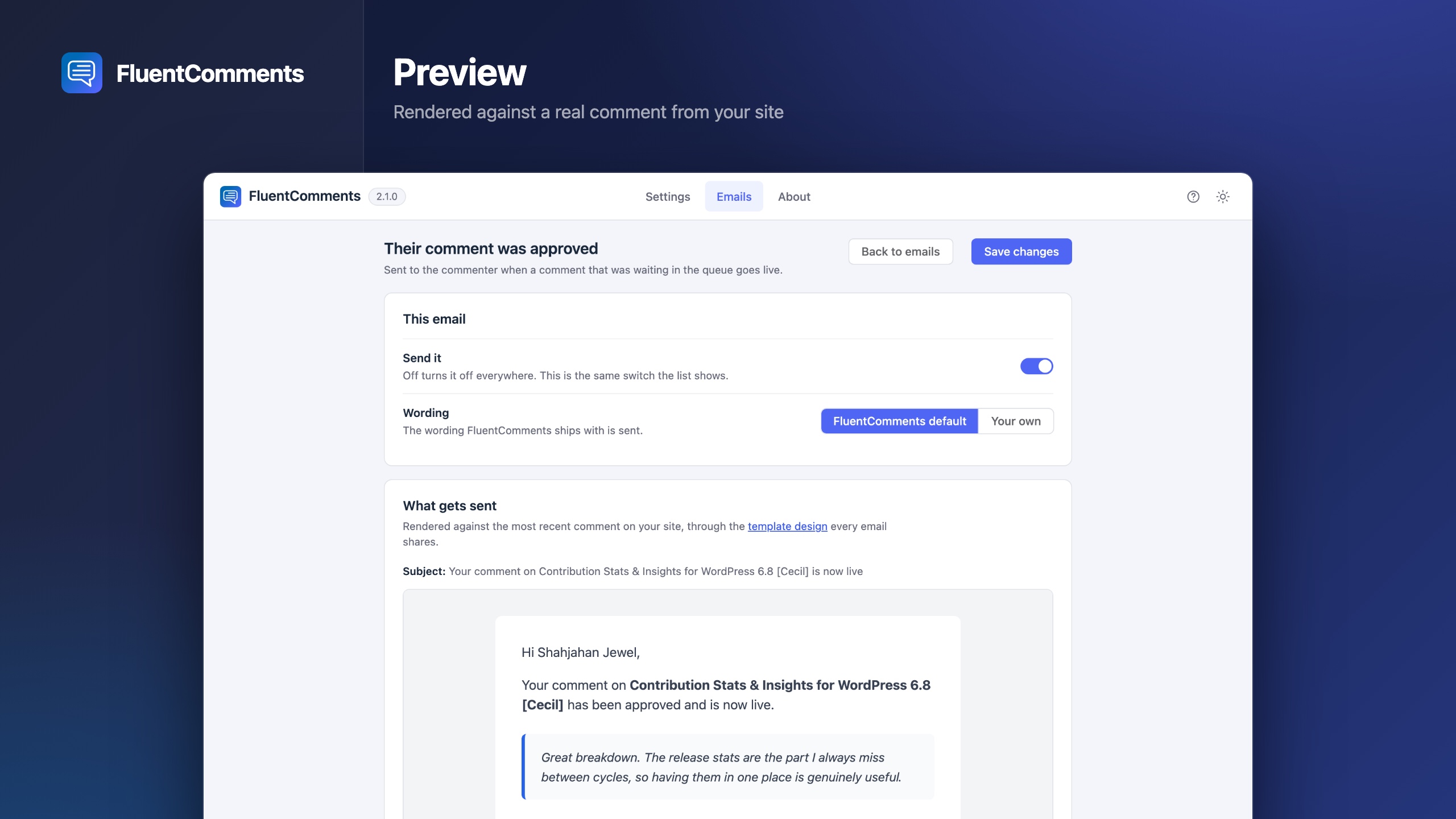
- Five comment notification emails. Each one can be edited, previewed and switched off.
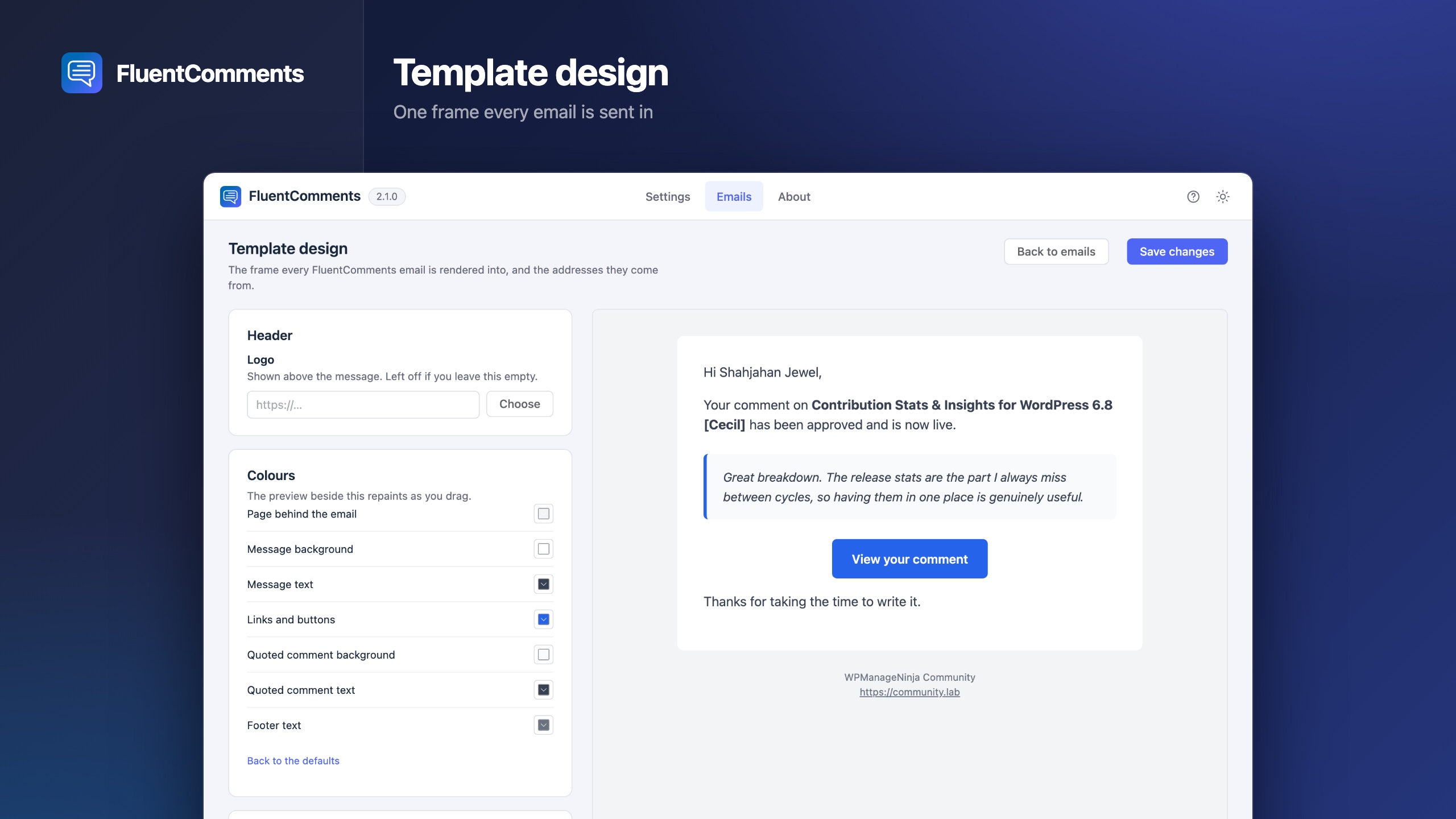
- An email template designer. Your logo, your colors, your footer and your From address, shared by all five.
- Block (FSE) theme support with a real block, plus a
[fluent_comments]shortcode for page builders. - Cache friendly. There is no security nonce anywhere in the plugin, so a cached comment form never expires.
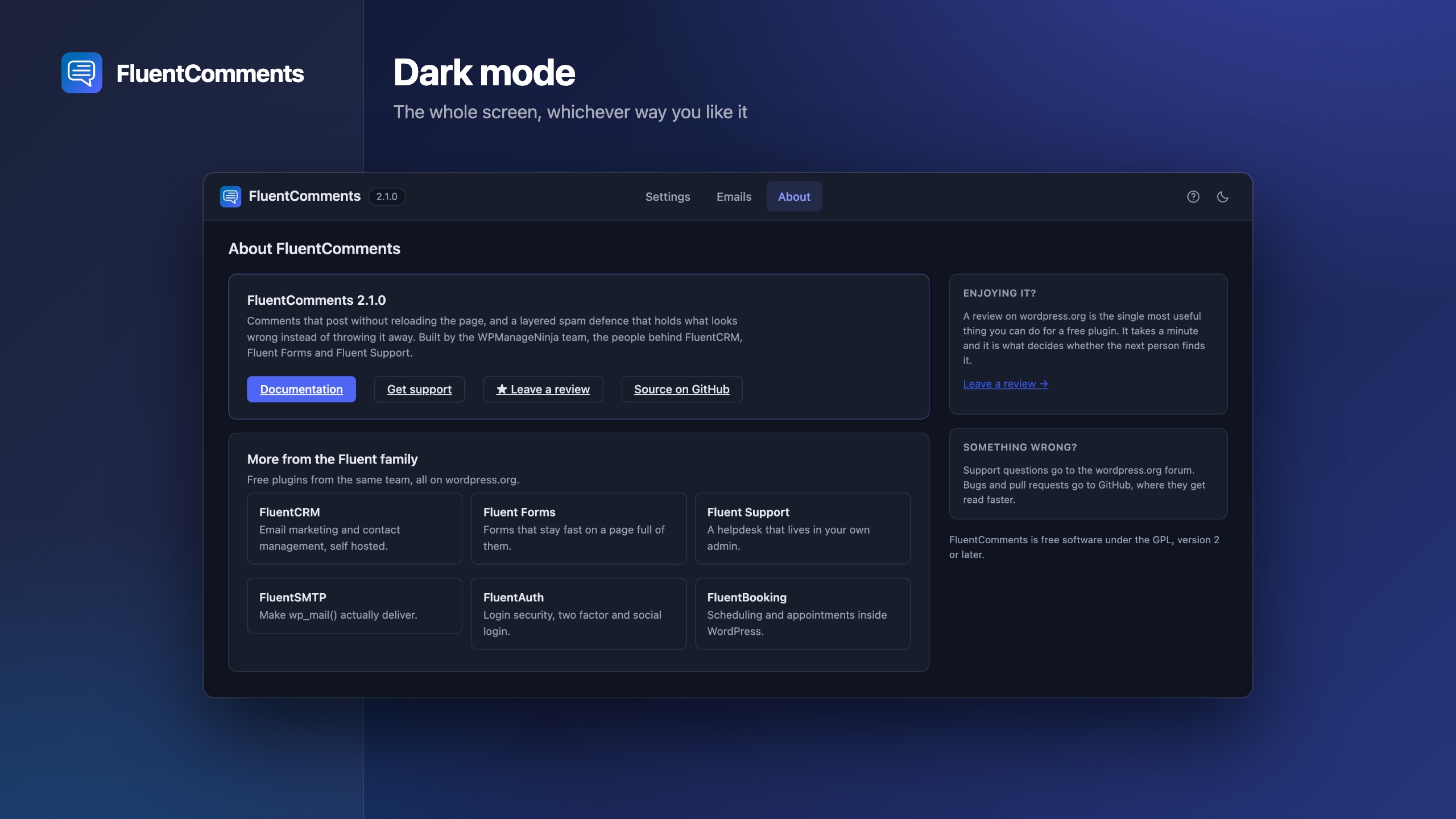
- Light, dark and system appearance for the admin screen.
- Developer friendly. A small, documented set of actions and filters.
- 100% free and open source, GPLv2.
Why FluentComments
WordPress comments are a genuinely good feature buried under a form from 2010 and a spam problem that most people solve by turning comments off. FluentComments fixes both halves: how comments look and feel, and the flood of junk behind them.
⚡ Instant, AJAX powered commenting
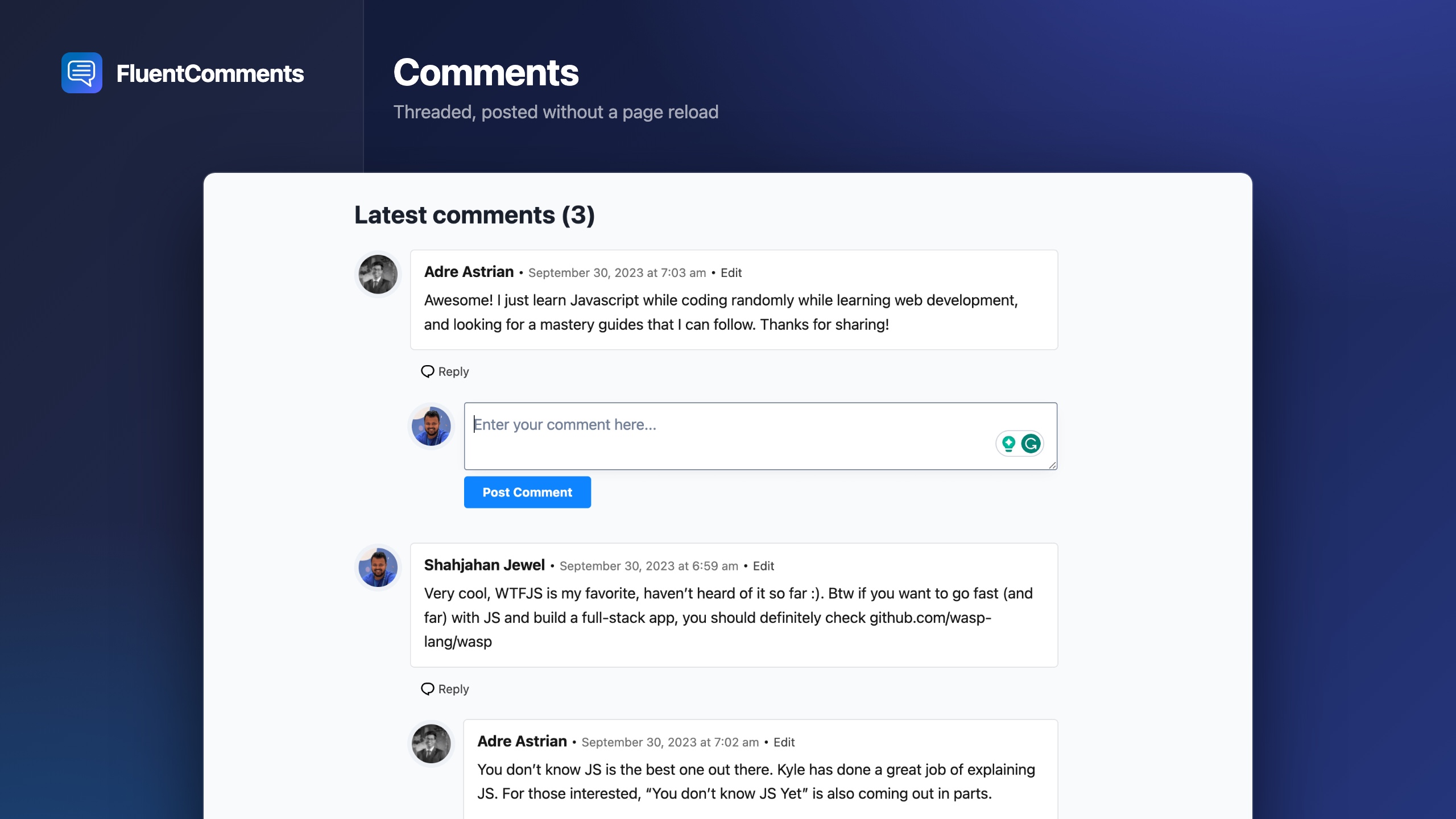
- Post a comment or a reply without reloading the page
- Threaded replies that follow your WordPress discussion depth setting
- “Load more” pagination instead of dumping 400 comments into one request
- Gravatar avatars, relative timestamps and a clean, modern card layout
- Fully responsive, and styled with CSS custom properties so your theme can restyle every part of it
- The whole interface is translatable
🛡️ Comment spam protection, without a CAPTCHA
Spam is scored, not guessed at. A borderline comment is held for moderation, and only a conclusive failure is turned away. Nobody is asked to identify a traffic light.
- Signed submission tokens. Every comment needs a short lived, HMAC signed token that is issued in a separate request. A bot that posts blindly at your site never gets one.
- Single use tokens, bound to a session cookie. A token cannot be replayed, or lifted from another visitor’s page.
- A honeypot field whose name comes from your site’s own salt. It is different on every install, so it cannot be hard coded against.
- A timing check. A form submitted faster than a human could type is scored as suspicious.
- Rate limiting, keyed per session first and per IP only as a backstop. An office or a CDN exit address is never counted as one person.
- Native form rejection. Once FluentComments handles a post type, anything posted to the default WordPress endpoint without our fields is refused. Bots that skip your page and POST straight to
wp-comments-post.phpget nothing. - Every threshold can be adjusted with a filter, and Akismet keeps working alongside it.
✉️ Five comment notification emails, all yours to rewrite
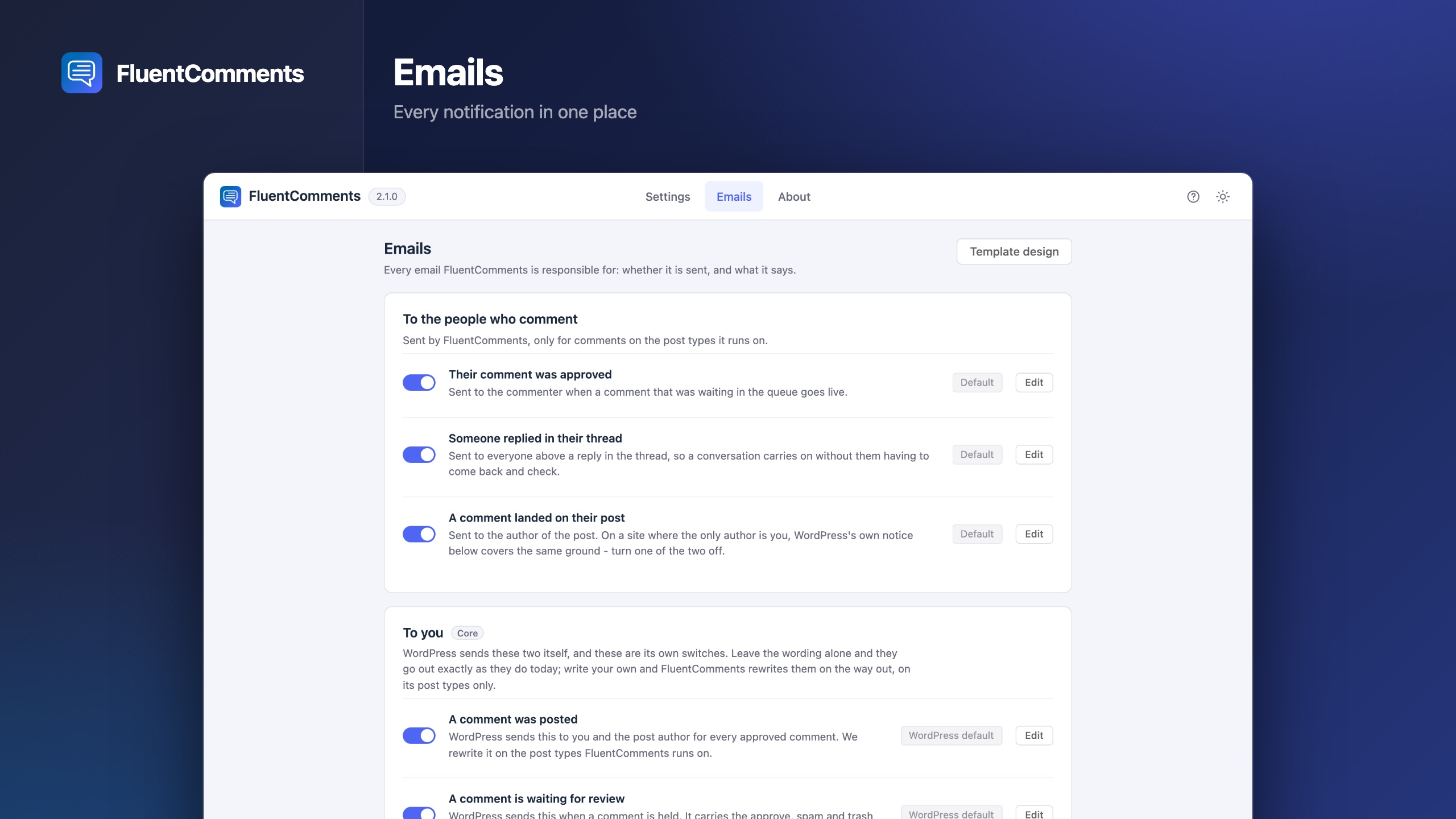
FluentComments owns every notification your site sends about a comment, and puts them all on one screen:
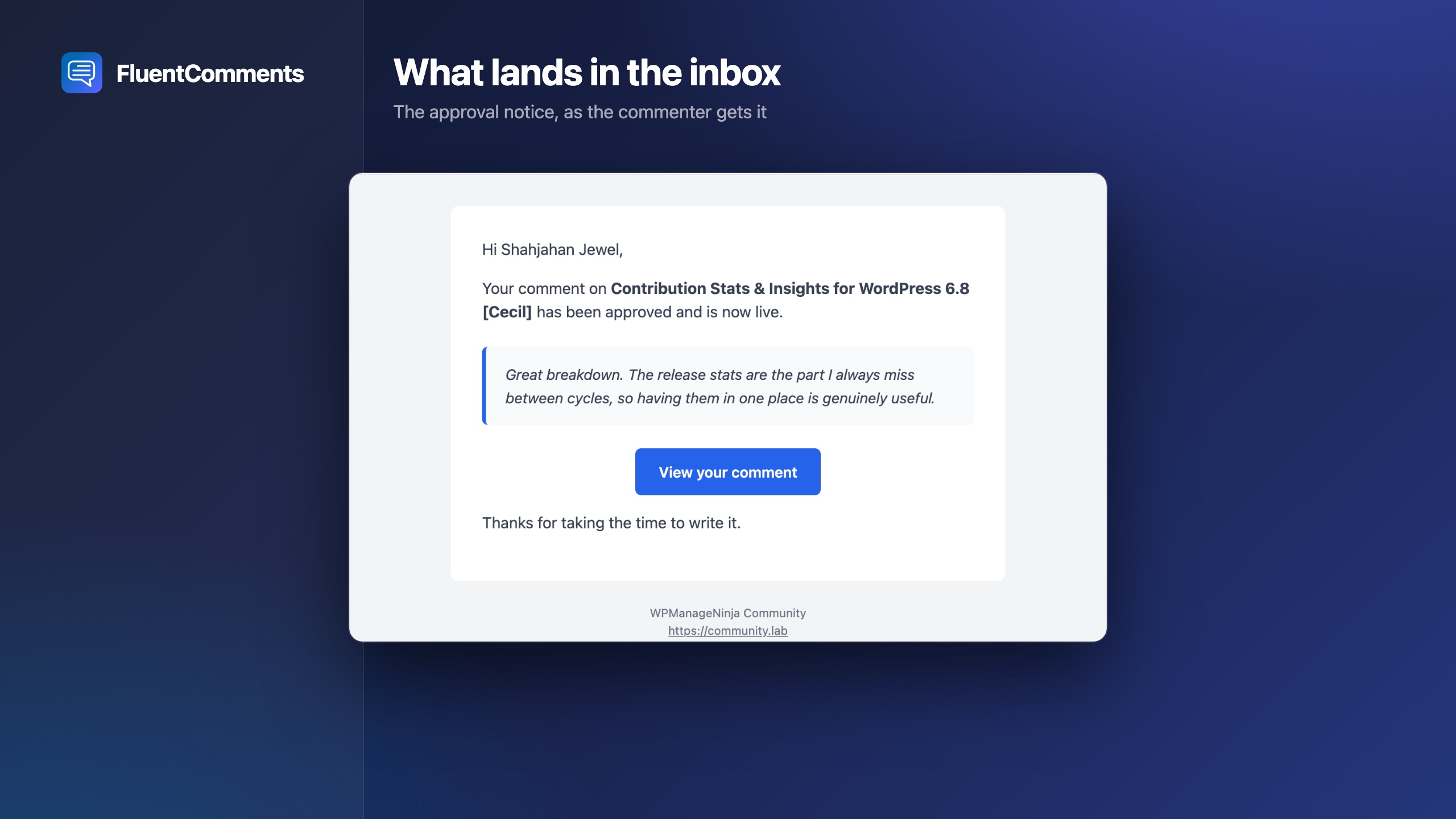
- A held comment was approved. Sent by FluentComments to the commenter.
- Someone replied in their thread. Sent to everyone above the reply.
- A comment landed on their post. Sent to the post author.
- A comment was posted. WordPress’s own notice, rewritten.
- A comment is waiting for review. WordPress’s own moderation notice, rewritten.
- Switch each one on or off from its own row. The switch takes effect immediately, with no save button.
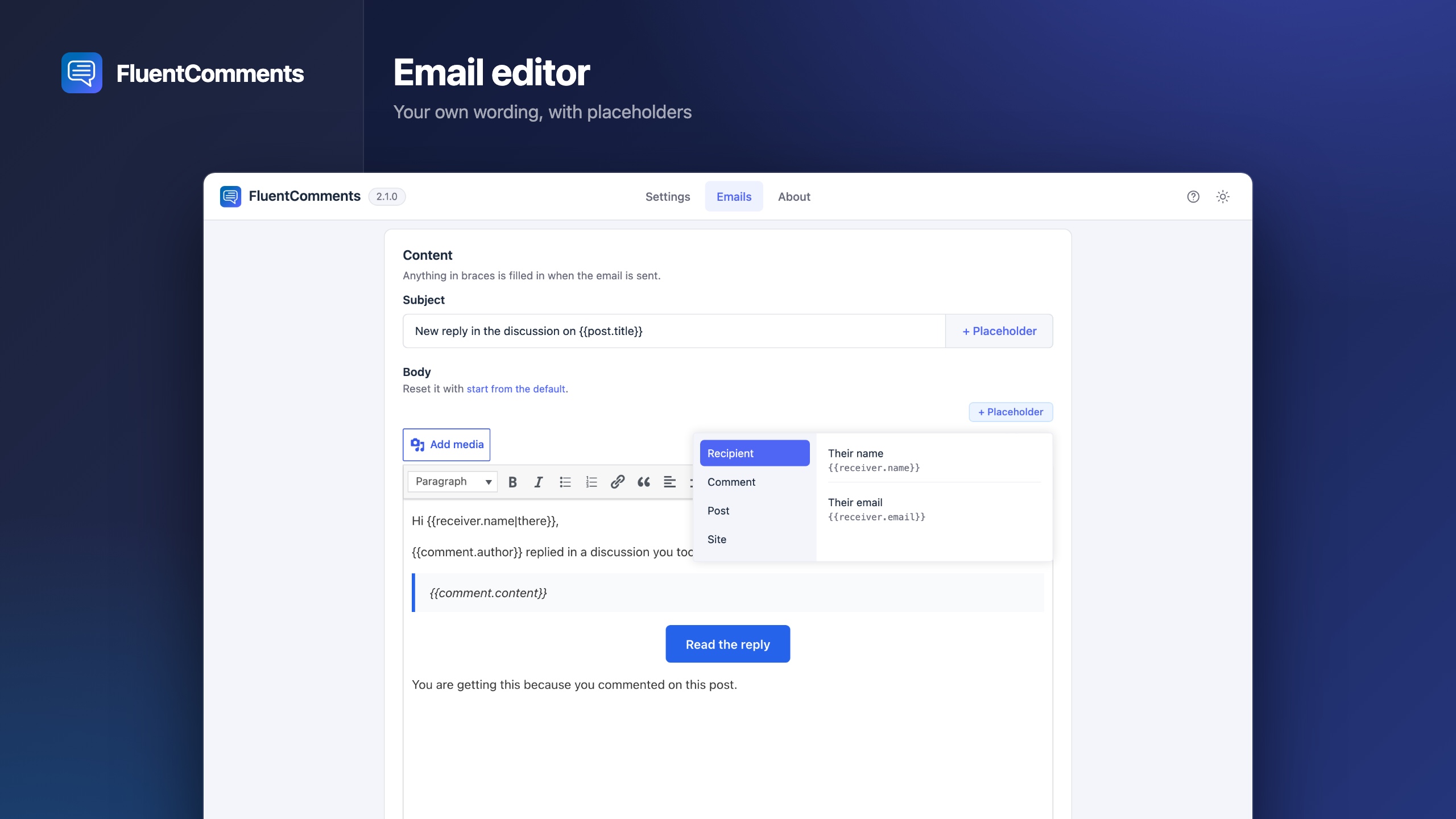
- Edit the subject and body in a real WordPress editor. Smartcodes like
{{comment.author}},{{post.title}},{{receiver.name}}and{{comment.content}}are filled in when the mail goes out. - Preview an email against a real comment from your site before you send anything.
- A shared template designer for your logo, your colors, your footer text, and the From and Reply-To addresses.
- WordPress’s own two notices are left completely alone until you explicitly ask to replace them. Upgrading the plugin never quietly changes an email your site was already sending.
🧩 Block themes, classic themes, page builders
- A FluentComments block for the Site Editor, with its own title, avatar, color and border radius controls
- A
[fluent_comments]shortcode that works anywhere, including page builders - On a classic theme it takes over
comments_templateautomatically, so there is nothing to place - On a block theme the plugin never rewrites your templates for you. Instead, the settings screen works out which template each of your post types renders through, follows its template parts and patterns, and tells you exactly which post types still need the block placed
⚙️ Settings that don’t fight WordPress
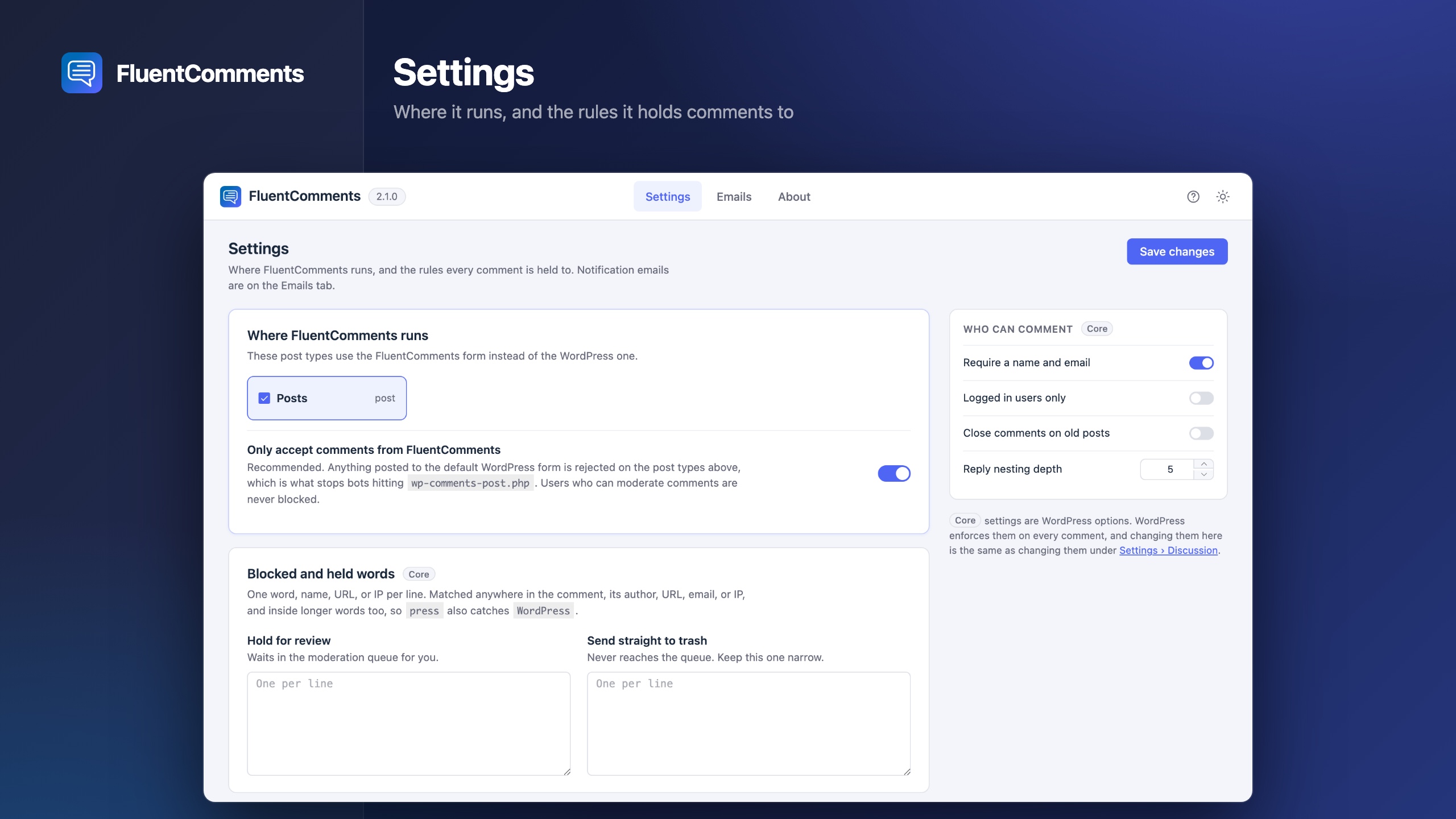
The settings screen puts the WordPress Discussion options that actually matter next to the plugin’s own: the moderation word lists, the link limit, threading depth, who may comment, and closing comments on old posts.
They are read and written in place as real WordPress options, never copied. This screen and Settings › Discussion can never disagree with each other.
🚀 Built for cached sites
Assume every page on your site is served from a full page cache to somebody else. FluentComments does.
- Nothing visitor specific is ever printed into the HTML. No identity, no token, and no security nonce anywhere in the plugin, so a comment form served from cache can never fail with a stale security token.
- The first page of comments is rendered into the page itself, so a visitor who only reads never triggers an uncached request.
- Everything per visitor is fetched on intent, when someone actually goes to comment.
🧑💻 For developers
A small, documented extension API that works identically on both front ends:
fluent_comments/form_fields: render your own fields into the formfluent_comments/validate_submission: reject a submission with aWP_Errorfluent_comments/comment_data: adjust the comment before it reaches WordPressfluent_comments/spam_score: nudge the score up or downfluent_comments/before_processandfluent_comments/after_added_comment: act around the insert
Every comment goes through wp_handle_comment_submission(), the same function wp-comments-post.php uses, so core’s validation, moderation rules and comment_post hook all behave exactly as they always did.
100% free, forever
No pro version. No locked features. No “upgrade to unlock”. Every feature described on this page is in the plugin you are about to install, and the source is on GitHub under GPLv2.
Contribute on GitHub
FluentComments is fully open source. If you want to contribute, or just report a bug, you are very welcome. The repository is on GitHub.
Other plugins by the WPManageNinja team
- FluentCart – Simple and Powerful eCommerce Plugin for WordPress
- Fluent Forms – Fastest Contact Form Builder Plugin for WordPress
- Fluentsmtp – le plugin SMTP le plus avancé pour WordPress
- FluentCRM - Email Marketing Automation et CRM plugin pour WordPress
- Tables Ninja – Meilleur plugin WP DataTables pour WordPress
Installation
- Install FluentComments from the WordPress.org plugin directory, or upload the plugin folder to
/wp-content/plugins/. - Activate FluentComments from the Plugins page.
- Go to Comments › FluentComments and pick the post types it should handle. That is the whole setup.
If your theme is a block (FSE) theme, there is one extra step. Open the Site Editor, edit the template your posts render through, replace the Comments block with the FluentComments block, and save. Or drop the [fluent_comments] shortcode wherever you want comments. The settings screen checks this for you and tells you which post types still need it.
Journal de modifications
All five comment notification emails can now be edited and previewed on one screen, there is a block for FSE themes, spam protection is much stronger, and comments are now readable by search engines. Two things to know: a name and email address are now always required from commenters who are not logged in, whatever your WordPress Discussion setting says; and if another anti-spam or CAPTCHA plugin adds a field to your comment form, its check no longer runs.
2.1.1
- Fixed: UI color issues for the Radio Buttons.
- Fixed: UI Flickering issues for the comment forms.
2.1.0 (Date: Aug 31, 2026)
- New: an Emails screen. All five comment notification emails can be edited, previewed against a real comment, and switched on or off from one place.
- New: a shared email template designer for your logo, colors, footer text and From address.
- New: a FluentComments block for block (FSE) themes. The settings screen tells you which post types still need it.
- New: comments load in pages with a “Load more” button instead of all at once.
- New: the most useful WordPress Discussion settings now sit on the FluentComments screen.
- New: a rebuilt admin screen with light, dark and system appearance modes.
- Improved: much stronger spam protection, and a suspicious comment is now held for moderation instead of being turned away.
- Improved: comments are now written into the page itself instead of being fetched by JavaScript after it loads, so search engines and link previews can read them.
- Improved: the whole front end is translatable. Previously it was hard coded English.
- Changed: a name and email address are now always required from commenters who are not logged in, whatever the WordPress “Comment author must fill out name and email” setting says. That setting has been removed from the FluentComments screen; it still applies to any post type FluentComments is not handling. Every notification email is addressed by the commenter’s email, so an anonymous comment quietly opts its author out of the replies everyone else in the thread receives.
- Fixed: comments that WordPress or Akismet marked as spam or trash could still trigger notification emails containing their contents.
- Fixed: re-approving a comment sent its notifications a second time.
- Fixed: pingbacks and trackbacks were emailed as if somebody had left a comment.
- Fixed: comments could be submitted on post types FluentComments was not switched on for.
- Fixed: on a cached site, the comment form could be served to the wrong visitor – showing a logged in reader the login notice, or leaving an anonymous one without the name and email fields.
- Fixed: comment times were saved in server time instead of UTC.
- Fixed: post authors got two emails for the same comment.
- Fixed: the comment form showed on posts with comments closed.
- Fixed: reply depth ignored your WordPress discussion settings.
- Fixed: the block’s “Show Avatars” option had no effect.
- Fixed: pingbacks and trackbacks appeared in the comment list.
- Please note: if you use another anti-spam or CAPTCHA plugin on your comment form, its check no longer runs on the FluentComments form. Akismet is not affected and keeps working.
2.0.0 (Date: Jul 07, 2025)
- Added support for FSE themes
- Added email notifications for admins, authors and commenters
- Added an option to enable or disable email notifications
- Advanced spam protection with cryptographic tokens
1.0.1 (Date: May 18, 2024)
- Added shortcode support for FSE themes
- Fixed minor CSS issues
- Checking logged in requirement for the comment form
1.0.0 (Date: Sep 30, 2023)
- Communiqué initial
Captures d'écran
Pour les développeurs
Est-ce votre plugin ? Montrez les chiffres.
Ajoutez un badge en direct à votre site, docs ou github readme. Il se met à jour par lui-même - aucun compte n'est nécessaire.
Best FluentComments alternatives
All ajax comments plugins →



FAQ
FluentComments: quick answers
Réponses directes, extraites des données en direct WordPress.org.
Source : WordPress.org
Is FluentComments free?
Yes. FluentComments is free to download and use from the official WordPress.org plugin directory.
Is FluentComments safe to use in 2026?
FluentComments is a solid plugin choice in 2026, with a few things worth checking first. It runs on 800+ sites, is rated 4.4/5 and was last updated 3 months ago, and scores 76/100 on our health check.
How many websites use FluentComments?
FluentComments is active on 800+ WordPress websites and has been downloaded 8,304 times since it launched in September 2023. It was downloaded 590 times in the last 30 days.
Does FluentComments work with WordPress 7.1?
Yes. The developer has tested FluentComments up to WordPress 7.1.5, the latest release. It requires WordPress 6.5 or newer.
What PHP version does FluentComments need?
FluentComments requires PHP 7.4 or higher. Most hosts run PHP 8.x today, so it works on any modern WordPress hosting.
When was FluentComments last updated?
The latest version, 2.1.1, was released on September 1, 2026 (3 months ago).
Who makes FluentComments?
FluentComments is developed and maintained by Shahjahan Jewel.
What are the best alternatives to FluentComments?
The most popular alternatives to FluentComments are Comments – wpDiscuz (60K+ installs), Simple Comment Editing (2K+ installs) and Epoch (60+ installs).
Propulsé par PageForge
Un modèle et une feuille de calcul. Une vraie page pour chaque recherche.
PageForge transforme chaque ligne d'un CSV en une page WordPress avec son propre titre, URL, SEO et schéma, construit sur la mise en page que vous Déjà conçu. Gratuit sur WordPress.org.
- CSV et XLSX, plus Google Sheets sur les professionnels et les entreprises
- Son propre titre, URL, SEO champs et schéma pour chaque page
- Fonctionne avec l'éditeur de blocs, Elementor, Divi et Avada
- Gratuit sur WordPress.org, pas de carte de crédit