


DocumentCloud
Embed DocumentCloud resources in WordPress content.

Envisager une alternative
DocumentCloud shows warning signs in 2026 — compare the alternatives below before installing. It runs on 1K+ sites, is rated 4/5 and was last updated 1 year ago, and scores 40/100 on our health check.
- Momentum — downloads up 36.4% vs the previous 30 days
- Très peu de critiques jusqu'à présent
- Pas de mise à jour depuis plus d'un an
- Uniquement testé jusqu'à WordPress 6,8 (le dernier est de 7,1)
Téléchargements quotidiens
Les pics de téléchargement suivent généralement une nouvelle version - chaque site qui met à jour automatiquement compte comme un téléchargement.
Classements
Where DocumentCloud stands todayWordPress.org Classements de recherche
Position en direct dans la recherche de plugins, Top 100| Mot-clé | Position |
|---|---|
| documentcloud | #1 |
| documents | >100 |
| journalism | #3 |
| reporting | >100 |
| research | #74 |
Adoption de version
Part de sites actifs par version.
Répartition des notes
★★★★★ ★★★★★ 4 sur 1 avis
About DocumentCloud
From the official readme · v0.7.0Description
DocumentCloud is a service that allows journalists to analyze, annotate and publish documents, hosted by Investigative Reporters & Editors. Initial development of this plugin supported by NPR as part of the StateImpact project.
This plugin allows you to embed DocumentCloud resources using either the raw URL on its own line:
Here's something you should really take a look at:

https://www.documentcloud.org/documents/282753-lefler-thesis.html

Isn't that interesting?
Or a custom shortcode:
[documentcloud url="https://www.documentcloud.org/documents/282753-lefler-thesis.html"]
When you save, WordPress fetches and stores the actual embed code HTML from the DocumentCloud servers using oEmbed. You can freely toggle between visual and HTML mode without mangling embed code, and your embed will always be up to date with the latest embed code.
By default, documents will have a responsive width (it will narrow and widen as necessary to fill available content area) and use the theme’s default height. If you want to override this, you can either set responsive="false" or explicitly set a width:
[documentcloud url="https://www.documentcloud.org/documents/282753-lefler-thesis.html" width="600"]
You can set your own defaults in Settings > DocumentCloud, but default widths will be ignored unless responsive is disabled:
[documentcloud url="https://www.documentcloud.org/documents/282753-lefler-thesis.html" responsive="false"]
To embed a single page, use any page-specific URL. Pages ignore width/height and always act responsively:
[documentcloud url="https://www.documentcloud.org/documents/282753-lefler-thesis.html#document/p1"]
To embed a note, use any note-specific URL. Notes ignore width/height and always act responsively:
[documentcloud url="https://www.documentcloud.org/documents/282753-lefler-thesis.html#document/p1/a53674"]
To control which view is displayed by default, use the mode parameter:
[documentcloud url="https://www.documentcloud.org/documents/282753-lefler-thesis.html" mode="notes"]
[documentcloud url="https://www.documentcloud.org/documents/282753-lefler-thesis.html" mode="text"]
[documentcloud url="https://www.documentcloud.org/documents/282753-lefler-thesis.html" mode="grid"]
Here’s the full list of embed options you can pass via shortcode attributes; some are specific to the type of resource you’re embedding.
All resources:
url(required, string): Full URL of the DocumentCloud resource.container(string): ID of element to insert the embed into; if excluded, embedder will create its own container.
Documents only:
height(integer): Maximum height (in pixels) of the embed.width(integer): Maximum width (in pixels) of the embed.page(integer): Page number to have the document scroll to by default.note(integer): ID of the note that the document should highlight by default.notes(boolean): Hide or show notes.search(boolean): Hide or show search form.sidebar(boolean): Hide or show sidebar.pdf(boolean): Hide or show link to download original PDF.text(boolean): Hide or show text tab.zoom(boolean): Hide or show zoom slider.mode(string): Display mode for the document viewer. Valid values:document,notes,text,grid. Controls which view is shown by default.format(string): Indicate to the theme that this is a wide asset by setting this towide. Defaultsnormal.
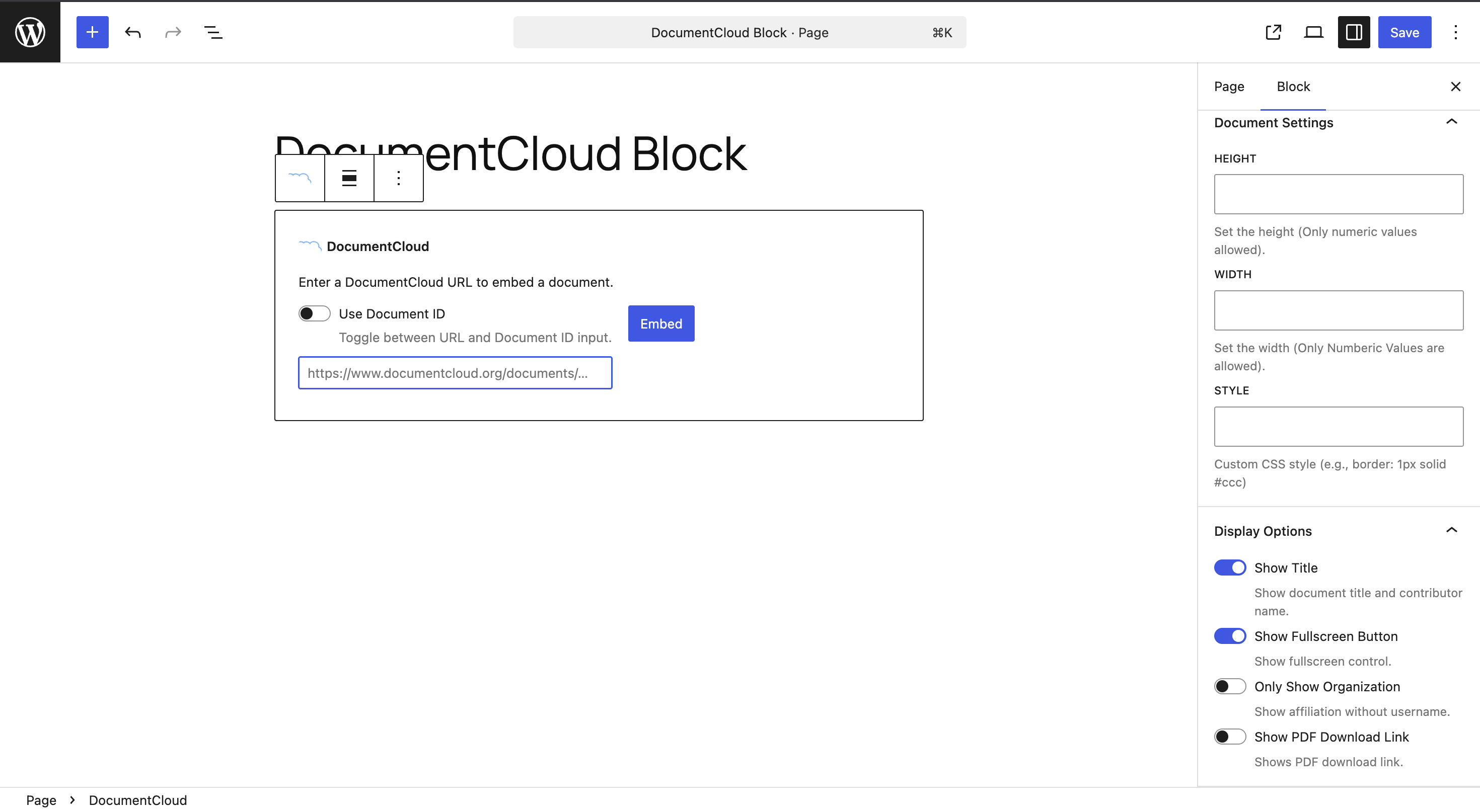
Or as a Gutenberg Block:
DocumentCloud
Here’s the list of settings that can be used for the block:
– WIDTH (number): Sets the width of the document (optional)
– HEIGHT (number): Sets the height of the document (optional)
– STYLE (string): Adds additional style to the embedded document (optional)
The following options can only be used for Documents:
– Show Title (toggle): Determines whether to show the title of the embedded document
– Show FullScreen Button (toggle): Determines whether to show a full screen icon on the document
– Only Show Organization (toggle): Determines whether to only show the organization name that published the document.
– Show PDF Download Link (toggle): Determines whether to show the download as pdf icon for documents.
Note – The default width and height from the Settings does not work for the Gutenberg Block.
You can read more about publishing and embedding DocumentCloud resources on https://www.documentcloud.org/help/publishing.
Installation
- Upload the contents of the plugin to
wp-content/plugins/documentcloud - Activate the plugin through the “Plugins” menu
- In your posts, embed documents, pages, or notes using the DocumentCloud button or the
[documentcloud]shortcode - Optional: Set a default width/height for all DocumentCloud embeds (which can be overridden on a per-embed basis with the
height/widthattributes) at Settings > DocumentCloud. (This default width will only be used if you setresponsive="false"on an embed.)
Upgrading from Navis DocumentCloud: If you’re currently using the Navis DocumentCloud plugin (from which this plugin was built), you’ll want to deactivate or delete it before installing this plugin.
Journal de modifications
Adds support for embedding notes and enables caching.
0.7.0
- Removes the
responsiveURL parameter option.
All embeds are rendered responsively, so this option is now deprecated.
The height and width of the embed can still be controlled with their respective options. - Add
modeparameter to control document viewer display mode. Valid values:document,notes,text,grid.
0.6.0
- Add Gutenberg block for embedding DocumentCloud documents resonating a functionality similar to the shortcode.
- Update the shortcode to support the following attributes
onlyshoworg– When set to 1 it only displays the organization namepdf– When set to 1 it shows a pdf download iconshowfullscreen– When set to 1 it displays a full screen icon.title– When set to 1 it displays the title of the document.
- Allow setting the query parameter attributes when directly embedding the url in Embed block.
0.5.1
- Expand regex support to catch more DocumentCloud URLs
0.5.0
- Add support for the DocumentCloud beta
0.4.3
- Separate the oEmbed config options (provided as params to the endpoint) from the embed config options (encoded as params on the
url) (#48) - Rename
default_pageanddefault_noteoptions back topageandnote(#47) - Remove
sidebar,text, andpdfdefault values
0.4.2
- Recognize Unicode document slugs (#37)
Captures d'écran
Pour les développeurs
Est-ce votre plugin ? Montrez les chiffres.
Ajoutez un badge en direct à votre site, docs ou github readme. Il se met à jour par lui-même - aucun compte n'est nécessaire.
FAQ
DocumentCloud: quick answers
Réponses directes, extraites des données en direct WordPress.org.
Source : WordPress.org
Is DocumentCloud free?
Yes. DocumentCloud is free to download and use from the official WordPress.org plugin directory.
Is DocumentCloud safe to use in 2026?
DocumentCloud shows warning signs in 2026 — compare the alternatives below before installing. It runs on 1K+ sites, is rated 4/5 and was last updated 1 year ago, and scores 40/100 on our health check.
How many websites use DocumentCloud?
DocumentCloud is active on 1K+ WordPress websites and has been downloaded 67,184 times since it launched in April 2015. It was downloaded 3,971 times in the last 30 days.
Does DocumentCloud work with WordPress 7.1?
DocumentCloud is officially tested up to WordPress 6.8.13, while the latest release is 7.1.5. It may still work, but try it on a staging site first.
When was DocumentCloud last updated?
The latest version, 0.7.0, was released on September 24, 2025 (1 year ago).
Who makes DocumentCloud?
DocumentCloud is developed and maintained by muckrock.
Propulsé par PageForge
Un modèle et une feuille de calcul. Une vraie page pour chaque recherche.
PageForge transforme chaque ligne d'un CSV en une page WordPress avec son propre titre, URL, SEO et schéma, construit sur la mise en page que vous Déjà conçu. Gratuit sur WordPress.org.
- CSV et XLSX, plus Google Sheets sur les professionnels et les entreprises
- Son propre titre, URL, SEO champs et schéma pour chaque page
- Fonctionne avec l'éditeur de blocs, Elementor, Divi et Avada
- Gratuit sur WordPress.org, pas de carte de crédit