


Datafeedr API
Connect to the Datafeedr API.

Choix solide
Datafeedr API is a solid plugin choice in 2026, with a few things worth checking first. It runs on 4K+ sites, is rated 4/5 and was last updated 2 months ago, and scores 76/100 on our health check.
- Testé avec le dernier WordPress (7.1)
Comment s'accumule-t-il ?
Côte à côte sur les installations, les mises à jour, les évaluations et le support


Téléchargements quotidiens
Les pics de téléchargement suivent généralement une nouvelle version - chaque site qui met à jour automatiquement compte comme un téléchargement.
Classements
Where Datafeedr API stands todayWordPress.org Classements de recherche
Position en direct dans la recherche de plugins, Top 100| Mot-clé | Position |
|---|---|
| data feed | #79 |
| datafeed | #2 |
| import affiliate products | #27 |
| import csv | #62 |
| import datafeed | #4 |
Adoption de version
Part de sites actifs par version.
Répartition des notes
★★★★★★★★★★ 4 from 13 reviews
About Datafeedr API
From the official readme · v1.4.3Description
Important
The Datafeedr API plugin requires that you have an active Datafeedr API Product subscription. Purchase Subscription.
The Datafeedr API provides access to our database of affiliate products. We have aggregated over 950,000,000 products from over 27,000+ merchants and 35+ affiliate networks. We have indexed and normalized the product data making it easy for you to search for and find products you want to promote on your website.
The Datafeedr API plugin currently integrates with the following plugins:
The Datafeedr API plugin provides the interface to connect to the Datafeedr API and perform the following tasks:
- Configure your API connection settings.
- Select affiliate networks you are a member of.
- Select merchants who have approved you.
- Add your affiliate network affiliate IDs.
- Import/export your selection of affiliate networks and/or merchants.
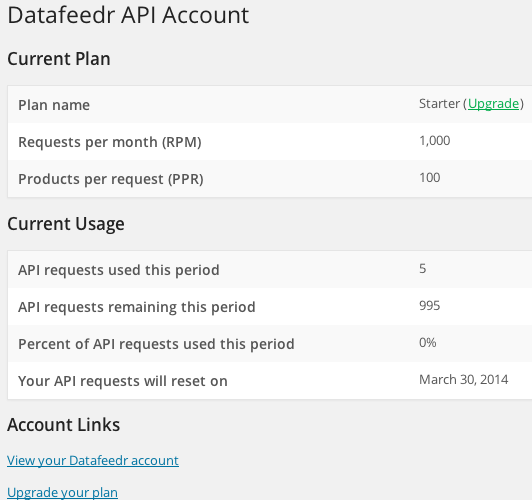
- View your API account usage.
The Datafeedr API plugin was built to be extended. The Datafeedr API plugin contains its own functions that third party developers can use to connect to the Datafeedr API, make search requests or display an ‘advanced search’ form. We encourage other developers to build on top of the Datafeedr API plugin.
Additionally, we have written plugins that integrate the Datafeedr API plugin with WooCommerce.
For personal-use only. Please contact us if you have any questions.
Obligations
- PHP 7.4 or greater
- MySQL version 5.6 or greater
- WordPress memory limit of 256 MB or greater
- PHP’s
CURLenabled - WordPress Cron enabled
- HTTPS support
Installation
This section describes how to install and configure the plugin:
- Téléchargez le dossier
datafeedr-apidans le répertoire/wp-content/plugins/. - Activate the Datafeedr API plugin through the ‘Plugins’ menu in WordPress.
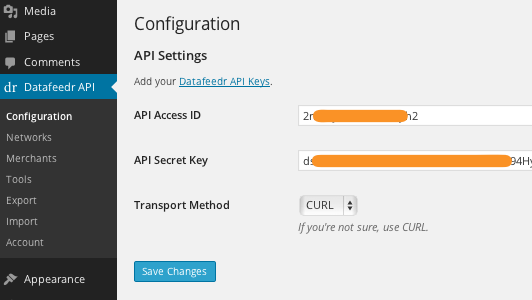
- Enter your Datafeedr API keys here: WordPress Admin Area > Datafeedr API > Configuration
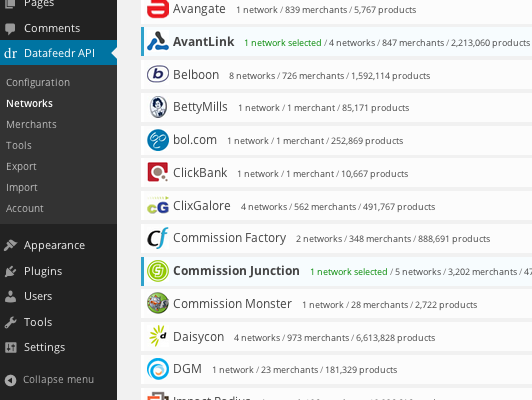
- Select the affiliate networks you are a member of here: WordPress Admin Area > Datafeedr API > Networks
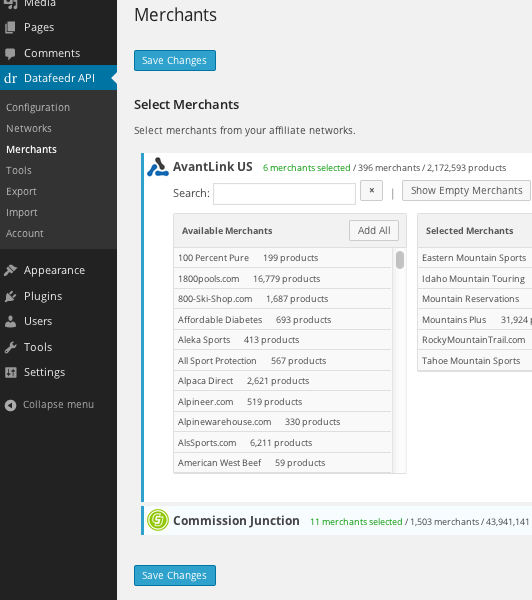
- Select the merchants who have approved you here: WordPress Admin Area > Datafeedr API > Merchants
Journal de modifications
Aucun
1.4.3 – 2026/10/05
- Security: The search form AJAX handler now requires a valid nonce and the
edit_postscapability (filterable viadfrapi_search_form_capability). Previously any logged-in user could call it. - Security: Search form AJAX now only accepts numeric network and merchant IDs.
- Security: All requests to the Datafeedr API now use HTTPS.
- Security: Requests to the Effiliation API now use HTTPS.
- Security: The Import page no longer unserializes objects. Imported network and merchant data is validated before it is saved.
- Security: Network affiliate IDs and tracking IDs, merchant IDs and Configuration settings are now sanitized when saved.
- Security: Escaped network names, merchant names, affiliate IDs, tracking IDs, saved search form values, API error messages and the API query display in the WordPress Admin Area.
- Security: The merchant search box on the Merchants page and in the search form popups no longer renders names as HTML.
- Security: “Delete Cached API Data” and “Test Connection” on the Tools page now require the
manage_optionscapability (filterable viadfrapi_tools_capability). - Security: The Awin API token is now sent in an Authorization header instead of the URL.
- Security: Image downloads no longer disable SSL certificate verification when retrying a failed download.
- Security: Added direct file access protection to remaining PHP files.
- Datafeedr API admin notices and the Datafeedr support (HelpScout Beacon) link are now only shown to users with the
manage_optionscapability. - Removed unused settings registrations from the Tools and Export pages.
- Fixed fatal errors when an XML API response cannot be parsed and when displaying certain API errors on the Merchants page.
- Fixed API errors on the Networks and Merchants pages displaying “Array” instead of the error details.
- Added
dfrapi_sanitize_setting_text(),dfrapi_sanitize_networks_option()anddfrapi_sanitize_merchants_option()helper functions.
1.4.2 – 2026/06/26
- Fixed Awin merchant list failing with a misleading credentials error when Awin’s API rate limit (20 requests/minute) was hit. The joined-programs list is now cached, and a 429 response triggers a short back-off instead of re-calling Awin on every page load.
- Added the Awin joined-programs cache and rate-limit back-off transients to the “Delete Cached API Data” tool so they can be purged.
1.4.1 – 2026/05/04
- Fixed Deprecated notice for dfrapi_admin_notice() function.
1.4.0 – 2026/03/23
- Added support for Amazon’s Creators API program.
1.3.25 – 2025/02/12
- Updated API Version selection to “stable” and “beta” and disabled the “beta” option as it’s not currently available.
1.3.24 – 2025/02/10
- Fixed drop down for Merchant Limit search filter
Captures d'écran
Pour les développeurs
Est-ce votre plugin ? Montrez les chiffres.
Ajoutez un badge en direct à votre site, docs ou github readme. Il se met à jour par lui-même - aucun compte n'est nécessaire.
Best Datafeedr API alternatives
All data feed plugins →FAQ
Datafeedr API: quick answers
Réponses directes, extraites des données en direct WordPress.org.
Source : WordPress.org
Is Datafeedr API free?
Yes. Datafeedr API is free to download and use from the official WordPress.org plugin directory.
Is Datafeedr API safe to use in 2026?
Datafeedr API is a solid plugin choice in 2026, with a few things worth checking first. It runs on 4K+ sites, is rated 4/5 and was last updated 2 months ago, and scores 76/100 on our health check.
How many websites use Datafeedr API?
Datafeedr API is active on 4K+ WordPress websites and has been downloaded 261,281 times since it launched in February 2014. It was downloaded 1,274 times in the last 30 days.
Does Datafeedr API work with WordPress 7.1?
Yes. The developer has tested Datafeedr API up to WordPress 7.1.5, the latest release. It requires WordPress 3.8 or newer.
What PHP version does Datafeedr API need?
Datafeedr API requires PHP 7.4 or higher. Most hosts run PHP 8.x today, so it works on any modern WordPress hosting.
When was Datafeedr API last updated?
The latest version, 1.4.3, was released on October 5, 2026 (2 months ago).
Who makes Datafeedr API?
Datafeedr API is developed and maintained by datafeedr.
What are the best alternatives to Datafeedr API?
The most popular alternatives to Datafeedr API are DataFeedWatch Connector for… (600+ installs), JSON Data Feed (10+ installs) and XML Data Feed for Shopbot C… (<10 installs).
Propulsé par PageForge
Un modèle et une feuille de calcul. Une vraie page pour chaque recherche.
PageForge transforme chaque ligne d'un CSV en une page WordPress avec son propre titre, URL, SEO et schéma, construit sur la mise en page que vous Déjà conçu. Gratuit sur WordPress.org.
- CSV et XLSX, plus Google Sheets sur les professionnels et les entreprises
- Son propre titre, URL, SEO champs et schéma pour chaque page
- Fonctionne avec l'éditeur de blocs, Elementor, Divi et Avada
- Gratuit sur WordPress.org, pas de carte de crédit