


Block Editor Bootstrap Blocks
Fully responsive Bootstrap 5 blocks, components and extends for Gutenberg

Choix
Yes — Block Editor Bootstrap Blocks is a safe, well-maintained plugin to use in 2026. It runs on 1K+ sites, is rated 4.5/5 and was last updated 1 week ago, and scores 80/100 on our health check.
- Développé activement — Dernière mise à jour il y a 1 semaine
- Testé avec le dernier WordPress (7.1)
- Momentum — downloads up 160.9% vs the previous 30 days
Comment s'accumule-t-il ?
Côte à côte sur les installations, les mises à jour, les évaluations et le support


Téléchargements quotidiens
Les pics de téléchargement suivent généralement une nouvelle version - chaque site qui met à jour automatiquement compte comme un téléchargement.
Classements
Where Block Editor Bootstrap Bloc… stands todayWordPress.org Classements de recherche
Position en direct dans la recherche de plugins, Top 100| Mot-clé | Position |
|---|---|
| breakpoints | #19 |
| columns | #87 |
| grid | >100 |
| la mise en page | >100 |
| sensible | >100 |
Adoption de version
Part de sites actifs par version.
Répartition des notes
★★★★★★★★★★ 4.5 from 8 reviews
About Block Editor Bootstrap Blocks
From the official readme · v6.9.3Description
Fully responsive Bootstrap 5 blocks, components and extends for Gutenberg
Now you can use Gutenberg editor as full-featured website builder.
Thanks to Bootstrap 5 – the world’s most popular front-end open source toolkit – you can build your layouts in 6 different breakpoints, so they will work perfectly on each device, no matter if your website visitor is on the phone, tablet, laptop or desktop.
You can use Bootstrap row and columns blocks with detailed settings for each breakpoint and autocomplete extension for bootstrap classes
- Option to load Bootstrap 5 css to editor from plugin if your theme doesn’t contain it
- Option to load Bootstrap 5 css to frontent from plugin if your theme doesn’t contain it
- Option to load Bootstrap 5 js to frontent from plugin if your theme doesn’t contain it
- Option to automatically add .container class to inner container of fullwidth group or cover block
- Option to remove .is-layout-constrained class from fullwidth group block
- Custom breakpoints control – add, remove or change any breakpoint
- Optimize Bootstrap CSS file by disabling not needed options and parts of Bootstrap
- Bootstrap container block
-
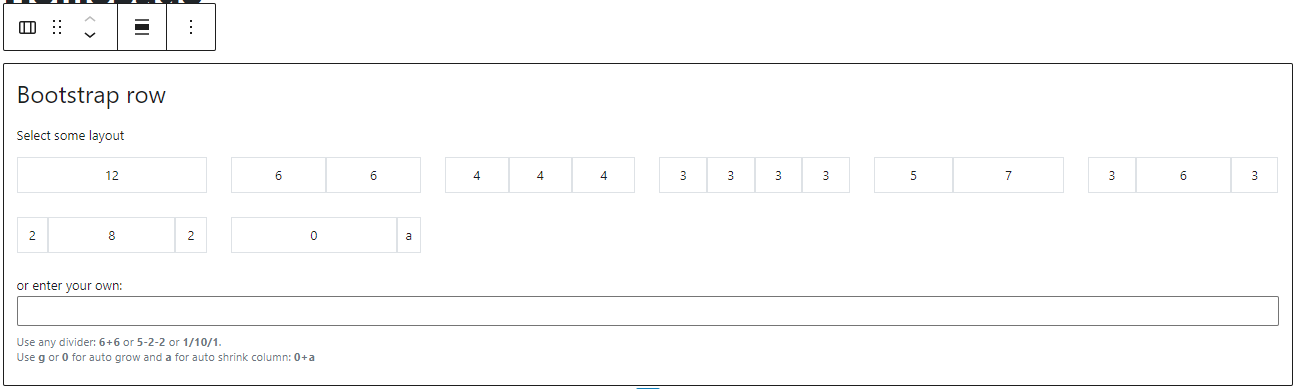
Bootstrap row block
- Use quick selector to instantly select row while editing
- Use predefined layouts
- Generate custom layout instantly just by adding columns counts, eg. 2+8+2
- Use any amount of columns
-
Use 6 different breakpoints to setup:
- Vertical alignment (align-items-*)
- Horizontal alignment (justify-content-*)
- Gutter (g-*)
- Row columns (row-columns-*)
-
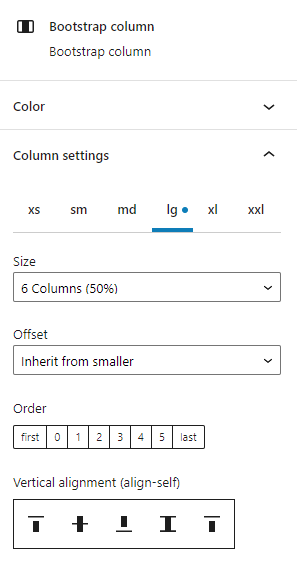
Bootstrap column block
- Use quick selector to instantly select column while editing
-
Use 6 different breakpoints to setup:
- Size (col-*)
- Offset (offset-*)
- Order (order-*)
- Vertical alignment (align-self-*)
-
Bootstrap accordion block
- Two styles – default and flush
- Always open option
- First open on load option
- Unlimited amount of accordion items
- Unlimited accordion item inner blocks content
-
Bootstrap tabs block
- Three styles – tabs, pills and text
- Possibility to reorder tabs
- Possibility to add and remove tabs
- Unlimited amount of tabs items
- Unlimited tab item inner blocks content
- Component for margin and padding Spacing for any block for 6 different breakpoints
- Component for Display visibility – display per breakpoints, print display, logged in/out display
- Component for Size – width, min-width, max-width, height, min-height, max-height, aspect-ratio for every breakpoint
- Component for Flex properties – control flex containers and item
- Component for Position properties – control position and z-index
- Component for Snapping for group block, so you can push some content out of container (or just background)
- Component for Alignment, so you can align your text to the left for PC but to the center for mobile
- Component for autocomplete Bootstrap classes
- Extended formats – uppercase, capitalize, lowercase, stretched-link, mark, non-breaking space (nbsp) and soft-hypen (shy) inserter
Installation
- Téléchargez les fichiers du plug-in dans le répertoire
/wp-content/plugins/ou installez directement le plugin via l'écran des plugins WordPress. - Activez le plugin via l'écran "Plugins" dans WordPress
Journal de modifications
6.9.3
- tested on WP 7.1
- requires WordPress 6.3+
- container, row and column blocks are position static in the editor (as on the frontend), so absolutely positioned inner blocks are placed correctly; selection outline matches core look and quick-select tags use CSS anchor positioning
- fix duplicated accordion item IDs after copying or moving accordion items in the editor
- block IDs (tempID, accordion and tabs anchors) are no longer regenerated on every editor load – post is not marked as changed just by opening it and anchor links keep working; new ID is generated only for new or copied blocks
- fix copied tabs block sharing the same IDs with the original
- frontend CSS values are validated instead of HTML escaped – fixes quotes (eg. grid-template-areas) and > in bootstrap_css_parent_selector, trailing !important is supported
- security: template loader doesn’t print server file path when template file is missing
- fix missing exit after redirect to settings page on plugin activation
- row layouts filter (bootstrap.row.layouts, old misspelled bootrap.row.layouts still works) supports whole copied row block markup as a layout
- new JS filters bootstrap.row.autocenterSingleColumn and bootstrap.container.autoselectParagraph
- removed shorthash dependency (generated IDs stay the same)
- removed paragraph / headings keyboard shortcuts (shift+alt+[1..7]) – they are part of WordPress core since 7.1
- removed own Ctrl/Cmd+Shift+Space shortcut for non-breaking space – WordPress core provides it (nbsp toolbar button stays)
- “Highlight” format renamed to “Mark” so it is not confused with core Highlight (text color) format
- removed fallbacks for __experimentalUseInnerBlocksProps (not needed for WordPress 6.3+)
- editor performance: snapping measures the layout only for snapped group / cover blocks
- editor performance: settings panels are rendered only for the selected block, and bootstrap extensions re-render (and rebuild editor CSS) only when their own attributes change
- bootstrap extensions are not added to synced patterns (core/block), shortcodes and missing blocks – new JS filter bootstrap.extensions.excludedBlocks
- arrow up / down keys change values like in spacing (Shift 10, Ctrl 100, Alt 0.1) also in Position (Z-index, Top, Right, Bottom, Left), Size (width, min-width, max-width, height, min-height, max-height), Flex container Gap, Flex item Flex basis and Grid item Order
- fix Row block in the editor: Flex container (gap, direction, wrap, justify / align), Grid container and Display (eg. grid, flex) settings are applied to the inner .row element like on the frontend, not to the editor block wrapper – new JS filter bootstrap.editor.layoutChildSelector
- fix bootstrap classes (spacing, display, flex, grid, position, size, snapping, bootstrap classes) not applied on the frontend for dynamic blocks rendered by PHP, eg. Site Logo, Site Title, Navigation – new PHP filter bootstrap_block_classes
6.9.2
- now you can specify anchor ID for every bootstrap tab and then use it in URL hash eg. with JS: bootstrap.Tab.getOrCreateInstance(‘#your-id’).show()
- change blocks apiVersion to version 3
6.9.1
- added semicolon for inline scripts to fix some minifications
- new transform-origin manipulation in Position controls
6.9
- tested on WP 6.9
- added Reset button for controls
- added inline-grid to Display options
- added controls for Grid containers and items
- spacing indicators moved from :after to :before and hidden when child selected
- Position is not !important in editor, so it will not jump on (de)select
- rename Experiments settings to JavaScript optimization
- PRO ONLY: new toolbar quick controls for Text Color and Font Size – can be disabled in settings
- PRO ONLY: new Spacing control UI allowing multiple template selection
- PRO ONLY: improvements for copy-paste settings
6.8
- tested on WP 6.8
- added interactivity support for every block
- new apply_filters( ‘bootstrap_css_parent_selector’, ‘body’ ) to change CSS selector specificity for generated styles
- new transform manipulation in Position controls
6.6.2
- sanitize to prevent XSS
- show active dot on XS with gutter 0 for a row
- show active dot when Row columns selected for a row
Captures d'écran



Pour les développeurs
Est-ce votre plugin ? Montrez les chiffres.
Ajoutez un badge en direct à votre site, docs ou github readme. Il se met à jour par lui-même - aucun compte n'est nécessaire.
Best Block Editor Bootstrap Blocks alternatives
All breakpoints plugins →

FAQ
Block Editor Bootstrap Blocks: quick answers
Réponses directes, extraites des données en direct WordPress.org.
Source : WordPress.org
Is Block Editor Bootstrap Blocks free?
Yes. Block Editor Bootstrap Blocks is free to download and use from the official WordPress.org plugin directory.
Is Block Editor Bootstrap Blocks safe to use in 2026?
Yes — Block Editor Bootstrap Blocks is a safe, well-maintained plugin to use in 2026. It runs on 1K+ sites, is rated 4.5/5 and was last updated 1 week ago, and scores 80/100 on our health check.
How many websites use Block Editor Bootstrap Blocks?
Block Editor Bootstrap Blocks is active on 1K+ WordPress websites and has been downloaded 22,576 times since it launched in July 2021. It was downloaded 1,195 times in the last 30 days.
Does Block Editor Bootstrap Blocks work with WordPress 7.1?
Yes. The developer has tested Block Editor Bootstrap Blocks up to WordPress 7.1.5, the latest release. It requires WordPress 6.3 or newer.
What PHP version does Block Editor Bootstrap Blocks need?
Block Editor Bootstrap Blocks requires PHP 7.4 or higher. Most hosts run PHP 8.x today, so it works on any modern WordPress hosting.
When was Block Editor Bootstrap Blocks last updated?
The latest version, 6.9.3, was released on November 21, 2026 (1 week ago).
Who makes Block Editor Bootstrap Blocks?
Block Editor Bootstrap Blocks is developed and maintained by kubiq.
What are the best alternatives to Block Editor Bootstrap Blocks?
The most popular alternatives to Block Editor Bootstrap Blocks are Custom Breakpoints for Elem… (300+ installs), Bootstrap Blocks for WP Edi… (200+ installs) and Blocks Grid Builder For Boo… (10+ installs).
Propulsé par PageForge
Un modèle et une feuille de calcul. Une vraie page pour chaque recherche.
PageForge transforme chaque ligne d'un CSV en une page WordPress avec son propre titre, URL, SEO et schéma, construit sur la mise en page que vous Déjà conçu. Gratuit sur WordPress.org.
- CSV et XLSX, plus Google Sheets sur les professionnels et les entreprises
- Son propre titre, URL, SEO champs et schéma pour chaque page
- Fonctionne avec l'éditeur de blocs, Elementor, Divi et Avada
- Gratuit sur WordPress.org, pas de carte de crédit