


Gestionnaire de redirection avancée 301
Manage 301, 302, 307 and 308 redirects, serve 403, 410 and 451 HTTP status codes, monitor 404 errors, and fix broken links.

Choix solide
Advanced Redirect Manager 301 is a solid plugin choice in 2026, with a few things worth checking first. It runs on 70+ sites, is rated 5/5 and was last updated 2 weeks ago, and scores 75/100 on our health check.
- Développé activement — Dernière mise à jour il y a 2 semaines
- Testé avec le dernier WordPress (7.1)
- Petite base d'utilisateurs (plus de 70 installations actives)
- Très peu de critiques jusqu'à présent
Comment s'accumule-t-il ?
Côte à côte sur les installations, les mises à jour, les évaluations et le support


Téléchargements quotidiens
Les pics de téléchargement suivent généralement une nouvelle version - chaque site qui met à jour automatiquement compte comme un téléchargement.
Classements
Where Advanced Redirect Manager 3… stands todayWordPress.org Classements de recherche
Position en direct dans la recherche de plugins, Top 100| Mot-clé | Position |
|---|---|
| 301 | #17 |
| 404 | >100 |
| 410 | #11 |
| Liens brisés | #82 |
| réorienter | #54 |
Adoption de version
Part de sites actifs par version.
Répartition des notes
★★★★★ ★★★★★ 5 sur 1 avis
About Advanced Redirect Manager 301
À partir du Lisez-moi officiel · v2.0.0Description
Advanced Redirect Manager is a powerful yet user-friendly WordPress plugin designed to give you complete control over your website’s URLs, redirects, and link health.
Create and manage all standard redirects (301, 302, 307 and 308), including advanced wildcard rules. Serve specific HTTP error responses such as 403 (Forbidden), 410 (Gone) and 451 (Unavailable For Legal Reasons) for content that should no longer be accessible.
The plugin also monitors HTTP errors, including 404 (Not Found), helping you identify broken URLs, inaccessible resources, and potential issues affecting your visitors.
With its configurable 404 logging system, you can enable or disable error recording whenever you need it, without affecting the redirect engine.
Advanced Redirect Manager also includes flexible Query String handling, allowing you to choose exactly how URL parameters are matched and transferred during redirects.
What truly sets the plugin apart is its proactive Link Scanner. Don’t wait for visitors to report broken links. Its intelligent scanner checks your posts and pages, identifying both internal and external broken links before they can negatively affect your website’s user experience and search engine visibility.
Whether you’re migrating a website, restructuring your content, managing complex URL patterns, or maintaining a healthy link structure, Advanced Redirect Manager provides the tools you need in one package.
Why Choose Advanced Redirect Manager?
- Complete URL Control: Manage standard redirects (301, 302, 307 and 308) and serve specific HTTP error responses such as 410 (Gone), 403 (Forbidden) and 451 (Unavailable For Legal Reasons).
- Advanced Query String Management: Choose between Ignore, Exact, Original + Pass and Exact + Pass to control how URL parameters are matched and transferred.
- Powerful Wildcard Redirects: Redirect entire directories or URL patterns using a single rule (e.g. /blog/* to /articles/$1).
- 404 Error Logging: Automatically capture 404 errors and identify URLs visitors are trying to access.
- Configurable 404 Logging: Enable or disable 404 error recording directly from the plugin settings.
- One-Click Redirect Creation: Turn a logged 404 URL into a redirect rule directly from the error log.
- Proactive Broken Link Scanner: Find and fix broken links throughout your content before search engines or visitors encounter them. Checks both internal and external URLs.
- SEO-Friendly: Maintain a clean URL structure, manage redirects correctly and identify broken links that could affect your website’s SEO.
- Performance-Oriented: Built with performance in mind, using WordPress Object Cache to minimize database queries.
- Developer-Friendly: Clean, structured and object-oriented code.
Features in Detail
Redirect Rules Tab
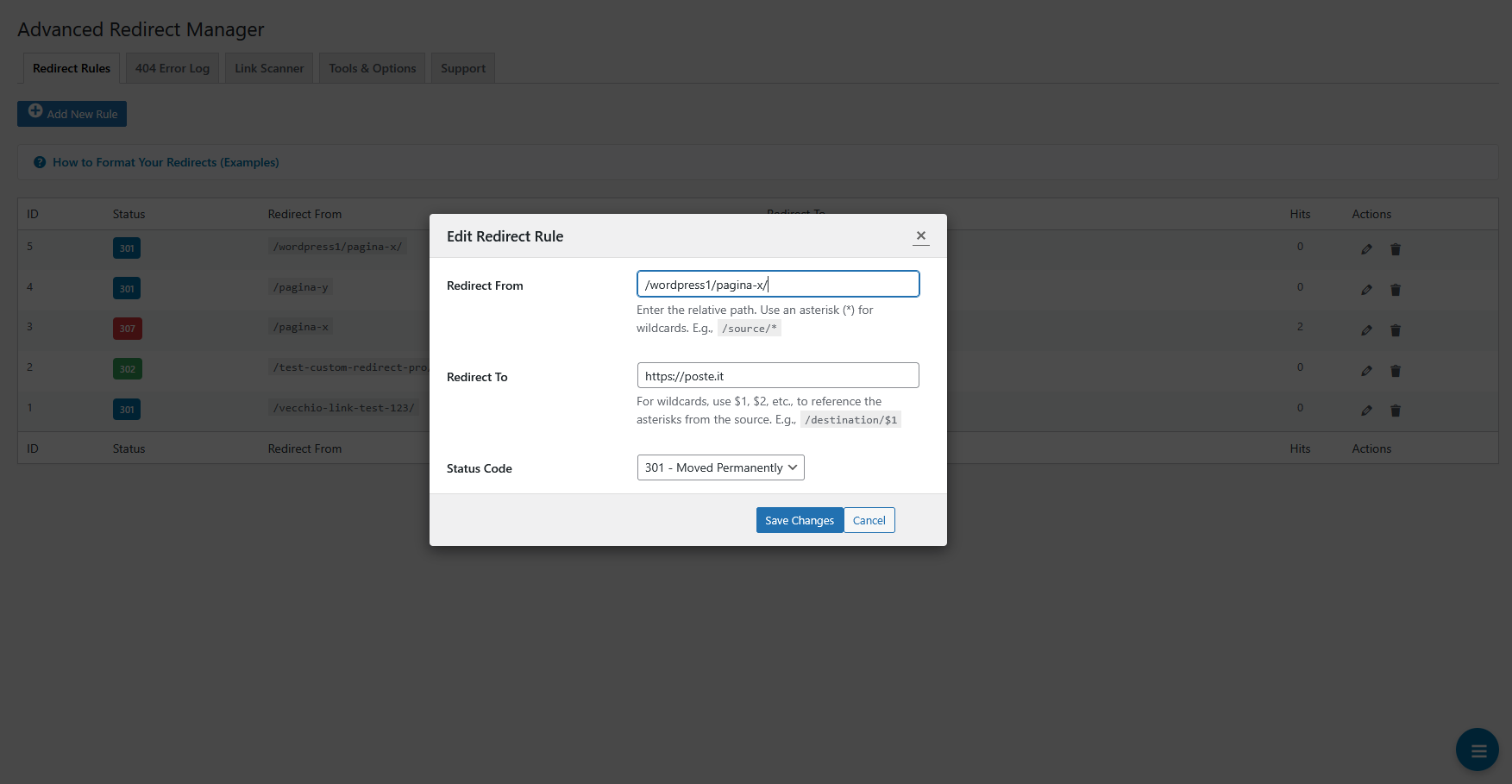
- Add, Edit and Delete Rules: Manage all your redirects from a single AJAX-powered table.
- Standard HTTP Redirects: Choose between 301, 302, 307 and 308 status codes.
- HTTP Error Responses: Serve 410 (Gone), 403 (Forbidden) and 451 (Unavailable For Legal Reasons) responses for specific URLs.
- Wildcard Support: Use an asterisk (
*) to match URL patterns. Use$1,$2in the destination URL to reference captured values. - Query String Modes: Choose how incoming query parameters are matched and transferred:
- Ignore: Match the URL path only. Do not transfer query parameters.
- Exact: Require an exact match of the URL path and query string. Do not transfer original parameters.
- Original + Pass: Match the URL path only and transfer the original query parameters.
- Exact + Pass: Require an exact query string match and transfer the original parameters when the rule matches.
- Destination Parameter Priority: When transferring original parameters, parameters already configured in the destination take precedence in case of name collisions.
- Smart “Redirect To” Search: Start typing in the “Redirect To” field to search for posts, pages and categories on your website.
- Hit Counter & Last Used: Track how many times each redirect has been used and see the date of its last use.
- In-context Help: Access examples and instructions for URL formats, wildcards and Query String Modes directly from the plugin interface.
HTTP Error Logging
- 404 Error Monitoring: Record requests that result in a 404 (Not Found) response.
- 404 Logging Toggle: Enable or disable 404 error recording directly from the plugin interface.
- Request Details: Capture relevant information such as the requested URL, timestamp, referrer and user agent.
- One-Click Redirect Creation: Create a redirect rule directly from a logged 404 entry, with the requested URL pre-filled.
- Filtered Logging: Ignore common bot traffic and irrelevant requests, such as requests for non-existent files, to keep the logs useful.
- Log Management: Manage and clear recorded error entries.
Disabling 404 logging does not affect redirect processing or existing redirect rules. Previously recorded log entries are retained.
HTTP error monitoring does not override or bypass access restrictions imposed by WordPress, the web server or other security plugins.
Link Scanner Tab
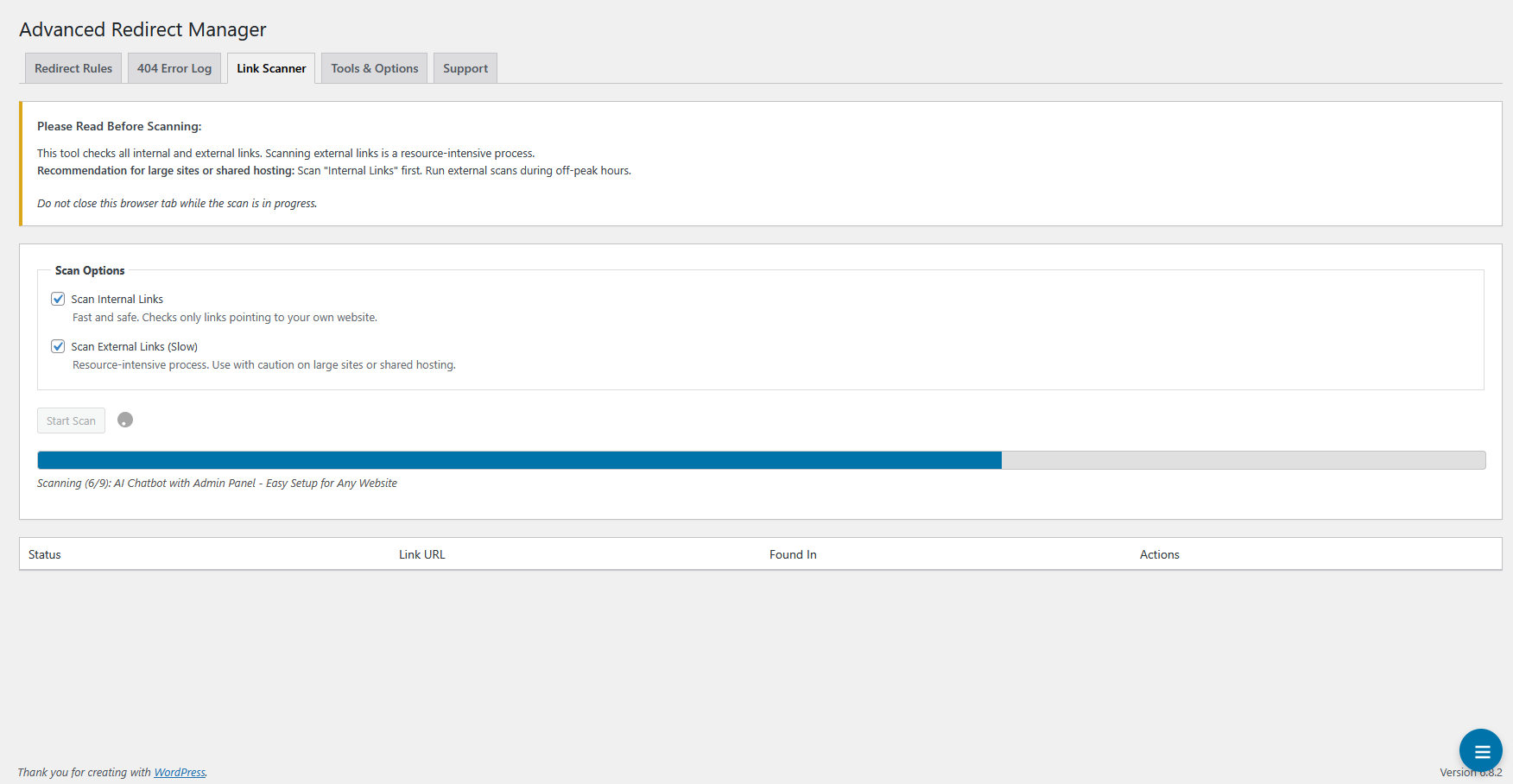
- Scan Internal & External Links: Choose to scan links pointing to your own website, external websites, or both.
- Intelligent Chunking: Process website content in small batches to help prevent server timeouts, making scanning suitable for large websites and shared hosting.
- Actionable Results: Identify broken links, including HTTP 4xx and 5xx responses and connection errors, showing the exact post or page where each link was found.
- Contextual Actions:
- For internal broken links, create a redirect rule directly from the results.
- For external broken links, use the “Edit Post” action to open the relevant content and fix the link.
Tools & Options Tab
- Import/Export via CSV: Back up redirect rules to a CSV file or migrate them to another website. The importer can handle new rules and update existing ones.
- Bulk Actions:
- Reset all redirect hit counters to zero.
- Permanently delete all redirect rules, with multiple confirmations to prevent accidental deletion.
Installation
- Téléchargez le dossier
advanced-redirect-managerdans le répertoire/wp-content/plugins/. - Activez le plugin via le menu "plugins" dans WordPress.
- Go to Settings > Redirect Manager to start creating redirect rules and monitoring your site.
The plugin automatically starts recording 404 errors when 404 logging is enabled.
Journal de modifications
2.0.0
- Major Release: Advanced Redirect Manager moves from the 1.0.x series to version 2.0.0.
- New Feature: Added visitor IP address logging for 404 errors.
- New Feature: Added Query String Modes with four options: Ignore, Exact, Original + Pass and Exact + Pass.
- New Feature: Added Original + Pass support to transfer original query parameters to the destination URL.
- New Feature: Added Exact + Pass support to match the configured query string and transfer original parameters when the rule matches.
- New Feature: Added support for HTTP 403 (Forbidden) redirect rules.
- New Feature: Added an ON/OFF control for 404 error logging.
- Enhancement: Improved query string handling, including destination parameter priority when original and destination parameters have the same name.
- Enhancement: Updated redirect rule management and in-context documentation to explain the available Query String Modes.
- Enhancement: Improved compatibility with modern PHP versions and WordPress coding standards.
- Fix: Fixed deprecated PHP usage and addressed related compatibility issues.
- Fix: Improved validation and handling of redirect rules and query string parameters.
- Fix: Preserved compatibility with existing redirect rules during the Query String Mode updates.
- Fix: Removed the redundant Original mode while retaining Ignore as the single path-only mode without parameter transfer.
- Tweak: Updated plugin documentation and help texts for the 2.0.0 release.
1.0.3
- New Feature: Added support for serving 410 Gone and 451 Unavailable For Legal Reasons status codes for specific URLs.
- Enhancement: The status code selector in the rule editor is now grouped by category (Permanent, Temporary, Error) for a better user experience.
- Enhancement: Added distinct status badges and colors for the new 410 and 451 codes in the main redirect table for easy identification.
- Tweak: Updated plugin documentation and help texts to include information about the new 410 and 451 status codes.
1.0.2
- New Feature: Added the “NewCodeByte Apps” section and a dedicated tab to showcase other available plugins from the author.
1.0.1
- New Feature: Added support for 308 Permanent Redirects, the modern and more precise alternative to 301 redirects.
- Enhancement: Improved sanitization and validation of user inputs and server variables, following WordPress security standards.
- Enhancement: Improved compatibility with newer PHP and WordPress versions and addressed deprecated notices.
- Enhancement: Improved the AJAX-powered table loading mechanism for a smoother and more reliable administration experience.
1.0
- Communiqué public initial.
- Let the redirects begin!
Captures d'écran




Pour les développeurs
Est-ce votre plugin ? Montrez les chiffres.
Ajoutez un badge en direct à votre site, docs ou github readme. Il se met à jour par lui-même - aucun compte n'est nécessaire.
Best Advanced Redirect Manager 301 alternatives
Tous les 301 plugins →





FAQ
Advanced Redirect Manager 301: quick answers
Réponses directes, extraites des données en direct WordPress.org.
Source : WordPress.org
Is Advanced Redirect Manager 301 free?
Yes. Advanced Redirect Manager 301 is free to download and use from the official WordPress.org plugin directory.
Is Advanced Redirect Manager 301 safe to use in 2026?
Advanced Redirect Manager 301 is a solid plugin choice in 2026, with a few things worth checking first. It runs on 70+ sites, is rated 5/5 and was last updated 2 weeks ago, and scores 75/100 on our health check.
How many websites use Advanced Redirect Manager 301?
Advanced Redirect Manager 301 is active on 70+ WordPress websites and has been downloaded 1,781 times since it launched in August 2025. It was downloaded 405 times in the last 30 days.
Does Advanced Redirect Manager 301 work with WordPress 7.1?
Yes. The developer has tested Advanced Redirect Manager 301 up to WordPress 7.1.5, the latest release. It requires WordPress 5.2 or newer.
What PHP version does Advanced Redirect Manager 301 need?
Advanced Redirect Manager 301 requires PHP 7.4 or higher. Most hosts run PHP 8.x today, so it works on any modern WordPress hosting.
When was Advanced Redirect Manager 301 last updated?
The latest version, 2.0.0, was released on November 8, 2026 (2 weeks ago).
Who makes Advanced Redirect Manager 301?
Advanced Redirect Manager 301 is developed and maintained by NewCodeByte.
What are the best alternatives to Advanced Redirect Manager 301?
The most popular alternatives to Advanced Redirect Manager 301 are Redirection (2M+ installs), Redirection (100K+ installs) and WP 404 Auto Redirect to Sim… (30K+ installs).
Propulsé par PageForge
Un modèle et une feuille de calcul. Une vraie page pour chaque recherche.
PageForge transforme chaque ligne d'un CSV en une page WordPress avec son propre titre, URL, SEO et schéma, construit sur la mise en page que vous Déjà conçu. Gratuit sur WordPress.org.
- CSV et XLSX, plus Google Sheets sur les professionnels et les entreprises
- Son propre titre, URL, SEO champs et schéma pour chaque page
- Fonctionne avec l'éditeur de blocs, Elementor, Divi et Avada
- Gratuit sur WordPress.org, pas de carte de crédit