


Admin Search
Admin Search makes searching your WordPress website easy by bringing results from all your post types, media, taxonomies, comments, users and admin pages together in a single, simple-to-use interface, seamlessly…

Utiliser avec prudence
Admin Search works, but test it on a staging site before relying on it in 2026. It runs on 1K+ sites, is rated 4.5/5 and was last updated 6 months ago, and scores 59/100 on our health check.
- Momentum — downloads up 33.3% vs the previous 30 days
Comment s'accumule-t-il ?
Côte à côte sur les installations, les mises à jour, les évaluations et le support



Téléchargements quotidiens
Les pics de téléchargement suivent généralement une nouvelle version - chaque site qui met à jour automatiquement compte comme un téléchargement.
Classements
Where Admin Search stands todayWordPress.org Classements de recherche
Position en direct dans la recherche de plugins, Top 100| Mot-clé | Position |
|---|---|
| administrateur | #32 |
| Avancée | >100 |
| recherche | #42 |
Adoption de version
Part de sites actifs par version.
Répartition des notes
★★★★★★★★★★ 4.5 from 18 reviews
About Admin Search
À partir du Lisezmoi officiel · v1.5.0Description
Admin Search makes searching your WordPress website easy by bringing results from all your post types, media, taxonomies, comments, users and admin pages together in a single, simple-to-use interface, seamlessly integrated into the WordPress admin interface.
Choose which post types and taxonomies are searched and the number of results displayed for each. Admin Search also supports custom post types and taxonomies.
Admin Search is a lightweight plugin with filter hooks for deep customization.
Traits
- Search everything on your WordPress site, anywhere
- Simple et facile à utiliser
- Sources of search results are customizable
- Extend the search query with filter hooks
Configure & Extend
Admin Search can be extended by using filter hooks. The following filters are available:
admin_search_queryto modify the search query string. The filter argument supplied is a string containing the search queryadmin_search_sourcesto modify the search sources. The filter argument supplied is an array of sources, add, remove or modify sourcesadmin_search_posts_queryto modify theWP_Queryarguments array for all searched post types. The filter argument supplied is an array ofWP_Queryarguments, add, remove or modify supported argumentsadmin_search_{Post Type}_queryto modify theWP_Queryarguments array for a specific post type. The filter argument supplied is an array ofWP_Queryarguments, add, remove or modify supported arguments. Replace {Post Type} with the name of the post type to modifyadmin_search_terms_queryto modify theget_termsarguments array for all searched terms (taxonomies). The filter argument supplied is an array ofget_termsarguments, add, remove or modify supported argumentsadmin_search_{Term}_queryto modify theget_termsarguments array for a specific term (taxonomy). The filter argument supplied is an array ofget_termsarguments, add, remove or modify supported arguments. Replace {Term} with the name of the term to modifyadmin_search_comments_queryto modify theWP_Comment_Queryarguments array for all searched comments. The filter argument supplied is an array ofWP_Comment_Queryarguments, add, remove or modify supported argumentsadmin_search_users_queryto modify theWP_User_Queryarguments array for all searched users. The filter argument supplied is an array ofadmin_search_users_queryarguments, add, remove or modify supported argumentsadmin_search_website_titlesto modify the labels array for external websites. The filter argument supplied is an array of predefined domains and titles, add, remove or modify domains and titlesadmin_search_pre_resultsandadmin_search_post_resultsto modify the results array before or after results are appended to the array. The filter argument supplied is an empty array foradmin_search_pre_resultsor search results for a given query foradmin_search_post_results, add, remove or modify result itemsadmin_search_fieldsto modify the searchable fields array. The filter argument supplied is an array of searchable fields (post_title,post_name,post_excerptandpost_content)admin_search_meta_queriesto add custom fields to the searchable fields array. The filter argument supplied is an empty array. Use this filter instead ofadmin_search_fieldswhen adding custom fields
Exemples :
Modify the query string before a search is initiated
// Correct the spelling of dog when searching
add_filter( 'admin_search_query', function( $query ) {
    if ( 'dog' === $query ) {
        $query = 'doggo';
    }

    return $query;
} );
Modify the WP_Query parameters before a search is initiated
// Exclude post with the ID 96
add_filter( 'admin_search_posts_query', function( $query ) {
    $query['post__not_in'] = array( 96 );

    return $query;
} );
Add a custom field to the searchable fields
// Add the price custom field to the searchable fields
add_filter( 'admin_search_meta_queries', function( $fields, $post_type ) {
    if ( 'post' === $post_type ) {
        $fields[] = 'price';
    }

    return $fields;
}, 10, 2 );
Modify the search results after a search has initiated
// Add custom results from external API
add_filter( 'admin_search_post_results', function( $results, $q ) {
    $results[ 'custom' ][ 'post_type' ] => array(
        'name' => 'custom',
        'label' => 'Custom'
    );

    $json = file_get_contents( 'https://example.com?search=' . $q );
    $obj = json_decode( $json );

    foreach ( $obj as $item ) {
        $results[ 'custom' ][ 'posts' ][] = array(
            …
        );
    }

    return $results;
}, 10, 2 );
Installation
- Visit Plugins > Add New
- Search for “Admin Search”
- Activate Admin Search from your Plugins page
- Go to Settings > Admin Search and choose what to search on your WordPress website
Journal de modifications
1.5.0
- New Feature: Choose what fields to search in settings. By default, Admin Search searches post titles and bodies, searches can now be extended to any public custom fields
- New Feature: Search by taxonomies
- Extended natural language searches. More date options, including “between 01/01/20 and 01/01/26”, “before 01/01/26”, “after 01/01/20”, “last 2 weeks”. These can be combined with query searches such as “corgi facts between 01/01/20 and 01/01/26”
- Tested on WordPress 7
1.4.2
- Fixed an issue where pasting text from some sources may also paste the style
1.4.1
- Tested up to 6.7
- Added a filter hook to add taxonomies to the searchable fields. This can be hooked into using
admin_search_taxonomies, this hook has two arguments:$taxonomies(a list of taxonomies being searched, this is empty initially) and$post_type(returns the current post type being searched so you can optionally apply the filter to a specific post type). Searching taxonomies significantly delays the return of results, it is not recommended you use this unless you’re willing to wait for your results. - Fixed issue with javascript function toggle instantly closing search box after opening
1.4.0
- New Feature: Introducing search suggestions! Now, whenever you search using a term with 9 or more characters and it returns results, it will be added to a database. The more you search that term, the higher it will rank. When you start typing 3 or more characters into the search box, autocomplete will display if it matches a term in the database, hit the right arrow key to apply it. This feature is disabled by default, go to Settings > Admin Search to enable it
- A new setting to enable or disable auto searching has been added. Typically, search results start displaying as you type, you can now disable this and only show results by hitting the enter key
- Many UI updates and some improvements to the mobile interface
- Fixed issues with hotkey handling. Navigating the results with the up and down keys is improved, hitting the right arrow key and the enter key behave better depending on what is in focus
- The search input has been switched from a traditional HTML input field and form to a contenteditable div, this shouldn’t affect most users but may affect OS or browser settings and extensions that alter the way inputs work. Testing is ongoing
- Added support for WP_Block post type
- Removed the user display as setting. Users will be displayed using their username from now on
- Reduced the default result count to 5. This can still be increased to show more results initially
- Disabled Ctrl + S and Cmmd + S keyboard shortcut due to conflicts with WordPress and browser functionality
- Fixed PHP8 related issues
- Fixed an issue where default settings weren’t applied when first installing and activating the plugin
- Fixed an issue where no message is displayed if there’re no results
- Fixed an issue where multiple results are focussed initially
- Fixed an issue with an undefined value displaying on the account setting page
- Tested on WordPress up to version 6.5.3
1.3.3
- Fixed visual issues with media results
- Updated donation link
1.3.2
- Tested on WordPress up to version 6.4.4a
- Added Woocommerce SKU field as searchable field
Captures d'écran
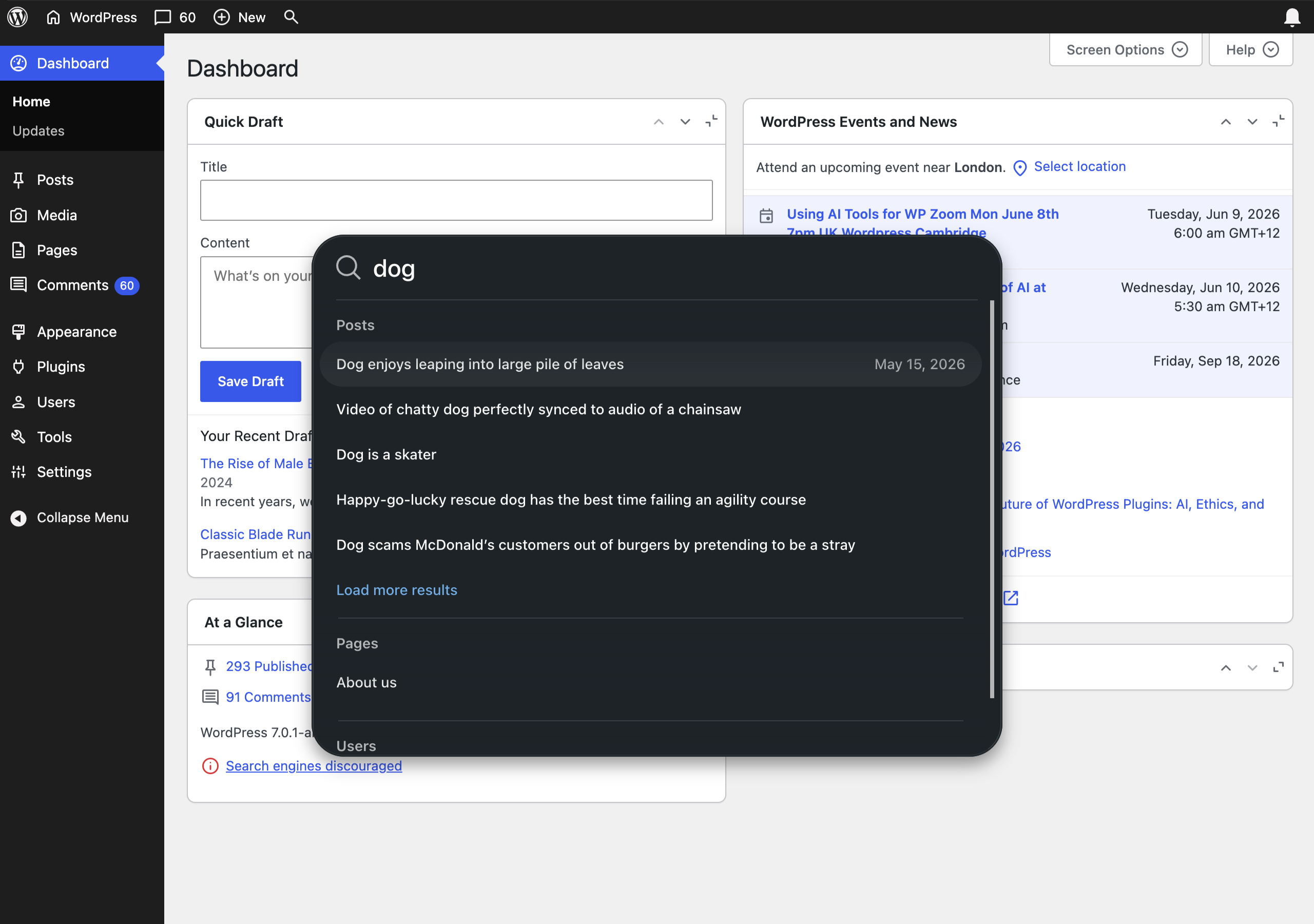
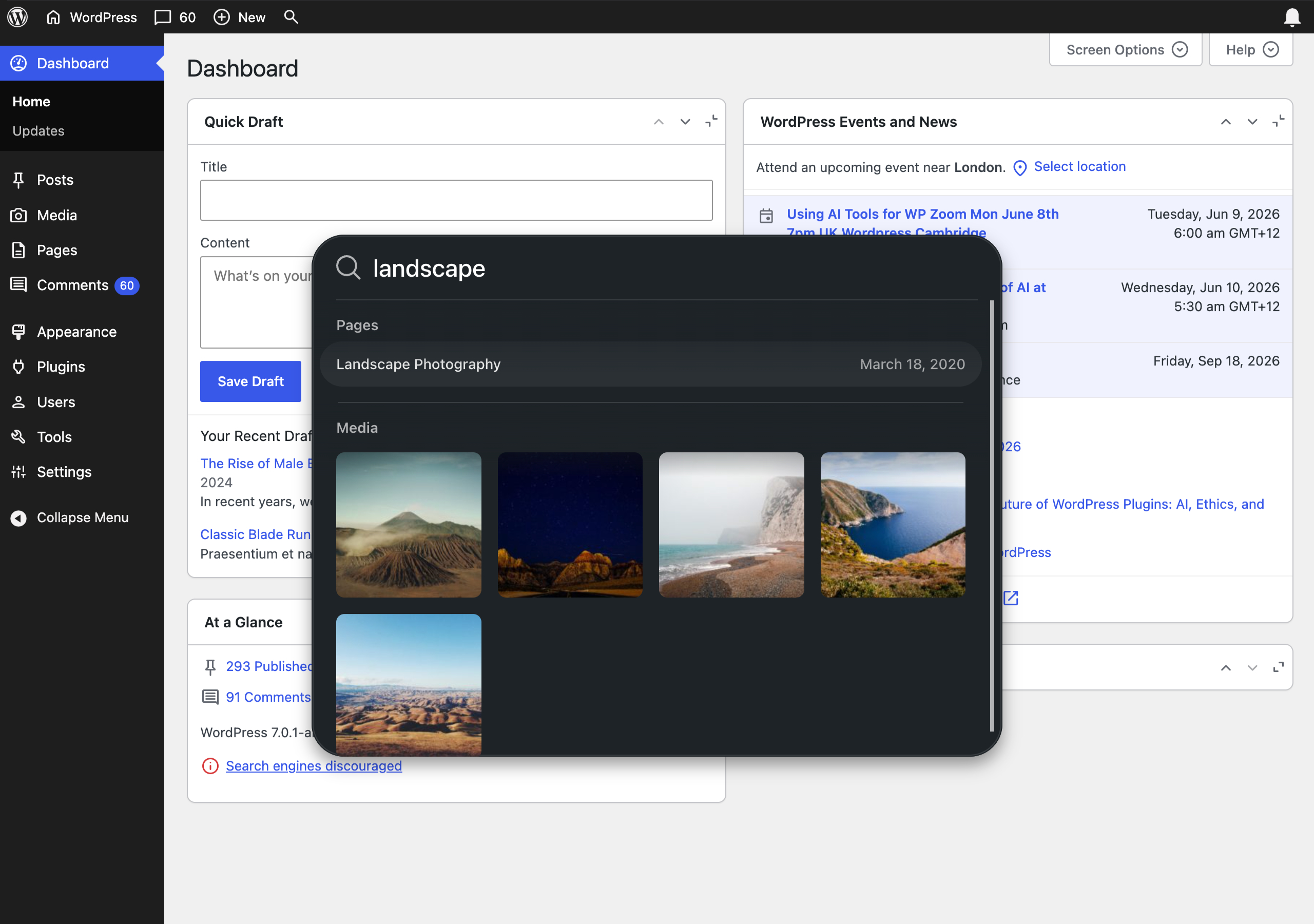
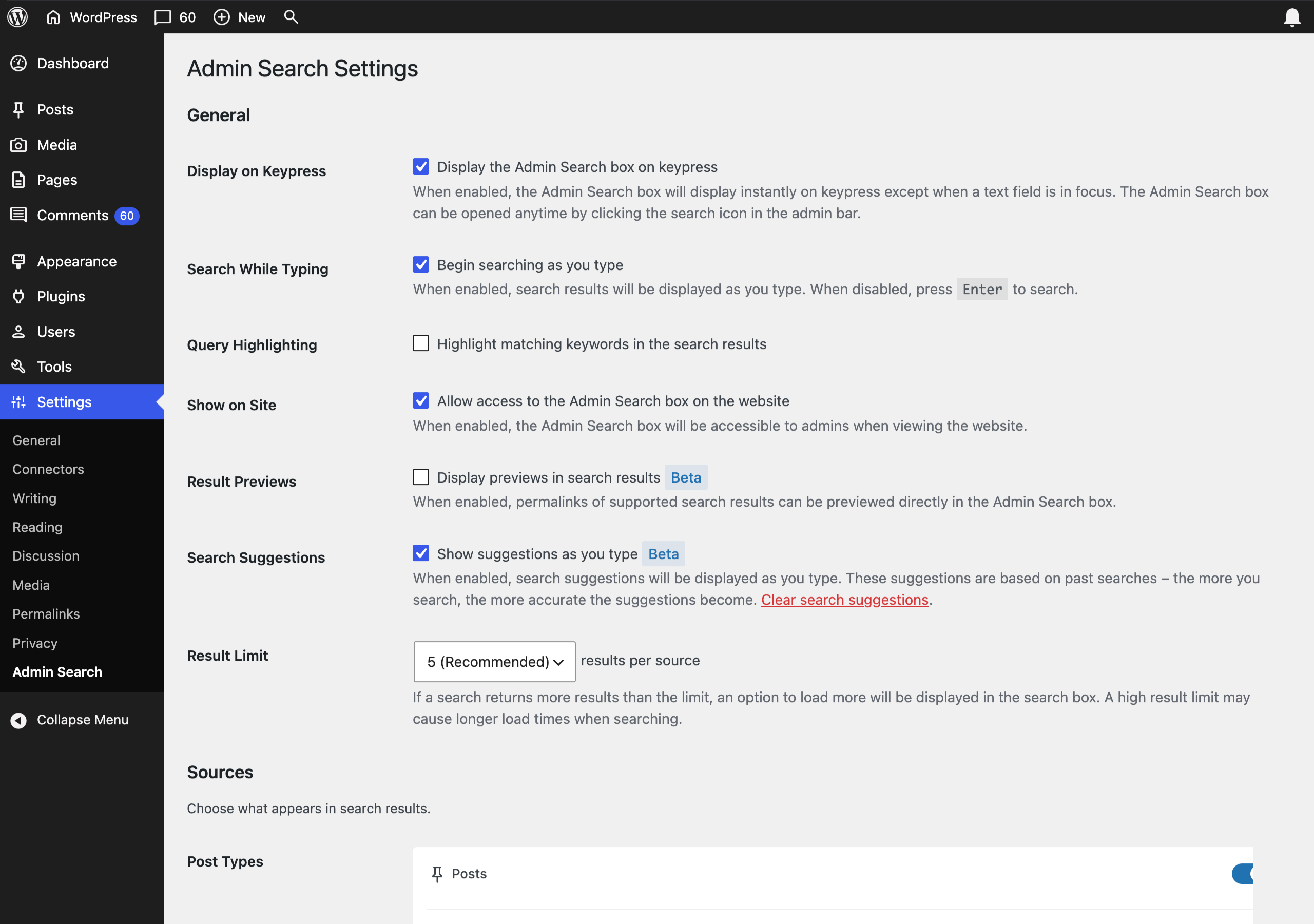
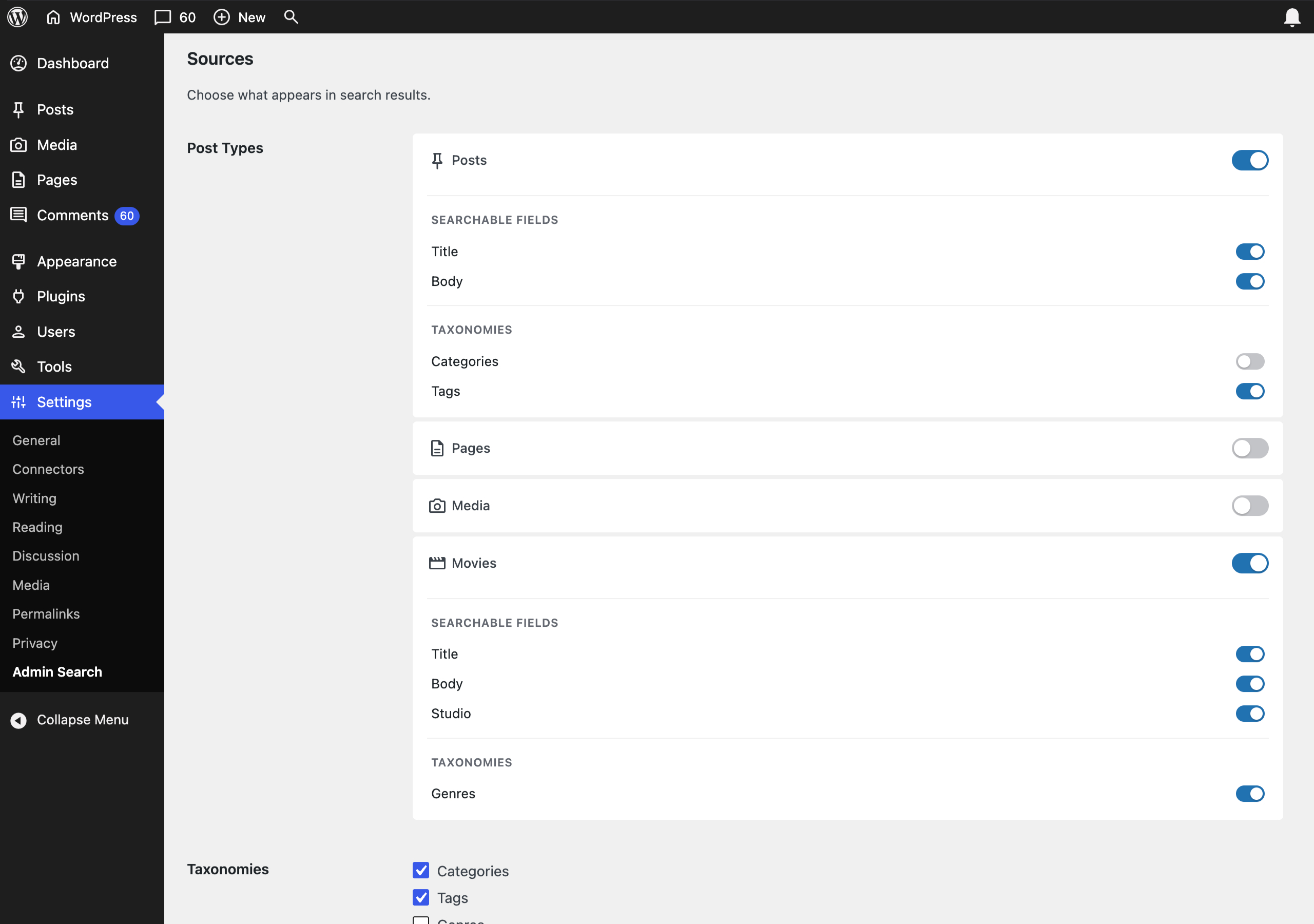
Pour les développeurs
Est-ce votre plugin ? Montrez les chiffres.
Ajoutez un badge en direct à votre site, docs ou github readme. Il se met à jour par lui-même - aucun compte n'est nécessaire.
Best Admin Search alternatives
Tous les plugins d'administrateur →




FAQ
Admin Search: quick answers
Réponses directes, extraites des données en direct WordPress.org.
Source : WordPress.org
Is Admin Search free?
Yes. Admin Search is free to download and use from the official WordPress.org plugin directory.
Is Admin Search safe to use in 2026?
Admin Search works, but test it on a staging site before relying on it in 2026. It runs on 1K+ sites, is rated 4.5/5 and was last updated 6 months ago, and scores 59/100 on our health check.
How many websites use Admin Search?
Admin Search is active on 1K+ WordPress websites and has been downloaded 30,822 times since it launched in March 2020. It was downloaded 888 times in the last 30 days.
Does Admin Search work with WordPress 7.1?
Admin Search is officially tested up to WordPress 7.0.9, while the latest release is 7.1.5. It may still work, but try it on a staging site first.
What PHP version does Admin Search need?
Admin Search requires PHP 5.2 or higher. Most hosts run PHP 8.x today, so it works on any modern WordPress hosting.
When was Admin Search last updated?
The latest version, 1.5.0, was released on May 28, 2026 (6 months ago).
Who makes Admin Search?
Admin Search is developed and maintained by Andrew Stichbury.
What are the best alternatives to Admin Search?
The most popular alternatives to Admin Search are Loginizer (1M+ installs), Redux Framework (800K+ installs) and Admin Menu Editor (300K+ installs).
Propulsé par PageForge
Un modèle et une feuille de calcul. Une vraie page pour chaque recherche.
PageForge transforme chaque ligne d'un CSV en une page WordPress avec son propre titre, URL, SEO et schéma, construit sur la mise en page que vous Déjà conçu. Gratuit sur WordPress.org.
- CSV et XLSX, plus Google Sheets sur les professionnels et les entreprises
- Son propre titre, URL, SEO champs et schéma pour chaque page
- Fonctionne avec l'éditeur de blocs, Elementor, Divi et Avada
- Gratuit sur WordPress.org, pas de carte de crédit