


Zoho Mail for WordPress
Zoho Mail Plugin lets you configure your Zoho Mail account on your WordPress site enabling you to send the email via Zoho Mail API.

Mit Vorsicht verwenden
Zoho Mail for WordPress works, but test it on a staging site before relying on it in 2026. It runs on 20K+ sites, is rated 3.7/5 and was last updated 6 months ago, and scores 45/100 on our health check.
- Bewährt auf 20.000 aktiven Standorten
- Nur getestet bis WordPress 6.9 (letzt ist 7.1)
Wie stapelt es sich?
Side-by-side bei Installationen, Updates, Bewertungen und Support



Tägliche Downloads
Download-Spitzen folgen normalerweise einer neuen Version - jede Website, die automatisch aktualisiert wird, gilt als Download.
Ranglisten
Where Zoho Mail for WordPress stands todayWordPress.org Ranglisten suchen
Live-Position in der Plugin-Suche, Top 100| Stichwort | Position |
|---|---|
| >100 | |
| versenden | #6 |
| mailer | #23 |
| phpmailer | #7 |
| wp_mail | #13 |
Versionsübernahme
Anteil aktiver Sites pro Release.
Bewertungsaufschlüsselung
★★★★★★★★★★ 3.7 from 42 reviews
About Zoho Mail for WordPress
From the official readme · v1.6.3Beschreibung
Zoho Mail for WordPress
Zoho Mail Plugin helps you to configure your Zoho Mail account in your WordPress site, to send emails from your Site.
It is recommended to use authorized server for sending emails from websites, instead of using generic hosting servers. It is possible to misuse unauthorized and unauthenticated configuration and harm the reputation of your domain/ website when using generic servers.
Zoho Mail plugin can help to ensure that the emails are sent from your account using Zoho Mail API’s.
PRE-REQUISITES
- A Zoho Mail Account
- A self-hosted WordPress site
- PHP 5.6 or later
ADVANTAGES OF ZOHO MAIL PLUGIN
- Zoho Mail plugin makes use of OAuth 2.0 protocol to access Zoho Mail API. This ensures a highly secure authentication process where the Username or password is not stored so cannot be misused.
- Zoho Mail plugin has customized the PHPMailer’s code library, used in WordPress for sending email.
- By using ’wp_mail’ function of WordPress, Zoho Mail plugin handles the custom send mail action anywhere from the entire site, without having to change/ configure in every occurrence.
ZOHO MAIL API FEATURES
- Zoho Mail API is authenticated using OAuth 2.0 protocol.
- You can configure your Zoho Mail account in your website to send email using Zoho Mail API.
- The emails sent will be available in the corresponding Zoho Mail account’s Sent folder.
ZOHO MAIL PLUGIN PARAMETERS
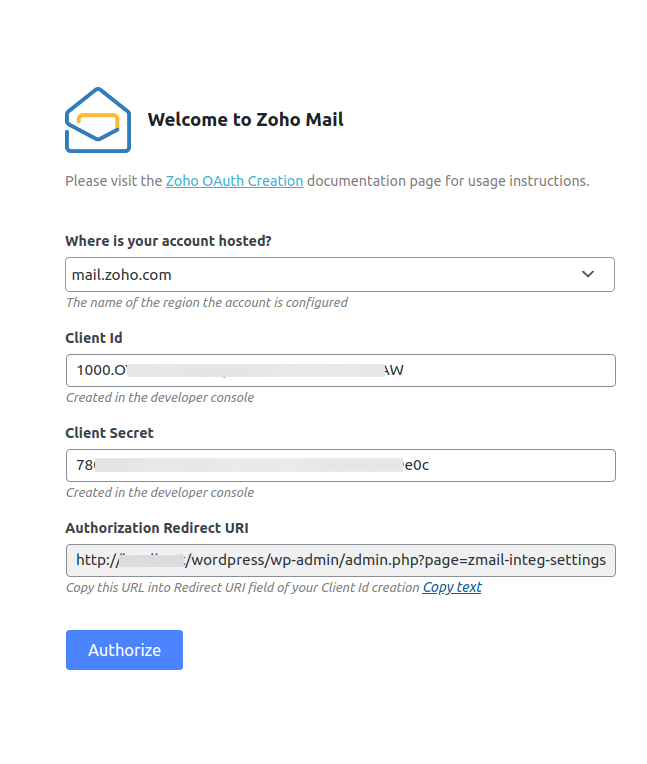
- Where is your account hosted? :The region where your Zoho Account data resides.
- Client ID :The Client ID of your Zoho Mail API.
- Client Secret : The Client secret of your API.
- Authorized Redirect URI : Authorized Redirect URL obtained from your website that is used to create Client ID.
- From Email Address :The Email address that will be used to send all the outgoing emails from your website.
- From Name :The Name that will be shown as the display name while sending all emails from your website.
ZOHO MAIL PLUGIN TEST EMAIL
After configuration, you can test the plugin. Navigate to the Zoho Mail – Test Email page in your Website settings.
– To : Email address of the recipient.
– Subject : Subject of the email.
– Content :The message or body of the email.
For in detail instructions on how to set up Zoho Mail plugin, visit Zoho Mail plugin page .
Note :
Sending emails through Zoho Mail is subjective to our Usage Policy restrictions. Please refer to our Usage Policy details here.
Installation
1) Login to your self-hosted WordPress account and navigate to the Zoho Mail plugin Account Configuration page.
2) Copy the Authorized Redirect URI from the configuration page.
3) Login to your Zoho Mail account and access the Zoho Mail Developer Console .
4) Click Add Client ID and provide the Client Name , Client Domain and the Authorized Redirect URI to generate a new OAuth Client ID and Client secret.Enter the generated Client ID and Client Secret in the Account configuration page.
5) Click Authorize .An authorization screen is displayed.
6) Click the Accept button to allow access of data from your Zoho Account.
7) Once the authentication process is done, you can choose the From Email address and the Mail format in which the emails should be sent from your WordPress site.
8) Provide a From Name to be displayed in the emails sent.
Once done, you can send emails from your WordPress site using Zoho Mail
Änderungsprotokoll
none
1.0.1
- Added notification for successful authentication while configuring.
- Empty configuration form issue has been handled.
- Support for html content type.
- Issue fix for Back end font problem.
1.0.2
- Fix for support – Support for lower PHP version.
1.1
- support for customizable From Name in configuration.
1.1.1
- support for Bcc email field
- Fixed an issue related to style
- Zoho Mail logo change
- Fix for Support – Support html content type in mails
1.1.2
- support for .in region
- Bug Fix for .com region
1.2
- support for Reply to – Support reply to in mails
Screenshots


Für Entwickler
Ist das dein Plugin? Zeigen Sie die Zahlen.
Fügen Sie Ihrer Website, Docs oder GitHub Readme ein Live-Badge hinzu. Es wird von selbst aktualisiert - kein Konto erforderlich.
Best Zoho Mail for WordPress alternatives
Alle E-Mail-Plugins →





Fragen und Antworten
Zoho Mail for WordPress: quick answers
Gerade Antworten, gezogen von Live WordPress.org Daten.
Quelle: WordPress.org
Is Zoho Mail for WordPress free?
Yes. Zoho Mail for WordPress is free to download and use from the official WordPress.org plugin directory.
Is Zoho Mail for WordPress safe to use in 2026?
Zoho Mail for WordPress works, but test it on a staging site before relying on it in 2026. It runs on 20K+ sites, is rated 3.7/5 and was last updated 6 months ago, and scores 45/100 on our health check.
How many websites use Zoho Mail for WordPress?
Zoho Mail for WordPress is active on 20K+ WordPress websites and has been downloaded 365,672 times since it launched in December 2017. It was downloaded 2,552 times in the last 30 days.
Does Zoho Mail for WordPress work with WordPress 7.1?
Zoho Mail for WordPress is officially tested up to WordPress 6.9.12, while the latest release is 7.1.5. It may still work, but try it on a staging site first.
What PHP version does Zoho Mail for WordPress need?
Zoho Mail for WordPress requires PHP 5.6 or higher. Most hosts run PHP 8.x today, so it works on any modern WordPress hosting.
When was Zoho Mail for WordPress last updated?
The latest version, 1.6.3, was released on May 26, 2026 (6 months ago).
Who makes Zoho Mail for WordPress?
Zoho Mail for WordPress is developed and maintained by Zoho Mail.
What are the best alternatives to Zoho Mail for WordPress?
The most popular alternatives to Zoho Mail for WordPress are WP Mail SMTP by WPForms (4M+ installs), MC4WP: Mailchimp for WordPr… (1M+ installs) and Easy WP SMTP (500K+ installs).
Angetrieben von PageForge
Eine Vorlage und eine Tabelle. Eine echte Seite für jede Suche.
PageForge Verwandelt jede Zeile eines CSV in eine WordPress-Seite mit eigenem Titel, URL, SEO Felder und Schema entworfen. Kostenlos auf WordPress.org.
- CSV und XLSX, plus Google Sheets auf Beruf und Unternehmen
- seinen eigenen Titel, URL, SEO Felder und Schema für jede Seite
- Arbeitet mit dem Blockeditor, Elementor, Divi und Avada
- Kostenlos auf WordPress.org, keine Kreditkarte