


XML Sitemap & Google News
Take control of your WordPress core XML Sitemap and add a Google News Sitemap.

Solide Wahl
XML Sitemap & Google News is a solid plugin choice in 2026, with a few things worth checking first. It runs on 100K+ sites, is rated 4.4/5 and was last updated 5 months ago, and scores 78/100 on our health check.
- Bewährt im Maßstab auf 100k+ aktiven Standorten
- Momentum — downloads up 32.1% vs the previous 30 days
Wie stapelt es sich?
Side-by-side bei Installationen, Updates, Bewertungen und Support



Tägliche Downloads
Download-Spitzen folgen normalerweise einer neuen Version - jede Website, die automatisch aktualisiert wird, gilt als Download.
Ranglisten
Where XML Sitemap & Google News stands todayWordPress.org Ranglisten suchen
Live-Position in der Plugin-Suche, Top 100| Stichwort | Position |
|---|---|
| google news | #3 |
| news | #3 |
| robots | #9 |
| sitemap | #5 |
| xml | #3 |
Versionsübernahme
Anteil aktiver Sites pro Release.
Bewertungsaufschlüsselung
★★★★★★★★★★ 4.4 from 85 reviews
About XML Sitemap & Google News
From the official readme · v5.7.7Beschreibung
Take control of your WordPress core XML Sitemap and add a Google News Sitemap. Compatible with WordPress Multisite, Polylang and WPML and most caching plugins. There are no static files created.
NEW: Connect your site to your Google Search Console and Bing Webmaster Tools to keep an eye on sitemap performance and possible errors.
NEW: Submit your sitemaps right from the WordPress admin. Yes, you read that correctly: Sitemap Pings are back!
Merkmale
- Control the WordPress core XML Sitemaps.
- Add a Google News Sitemap.
- Connect your site to Google Search Console and Bing Webmaster Tools to keep an eye on sitemap performance and possible errors.
- Submit/ping sitemaps to Google Search Console and Bing Webmaster Tools for fast reindexation.
- Add custom robots.txt rules.
XML-Sitemap
- Option to disable the main XML Sitemap Index.
- Select sitemaps to include in the sitemap index: post types, taxonomies, authors and google news.
- Select which (custom) post types, taxonomy archives and users to include in respective sitemaps.
- Exclude specific posts, pages and custom post type posts from sitemaps.
- Add a custom sitemap with external URLs.
- Add external sitemaps.
- Choose the sitemap server/generator: WordPress core or Plugin.
- Plugin server: Include featured images or attached images with title.
- Choose to update Last modification date only on post modification (default) or also on comments.
- Sitemap stylesheet templates can be overridden by theme template files.
Google News Sitemap
- Optionally activate the Google News Sitemap.
- Includes the required news sitemap tags: Publication name, language, title and publication date.
- Set a News Publication Name (site name by default).
- Supports custom post types.
- Limit inclusion of certain post categories.
- Google News Sitemap stylesheet template can be overridden by theme template files.
Pro Extensions
- Sitemap notifier: Automatic XML Sitemap Index update notification to Google and Bing.
- Sitemap notifier log
- Set a custom sitemap URL (slug)
- Exclude posts and pages in the Bulk Editor.
- Optionally include empty taxonomy term and empty author archives
- Yoast SEO and Rank Math compatibility: exclude posts set to noindex
- Sitemap norifier: Automatic Google News Sitemap update notification to Google.
- Sitemap notifier log
- Multiple post types – Include more than one post type in the same News Sitemap.
- Keywords – Add the keywords tag to your News Sitemap. Keywords can be created from Tags, Categories or a dedicated Keywords taxonomy.
- Stock tickers – Add stock tickers tag to your News Sitemap. A dedicated Stock Tickers taxonomy will be available to manage them.
Privacy / GDPR
This plugin does not collect any user or visitor data nor set browser cookies. Using this plugin should not impact your site privacy policy in any way.
Data that is published
An XML Sitemap index, referencing other sitemaps containing your web site’s public post URLs of selected post types that are already public, along with their last modification date and associated image URLs, and any selected public archive URLs.
An author sitemap can be included, which will contain links to author archive pages. These urls contain author/user slugs, and the author archives can contain author bio information. If you wish to keep this out of public domain, then deactivate the author sitemap and use an SEO plugin to add noindex headers to the respective archive pages.
A Google News Sitemap containing your web site’s public and recent (last 48 hours) URLs of selected news post type, along with their publication time stamp and associated image URL.
Data that is transmitted
when a connection between your site and Google Search Console is configured in this plugin, the sitemap index and google news sitemap can be submitted to Google. No data is transmitted to any third party.
Beitragen
If you’re happy with this plugin as it is, please consider writing a quick rating or helping other users out on the support forum.
If you wish to help build this plugin, you’re very welcome to translate it into your language or contribute code on Github.
Credits
XML Sitemap Feed was originally based on the discontinued plugin Standard XML Sitemap Generator by Patrick Chia. Since then, it has been completely rewritten and extended in many ways.
NOTES:
-
If you do not use fancy URL’s or you have WordPress site running in a subdirectory, a dynamic robots.txt will NOT be generated.
-
On large sites, it is advised to use a good caching plugin to improve your site and sitemap performance.
Installation
WordPress
I. If you have been using another XML Sitemap plugin before, check your site root and remove any created sitemap.xml, sitemap-news.xml and (if you’re not managing this one manually) robots.txt files that remained there.
II. Install plugin by:
Quick installation via Covered Web Services !
… OR …
Search for “xml sitemap feed” and install with that slick Plugins > Add New admin page.
… OR …
Follow these steps:
-
Download archive.
-
Upload the zip file via the Plugins > Add New > Upload page … OR … unpack and upload with your favourite FTP client to the /plugins/ folder.
III. Activate the plugin on the Plugins page.
Done! Check your sparkling new XML Sitemap by visiting yourblogurl.tld/sitemap.xml (adapted to your domain name of course) with a browser or any online XML Sitemap validator. You might also want to check if the sitemap is listed in your yourblogurl.tld/robots.txt file.
WordPress 3+ in Multi Site mode
Same as above but do a Network Activate to make a XML sitemap available for each site on your network.
Installed alongside WordPress MU Sitewide Tags Pages, XML Sitemap Feed will not create a sitemap.xml nor change robots.txt for any tag blogs. This is done deliberately because they would be full of links outside the tags blogs own domain and subsequently ignored (or worse: penalised) by Google.
Uninstallation
Upon uninstalling the plugin from the Admin > Plugins page, plugin options and meta data will be cleared from the database. See notes in the uninstall.php file.
On multisite, the uninstall.php loops through all sites in the network to perform the uninstallation process for each site. However, on large networks it only does this when define('XMLSF_MULTISITE_UNINSTALL', true); is explicitly set in wp-config.php.
Änderungsprotokoll
Bugfix: SEO plugin sitemap admin warning.
5.7.7
Date: 20260610
* FIX Rank Math admin warning
5.7.6
Date: 20260605
* Fix: invalid callback on news settings page
5.7.5
Date: 20260519
* Fix: Bing report only returns sitemap number
* Fix: Split by year no longer default after swichting server
* Drop additional no-store for news sitemap nocache headers
5.7.4
Date: 20260430
* Fix LPAD months, thanks @midwestdev
* Fix settings fields: news notifier and stock tickers
* Admin button styles
5.7.2
Date: 20260129
* Fix Google Connect instructions text
* Fix transients upgrade routine
5.7
Date: 20260121
* Bing Webmaster Tools sitemap reports
* Bing sitemap submission from admin
* Priority tags dropped
Screenshots
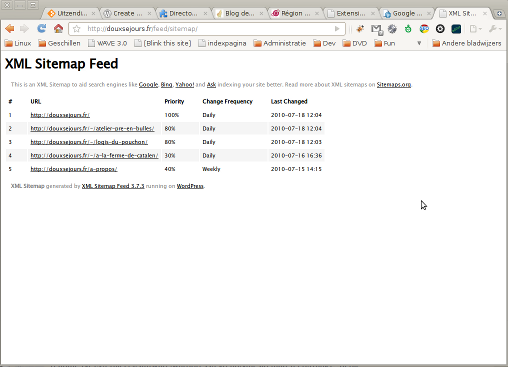
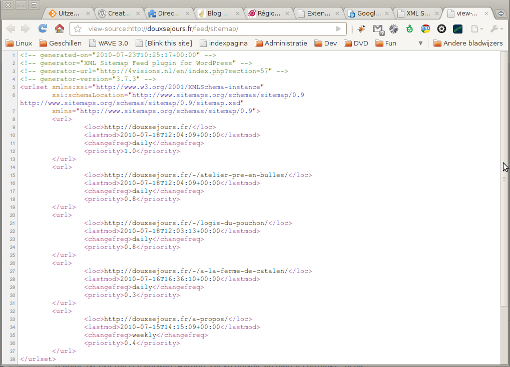
Für Entwickler
Ist das dein Plugin? Zeigen Sie die Zahlen.
Fügen Sie Ihrer Website, Docs oder GitHub Readme ein Live-Badge hinzu. Es wird von selbst aktualisiert - kein Konto erforderlich.
Best XML Sitemap & Google News alternatives
All google news plugins →


Fragen und Antworten
XML Sitemap & Google News: quick answers
Gerade Antworten, gezogen von Live WordPress.org Daten.
Quelle: WordPress.org
Is XML Sitemap & Google News free?
Yes. XML Sitemap & Google News is free to download and use from the official WordPress.org plugin directory. The developer also sells premium add-ons or a Pro version with extra features.
Is XML Sitemap & Google News safe to use in 2026?
XML Sitemap & Google News is a solid plugin choice in 2026, with a few things worth checking first. It runs on 100K+ sites, is rated 4.4/5 and was last updated 5 months ago, and scores 78/100 on our health check.
How many websites use XML Sitemap & Google News?
XML Sitemap & Google News is active on 100K+ WordPress websites and has been downloaded 4,948,144 times since it launched in September 2009. It was downloaded 18,358 times in the last 30 days.
Does XML Sitemap & Google News work with WordPress 7.1?
XML Sitemap & Google News is officially tested up to WordPress 7.0.9, while the latest release is 7.1.5. It may still work, but try it on a staging site first.
What PHP version does XML Sitemap & Google News need?
XML Sitemap & Google News requires PHP 5.6 or higher. Most hosts run PHP 8.x today, so it works on any modern WordPress hosting.
When was XML Sitemap & Google News last updated?
The latest version, 5.7.7, was released on June 10, 2026 (5 months ago).
Who makes XML Sitemap & Google News?
XML Sitemap & Google News is developed and maintained by Rolf Allard van Hagen.
What are the best alternatives to XML Sitemap & Google News?
The most popular alternatives to XML Sitemap & Google News are Dynamic XML Sitemaps Genera… (20K+ installs), GN Publisher: Google News C… (20K+ installs) and Lana Sitemap (400+ installs).
Angetrieben von PageForge
Eine Vorlage und eine Tabelle. Eine echte Seite für jede Suche.
PageForge Verwandelt jede Zeile eines CSV in eine WordPress-Seite mit eigenem Titel, URL, SEO Felder und Schema entworfen. Kostenlos auf WordPress.org.
- CSV und XLSX, plus Google Sheets auf Beruf und Unternehmen
- seinen eigenen Titel, URL, SEO Felder und Schema für jede Seite
- Arbeitet mit dem Blockeditor, Elementor, Divi und Avada
- Kostenlos auf WordPress.org, keine Kreditkarte