


WPGraphQL Smart Cache
WPGraphQL Smart Cache is a WordPress plugin that provides fast, accurate API responses by intelligently caching and invalidating WPGraphQL queries.

Solide Wahl
WPGraphQL Smart Cache is a solid plugin choice in 2026, with a few things worth checking first. It runs on 5K+ sites, is rated 5/5 and was last updated 1 week ago, and scores 74/100 on our health check.
- Aktiv entwickelt — letztes Update vor 1 Woche
- Bisher sehr wenige Bewertungen
Wie stapelt es sich?
Side-by-side bei Installationen, Updates, Bewertungen und Support



Tägliche Downloads
Download-Spitzen folgen normalerweise einer neuen Version - jede Website, die automatisch aktualisiert wird, gilt als Download.
Ranglisten
Where WPGraphQL Smart Cache stands todayWordPress.org Ranglisten suchen
Live-Position in der Plugin-Suche, Top 100| Stichwort | Position |
|---|---|
| API | >100 |
| Zwischenspeicher | #23 |
| Performance | >100 |
| Persisted Queries | #1 |
| WpGraphQL | #4 |
Versionsübernahme
Anteil aktiver Sites pro Release.
Bewertungsaufschlüsselung
★★★★★★★★★★ 5 from 4 reviews
About WPGraphQL Smart Cache
From the official readme · v2.6.0Beschreibung
Do you want your API data fast or accurate? With WPGraphQL Smart Cache, you can have both.
WPGraphQL Smart Cache is a free, open-source WordPress plugin that provides support for caching and cache invalidation of WPGraphQL Queries.
To get the most out of this plugin, we recommend using GET requests with Network Caching, which requires your WordPress install to be on a supported host.
Note: WPGraphQL Smart Cache is now part of the WPGraphQL monorepo. All releases, issues, and discussions are managed in the main repository.
BREAKING CHANGES: We may make breaking changes in the future to improve functionality and experience. If we do, we will use semver to do so. Pay attention to release notes and upgrade notices before updating.
Video Overview
Dokumente
- Übersicht
- Quick Start
- Merkmale
- Extending / Customizing Functionality
- FAQ and Troubleshooting
- Known Issues
- Providing Feedback
Upgrading
It is recommended that anytime you want to update WPGraphQL Smart Cache that you get familiar with what’s changed in the release.
WPGraphQL Smart Cache publishes release notes on GitHub. Look for releases tagged with wp-graphql-smart-cache/v*.
WPGraphQL Smart Cache will follow Semver versioning.
The summary of Semver versioning is as follows:
- MAJOR version when you make incompatible API changes,
- MINOR version when you add functionality in a backwards compatible manner, and
- PATCH version when you make backwards compatible bug fixes.
You can read more about the details of Semver at semver.org
Datenschutzerklärung
WPGraphQL Smart Cache uses Appsero SDK to collect some telemetry data upon user’s confirmation. This helps us to troubleshoot problems faster & make product improvements.
Appsero SDK does not gather any data by default. The SDK only starts gathering basic telemetry data when a user allows it via the admin notice. We collect the data to ensure a great user experience for all our users.
Integrating Appsero SDK DOES NOT IMMEDIATELY start gathering data, without confirmation from users in any case.
When you opt in, each telemetry request is sent to Appsero and a duplicate is sent in a non-blocking request to WPGraphQL-operated infrastructure at https://telemetry.wpgraphql.com (the same categories of data as described for Appsero below, except this site’s admin email address and an administrator’s name, which the copy leaves out). If you deactivate the plugin from the Plugins screen while opted in, a feedback form may ask why; submitting it sends that reason with the same categories of site details as a regular check-in. If you have not opted in, deactivation skips the form and sends nothing.
Learn more about how Appsero collects and uses this data.
Änderungsprotokoll
Security Fixes Two fixes, both of which change behavior that some sites may be relying on. Saved query allow and deny rules now apply to authenticated requests. The "Allow only specific queries" and "Deny some specific queries" modes were previously enforced only for logged out callers, so an authenticated client could run queries the allow list was meant to block, including documents marked Deny. The rules now apply to every request, with one exemption: users who can manage_options can still run ad-hoc queries, which is what keeps the IDE working for administrators. If your application relies on authenticated clients running queries outside the allow list, either add those documents to the allow list, or exempt a capability your clients hold: add_filter( 'graphql_smart_cache_grant_exempt_capability', function () { return 'edit_posts'; } ); If you have granted IDE access to non-administrators, note that WPGraphQL IDE gates on manage_graphql_ide rather than manage_options, so those users are now subject to the allow list as well. Filter the capability to the one your IDE access uses. Automatically saved query documents are now limited. Automatic Persisted Queries saved a document for every distinct query with nothing bounding the total, and garbage collection is off by default and prunes by age rather than by count, so the posts table could grow without end. A limit now applies, 5000 by default, and the oldest automatically saved documents are removed as new ones arrive. Removing one is safe, because a client that sends an ID the server no longer knows re-sends the full query, which is part of the protocol. Documents you have granted, denied, or placed in a Group are never removed. A new setting also controls who may save documents automatically, and it defaults to anyone, so nothing changes unless you narrow it.
2.6.0
New Features
- smart-cache: add a setting for automatically saved queries with literal argument values (#4723)
2.5.0
New Features
- leave the admin email and an administrator’s name out of the usage data copy sent to telemetry.wpgraphql.com (#4707)
Bug Fixes
- deps-dev: bump axepress/wp-graphql-stubs from 2.25.0 to 2.26.0 in /plugins/wp-graphql-smart-cache in the wp-graphql-smart-cache-composer-dev-minor-patch group (#4683)
- deps-dev: bump axepress/wp-graphql-stubs from 2.26.0 to 2.26.2 in /plugins/wp-graphql-smart-cache in the wp-graphql-smart-cache-composer-dev-minor-patch group (#4719)
- translate the Extensions page descriptions and Smart Cache setting labels (#4730)
2.4.1
Bug Fixes
- only show deactivation feedback when usage tracking is opted in (#4655)
2.4.0
New Features
- smart-cache: pass structured context to graphql_purge listeners (#4622)
Bug Fixes
- deps-dev: bump axepress/wp-graphql-stubs from 2.23.1 to 2.24.2 in /plugins/wp-graphql-smart-cache in the wp-graphql-smart-cache-composer-dev-minor-patch group (#4588)
- deps-dev: bump axepress/wp-graphql-stubs from 2.24.2 to 2.25.0 in /plugins/wp-graphql-smart-cache in the wp-graphql-smart-cache-composer-dev-minor-patch group (#4628)
- deps-dev: bump symfony/yaml from 5.4.53 to 5.4.54 in /plugins/wp-graphql-smart-cache (#4598)
- smart-cache: stop purging a user’s cached data on every login and logout (#4671)
2.3.4
Bug Fixes
- deps-dev: bump axepress/wp-graphql-stubs from 2.22.2 to 2.23.1 in /plugins/wp-graphql-smart-cache in the wp-graphql-smart-cache-composer-dev-minor-patch group across 1 directory (#4348)
- deps: bump appsero/client from 2.0.6 to 2.0.7 in /plugins/wp-graphql-smart-cache in the wp-graphql-smart-cache-composer-patch group (#4495)
- smart-cache: don’t store response extensions in the object cache (#4501)
- smart-cache: withhold saved-document settings from restricted views (#4479)
2.3.3
Bug Fixes
- deps-dev: bump axepress/wp-graphql-stubs from 2.20.0 to 2.22.2 in /plugins/wp-graphql-smart-cache in the wp-graphql-smart-cache-composer-dev-minor-patch group (#4322)
- smart-cache: allow filtering the GraphQL query cache key (#4389)
- smart-cache: apply persisted query grants to authenticated users (GHSA-vcpc-35rg-68xw)
- smart-cache: bound automatically registered query documents (GHSA-5p5r-f66g-r4vp)
- smart-cache: identify saved documents by the query they hold, not their slug (#4374)
- smart-cache: never advertise an error response as cacheable (#4390)
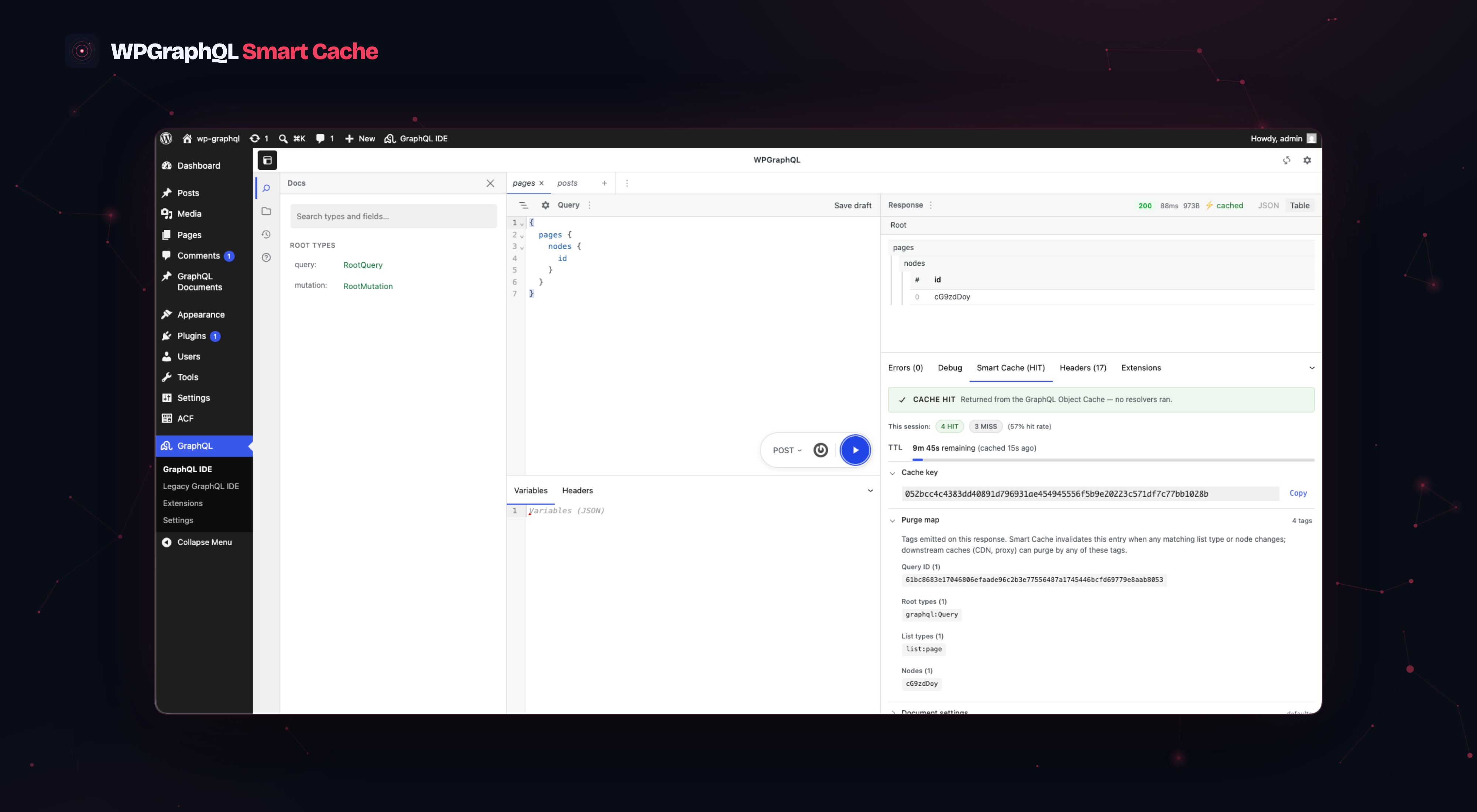
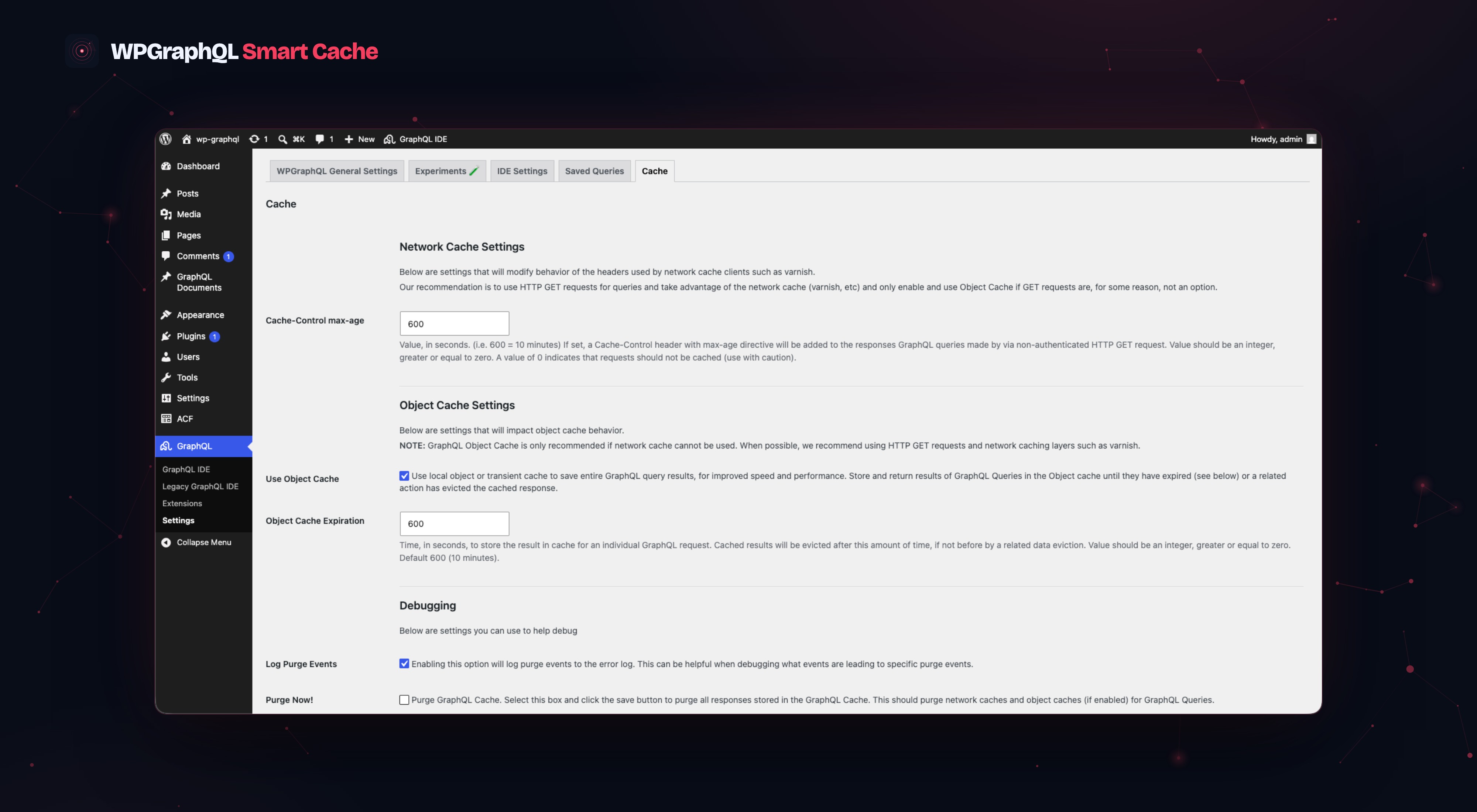
Screenshots
Für Entwickler
Ist das dein Plugin? Zeigen Sie die Zahlen.
Fügen Sie Ihrer Website, Docs oder GitHub Readme ein Live-Badge hinzu. Es wird von selbst aktualisiert - kein Konto erforderlich.
Best WPGraphQL Smart Cache alternatives
Alle API-Plugins →





Fragen und Antworten
WPGraphQL Smart Cache: quick answers
Gerade Antworten, gezogen von Live WordPress.org Daten.
Quelle: WordPress.org
Is WPGraphQL Smart Cache free?
Yes. WPGraphQL Smart Cache is free to download and use from the official WordPress.org plugin directory.
Is WPGraphQL Smart Cache safe to use in 2026?
WPGraphQL Smart Cache is a solid plugin choice in 2026, with a few things worth checking first. It runs on 5K+ sites, is rated 5/5 and was last updated 1 week ago, and scores 74/100 on our health check.
How many websites use WPGraphQL Smart Cache?
WPGraphQL Smart Cache is active on 5K+ WordPress websites and has been downloaded 163,574 times since it launched in December 2022. It was downloaded 12,454 times in the last 30 days.
Does WPGraphQL Smart Cache work with WordPress 7.1?
WPGraphQL Smart Cache is officially tested up to WordPress 7.0.9, while the latest release is 7.1.5. It may still work, but try it on a staging site first.
What PHP version does WPGraphQL Smart Cache need?
WPGraphQL Smart Cache requires PHP 7.4 or higher. Most hosts run PHP 8.x today, so it works on any modern WordPress hosting.
When was WPGraphQL Smart Cache last updated?
The latest version, 2.6.0, was released on November 20, 2026 (1 week ago).
Who makes WPGraphQL Smart Cache?
WPGraphQL Smart Cache is developed and maintained by Jason Bahl.
What are the best alternatives to WPGraphQL Smart Cache?
The most popular alternatives to WPGraphQL Smart Cache are WP Consent API (300K+ installs), Disable REST API (80K+ installs) and Mailgun for WordPress (70K+ installs).
Angetrieben von PageForge
Eine Vorlage und eine Tabelle. Eine echte Seite für jede Suche.
PageForge Verwandelt jede Zeile eines CSV in eine WordPress-Seite mit eigenem Titel, URL, SEO Felder und Schema entworfen. Kostenlos auf WordPress.org.
- CSV und XLSX, plus Google Sheets auf Beruf und Unternehmen
- seinen eigenen Titel, URL, SEO Felder und Schema für jede Seite
- Arbeitet mit dem Blockeditor, Elementor, Divi und Avada
- Kostenlos auf WordPress.org, keine Kreditkarte