


WP Travel Gutenberg Blocks
WP Travel Gutenberg Blocks is the easiest, most flexible way to display your Trips using the Gutenberg blocks.

Solide Wahl
WP Travel Gutenberg Blocks is a solid plugin choice in 2026, with a few things worth checking first. It runs on 800+ sites and was last updated 1 month ago, and scores 66/100 on our health check.
- Getestet mit dem neuesten WordPress (7.1)
- Small user base (800+ active installs)
- Bisher sehr wenige Bewertungen
Wie stapelt es sich?
Side-by-side bei Installationen, Updates, Bewertungen und Support



Tägliche Downloads
Download-Spitzen folgen normalerweise einer neuen Version - jede Website, die automatisch aktualisiert wird, gilt als Download.
Ranglisten
Where WP Travel Gutenberg Blocks stands todayWordPress.org Ranglisten suchen
Live-Position in der Plugin-Suche, Top 100| Stichwort | Position |
|---|---|
| Blöcke | #59 |
| gutenberg blocks editor | #44 |
| tour booking | #21 |
| Tour Operator | #9 |
| travel agency | #3 |
Versionsübernahme
Anteil aktiver Sites pro Release.
About WP Travel Gutenberg Blocks
From the official readme · v3.9.9Beschreibung
WP Travel Gutenberg Blocks is a free plugin that integrates seamlessly with the Ultimate Travel Booking Plugin WP Travel and lets you display trips and tour packages using customizable Gutenberg blocks. You can add and arrange trip listings, images, buttons, forms, and other travel-related elements without writing code.
View Documentation of WP Travel Gutenberg Blocks
You will be able to completely build a new trip page, adding different blocks from the plugin. The add-on comes with a collection of ready-to-use custom blocks that are specially designed for travel agency sites. Built with simplicity in mind, you can select multiple layouts without touching a single line of code.
🌟 BLOCKS WE OFFER
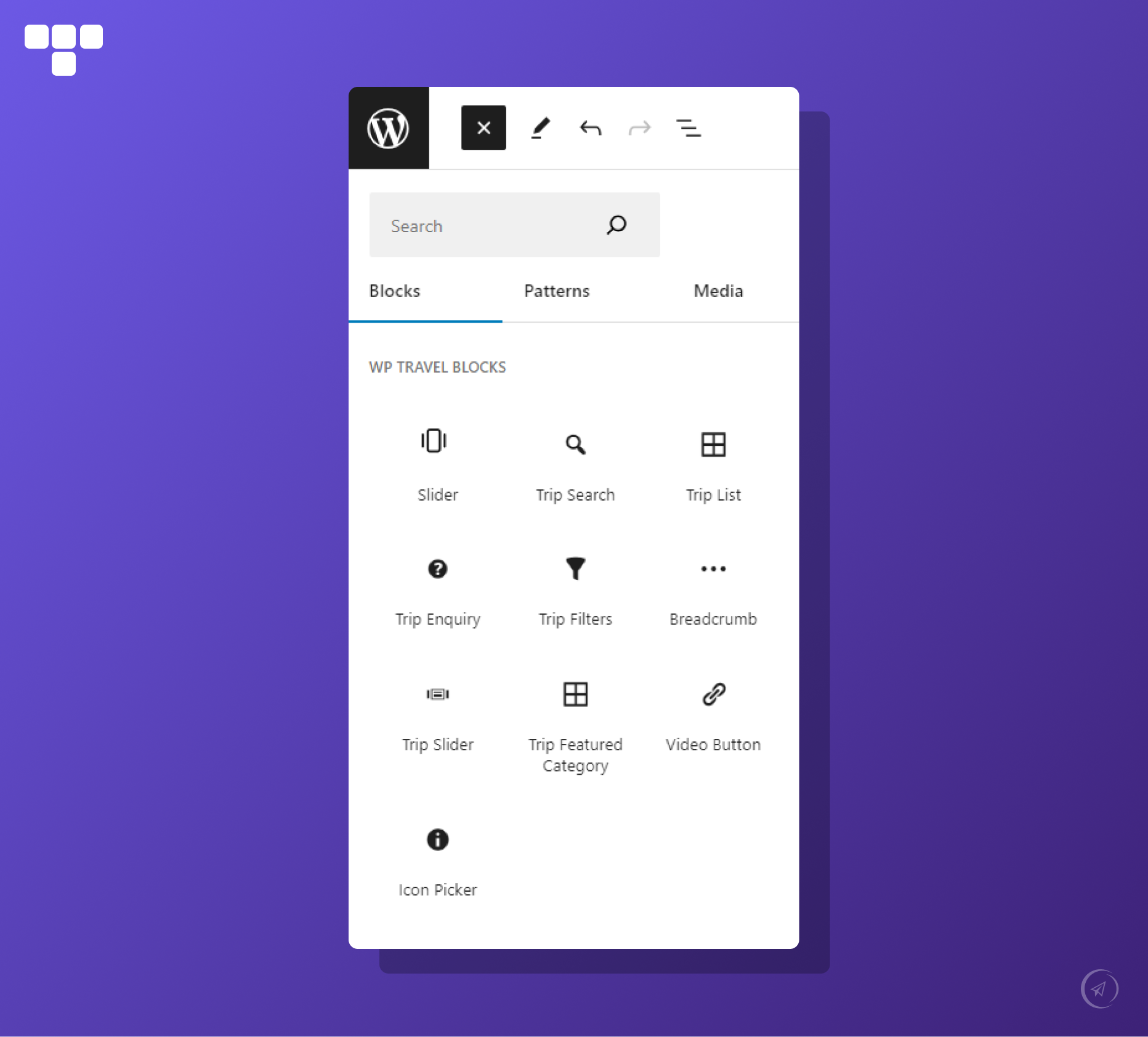
- Slider: A Slider block can be used to create a slider of your choice.
- Trip Search: A Trip Search block can be used to search your trips.
- Trip List: A Trip List block can be used to display trips in different layouts.
- Trip Inquiry: A Trip Inquiry block can be used to display an inquiry form for trips.
- Trip Filters: A Trip Filters block can be used to filter trips based on different criteria.
- Breadcrumb: A Breadcrumb block can be used to display the navigation hierarchy.
- Trip Slider: A Trip Slider block can be used to display trips in a slider layout.
- Trip Featured Category: A Trip Featured Category block can be used to highlight featured trip categories.
- Filterable Trips: A Filterable Trips block can be used to display trips with filter options.
- Cart Button: A Cart Button block can be used to display the cart icon for the add-to-cart feature.
- Icon Picker: An Icon Picker block can be used to add and display icons.
- Trip Calendar: A Trip Calendar block can be used to select a date for booking a trip.
- Trip Categories: A Trip Categories block can be used to display trip categories or taxonomies.
- Trip Code: A Trip Code block can be used to display the unique code of a trip.
- Trip Duration: A Trip Duration block can be used to display the duration of a trip.
- Trip Excludes: A Trip Excludes block can be used to display excluded items from the trip.
- Trip Facts: A Trip Facts block can be used to display key trip information or facts.
- Trip FAQ: A Trip FAQ block can be used to display frequently asked questions related to the trip.
- Trip Gallery: A Trip Gallery block can be used to display images of the trip.
- Trip Group Size: A Trip Group Size block can be used to display the maximum group size.
- Trip Includes: A Trip Includes block can be used to display included items in the trip.
- Trip Map: A Trip Map block can be used to display the trip location on a map.
- Trip Pickup Location: A Trip Pickup Location block can be used to display the pickup location details.
- Trip Outline: A Trip Outline block can be used to display the itinerary outline.
- Trip Overview: A Trip Overview block can be used to display an overview of the trip.
- Trip Price: A Trip Price block can be used to display the trip price.
- Trip Rating: A Trip Rating block can be used to display trip ratings.
- Trip Review: A Trip Review block can be used to display a review summary or count.
- Trip Review List: A Trip Review List block can be used to display a list of reviews.
- Trip Tabs: A Trip Tabs block can be used to display trip content in a tabbed layout.
- Trip Timespan: A Trip Timespan block can be used to display trip duration and timing details.
- Trip Wishlists: A Trip Wishlists block can be used to display a wishlist option for trips.
- Trip Sale: A Trip Sale block can be used to display discounted or sale prices.
- Trip Departure: A Trip Departure block can be used to display departure dates or details.
- Trip Downloads: A Trip Downloads block can be used to display downloadable files for the trip.
- Trip Custom Content: A Trip Custom Content block can be used to display custom content sections.
- Trip Date Countdown: A Trip Date Countdown block can be used to show a countdown timer for trip start dates.
- Booking Close Countdown: A Booking Close Countdown block can be used to show the booking closing time countdown.
- WhatsApp Inquiry: A WhatsApp Inquiry block can be used to allow users to send inquiries via WhatsApp.
- Trip Button: A Trip Button block can be used to link to a specific trip page.
- Book Button: A Book Button block can be used to display a “Book Now” button.
- Trip Guide List: A Trip Guide List block can be used to display a list of guides.
- Guide Image: A Guide Image block can be used to display the guide’s image.
- Guide Full Name: A Guide Full Name block can be used to display the guide’s name.
- Guide Contact Number: A Guide Contact Number block can be used to display the guide’s phone number.
- Guide Email: A Guide Email block can be used to display the guide’s email address.
- Guide Country: A Guide Country block can be used to display the guide’s country.
- Guide City: A Guide City block can be used to display the guide’s city.
- Guide Age: A Guide Age block can be used to display the guide’s age.
- Guide Join Year: A Guide Join Year block can be used to display the year the guide joined.
- Guide Language: A Guide Language block can be used to display the languages spoken by the guide.
- Guide Gender: A Guide Gender block can be used to display the guide’s gender.
- Guide Social Link: A Guide Social Link block can be used to display social media links.
- Guide Slogan: A Guide Slogan block can be used to display the guide’s slogan or tagline.
- Guide Short Description: A Guide Short Description block can be used to display a short introduction.
- Guide Biography: A Guide Biography block can be used to display the full biography of the guide.
- Guide Featured Trip: A Guide Featured Trip block can be used to display trips assigned to the guide.
- Guide Review: A Guide Review block can be used to display reviews for the guide.
- Guide Review Form: A Guide Review Form block can be used to submit reviews for the guide.
- Guide Code: A Guide Code block can be used to display the guide’s unique code.
- Trip Extra Description: A Trip Extra Description block can be used to display extra details.
- Trip Extra Price: A Trip Extra Price block can be used to display pricing for extra services.
- Trip Extra Gallery: A Trip Extra Gallery block can be used to display additional images.
Note
With the release of WP Travel Block v3.0.0, we have added a separate plugin for the Elementor widgets as WT Widgets for Elementor.
FREE TRAVEL THEMES COMPATIBLE WITH WP TRAVEL GUTENBERG BLOCKS PLUGIN
- WENS Adventure by WP Travel
- Travelin by WP Travel
- WP Yatra by WP Travel
- Travelaero by WP Travel
- Travel Knock by WP Travel
- Travel Solution by WP Travel
- Travelyo by WP Travel
- Travel Mates by WP Travel
- Triphub by WP Travel
- Trovity by WP Travel
- Travo Nomad by WP Travel
- Advantura Trails by WP Travel
- WP Travel FSE by WEN Solutions
- Travelvania by WEN Solutions
- WENS Travel Expanse by WEN Solutions
- WENS Explore Ease by WEN Solutions
- WENS Trails by WEN Solutions
- WENS Travel by WEN Solutions
- WENS Wander by WEN Solutions
- Wens TravelGo by WEN Solutions
- WENS Track by WEN Solutions
- WENS Travel Next by WEN Solutions
- WENS Travel Studio by WEN Solutions
- WENS TravelX by WEN Solutions
- WENS Travel Joy by WEN Solutions
- WENS Explore Ease Lite by WEN Solutions
- Travel FSE by Eagle Themes
📝 RELEASE NOTES
Before updating the plugin, please check “Our latest release notes”.
🔁 REQUIRED PLUGINS
🌍 WP Travel
WP Travel is the optimal choice among the WordPress Travel Booking Plugins and Tour Operators to Create Travel and Trekking Websites in Minutes, Without Coding!
If you are looking for a reliable travel plugin for your WordPress travel booking website, then look no further than the WP Travel plugin. It’s a powerful, free travel engine (also available in a Pro version with additional features) for creating customized travel agency or tour operator websites on WordPress in minutes.
The plugin is useful for travel agencies, tour operators, or anyone looking to build a travel-focused site with features like booking forms, itineraries, and customer management.
View: Demo of Best Travel & Tour plugin | Modules | Best Travel & Tour Themes | Documentations | Video Tutorials
How to Create a Travel Booking Website Without Coding Using the WP Travel plugin?
💁♂️ Dedicated Support
We have an entire team of happy, smart engineers ready to help you. You can easily ask your questions in support forum.
❤️ Love WP Travel?
We are doing our best from our side to help and provide support as soon as we can.
Join our Facebook Community group
Like our Facebook Page
Follow us on LinkedIn Page
Subscribe to our Youtube Channel
Follow us on Instagram
Find us on Pinterest
Installation
Uploading in WordPress Dashboard
- Navigate to the ‘Add New’ in the plugins dashboard
- Navigate to the ‘Upload’ area
- Select wp-travel-gutenberg-blocks.zip from your computer
- Click ‘Install Now.’
- Activate the plugin in the Plugin dashboard
Using FTP
- Download wp-travel-gutenberg-blocks.zip
- Extract the wp-travel-blocks.zip directory to your computer
- Upload the wp-travel-blocks directory to the /wp-content/plugins/ directory
- Activate the plugin in the Plugin dashboard
Änderungsprotokoll
Before updating the plugin, please check "our latest release notes".
3.9.9
Release Date: 12th October 2026
- Added trip activity on Trip Search block.
- Tested upto WordPress v7.1
3.9.8
Release Date: 23rd July 2026
- Added a Trip Book Count block.
3.9.7
Release Date: 17th June 2026
- Fixed a block registration issue.
3.9.6
Release Date: 12th June 2026
- Fixed the typo mistake of Trip Booking CountDown block controls.
- Fixed the typo mistake of Booking Close CountDown block controls.
3.9.5
Release Date: 07th April 2026
- Added new layouts on the Trip Slider block.
- Update the blocks API Version to 3.
- Improved query validation of the Trip Slider block.
3.9.4
Release Date: 11th March 2026
- Added new block “Trip Date Countdown”.
- Added new block “Booking Close Countdown”.
- Added new block “WhatsApp Inquiry Button”.
Screenshots


Für Entwickler
Ist das dein Plugin? Zeigen Sie die Zahlen.
Fügen Sie Ihrer Website, Docs oder GitHub Readme ein Live-Badge hinzu. Es wird von selbst aktualisiert - kein Konto erforderlich.
Best WP Travel Gutenberg Blocks alternatives
Alle Blöcke Plugins →





Fragen und Antworten
WP Travel Gutenberg Blocks: quick answers
Gerade Antworten, gezogen von Live WordPress.org Daten.
Quelle: WordPress.org
Is WP Travel Gutenberg Blocks free?
Yes. WP Travel Gutenberg Blocks is free to download and use from the official WordPress.org plugin directory.
Is WP Travel Gutenberg Blocks safe to use in 2026?
WP Travel Gutenberg Blocks is a solid plugin choice in 2026, with a few things worth checking first. It runs on 800+ sites and was last updated 1 month ago, and scores 66/100 on our health check.
How many websites use WP Travel Gutenberg Blocks?
WP Travel Gutenberg Blocks is active on 800+ WordPress websites and has been downloaded 46,990 times since it launched in May 2019. It was downloaded 675 times in the last 30 days.
Does WP Travel Gutenberg Blocks work with WordPress 7.1?
Yes. The developer has tested WP Travel Gutenberg Blocks up to WordPress 7.1.5, the latest release. It requires WordPress 6.0 or newer.
What PHP version does WP Travel Gutenberg Blocks need?
WP Travel Gutenberg Blocks requires PHP 7.4 or higher. Most hosts run PHP 8.x today, so it works on any modern WordPress hosting.
When was WP Travel Gutenberg Blocks last updated?
The latest version, 3.9.9, was released on October 12, 2026 (1 month ago).
Who makes WP Travel Gutenberg Blocks?
WP Travel Gutenberg Blocks is developed and maintained by WP Travel.
What are the best alternatives to WP Travel Gutenberg Blocks?
The most popular alternatives to WP Travel Gutenberg Blocks are Spectra Legacy (1M+ installs), Kadence Blocks (600K+ installs) and Extendify (500K+ installs).
Angetrieben von PageForge
Eine Vorlage und eine Tabelle. Eine echte Seite für jede Suche.
PageForge Verwandelt jede Zeile eines CSV in eine WordPress-Seite mit eigenem Titel, URL, SEO Felder und Schema entworfen. Kostenlos auf WordPress.org.
- CSV und XLSX, plus Google Sheets auf Beruf und Unternehmen
- seinen eigenen Titel, URL, SEO Felder und Schema für jede Seite
- Arbeitet mit dem Blockeditor, Elementor, Divi und Avada
- Kostenlos auf WordPress.org, keine Kreditkarte