


WP-Untertitel
Fügen Sie Ihren Seiten, Beiträgen oder benutzerdefinierten Post-Typen Untertitel (Unterüberschriften) hinzu.

Mit Vorsicht verwenden
WP Subtitle works, but test it on a staging site before relying on it in 2026. It runs on 10K+ sites, is rated 4.1/5 and was last updated 9 months ago, and scores 58/100 on our health check.
- Bewährt im Maßstab auf 10k + aktiven Standorten
- Momentum — downloads up 30.9% vs the previous 30 days
- Nur getestet bis WordPress 6.9 (letzt ist 7.1)
Wie stapelt es sich?
Side-by-side bei Installationen, Updates, Bewertungen und Support



Tägliche Downloads
Download-Spitzen folgen normalerweise einer neuen Version - jede Website, die automatisch aktualisiert wird, gilt als Download.
Ranglisten
Where WP Subtitle stands todayWordPress.org Ranglisten suchen
Live-Position in der Plugin-Suche, Top 100| Stichwort | Position |
|---|---|
| Inhalt | >100 |
| subhead | #1 |
| subheading | #2 |
| subtitle | #2 |
| title | #83 |
Versionsübernahme
Anteil aktiver Sites pro Release.
Bewertungsaufschlüsselung
★★★★★★★★★★ 4.1 from 21 reviews
About WP Subtitle
From the official readme · v3.4.2Beschreibung
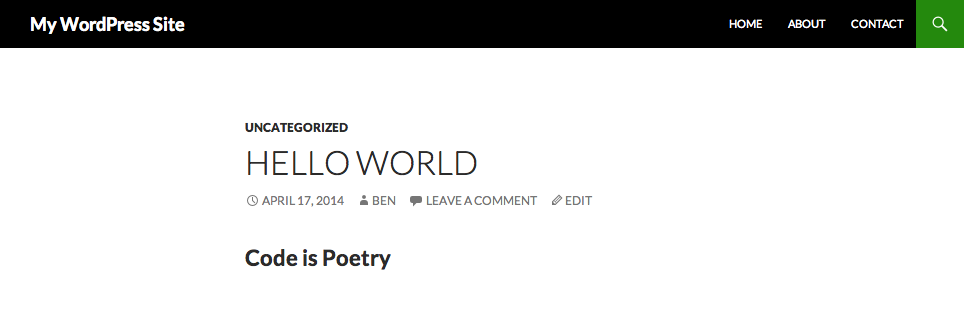
The WP Subtitle plugin allows your pages and posts to contain a subtitle. Also called a sub-heading, this this short line of text is meant to appear beneath a post’s (or page’s) title, but can be inserted in your template wherever you choose.
The subtitle can be inserted into your theme template files (or plugin) using the following API:
Display The Subtitle
All parameters are optional. If ‘post_id’ is omitted then the current post ID in the loop is used.
PHP Code:
do_action( 'plugins/wp_subtitle/the_subtitle', array(
    'before'        => '<p class="subtitle">',
    'after'         => '</p>',
    'post_id'       => get_the_ID(),
    'default_value' => ''
) );
Output:
<p class="subtitle">My Post Subtitle</p>
Get The Subtitle
All parameters are optional. If ‘post_id’ is omitted then the current post ID in the loop is used.
A default value can be supplied as the second parameter for apply_filters. This will be used if the post does not have a subtitle. Leave as an empty string to return an empty string if the post does not have a subtitle.
PHP Code:
$subtitle = apply_filters( 'plugins/wp_subtitle/get_subtitle', '', array(
    'before'  => '<p class="subtitle">',
    'after'   => '</p>',
    'post_id' => get_the_ID()
) );
Result:
$subtitle = '<p class="subtitle">My Post Subtitle</p>'
Parameters
The array of arguments accepted for the plugins/wp_subtitle/the_subtitle action and plugins/wp_subtitle/get_subtitle filter are:
before
(string) Text to place before the subtitle if one exists. Defaults to an empty string.
after
(string) Text to place after the subtitle if one exists. Defaults to to an empty string.
post_id
(integer) Post, page or custom post type ID.
default_value
(string) Only used by the plugins/wp_subtitle/the_subtitle action, allows you to specify a default subtitle to display if the post does not have one. For the plugins/wp_subtitle/get_subtitle filter the second parameter of apply_filters should be used instead. Defaults to to an empty string.
Post Type Support
By default, subtitle are supported by both posts and pages. To add support for custom post types add teh following to your theme functions file or plugin:
add_post_type_support( 'my_post_type', 'wps_subtitle' )
WooCommerce Plugin Support
Subtitles can automatically be added to your WooCommerce products without needing to make template changes. In the admin go to WooCommerce > Settings > Products where you can choose to:
- Enable Product Subtitles
- Display the subtitle on single product pages
- Display the subtitle on product archives (category pages)
Yoast SEO and SEOPress Plugin Support
The plugin allows you to include the subtitle in your meta titles and descriptions via the Yoast SEO and SEOPress plugins.
Similar to the Yoast %%title%% placeholder which inserts the post title, you can use %%wps_subtitle%%.
There are also addition placeholders and filters to allow to to customize seperators for the subtitle.
For more information, view the SEO support documentation here.
Installation
- Upload the WP Subtitle plugin to your WordPress site in the
/wp-content/pluginsfolder or install via the WordPress admin. - Activate it from the WordPress plugin admin screen.
- Use the API to display the subtitle in your theme.
For full details on the API and how to display the subtitle, view the documentation here.
Änderungsprotokoll
Resolve XSS issue - standardized santitization throughout plugin and fixed issue with autosave and preview.
3.4.2
- Resolve XSS issue – standardized santitization throughout plugin.
- Fixed issue with autosave and preview.
- Confirmed WordPress 6.9 compatibility.
3.4.1
- Security: Resolve XSS issue by improving sanitization when saving subtitle custom field.
- Pass the current post object to the
wps_subtitle_field_placeholderfilter. Props Dominik Schilling.
3.4
- Added support for the SEOPress plugin. Props @chriselkins.
- You can now update the subtitle via the REST API. Props @chriselkins.
3.3.1
- Fixed broken closing H2 tag for WooCommerce subtitle. Props @faktorvier.
3.3
- New API for displaying the subtitle using
do_action( 'plugins/wp_subtitle/the_subtitle' ). - New API for getting the subtitle using
apply_filters( 'plugins/wp_subtitle/get_subtitle', '' ). - Admin column title now matches the meta box title if altered using the
wps_meta_box_titlefilter.
3.2
- Fix WordPress 5.0 compatibility – check
use_block_editor_for_post_type.
Screenshots


Für Entwickler
Ist das dein Plugin? Zeigen Sie die Zahlen.
Fügen Sie Ihrer Website, Docs oder GitHub Readme ein Live-Badge hinzu. Es wird von selbst aktualisiert - kein Konto erforderlich.
Best WP Subtitle alternatives
Alle Content-Plugins →





Fragen und Antworten
WP Subtitle: quick answers
Gerade Antworten, gezogen von Live WordPress.org Daten.
Quelle: WordPress.org
Is WP Subtitle free?
Yes. WP Subtitle is free to download and use from the official WordPress.org plugin directory.
Is WP Subtitle safe to use in 2026?
WP Subtitle works, but test it on a staging site before relying on it in 2026. It runs on 10K+ sites, is rated 4.1/5 and was last updated 9 months ago, and scores 58/100 on our health check.
How many websites use WP Subtitle?
WP Subtitle is active on 10K+ WordPress websites and has been downloaded 495,462 times since it launched in July 2009. It was downloaded 1,732 times in the last 30 days.
Does WP Subtitle work with WordPress 7.1?
WP Subtitle is officially tested up to WordPress 6.9.12, while the latest release is 7.1.5. It may still work, but try it on a staging site first.
What PHP version does WP Subtitle need?
WP Subtitle requires PHP 5.6 or higher. Most hosts run PHP 8.x today, so it works on any modern WordPress hosting.
When was WP Subtitle last updated?
The latest version, 3.4.2, was released on March 5, 2026 (9 months ago).
Who makes WP Subtitle?
WP Subtitle is developed and maintained by husani.
What are the best alternatives to WP Subtitle?
The most popular alternatives to WP Subtitle are One Click Demo Import (1M+ installs), Advanced Excerpt (80K+ installs) and Rara One Click Demo Import (20K+ installs).
Angetrieben von PageForge
Eine Vorlage und eine Tabelle. Eine echte Seite für jede Suche.
PageForge Verwandelt jede Zeile eines CSV in eine WordPress-Seite mit eigenem Titel, URL, SEO Felder und Schema entworfen. Kostenlos auf WordPress.org.
- CSV und XLSX, plus Google Sheets auf Beruf und Unternehmen
- seinen eigenen Titel, URL, SEO Felder und Schema für jede Seite
- Arbeitet mit dem Blockeditor, Elementor, Divi und Avada
- Kostenlos auf WordPress.org, keine Kreditkarte