


WP Social Avatar
As the name suggests, this plugin allows you to use the social profile picture as your WordPress Avatar. You can see more, on how to install and use the plugin here in this blog WP Social Avatar

Betrachten Sie eine Alternative
WP Social Avatar shows warning signs in 2026 — compare the alternatives below before installing. It runs on 200+ sites, is rated 4.3/5 and was last updated 10 years ago, and scores 35/100 on our health check.
- Kleine Benutzerbasis (über 200 aktive Installationen)
- Kein Update in 10 Jahren
- Nur getestet bis WordPress 4.5 (letzt ist 7.1)
Wie stapelt es sich?
Side-by-side bei Installationen, Updates, Bewertungen und Support


Tägliche Downloads
Download-Spitzen folgen normalerweise einer neuen Version - jede Website, die automatisch aktualisiert wird, gilt als Download.
Ranglisten
Where WP Social Avatar stands todayWordPress.org Ranglisten suchen
Live-Position in der Plugin-Suche, Top 100| Stichwort | Position |
|---|---|
| Avatar | >100 |
| Gravatar | >100 |
| social | >100 |
| social avatar | >100 |
Versionsübernahme
Anteil aktiver Sites pro Release.
Bewertungsaufschlüsselung
★★★★★★★★★★ 4.3 from 6 reviews
About WP Social Avatar
From the official readme · v1.5Beschreibung
As the name suggests, this plugin allows you to use the social profile picture as your WordPress Avatar.
You can see more, on how to install and use the plugin here in this blog WP Social Avatar
Why this plugin?
If you are me, who gets bore of using the same gravatar for few days or months then this plugin is totally for you.
This plugin provides option to the user to use Social media like Facebook and Google plus profile pictures as the gravatar instead of the one from en.gravatar.com.
WP Social Avatar Settings:
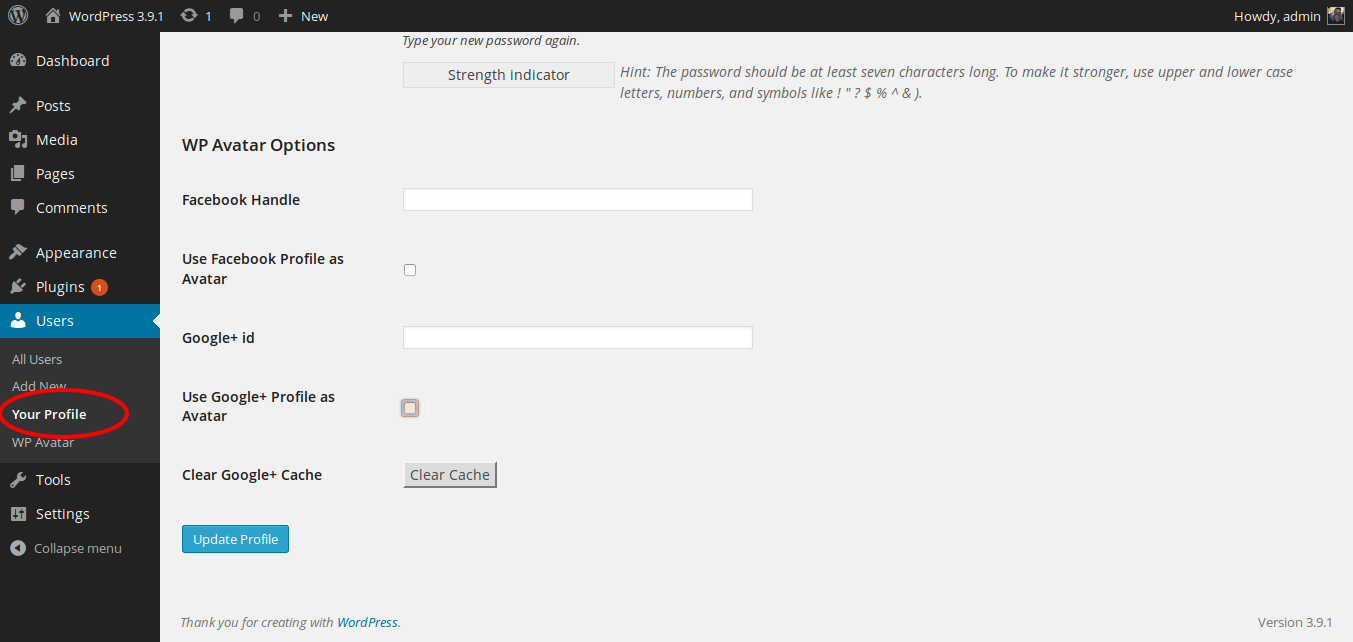
After activating the plugin admin will see WP Avatar, under Users menu. Here the admin can set the minimum role/capabilities required to avail this feature.
The allowed users will see the available options in their Your Profile sub menu under Users menu.
For the first version I only have two social options available, Facebook and Google plus. You need to add either the Facebook user ID(numeric) or Google plus id in the corresponding fields. You can find your facebook user id here
Once done with the above, check the social profile picture you want to use as the gravatar and click Update Profile and you are done.
After saving the profile you can see all the gravatars in the site has been replaced by the respective social media profile picture.
With this you will get rid of the boredom of looking at the same gravatar all the time. With the change in the respective social media profile picture, the gravatar of your site will also change.
With Version 1.4 Cache functionality is implemented for Google Plus avatar, this optimizes the functionality. I have added a clear cache button for Google plus, anytime you upload a new profile picture in your Google Plus account click the “clear cache” button and you will get the latest image else the code will make a request and pull the latest image after every 48 hours. This has been done to make the Google Plus functionality faster.
Installation
- Upload “wp-social-avatar” folder to the “wp-content/plugins” directory.
- Activate the plugin through the “Plugins” menu in WordPress.
Änderungsprotokoll
1.5
1.5
- Made changes due to change in Facebook APIs. Now you need to use facebook user id instead of facebook handle/username.
1.4.1
- Introduced wp_social_avatar_heading filter
1.4
- Opitimized the Google Plus API call
- Implemented cache functionality to improve the Google Plus Avatar functionality.
1.3
- Opitimized the plugin
1.2
- Now Users can either use the Google plus user id or the new Google Plus handle for WP Social Avatar Google Plus option.
1.1
- Fixed the Google Plus issue.
Screenshots

Für Entwickler
Ist das dein Plugin? Zeigen Sie die Zahlen.
Fügen Sie Ihrer Website, Docs oder GitHub Readme ein Live-Badge hinzu. Es wird von selbst aktualisiert - kein Konto erforderlich.
Best WP Social Avatar alternatives
Alle Avatar-Plugins →





Fragen und Antworten
WP Social Avatar: quick answers
Gerade Antworten, gezogen von Live WordPress.org Daten.
Quelle: WordPress.org
Is WP Social Avatar free?
Yes. WP Social Avatar is free to download and use from the official WordPress.org plugin directory.
Is WP Social Avatar safe to use in 2026?
WP Social Avatar shows warning signs in 2026 — compare the alternatives below before installing. It runs on 200+ sites, is rated 4.3/5 and was last updated 10 years ago, and scores 35/100 on our health check.
How many websites use WP Social Avatar?
WP Social Avatar is active on 200+ WordPress websites and has been downloaded 18,710 times since it launched in February 2014. It was downloaded 135 times in the last 30 days.
Does WP Social Avatar work with WordPress 7.1?
WP Social Avatar is officially tested up to WordPress 4.5.33, while the latest release is 7.1.5. It may still work, but try it on a staging site first.
When was WP Social Avatar last updated?
The latest version, 1.5, was released on June 21, 2016 (10 years ago).
Who makes WP Social Avatar?
WP Social Avatar is developed and maintained by Maruti Mohanty.
What are the best alternatives to WP Social Avatar?
The most popular alternatives to WP Social Avatar are Gravatar Enhanced (200K+ installs), Simple Local Avatars (100K+ installs) and One User Avatar (100K+ installs).
Angetrieben von PageForge
Eine Vorlage und eine Tabelle. Eine echte Seite für jede Suche.
PageForge Verwandelt jede Zeile eines CSV in eine WordPress-Seite mit eigenem Titel, URL, SEO Felder und Schema entworfen. Kostenlos auf WordPress.org.
- CSV und XLSX, plus Google Sheets auf Beruf und Unternehmen
- seinen eigenen Titel, URL, SEO Felder und Schema für jede Seite
- Arbeitet mit dem Blockeditor, Elementor, Divi und Avada
- Kostenlos auf WordPress.org, keine Kreditkarte